Showing posts with label WSUS. Show all posts

Tuesday, 15 April 2014

Windows 8.1 and Windows Server 2012 R2 Update 1 Caveats

Whenever we hear about updates for any device firmware, application software, or operating system software it is _always_ a good idea to read the Release Notes (we probably all know the acronym that comes to mind here ;) ), README.TXT, _and_ do a search for the update to see if anyone is complaining about it. Unfortunately, this major update for Windows 8.1 and Windows Server 2012 R2 has its issues some of which are full-stop problems. The first place to start for this update is here:
There is a lot of information there.
  1. Update 1 is the new baseline for all updates going forward.
    • Meaning, no more updates to that OS if the bits are earlier than 8.1 U1 or 2012 R2 U1.
  2. Update 1 breaks SSL communications between endpoints and WSUS
This last one is a deal breaker for many enterprises, medium enterprises, and especially in our own SMB/SME environments where WSUS is virtually everywhere for patch management.
We just stood up a new cluster on 2012 R2. After our Cluster-Aware Update run:
image
Our cluster nodes now have the update. Since this cluster setup is Greenfield with WSUS ultimately ending up _on_ the cluster the nodes were updated via Microsoft Update.
The workaround for this situation is to enable TLS 1.2 as instructed in the above blog post. Since we are deploying Windows Server 2012 R2 into client sites we will have no choice but to make this change.
Then, when Microsoft releases an update to the update to hopefully fix the problem we will need to test that update extensively _especially_ in a cluster setting!
Yo Microsoft! There is a huge pool of folks willing to test and break this stuff for you! Please get us involved in the early bits for operating systems, applications, and updates again. This ongoing situation of releasing patches and updates to the public without testing them on disparate systems is a _bad_ thing. :(
EDIT: Updated the Gladiator link since between Live Writer and Blogger it got mangled.
Philip Elder
Microsoft Cluster MVP
MPECS Inc.
Co-Author: SBS 2008 Blueprint Book
Chef de partie in the SMBKitchen ASP Project
Find out more at
Third Tier: Enterprise Solutions for Small Business


Wednesday, 11 September 2013

Windows Features Error: Windows couldn't complete the requested changes 0x800F0906

We hit this today:

image

Windows Features

Windows couldn't complete the requested changes.

Windows couldn't connect to the Internet to download necessary files. Make sure that you're connected to the Internet, and click "Retry" to try again.

Error code: 0x800F0906

Our search turned up the following KB:

The OS affected was Windows 8 Enterprise on a greenfield Windows Server 2012 Essentials virtualization setup.

The relevant point for us was in the WSUS settings as we set up WSUS in Group Policy with the appropriate WMI Filters for each operating system. We did _not_ make the respective changes recommended in the KB article though.

image

We made the necessary change to allow for the required files to be pulled down:

image

We then ran GPUpdate /Force on W2012E and the affected system.

image

We were then able to click the Retry button on the error window and the needed content was downloaded.

image

We were then able to move on with our tasks!

Philip Elder
MPECS Inc.
Microsoft Small Business Specialists
Co-Author: SBS 2008 Blueprint Book

Chef de partie in the SMBKitchen
Find out more at
www.thirdtier.net/enterprise-solutions-for-small-business/

Windows Live Writer

Friday, 22 February 2013

WSUS for Windows 8/Server 2012 and Fixing the 800B0001 Windows Update Error

We need to apply the following update to our WSUS servers to allow Windows 8 and Server 2012 to be updated via WSUS.

And, since we a fair way down the road since both products were RTM we need to read the following caveat:

From the blog post:

If you have Windows 8 or Windows Server 2012 clients that synchronized with WSUS 3SP2 before you applied this update, wait for the update to be applied to the WSUS servers, and then follow these steps:

  1. On the affected client, open cmd.exe in elevated mode.
  2. Type the following commands. Make sure that you press Enter after you type each command:

Net stop wuauserv
rd /s %windir%\softwaredistribution\
Net start wuauserv

This is what we are seeing in Windows 8 and Windows Server 2012:

image

  • Windows could not search for new updates
    • There was a problem checking for updates. Error(s) found: Code 80096002

We ran the above update on our SBS 2011 Standard server.

image

And:

image

And then the waiting game began:

image

The server came up with everything in order.

image

And, on the Windows 8 clients:

image

NOTE: We recommend rebooting both Windows 8 and Windows Server 2012 _as soon as the updates are applied_ and not leaving either OS in a half-patched state!

And, on to the next WSUS snag:

This fix corrects the 800B0001 error clients may see where the client machine has had its Update Services backend updated but the WSUS server has not been updated for the changes Microsoft has made to the Update Services structure.

image

For this particular update we will need to wait as our own WSUS infrastructure has not had this issue. But, we have seen a number of clients that have.

Philip Elder
MPECS Inc.
Microsoft Small Business Specialists
Co-Author: SBS 2008 Blueprint Book

Chef de partie in the SMBKitchen
Find out more at
www.thirdtier.net/enterprise-solutions-for-small-business/

Windows Live Writer

Saturday, 2 July 2011

SBS 2011 – WSUS SQL Memory Usage Is Very High – How To Reduce It

Our destination SBS 2011 has an SQL (S-Q-L) process that was taking up a whopping 5GB of RAM:

image

Since this was a relatively fresh install of SBS 2011 we needed to find out what SQL setup was using so much memory.

  1. Open Task Manager –> Processes tab.
  2. View –> Choose Columns –> PID, Memory, etc. (Our SBS 2011 Setup Guide has the customizations)
  3. Start –> CMD –> Right click and Run As Admin.
  4. tasklist /svc [Enter]
  5. Scroll through the resulting list looking for the PID.
    •  image
  6. Start –> All Programs –> Microsoft SQL Server 2008 R2 –> Right click and Run as Admin on SQL Server Management Studio.
    • Server type: Database Engine.
    • Server name: \\.\pipe\mssql$microsoft##ssee\sql\query
      • Copy and paste the above.
    • Authentication: Windows Authentication.
  7. Click Connect.
    1. image
  8. Right click the root node (\\.\pipe\mssql$microsoft##ssee\sql\query) and left click on Properties.
  9. Click Memory.
  10. Change the amount of memory that WSUS can use. On this particular SBS 2011 VM we have 16GB of RAM allocated. So, we will set the amount of RAM to 1GB.
    1. Before:
      • image
    2. After:
      • image

Our WSUS SQL memory usage was now a lot more reasonable:

image

image

UPDATE 2011-07-16: Tweaked the steps for a typo as per Arcon’s comment.

Philip Elder
MPECS Inc.
Microsoft Small Business Specialists
Co-Author: SBS 2008 Blueprint Book

*Our original iMac was stolen (previous blog post). We now have a new MacBook Pro courtesy of Vlad Mazek, owner of OWN.

Windows Live Writer

Wednesday, 9 March 2011

Windows 7 Service Pack 1 Error c0000034 Workaround

UPDATE: Please see this post FIRST:

While the methodology below works to bring the machine back, its state after the fact is questionable.

Original Post

This post is a direct copy and paste from here:

Answer was provided by thiswoot.

YEP I GOT IT WORKING!! I DONT KNOW IF MY METHOD IS THE BEST BUT IT WORKS!

This method works without Safe Mode, without backups, without System Restore, without DISM, and without a Windows 7 DVD repair disc.

INSTRUCTIONS:

01. Reboot your computer while it's starting up.

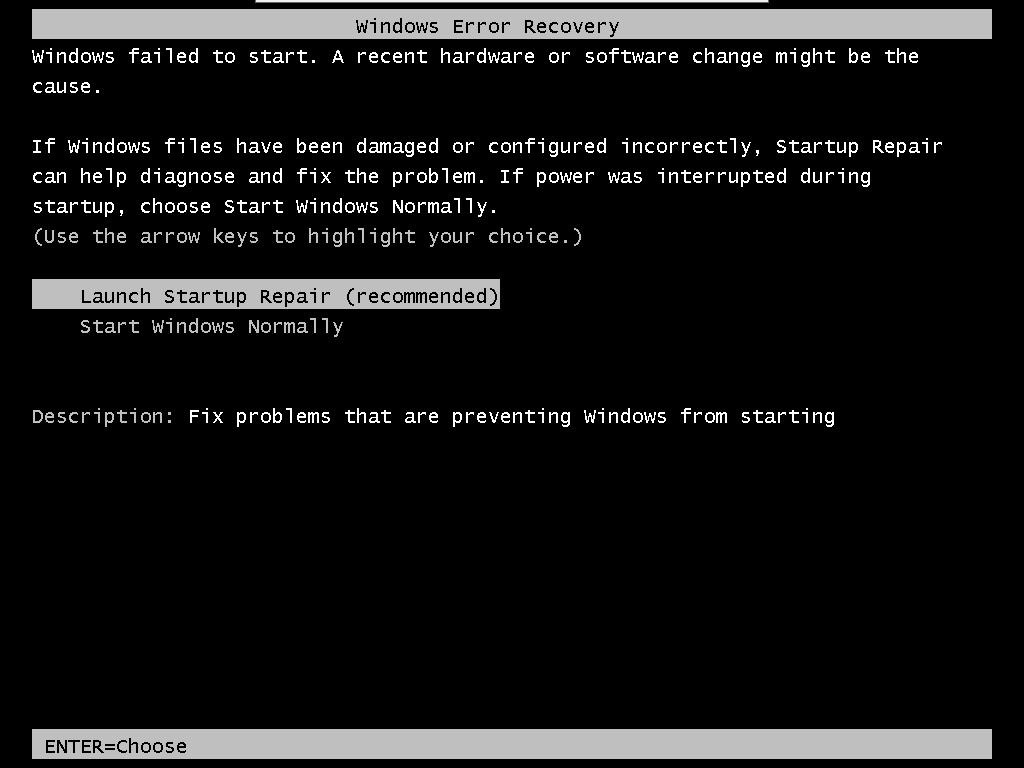
02. When your computer starts up again, choose the option "Launch Startup Repair" 

--> PIC: http://notebooks.com/wp-content/uploads/2011/01/Recov-1.jpg

03. When the Startup repair starts, click cancel.

04. After you click cancel it will show a box. Click "Don't Send" 

--> PIC: http://i52.tinypic.com/xgjriw.png

05. Click the link "View advanced options for recovery and support"

06. In the new window click Command Prompt at the bottom.

--> PIC: http://i51.tinypic.com/50imu8.png

07. In Command Prompt type this and press enter: %windir%\system32\notepad.exe

08. Notepad will open. In notepad go to File-->Open.

09. Change the type of files notepad views from .txt to All Files (see pic)

--> PIC: http://i51.tinypic.com/35nd74z.png

10. Now in Notepad, go to C:\Windows\winsxs\ (or whichever drive Windows is installed on)

11. In that folder, find pending.xml and make a copy of it

12. Now open the original pending.xml (it will load really slow because the file is huge)

13. Press CNTRL+F and search for the following exactly: 0000000000000000.cdf-ms

14. Delete the following text (yours will be a little different):

<Checkpoint/>

<DeleteFile path="\SystemRoot\WinSxS\FileMaps\_0000000000000000.cdf-ms"/>

<MoveFile source="\SystemRoot\WinSxS\Temp\PendingRenames\e56db1db48d4cb0199440000b01de419._0000000000000000.cdf-ms" destination="\SystemRoot\WinSxS\FileMaps\_0000000000000000.cdf-ms"/>

--> PIC: http://i54.tinypic.com/adzpzp.png

image

Your PC might not have all 3 sections of code (<Checkpoint>, <DeleteFile>, <MoveFile>). Just make sure you delete section "Checkpoint" and whatever other sections have "000000000000000.cdf-ms". They will be right next to eachother.

15. Save the file, close notepad, close command prompt, restart your computer.

Once your computer starts up, do a normal startup (it may stall for 5-10 minutes at the "starting windows" screen, but leave it going) and the Service Pack will install some more stuff and restart a few times and then everything should be working! For some people, it reverts everything and cancels the service pack installation. For other people, the service pack installation completes. Either result is fine.

We are starting to see dead bodies as well and will use this method to restore the machines to working order.

Note that the Pending.XML file may change its permission state when edited and cause the revert to fail. Check the file attributes both before and after making the necessary changes.

Again, the answer was provided by thiswoot. Thank you! :)

UPDATE: An important link to start with when troubleshooting on Windows 7:

Philip Elder
MPECS Inc.
Microsoft Small Business Specialists
Co-Author: SBS 2008 Blueprint Book

*Our original iMac was stolen (previous blog post). We now have a new MacBook Pro courtesy of Vlad Mazek, owner of OWN.

Windows Live Writer

Tuesday, 1 February 2011

Windows Server 2008 R2 Standard – Updates Required After A Fresh Install And Update Order

We just rebuilt one of our servers to provide file services for our network.

Out of the box, this particular Windows Server 2008 R2 Standard full GUI install has approximately 93 updates waiting:

image

Windows Update on the server sees things a bit differently:

image

However, once we have run the full gamut of updates shown above there are guaranteed to be more updates waiting to update the updates! :)

image

The first step in our update process will be to run the Windows Server 2008 R2 security updates. We will then run any other updates that may be waiting. We will not update .NET until we have a backup of the box which has just been configured but not run yet.

Depending on the OS that has just been installed we would run .NET updates in the following order:

  1. .NET 1
    1. .NET 1.1.x
    2. .NET 1.2.x etc.
  2. .NET 2
    1. .NET 2.1.x
    2. .NET 2.2.x etc.
  3. .NET 3
    1. Same pattern as above for each subsequent version.

A reboot would be done in between each version of .NET and if the server is critical then we would run a backup in between each version as well.

We will also leave out the BPA updates until we have all of the necessary core updates completed successfully.

Off the server goes on the first round:

image

Philip Elder
MPECS Inc.
Microsoft Small Business Specialists
Co-Author: SBS 2008 Blueprint Book

*Our original iMac was stolen (previous blog post). We now have a new MacBook Pro courtesy of Vlad Mazek, owner of OWN.

Windows Live Writer

Friday, 23 July 2010

Amazing WSUS v3 Cleanup Wizard Time Now Into Days!

We started the cleanup wizard on our managed SBS 2003 boxes three days ago.

All of the boxes finished in anywhere from 18 hours to 36 hours later.

We have however, one box that is _still_ running its cleanup process.

Now, this is not one of our normally crusty boxes as it is under 2 years old and is running a quad core Xeon X3220 with 4GB of RAM. Its reports normally come in every morning on time.

Since starting the wizard the reports have stopped, but we left the wizard alone just in case.

It took _two full days_ for the wizard to gain and hold just one pip on the progress bar.

So, here we are three mornings later:

image

We now have a number of pips in the progress bar but the process is still moving quite slow.

On the other boxes, the SQL process handling the cleanup usually pins a core on the server. In this case the SQL process has barely taken any additional headroom on the CPU.

image

Judging by the CPU time allotment shown in the above Task Manager Processes tab new the cleanup process is running however slowly.

If we have not seen at least three or four additional pips on the progress bar we will reboot this box tonight and restart the process.

We track the progress by setting a Notepad window above the progress bar and noting the advances of the progress bar:

image

The WSUS V3 Cleanup Wizard may look like it is not working even when checking the SQL Process CPU usage in the Task Manager, but in this case we let it ride and things started to move after a day!

Philip Elder
MPECS Inc.
Microsoft Small Business Specialists
Co-Author: SBS 2008 Blueprint Book

*Our original iMac was stolen (previous blog post). We now have a new MacBook Pro courtesy of Vlad Mazek, owner of OWN.

Windows Live Writer

Tuesday, 20 July 2010

The WSUS Cleanup Wizard on SBS 2003 and SBS 2008

On some of our older and more crusty SBS 2003 R2 installs with WSUS v3 installed, we need to run the Cleanup Wizard on a fairly regular basis to keep the SBS Reports from having a blank page with an error.

image

Given that some of these older boxes may not have multiple cores or even HyperThreading enabled on them, the cleanup process can  actually impact the server’s performance big time.

When the wizard starts, the process should actually be run in two steps.

image

The first step will take anywhere up to 30-60 minutes depending on the age and speed of the box.

The second step can take _days_ even on boxes we frequently run the wizard on.

The Cleanup complete screen below actually took close to 36 hours to complete:

image

Besides being a part of our regular maintenance routine on both SBS 2003 and SBS 2008 boxes, we also need to run the wizard prior to running a migration to make sure to trim things down.

Philip Elder
MPECS Inc.
Microsoft Small Business Specialists
Co-Author: SBS 2008 Blueprint Book

*Our original iMac was stolen (previous blog post). We now have a new MacBook Pro courtesy of Vlad Mazek, owner of OWN.

Windows Live Writer

Thursday, 17 June 2010

SBS – Setting WSUS Synchronization Frequency

In our SBS 2008 Setup Guide V1.5.0 at step 22 we indicate some customizations to the WSUS setup.

  • 22: Make changes to the WSUS Setup:
    • WSUS Classifications: Enable all except Drivers.
    • WSUS Sync Schedule: Increase synchronization frequency schedule depending on what products are installed on the server.

If we have Forefront Server Security for Microsoft Exchange licensed on the SBS 2008 box, we would set a synchronization schedule of once per hour.

Now, since we use ExchangeDefender for our e-mail sanitation needs, we generally do not need to synchronize WSUS with such frequency as Forefront would not be installed.

However, we tend to set that frequency to at least 6 checks per day which equates to synchronizing every 4 hours.

Why?

In the above blog post, Damian examines an issue with a SVCHOST process causing a spike in the SBS server’s CPU.

After some troubleshooting by Damian, the problem turned out to be the Windows Update client and a series of Forefront updates.

Here is another WSUS update related issue that hit us:

So, when a problem fix is published by Microsoft to WSUS, it will not hit SBS until the next scheduled sync. The default is 1 sync per day (24 hours).

Our setting the WSUS sync schedule to every 4 hours is our attempt to mitigate any possible problems we may encounter.

WSUS Driver Classifications

As far as not allowing drivers to come down through WSUS, we do this for heterogeneous networks that still have Windows XP Professional installed on physical hardware.

For homogeneous Windows 7 networks, which are starting to be the norm, we enable the Drivers classification as the drivers delivered have been consistently stable in both the update process and in post update system stability.

Philip Elder
MPECS Inc.
Microsoft Small Business Specialists
Co-Author: SBS 2008 Blueprint Book

*Our original iMac was stolen (previous blog post). We now have a new MacBook Pro courtesy of Vlad Mazek, owner of OWN.

Windows Live Writer

Saturday, 30 January 2010

SBS 2003 R2 – WSUS SP Blue Shield Fix

We had one of our SBS 2003 R2 Premium boxes go blue shield on us after WSUS v3 was service packed.

As we combed through the various settings to make sure they were set to the SBS 2003 R2 specific ones, we ended up needing to recreate the groups in the WSUS console, set the Products updated to all, and reset the sync schedule to automatic.

After combing through all of those settings though, we still had a blue shield.

The fix ended up being the SQL script that we needed to run in the following Knowledgebase article under the second method:

After running the script we received the following output:

Changed database context to 'SUSDB'.
Using SUSDB
No work to do.  Record already exists.
Automatic Approval For Detection is already enabled
Target group of approval for detection is not "AllComputers"
Inserting "AllComputers" group
"AllComputers" Group added
Critical update is not in approval for detection classification
Critical update is inserted to approval for detection classification
Security update is not in approval for detection classification
Security update is inserted to approval for detection classification
Service pack is not in approval for detection classification
Service pack is inserted to approval for detection classification

We then went into the SBS Console and clicked on the Update Services node and after a few minutes were greeted with:

image

We now have our WSUS integration back.

Philip Elder
MPECS Inc.
Microsoft Small Business Specialists
Co-Author: SBS 2008 Blueprint Book

*Our original iMac was stolen (previous blog post). We now have a new MacBook Pro courtesy of Vlad Mazek, owner of OWN.

Windows Live Writer

Tuesday, 22 December 2009

WSUS v3 Build Versions List

The WSUS Console gives us a build version:

image

  • WSUS Server version: 3.2.7600.226

Thus, we needed a quick reference to make sure we have WSUS v3 Service Pack 2 installed for Windows 7 update compatibility.

There does not seem to be one location in English for the build list that we can find.

However, we did find this:

image

TechNet does have a detection routine to run on the WSUS server itself:

However, the routine does not give us a quick reference point for version and service pack level that the WSUS.DE site does.

Philip Elder
MPECS Inc.
Microsoft Small Business Specialists
Co-Author: SBS 2008 Blueprint Book

*Our original iMac was stolen (previous blog post). We now have a new MacBook Pro courtesy of Vlad Mazek, owner of OWN.

Windows Live Writer

Wednesday, 2 December 2009

WSUS – Error 33002 – Access to module dbo.spConfiguration is blocked because the signature is not valid

This one has showed up on a few of our WSUS v3 based SBS 2003 R2 boxes after the last post update reboots. And, there are _lots_ of them:

Event Type:    Error
Event Source:    MSSQL$MICROSOFT##SSEE
Event Category:    (2)
Event ID:    33002
Date:        12/1/2009
Time:        5:40:43 PM
User:        NT AUTHORITY\NETWORK SERVICE
Computer:   SBS
Description:
Access to module dbo.spConfiguration is blocked because the signature is not valid.

For more information, see Help and Support Center at http://go.microsoft.com/fwlink/events.asp.

Another example of the error:

Event Type:    Error
Event Source:    MSSQL$MICROSOFT##SSEE
Event Category:    (2)
Event ID:    33002
Date:        12/1/2009
Time:        5:40:43 PM
User:        NT AUTHORITY\NETWORK SERVICE
Computer:    SBS
Description:
Access to module dbo.spReturnStateMachineTransitionEventLogEntriesFromError is blocked because the signature is not valid.

For more information, see Help and Support Center at http://go.microsoft.com/fwlink/events.asp.

The only thing to come up in our searches to fix the problem were to do the following:

  1. Start –> Run –> Services.msc [Enter]
  2. Right click and Restart Windows Internal Database.
  3. Right click and Restart Update Services.
    • image
  4. Verify that there are no more errors in the logs.

The solution was found on Experts-Exchange: Event ID: 33002 Access blocked because signature is not valid.

Philip Elder
MPECS Inc.
Microsoft Small Business Specialists
Co-Author: SBS 2008 Blueprint Book

*Our original iMac was stolen (previous blog post). We now have a new MacBook Pro courtesy of Vlad Mazek, owner of OWN.

Windows Live Writer

Wednesday, 16 September 2009

Third Tier Webinar with Susan Bradley on Patching Tomorrow

Third Tier offers Webinars on various subjects as part of their ongoing commitment to the SBS/SMB community.

Tomorrow, Susan Bradley the SBS Diva will be speaking on WSUS and patch management and all that entails.

image

The Third Tier post: Third Thursday with special guest Susan Bradley.

Susan provided some awesome feedback and encouragement back in the early days of this blog. To this day, I can still remember the first time I saw her site’s referral link and my following back to her blog post and the really big smile that hit my face.

Along with Susan, there were others that provided some key encouragement that really helped to get past those moments of discouragement when I thought that this blog was going nowhere.

Thanks Susan!

And thank you all that have supported us here by your comments, encouragement, and of course, thanks for reading! :)

Philip Elder
MPECS Inc.
Microsoft Small Business Specialists
Co-Author: SBS 2008 Blueprint Book

*All Mac on SBS posts will not be written on a Mac until we replace our now missing iMac! (previous blog post)

Windows Live Writer

Saturday, 22 August 2009

Drivers From WSUS or Windows Update

While the drivers we downloaded from Windows Update (WU) for the Toshiba Tecra running Windows 7 Ultimate x64 (previous blog post) worked quite well, we had an HP laptop running Windows Vista Home Premium that did not.

We allowed the drivers for the HP’s Conexant audio device to download and install and sure enough, on the next reboot there was no longer any sound being produced by the speakers.

It took running the HP Update Assistant to verify all of the drivers on the laptop and subsequently the download and install of the HP specific drivers for that laptop to bring the sound back.

We disable driver checking and downloading in WSUS by default due to past experiences like this.

We also tend to avoid drivers offered by WU, but this time we took the risk and lost. So, we will again avoid drivers offered up by WU unless there is a very specific need for them.

Philip Elder
MPECS Inc.
Microsoft Small Business Specialists
Co-Author: SBS 2008 Blueprint Book

*All Mac on SBS posts will not be written on a Mac until we replace our now missing iMac! (previous blog post)

Windows Live Writer

Saturday, 15 August 2009

SBS 2003 – Move WSUS DB To Another Partition

We have this older SBS 2003 box throwing alerts about running out of disk space on the C: system partition.

image

450MB is not a lot of space for the SBS OS to move around in.

So, we needed to move the WSUS database onto a different partition.

To do so:

  1. Open a Command Prompt
  2. cd \Program Files\Update Services\Tools [Enter]
  3. wsusutil movecontent L:\WSUS C:\WSUSMove.log
    • L:\WSUS is the destination partition and directory.
    • C:\WSUSMove.log will be the results log file name and location.

Depending on the age and speed of the machine, the move process may take a while.

But, once it is done there will be a significant increase in the amount of space available on the server.

  • Process found in step 5 of the WSUSWiki.

Philip Elder
MPECS Inc.
Microsoft Small Business Specialists
Co-Author: SBS 2008 Blueprint Book

Windows Live Writer

Friday, 26 June 2009

Windows Vista Service Pack 2 Breaks Lacerte 2008?

When starting Lacerte 2008 this morning, this is what the user would see:

image

Now, this particular network is a homogeneous SBS 2008 and Windows Vista network.

Since we deliver a restricted domain user account to all of the Windows Vista workstation’s local Administrators Group by Group Policy Preferences, we are able to use Run As Administrator on the shortcut for Lacerte 2008 while logged in as a Standard User.

When we do, we received the following error:

09-06-26 Lacerte 2008 - Run As Error - Not Legal Path Name

Click on the OK button, and try and navigate to the UNC:

09-06-26 Lacerte 2008 - Run As Error - Not Legal Path Name - 2 Find Path 

When we tried that either running as the user account or via the Run As Administrator account we would receive the same error.

Logging for dropped packets is enabled on all workstations for all three firewall profiles. The Windows Firewall with Advanced Security log showed no dropped packets when trying to run Lacerte 2008.

Since every user was experiencing the same thing, either one of three things has happened:

  1. A change was made at the server since all of their Lacerte data resides on it.
  2. A change was made at the workstation.
  3. A change was made in the program itself.

Since we manage this particular server, we know that there were no changes made between yesterday and today as Lacerte 2008 ran fine yesterday.

When asked about whether Lacerte 2008 took any updates yesterday, the users indicated that none were applied.

That left the workstation:

image

The Windows Vista Service Pack 2 was installed via WSUS delivery last night.

After troubleshooting the setup on an available workstation, we rebooted the workstation to make sure that any changes made by the service pack were not causing any problems.

Once the workstation came back up, Lacerte 2008 started up just fine.

Something in the WSUS delivered Windows Vista Service Pack 2 did not take properly, or the system did not reboot itself as necessary once the update was applied.

We have a batch file on the server’s desktop with the following content for each workstation on the domain:

  • shutdown –r –t 90 –f –m \\MI-Workstation01
  • shutdown –r –t 90 –f –m \\MI-Workstation02
  • etc…

We made sure to warn them ahead of time via a phone call to the office administrator that we were initiating a reboot of all workstations on the domain.

Once all of the workstations had rebooted, they all had their Lacerte 2008 back.

Philip Elder
MPECS Inc.
Microsoft Small Business Specialists
Co-Author: SBS 2008 Blueprint Book

*All Mac on SBS posts will not be written on a Mac until we replace our now missing iMac! (previous blog post)

Windows Live Writer

Saturday, 13 June 2009

XP Pro to Vista Enterprise In-Place Upgrade Error – Workstation Reboots

We are in the process of concluding a project for one of our non-profit clients upgrading their Windows XP Professional workstations to Windows Vista Enterprise with Service Pack 1.

One of the workstations refused to come back up on the reboot that takes us into the user name, password if any, computer name, and network type. It kept getting into the Windows Vista boot cycle to the point where the screen would go black just prior to the first question screen.

After watching the system do this for a couple of cycles, the one thing that seemed to be happening all the time was the optical drive light coming on solid just before the spontaneous reboot. The Windows Vista Enterprise DVD in the drive would not spin up though.

So, after trying to get into Safe Mode and being told that the install routine could not run in Safe Mode, we pulled the DVD just before the point where the light would come on.

The install routine kept happily humming along and eventually got to the requisite questions.

Here we are a number of hours later running the first round of WSUS delegated updates:

image

The troublesome workstation is not shown in this screenshot as it has seemingly started the update installs when we put it into a forced reboot cycle.

Philip Elder
MPECS Inc.
Microsoft Small Business Specialists
Co-Author: SBS 2008 Blueprint Book

*All Mac on SBS posts will not be written on a Mac until we replace our now missing iMac! (previous blog post)

Windows Live Writer

Monday, 18 May 2009

SBS 2003 to SBS 2008 Migration – WSUS, SUS and GPO Deleting Step Caution

The migration we are running this weekend is an SBS 2003 Premium RTM with SP1 installed to SBS 2008 one.

So, in this particular case, we have the manually created GPOs in place for the downloaded install of WSUS v2:image

The Migration steps call for the deletion of the following SBS 2003 R2 based GPOs:

  • Small Business Server Update services Client Computer Policy.
  • Small Business Server Update services Common Settings Policy.
  • Small Business Server Update services Server Computer Policy.

In this case, and any other where SUS/WSUS was manually installed on SBS 2003 RTM, we need to be mindful of which GPOs to delete.

Philip Elder
MPECS Inc.
Microsoft Small Business Specialists
Co-Author: SBS 2008 Blueprint Book

*All Mac on SBS posts will not be written on a Mac until we replace our now missing iMac! (previous blog post)

Windows Live Writer

Friday, 13 March 2009

SBS 2008 – During Setup Do Not Update

The setting in the Answer File Generator:

09-03-13 SBS 2008 Answer File

SBS Answer File – Get Installation Updates disabled

If the SBS setup is being run without an Answer File, then click:

09-03-13 SBS 2008 No Answer File

Install – Do not get the most recent installation updates

There are a lot of updates that have been released since SBS first RTMd. Some of them will cause the server install to choke.

Once the server has run through the setup routines successfully, we would run the available MU/WSUS updates after we have completed the server’s preliminary configuration steps.

We would update in the following order along with the requisite reboots:

  • Exchange Updates and the latest Rollup.
  • Windows Server 2008 x64 updates.
  • SharePoint, WSUS , server component specific updates.
  • SQL Server updates.

When it comes to SQL updates, there are some newly released service packs that may not get offered via MU/WSUS before the prior incremental updates do. Keeping the latest service pack level for the install SQL instance versions in mind and only choosing the needed updates will facilitate a more efficient update process.

One practice we have taken up since our struggles with the recent SQL updates causing issues with SharePoint v3 is to run the SBS Backup prior to running each update stage.

If an update causes the server to choke, we are only a restore away to the point we were prior to running the updates.

Philip Elder
MPECS Inc.
Microsoft Small Business Specialists
Co-Author: SBS 2008 Blueprint Book

*All Mac on SBS posts will not be written on a Mac until we replace our now missing iMac! (previous blog post)

Windows Live Writer

Monday, 2 March 2009

WSUS Database at 61GB

Here is probably one of the largest WSUS directories we have seen to date:

09-03-02 WSUS Downloads at 60GB

WSUS Folder at 60.8GB

This particular server is a stand-alone Windows Server 2003 RTM Standard box that has been around for a long time.

Given the way the WSUS Server Cleanup Wizard tends to choke up the CPU cycles for a very good amount of time, we have not had any opportunity to run the cleanup wizard on this particular box.

The box is also running very slim on disk space on both the OS partition and the data partition. So, hopefully this particular organization will be able to replace the box … and soon.

Nonprofits struggle by default unless they are large and/or well funded by the government. This particular nonprofit is no exception to the rule: Broke all of the time.

Please remember to help out with your local nonprofits with talent time, hardware, and if possible cash donations. Giving a little back to the community we happen to find ourselves in is an important part of doing business.

Giving back is even more important today as folks around us tighten up their wallets.

Philip Elder
MPECS Inc.
Microsoft Small Business Specialists

*All Mac on SBS posts will not be written on a Mac until we replace our now missing iMac!

Windows Live Writer