Showing posts with label Error. Show all posts

Tuesday, 9 April 2019

IMPORTANT: CRITICAL Firmware Update for Intel SSD DC S4510 and S4610

The Intel SSD DC S4510 and S4610 series SATA SSDs have a critical flaw where after 1,700 hours of idle time, meaning on but not working, they brick.

The following is from the Release Notes for the update:

Intel® Solid State Drive DC S4510 and S4610 Series Revision History

History

Date

Firmware

March 2019

XC311102(MR1)

XCV10110(MR1)

The following changes are included in this firmware update:

Resolved issue related to intermittent drive drop during initial boot.

Resolved 1.92TBand 3.84TB SKUs may become unresponsive at 1700hrs. of cumulative Idle Power On Hours.

Intel direct download can be found here: Intel® SSD Data Center Tool (Intel® SSD DCT)

For OEM provided applications check with the vendor's support site to find out if there is an update available.

This is a _critical data loss scenario_ and should be dealt with ASAP!

Philip Elder
Microsoft High Availability MVP
MPECS Inc.
Co-Author: SBS 2008 Blueprint Book
www.s2d.rocks !
Our Web Site
Our Cloud Service

Saturday, 22 December 2018

VS Code for PowerShell: IntelliSense Code Highlighting Not Working?

This is what VS Code looks like on _all_ machines used in the shop and elsewhere but one:

image

Note the great colour coding going on. That's IntelliSense working its magic to render the code in colour!

The errant machine looks like this:

image

Note the distinct lack of colour coding going on. :(

We removed and re-installed VS Code, the Extensions, and anything else we could with no change.

After an ask on a PowerShell list a suggestion was made to check the VS Code theme.

Sure enough, on the problematic one:

image

VS CODE: Dark (Visual Studio) Colour Theme

While on a functioning setup:

image

VS CODE: Dark+ (default dark)

For whatever reason, the latter colour theme seems to break things.

Now that we have that figured out, we can move on to coding! :D

Merry Christmas and a Happy New Year's to everyone!

Hat Tip: Shawn Melton MVP

Philip Elder
Microsoft High Availability MVP
MPECS Inc.
Co-Author: SBS 2008 Blueprint Book
www.s2d.rocks !
Our Web Site
Our Cloud Service

Thursday, 6 December 2018

Error Fix: Trust Relationship is Broken

Here's a quick post on fixing a broken trust situation when the local administrator username and password is a known commodity.

On Windows 7:

  1. Windows Explorer
  2. Right click My Computer/This PC --> Properties
  3. Change settings for Computer Name
  4. Change button
  5. Domain: Setting Now: DOMAIN.LOCAL
    1. Change to DOMAIN (delete .Local)
    2. Credential
  6. Reboot

That process will fix things for Windows 7 unless PowerShell is up to date then for all others including it:

  1. Log on with local admin user
  2. Reset-ComputerMachinePassword -Credential DOMAIN\DomainAdmin
  3. Log off
  4. Log on with domain user account

That's it.

If you know any other methods, especially for situations where the local admin username and password is an unknown or all local admin accounts are disabled feel free to comment or ping!

Thanks for reading. :)

Philip Elder
Microsoft High Availability MVP
MPECS Inc.
Co-Author: SBS 2008 Blueprint Book
www.commodityclusters.com
Our Web Site
Our Cloud Service

Tuesday, 6 November 2018

Apple MacBook Pro: Upgrading OS X Snow Leopard 10.6 to El Capitan 10.11 with 2 Factor Authentication On

Wow, what an adventure.

We have a MacBook Pro 13" early 2009 laptop here in the shop that has been sitting idle for a while.

We installed a new SSD in the unit and bumped the RAM up to 8GB.

Then, on to installing a fresh copy of Snow Leopard 10.6 via the installer DVD.

We needed to use the Disk Utility in the installer to set up a partition prior to being allowed to install the OS.

Once in, we went through the updates process.

Then, on to upgrading OS X to El Capitan 10.11.

What a pain. Because we are on what is essentially an ancient OS version all of the apps were uncooperative due to the 2 Factor Authentication (2FA) that is enabled on our Apple ID.

Safari would not work with Apple's sites for authentication either due to SSL compatibility issues.

Searching meant using buckshot terms to try and figure out exactly what needed to be done to allow the upgrade to proceed in the App Store.

The long and short of it found here is to do the following:

  1. Open Safari and navigate to this Apple Support page: How to upgrade to OS X El Capitan
  2. Scroll down to Step 4 and click on the Get El Capitan link to bring up the App Store
  3. Click the Get button in the store
  4. On a trusted device such as an iPhone
    1. Tap into Settings --> Your Name --> Password & Security
    2. Tap on the Get Verification Code at the bottom of that page
  5. On the MacBook Pro enter the Apple ID and the Password
    1. YourAppleID@YourDomain.Com
    2. YourAppleIDPassword123456
      • 123456 = Verification Code

The verification code gets tagged on to the password at the end as above.

It's a monster weighing in at 6.21GB so a good fast connection should be used to download this one!

Philip Elder
Microsoft High Availability MVP
MPECS Inc.
Co-Author: SBS 2008 Blueprint Book
www.s2d.rocks !
Our Web Site
Our Cloud Service

Friday, 2 November 2018

Veeam Error: Unable to allocate processing resources. Error: On-host proxy [ServerName] requires upgrade before it can be used.

We rebooted one of our Hyper-V hosts that has a number of VMs hosted on it.

The Veeam setup was just completed with the VMs set up right after.

The host was having some network difficulties as it turned out that one of the two ports in the host LBFO Management team was plugged into the VM's switch instead of our setup network.

Once corrected and a reboot later and Veeam was throwing an error due to "Server Not Found".

We had set up the backup based on the IP address the server had. Low and behold that address had changed after the reboot.

So, we set up a new Managed Server based on the new IP and updated the Backup Job.

We fired the backup but it failed:

11/2/2018 4:22:55 PM :: Unable to allocate processing resources. Error: On-host proxy [ServerName] requires upgrade before it can be used. 

After some searching on Veeam's forums this post came up: On-host proxy requires upgrade

After reading through the forum thread it was the very last post that got things going for us:

  1. Restart Veeam Backup Service
  2. Restart Veeam Broker Service
  3. Fire the backup
  4. Success!

Philip Elder
Microsoft High Availability MVP
MPECS Inc.
Co-Author: SBS 2008 Blueprint Book
www.commodityclusters.com
Our Web Site
Our Cloud Service

Friday, 14 September 2018

WARNING: Edge (Sync) Ate All Favourites - Favourites Gone!

We've been doing _a lot_ of work setting up a Grafana/InfluxDB/Telegraph monitoring and history system lately.

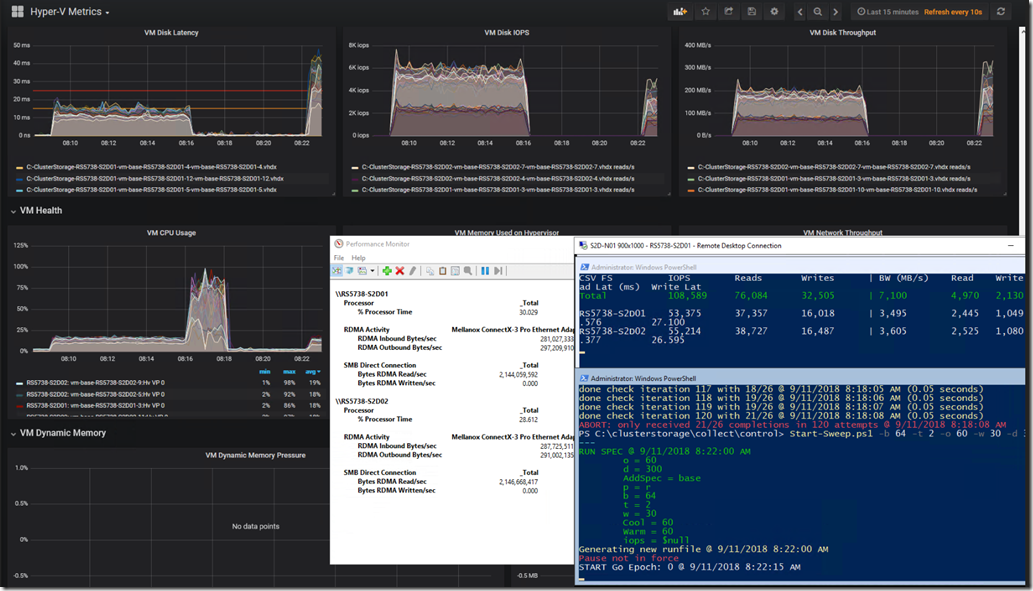
The following is our custom Kepler-64 Storage Spaces Direct 2-node cluster being tracked in a Grafana Dashboard that we've customized:
image

Grafana graphs, PerfMon RoCE RDMA Monitoring, and VMFleet Watch-AllCluster.PS1 (our mod)

Needless to say, a substantial number of links to various sites about running the above setup on both Windows and Ubuntu were lost after something seemingly went wrong. :(

Edge (Sync ?) Hiccups then Pukes

As we were quite busy throughout the day and Edge was being very uncooperative we started using Firefox for most of the browsing throughout the day.

image

Edge: Favourites Bar Shortcut Count Drastically Trimmed

The first response once things started misbehaving should have been was to use the Edge Favourites Backup feature and get them out!

When we opened Edge later in the day this is what we were greeted with:

image

Edge: Favourites Bar Shortcuts Gone!

As a small caveat one of the behaviours with Edge has been for it to either go unresponsive requiring a Task Manager Kill or when another Edge browser session was opened for it to not allow Paste or Right Click in the Address Bar or any Favourites, History, or other buttons to be shown.

So, Task Manager Kill? Nope. They were not there.

Log off and back on again? Nope.

Reboot the machine? Nope.

Both the Favourites Bar content and _all_ of our Favourites were gone.

Back Them Up!

During the above day when things started to misbehave the next step _should have been_ to grab one of the tablets they were syncing to and run a backup process without allowing the tablet to connect to WiFi and sync! Ugh, hindsight is 20/20. :P

And, much like the advice we always start out with when training users on the use of Office products the very first step they need to take is to _save_ their work before doing anything! And, once the work is done, to _save_ their work. Well, that advice is something that we will be taking from now on with regards to Edge and Favourites.

After a big day of Favourites building a backup should be taken.

So, Where Are Those Favourites?

Why, oh why do software vendors move my cheese?

In this case, the original location for those Favourites when using IE back in the day was OneDrive. If there was a hiccup somewhere between the number of different clients OneDrive Sync would append the name of the machine to the conflicting shortcuts and we'd be left with doing a quick Search & Destroy post mortem. No biggie. Not so with Edge.

Thanks to Michael B. Smith via a list we were pointed to:

The location that Edge stores those favourites is here:

  • Stored under %LOCALAPPDATA%\Packages\Microsoft.MicrosoftEdge_8wekyb3d8bbwe\AC\MicrosoftEdge\User\Default\DataStore\Data\nouser1\120712-0049\DBStore
  • Database Name: Spartan.edb

Change the somewhat hidden dropdown to Favourites and:

image

Some Edge Favourites Post Backup Import

What Does All This Mean? Edge Bug

It means that there's a serious bug somewhere in the Edge setup with Data Loss being one possible result.

It means that, for now one needs to run the Edge Export process to back those Favourites up after a serious day of adding to that list!

  1. In Edge click the Favourites/History/Downloads button
    • image
  2. Click the Favourites Star if they are not shown as above
  3. Click the Gear
  4. Click the Import from another browser button
    • image
  5. Click the Export to file button
    • image
  6. Choose a location and give the file a name
    • We drop ours in OneDrive to keep it backed up
    • image
    • Naming convention: DATE-TIME-Location.HTML

The above process will at least help mitigate any choke in the Edge Favourites setup that may happen.

Warning Note

IMPORTANT NOTE: Edge does not have any kind of parsing structure for the import process.

We cannot pick and choose what to import, and, if there are still Favourites _in the database_ they may disappear/be deleted when importing!

If the bulk of the Favourites are still there then an alternative to a wholesale import would be to open the backup .HTML page and click on the needed links and Favourite them again. *sigh*

Conclusion

What does all of this mean?

Considering that we've lost data there's a very serious problem here. In our case, we're talking about a very long and full day's worth of bookmarks/favourites gone. :(

For now, it means back those favourites up _a lot_ when doing critical work that requires knowledge keeping!

Oh, and we need to set aside some time to delve into the NirSoft utility linked to above to see if there are features in there to help mitigate this situation.

Philip Elder
Microsoft High Availability MVP
MPECS Inc.
Co-Author: SBS 2008 Blueprint Book
www.s2d.rocks !
Our Web Site
Our Cloud Service

Friday, 7 September 2018

Surface Pro 4 or Surface Book phantom touches

A couple of days ago one of our docked Surface Pro 4 (SP4) units started to experience what looked like an ongoing touch in the middle between the two screens near the bottom.

A reach over to the SP4 and a touch to figure out where the phantom touches were happening brought about the discovery that it was near the bottom righthand corner of the touch screen.

Weird.

Okay, so pull it off the dock, give it a good screen cleaning, and for good measure blow it out since it's been sitting there for a while.

It seemed okay but the problem came back.

A reboot would not fix it either.

So, in to the Microsoft Store we went today. The tech took it into the back for a few minutes then came back and said it's good to go.

What was done? They have a calibration tool there at the store to recalibrate the touch screen.

Since that was done the SP4 has been behaving. We'll see, but let's hope it's all good.

As it turns out, the task run by the Microsoft Tech is in the above KB article.

So, if experiencing phantom touches download and run the calibration tool found in that article.

UPDATE 2018-09-10: They came back. :(

As  an FYI, this time around instead of hugging one side of the screen we had a line of touches running across the screen.

So, instead of heading back to the store we ran through the hotfix e-mail process and ran the utility.

The phantom touches disappeared again. We'll see for how long.

Philip Elder
Microsoft High Availability MVP
MPECS Inc.
Co-Author: SBS 2008 Blueprint Book
www.commodityclusters.com
Our Web Site
Our Cloud Service

Wednesday, 5 September 2018

When Software Bugs can Kill: Dodge RAM 1500 Cruise Control Bug

A while back there was a scary moment where the cruise control in our 2016 RAM 1500 refused to release via any of the buttons on the steering wheel.

In that moment, rushing up on a vehicle fairly far ahead of us and going over a bridge, there were only a few options left:

  1. Brakes release the cruise
  2. Try and Power Down & Brake
  3. Ditch @ 100KM/H on a bridge bank

Fortunately, the cruise released when the brakes got hit, we were able to avoid rear ending the person in front of us, and in fact the cruise system crashed right after the brakes were applied.

When addressing the complaint with Dodge and the dealer there's the, "Oh, no we didn't realize there was a problem there" type of response.

Well, obviously there was a problem that needed to be addressed as the bellow letter shows.

image

So, being that the problem could be life threatening we took the truck in to have it flashed as soon as the above showed up and the dealer had a spot open.

Here we are a few weeks or more from the day the flash was done and the behaviour happened again this morning. :S

Fortunately, at that moment there was less panic and more "Oh, hopefully the brakes work to kick it off this time" happening. ;)

A call into the dealer and the service tech indicated they'd have a conversation with the service manager since the tech was not sure whether there would be a "re-flash" of the module or the problem would need to head further up the Fiat Chrysler Canada food chain.

The Customer Service Wall

It's understandable that companies try and hide their mistakes. Yet, time and time again it's been shown that companies that are up-front about mistakes made and changes made to mitigate or eliminate them happening again tend to do quite well. It seems the lawyers tend to win this argument, and the ridiculous cases that have forced the issue, to keep things relatively hidden.

For the end-user it's very frustrating to face that "Customer Service Wall" with virtually no hope of getting anywhere beyond the person standing in front of that wall. In this case, it's the "Service Technician" that is in front of the Wall.

The reality is that the Customer Service Wall is a very well designed system to keep the person/user who is essentially paying the bills as far away from the manufacturer/vendor as is possible.

The same is true of voice recognition systems that users/customers hit as soon as they call "Customer Service".

There is no lack of irony in the above two sentences.

Conclusion

Sadly, the situation with the Dodge software bug, which can be deadly, will remain a mystery for a little while longer. With a bit of awareness, and a good dose of caution, we will be able to mitigate the bug's release block and not hit anyone including the ditch.

But for now, we wait until the folks that do the programming can figure out where the bug really lies and hopefully fix it … without introducing an even deadlier bug.

Philip Elder
Microsoft High Availability MVP
MPECS Inc.
Co-Author: SBS 2008 Blueprint Book
www.s2d.rocks !
Our Web Site
Our Cloud Service

Friday, 10 August 2018

Intel/LSI/Avago StorCli Error: syntax error, unexpected $end FIX

We're working with an Intel setup and needed to verify the setup on an Intel RAID Controller.

After downloading the command line utilities, since we're in Server Core, we hit this:

C:\Temp\Windows>storcli /cx show

syntax error, unexpected $end

     Storage Command Line Tool  Ver 007.0415.0000.0000 Feb 13, 2018

     (c)Copyright 2018, AVAGO Technologies, All Rights Reserved.


help - lists all the commands with their usage. E.g. storcli help
<command> help - gives details about a particular command. E.g. storcli add help

List of commands:

Commands   Description
-------------------------------------------------------------------
add        Adds/creates a new element to controller like VD,Spare..etc
delete     Deletes an element like VD,Spare
show       Displays information about an element
set        Set a particular value to a property
get        Get a particular value to a property
compare    Compares particular value to a property
start      Start background operation
stop       Stop background operation
pause      Pause background operation
resume     Resume background operation
download   Downloads file to given device
expand     expands size of given drive
insert     inserts new drive for missing
transform  downgrades the controller
/cx        Controller specific commands
/ex        Enclosure specific commands
/sx        Slot/PD specific commands
/vx        Virtual drive specific commands
/dx        Disk group specific commands
/fall      Foreign configuration specific commands
/px        Phy specific commands
/[bbu|cv]  Battery Backup Unit, Cachevault commands
/jbodx      JBOD drive specific commands

Other aliases : cachecade, freespace, sysinfo

Use a combination of commands to filter the output of help further.
E.g. 'storcli cx show help' displays all the show operations on cx.
Use verbose for detailed description E.g. 'storcli add  verbose help'
Use 'page=[x]' as the last option in all the commands to set the page break.
X=lines per page. E.g. 'storcli help page=10'
Use J as the last option to print the command output in JSON format
Command options must be entered in the same order as displayed in the help of
the respective commands.

What the Help does not make clear, and what our stumbling block was, is what exactly we're missing.

It turns out, that the correct command is:

C:\Temp\Windows>storcli /c0 show jbod
CLI Version = 007.0415.0000.0000 Feb 13, 2018
Operating system = Windows Server 2016
Controller = 0
Status = Success
Description = None


Controller Properties :
=====================

----------------
Ctrl_Prop Value
----------------
JBOD      ON
----------------


CFShld-Configured shielded|Cpybck-CopyBack|CBShld-Copyback Shielded

The /cx switch needed a number for the controller ID.

A quick search turned up the following:

Philip Elder
Microsoft High Availability MVP
MPECS Inc.
Co-Author: SBS 2008 Blueprint Book
www.commodityclusters.com
Our Web Site
Our Cloud Service

Thursday, 9 August 2018

PowerShell: Add-Computer Error when Specifying OUPath: The parameter is incorrect FIX

We're in the process of setting up a second 2-node Kepler-64 cluster when we hit this when running the Add-Computer PowerShell to domain join a node:

Add-Computer : Computer 'S2D-Node03' failed to join domain 'Corp.Domain.Com from its current
workgroup 'WORKGROUP' with following error message: The parameter is incorrect.
At line:1 char:1
+ Add-Computer -Domain Corp.Domain.Com -Credential Corp\DomainAdmin -OUPath  …
+ ~~~~~~~~~~~~~~~~~~~~~~~~~~~~~~~~~~~~~~~~~~~~~~~~~~~~~~~~~~~~~~~~~~~~~
     + CategoryInfo          : OperationStopped: (S2D-Node03:String) [Add-Computer], InvalidOperation
    Exception
     + FullyQualifiedErrorId : FailToJoinDomainFromWorkgroup,Microsoft.PowerShell.Commands.AddComp
    uterCommand

The PowerShell line it's complaining about is this one:

Add-Computer -Domain Corp.Domain.Com -Credential Corp\DomainAdmin -OUPath "OU=S2D-OpenNodes,OU=S2D-Clusters,DC=Corp,DC=Domain,DC-Com" -Restart

Do you see it ? ;)

The correct PoSh for this step is actually:

Add-Computer -Domain Corp.Domain.Com -Credential Corp\DomainAdmin -OUPath "OU=S2D-OpenNodes,OU=S2D-Clusters,DC=Corp,DC=Domain,DC=Com" -Restart

When specifying the OUPath option if there is any typo in that setting the nondescript error is "The parameter is incorrect."

We always prefer to drop a server or desktop right into their respective OU containers as that allows our Group Policy settings to take giving us full access upon reboot and more.

Philip Elder
Microsoft High Availability MVP
MPECS Inc.
Co-Author: SBS 2008 Blueprint Book
www.s2d.rocks !
Our Web Site
Our Cloud Service

Wednesday, 8 August 2018

QuickBooks Desktop Freezes: Running Payroll, Downloading Online Transactions, and Closing Company File - Workaround

There seems to be an issue with the Canadian version of Intuit QuickBooks where the software freezes when doing a payroll run, downloading online transactions into QuickBooks, and when closing the Company file.

The workaround is to do the following:

  1. Close your company file.
  2. Open a sample file within QuickBooks
  3. From the No Company Open window, select Open a sample file
  4. Select a sample company file
  5. Click Ok to the warning You're opening a QuickBooks Desktop sample company file.
  6. In the sample company file, go to the Employees menu > Pay Employees > Scheduled Payroll
  7. Click Start Scheduled Payroll.
  8. Click Continue.
  9. Select one of the employees listed and click Continue.
  10. Click Ok to the warning message.
  11. Click Create Pay Cheques.
  12. Click Yes to the Past Transactions message.
  13. Click Close

We have a confirmation with one of our accounting firm clients that had the problem that this "fixes" it at least for now.

Intuit Help Article: QuickBooks Desktop freezes trying to create paycheques (CA only)

Philip Elder
Microsoft High Availability MVP
MPECS Inc.
Co-Author: SBS 2008 Blueprint Book
www.commodityclusters.com
Our Web Site
Our Cloud Service

Monday, 30 July 2018

Intel Server System R1208JP4OC Base System Device Driver ERROR Fix

We were asked to rebuild a cluster that had both Intel Server System R1208JP4OC nodes go blotto.

After installing Windows Server 2012 R2 the first step is to install the drivers. But, after installing the most recent Intel Chipset Drivers file we still saw the following:

image

Base System Device: Error

After a bit of finagling around we figured out that version 10.1.2.86_Public shown in the above snip cleared things up nicely.

image

PowerShell found in our Kepler-47 Setup Guide # DRIVERS section

Thanks for reading! :)

Philip Elder
Microsoft High Availability MVP
MPECS Inc.
Co-Author: SBS 2008 Blueprint Book
www.s2d.rocks !
Our Web Site
Our Cloud Service

Saturday, 28 July 2018

CaseWare CaseView: DRAFT Watermark Not Printing on HP LaserJet Pro M203dw

We hit a very strange situation with a newly set up HP LaserJet Pro M203dw. This was the first printer to go in to replace a HP LaserJet Pro P1606dn that was not behaving well with Windows 10 Enterprise 64-bit at an accounting firm client of ours.

It took a number of installs to get the printer to show up in Printers & Scanners for one. The rip and replace process got to be a bit tedious but we eventually got it to show there.

The catch was when the partner ticked the DRAFT option in CaseView and went to print the file the watermark was so light as to be practically invisible.

Print to PDF then to the printer and the DRAFT watermark would show up but weirdly due to the firm's logo.

Since this was a newly set up machine we tested a few other HP printers in the firm with the watermark showing just fine.

It became apparent that nothing we could do would get it to work.

So, we replaced the printer with a HP LaserJet Pro M402dw and it just worked. In fact, Windows 10 picked up the printer as soon as the USB port was plugged in to the laptop dock and set it as default.

Some observations:

  • HP LJ Pro M203dw came with a _tiny_ toner cartridge
  • HP LJ Pro M203dw has a separate toner and imaging drum a la Brother
    • We do _not_ like this setup at all
  • HP LJ Pro M402dw has a recent firmware update
    • This took some time but ran flawlessly
  • HP LJ Pro M402dw works great via Remote Desktop into the partner's laptop, Remote Desktop Session Host, and RemoteApp
    • RD EasyPrint just works with this one

Conclusion

We won't be supplying anymore HP LJ Pro M203dw printers. All of our firms will be getting the M402dw and our cloud clients will get this printer as a recommendation.

Philip Elder
Microsoft High Availability MVP
MPECS Inc.
Co-Author: SBS 2008 Blueprint Book
www.s2d.rocks !
Our Web Site
Our Cloud Service

Saturday, 7 July 2018

GitHub: SSH Key Error: Key is invalid FIX

We're following the GitHub Help instructions for Adding a new SSH key to your GitHub account.

The OS is Ubuntu 16.04 LTS on Azure for a service we're in the process of setting up.

The following _did not work_ for us:

$ clip < ~/.ssh/id_rsa.pub

So, we did this instead:

$cd .ssh

$ vi ~/.ssh/id_rsa.pub

And received the following:

image

Everything looked fine but no matter which way the Copy & Paste was done the Key is invalid. Ensure you've copied the file correctly error would happen.

image

In the end, the stackoverflow post at the bottom got us some joy.

We needed to run:

more id_rsa.pub

Highlight from the last character in the e-mail address to the front of ssh-rsa and it worked!

image

While it's been a few years since I've worked in a *NIX/*BSD environment it was just like riding a bicycle! Oh, and being somewhat fluent in PowerShell really helps too. :)

Thanks for reading!

Philip Elder
Microsoft High Availability MVP
MPECS Inc.
Co-Author: SBS 2008 Blueprint Book
Our Web Site
S2D.Rocks!
Our Cloud Service

Tuesday, 3 July 2018

Hyper-V Storage Live Migration Error: …not allowed because replication state is not initialized.

We had a Hyper-V server choke on some attached USB storage that was being used as a backup destination.

After getting things up and running we went to move one of the VM's VHDX file set and hit this:


image

Move Wizard

Storage migration for virtual machine 'VMName' failed.

Operation not allowed because the replication state is not initialized.

Storage Migration for virtual machine 'VMName' (GUID) failed with error 'The device is not ready.' (0x80070015).

Operation not allowed for virtual machine 'VMName' because Hyper-V state is yet to be initialized from the virtual machine configuration. Try again in a few minutes. (Virtual machine ID GUID)

The "fix" is to restart the VMM Service in an elevated PowerShell:

Restart-Service -Name VMMS

Once the service was restarted:

image

The move started without issue.

HT: Charbel Nemnom.

Philip Elder
Microsoft High Availability MVP
MPECS Inc.
Co-Author: SBS 2008 Blueprint Book
Our Web Site
Our Cloud Service

Wednesday, 20 June 2018

Windows Server: Black Screen with "Windows logon process failed to spawn user application."

After demoting a DC we were not able to get to the desktop with a black screen showing up and that was it.

Try and get Task Manager up and running produced the following in the server's Event Logs:

Log Name:      Application
Source:        Microsoft-Windows-Winlogon
Date:          6/20/2018 11:19:06 AM
Event ID:      4006
Task Category: None
Level:         Warning
Keywords:      Classic
User:          N/A
Computer:      SERVER.DOMAIN.COM
Description:
The Windows logon process has failed to spawn a user application. Application name: launchtm.exe. Command line parameters: launchtm.exe /3 .

In the end the solution ended up being to add the local administrator account to the local Users group after hitting CTRL+ALT+DEL/END to click Log Off/Sign Out.

Once we signed back in we got to the server's desktop and were able to continue with it's removal from the domain.

EDIT: Note that the change was done from a DC via Active Directory Users and Computers.

Philip Elder
Microsoft High Availability MVP
MPECS Inc.
Co-Author: SBS 2008 Blueprint Book
Our Web Site
Our Cloud Service

Wednesday, 9 May 2018

Remote Desktop Client: An authentication error has occurred. *Workaround

Updates last night included one for CredSSP CVE-2018-0886.

For those of us that are hesitant to patch our servers the instant a patch is available we'll be seeing RD Clients unable to connect for the period prior to our regression testing and release cycle.

Remote Desktop Connection

An authentication error has occurred.
The function requested is not supported.

Remote Computer: SERVERNAME
This could be due to CredSSP encryption oracle remediation.
For more information, see https://go.microsoft.com/fwlink/?linkid=866660

For now, the workaround on the remotely connecting RD Clients is to set the following registry key:

Windows Registry Editor Version 5.00

[HKEY_LOCAL_MACHINE\SOFTWARE\Microsoft\Windows\CurrentVersion\Policies\System\CredSSP]

[HKEY_LOCAL_MACHINE\SOFTWARE\Microsoft\Windows\CurrentVersion\Policies\System\CredSSP\Parameters]
"AllowEncryptionOracle"=dword:00000002

Copy and paste the above into Notepad and Save As "CredSSP.REG" in a quickly accessible location.

Double click on the created file and MERGE. An elevated Registry Editor session would also allow for import via the FILE menu.

Once the above registry setting is in-place reboot the client machine and the connection should work.

Happy Patching! :)

UPDATE 2018-05-09 @ 10:47 MST: A caveat:

It is better to update the server backend, if possible, before making the above registry change.

If that is _not_ possible, then after the updates have been applied on the server(s) make sure to _change_ the registry setting to its most secure setting.

UPDATE 2018-05-10 @ 17:38 MST:

Update sources:

Philip Elder
Microsoft High Availability MVP
MPECS Inc.
Co-Author: SBS 2008 Blueprint Book
Our Web Site
Our Cloud Service

Monday, 18 December 2017

Cluster: Troubleshooting an Issue Using Failover Cluster Manager Cluster Events

When we run into issues the first thing we can do is poll the nodes via the Cluster Events log in Failover Cluster Manager (FCM).

  1. Open Failover Cluster Manager
  2. Click on Cluster Events in the left hand column
  3. Click on Query
    • image
  4. Make sure the nodes are ticked in the Nodes: section
  5. In the Event Logs section:
    • Microsoft-Windows-Cluster*
    • Microsoft-Windows-FailoverClustering*
    • Microsoft-Windows-Hyper-V*
    • Microsoft-Windows-Network*
    • Microsoft-Windows-SMB*
    • Microsoft-Windows-Storage*
    • Microsoft-Windows-TCPIP*
    • Leave all defaults checked
    • OPTION: Hardware Events
  6. Critical, Error, Warning
  7. Events On
    • From: Events On: 2017-12-17 @ 0800
    • To: Events On: 2017-12-18 @ 2000
  8. Click OK
  9. Click Save Query As...
  10. Save it
    • Copy the resultant .XML file for use on other clusters
    • Edit the node value section to change the node designations or add more
  11. Click on Save Events As... in FCM to save the current list of events for further digging

Use the Open Query option to get to the query .XML and tweak the dates for the current date and time, add specific Event IDs that we are looking for, and then click OK.

We have FCM and Hyper-V RSAT installed on our cluster's physical DC by default.

Philip Elder
Microsoft High Availability MVP
MPECS Inc.
Co-Author: SBS 2008 Blueprint Book
Our Web Site
Our Cloud Service

Wednesday, 1 November 2017

Error Fix: Event 7034 Service Control Manager - Server, BITS, Task Scheduler, Windows Management Instrumentation, Shell Hardware Detection Crashes

This has just recently started to pop up on networks we manage.

All of the following are Event ID 7034 Service Control Manager service terminated messages:

  • The Windows Update service terminated unexpectedly. It has done this 3 time(s).
  • The Windows Management Instrumentation service terminated unexpectedly. It has done this 3 time(s).
  • The Shell Hardware Detection service terminated unexpectedly. It has done this 3 time(s).
  • The Remote Desktop Configuration service terminated unexpectedly. It has done this 3 time(s).
  • The Task Scheduler service terminated unexpectedly. It has done this 3 time(s).
  • The User Profile Service service terminated unexpectedly. It has done this 3 time(s).
  • The Server service terminated unexpectedly. It has done this 3 time(s).
  • The IP Helper service terminated unexpectedly. It has done this 2 time(s).
  • The Device Setup Manager service terminated unexpectedly. It has done this 3 time(s).
  • The Certificate Propagation service terminated unexpectedly. It has done this 2 time(s).
  • The Background Intelligent Transfer Service service terminated unexpectedly. It has done this 3 time(s).
  • The System Event Notification Service service terminated unexpectedly. It has done this 2 time(s).

It turns out that all of the above are tied into SVCHost.exe and guess what:

Log Name: Application
Source: Application Error
Date: 10/23/2017 5:09:57 PM
Event ID: 1000
Task Category: (100)
Level: Error
Keywords: Classic
Computer: ABC-Server.domain.com
Description:
Faulting application name: svchost.exe_DsmSvc, version: 6.3.9600.16384, time stamp: 0x5215dfe3
Faulting module name: DeviceDriverRetrievalClient.dll, version: 6.3.9600.16384, time stamp: 0x5215ece7
Exception code: 0xc0000005
Fault offset: 0x00000000000044d2
Faulting process id: 0x138
Faulting application start time: 0x01d34c5c3f589fe7
Faulting application path: C:\Windows\system32\svchost.exe
Faulting module path: C:\Windows\System32\DeviceDriverRetrievalClient.dll

A contractor of ours that we deployed a greenfield AD and cluster for was the one who figured it out. WSUS and the Group Policy settings were deployed this last weekend with everything in our Cloud Stack running smoothly until then.

The weird thing is, we have had these settings in place for years now without any issues.

The following are the settings changed at both sites:

System/Device Installation
Specify search order for device driver source locations: Not Configured
2014-02-11: Enabled by Philip Elder.
2017-11-01: Not Configured by Philip Elder.
Specify the search server for device driver updates: Not Configured
2014-02-11: Enabled by Philip Elder.
2017-11-01: Not Configured by Philip Elder.

System/Driver Installation
Turn off Windows Update device driver search prompt: Not Configured
2017-10-28: Disabled by Philip Elder.
2017-11-1: Returned to Not Configured by Philip Elder

System/Internet Communication Management/Internet Communication settings
Turn off Windows Update device driver searching: Not Configured
2014-02-11: Disabled by Philip Elder.
2017-11-01: Not Configured by Philip Elder.

It is important to note that when working with Group Policy settings a comment should be made in each setting if at all possible. Then, when it comes to troubleshooting an errant behaviour that turns out to be Group Policy related we are better able to figure out where the setting is and when it was set. In some cases, a short description of the "Why" the setting was made helps.

Philip Elder
Microsoft High Availability MVP
MPECS Inc.
Co-Author: SBS 2008 Blueprint Book
Our Cloud Service
Twitter: @MPECSInc

Tuesday, 31 October 2017

Xeon Scalable Processor Motherboard CPU-Soft Lockup Fix

The new Intel Purley based Intel Server Boards S2600WF, S2600BP, and S2600ST Product Family use a new BMC (Baseboard Management Controller) video subsystem.

As a result, some operating systems, mostly *NIX based, will choke on install as they may not have the driver built-in.

Intel Technical Advisory: Intel® Server Board S2600WF, S2600BP and S2600ST Product Family fail to initialize the operating system video driver for the ASPEED* Base Management Controller (BMC).

That document point's to ASPEED's site for downloading an up to date driver that fixes the problem.

Root Cause
Full root cause of this issue has been determined. Intel has confirmed that the failure has no bearing on system performance, it only impacts local video graphics. In detail, when the operating system loads, the OS-embedded ASPEED* video driver is not able to access a portion of the BMC memory space, therefore the process stalls.

On Windows Server based configurations we need to update the driver once the OS is installed. The default VGA driver that comes built-in to the OS works just fine.

Philip Elder
Microsoft High Availability MVP
MPECS Inc.
Co-Author: SBS 2008 Blueprint Book
Our Cloud Service
Twitter: @MPECSInc