Showing posts with label SBS 2003 Premium. Show all posts

Thursday, 3 December 2009

SBS 2003 – Determining ISA 2004 Version And Service Pack Level

We needed to figure out what service pack level one of our ISA 2004 on SBS 2003 installations has:

This is the grid from the ISAServer.org site:

image

In our case, our version number is 4.0.2167.907 which indicates that it is Service Pack 3 with at least one update beyond that.

Philip Elder
MPECS Inc.
Microsoft Small Business Specialists
Co-Author: SBS 2008 Blueprint Book

*Our original iMac was stolen (previous blog post). We now have a new MacBook Pro courtesy of Vlad Mazek, owner of OWN.

Windows Live Writer

Friday, 17 April 2009

Hardware Independent Restore and NIC Teaming Caveat

We have a ShadowProtect image of one of our client’s SBS 2003 Premium RTM boxes that we are using to run through the SBS 2003 to SBS 2008 migration process with.

This SBS has been around for about four years or so. As a result, we wanted to run through the Microsoft migration method to see if there are any unforeseen hiccups with their setup or Line of Business applications.

So, we used the Hardware Independent Restore feature of ShadowProtect to restore the image to one of our lab server boxes. The restore process and the subsequent old server device cleanup (previous post) while in Safe Mode after the restore went as well as expected.

Once the OS had finished its boot after the cleanup, there were all kinds of problems though. Their source was the lack of NICs showing in Network Connections.

The Device Manager showed the Intel NICs, the teaming driver setups, and the NIC Team, but they were not showing up anywhere else.

It took a while to figure out how to break the team as any attempt to access the NICs in the Device Manager or work with the Intel driver software would result in a perpetual hour glass.

The old server setup has three NICs installed. There are the two onboard NICs teamed along with an add-in NIC that is used to connect to the Internet.

We ended up needing to reboot into Safe Mode and disabling any of the Intel software driver NIC components (MiniPorts, etc) and the like in the Device Manager leaving only the physical NICs enabled. We also set the Exchange and ISA services to manual so that they would not drag the box down during boot up as no IP addresses would be in place yet.

After rebooting the box into the SBS OS we finally had the two NICs showing up in the Device Manager and the Network Connections folder. We then reinstalled the current Intel ProSet drivers.

From there, we set one NIC with the SBS internal IP and in the other we set an IP to work with one of our routers that has direct access to the Internet. We did not need inbound Internet traffic, but we did need the Internet connection for the migration process.

We reset the Exchange and ISA services to automatic, restarted the ISA services only and reran the Configure E-mail and Internet Connection Wizard to set the new Internet subnet into ISA.

A reboot later and we had a happy Exchange with full mailbox access and ISA was working as expected. IE brought up a Web site as a test for Internet connectivity.

Now, we will image the box so as to have a place to fall back to in the event we have a failure during the initial migration process steps. We will keep imaging the old SBS box with incremental images until the process is finished, or we need to step back and figure out where things went wrong.

We will use the built-in SBS 2008 backup to keep a fallback for it.

IMPORTANT:

  • For any production SBS box image that is restored to a lab server setup or VM setup needs to have the POP3 Connector disabled before Internet connectivity is turned on!

Philip Elder
MPECS Inc.
Microsoft Small Business Specialists
Co-Author: SBS 2008 Blueprint Book

*All Mac on SBS posts will not be written on a Mac until we replace our now missing iMac! (previous blog post)

Windows Live Writer

Monday, 8 September 2008

Security and SBS 2008 Webinar with Untangle

I will be a part of the upcoming Webinar presented by Untangle.

You can register here.

Untangle will be presenting on Security in an SBS 2008 World tying in their Untangle firewall security product.

For those looking for alternatives to ISA or SonicWall, Untangle may present one, though we have not had a chance to evaluate their product yet.

We will be diving into the Untangle product along with others as we look for an alternative to SBS 2003 R2 Premium once SBS 2008 SKUs go live. Once we do, we will be sure to share the results here.

Philip Elder
MPECS Inc.
Microsoft Small Business Specialists

*All Mac on SBS posts are posted on our in-house iMac via the Safari Web browser.

Thursday, 28 August 2008

SBS 2008 Premium on Open Value Licensing - ISA considerations

This post is more to generate some creative juices in the old grey matter. ;)

Given the experiences we have had configuring ISA 2004 to work with our SBS 2008 lab setups, there look to be a couple of possible methods to make things work.

The key to it all folks: Take a very close look at your SBS 2003 SP1/R2 Premium setups with ISA 2004 installed and configured properly.

Look at how the SSL setup works and just how the Configure E-mail and Internet Connection Wizard sets the ISA SSL bridging up.

From there, it is possible to see two possible ways of configuring ISA:

  1. Bridging using the SBS self-issued cert for RWW and an internal URL for RWW. ISA will bridge SSL for remote.mysbs2008.com to remote.mysbsdomain.local without the dreaded 500 errors.
  2. Bridging using the split DNS setup built into SBS 2008. ISA bridge Internet remote.mysbsdomain.com calls to remote.mysbsdomain.com on the SBS 2008 box.
We have been using the second method to make everything work so far. The key factor is to make sure to import the third party SSL certificate with the Private Key in it.

But, since the current SBS 2003 SP1/R2 Premium setups with ISA 2004 use method 1, we will experiment with it to see if using the internal URL will break things on SBS 2008 ... a distinct possibility given the wizard's use of a split DNS setup.

We won't be able to do this until our lab setup has the SBS 2008 Win2K3 setup in place with ISA 2006 installed and waiting to be configured for use with the Springers' SBS 2008 network.

If the trial runs at setting up option 1 do not work, we will make sure to let you know...

Philip Elder
MPECS Inc.
Microsoft Small Business Specialists

*All Mac on SBS posts are posted on our in-house iMac via the Safari Web browser.

Saturday, 2 August 2008

SBS 2K3 Premium - Configuring an SSL Wildcard Cert

Finding information on getting a third party SSL certificate installed on SBS Premium is a struggle.

In our case, we are looking to get away from the SBS self-issued certificate as much as possible. The amount of support related issues around that setup can be eliminated with the addition of a rather inexpensive investment in a third party certificate.

The process for setting up for the certificate is rather straight forward. The Official SBS Blog has a post on the initial part: How to Install a Public 3rd Party SSL Certificate on IIS on SBS 2003.

We create a dummy Web site in IIS, issued the certificate request from there, obtained the certificate from DigiCert, import it into the Intermediate Certification Authorities, and finally imported the certificate via the dummy site's certificate wizard. All of these steps are clearly outlined in the above blog post.

The blog author indicates that a further blog post is forthcoming on installing that certificate into ISA but none appear to be found.

The Configure Email and Internet Connection Wizard (CEICW) does have the ability to import a third party certificate, but it wants a *.cer file that does not seem to work from the many times we tried to get things configured that way.

So, that left us in a quandry: How do we get that certificate tied into ISA.

Having a little understanding as to how the CEICW configures both IIS and ISA together is a really important step to discovering how we need to get that certificate working.

With ISA installed on SBS, the configuration used to keep an end to end SSL tunnel between the user and IIS is called an SSL Bridge (MS TechNet Article).

When the browser requests https://rww.mydomain.com/remote and an SSL tunnel is established, ISA actually decrypts the tunnel to inspect the packets. ISA then re-encrypts the packets by establishing a subsequent SSL tunnel into the local IIS server.

When we look at the SBS ISA and IIS SSL setup from the user's perspective we see:

In this bridging setup, the key to realizing how we need to install the third party certificate can be discovered.

It is the Internet facing site that needs that certificate along with OWA, OMA, and direct SharePoint access.

The process is very simple:
  1. On the SBS server open the ISA manager.
  2. Click on the Firewall Policy item.
  3. Double click on any SBS xxx Publishing Rule that uses the SBS Web Listener.
  4. Click the Listner tab.
  5. Click the Properties button beside "SBS Web Listener".
  6. Click the Preferences tab.
  7. Under SSL: Click the Select button.
  8. The new third party certificate should be one of the available ones, click on it.
  9. OK.
  10. Apply & OK.
  11. Double click on the SBS Windows SharePoint Services Web Publishing Rule.
  12. Listener tab.
  13. Properties button.
  14. Preferences tab.
  15. Select button
  16. Choose the correct certificate as above.
  17. OK.
  18. Apply & OK.
  19. Apply in ISA Manager.
From an external client, connect to the Remote Web Workplace and view the certificate. It should reflect the newly installed third party certificate. Connect directly to the SharePoint Companyweb site: https://rww.mydomain.com:444/ and verify the certificate there.

An important note regarding SSL wildcard certificates: For Outlook 2003/2007 clients using Outlook Anywhere (RPC/HTTPS), the msstd:rww.mydomain.com setting in Outlook needs to be changed to: msstd:*mydomain.com in order to avoid this:


Microsoft Office Outlook

There is a problem with the proxy server's security certificate. The name on the security certificate is invalid or does not match the name of the target site rww.mydomain.com.

Outlook is unable to connect to the proxy server. (Error Code 0)
Some helpful links:
Now that we have discovered the process order and configuration steps, we are migrating all of our clients over to third party certificates.

Managing our client's SSL certification needs is one small service addition we have made to our managed services portfolio.

Philip Elder
MPECS Inc.
Microsoft Small Business Specialists

*All Mac on SBS posts are posted on our in-house iMac via the Safari Web browser.

Tuesday, 1 April 2008

SBS Premium - ISA Client Firewall Icon

Sometimes it can be difficult to communicate just what the ISA Client Firewall Icon looks like when phone based troubleshooting with a client.

ISA Client Firewall Icon on the right

The icon to the left of the ISA icon is the Windows Vista Sync Center icon indicating that it is currently up to date and happy with the UT connected to the workstation.

Philip Elder
MPECS Inc.
Microsoft Small Business Specialists

*All Mac on SBS posts are posted on our in-house iMac via the Safari Web browser.

Monday, 17 March 2008

SBS Premium + ISA = You have received an e-card?!?

On the F-Secure Weblog, we have the following article: From SMTP to HTTP to FTP where Mikko talks about the e-card spam evolution.

What Mikko is indicating to us, is that the spammers now send us to a page that will have a link to the virus file via FTP. Note the file link revealing that it is an executable file on an ftp://... at the bottom left of the Hallmark card:

We all love those Greeting Cards! ;)

So, our Favourite User clicks on the link and voila ... they get?

Well, on a vanilla, out of the box SBS 2003 Premium install with ISA 2000/4 installed and configured via the Configure Email and Internet Connection Wizard (CEICW), the user gets absolutely nothing ... zippo ... nada ... and we get a support call from Favourite User wondering why they cannot get their greeting card. ;)

The FTP protocol through the ISA server is disabled by default. We do not enable FTP unless the client specifically needs it for Web site development access to their site root. In some cases, we have a scheduled time to turn FTP access on for our client's site coders when they will be working directly on their sites. We then disable the Rule when they are done.

It has been a long time since we have had a client request FTP access for something other than Web site coding. So many software sites use HTTP for data transfers now that FTP has become something of a special need in our experience.

This situation is a good example of why we have a 95% install base of SBS 2K3 Premium at our client sites.

Philip Elder
MPECS Inc.
Microsoft Small Business Specialists

*All Mac on SBS posts are posted on our in-house iMac via the Safari Web browser.

Friday, 12 October 2007

SBS Premium - ISA - Creating a Work Hours Internet Site Restriction Policy

Almost all of our clients have an Acceptable Use Policy (AUP). The AUP outlines what one can and cannot do with company equipment and Internet access while in the office or out.

One of the requests we get is to place a restriction on which Internet sites that users would commonly visit during working hours or at all.

In ISA 2004, we would do the following:

  1. Open the ISA Management Console
  2. Right click on Firewall Policy -->New --> Access Rule
  3. We call them Workhours Deny
  4. Rule Action: Deny
  5. Selected Protocols: HTTP, HTTPS, MSN Messenger
  6. Access Rule Sources: Internal & Local Host
  7. Access Rule Destination: Add
    1. New: URL Set
    2. Name: Workhours Deny
    3. Add: http://*.rad.msn.com/*
    4. Some sites at the bottom of this post.
    5. OK
    6. Click on + beside URL Sets and double click on "Workhours Deny"
    7. Close
  8. Next
  9. All Users -->Next
  10. Finish
  11. In the ISA Console, double click on the Rule before clicking Apply in there
  12. Click the Action Tab: Tick "Redirect HTTP requests to this Web page:"
  13. Click the Schedule Tab
  14. New button
  15. Name ClientName Workhours and set the active times.
    • We set 0800 to 1800 for the times as a rule for all 7 days.
  16. Click OK
  17. Click Apply and OK in the Workhours Deny Properties window
  18. Click Apply and OK in the ISA Console.
Once the above is done you will end up with a policy that looks something like this in the ISA console:

During the working hours specified, if the user tries to connect to the Web sites that are listed in the Deny List, they will be greeted with the following:


Here is a partial list of sites that we tend to restrict out of the box as part of the SBS Premium setup:

Any site that would essentially waste a user's time or open the network to possible compromise would normally make the list.

In almost all cases, most people figure it out and there is not a problem. Once in a while a little more is needed, so with the Client Contact's approval, a simple email with a screen shot of an ISA report showing the user name and sites being visited is sent to the problematic user. This usually kills the behaviour immediately.

Philip Elder
MPECS Inc.
Microsoft Small Business Specialists

*All Mac on SBS posts are posted on our in-house iMac via the Safari Web browser.

Accpac Workstation Setup: BTrieve Error 35

We were migrating an existing peer to peer network to a SBS Premium based domain.

When we had most of the bugs ironed out, but the one that had us struggling the most was this error when we ran the Accpac client on the workstation:
BTRIEVE file directory is invalid(btrieve error 35)
This error had absolutely no indication as to the cause.

By this time, it was getting quite late, and the answer just did not seem to be forthcoming in our Web searches.

So, we took a break from it. The following day, we were able to finally discover what was causing the problem: We had setup the ODBC Datasources using the mapped network drive for the setting in the ODBC Administrator.

We needed to change the settings to the UNC path: \\mysbsserver\accpac

That fixed it.

A huge thank you to NextLevel Information Solutions for sharing their fix for the problem. It is a little over half way down in the FAQ.

Philip Elder
MPECS Inc.
Microsoft Small Business Specialists

*All Mac on SBS posts are posted on our in-house iMac via the Safari Web browser.

Thursday, 11 October 2007

SBS Premium - SBS Post Install ISA Rule Must Do for DHCP

The reason that brought us to the aformentioned Mr. Client's location was a complaint that some machines were no longer able to connect to the network.

The possibility of a switch failure drew us to bring an extra Gigabit switch with us as we have seen switch failures before.

It turned out that we needed to create a special rule in ISA for client machines that have lost their IP completely and now had a 169. address.

The rule looks like the following:

Access Rule: DHCP (reply) & (request) via Internal and Local Host

Note that the Listener is set for only the Internal and Local Host interfaces. We don't want the DHCP rule to access the Internet NIC.

To create the rule:
  1. Open ISA Manager
  2. Right Click on Firewall Policy --> New
  3. Click on "Access Rule"
  4. Call it 169 DHCP Access or the like [Next]
  5. Allow [Next]
  6. This rule applies to: Selected Protocols
  7. Add Button
  8. Infrastructure: DHCP (reply) and DHCP (request)
  9. Close and Next
  10. This rule applies to traffic from these sources: Internal and Local Host [Next]
  11. This rule applies to traffic sent to these destinations: [Add Button]
  12. Network Sets: All Networks (and Local Host)
  13. Close and Next
  14. All Users [Next]
  15. Finish
  16. Apply and OK in the ISA Manager
Your now complete rule will look like the above pictured ISA Firewall Policy that is highlighted.

Doing a release and renew will allow the client computer to now connect.

The reasoning as we understand it can be found in a previous post: SBS 2K3 Premium - All Editions, ISA, and DHCP on SBS.

This particular SBS Premium box was installed last year during a run of large installs and apparently we missed this step during setup and the DHCP issue didn't rear its head until now!

The importance of this Firewall Rule being there on Premium boxes is the reason behind this post. :D

UPDATE 2007-10-12: Image of ISA if one tries to add the broadcast address to the Internal Range:


It does not seem to work.

The default ISA Internal does include the full subnet though:


But only for that particular IP range.

Philip Elder
MPECS Inc.
Microsoft Small Business Specialists

*All Mac on SBS posts are posted on our in-house iMac via the Safari Web browser.

SBS Premium - Rootkit, Backdoor, Trojan ... Panic...

Ever had one of these?

Too many long nights and early mornings were partially to blame for the precipitation of a sense of panic that ensued when the following was seen in ISA's live query:


ISA: Unidentified IP Protocol: Source Port 1175, Destination Port 5571

So, a quick search for the destination port of 5571 turns up: Trojan "Lamer Variant".

The next step was to figure out what the program/service was and where it was.

The inital PortQry using the GUI version turned up (unknown service) for the sending port of 1175. That was not too encouraging.

SysInternals' Process Explorer was also turning up nothing out of the ordinary.

The next step was to run the SysInternals Rootkit Revealer. After 45 minutes of scanning - this particular server has huge arrays - nothing out of the ordinary seemed to be there. The scan kept on going with nothing to show for it.

The Symantec A/V on the server was up to date and running with no indications of any interference.

By now, the panic has set in, and the thoughts swirling around were along the lines of, "Mr. Client, we need to perform a Swing Migration in the next 5 minutes." Not really a bad thing given they have a secondary AD server that also has the arrays mirrored. Or is it? With the possibility of rootkit infection, we may be pulling just the data from backups.

Mr. Client's reaction would probably not be too happy. :(

So, as a final effort before having to consider the above meeting, a full port analysis was needed - just in case.

In the command line PortQryV2 directory the following was done:
  • portqry -local -l serverlog.txt [Enter]
This command runs a full query of absolutely everything on the local machine that is related to ports and services on those ports.

After the serverlog.txt file was created, we opened it in NotePad, and did a find for 1175 to see if anything came up and low and behold:

Process ID: 2476 (javaw.exe) on UDP Port 1175

Bingo. Open the Task Manager and shutdown the javaw.exe service, and the UDP errors in ISA disappeared.

Java is required for the Intel Management software that runs on the server. We had updated it during the last update run last week on that particular SBS box. So, something has changed in the program.

The DNSStuff.com report for the IP:
Reverse DNS for 229.111.112.12
Details:
strul.stupi.se. (an authoritative nameserver for 229.in-addr.arpa., which is in charge of the reverse DNS for 229.111.112.12)
says that there are no PTR records for 229.111.112.12.

A Whois for the mentioned .se server turned up Switzerland with no details. Not sure what Java is up to there.

For now, we will leave Java running, but not allow the UDP communication to pass through ISA to that 229 IP. We may even place a full ISA application restriction against it just in case.

After all of that, a huge sigh of relief and a little Irish kick! We got to smile and say, "Good day" to Mr. Client on our way out. ;)

UPDATE 2007-10-12: One thing that wasn't considered was searching for the actual IP listed. It seems that the IP is drawing people to the blog via search.

A question on Experts Exchange: Possible Hacker 229.111.112.12 mentions that the IP address may be an internal "Multicast" IP for the 229/8 range.

It would possibly explain why the Destination Network in ISA was Internal and the Source was the Local Host. It would also explain why there were no rDNS PTR records for the IP.

From the Internet Assigned Numbers Authority we have the following document: Internet Protocol V4 Address Space that indicates:

229/8 Sep 81 IANA - Multicast
Personally, this is not one of my strong points. So, please feel free to comment on whether this is the right direction or are we barking up the wrong tree?

Philip Elder
MPECS Inc.
Microsoft Small Business Specialists

*All Mac on SBS posts are posted on our in-house iMac via the Safari Web browser.

Thursday, 4 October 2007

SBS - ISA 2K4 - New ISA Client Edition Available

There is a new version of the ISA Client Firewall that has been released today:

Please make sure to update your technician thumb drives and SBS Premium installations with the new file. This will be especially important for new Vista installs on SBS infrastructure that has or will be RipCurled (previous blog post).

Philip Elder
MPECS Inc.
Microsoft Small Business Specialists

*All Mac on SBS posts are posted on our in-house iMac via the Safari Web browser.

Wednesday, 26 September 2007

SBS - ISA 2K4 - Publishing a DNS Server behind ISA

When we did our very first SBS 2K to SBS 2K3 Premium upgrade for one of our Internet facing clients who have their own little Web farm and Internet DNS settings, it was a lot of "fun"! :(

This is what we found in the ISA 2004 help file for publishing their DNS servers:
Publishing DNS servers

ISA Server does not translate the IP address of DNS servers. To publish a DNS server, configure a route network relationship between the Local Host network and the network that includes the DNS server. Similarly, ISA Server must know the IP address of the DNS server.
Um, huh?!?

We ended up having to call the Partner Support line and work with the ISA troubleshooting team for hours upon hours spanning days. Eventually, while on the phone with a Microsoft tech, we actually figured it out. And, guess what? The answer was just too simple.

  1. Create a Server Publishing rule
  2. Call it DNS Publishing or the like
  3. Assign the DNS Server's internal IP
  4. Assign the DNS Server protocol

  5. Select the External Network
  6. Click Finish
  7. Click the Apply button in the ISA console
  8. OK
That experience over a very poorly written Help File entry was an incredible amount of frustration for us! It was even more so because we had a number of SBS 2K3 Premium migrations with Web farms behind them waiting on us to do after that.

Truly, it must have been a real pain point because Microsoft actually published a KB article about it: How to publish a DNS server in Internet Security and Acceleration (ISA) Server 2006 or in ISA Server 2004.

When publishing any form of manual for users, it must be "User" tested. It must pass the, "My mom can read and do it" test. The language must be simple and bullet proof. All of the bases need to be covered. If we professionals can't read and understand whatever was written in the manual or Help File in the first place, then we can sure as heck count on the phone to be ringing with our users calling us for clarification.

Philip Elder
MPECS Inc.
Microsoft Small Business Specialists

*All Mac on SBS posts are posted on our in-house iMac via the Safari Web browser.

Saturday, 8 September 2007

SBS Premium - Intel ProSet not working?

So far, with every build of SBS Premium, we have lost the Teaming ability on the server.

We have run the P3Uninst.exe file on the server to no avail.

We made sure to shut down all IP related services on the server before attempting any form of uninstall/reinstall.

We then ran the ProSet install utility with the Remove option. This too did not bring back the teaming ability.

Out of the three adapters in this server, two showed the Teaming tab, but if we tried to create a team, we were greeted with:

No Intel server adapter or Intel integrated connection is available for teaming. Each team must include at least one Intel server adapter or Intel integrated connection.
There is something on SBS Premium that is interfering with the teaming. So far, we have not been able to figure out just what that is.

We do not W2K3 SP2 our SBS boxes unless absolutely necessary at this point. So, the problem is not stemming from SP2 issues.

It does not seem to matter whether we are building on a S3000AH Xeon 3000 series board or a S5000PSL Xeon 5000 series board.

Anyone else having similar experiences?

Note: We only build our SBS based servers on the above Intel Server Platforms. We are very conservative in our choice of platform for SBS, and the Intel one has worked very well for us.

Philip Elder
MPECS Inc.
Microsoft Small Business Specialists

*All Mac on SBS posts are posted on our in-house iMac via the Safari Web browser.

Wednesday, 29 August 2007

SBS - SBS Security and a Linux comparison

In all of our conversations with Linux gurus or guru wannabees, we can ask a simple question (keep in mind that we deploy 98.5% SBS Premium): You get your best tools, and we can sit down together and watch them try to work on our SBS Premium box with ISA setup and configured properly. With ISA SP3, we will be seeing a sea of red - that is denies!

ISA is more than a software firewall! Check out isaserver.org for more info. It is one of the best ways to manage data coming in or leaving the SBS network ... period. This is one of the main reasons why we pretty much only deploy Premium Edition of SBS. For a few extra dollars, the client gets an enterprise level of protection and user/software access management.

We have clients with Internet facing SBS Premium servers hosting email and providing HTTP filtering for Server 2003 Web Edition farms that have been running trouble free for years now. We have yet to see a successful attack.

For SBS standard, it is not much different since the built in firewall service is configured by the CEICW to only allow the requisite ports opened for SMTP and Remote Web Workplace access. The built in firewall cannot be as finely tuned as ISA, but it will provide that extra layer of protection over a firewall/router/gateway that should be protecting that SBS Standard box.

One should always use the native Remote Web Workplace connectivity to manage your SBS boxes. This further reduces the server's exposure. It gives you SSL protection for your management access without the risk of opening the 3389 port for Terminal Services.

The principle, as far as Linux is concerned, is having so many services running on one box. This is because of the way Linux operates. Each SBS like component, email like SendMail or QMail, Squid for firewall and proxy, Apache for web based services, SSH for remote management and connectivity, MySQL for databases, PHP for scripting and environments, Samba for sharing data files and folders across the internal network, and more all present an attack vector for someone to try and crack their way into the system.

Just the patch management alone on this kind of Linux setup would be a huge undertaking. Each server application product presents a different Web site or newsgroup that one would have to monitor for updates! Nevermind the conflicts that could arrise with all of these services installed on one box.

Small Business Server is not like that. Microsoft in the guise of the SBS team took a lot of time to make sure that each component of SBS plays nice together. They took the time to make sure that there would be a reduced attack vector by presenting what is essentially one secure and united front for access to the server: Remote Web Workplace. This front has a few facets in that VPN and Outlook Web Access can also be dialed in for access to data and email respectively. But, we are still presented with one way in: Through an SSL secured portal that requires us to authenticate BEFORE we get any further.

That is what a Linux person will not understand without sitting them down in front of the server's console and showing them point by point how things operate on a SBS box. Then we would let them watch the live traffic monitoring feature in ISA to gain an understanding of just how tight things run on SBS.

That in a nutshell, this late at night, is an off the top of the head run down of what is said to the Linux people we come across who protest the SBS configuration.

Philip Elder
MPECS Inc.
Microsoft Small Business Specialists

*All Mac on SBS posts are posted on our in-house iMac via the Safari Web browser.

Wednesday, 15 August 2007

SBS Premium - SBS ISA Rule for Remote Management Needed

For those of us who have SBS Premium internally and manage client SBS servers, the following is an important manually created rule for allowing the 4125 RDP proxy port out:


If one does not create this rule, there is no RDP connectivity allowed out of the internal network to any external SBS server's RWW based RDP session.

For clients, this is no big deal, but for those of us who manage SBS networks, it means not being able to connect to remote SBS and XP Pro/Vista Business desktops via RWW proxied RDP.

Philip Elder
MPECS Inc.
Microsoft Small Business Specialists

*All Mac on SBS posts are posted on our in-house iMac via the Safari Web browser.

SBS Premium - SBS ISA publishing defaults

Out of the box for SBS 2K3 Premium and SBS 2K3 Premium R2 ISA runs the CEICW when it is installed.

This is a screen shot of the default rules created out of the box by the ISA CEICW:

Sometimes it is good to have a quick reference when mucking about with those settings! :D

Philip Elder
MPECS Inc.
Microsoft Small Business Specialists

*All Mac on SBS posts are posted on our in-house iMac via the Safari Web browser.

Tuesday, 19 June 2007

SBS 2K3 Premium - ISP changes the static IP, now what?

As was mentioned earlier, our clients affected by the extended Internet outage had their static IP changed during the upgrade to DSL 2.0.

With SBS 2K3 Standard, all one needs to do is change the IP, Subnet, and Gateway on the second adapter (if installed). Or, the same changes would need to be made on the Router/Gateway box protecting the SBS network. Obviously this would have to be done on-site by someone with admin access, or via a service call by us.

The second thing common to both versions is to update the client Internet domain name's DNS settings for e-mail if the client has their domain e-mail coming to the SBS box via SMTP. This involves updating the IP associated with the MX and A record pointing to the old IP:

  • MX 10 mail.mydomain.com
  • A mail.mydomain.com 24.62.26.42 (old IP)
Updated to:

  • A mail.mydomain.com 62.24.42.26 (new IP)
If any updates in WSUS were approved just before the connection went down and hadn't yet had a chance to synchronize and download, they will have errors beside them (shown by a red x in the WSUS Web console). One will need to approve them again in order to get them to download and install properly. In this case we were dealing with WSUS 2.0. Once should verify the WSUS 3.0 updates status as well.

Once the above steps have been completed, then on the Premium boxes, we need to make some changes to ISA as well.

  1. On the second NIC (WAN=ISA), the IP, Subnet, and Gateway need to be changed to the new settings. Note that DNS on this adapter always points to the SBS IP!
  2. ISA Services need to be rebooted:
    • Click on Restart the service
    • Click on "Yes" to the "Restart Other Services" warning dialogue:


  3. Verify the settings in ISA:
    1. Open the ISA Manager
    2. Click on Firewall Policy
    3. Double click any one of the SBS Rules: SharePoint, OWA, etc
    4. Click the Listener tab
    5. Click the Properties button
    6. Click on the Networks tab
    7. Double Click the "External " (or click the Address button)
    8. Note that the correct IP is now present: 62.24.42.26


  4. The server should be rebooted after hours.
The server reboot is a precaution. This is especially true for one of our client's servers since it was quite plugged up after not being connected to the Internet for 5 whole days.

One can log on later to reboot the server via remote connection, or one can schedule a reboot (previous blog post how-to).

As always, let your client know that the reboot will be happening later on in the evening, and check RRAS to verify that no clients are connected via VPN so that no files may be corrupted:


As a rule, if anyone was connected to their desktop via RWW/RDP at the time of the server reboot, they will be able to reconnect to their session after the server reboots. In the event that they are not able to, their workstation should remain locked with their work there for them in the morning. The exception to this rule is a workstation reboot forced by the overnight updates.

Thus the request for the server reboot in the first place! :D

Philip Elder
MPECS Inc.
Microsoft Small Business Specialists

Monday, 11 June 2007

SBS 2K3 Premium - Setup a DB on SQL 2000 & test it

We received a request to setup a database on the default SQL 2000 instance and verify connectivity.

We went through the following steps (change italics to your own names):

  1. Server Management Console
  2. Advanced Management
  3. Computer Management
  4. Services and Applications
  5. Microsoft SQL Servers (local) (Windows NT)
  6. Databases
  7. Right click: New Database
  8. Name: mynewdb
    • Leave the defaults
  9. Down to: Security
  10. Logins
  11. Right click: New Login
  12. Name: newdbuser
  13. SQL Server Authentication with password: dbpassword01
  14. Database: mynewdb
  15. No Server Roles
  16. Database Access Tab: check mynewdb
  17. Check: db_owner
  18. OK
Your database should now be setup and ready to role. Or at least it should.

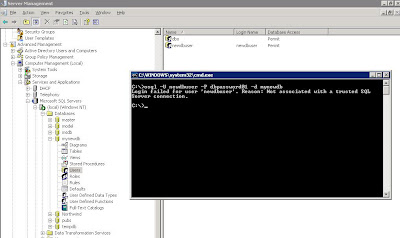
Next step, at the SBS server from the command line we test connectivity to the database:

osql -U newdbuser -P dbpassword01 -d mynewdb

Here is the result of that osql command:


Login failed for user 'newdbuser'. Reason: Not associated with a trusted SQL Server connection.
A search of the Microsoft KB turned up the following articles:

Microsoft KB 889615: You may receive a "Not associated with a trusted SQL Server connection" error message when you try to connect to SQL Server 2000 or SQL Server 2005.

and

Microsoft KB 555332: Login failed for user 'username'. The user is not associated with a trusted SQL Server connection. (Microsoft SQL Server, Error: 18452).

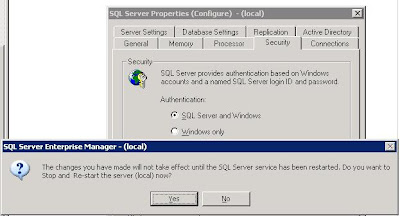
The second article contains the solution:

Switch the authentication mode to SQL Server and Windows:


Note that the change requires a restart of the SQL Server services. If there are any client databases online at the time, either everyone needs to shutdown their access, or we need to wait until later on when no connections to any databases on the server are happening.

Also note that we did not receive any indication as to why the database was not accepting connections via the SQL Enterprise Manager on another workstation. It just refused to connect which is why we went to the osql commands directly on the server.

Some links:

When looking for the commands we needed on the command line, it was a bit of a trial at first. We finally came up with: MSDN Forums - Command Line connect to SQL Server Database.

That in turn led us to:

The osql Utility and its commands on MSDN.

Lots of database fun on this one! :D

Philip Elder
MPECS Inc.
Microsoft Small Business Specialists

Thursday, 19 April 2007

SBS Premium and desktop security - BotNets, PWNED, & OWNED

Support Intelligence analyzes various aspects of, "eCrime including DDoS, Scanning, hosting Malware, sending Spam, etc".

They publish a list, called the Digest of Abuse Report, of the top 100 networks and the volume of incidents on them. One can subscribe to receive updates to the list.

The DOA report for Week 13, 2007.

An article, also written by SI, on Owned hosts of Banc of America Securities.

The above article, in my mind, is one really good reason to be selling the Premium version of SBS over the Standard version. Why? Because of the added network traffic security that can be found in Internet Security and Acceleration Server (ISA) 2000/2004 depending on what version of SBS Premium one is supporting.

One can closely monitor all aspects of network traffic being routed through the SBS server whether it is destined to an internal host or external network host. The type of traffic moving across the network or networks, from HTTP, SMTP, and all other protocol types is also monitored and reported on.

With ISA, one can also act on locking down certain types of network traffic, or sources of network traffic to mitigate a known threat, or even restrict a compromised system.

However, this takes a little bit of configuration on ISA and some monitoring on our part. It also takes learning to know the intricacies of configuring and tuning ISA.

Some questions that we need to ask when completing an SBS Premium install:
  • Have we setup the ISA reports to run daily?
  • Have we included an e-mail of those reports to us and a client contact if need be?
    • In many cases we are our client's only hope of mitigating network compromises.
  • Do we pay attention to those daily reports?
  • Have we configured the Server Performance Report to be emailed to us?
  • Do we look at them every morning?
One of the best ways to get to know the health and hiccups experienced on SBS based networks is to watch those reports every day. It is a good way to get to know the "personality" of each SBS server we support.

The threat of a client's network being compromised is real. The best that we can do for them is to provide a multi-tiered solution incorporating user Internet use training (yes ... this is # 1), layered system and software protection systems, and knowledge on our part of those threats. Of course, keeping in mind that a lot of our small business clients have limited I.T. budgets! :D

There is another business aspect to the configuration and monitoring of our SBS networks: A value added service for our clients.

I personally spend the first hour or two of my day going through the reports looking for issues or indicators for potential issues.

We offer this report monitoring as a "free" service, or value add, to our providing support to our SBS clients. They know that we are monitoring the health and well being of their SBS network because we let them know it, and that the service is free. To us, it is the cost of doing business.

One of the neat aspects of providing this service, is the proactive phone call: "Hi, this is Philip from MPECS, we see that there is a need for __ in the Server reports, could we schedule a time to address this please?" Or, something along those lines.

This instills in our clients a confidence and trust in our service. It is one of the ways to demonstrate that we care enough to be watching out for the well being of their business.

An excellent source of ISA information and tutorials can be found at ISAServer.org.

Via: Threat Level (27B Stroke 6), then TaoSecurity.

A definition of ASN at dictionary.com: Autonomous System Number.

Trendmicro: Network Reputation - Estimated Spam Volume by ISP. (Secure Site).

Emergent Chaos' take on Support Intelligence: Month of Owned Corporations.

Keep in mind that ISA, layered security measures, and monitoring are only a some of the aspects to network and data security. This is by no means a comprehensive list!

Philip Elder
MPECS Inc.
Microsoft Small Business Specialists