Showing posts with label Adaptec. Show all posts

Wednesday, 15 June 2011

2x SR1695GPRX2AC Hyper-V Node VTrak E310sD enabled Cluster Quote

This is our basic outline for the two node cluster configuration we have been working on:

The Promise VTrak E310sD RAID Subsystem with 12 drive bays:

image

And our Intel Server System SR1695GPRX2AC server node configuration:

image

  1. 2x Intel Server System SR1695GPRX2AC servers.
  2. 1x Promise VTrak E310sD outfitted with 12x 300GB 15K Seagate SAS drives.
    1. Time to stand up the cluster on an existing domain.

Cost wise this configuration makes a lot of sense for clients that can be hit with thousands of dollars per hour for downtime during their peak season or anytime for that matter.

Whenever we have an opportunity to propose a Failover Cluster option where the Intel Modular Server is our primary we will fall back to a configuration like this to present as a second option.

Failover is an insurance policy. So, the better the insurance the higher the cost.

The Intel Modular Server platform provides a full level of redundancy and scalability where the 2 node standalone server configuration does not.

Philip Elder
MPECS Inc.
Microsoft Small Business Specialists
Co-Author: SBS 2008 Blueprint Book

*Our original iMac was stolen (previous blog post). We now have a new MacBook Pro courtesy of Vlad Mazek, owner of OWN.

Tuesday, 14 June 2011

2 Node SR1695GPRX + VTrak E610sD Hyper-V Cluster Is Live

We are still ironing out a few things as far as how to set up the MPIO settings, but for the most part we are quite happy with the end results of our configuration testing.

A Hardware Problem

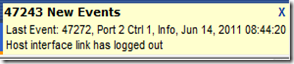
It seems that one of the Adaptec cards has taken exception to the current setup. We have not concluded as to whether the card has failed or needs a firmware reset as of yet. We need to determine _which_ card is causing the following on the VTrak:
image

47243 New Events

Last Event: 47272, Port 2 Ctrl 1, Info, Jun 14, 2011 08:44:20 – Host interface has logged out.

The corresponding error for a log in would follow the above. Note that none of the other three connections are throwing this error. As a result we are pretty sure it is one of the Adaptec cards since we connected like with like on the controllers.

  • Adaptec SAS:
    • Server 1: Port x on Controller 1
    • Server 2: Port x on Controller 1
  • Intel 1064e SAS:
    • Server 1: Port x on Controller 2
    • Server 2: Port x on Controller 2

We connected the cables in this manner just for this reason. We will be running through the VTrak’s Web GUI as well as the console session connected via Serial cable to see if we can figure out which port is which on Controller 1.

We have a pair of LSI 3442E-R SAS controllers on the way. We will replace both of the Adaptec cards with the LSi cards, flatten everything, and stand up a cluster for the third time.

Live Migration Success

This is a happy sign:

image

We initiated a Live Migration of the Windows Server 2008 R2 Standard Remote Desktop Services VM from Node-99 to Node-90.

image

The Live Migration ran successfully as shown above. The RDS VM was Live Migrated to Node-90. We left things alone for a while then Live Migrated the VM back to Node-99 without issue.

Cluster Events

There are a few Errors and one Critical error in the logs. All of them are from a problem with bringing additional LUNs online, formatting them, adding them as available storage in FCM, and then making them Clustered Shared Volumes.

The problems stemmed from a deadlock condition in the Cluster Resource Control Manager which we believe came about as a result of the problem path via the failed/flaky Adaptec card.

Conclusion

We are now confident enough to start proposing this Highly Available Failover Cluster to our clients.

Cost wise this HA Hyper-V cluster will be a very economical insurance policy against any single point of failure.

Philip Elder
MPECS Inc.
Microsoft Small Business Specialists
Co-Author: SBS 2008 Blueprint Book

*Our original iMac was stolen (previous blog post). We now have a new MacBook Pro courtesy of Vlad Mazek, owner of OWN.

Windows Live Writer

Monday, 13 June 2011

2 Node Hyper-V Cluster Update: We have MPIO Based Storage

Well, it looks as though the problems in the first run through were indeed driver related as well as process (which step goes before which) related:

image

We enabled the MPIO feature on the Hyper-V nodes after installing the updated drivers for both the Adaptec (which comes up unsigned despite Adaptec’s indicating they are) and the Intel SAS module.

  • Driver install command line:
    • pnputil –i –a Adaptec.inf
    • pnputil –i –a IntelSAS.inf
  • MPIO feature enable (TechNet):
    • Dism /online /enable-feature:MultipathIo
      • Note that this command is case sensitive.
    • mpclaim –n –i –a
      • Grab all of those disks
    • mpclaim –l –m 4
      • Set load balancing mode to “Lease Queue Length”
    • mpclaim –s –d
      • Shows the current load balancing mode:

New to Windows Server 2008 R2 SP1 Core and thus Hyper-V Server 2008 R2 SP1 is the MPIO Control Panel:

  • MPIOCPL.exe

Once we go through and configure the MPIO based storage there are a few more steps to take to configure and test the networking and then we will stand the cluster up.

Philip Elder
MPECS Inc.
Microsoft Small Business Specialists
Co-Author: SBS 2008 Blueprint Book

*Our original iMac was stolen (previous blog post). We now have a new MacBook Pro courtesy of Vlad Mazek, owner of OWN.

Windows Live Writer

Thursday, 9 June 2011

Intel Server System SR1695GPRX2AC RAID and SAS Integration

Here are some shots of one of the two nodes going into our entry level Hyper- V Cluster:

image

  • Intel Integrated RAID Module SRAMBSASMR

We took the stock cables that come with the SR1695GPRX setup and plugged them into the RAID controller.

Note the battery backup cable that is plugged into the RAID controller near the “bottom” relative to the picture’s up/down. It is the black braided cable with a white end.

image

The cache battery sits in its own tray that gets locked into a mount in the server chassis shown above.

Below is a shot of the back of the chassis where the Adaptec and the SAS I/O Module are installed:

image

The Intel SAS I/O Module is sitting just under the Adaptec card installed in the PCI-E slot.

Next up in the configuration process will be setting up the Promise VTrak RAID Subsystem storage for the cluster, the SAS IDs, and LUN Mapping.

From there we will be installing the Hyper-V Server 2008 R2 SP1 OS and configuring each node.

Philip Elder
MPECS Inc.
Microsoft Small Business Specialists
Co-Author: SBS 2008 Blueprint Book

*Our original iMac was stolen (previous blog post). We now have a new MacBook Pro courtesy of Vlad Mazek, owner of OWN.

Windows Live Writer

Tuesday, 7 September 2010

On Board Software “RAID” No More

We stopped using the on board “RAID” feature of on all of our client servers.

Why?

Because the cost of a high performance 4 port RAID controller like the Intel RAID Controller RS2BL040 is under $450CA.

For $450 we get:

  1. True RAID on Chip driven calculations.
    • No software interpreting the RAID calculations on the CPU.
  2. Drive redundancy.
    • But, on board RAID is just that: RAID right? Well, no. If a drive fails in an on board based “RAID” array 9 times out of 10 the server is locked up.
    • If a drive fails on a true RAID controller based array the RAID controller marks the drive dead, logs the failure, but _keeps moving along_.
  3. Data Protection
    • We have seen more failed OS loads after an on board based “RAID” array member failure by a factor of at least 10 compared to either a member or RAID controller failure in server settings.
  4. Performance
    • On board RAID relies on the software drivers to do all of the calculations. They run on top of the CPU. There is a performance hit for this.
    • Add a battery backup for the RAID on Chip’s memory cache and the array performance steps up accordingly.
    • Array rebuild times to hot spare for the RAID on Chip solution will be superior to on board software “RAID”.
      • A failed drive is when the server is most vulnerable.
  5. Maintenance
    • RAID on Chip solutions offer true hot swap compatibility.
    • Some software “RAID” setups may offer the same. But, test it first.

Given the overall benefits of an add-in RAID solution, in our opinion, no server should go out the door with an on board software “RAID” setup.

It is just not worth the risk.

Adaptec also makes some pretty good RAID on Chip solutions.

Philip Elder
MPECS Inc.
Microsoft Small Business Specialists
Co-Author: SBS 2008 Blueprint Book

*Our original iMac was stolen (previous blog post). We now have a new MacBook Pro courtesy of Vlad Mazek, owner of OWN.

Windows Live Writer