Showing posts with label Hard Drives. Show all posts

Wednesday, 13 November 2013

External Hard Disk Formatted GPT: Shows Healthy (GPT Protected Partition) in Disk Management

Okay, this was a bit of a puzzle:

image

A 2TB Seagate drive used for backups was originally formatted GPT on a Windows Server 2012 RTM Hyper-V host server.

We plugged the drive into a Windows Server 2012 R2 Hyper-V host to run backup recovery tests and ended up with the above. We tried a Windows 7 Enterprise system and the same result was to be had.

Getting a little concerned that any search results for the above stated to format the hard disk we tried one more thing. We plugged the drive into a Windows 8.0 Enterprise x64 machine to see if the VHDX files would show up.

image

Sure enough the drive received a letter and the files became available. Now to figure out how to get the newer server OS to read the drive!

Philip Elder
MPECS Inc.
Microsoft Small Business Specialists
Co-Author: SBS 2008 Blueprint Book

Chef de partie in the SMBKitchen
Find out more at
www.thirdtier.net/enterprise-solutions-for-small-business/

Windows Live Writer

Friday, 28 December 2012

Western Digital USB Drives Use A Proprietary Drive PCB for USB

This comes via the SBS2K Yahoo Group.

Apparently, Western Digital in their great wisdom has decided to mass produce a hard drive controller with only one interface on it: USB.

image

And:

image

As a rule we have been using the StarTech 4 bay SuperSpeed drive dock with bare drives for our backup rotations that we run.

For clients that have been running their own backup rotations we have been recommending the WD non-Green USB drives as we have had pretty good success with them. The same goes for the Seagate USB drives that are not “Green” in nature.

The one thing we have noticed with the manufacturer built USB drives is that there is a tendency to use 5400 RPM drives. And now, perhaps we are limited in how we can access a drive if something goes wrong with the controller.

Our preference for bare backup drives are:

  1. Seagate Enterprise Storage (ES or Constellation) series SATA
  2. Western Digital Black Label (non-Advanced Format for VHD/Backup VHD)

Both drives are 7200 RPM with better firmware than the retail/consumer drives. So, they will perform better and last longer due to ongoing handling during rotations.

We may request that in the future clients only purchase a certain drive and USB enclosure for their backups so that we have some control over what drives are used for backups.

As usual, it is Buyer Beware.

Philip Elder
MPECS Inc.
Microsoft Small Business Specialists
Co-Author: SBS 2008 Blueprint Book

Windows Live Writer

Thursday, 22 December 2011

Seagate Updates Their Bare Drive Product Warranty Periods

We received notification that Seagate is reducing the warranty periods on most of their hard drive product lines.

Seagate

Update to Seagate Bare Drive Product Warranty Periods

Dear Philip,

At Seagate, we are standardizing warranty terms to be more consistent with those commonly applied throughout the consumer electronics and technology industries. By aligning to current industry standards, Seagate can continue to focus its investments on technology innovation and unique product features that drive value for our customers rather than holding long-term reserves for warranty returns.

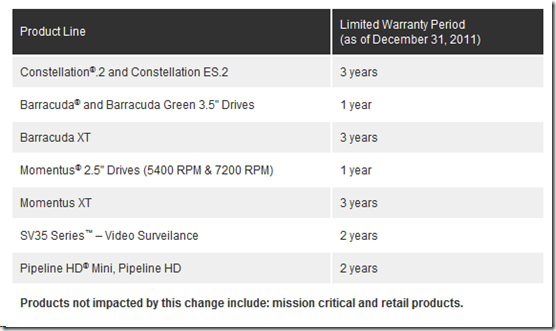
Therefore, effective December 31, 2011, Seagate will be changing its warranty policy from 5 years to 3 years for nearline drives, 2 years to 1 year for certain desktop and notebook bare drives (5 years to 3 years on Barracuda® XT and Momentus® XT), and from as much as 5 years to 2 years on Consumer Electronics (see table below.)
image

The new warranty periods will apply to all shipments of applicable products, as of December 31, 2011. Former warranty periods will be honored for all existing channel inventory shipped to you before the effective date. To check the warranty status of a single or multiple drives, you may visit http://www.seagate.com/www/en-us/support/warranty_&_returns_assistance.

Seagate will update its Global Limited Warranty Overview Policy as of December 31, 2011 specifically documenting these changes. The limited warranty included in your agreement with Seagate will continue to apply to these products under the new warranty periods.
Please share the warranty change information with your end customers as you sell your inventory. If you mention warranties online or in printed material, don't forget to update that as well.

As always, we believe in strong communication with our channel partners and appreciate your support and loyalty. Please do not hesitate to contact us via reseller.partner@seagate.com if you have any questions, comments, or need any other type of assistance or information regarding the Seagate Partner Program.

Seagate Technology LLC 10200 South DeAnza Boulevard, Cuptertino, CA 95014 USA
If you would no longer like to receive emails from Seagate, visit here.
© 2011 Seagate Technology LLC. All rights reserved. Seagate, Seagate Technology, the Wave logo are registered trademarks of Seagate Technology LLC in the United States and/or other countries. Barracuda, Constellation, Momentus, Pipline HD and SV35 Series are trademarks or registered trademarks of Seagate Technology LLC or one of its affiliated companies in the United States and/or other countries. All other trademarks or registered trademarks are the property of their respective owners. Complying with all applicable copyright laws is the responsibility of the user. Seagate reserves the right to change, without notice, product offerings or specifications..

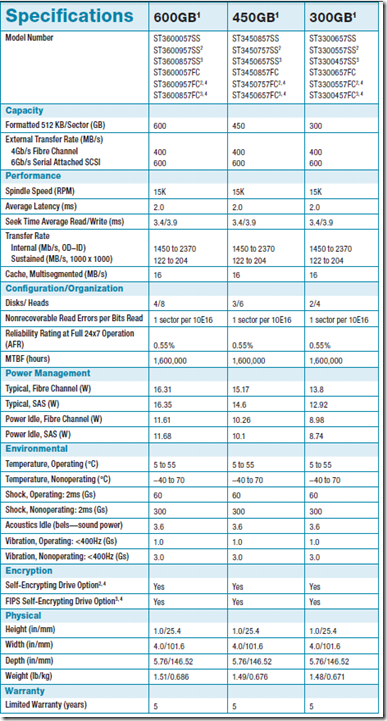
As is indicated in the above e-mail from Seagate most drive warranties will be 3 years for the enterprise class SATA and high end SATA lines. Seagate SAS looks to be holding in at the current level of five years.

From that Data Sheet we see the following:
image

Since we have stopped deploying servers with SATA based drives, with only near-line exceptions made for archive type purposes, we are not too concerned with the warranty period changes.

System Builders

System Builders that provide their own warranties for systems going out the door may need to take notice of these changes as the cost of adding a second and/or third year warranty to desktop systems may need to be changed accordingly.

This is especially true in that the failure rate for RMA replacement green label drives that come back from Seagate are substantially higher than new drives in our experience. So, keeping a number of new drives around for warranty replacement needs is something we factor into our extended warranty costs.

Philip Elder
MPECS Inc.
Microsoft Small Business Specialists
Co-Author: SBS 2008 Blueprint Book

*Our original iMac was stolen (previous blog post). We now have a new MacBook Pro courtesy of Vlad Mazek, owner of OWN.

Monday, 12 December 2011

Hard Drive Prices = Blade End of the Stick!

We now know that things are getting even more crazy when it comes to hard drive prices since our primary Seagate Distribution point in Canada, Synnex Canada, has dropped publishing prices in their portal:

image

The prices were there last week. But now they are not. Hover over the Call link and we see:

image

  • Vendor prohibits pricing to be published on the internet.

And, to top it off the prices are moving upwards at a faster and faster rate as witnessed by the ~$100 per drive jump over this last weekend for 300GB 15K Seagate SAS drives.

We have also seen mention of certain Tier 1 vendors pulling any retail stock and indicating $1K or $2K per drive or more when one enquired about purchasing additional drives just weeks ago. Now Tier 1 vendors are stating outright that hard drives are not available outside of system sales period.

The situation really begs the question: What are Tier 1s going to do to cover drive failures? Are existing customers going to be left in a bind if they have any drive failures?

Trying to balance the demand for new system sales versus supporting existing systems is going to be a real tough balancing act especially since there is so much uncertainty around if and when the offline factories will come back online.

Top that off with the fact that the hard disk industry is a relatively mature one so factory capacity has been pretty static over these last number of years. There may not be enough excess capacity to meet the hard drive shortfall. Period.

The current situation may be the catalyst that brings about a huge shift away from spindle based storage to solid-state based storage.

Prices are now close enough to Intel’s 300GB 320 Series SSDs for 300GB 15K SAS drives and climbing closer for the 600GB 320 Series SSDs for 600GB 15K SAS (3.5” drives) that we are almost at the whole point being moot.

Philip Elder
MPECS Inc.
Microsoft Small Business Specialists
Co-Author: SBS 2008 Blueprint Book

*Our original iMac was stolen (previous blog post). We now have a new MacBook Pro courtesy of Vlad Mazek, owner of OWN.

Windows Live Writer

Friday, 4 November 2011

Spindled Based Hard Drives Are Getting Scarce – An Opportunity For SSDs

Hard drives through pretty much all channels at this point are either in limited supply, require us to purchase a motherboard and CPU with each, or a server that can hold the number of drives we require.

We are also seeing prices going up as a 2TB Seagate XT drive we paid $150 for a few months back is now $210 and rising sometimes daily!

What this means is that we are looking to SSD to fill in the gaps.

At the smaller capacities the overall system cost to include an 80GB or 160GB Intel 320 series SSD is not too much higher with the performance benefits far outweighing that cost.

Thus we have an opportunity to possibly sell SSDs into client situations where we may not have had that option before.

And, once the client’s users have worked on an SSD based system for a while they will probably notice the performance differences when working on systems with spindle based storage. From thereon in we will probably be deploying SSDs in almost all workstations going into those clients.

On the server side, where we once had a $150 difference between the 300GB 15K 2.5” Seagate SAS drives and the Intel 300GB 320 Series SSD that gap has pretty much been eliminated. Now, selling 300GB Intel 320 Series SSDs into a server setting has become quite easy.

Not only that, we can demonstrate quite clearly to our server clients that the SSDs have a clear advantage over spindled drives in performance but also in lower power consumption and less heat (means less cooling required).

In the end, if SSD demand does indeed rise significantly we win in that the higher volumes means the costs for those drives will come down. With lower costs, we will see even greater SSD adoption.

Philip Elder
MPECS Inc.
Microsoft Small Business Specialists
Co-Author: SBS 2008 Blueprint Book

*Our original iMac was stolen (previous blog post). We now have a new MacBook Pro courtesy of Vlad Mazek, owner of OWN.

Windows Live Writer

Thursday, 20 October 2011

System Builders: May Need to Stock up on Hard Drives. Flooding in Thailand is Hurting Production

It looks as though flooding in Thailand is causing problems with various hard drive manufacturer’s hard drive production.

So far, pretty much every hard drive manufacturer has indicated that their spindled products are impacted by the flooding.

We were made aware of the situation by one of our local suppliers that has indicated that prices are on their way up.

Philip Elder
MPECS Inc.
Microsoft Small Business Specialists
Co-Author: SBS 2008 Blueprint Book

*Our original iMac was stolen (previous blog post). We now have a new MacBook Pro courtesy of Vlad Mazek, owner of OWN.

Windows Live Writer

Thursday, 2 June 2011

Our Data Mule System Gets A Transplant

We have a system sitting at the end of the shop that is used for making ShadowProtect images of _all_ systems we will be working on, data recovery on dead drives, and for secure wiping hard disks.

The motherboard, power supply, and hard drive are custom mounted to the inside of an old Compaq desktop PC cover leaving SATA connectors and PCI/PCI-E connectors quickly accessible depending on the job at hand.

image

We swapped out the Intel Desktop Board DQ965GF with Core 2 Duo E6600 series CPU for an Intel Desktop Board DQ67SW with a Core i5-2500K CPU that we purchased as part of the Intel Virtual Channel Conference a while back.

To get the necessary speeds for the drives with the old setup we would power down and plug the SATA cables directly into the drives to be serviced and power up again.

Now, we can drop a drive into one of the above NexStar Hard Drive Docks that utilizes a USB 3.0 interface (NST-D300S3) giving us the ability to work on two drives at USB 3.0 speeds simultaneously. We will pick up a couple of dual drive docking bays at a later date if the need requires.

For now, we also have the eSATA ports that we can plug a couple of BlackX eSATA drive docks (ST0005U) into to give us two more hot swappable and fast connections for drive work.

We store images on the local hard disk that are password protected, but we will be taking the extra step to BitLocker the drive since this board comes with a compatible TPM.

System Configuration

Utilities

We have an account that is set up as a Standard User on that machine. The account runs under very restricted domain access so as to prevent any possible overspill from bad stuff on drives hooked up to it.

Philip Elder
MPECS Inc.
Microsoft Small Business Specialists
Co-Author: SBS 2008 Blueprint Book

*Our original iMac was stolen (previous blog post). We now have a new MacBook Pro courtesy of Vlad Mazek, owner of OWN.

Windows Live Writer

Thursday, 28 April 2011

SAS versus SATA and Hardware RAID versus Software RAID

In the last few years we have made some changes to the server configurations that we either build and deploy or Tier 1 provides:

  • We install SAS 10K or SAS 15K drives over SATA.
    • Performance for one is vastly superior on the SAS drives.
    • SAS drives are a lot more sensitive to bad sector behaviour and are better able to recover from bad data being tossed up.
    • SAS drives use many forms of ECC which protects the integrity of the data.
  • We install a hardware RAID controller with battery backup or SSD Cache over using the on board software RAID.
    • The on board “RAID” is software driven. All RAID calculations are completed by the server’s CPU and in many cases require the software driver to rebuild or function properly – meaning we need to boot into the OS.
    • We have had difficulties with on board software RAID recoveries and ShadowProtect due to driver issues.
    • Hardware RAID on Chip with the battery backup or SSD Cache virtually eliminates the parity write cost of RAID 5 and greatly reduces that cost for RAID 6. SSD Cache almost renders the whole discussion moot as the most frequently requested data sits on the SSD.
    • Hardware RAID controllers have the ability to mitigate the failure of a drive by keeping the server up. In our experience software RAID tends to freeze the box if a drive fails.
    • Hardware RAID controllers tied to SAS drives have a much better chance of mitigating or eliminating the possibility of data corruption if sectors on an array member are dying.

Intel has a couple of resources for the above discussion as do many other RAID related vendors.

One Intel resource is the following Intel support page: Intel Server Products: Choosing between SAS vs. SATA Hard Disk for your Server RAID System.

There we find this grid that gives us a pretty good idea of some of the significant differences between SAS and SATA drives:

image

We are given an extensive explanation in the following document which is linked to below the above table: Intel – Enterprise-class versus Desktop-class Hard Drives (Link to PDF document download).

We put our server configurations through a lot of testing before we deploy them to client sites or within our own organization. We do this because we want to make absolutely sure that the server configuration we are going to deploy will meet the needs of our client over the life of the box which is about 36 months.

The extra cost for the hardware RAID controller, battery backup, and 15K SAS drives (not much of a cost difference between 300GB 15K SAS and Seagate Enterprise SATA these days) when taken over the life of the box (divide that cost by 36) is actually quite small relative to the performance, data protection, and overall storage stability benefits.

Tier 1 Caveat

Keep in mind that cost inferences mentioned here are for our in-house Intel server solution components. When it comes to Tier 1 the costs of some server components and server storage can be extremely high relative to components supplied in our solutions.

Philip Elder
MPECS Inc.
Microsoft Small Business Specialists
Co-Author: SBS 2008 Blueprint Book

*Our original iMac was stolen (previous blog post). We now have a new MacBook Pro courtesy of Vlad Mazek, owner of OWN.

Windows Live Writer

Wednesday, 29 December 2010

Partition Recovery Tool – Active@ Partition Recovery

This little tool may come in handy for those times when a partition just mysteriously disappears after a server or workstation reboot.

image

Cost wise it is very reasonable for us to use here in the shop for any hard drive boot record work.

Hat Tip: Boon Tee

Philip Elder
MPECS Inc.
Microsoft Small Business Specialists
Co-Author: SBS 2008 Blueprint Book

*Our original iMac was stolen (previous blog post). We now have a new MacBook Pro courtesy of Vlad Mazek, owner of OWN.

Windows Live Writer

Tuesday, 23 November 2010

Seagate’s New Model Numbering Scheme

We just received a Seagate Partner e-mail that indicates that Seagate is changing the product model numbering scheme.

image

As we can see, the model numbers have changed significantly relative to the current model number structures. In the current scheme The prefix ST3 means 3.5” drive, ST9 means 2.5” drive while the suffix AS is SATA, ES is Enterprise SATA, and SS is SAS. The numbers in between the prefix and suffix would be the size of the drive and then three numbers indicating model specifics.

A breakdown of the model number and what each means is this:

image

What we will end up with will actually be a simpler way to order Seagate drives. No more needing to know the various model numbers for whatever feature we want with a 500GB drive for example. With the new model number scheme the number will remain the same for the 320GB drive across all of is various feature sets while the model number will be specific to those feature sets.

It means that internally we can track all of the various feature sets for inventory purposes but our externally facing collateral will use the one model number to describe a 320GB drive. This makes for a much simpler presentation too.

image

Ultimately, when it comes to ordering product the new model numbering scheme will not make too much of a difference when searching our distribution channels for product. Now, we can search ST31000*SS to find any 1TB SAS drives, ST3500*NS to find any Enterprise SATA drives, and so on. After modifying our wildcard location to ST500* we will find any and all 500GB SKUs available to us. We can then use the same methodology as above to limit our search results to ST500MX* for Mission Critical 500GB drive models or ST*MX to bring up all Mission Critical products.

Note that not all distribution search engines support wildcard searches beyond dropping the asterisk at the end of some alpha characters.

Philip Elder
MPECS Inc.
Microsoft Small Business Specialists
Co-Author: SBS 2008 Blueprint Book

*Our original iMac was stolen (previous blog post). We now have a new MacBook Pro courtesy of Vlad Mazek, owner of OWN.

Windows Live Writer

Friday, 22 October 2010

ShadowProtect – Garbage In = Garbage Out

The situation we are in is not the fault of ShadowProtect specifically, but one that we have encountered before where the system’s disks were starting to fail and the backup was image based. Thus, any image backup software can be found to have bad data within the image.

image

We are in the process of finalizing an SBS 2008 server setup for a new client on-site. Their “server” system was experiencing spontaneous reboots with Check Disk running on each start up. This morning the system refused to come back up.

We had set up a ShadowProtect backup on that machine to help protect the data that was on it.

However, as the above screenshot of a BeyondCompare data copy out of the mounted ShadowProtect image shows us, if the data going in is bad the data coming out will be bad.

We experienced a situation like this at an unprecedented level a few years ago where a client’s very large RAID 5 array decided to start dropping sectors on the drives. We ended up recovering that SBS domain using the Swing method and the data through a combination of backup recoveries across the two servers at that site.

In this case we have no other fallback methods other than some of the users may have a copy of the corrupted files on the own systems since the central “server” has been behaving quite flaky for a while now.

So, we will be mounting the ShadowProtect backups that have been running on the flaky system for a couple of weeks now to see if we can find any of the now corrupted files that still may be in good shape.

Philip Elder
MPECS Inc.
Microsoft Small Business Specialists
Co-Author: SBS 2008 Blueprint Book

*Our original iMac was stolen (previous blog post). We now have a new MacBook Pro courtesy of Vlad Mazek, owner of OWN.

Windows Live Writer

Tuesday, 7 September 2010

On Board Software “RAID” No More

We stopped using the on board “RAID” feature of on all of our client servers.

Why?

Because the cost of a high performance 4 port RAID controller like the Intel RAID Controller RS2BL040 is under $450CA.

For $450 we get:

  1. True RAID on Chip driven calculations.
    • No software interpreting the RAID calculations on the CPU.
  2. Drive redundancy.
    • But, on board RAID is just that: RAID right? Well, no. If a drive fails in an on board based “RAID” array 9 times out of 10 the server is locked up.
    • If a drive fails on a true RAID controller based array the RAID controller marks the drive dead, logs the failure, but _keeps moving along_.
  3. Data Protection
    • We have seen more failed OS loads after an on board based “RAID” array member failure by a factor of at least 10 compared to either a member or RAID controller failure in server settings.
  4. Performance
    • On board RAID relies on the software drivers to do all of the calculations. They run on top of the CPU. There is a performance hit for this.
    • Add a battery backup for the RAID on Chip’s memory cache and the array performance steps up accordingly.
    • Array rebuild times to hot spare for the RAID on Chip solution will be superior to on board software “RAID”.
      • A failed drive is when the server is most vulnerable.
  5. Maintenance
    • RAID on Chip solutions offer true hot swap compatibility.
    • Some software “RAID” setups may offer the same. But, test it first.

Given the overall benefits of an add-in RAID solution, in our opinion, no server should go out the door with an on board software “RAID” setup.

It is just not worth the risk.

Adaptec also makes some pretty good RAID on Chip solutions.

Philip Elder
MPECS Inc.
Microsoft Small Business Specialists
Co-Author: SBS 2008 Blueprint Book

*Our original iMac was stolen (previous blog post). We now have a new MacBook Pro courtesy of Vlad Mazek, owner of OWN.

Windows Live Writer

Saturday, 31 July 2010

Dell RAID Array Drive Failure

We had all of the Dell management utilities configured when the box was put into production which meant that the e-mail alerts that were set up were tested good.

For some reason they did not fire when a drive in one of the Dell server’s RAID arrays failed. The RAID controller is a PERC 6/i which has no audible warning on it so no one in the office beside the server closet knew anything was up.

Since this is a remote server we have contacted our client with the news and will work with them and Dell to get that drive swapped out as soon as possible since the array in jeopardy contains their data.

image

We will spend some time trying to figure out why OpenManage failed to send an e-mail as well.

The lack of an audible warning on Dell configured LSi RAID controllers has been mentioned here before.

Philip Elder
MPECS Inc.
Microsoft Small Business Specialists
Co-Author: SBS 2008 Blueprint Book

*Our original iMac was stolen (previous blog post). We now have a new MacBook Pro courtesy of Vlad Mazek, owner of OWN.

Windows Live Writer

Wednesday, 16 June 2010

USB 3.0 – Is It Worth It?

We are gearing up to do some testing here in the shop of some new USB 3.0 gear.

The components:

We will use a standard 7200 RPM Seagate SATA drive to provide the baseline for performance. We will then use a Western Digital 150GB VelociRaptor and an Intel 80GB G2 code SSD drive to push the USB 3.0 bus to its limits.

We already know that USB 2.0 gives us a real world throughput of about 35MB/second.

We have seen eSATA give us around 60-70MB/second in our own real world testing and usage of the connection.

So, we look forward to seeing if USB 3.0 is all its cut out to be.

Once we have a good idea of what the speed advantages are, we will install the Vantec USB 3.0 PCI-E Host Card into one of our lab servers with an SBS 2008 OS installed. We will configure the SBS Backup to run once an hour. Hopefully we will be able to gain some insight as to whether the Vantec card will work with our servers.

Philip Elder
MPECS Inc.
Microsoft Small Business Specialists
Co-Author: SBS 2008 Blueprint Book

*Our original iMac was stolen (previous blog post). We now have a new MacBook Pro courtesy of Vlad Mazek, owner of OWN.

Windows Live Writer

Saturday, 24 April 2010

SATA Drives in Dell And HP Servers Only Have 1 Year Warranty

As of March 24, 2009, Dell changed their warranty policies for entry level servers. Essentially, no matter what the length of the warranty is with that new Dell PowerEdge server that has SATA drives, those drives are only covered for one year from the date of purchase.

Check out the last bullet under the “How long does this limited hardware warranty last?” section.

SATA hard drives in PowerEdgeTM , PowerEdge SCTM  and PowerVaultTM  systems launched on or after March 24, 2009 (e.g. PowerEdge T110, PowerEdge T310, PowerEdge T410, PowerEdge T610, PowerEdge T710, PowerEdge R210, PowerEdge R410, PowerEdge R510, PowerEdge R610, PowerEdge R710, PowerEdge M610, PowerEdge M710 and PowerVault NX300) carry the lesser of either a 1-year limited hardware warranty or the length of the limited hardware warranty for the Dell system with which the SATA hard drive is shipped. Service offerings may be available to extend the SATA hard drive warranty period on these systems for an additional fee.

Note the last line. An extended warranty for those drives can be obtained for a fee.

Apparently HP has also been doing this too.

Be prepared to not be surprised by this situation and make the client aware that this is the case so they are not surprised if a drive fails and they need to pay for it.

The other possibility is to look into the manufacturer’s extended warranty and support options before purchasing.

Philip Elder
MPECS Inc.
Microsoft Small Business Specialists
Co-Author: SBS 2008 Blueprint Book

*Our original iMac was stolen (previous blog post). We now have a new MacBook Pro courtesy of Vlad Mazek, owner of OWN.

Windows Live Writer

Tuesday, 6 April 2010

Intel Modular Server – Tested Hardware and Operating System List – Tested External Storage

For any Intel product, the Tested Hardware and Operating System List (THOL) is the de facto point of reference for component and product compatibility.

If there is a conflict or problem in an Intel based system and the problematic component is _not_ on the THOL, then Intel Support will not be applicable.

Some results from the above search:

image

To find the latest THOL for the Intel Modular Server quickly:

Notice that the IMS THOL is the first link:

image

The current reason we are digging into the IMS THOL is to verify how we can extend the 14 drive internal storage unit either via the external SAS ports on the Intel Storage Controllers or via iSCSI target to a SAN.

We are looking for additional storage that is also redundant for any cluster based VMs.

The THOL tells us that we have a few options:

image

Note the Promise e310sD is a dual controller 2U unit that has 12 drive bays and the e610sD is a dual controller 3U unit that has 16 drive bays.

Intel’s own Storage Server SSR212MC2R is currently the only iSCSI target that is on the above approved list.

The Promise vTrak storage units are quite reasonably priced relative to the additional storage that we are able to access along with the ability to utilize a dual storage path (Multi-Path I/O or MPIO) to ensure storage access redundancy.

This is a screenshot of a page out of the VTrak Ex10s supported configurations with Intel Modular Server (PDF) document:

image

So, we have potentially found what we are looking for. Now we need to discover where the IMS specific Promise documents are located as the links within some of the documents are not working at this time.

Philip Elder
MPECS Inc.
Microsoft Small Business Specialists
Co-Author: SBS 2008 Blueprint Book

*Our original iMac was stolen (previous blog post). We now have a new MacBook Pro courtesy of Vlad Mazek, owner of OWN.

Windows Live Writer

Thursday, 18 March 2010

Tool To Create Fixed VHD Files _Fast_ – VHD Tool

This tool is awesome!

Creating a fixed size VHD in Hyper-V Manager can be a painfully slow process as it creates the disk. The larger the VHD, the more painful things get.

The following tool eliminates that:

We downloaded the tool and copied it onto the local workstation. We then ran through and created a 10GB fixed VHD using the tool. The creation process was virtually instantaneous!

The creation process:

image

  • vhdtool /create TestVHD.VHD 10737418240
    • Creates a 10GB fixed size VHD file.

We then opened the created VHD via Windows 7 Disk Management console, formatted it and ended up with:

image

Note that the file size needs to be in bytes. So, here is a handy converter:

Philip Elder
MPECS Inc.
Microsoft Small Business Specialists
Co-Author: SBS 2008 Blueprint Book

*Our original iMac was stolen (previous blog post). We now have a new MacBook Pro courtesy of Vlad Mazek, owner of OWN.

Windows Live Writer

Tuesday, 2 February 2010

So, Just How Fast? 160GB X25-M Versus 250GB WD SATA – Both In Acer TM6592 Series

For comparison’s sake, we did the following tests on Acer TravelMate TM6592 series laptops with a fresh install of Windows 7 Enterprise x64 OS. Both laptops have the same CPU and RAM configuration as well as BIOS version.

This TM6592 is using the factory installed 250GB Western Digital WD2500BEVS SATA hard disk:

C:\Windows\system32>winsat disk
Windows System Assessment Tool
> Running: Feature Enumeration ''
> Run Time 00:00:00.00
> Running: Storage Assessment '-seq -read -n 0'
> Run Time 00:00:15.74
> Running: Storage Assessment '-ran -read -n 0'
> Run Time 00:00:13.56
> Running: Storage Assessment '-scen 2009 -drive C:'
> Run Time 00:01:26.55
> Running: Storage Assessment '-seq -write -drive C:'
> Run Time 00:00:13.29
> Running: Storage Assessment '-flush -drive C: -seq'
> Run Time 00:00:08.55
> Running: Storage Assessment '-flush -drive C: -ran'
> Run Time 00:00:13.01
> Running: Storage Assessment '-hybrid -ran -read -n 0 -ransize 4096'
NV Cache not present.
> Run Time 00:00:00.09
> Running: Storage Assessment '-hybrid -ran -read -n 0 -ransize 16384'
NV Cache not present.
> Run Time 00:00:00.05
> Disk  Sequential 64.0 Read                  44.80 MB/s          5.2
> Disk  Random 16.0 Read                     1.25 MB/s          3.5
> Responsiveness: Average IO Rate         5.79 ms/IO          5.1
> Responsiveness: Grouped IOs               13.61 units          6.3
> Responsiveness: Long IOs                   21.19 units          6.1
> Responsiveness: Overall                     288.42 units          6.0
> Responsiveness: PenaltyFactor                0.0
> Disk  Sequential 64.0 Write                 54.38 MB/s          5.5
> Average Read Time with Sequential Writes  7.824 ms       5.1
> Latency: 95th Percentile                     15.855 ms          4.9
> Latency: Maximum                             40.617 ms          7.9
> Average Read Time with Random Writes   8.321 ms         4.9
> Total Run Time 00:02:32.26

This TM6592 is using a second generation Intel X25-M 160GB SSD:

C:\>winsat disk
Windows System Assessment Tool
> Running: Feature Enumeration ''
> Run Time 00:00:00.00
> Running: Storage Assessment '-seq -read -n 0'
> Run Time 00:00:04.41
> Running: Storage Assessment '-ran -read -n 0'
> Run Time 00:00:00.36
> Running: Storage Assessment '-scen 2009 -drive C:'
> Run Time 00:01:20.96
> Running: Storage Assessment '-seq -write -drive C:'
> Run Time 00:00:07.86
> Running: Storage Assessment '-flush -drive C: -seq'
> Run Time 00:00:01.19
> Running: Storage Assessment '-flush -drive C: -ran'
> Run Time 00:00:01.19
> Running: Storage Assessment '-hybrid -ran -read -n 0 -ransize 4096'
NV Cache not present.
> Run Time 00:00:00.00
> Running: Storage Assessment '-hybrid -ran -read -n 0 -ransize 16384'
NV Cache not present.
> Run Time 00:00:00.00
> Disk  Sequential 64.0 Read                263.91 MB/s          7.6
> Disk  Random 16.0 Read                   243.05 MB/s          7.9
> Responsiveness: Average IO Rate       4.29 ms/IO          5.7
> Responsiveness: Grouped IOs            16.37 units          4.6
> Responsiveness: Long IOs                 100.06 units          1.9
> Responsiveness: Overall                   1638.23 units          1.9
> Responsiveness: PenaltyFactor                1.0
> Disk  Sequential 64.0 Write                 99.40 MB/s          6.5
> Average Read Time with Sequential Writes  0.427 ms       7.9
> Latency: 95th Percentile                     1.671 ms          7.9
> Latency: Maximum                             2.033 ms          7.9
> Average Read Time with Random Writes   0.489 ms       7.9
> Total Run Time 00:01:36.63

By the numbers:

  • 250GB SATA drive:
    • Disk  Sequential 64.0 Read       44.80 MB/s          5.2
    • Disk  Random 16.0 Read            1.25 MB/s          3.5
    • Disk  Sequential 64.0 Write       54.38 MB/s          5.5
    • Total Run Time 00:02:32.26
  • 160GB SSD drive:
    • Disk  Sequential 64.0 Read       263.91 MB/s          7.6
    • Disk  Random 16.0 Read          243.05 MB/s          7.9
    • Disk  Sequential 64.0 Write        99.40 MB/s          6.5
    • Total Run Time 00:01:36.63

Given the above numbers, it is not difficult to justify the extra cost of the 160GB SSD to our clients. The performance increase is so _huge_, that they see payback in a matter of weeks.

Philip Elder
MPECS Inc.
Microsoft Small Business Specialists
Co-Author: SBS 2008 Blueprint Book

*Our original iMac was stolen (previous blog post). We now have a new MacBook Pro courtesy of Vlad Mazek, owner of OWN.

Windows Live Writer

Saturday, 14 November 2009

What A BitLocker Encrypted Drive Looks Like On Another PC

It looks like this:

image

After refreshing the view it looks like this:

image

And, in Windows Explorer after clicking on the encrypted partition showing as G: with no file system indicator we get:

image

The above screenshots are from the Tecra S10’s 160GB spindle based hard disk that has since been replaced by an Intel X-25 M 160GB SSD.

The E: partition was the Active one that contained the BCD database and other files needed for the initial boot of the Windows 7 Enterprise.

The E: partition was actually a misguided attempt at setting up BitLocker with Windows 7 since the discovery that Windows 7 would create its own 100MB partition for the boot content was made after the fact.

This time around, we allowed Windows to install into the new SSD without touching any of the partitioning and we now have a BitLocker encrypted SSD in the Tecra S10 with nothing more than a small Active partition. The encryption process looks to be more CPU dependent that drive I/O dependent as the encryption time may have been reduced by 35%.

So, any guesses on whether the data in that encrypted partition is accessible? Perhaps by someone with a lot of horsepower like law enforcement or perhaps an organized crime syndicate of some sort . . . maybe.

For now, with BitLocker we have taken the best possible precautions at protecting the data on that drive and can be reasonably assured that the data will remain intact until we wipe the drive using a DoD 7 pass erase.

For that DoD 7 pass wipe we use a freeware product called Eraser. It is an excellent little utility that allows us to wipe as many drives as this particular system can handle (7+ drives).

Philip Elder
MPECS Inc.
Microsoft Small Business Specialists
Co-Author: SBS 2008 Blueprint Book

*Our original iMac was stolen (previous blog post). We now have a new MacBook Pro courtesy of Vlad Mazek, owner of OWN.

Windows Live Writer

Thursday, 15 October 2009

Is eSATA Really Faster?

This says it is:

09-10-15 eSATA Transfer Speeds

Those ISO files copied over really quick!

With our best USB flash or hard drives we are fortunate when we see a 30-35MB/Second write speed.

65MB/Second is almost double the USB flash drive write speed.

So, if the server supports eSATA and the ability to hot swap those eSATA drives, then use it.

Is it worth it to install a third party eSATA PCI or PCI-E card into existing hardware?

Probably not. They will require proprietary drivers that may or may not work with our server or workstation hardware. So, they are not worth the risk.

But for those situations where the laptop or workstation has a built-in eSATA port that is hot swap capable, then the small added expense of purchasing an external hard drive with the port in it is worth it.

Philip Elder
MPECS Inc.
Microsoft Small Business Specialists
Co-Author: SBS 2008 Blueprint Book

*Our original iMac was stolen (previous blog post). We now have a new MacBook Pro courtesy of Vlad Mazek, owner of OWN.

Windows Live Writer