Showing posts with label SAS. Show all posts

Monday, 24 July 2017

Intel JBOD2224S2DP - Troubleshooting Redundant Path Fail

We have an Intel JBOD2224S2DP that has seemingly dropped one of its expanders as we are seeing a MPIO path error on both nodes in a Hyper-V/Storage Spaces cluster (2x nodes + 2x JBODs).

First step is to get the SAS IDs for the expanders by pulling the cover:


With IDs in-hand the next step is to figure out which one has failed.

We do this by downloading the latest firmware for the JBOD and copying the contents to a \TMP folder on the server or server node.

Open an elevated CMD on the server/node and:

C:
CD \TMP\Windows [ENTER]
cmdtool2_64 -adpsetprop ExposeEnclDevicesEnbl 1 -aall [ENTER]
xflash -I get avail [ENTER]

And, voila! We have our culprit:


The problematic expander is the one on the right.

The final step to run on the server/node:
cmdtool2_64 -adpsetprop ExposeEnclDevicesEnbl 0 -aall [ENTER]

Now, off to call Intel to see about a warranty replacement or to find one out there somewhere. ;)

UPDATE 2017-08-16: As it turns out, we replaced the seemingly problematic expander and still had the error. After swapping the RS25GB008 HBA pair between nodes the problem followed the HBAs. After a bit more testing we found that one of the RS25GB008 HBAs had a bad port.

Since Intel no longer supports them and distribution didn't have any in the channel we had to go out and find some via the regular channels. They just arrived the other day and we now have MPIO on both systems without an error.

Philip Elder
Microsoft High Availability MVP
MPECS Inc.
Co-Author: SBS 2008 Blueprint Book
Our Cloud Service
Twitter: @MPECSInc

Friday, 28 March 2014

Flash Multiple Intel or LSI RAID and SAS HBAs Together

We ran into a bit of a question mark around updating the SAS HBAs (Host Bus Adapters) in our Scale-Out File Server nodes. The question being how do we update all of the SAS HBAs in the server without having to take things a part physically.

When looking at the HBA.NSH file that comes with the firmware update for EFI Shell we see the default command line in the batch:

  • sas2flash -f Intel\gb.fw -b mptsas2.rom -b x64sas2.rom

A quick search on the SAS2Flash utility and we found the LSI manual here:

In the guide we find what we need:

  • sas2flash -fwall Intel\gb.fw -b mptsas2.rom -b x64sas2.rom

Once we power cycled through POST and CTRL+C into the HBA BIOS we saw:

image

Happiness is not having to pull apart the server systems to update things one at a time!

Philip Elder
Microsoft Cluster MVP
MPECS Inc.
Co-Author: SBS 2008 Blueprint Book

Chef de partie in the SMBKitchen ASP Project
Find out more at
Third Tier: Enterprise Solutions for Small Business

Wednesday, 18 December 2013

Repeat After Me: SATA Does Not Belong In Servers Part Deux

For the last number of years we have stopped deploying servers with SATA drives installed.

There are so many reasons why we stopped but here are a few comparisons to SCSI/SAS:

  • SATA does not have the ability to manage a high I/O workload
  • SATA only offers a single inbound and outbound data port while SAS offers dual ports for redundant paths
  • SATA does not have the health monitoring capabilities with SMART certainly not cutting it
  • SATA does not offer anywhere near the capabilities and command set that SAS does for server related tasks, disk redundancy, disk sharing, and so much more

There is a reason why disk manufacturers have tacked on SAS controllers to SATA platter sets. These so-called NearLine drives offer all of the SAS goodness but with SATA capacities.

Here is the first public, that I know of, presentation from Microsoft on the _why_ SATA does not belong in servers.

To quote specifically:

1.Use the per I/O control mechanism that is known as Force Unit Access (FUA). This flag specifies that the drive should write the data to stable media storage before signaling (sic) is finished. Applications that have to do this make sure that data is stable on the disk issue FUA to make sure that data is not lost if a power failure occurs.

Server-class disk drives (SCSI and Fibre Channel) generally support the FUA flag. On commodity drives (ATA, SATA, and USB), FUA might not be honored. (emphasis added) This can potentially leave data in an inconsistent state unless the drive's write cache is disabled. Make sure that the disk subsystem handles FUA correctly if you depend on this mechanism

When listening to a discussion on this the above applies even when SATA disks are used in a properly configured RAID setup whether software (host-based) or hardware RAID on Chip.

In addition, if one were to be setting up a Storage Spaces cluster with multiple paths to the JBOD unit then one would be required to set it up with SAS based SSDs for the high performance storage tier. SATA will work in a single server and single enclosure lab like setting but _not_ in production.

We have had other posts on this topic that outline many other reasons for our decision to drop SATA in servers. The SATA category and the SAS category would be one place to start. :)

Philip Elder
Microsoft MVP
MPECS Inc.
Co-Author: SBS 2008 Blueprint Book

Chef de partie in the SMBKitchen
Find out more at
Third Tier: Enterprise Solutions for Small Business

Thursday, 9 May 2013

Repeat after me: SATA does not belong in servers.

One of the very last servers we deployed with SATA drives had yet another failure in it.

There is a new Intel R2208GZ4GC 2U server in place with eight 600GB 10K SAS drives configured in a RAID 6 array already installed and waiting for tax season to slow down for them (they are an accounting firm).

image

Our client recently moved to a new location with the servers now located in a dedicated room in the basement. The little A/C unit in that room was a leftover from the previous occupant that we were not too sure about.

Well, the hot spare in this server, an Intel Server System SR1560SFHS with three 750GB Seagate ES series SATA drives, died about four months ago. Since the system was slated for replacement we left the remaining two in a RAID 1 array alone.

Well, that ended this morning with one of the drives in the pair having gone full stop. This was probably due to the fact that the temp in the room upon arrival this afternoon was close to 90F.

Someone had fired up the A/C unit without realizing that the hose that puts the heat outside was not connected to the back of the unit. Thus all of the heat it was trying to pull out plus its own heat yielded a very high temperature in that room.

Once the hose was affixed to the back of the unit the temperature started to come down.

So, here we are writing this blog post at 2216Hrs on a Wednesday evening after having logged in to check on the progress of the array rebuild and the above was what we saw.

The RAID controller is an Intel RAID Controller SRCSASRB with battery backup.

SATA does not belong in a server when it comes to spindled hard drives. This experience with the blind failure and the dismal rebuild times, during off hours no less, are definitely a part of it.

SAS/SCSI was designed and engineered to run in server environments. SATA was not.

The firmware tweaks that the hard drive vendors have introduced, along with the pretty much failed NCQ effort, to try and mimic a SAS setup within the SATA controller do not come close to the performance, longevity, and stability that SAS drives offer.

By the way, this goes for NearLine SAS drives as well. These drive types are SATA internals with SAS electronics slapped on to the external of the drive. There is a very good reason why the drives are called "NearLine". :)

The cost on 2.5" 10K SAS drives in 300GB and 600GB sizes have come down quite a bit in the last year. The 900GB 10K SAS drives are still relatively expensive per Gigabyte but provide an opportunity for a large aggregate of storage when needed.

Another way to look at it is this: How many RMA efforts have gone in to server setups with SATA drives in them? Compare that with the servers that have SAS setups. In our case, where we have lots of servers deployed, there is virtually no comparison. Over time the SAS drives have completely trumped the SATA drives in all aspects.

Even with 24x7x365 by 4 hour response times most vendors require time wasted on the phone prior to initiating that on-site visit to replace the failed drive. This time is expensive and to some extent a waste.

Oh, and one more thing: If going with parity in an array go RAID 6 with at least eight 10K spindles and make sure the RAID controller has either flash backed cache or a battery backup.

Storage is almost always the weakest point in a server both for hardware failures and I/O bottlenecks. Kill both. Use a wide array of eight spindles or more and make sure the drives 10K SAS.

The risk when using SATA is just not worth the "savings" IMNSHO (in my not so humble opinion).

Philip Elder
MPECS Inc.
Microsoft Small Business Specialists
Co-Author: SBS 2008 Blueprint Book

Chef de partie in the SMBKitchen
Find out more at
www.thirdtier.net/enterprise-solutions-for-small-business/

Windows Live Writer

Thursday, 31 May 2012

LSI SAS6160 Switch Compatibility List

We are in the process of setting up a number of Intel Server System SR1695GPRX2AC units along with our soon to be two Intel Server System R2208GZ4GC units to one Promise VTrak E610sD RAID subsystem.

Out of the box we are dealing with 3Gbit/Second SAS connections with the VTrak so we are not able to use the more advanced features the SAS Switch offers.

The LSI SAS6160 Switch compatibility list can be found here:

Specifically we are looking for a replacement for the Promise VTrak that will give us access to SAS 6Gbit/Second and the advanced features offered by the SAS Switch.

image

Now, note that the Promise VTrak E610sD requires firmware 3.36.00. Our current unit is at 3.34.00. So, we are on our way to updating the firmware in the Promise before we can draw any conclusions as far as setting things up.

image

As far as a replacement for the Promise the first in the above list is actually a NetApp appliance. We will be looking into their products. We have already been in conversations with IBM over their DS3524 dual controller SAS unit so we shall see where that goes.

For now, we are on the road to bringing a very flexible, high performance, and highly redundant hardware solution online to deliver Hyper-V Failover Clusters as well as a Private Cloud solution.

Philip Elder
MPECS Inc.
Microsoft Small Business Specialists
Co-Author: SBS 2008 Blueprint Book

*Our original iMac was stolen (previous blog post). We now have a new MacBook Pro courtesy of Vlad Mazek, owner of OWN.

Windows Live Writer

Tuesday, 8 May 2012

LSI SAS6160 Switch First Look

We are looking to scale out our two node Hyper-V failover cluster configuration beyond the two redundant SAS connections per controller on the Promise VTrak E610sD RAID Subsystem.

So, we brought in a couple LSI 6Gbit/Second SAS switches.

image

We see the possibility of going beyond the maximum six nodes in the Intel Modular Server using Intel R1208GZ Server Systems (previous blog post) with dual Intel RS25GB008 SAS Host Bus Adapters.

It will be interesting to see when we connect all four external SAS connectors on the two RS25GB008 HBAs for a total of four quad port SAS connections running at 6Gbit/Second at each port what kind of throughput, bandwidth, and IOPs we will see.

We have the switch out of the box, plugged in, and powered up. We changed a Windows 7 VM’s IP address to 192.168.1.101 so that we would be able to connect to the switch at its default static IP of 192.168.1.100.

Note that Java is required to connect to the management console.

image

The default username and password:

  • Username: admin
  • Password: admin
  • Default IP: 192.168.1.100

Once logged in we are greeted with the SAS Domain Manager GUI:

image

From there we went into the Operations tab so we could configure networking for management:

image

Now, the next step in the process is to get the firmware updated if need be.

Out of the box this particular switch has 200.10 which has the publishing date of August 1, 2011.

image

So, in this case it looks as though we need to run through the upgrade process as indicated in the above KB article twice to get to the most recent version. The KB is very specific about the process too!

Note that the dates must be goofy on the downloads because the April 11th download is Phase 12 with a later version number than the firmware the switch came with.

Once we have run through the firmware updates we will be plugging in the four Intel Server System SR1695GPRX2AC servers with dual 3Gbit/Second SAS connections each into the two switches we have for a fully redundant configuration.

We will start with one Promise VTrak E610sD RAID Subsystem for destination storage. We will add a second E610sD once we have worked our way through the first few rounds of configuration and testing.

More to come . . .

Philip Elder
MPECS Inc.
Microsoft Small Business Specialists
Co-Author: SBS 2008 Blueprint Book

*Our original iMac was stolen (previous blog post). We now have a new MacBook Pro courtesy of Vlad Mazek, owner of OWN.

Windows Live Writer

Monday, 28 November 2011

Huawei Symantec Oceanspace S2600 Configuration

We now have our RAID Group set up with the configuration set at RAID 10.
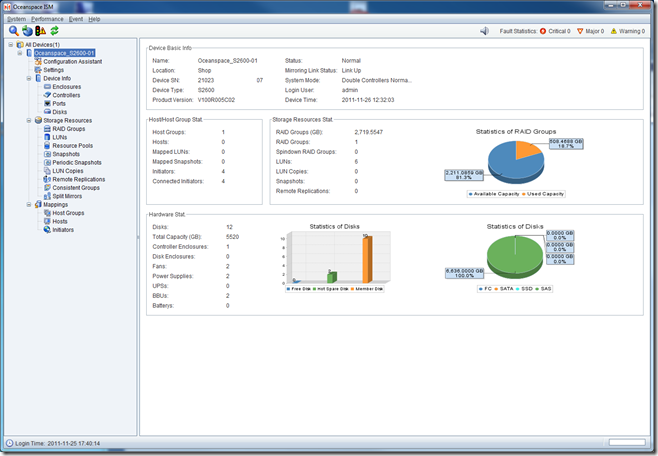
image

We then went ahead and configured our LUNs:
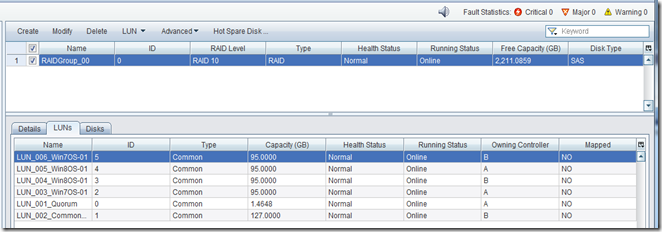
image

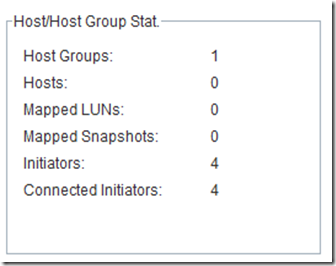
We have our two Intel Server System SR1695GPRX2AC units plugged in and turned on as can be seen under the Host section (4 Initiators).
image

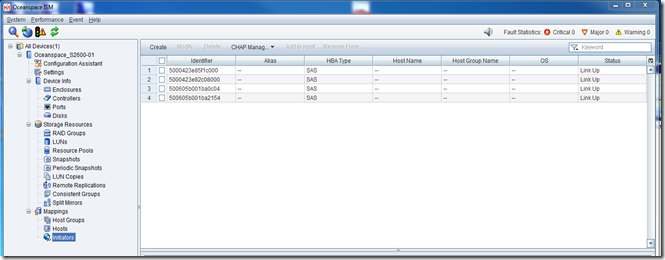
At the bottom of the left hand column under Mappings in the ISM we find our four SAS initiators for the two nodes:
image

It took a bit to figure out just how to get the SAS IDs mapped to the LUNs. First we shut down the second node so that we would know which IDs belonged to which server:

image

We mapped them to the appropriate node:

image

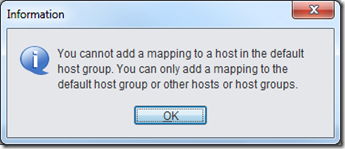
Then we went to map the actual LUNs to the Hosts:
image

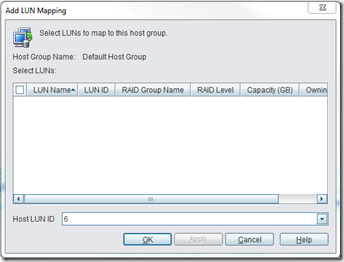
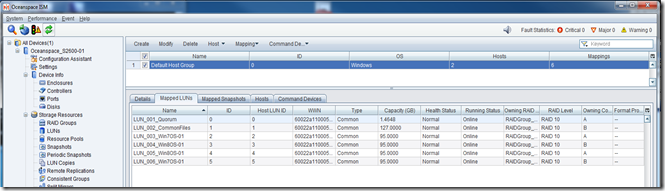
So, we moved to the Host Groups node in the left hand column of the ISM and went through the Add LUN Mapping wizard. Despite the way things looked, when we selected all of the LUNs they were given a sequential LUN ID.
image

That Host LUN ID drop down list near the bottom is a bit misleading.

We then had our LUNs mapped to the Default Host Group:
image

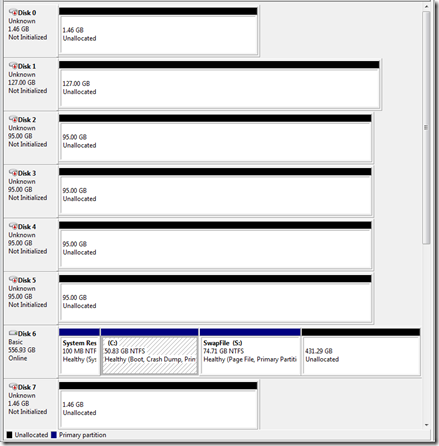
With that the shared storage showed up in both node’s Disk Management!

Now on to setting up MPIO in the Hyper-V node, running the Cluster Validation Wizard, and finally standing up a Hyper-V Failover Cluster for some further testing.

Some Initial Observations

Disk and LUN Configuration

Our primary DAS product has been the Promise VTrak E610sD and E310sD RAID subsystems. So, working with the Oceanspace S2600 has been a bit of a challenge since the management console and set up steps are quite different.

For one, the Oceanspace S2600 does not allow LUN level disk RAID configuration. The RAID Group that is configured with however many disks carries the RAID level.

This contrasts with the Promise VTrak’s ability to create a Disk Array and then set up whatever RAID level for each LUN we may set up in that Disk Array.

The cost is some storage space where RAID 1 would be specified for certain LUNs that would host low I/O needs such as RDS or SQL host OSs.

However, that would be balanced out with the fact that running RAID 10 underneath everything means that every LUN on the Oceanspace S2600 would receive the benefit of higher throughput.

Management Console

The Promise VTrak’s Web based management console is quite feature complex relative to the Oceanspace S2600’s console.

The plus side for the Oceanspace S2600 console is that it was quite simple to pick up on how to set up storage for our needs with very little reading needing to be done (primarily to get to know the nomenclature).

In the end, preference for one console over another is subjective. In both cases, the respective vendor’s Management Console gets the job done and that is what is most important to us.

MPIO Setup

It took a couple of reboots after removing any MPIO device references, then running:

  • mpclaim –n –i –a (reboot)

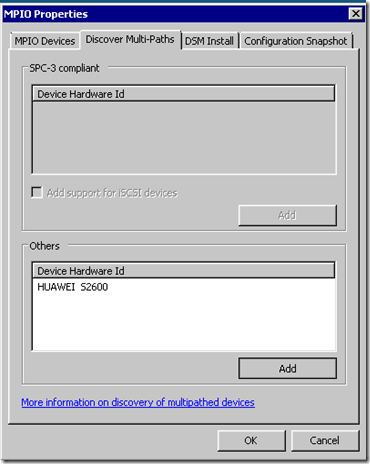
Finally, in MPIOCPL.exe we saw the following on Node-01:
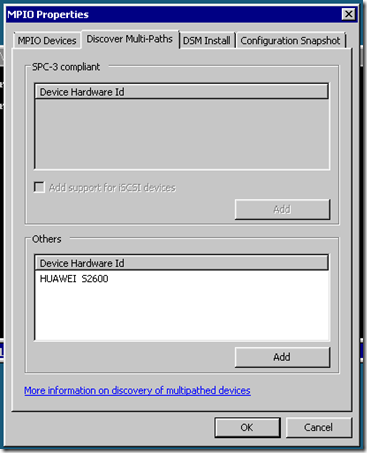
image

We then saw:

image

After a minute or two we finally had:
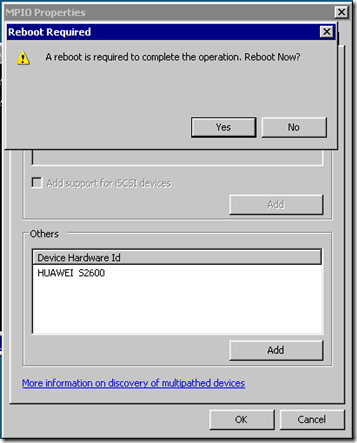
image

One reboot later:

image

But, our second node was still blank:
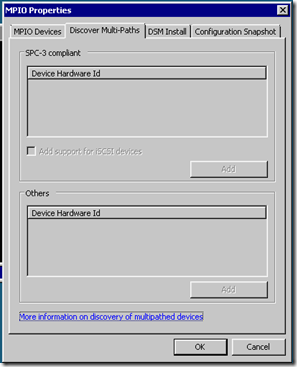
image

We manually added the Device Hardware ID as per the other node:
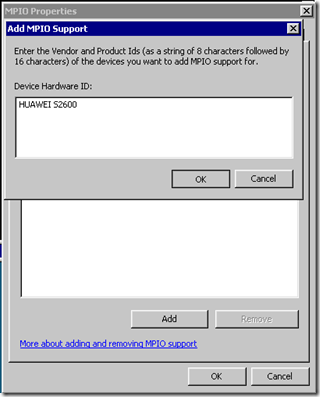
image

After a reboot and another mpclaim –n –i –a we finally had doubles of everything! One reboot later and we finally had our shared storage configured and ready for the Failover Cluster Manager’s Cluster Validation Wizard!

Long story short we had a lot of problems getting one of our nodes (they are identical all the way through) to recognize both SAS paths to the Oceanspace S2600.

Philip Elder
MPECS Inc.
Microsoft Small Business Specialists
Co-Author: SBS 2008 Blueprint Book

*Our original iMac was stolen (previous blog post). We now have a new MacBook Pro courtesy of Vlad Mazek, owner of OWN.

Friday, 25 November 2011

Huawei Symantec Oceanspace S2600 Entry Level Storage System

It is no secret that we are working on a commodity based 2 node Hyper-V Cluster to put our SMB clients into the running for high availability server systems.

As a result, Huawei Symantec (Huawei is pronounced: Wah-Way) graciously sent us one of their new entry level direct attached storage units the Oceanspace S2600.

Once we had the S2600 out of the box and on the bench we plugged the supplied RJ45 to Serial Cable into our Tecra S10’s serial port and fired up TeraTerm using the default settings. We made sure to have controller A’s network connection plugged in as well.

Once the unit finished its first boot sequence we needed to change the default IP address using the serial connection.

  • Oceanspace S2600 default username and password:
    • admin
    • 123456
  • Oceanspace S2600 default network settings:
    • IP: 192.168.128.101 or 102
    • Subnet: 255.255.0.0
  • Oceanspace S2600 Serial settings:
    • Bits per second: 115200, Data bits: 8, Parity: None, Stop bits: 1, Flow: None.

To change the default IP address we logged into the command line on our Tecra and ran the following command:

  • chgctrlip –c A –a 192.168.95.210 –s 255.255.255.0 –g 192.168.95.1

Once we had a successful IP change we were able to bring up the Oceanspace ISM:

image

Once we clicked on the Launch Oceanspace ISM link we needed to allow a file download which lead to:

image

We were then prompted for a Windows Firewall exception. Once made:

image

We left the default at English.

image

Despite being launched from the Oceanspace S2600’s web page found at the assigned IP address we had to go through a discovery process once into the ISM:

image

The device was promptly found:

image

We were then into the ISM console itself:

image

Now the next step will be to set up the storage subsystem and see how the S2600 hooks up to our 2 Intel Server Systems via SAS and set up a Hyper-V cluster for some performance testing.

Philip Elder
MPECS Inc.
Microsoft Small Business Specialists
Co-Author: SBS 2008 Blueprint Book

*Our original iMac was stolen (previous blog post). We now have a new MacBook Pro courtesy of Vlad Mazek, owner of OWN.

Wednesday, 17 August 2011

Restructuring DAS/SAN Storage Requires LD/LUN Initialization

We set up the Promise VTrak E610sD RAID subsystem and its storage for the client deployment we are going to do over the next few days.

In this case we are deploying one Intel Server System SR1695GPRX2AC (1U, Xeon X3470, 32GB, 600GB 15K SAS RAID 10) and the Promise VTrak unit. We will add the second 1U server in their new budget year and enable the cluster setup from there.

We did an initial storage configuration on the VTrak but made a few mistakes on sizes for the VMs that will be hosted by the one Hyper-V Server 2008 R2 SP1 node.

So, we needed to wipe the Logical Drives (LDs) and start fresh. Once we did so, we went in and initiated an Initialization sequence on each new Logical Drive that was created.

image

We initiate the Initialization process because the Hyper-V OS may pick up the previous disk configuration information from the new LD setup.

It can be a bit confusing to be looking in Disk Management and seeing the previous LD”s configuration still listed even after rescanning the disks!

The other consideration in all of this has to do with existing data if there was any. If there were VM VHDs on the LDs or even pass through information on them any new VHD created using VHDTool (previous blog post) would be able to scan the bits and see that existing data using a tool like GetDataBack (beware of imposters).

Initializing on the VTrak does not take a lot of time. So, it is well worth the wait to make sure we have nice client LDs to start with.

Done:

image

Now off to enable Microsoft MPIO on the node and configure it for performance.

Philip Elder
MPECS Inc.
Microsoft Small Business Specialists
Co-Author: SBS 2008 Blueprint Book

*Our original iMac was stolen (previous blog post). We now have a new MacBook Pro courtesy of Vlad Mazek, owner of OWN.

Windows Live Writer

Thursday, 28 April 2011

SAS versus SATA and Hardware RAID versus Software RAID

In the last few years we have made some changes to the server configurations that we either build and deploy or Tier 1 provides:

  • We install SAS 10K or SAS 15K drives over SATA.
    • Performance for one is vastly superior on the SAS drives.
    • SAS drives are a lot more sensitive to bad sector behaviour and are better able to recover from bad data being tossed up.
    • SAS drives use many forms of ECC which protects the integrity of the data.
  • We install a hardware RAID controller with battery backup or SSD Cache over using the on board software RAID.
    • The on board “RAID” is software driven. All RAID calculations are completed by the server’s CPU and in many cases require the software driver to rebuild or function properly – meaning we need to boot into the OS.
    • We have had difficulties with on board software RAID recoveries and ShadowProtect due to driver issues.
    • Hardware RAID on Chip with the battery backup or SSD Cache virtually eliminates the parity write cost of RAID 5 and greatly reduces that cost for RAID 6. SSD Cache almost renders the whole discussion moot as the most frequently requested data sits on the SSD.
    • Hardware RAID controllers have the ability to mitigate the failure of a drive by keeping the server up. In our experience software RAID tends to freeze the box if a drive fails.
    • Hardware RAID controllers tied to SAS drives have a much better chance of mitigating or eliminating the possibility of data corruption if sectors on an array member are dying.

Intel has a couple of resources for the above discussion as do many other RAID related vendors.

One Intel resource is the following Intel support page: Intel Server Products: Choosing between SAS vs. SATA Hard Disk for your Server RAID System.

There we find this grid that gives us a pretty good idea of some of the significant differences between SAS and SATA drives:

image

We are given an extensive explanation in the following document which is linked to below the above table: Intel – Enterprise-class versus Desktop-class Hard Drives (Link to PDF document download).

We put our server configurations through a lot of testing before we deploy them to client sites or within our own organization. We do this because we want to make absolutely sure that the server configuration we are going to deploy will meet the needs of our client over the life of the box which is about 36 months.

The extra cost for the hardware RAID controller, battery backup, and 15K SAS drives (not much of a cost difference between 300GB 15K SAS and Seagate Enterprise SATA these days) when taken over the life of the box (divide that cost by 36) is actually quite small relative to the performance, data protection, and overall storage stability benefits.

Tier 1 Caveat

Keep in mind that cost inferences mentioned here are for our in-house Intel server solution components. When it comes to Tier 1 the costs of some server components and server storage can be extremely high relative to components supplied in our solutions.

Philip Elder
MPECS Inc.
Microsoft Small Business Specialists
Co-Author: SBS 2008 Blueprint Book

*Our original iMac was stolen (previous blog post). We now have a new MacBook Pro courtesy of Vlad Mazek, owner of OWN.

Windows Live Writer

Tuesday, 23 November 2010

Seagate’s New Model Numbering Scheme

We just received a Seagate Partner e-mail that indicates that Seagate is changing the product model numbering scheme.

image

As we can see, the model numbers have changed significantly relative to the current model number structures. In the current scheme The prefix ST3 means 3.5” drive, ST9 means 2.5” drive while the suffix AS is SATA, ES is Enterprise SATA, and SS is SAS. The numbers in between the prefix and suffix would be the size of the drive and then three numbers indicating model specifics.

A breakdown of the model number and what each means is this:

image

What we will end up with will actually be a simpler way to order Seagate drives. No more needing to know the various model numbers for whatever feature we want with a 500GB drive for example. With the new model number scheme the number will remain the same for the 320GB drive across all of is various feature sets while the model number will be specific to those feature sets.

It means that internally we can track all of the various feature sets for inventory purposes but our externally facing collateral will use the one model number to describe a 320GB drive. This makes for a much simpler presentation too.

image

Ultimately, when it comes to ordering product the new model numbering scheme will not make too much of a difference when searching our distribution channels for product. Now, we can search ST31000*SS to find any 1TB SAS drives, ST3500*NS to find any Enterprise SATA drives, and so on. After modifying our wildcard location to ST500* we will find any and all 500GB SKUs available to us. We can then use the same methodology as above to limit our search results to ST500MX* for Mission Critical 500GB drive models or ST*MX to bring up all Mission Critical products.

Note that not all distribution search engines support wildcard searches beyond dropping the asterisk at the end of some alpha characters.

Philip Elder
MPECS Inc.
Microsoft Small Business Specialists
Co-Author: SBS 2008 Blueprint Book

*Our original iMac was stolen (previous blog post). We now have a new MacBook Pro courtesy of Vlad Mazek, owner of OWN.

Windows Live Writer

Monday, 12 April 2010

Intel Modular Server – SATA to SAS Adapters for Intel X25-M SSDs or SATA

Intel has given us an extension on the Intel Modular Server demo box we have had for the last six to eight weeks.

We have mentioned in the past that there is an optional SATA to SAS adapter, AXXTM3SATA,  for the IMS that allows us to install 2.5” SATA based drives in the built-in storage unit.

So, since we were ordering from Tech Data Canada and they happened to have some, we ordered the stock that they had:

image

Note that it is very important to have a look in the IMS Tested Hardware and Operating Systems List (THOL) (previous blog post) to verify how we can combine SATA, SSD, and SAS drives in the IMS storage bays.

We did not find out about the IMS demo extension until after we had taken everything down and set the IMS into its shipping pallet setup.

So, we are going to pull a couple of 160GB Intel X25-M second generation SSDs out of stock and install them. We will use the SSDs for the Hyper-V OSs as well as the Hyper-V configuration and memory file location.

We now have a pretty good performance baseline for the pair of 146GB 15K Seagate drives we have been using for this purpose, so we are looking forward to the performance gains the SSDs will give us.

The extension was give because we would not be able to get our own Intel Modular Server into our shop and ready for my upcoming SBS clustering presentation for the Edmonton Microsoft User Group on the twentieth.

Philip Elder
MPECS Inc.
Microsoft Small Business Specialists
Co-Author: SBS 2008 Blueprint Book

*Our original iMac was stolen (previous blog post). We now have a new MacBook Pro courtesy of Vlad Mazek, owner of OWN.

Windows Live Writer

Tuesday, 6 April 2010

Intel Modular Server – Tested Hardware and Operating System List – Tested External Storage

For any Intel product, the Tested Hardware and Operating System List (THOL) is the de facto point of reference for component and product compatibility.

If there is a conflict or problem in an Intel based system and the problematic component is _not_ on the THOL, then Intel Support will not be applicable.

Some results from the above search:

image

To find the latest THOL for the Intel Modular Server quickly:

Notice that the IMS THOL is the first link:

image

The current reason we are digging into the IMS THOL is to verify how we can extend the 14 drive internal storage unit either via the external SAS ports on the Intel Storage Controllers or via iSCSI target to a SAN.

We are looking for additional storage that is also redundant for any cluster based VMs.

The THOL tells us that we have a few options:

image

Note the Promise e310sD is a dual controller 2U unit that has 12 drive bays and the e610sD is a dual controller 3U unit that has 16 drive bays.

Intel’s own Storage Server SSR212MC2R is currently the only iSCSI target that is on the above approved list.

The Promise vTrak storage units are quite reasonably priced relative to the additional storage that we are able to access along with the ability to utilize a dual storage path (Multi-Path I/O or MPIO) to ensure storage access redundancy.

This is a screenshot of a page out of the VTrak Ex10s supported configurations with Intel Modular Server (PDF) document:

image

So, we have potentially found what we are looking for. Now we need to discover where the IMS specific Promise documents are located as the links within some of the documents are not working at this time.

Philip Elder
MPECS Inc.
Microsoft Small Business Specialists
Co-Author: SBS 2008 Blueprint Book

*Our original iMac was stolen (previous blog post). We now have a new MacBook Pro courtesy of Vlad Mazek, owner of OWN.

Windows Live Writer

Wednesday, 20 January 2010

Intel Modular Server – File Copy Performance From/To The Same Virtual Disk

As we are working our way through the implementation of the Intel Modular Server based Hyper-V Server 2008 R2 cluster, there are little things we have caught our eye here and there.

This is one of them:

image

The above is the tail end of of a content copy of various sized database files from a source folder into a subfolder to preserve the originals and keep them handy as a just-in-case.

The average copy speed was 130MB/Second as the copy process peaked at about 160MB/Second sustained for a good chunk of the copy process for a 3.2GB database file.

The Virtual Disk being used is sitting on four 146GB Seagate Savvio 15K.6 SAS drives. The RAID configuration for the Virtual Disk is RAID 10 across the four.

Philip Elder
MPECS Inc.
Microsoft Small Business Specialists
Co-Author: SBS 2008 Blueprint Book

*Our original iMac was stolen (previous blog post). We now have a new MacBook Pro courtesy of Vlad Mazek, owner of OWN.

Windows Live Writer

Thursday, 10 September 2009

New Intel Uniprocessor Servers – 1U And Pedestal Get Awesome Enterprise Level Features For SMB!

Our number one complaint when it came to the SMB focused server systems, read uniprocessor,  we implement for our more local clients are the following missing features:

  • Remote Management Module built-in.
  • More than 8GB of ECC RAM.
  • No plug-in I/O or LAN modules to save the one PCI-E slot in 1U form factor servers.

The biggest drawback was the lack of the remote management module. For the cost of the module to be included in a server we only needed one or two visits to our client’s site to pay for it.

We found an alternative in the StarTech IP KVMs and their PDU units that would allow us to manage the server remotely along with the ability to power cycle it if need be.

image

With the release of the new SR1630GP and SR1630HGP 1U servers as well as the Intel Server Board S3420GP for pedestal applications we now have access to the following options:

  • Remote Management Module 3 in plug-in module format.
  • SAS 4 port RAID plug-in module.
  • 32GB of ECC Registered RAM supported.

Both the RMM3 and the SAS 4 port modules plug directly into the server board thus saving the PCI-E slot in a 1U configuration for something important such as a 2 or 4 port PCI-E Gigabit Server NIC for virtualization needs.

For the first time in immediate memory, we have a notation that the product line was developed with Small Business Server in mind. From the Intel Xeon Processor 3400 Series Product Brief (PDF File) on page 6:

image

For those of us that prefer to build our own servers based on the Intel name brand that also ties in the Intel Channel Partner Program, these new features are a huge step forward.

We are no longer at a disadvantage with the Tier 1 server builders that could offer the above features in their step up from entry level server systems.

We build our servers so that we can know them through and through. This product knowledge facilitates the troubleshooting process significantly. Another advantage is that we do not get caught between the hardware vendor and the software vendors blaming each other for a stability problem.

The new 1U SR1630HGP server systems will be perfect for small business virtualization needs. Since the new Hyper-V Server 2008 R2 now includes failover clustering and its free, we will be looking to basing our entry level clusters on these units.

Lots of neat things to come! :)

Philip Elder
MPECS Inc.
Microsoft Small Business Specialists
Co-Author: SBS 2008 Blueprint Book

*All Mac on SBS posts will not be written on a Mac until we replace our now missing iMac! (previous blog post)

Windows Live Writer