Showing posts with label Intel 1U. Show all posts

Wednesday, 25 May 2011

Intel S3420GPRX I/O Shield Arrived Today

We finally managed to order and receive some I/O Shields for the Intel Server Board S3420GPRX today:

image

image

We can now move on to building our entry level virtualization servers that are based on this server board installed in an Intel Server Chassis SC5650 pedestal.

One thing to note when it comes to installing the Intel Server Board S3420GPRX into a pedestal chassis is that we lose the ability to use any external facing I/O modules such as the AXXSASIOMOD which would give us external Quad-port SAS connectors.

The one PCI-E slot on the server board will be used for a high performance RAID controller with battery or SSD Cache backup so that leaves iSCSI as the only real way of reaching a central storage unit for a Hyper-V cluster.

An alternative may be to use one of the add-in I/O Modules for entry level SAS RAID that connects directly to the server board and use that PCI-E slot for a SAS or RAID controller with an external Quad-port SAS connection. We lose storage path redundancy in this configuration though.

On another note, we are just getting ready to configure a couple of Intel Server Systems SR1695GPRX2AC 1U 1P servers with dual Quad-port external SAS ports connected to a Promise VTrak E610sD RAID Subsystem to see if we can stand up a full two node Hyper-V Server 2008 R2 SP1 cluster in this configuration. More to come on this hopefully later!

Philip Elder
MPECS Inc.
Microsoft Small Business Specialists
Co-Author: SBS 2008 Blueprint Book

*Our original iMac was stolen (previous blog post). We now have a new MacBook Pro courtesy of Vlad Mazek, owner of OWN.

Windows Live Writer

Thursday, 19 May 2011

Warning: Intel Server System R1304BTLSHBN (1U Hot Swap) Has A Drive Height Restriction

Due to the fact that the new Intel E3-1200 series pedestal and 1U server configurations are a little restrictive, we have been reserving their use for standalone SBS 2011 OS installs (OS on physical box).

Almost all of our server deploys are configured with either 2.5” 15K SAS, 3.5” 15K SAS, or Intel X25-M or 320 Series SSDs.

There is an Intel Technical Advisory dated May 6th, 2011 that states that the new Intel Server System R1304BTLSHBN 1U with four hot swap drive bays has a drive height restriction of 25.9mm.

Well, we just checked Seagate’s Web site for the height of the 300GB 15K SAS drive and found that its specification is 26.10mm.

Here is a look at the hard drive compatibility list for this unit:

image

There seems to be a distinct lack of 3.5” 15K SAS drives on the above list. We have a few 300GB 15K Seagate SAS drives kicking about for lab purposes so we would have been testing this chassis with them and discovered this issue right away.

It is good to know ahead of time that there may be compatibility problems with our standard configurations on new platforms.

The above page can be found via the following link:

Note that the above link jumps into the base THOL page for all of the new E3-1200 series products:

image

It looks as though Intel is moving away from a PDF, and thus offline, version of the Tested Hardware and Operating Systems List (THOL which is our definitive compatibility guide) towards an online version only:

image

Hopefully this new version of the Server Configurator has its stability issues dealt with. So far, the site seems to be functioning a lot better than it did just a few short weeks ago.

Philip Elder
MPECS Inc.
Microsoft Small Business Specialists
Co-Author: SBS 2008 Blueprint Book

*Our original iMac was stolen (previous blog post). We now have a new MacBook Pro courtesy of Vlad Mazek, owner of OWN.

Windows Live Writer

Tuesday, 17 May 2011

UPDATE: Stock on Intel Server Board S3420GPRX I/O Shield

We have found out that D&H USA has stock on the Intel Server Board S3420GPRX I/O shield (AGPRXIO).

Unfortunately D&H Canada is not allowed to sell Intel product into Canada at this time, so we were not able to get stock through their Canadian distribution point while the US distribution point will not drop-ship into Canada.

Fellow MVP Russ Grover suggested we talk to Applied Computer Online Services (Link to the I/O Shield part). They show available stock in their online ordering system.

But, because we are in Canada we ended up needing to call in to work out the product cost and the cost to ship up to Canada. In the end they were very helpful and their price was reasonable for each unit including shipping.

Our previous blog post:

Note that we specifically requested FedEx as the courier since UPS charges an arm and a leg for their customs clearing services (we subsequently contracted the FedEx folks due to ongoing problems with UPS).

Philip Elder
MPECS Inc.
Microsoft Small Business Specialists
Co-Author: SBS 2008 Blueprint Book

*Our original iMac was stolen (previous blog post). We now have a new MacBook Pro courtesy of Vlad Mazek, owner of OWN.

Windows Live Writer

Monday, 9 May 2011

Setting Up an Intel S3420GPRX Entry Level Server Board In An Intel Pedestal Chassis

We are building out a number of pedestal based servers over the next couple of months that will be standalone Hyper-V hosts for SBS 2011 Standard, at least a Remote Desktop Services server, at least one Windows Desktop OS, and in a few cases a dedicated BlackBerry (BESx) server.

The perfect platform for this setup is the Intel Server Board S3420GPRX (Intel Ark Site) as it has four Intel Virtualization Technology accelerated Gigabit NICs that can be teamed together along with a fifth Gigabit NIC that can be bound to an Intel Remote Management Module 3 (Intel Product Site) for external Web based console access.

The catch with this setup though is that the S3420GPRX is designed to be installed in a 1U form factor chassis. So, the retail box comes with _no_ I/O shield for the back of the pedestal chassis.

However, we are able to order them . . . hopefully:

  • Intel S3420GPRX I/O Shield: AGPRXIO

We will see what our distribution channels say as we have put out inquiries to all of them and we have a request into our Intel sales representative.

So far, no one has indicated the what/where/when with regards to the parts. But, we remain hopeful.

Philip Elder
MPECS Inc.
Microsoft Small Business Specialists
Co-Author: SBS 2008 Blueprint Book

*Our original iMac was stolen (previous blog post). We now have a new MacBook Pro courtesy of Vlad Mazek, owner of OWN.

Windows Live Writer

Monday, 11 April 2011

Intel S1200BT Server Board and R1304BT Server Systems Memory Setup

With the introduction of the new S1200BT series Intel Server Board and the associated 1U Intel Server Systems we have a bit of a memory configuration change with the new platform.

So far we have not yet seen a tested memory list from Intel on the new product’s support site.

In the S1200BT TPS we see the following on pages 17 and 18:

image

So, the first thing off the top is that the boards now only support Unbuffered DIMMs with a single or dual rank with only two slots per channel.

Okay then, off to Kingston’s site to see if there are any new part numbers for these boards:

image

  • Note that the part number shown in Kingston’s list should be: R1304BTL Server System.

What we see here is what appears to be compatible memory though not in the same way that previous Kingston Intel tested memory would indicate via the “i” suffix in the part number: KVRxxxxDxExSx/4Gi.

We called into the Intel Channel Support line to find out whether there was a list that had not been posted yet. They indicated that the list is a work in progress. The support technician did send us a copy of some of the memory parts on one version of the upcoming list:

  • 8GB Samsung M391B1G73AH0-CH9
  • 4GB Samsung M391B5273CH0-CH9

With the partial list we received from Intel we are not able to outfit any of the new server configurations with 32GB without paying a very high price for the 8GB Samsung RAM. Any Samsung or Hynix part number is very difficult to come by for us here in Canada as of this writing.

We went on to check out Crucial’s product site to see what would come up:

image

Nothing seemed to come up in our site searches so we clicked on the Live Chat button. In the chat session we were pointed to the following page:

image

Like the Kingston site we see the “Guaranteed-Compatible” statement.

The problem for us is that while both Kingston and Crucial say their products are guaranteed to work with the Intel products in question we hit a roadblock with Intel’s support team if the memory installed in the server is _not_ on the Tested Memory List. The very first thing we would be told when trying to troubleshoot a problem would be to purchase memory on the approved list.

For now we will be sitting back and waiting for a while for the new product line to mature some.

Previously, we did not wait until the Xeon 3400 Series CPUs and Intel Server Systems based on the new Intel Server Board S3420GP and subsequently the Intel Server Board S3420GPRX product lines matured. That generation of hardware had virtualization capabilities that were key to us jumping on the new products as soon as we could get them.

Also, there are no indications as of yet whether we will be seeing a new SKU for the Intel Server System SR1695GPRX which is one of the best virtualization platforms available to us from Intel at this time. So, we will be sticking with this server system for the time being.

UPDATE 2011-04-12: The list as it stands that Intel sent us is as follows:

image

Hopefully we will be seeing both Crucial and Kingston enter the running with 4GB and 8GB parts so that it is not so painful for us to get more than 16GB of RAM in these boxes.

Philip Elder
MPECS Inc.
Microsoft Small Business Specialists
Co-Author: SBS 2008 Blueprint Book

*Our original iMac was stolen (previous blog post). We now have a new MacBook Pro courtesy of Vlad Mazek, owner of OWN.

Windows Live Writer

Monday, 29 November 2010

Intel’s New Server System SR1695GPRX 1U 1P 4 Hot Swap Drive

We just received a new Intel Server System SR1695GPRX 1U uni-processor system that has four hot swap SAS/SATA drive bays capable of handling both 3.5” and 2.5” drive sizes out of the box.

image

This new Intel Server platform is an excellent fit for the SMB space in that it offers the same enterprise class 1U server features as a dual processor unit but at a single processor price level.

This configuration has been on our wish list for _a long time_ now.

  • 1U profile provides for lots of room in that 24U enclosure.
  • Single processor leads to a lower cost point based.
    • A single processor server board with extended RAM capabilities.
  • 4 hot swap drive bays give us access to RAID 10 configurations.
  • A full height PCI-E slot for a high performance RAID controller.
  • Intel Remote Management Module 3 (LITE) capable.
    • Takes over NIC5 to provide out-of-band console access via Web.

image

As we can see the server system also has dual redundant power supplies which is absolutely critical to providing our clients with needed hardware redundancy. On the right hand side at the bottom of the above shot are two ports where we can plug in a couple of additional I/O modules such as dual Intel Gigabit server NICs to bring the total NICs available on this box to eight (without the RMM3LITE NIC).

  • The SR1695GPRX is dual power supply capable (watch that part number!)
  • Can add another set of dual port Intel Gigabit server NICs.
  • Can add an entry level performance SAS RAID I/O module without using the PCI-E slot.
    • Some RAID I/O modules have the ability to add a cache battery.

Given that we can have up to eight NICs in this system we now have an excellent platform for a single server Hyper-V host when deploying SBS 2008 plus the second server or as an inexpensive node in a Hyper-V cluster attached to iSCSI storage for Clustered Shared Volumes.

image

The shot above is just prior to dropping the airflow baffle back on between the fans and the CPU and the memory.

The RAID controller is an Intel RS2BL080 with battery backup situated near the top of the shot (shiny object). We have an RS2BL040 on order but it will not be here until the end of the week. Since Intel RAID controllers can be inter-changed we have this Hyper-V server built up already and will swap in the production controller when it shows up.

From now on this particular hardware configuration will be our principle offering for any situations where we need a 1U server system whether the client is looking for standalone server systems, a couple of virtualized server operating systems, or even a small two node cluster based on two of these units and one or two NAS devices that act as iSCSI targets.

Philip Elder
MPECS Inc.
Microsoft Small Business Specialists
Co-Author: SBS 2008 Blueprint Book

*Our original iMac was stolen (previous blog post). We now have a new MacBook Pro courtesy of Vlad Mazek, owner of OWN.

Windows Live Writer

Thursday, 30 September 2010

Integrating An Intel RAID RS2BL040 Battery Backup AXXRSBBU7 With An Intel Server System SR1630HGPRX

The Intel Server System SR1630HGPRX has a spot on one side of the chassis to mount the Intel RAID Controller’s RAID Smart Battery.

Having the battery unit mounted elsewhere in the chassis is a good idea since having it mounted on the RAID controller itself causes an obstruction to the air flowing towards the RAID controller’s processor heatsink.

Tray Mounting

The plastic tray was a bit of a bear to mount in place:

image

We had to slip the guides in onto the high points of the mounting slot and somehow pivot it into the low point with a good amount of effort required to get the locking mechanism to snap in place. The lock is just above the white plastic zip tie in the above screenshot.

Note the star shaped pin near the bottom right hand side of the tray. One would initially gather that it was meant to guide the battery backup’s PCB board into the proper place. Especially since there looks to be a hole in the PCB board just for that purpose.

In fact, it is not a guide but a stand-off to prevent the PCB board from being pushed too far into the tray. Keep this in mind when mounting the battery and PCB.

Another catch to getting the battery/PCB in is in fact the catches themselves. There is one on either side of the tray’s lock. They provide a significant amount of resistance to getting the PCB to set in place. We needed to be mindful of just how much they were being pulled back while trying to slip the PCB into place.

And one more thing when it comes to the tray and batter/PCB combination, there is a requirement for the battery to sit above the PCB in order for the PCB to catch under the two mounting clips on the tray. The PCB clip that holds the battery down looks large enough to prevent this, but there is enough flex in the PCB itself to get things into place.

All in all, this is one snug fitting trio.

image

Remote PCB and RAID Controller

Once we ran the cable from the battery backup to the RAID controller, we needed to install a small daughter card onto the RAID controller itself.

image

The daughter card, shown above, has the socket that connects to the RAID controller as well as the black pivot pin that is used to set the mounting screw into on the RAID controller. The pivot pin is shown in the correct location above. We needed to loosen the screw on the daughter card and rotate the pivot pin into the correct location prior to installing it onto the RAID controller.

The daughter card installed:

image

After installing the power cable the RAID controller was connected to the PCI-E riser and finally installed in the system.

Philip Elder
MPECS Inc.
Microsoft Small Business Specialists
Co-Author: SBS 2008 Blueprint Book

*Our original iMac was stolen (previous blog post). We now have a new MacBook Pro courtesy of Vlad Mazek, owner of OWN.

Windows Live Writer

Thursday, 10 September 2009

New Intel Uniprocessor Servers – 1U And Pedestal Get Awesome Enterprise Level Features For SMB!

Our number one complaint when it came to the SMB focused server systems, read uniprocessor,  we implement for our more local clients are the following missing features:

  • Remote Management Module built-in.
  • More than 8GB of ECC RAM.
  • No plug-in I/O or LAN modules to save the one PCI-E slot in 1U form factor servers.

The biggest drawback was the lack of the remote management module. For the cost of the module to be included in a server we only needed one or two visits to our client’s site to pay for it.

We found an alternative in the StarTech IP KVMs and their PDU units that would allow us to manage the server remotely along with the ability to power cycle it if need be.

image

With the release of the new SR1630GP and SR1630HGP 1U servers as well as the Intel Server Board S3420GP for pedestal applications we now have access to the following options:

  • Remote Management Module 3 in plug-in module format.
  • SAS 4 port RAID plug-in module.
  • 32GB of ECC Registered RAM supported.

Both the RMM3 and the SAS 4 port modules plug directly into the server board thus saving the PCI-E slot in a 1U configuration for something important such as a 2 or 4 port PCI-E Gigabit Server NIC for virtualization needs.

For the first time in immediate memory, we have a notation that the product line was developed with Small Business Server in mind. From the Intel Xeon Processor 3400 Series Product Brief (PDF File) on page 6:

image

For those of us that prefer to build our own servers based on the Intel name brand that also ties in the Intel Channel Partner Program, these new features are a huge step forward.

We are no longer at a disadvantage with the Tier 1 server builders that could offer the above features in their step up from entry level server systems.

We build our servers so that we can know them through and through. This product knowledge facilitates the troubleshooting process significantly. Another advantage is that we do not get caught between the hardware vendor and the software vendors blaming each other for a stability problem.

The new 1U SR1630HGP server systems will be perfect for small business virtualization needs. Since the new Hyper-V Server 2008 R2 now includes failover clustering and its free, we will be looking to basing our entry level clusters on these units.

Lots of neat things to come! :)

Philip Elder
MPECS Inc.
Microsoft Small Business Specialists
Co-Author: SBS 2008 Blueprint Book

*All Mac on SBS posts will not be written on a Mac until we replace our now missing iMac! (previous blog post)

Windows Live Writer

Wednesday, 1 April 2009

Intel SR1625UR 1U Dual Xeon 5500 Series Configuration

The image looked good in Windows Live Writer when putting together yesterday’s post on the new Intel 5500 Series Xeons and related components (previous blog post).

But, I see now that the Intel Server Configurator screenshot turned out to be quite illegible.

So, there is that server configuration:

Description

Part Number

MM #

QTY

Intel® Server System SR1625UR (1U Passive Backplane) SR1625URNA (Includes power cord for North America) and R1625UR 901132 (power cord included) or 900986 1
Intel® Xeon® Processor X5560 (Heat Sink not included) BX80602X5560 901026 2
SR1625 Standard front panel accessory kit ASR1625FP 900991 1
Quad port GbE I/O module AXX4GBIOMOD2 901359 1
Intel® Remote Management Module 3 AXXRMM3 900961 1
Intel® RAID Controller SRCSASJV (8 internal/external SAS/SATA ports, up to 1GB cache) SRCSASJV 892602 1
AXXRSBBU3 Intel® RAID Smart Battery Backup Module (Use with Intel® Integrated Server RAID) AXXRSBBU3 900954 1
Slimline SATA DVD ROM - AXXSATADVDROM AXXSATADVDROM 893637 1
Black Bezel (Standard Control Panel) ASR1550BEZ 879406 1
Full extending Rail Kit AXXHERAIL2 901082 1
RJ45 To DB9 Cable AXXRJ45DB92 881944 1
650W Hot-Swap power supply module ASR1625PS 901016 1
2.5" Hard Drive Carrier FXX25HDDCAR 881681 2

Intel SR1625UR 1U 8 x 2.5” SAS Configuration

The above configuration would be implemented with the Hyper-V Role set up on Server Core where the VMs would have high load performance requirements.

Note that there are a few typos in the actual Server Configurator results. Make sure to verify the part numbers with distribution. We corrected the mistakes in the above grid.

Philip Elder
MPECS Inc.
Microsoft Small Business Specialists
Co-Author: SBS 2008 Blueprint Book

*All Mac on SBS posts will not be written on a Mac until we replace our now missing iMac! (previous blog post)

Windows Live Writer

Tuesday, 31 March 2009

Intel Releasing New 5500 Series Xeons and Components

Intel is releasing a bunch of new technology for Intel branded servers over the next number of weeks.

Here is an overview of some of the new components coming down the pipe:

As always, when it comes time to put a server configuration together, there is the Intel Server Configurator tool.

One of our more eagerly anticipated models is this one:

The unit runs a passive midplane to allow us to install a high performance RAID controller to configure a RAID 5+0 or RAID 1+0 array for high load virualization needs. With the addition of a Quad Port Gigabit I/O module, the second power supply for redundancy, and a couple of 2.5” drive carriers to utilize the full 8 drive bays, we are set to rock! :)

It looks as though the Server Configurator has had a bit of a revamp too as it now includes compatible, which means properly tested, third party hard drives, memory and more.

Below is a screenshot of the new 1U’s configuration as we would put it together with the exception of the drives:

09-03-31 Intel 5500 1U 2.5in Series

SR1625UR Server System

Good things are coming down the pipe since we will receive a lot more bang for our power and cooling consumption dollars!

Philip Elder
MPECS Inc.
Microsoft Small Business Specialists
Co-Author: SBS 2008 Blueprint Book

*All Mac on SBS posts will not be written on a Mac until we replace our now missing iMac! (previous blog post)

Windows Live Writer

Thursday, 5 March 2009

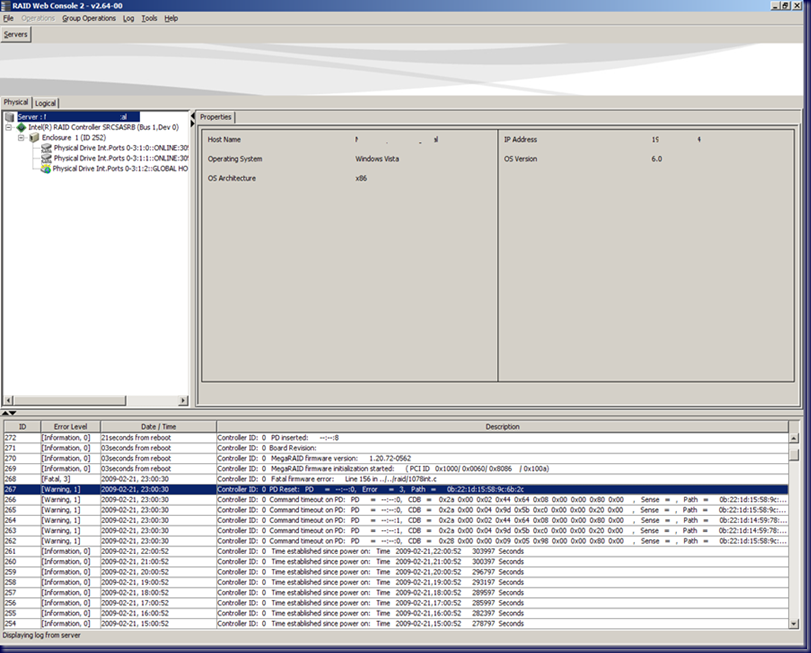
Intel SRCSASRB Firmware 1.20.72-0572 = Fatal Firmware Error (Correction Post)

This is a repost to correct my mistaken identification for the RAID controller’s model number! We had two identical boxes on the bench while this testing was going on. One had the SRCSASBB8i (Server Core box) and the other had the SRCSASRB (SBS 2008).

My apologies for making that mistake!

The discovery of the mistake was made when we opened up the box to switch out the RAID controller with another SRCSASBB8i and noticing that I had made the mistake. I am correcting that mistake with the Intel folks too as we have called into them to escalate the problem beyond the first tier.

We changed out the card with a known good card, updated that RAID controller’s firmware to 1.20.72-0572 and let it go over night. Well, this morning we came in and one of the hot swap caddy’s LEDs was solid and the system was locked up.

The only other step for us now is to swap out the hard disks with new ones and see if the problem reappears.

The odd thing is that we do have this RAID controller with this firmware installed in a number of other server configurations and we have not been experiencing any lockups there. The problem may be particular to this one setup.

*Repost Starts Here*

We have just started to implement the SRCSASBB8i SRCSASRB RAID controller with the new 1.20.72-0562 firmware in it. The system this particular one is in is our bench SBS 2008 box.

We stress test any new RAID controller firmware for a couple of weeks prior to implementing the update in any client environment where it is applicable.

This is what we have been seeing with the newest firmware update on the SRCSASBB8i SRCSASRB:

090302SRCSASBB8iError_thumb4

Intel SRCSASRB

[Fatal, 3] … Fatal firmware error: Line 156 in ../../raid/1078in.c

The server will be completely locked up with either one or both of the RAID 1 array drive lights being solid green.

The 320GB Seagate drives have been tested and are in the clear.

The Intel SRCSASRB and SRCSASBB8i share the same engine, though the boards are completely different as the BB8i has a PCI-E 8x where the RB has a PCI-E 4x interface.

In our testing of what seems to be the same firmware on the SRCSASRB SRCSASBB8i, we have not seen an error like this at all.

We will back the SRCSASBB8i SRCSASRB off to the previous firmware revision 1.12.172_0470 and run things up again to see if we run into the same problem. If we do, then we may be dealing with a problematic RAID controller and not bad firmware.

UPDATE 2009-03-05: Please note that the RAID controller we are dealing with is not the SRCSASBB8i, it is the SRCSASRB. My bad for that. We had two identical boxes on the bench, one with each model of RAID controller and I got them mixed up!

My apologies for the mistaken identification.

Philip Elder
MPECS Inc.
Microsoft Small Business Specialists

*All Mac on SBS posts will not be written on a Mac until we replace our now missing iMac!

Windows Live Writer

Tuesday, 3 March 2009

Intel SR1530HSH + Intel SRCSASRB or Other RAID Controller Require IPMB Cable

On the Intel Server System SR1530HSH the SATA backplane is passive. Any hard disk management features are handled between the Intel Entry Server Board S3200SH and an add-in RAID controller if installed.

Now, when we configure Intel servers based on the pedestal style chassis with hot swap capabilities, all of the required cables to connect the backplane with the motherboard and RAID controller are included with the backplane kit.

What we have discovered is that there is no IPMB cable included with the SR1530HSH server system. That discovery was made today while troubleshooting further issues with the SRCSASBB8i RAID controller we hit the wall with firmware wise (previous blog post).

Today we worked directly with an Intel support technician to try and get to the bottom of the problems we were experiencing since our last conversation with them.

As they had recommended, we backed the firmware off to the next oldest revision on the RAID controller to see if the firmware we were experiencing would not happen again.

Once the firmware update was completed and the system was powered down, we powered back up and all three drive lights lit red indicating drive failure. Yet, the RAID controller POSTed successfully with no errors.

We let SBS 2008 boot up to see if the RAID Web Console 2 would show us any errors in the RAID controller specific logs. They were free and clear indicating a successful firmware burn, drive initialization, and OS boot.

The Intel technician eventually found some information about the need for the IPMB cable between the RAID controller and the server board.

Unfortunately, the information that he found was nowhere to be found in any of the publically available configuration for the SR1530SH or SRCSASBB8i RAID controller.

We still need to test things further as we have not fired up the server since fortunately finding an IPMB cable buried in one of our parts bins.

The required part number:

We ordered a couple of packs to make sure we have them around for our future server builds on the 1U hot swap platform that require an add-in RAID controller.

Further reading:

Philip Elder
MPECS Inc.
Microsoft Small Business Specialists
Co-Author: SBS 2008 Blueprint Book

*All Mac on SBS posts will not be written on a Mac until we replace our now missing iMac!

Windows Live Writer

Thursday, 7 August 2008

Virtualization - Server, Desktop, Performance, and the Future

We do a fair amount of client and internal virtualization setups.

For our clients, virtualization gives us a single system setup that can provide a number of desktop OS virtual machines for Group Policy managed Remote Web Workplace accessible desktops.

A little while back, our Edmonton Microsoft User Group (previous blog post) brought in Kai Axford to speak on various aspects of computer security with a focus on virtualization.

A number of really good points were made.

When it comes to virtual machine performance, the one thing Kai said that still stands out today: The more spindles (hard drives) the server has, the better the VM performance.

We have a number of low utilization setups where a simple RAID 1 volume configured in a 1U Xeon X3000 series Quad Core works really well.

For one of our clients, there is an employee expansion drive that goes beyond the limits of their current location. It is fortunate that they are at the end of their 2 year cycle for the implementation of new hardware and a refresh and re-purposing of their existing hardware as we have some flexibility for our solution proposal.

In their case, we spoke about utilizing the Remote Web Workplace (RWW) and dedicated desktops for people to work from home on (virtualized XP Pro or Vista Enterprise). We also spoke to some of the new RWW features that will be available in SBS 2008 such as Terminal Services Application publishing, so it was pretty easy to see the gears turning in the business owner's head as we went through the various remote access solutions we could implement today and next year.

Currently, they have a 1U Xeon 3000 series dedicated desktop that one of our primary technical contacts utilizes. So, it was not much of a step to develop that setup into a virtualized desktop solution for many more users.

For the hardware, we settled on the newer SR1550ALR 1U dual Intel Xeon 5000 Dual/Quad Core series chassis with the Intel SRCSASRB RAID controller that gives us the capability to run 8 2.5" SAS or SATA drives for our primary virtualization requirements. Since we are looking for capacity and performance, this configuration with the new 320GB 7200RPM Seagate Momentus SATA drives would make a good fit.

This setup will host a number of very active desktop OS VMs along with the possible addition of a server OS VM next summer. Out of the box we will install Windows Server 2008 full version with the Hyper-V role enabled.

This winter when SBS 2008 is released, we will initiate our client's Software Assurance benefits for their SBS 2003 R2 Premium Open Value Agreement to obtain the required media, keys, and updates to the Microsoft Volume Licensing Portal.

These Software Assurance Benefits will give us the flexibility to work with an additional inexpensive 1U for our client's ISA needs, or implement another VM running a server OS and ISA installed therein.

The Software Assurance Benefits will also enable us to look into implementing a cold backup setup for SBS disaster recovery purposes.

And finally, in this particular client setup, we will be able to utilize either the SR1550AL or the soon to be backup server to host a VM setup for the SBS 2008 migration process next summer.

We believe that our goal to provide a solution that will enable our client to expand their numbers today, and also provide the flexibility to implement upcoming technologies based on the new hardware being installed as well as the existing hardware being refreshed has been met. And, our client believes the same.

One other very important point: The new hardware and licensing setup will also give us some flexibility to implement solutions based on the upcoming Cloud solutions from Microsoft and others.

A couple of SBS migration related links:
Philip Elder
MPECS Inc.
Microsoft Small Business Specialists

*All Mac on SBS posts are posted on our in-house iMac via the Safari Web browser.

Wednesday, 2 July 2008

750GB Seagate ES.2 failure on SR1530AH plus SRCSASRB

Our Server Core system running Hyper-V on Server Core has had a drive failure.

The culprit:
  • 750GB Seagate Barracuda ES.2
    • ST3750330NS
    • Firmware: SN04
    • Date Code: 08277
    • Site Code: KRATSG
The failed drive is in the same batch as the last one: Seagate 750GB ES.2 Failure on SR1530AHLX swap experience. The replacement drive is also in this batch. This is the third 750GB ES.2 drive failure we have had in recent weeks. Given our volume of drives, this may not be indicative of a general batch problem, but, if we keep experiencing drive failures out of this batch then it may be safe to assume that we are probably dealing with a batch problem.

This particular server setup is in an Intel SR1530AH 1U with an Intel SRCSASRB add-in RAID controller installed. The drives were setup in a RAID 1 mirror in a fixed hard drive install. The 1U was installed in one of our rack enclosures in our shop data centre setup. The air is properly conditioned, so heat would not be a factor in this failure.

Due to the nature of Server Core and the fact that Intel's RAID Web Console Utility for Windows does not support being installed on Server Core installations, we were in a position where we needed to reboot the server into the RAID controller's BIOS in order to remove the now dead drive and configure its replacement.

With the inability to run the RAID Web Console on Server Core, the server will remain down until the RAID array rebuild completes. It does not look as though the array rebuild requires the server to be down during the rebuild process, but given the disk intensive nature of Hyper-V with multiple VMs running, we will let it alone for now.

The RAID Web Console does install on our full Windows Server 2008 installations, so, for those clients that require the least amount of downtime, a hot swap setup would require the full version of Server 2008 versus Server Core for their Hyper-V needs. This may involve a slight adjustment in server configurations to accommodate the additional resource requirements of the full Windows Server 2008 OS.

Philip Elder
MPECS Inc.
Microsoft Small Business Specialists

*All Mac on SBS posts are posted on our in-house iMac via the Safari Web browser.

Wednesday, 14 May 2008

SR1530AH + PCI-E Riser = SRCSASRB RAID Capable

In the current SR1530HSH/SH line of 1U uniprocessor server systems we no longer need to deal with a standard and LX version of the product.

The 1U SR1530HSH/SH server systems come in 2 SKUs and both have the same motherboard (MB):
  • SR1530SH: With fixed hard drives
  • SR1530HSH with 3 Hot Swap Drive Bays
The cost differential between the fixed hard drive and hot swap hard drive models is relatively small in comparison to the previous generation's steps:
  • SR1530AH: Base model with S3000AH MB and fixed drives
  • SR1530AHLX: Base model with S3000AHLX MB and fixed drives
  • SR1530HAHLX: Premium model with S3000AHLX MB and 3 hot swap drives
The cost differential between the base AH model and the hot swap AHLX model was quite a bit steeper than the current SH models.

So, in some cases we have configured the SR1530AH model with the add-in PCI-E PCB and subsequently an SRCSASRB Intel RAID controller for better drive performance without the need for the LX or hot swap features.

There is a proper sequence for installing and updating the RAID controller's firmware:
  1. Install the Intel RAID controller into the PCI-E Riser card.
  2. Install the riser into the 1U server.
  3. Boot the server and connect to the RAID controller BIOS.
  4. Setup the RAID array(s).
  5. Reboot.
  6. Download the newest SRCSASRB firmware.
  7. Boot to a bootable USB flash drive.
  8. Update the firmware.
  9. Reboot and check into the SRCSASRB settings.
  10. Download the newest S3000AH BIOS.
  11. Boot to a bootable USB flash drive.
  12. Update the BIOS
  13. Reboot and verify the SRCSASRB shows up in the BIOS' hard drive boot order.
  14. Boot into the Windows Server 2008 setup.
  15. Install the SRCSASRB drivers and go from there.
On our first build we updated the SRCSASRB firmware without touching the S3000AH BIOS. In this case, the motherboard revision was a couple of steps back.

After the firmware update and subsequent boot into the Windows Server 2008 setup we kept getting an error message indicating that there was no controller associated with the hard disks listed. The error is identical to the one experienced in a previous Windows Vista setup problem.

In this case though, we rebooted back into the BIOS and sure enough the RAID controller was not listed as one of the boot device options.

Once we updated the board's BIOS we were good to go ... the SRCSASRB showed up in the BIOS as a bootable device and Windows Server 2008 was happy to be installed on the configured array.

Philip Elder
MPECS Inc.
Microsoft Small Business Specialists

*All Mac on SBS posts are posted on our in-house iMac via the Safari Web browser.

Tuesday, 13 May 2008

Intel SR1530HSH/SH On Board RAID and Server 2008

Intel's site indicates that drivers are forth coming for the Xeon 3000 series servers.

When at the S3200SH choose your OS download page, if one chooses either the 32bit or 64bit versions of Vista we end up with no drivers available.

However, if we choose the Server 2003 x64 or x86 OS version, we do end up with a download option: Software RAID Driver for Windows version 09.23.1010.2007.

After extracting the drivers we see:

Windows Vista x86 and x64 RAID Drivers

Place the drivers on a USB drive and we are good to go.

Windows Server 2008 will pickup the RAID array(s) and the OS install can proceed.

By the way, the Intel Server Configurator gives us a SATA based DVDROM or DVDRW as options. Intel has a disclaimer on their S3200SH support site indicating that connecting the SATA based optical drive to an on board or add-in RAID card is "Supported but not tested".

We have done a number of Server 2008 installs for both Full and Core editions on systems configured with on board and add-in RAID. So far we have not run into a SATA based optical drive access or performance problem.

Keep in mind that we make a point of sourcing only the Intel specific part numbers from our suppliers. We will not purchase other branded or supplied slimline optical drives for our rack mount server setups. For servers, we always err on the side of caution.

This is one issue we will need to keep an eye on until Intel puts a "Fully supported and tested" indicator for the RAID controllers we work with.

Philip Elder
MPECS Inc.
Microsoft Small Business Specialists

*All Mac on SBS posts are posted on our in-house iMac via the Safari Web browser.

Intel SR1530HSH/SH Server System Build Experiences

Not too long after our post Intel SR1530SH/HSH and S3200SH Series - Xeon X3350/60 Not Supported Yet ..., Intel released a number of updates for the server board S3200SH that the SR1530HSH Server System is based on. The links are available at the end of this post.

The BIOS update that was required to enable support for the new Xeon X3350/60 CPUs was released.

Since these particular systems incorporate hot swap capabilities, updating the BIOS alone is not an option. We also need to update the BMC, FRU, and other components. The Intel Deployment Assistant (IDA) that boots via the supplied Intel drivers CD gives us the ability to connect to the Internet and download any required updates and then apply them seamlessly.

We are finding that the updates available to the IDA via the Internet are out of date though. So, we end up having to go to the product's support page and downloading the newest update package manually.

Once we have downloaded the update, we do the following to update the server system:
  1. We extract the download and place it on a USB flash drive in an appropriately named folder.
  2. From there we boot the SR1530HSH/SH system up into the BIOS and enter the Boot Manager.
  3. We choose the EFI Shell option for boot device and wait until the shell finishes booting.
  4. A little *BSD/Linux experience pays off here as we need to access the USB drive: fs0: [Enter]
    • Once the EFI shell finishes booting it will tell you in the list of attached drives which "drive letter" to connect to.
    • Note that some standard DOS shell commands work as do *BSD/Linux ones.
  5. Once into the updates folder type: startup.nsh [Enter]
    • Note that the update initialization may take a while. Please wait until it generates the update options.
  6. Choose your update type (we choose both BMC & FRU)
  7. Options will be presented to enter user data such as part numbers, serial numbers, and the like.
  8. Once the process is complete, one will see: Updates completed. Please reboot using the front panel button.
Upon rebooting the system, make sure to head back into the BIOS to make sure that all of the settings are as they should be.

If using the on board RAID controller, we tend to setup and initialize the arrays before we do the updates. When using an add-in RAID controller such as the SRCSASRB, we will update the firmware on the RAID controller after updating the system BIOS and components as the newer RAID controller firmware may break the connection with the server board on an older BIOS.

Product related links: We are finding that the Xeon 3000 series 1U Server Systems provide a really good value for our clients that are seeking to virtualize a number of desktops for Remote Web Workplace access or for legacy Line of Business Application access.

Philip Elder
MPECS Inc.
Microsoft Small Business Specialists

*All Mac on SBS posts are posted on our in-house iMac via the Safari Web browser.

Tuesday, 6 May 2008

Hyper-V on Server Core - Hardware Considerations

Depending on an organization's needs and usage model, there are a number of configurations that can be used.

For those that require a number of virtualized desktops for remote access or perhaps a virtualized small Web server setup: Where more performance is required for virtualizing high volume Web sites, CPU intensive Line of Business Applications, or a couple of server and a number of desktop instances:

Another possible option for our larger clients is Intel's new 6U Modular Server that gives us the ability to install up to 6 blades that support dual Xeon Quad Core 5400 CPUs and up to 32GB of RAM per blade. The modular server supports up to 14 2.5" SATA or SAS drives that can be configured in many different ways relative to one or more of the blades. SBS on one blade, SQL on another, ISA on yet another, and the rest for virtualization or other needs.

There is a lot of flexibility to be had for virtualization and other server infrastructure needs on the Modular Server.

Whatever the virtualization requirements that our clients have, server capabilities today can bring about a very quick and reasonable Return on Investment and with their very efficient power consumption patterns significantly reduce the Total Cost of Ownership over the life of the server.

Philip Elder
MPECS Inc.
Microsoft Small Business Specialists

*All Mac on SBS posts are posted on our in-house iMac via the Safari Web browser.

Wednesday, 30 April 2008

Intel SR2400SYSD2, SR1530AH, and SR1560SF Power Consumption

We have an APC BR1500LCD UPS unit that we leave sitting on our bench.

It has the facility to provide live readouts on its LCD panel of various power and UPS events.

One of them is the amount of watts that a device uses while connected to it.

So, to get an idea of what each unit uses for power we plugged each unit into the BR1500LCD on its own and fired it up.

Here are some of the results:

  • Intel SR1560SF 1U with Dual E5440 Quad Core Xeons and 3x 750GB Seagate ES SATA
    • Power Up POST: 205 Watts Peak
    • SBS Boot: 175 Watts on average
    • SBS Online: 145 Watts on average
    • SBS at rest: 110 Watts on average
  • Intel SR1530AH 1U with Intel Xeon X3230 Quad Core Xeon and 2x 750GB Seagate ES SATA
    • Power Up: 175 Watts Peak
    • Server 2008 Core Boot: 125 Watts on average
    • Server 2008 Core online: 80 Watts on average
    • Server off but plugged in: 8 Watts
  • Intel SR2400SYSD2 2U with dual Intel Xeon 3.0GHz HT and 6x 500GB Seagate ES
    • Power Up: 525 Watts Peak
    • POST Initialization phase: 235 Watts on Average
    • Windows Server 2003 scroll Portion of OS startup: 250 Watts on average
    • Windows Server 2003 network and computer startup portion: 205 Watts on average
    • SBS at work: 225 Watts on average
    • SBS at rest: 205 Watts on average
    • Server off but plugged in: 30 Watts
It looks as though the newer technology really shows its efficiency when running full tilt or at a relative idle as can be seen by the above numbers.

Obviously the 2U will consume a bit more power due to the additional hard drives and a more powerful fan setup. However, the older 2U still has a big hit against it in the form of power savings relative to the new 3000 and 5000 series Xeon setups.

In a high density data centre situation, that 50 watts at idle on the newer technologies spread across hundreds if not thousands of servers means a huge savings in power consumption for the server systems themselves as well as the power required to cool the centre.

The neat thing is, there are even better power efficiency enhancements coming down the pipe in future versions of Intel CPUs, the server boards they plug into, and the plug in peripherals. All of this translates into a bit of relief for those data centres already pushed to the limits on their floor space per compute capability, power consumption, and cooling capacity.

For us, it means we have seen a significant drop in our power bill with every NetBurst Xeon server we have replaced with a Core Xeon technologies based server.

That practical experience for us translates into a good selling point for the newer technologies with our clients. A server that saves them money even when they are not in the office is a good thing!

Philip Elder
MPECS Inc.
Microsoft Small Business Specialists

*All Mac on SBS posts are posted on our in-house iMac via the Safari Web browser.

Friday, 25 April 2008

Intel SRCSASRB on Intel SR1560SF/S5400SF Series requires PS/2 Keyboard

During the first phase of the SBS setup, there is a point right around 34 minutes where the USB ports are knocked out.

That is also right around the time that the Intel SRCSASRB RAID card drivers will have a WHQL warning pop-up message that one will need to acknowledge.

If there is only a USB keyboard and mouse installed on the server, one will not be able to click on the Continue button. One will need to reset the server and plug in a PS/2 keyboard or mouse to get to the pop-up window.

Once the pop-up driver windows have been acknowledged, the setup can proceed without the need for any further input via a PS/2 keyboard.

This situation is one reason to keep a PS/2 keyboard around besides the need for one on KVMs.

Philip Elder
MPECS Inc.
Microsoft Small Business Specialists

*All Mac on SBS posts are posted on our in-house iMac via the Safari Web browser.