Showing posts with label intel SR1530SH-HSH. Show all posts

Thursday, 5 March 2009

Intel SRCSASRB Firmware 1.20.72-0572 = Fatal Firmware Error (Correction Post)

This is a repost to correct my mistaken identification for the RAID controller’s model number! We had two identical boxes on the bench while this testing was going on. One had the SRCSASBB8i (Server Core box) and the other had the SRCSASRB (SBS 2008).

My apologies for making that mistake!

The discovery of the mistake was made when we opened up the box to switch out the RAID controller with another SRCSASBB8i and noticing that I had made the mistake. I am correcting that mistake with the Intel folks too as we have called into them to escalate the problem beyond the first tier.

We changed out the card with a known good card, updated that RAID controller’s firmware to 1.20.72-0572 and let it go over night. Well, this morning we came in and one of the hot swap caddy’s LEDs was solid and the system was locked up.

The only other step for us now is to swap out the hard disks with new ones and see if the problem reappears.

The odd thing is that we do have this RAID controller with this firmware installed in a number of other server configurations and we have not been experiencing any lockups there. The problem may be particular to this one setup.

*Repost Starts Here*

We have just started to implement the SRCSASBB8i SRCSASRB RAID controller with the new 1.20.72-0562 firmware in it. The system this particular one is in is our bench SBS 2008 box.

We stress test any new RAID controller firmware for a couple of weeks prior to implementing the update in any client environment where it is applicable.

This is what we have been seeing with the newest firmware update on the SRCSASBB8i SRCSASRB:
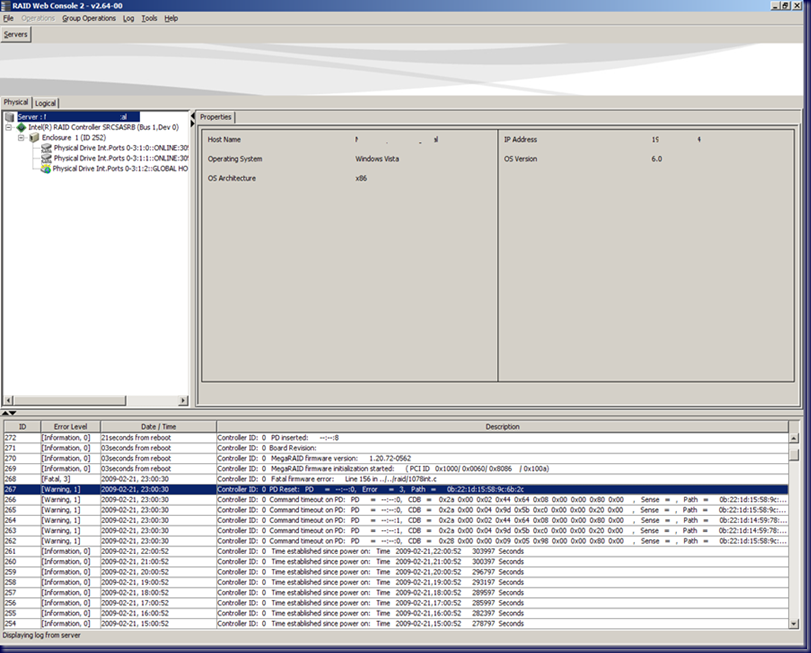
090302SRCSASBB8iError_thumb4

Intel SRCSASRB

[Fatal, 3] … Fatal firmware error: Line 156 in ../../raid/1078in.c

The server will be completely locked up with either one or both of the RAID 1 array drive lights being solid green.

The 320GB Seagate drives have been tested and are in the clear.

The Intel SRCSASRB and SRCSASBB8i share the same engine, though the boards are completely different as the BB8i has a PCI-E 8x where the RB has a PCI-E 4x interface.

In our testing of what seems to be the same firmware on the SRCSASRB SRCSASBB8i, we have not seen an error like this at all.

We will back the SRCSASBB8i SRCSASRB off to the previous firmware revision 1.12.172_0470 and run things up again to see if we run into the same problem. If we do, then we may be dealing with a problematic RAID controller and not bad firmware.

UPDATE 2009-03-05: Please note that the RAID controller we are dealing with is not the SRCSASBB8i, it is the SRCSASRB. My bad for that. We had two identical boxes on the bench, one with each model of RAID controller and I got them mixed up!

My apologies for the mistaken identification.

Philip Elder
MPECS Inc.
Microsoft Small Business Specialists

*All Mac on SBS posts will not be written on a Mac until we replace our now missing iMac!

Windows Live Writer

Tuesday, 3 March 2009

Intel SR1530HSH + Intel SRCSASRB or Other RAID Controller Require IPMB Cable

On the Intel Server System SR1530HSH the SATA backplane is passive. Any hard disk management features are handled between the Intel Entry Server Board S3200SH and an add-in RAID controller if installed.

Now, when we configure Intel servers based on the pedestal style chassis with hot swap capabilities, all of the required cables to connect the backplane with the motherboard and RAID controller are included with the backplane kit.

What we have discovered is that there is no IPMB cable included with the SR1530HSH server system. That discovery was made today while troubleshooting further issues with the SRCSASBB8i RAID controller we hit the wall with firmware wise (previous blog post).

Today we worked directly with an Intel support technician to try and get to the bottom of the problems we were experiencing since our last conversation with them.

As they had recommended, we backed the firmware off to the next oldest revision on the RAID controller to see if the firmware we were experiencing would not happen again.

Once the firmware update was completed and the system was powered down, we powered back up and all three drive lights lit red indicating drive failure. Yet, the RAID controller POSTed successfully with no errors.

We let SBS 2008 boot up to see if the RAID Web Console 2 would show us any errors in the RAID controller specific logs. They were free and clear indicating a successful firmware burn, drive initialization, and OS boot.

The Intel technician eventually found some information about the need for the IPMB cable between the RAID controller and the server board.

Unfortunately, the information that he found was nowhere to be found in any of the publically available configuration for the SR1530SH or SRCSASBB8i RAID controller.

We still need to test things further as we have not fired up the server since fortunately finding an IPMB cable buried in one of our parts bins.

The required part number:

We ordered a couple of packs to make sure we have them around for our future server builds on the 1U hot swap platform that require an add-in RAID controller.

Further reading:

Philip Elder
MPECS Inc.
Microsoft Small Business Specialists
Co-Author: SBS 2008 Blueprint Book

*All Mac on SBS posts will not be written on a Mac until we replace our now missing iMac!

Windows Live Writer

Monday, 2 March 2009

Intel SRCSASBB8i Firmware 1.20.72-0572 = Fatal Firmware Error

We have just started to implement the SRCSASBB8i RAID controller. The system this particular one is in is our bench SBS 2008 box.

We stress test any new RAID controller firmware for a couple of weeks prior to implementing the update in any client environment where it is applicable.

This is what we have been seeing with the newest firmware update on the SRCSASBB8i:

09-03-02 SRCSASBB8iError

Intel SRCSASBB8i (shows SRCSASRB)

[Fatal, 3] … Fatal firmware error: Line 156 in ../../raid/1078in.c

The server will be completely locked up with either one or both of the RAID 1 array drive lights being solid green.

The 320GB Seagate drives have been tested and are in the clear.

The Intel SRCSASRB and SRCSASBB8i share the same engine, though the boards are completely different as the 8i has a PCI-E 8x where the RB has a PCI-E 4x interface.

In our testing of what seems to be the same firmware on the SRCSASRB, we have not seen an error like this at all.

We will back the SRCSASBB8i off to the previous firmware revision 1.12.172_0470 and run things up again to see if we run into the same problem. If we do, then we may be dealing with a problematic RAID controller and not bad firmware.

UPDATE 2009-03-05: Please note that the RAID controller we are dealing with is not the SRCSASBB8i, it is the SRCSASRB. My bad for that. We had two identical boxes on the bench, one with each model of RAID controller and I got them mixed up!

My apologies for the mistaken identification.

Philip Elder
MPECS Inc.
Microsoft Small Business Specialists

*All Mac on SBS posts will not be written on a Mac until we replace our now missing iMac!

Windows Live Writer

Tuesday, 13 May 2008

Intel SR1530HSH/SH Server System Build Experiences

Not too long after our post Intel SR1530SH/HSH and S3200SH Series - Xeon X3350/60 Not Supported Yet ..., Intel released a number of updates for the server board S3200SH that the SR1530HSH Server System is based on. The links are available at the end of this post.

The BIOS update that was required to enable support for the new Xeon X3350/60 CPUs was released.

Since these particular systems incorporate hot swap capabilities, updating the BIOS alone is not an option. We also need to update the BMC, FRU, and other components. The Intel Deployment Assistant (IDA) that boots via the supplied Intel drivers CD gives us the ability to connect to the Internet and download any required updates and then apply them seamlessly.

We are finding that the updates available to the IDA via the Internet are out of date though. So, we end up having to go to the product's support page and downloading the newest update package manually.

Once we have downloaded the update, we do the following to update the server system:
  1. We extract the download and place it on a USB flash drive in an appropriately named folder.
  2. From there we boot the SR1530HSH/SH system up into the BIOS and enter the Boot Manager.
  3. We choose the EFI Shell option for boot device and wait until the shell finishes booting.
  4. A little *BSD/Linux experience pays off here as we need to access the USB drive: fs0: [Enter]
    • Once the EFI shell finishes booting it will tell you in the list of attached drives which "drive letter" to connect to.
    • Note that some standard DOS shell commands work as do *BSD/Linux ones.
  5. Once into the updates folder type: startup.nsh [Enter]
    • Note that the update initialization may take a while. Please wait until it generates the update options.
  6. Choose your update type (we choose both BMC & FRU)
  7. Options will be presented to enter user data such as part numbers, serial numbers, and the like.
  8. Once the process is complete, one will see: Updates completed. Please reboot using the front panel button.
Upon rebooting the system, make sure to head back into the BIOS to make sure that all of the settings are as they should be.

If using the on board RAID controller, we tend to setup and initialize the arrays before we do the updates. When using an add-in RAID controller such as the SRCSASRB, we will update the firmware on the RAID controller after updating the system BIOS and components as the newer RAID controller firmware may break the connection with the server board on an older BIOS.

Product related links: We are finding that the Xeon 3000 series 1U Server Systems provide a really good value for our clients that are seeking to virtualize a number of desktops for Remote Web Workplace access or for legacy Line of Business Application access.

Philip Elder
MPECS Inc.
Microsoft Small Business Specialists

*All Mac on SBS posts are posted on our in-house iMac via the Safari Web browser.

Tuesday, 6 May 2008

Hyper-V on Server Core - Hardware Considerations

Depending on an organization's needs and usage model, there are a number of configurations that can be used.

For those that require a number of virtualized desktops for remote access or perhaps a virtualized small Web server setup: Where more performance is required for virtualizing high volume Web sites, CPU intensive Line of Business Applications, or a couple of server and a number of desktop instances:

Another possible option for our larger clients is Intel's new 6U Modular Server that gives us the ability to install up to 6 blades that support dual Xeon Quad Core 5400 CPUs and up to 32GB of RAM per blade. The modular server supports up to 14 2.5" SATA or SAS drives that can be configured in many different ways relative to one or more of the blades. SBS on one blade, SQL on another, ISA on yet another, and the rest for virtualization or other needs.

There is a lot of flexibility to be had for virtualization and other server infrastructure needs on the Modular Server.

Whatever the virtualization requirements that our clients have, server capabilities today can bring about a very quick and reasonable Return on Investment and with their very efficient power consumption patterns significantly reduce the Total Cost of Ownership over the life of the server.

Philip Elder
MPECS Inc.
Microsoft Small Business Specialists

*All Mac on SBS posts are posted on our in-house iMac via the Safari Web browser.

Thursday, 10 April 2008

SR1530HSH + Server 2008 and Intel ProSet - Receive Side Scaling and Teaming

Now that we have Windows Web Server 2008 x64 (trial software download) configured on an Intel SR1530HSH 1U chassis with 4GB of RAM and a Xeon X3220 Quad Core CPU.

This particular box will be configured with the SharePoint V3 role for Internet facing site collections.

Before we went to add the unit to the SBS domain, we wanted to team up the adapters in Fault Tolerance mode. Version 12.4 of the Intel ProSet (link to download via the PRO/1000 PT support page) drivers support teaming on both the x86 and x64 versions of Server 2008.

This is the message we received once we ran through the team setup process:

New Team Wizard

One or more adapters in the team do not support Receive-Side Scaling. Receive-Side Scaling will be disabled for the team.
Receive-Side Scaling (RSS) gives us the ability to utilize the multiple cores on this particular server to process network packets that are received. Given that this is a Web server, having that ability to streamline network performance is more important than initally having the fault tolerant team.

So, we will leave teaming between the on board NICs for now, and proceed to install an add-in dual port Gigabit PCI-E NIC that will support RSS while teamed.

You may remember RSS because of the issues the Windows Server 2003 Service Pack 2 introduced on our SBS boxes when RSS went live after applying the Service Pack (previous blog post).

From Intel's support site: Intel® Server Adapters - Receive Side Scaling on Intel® Network Adapters
When Receive Side Scaling (RSS) is enabled, all of the receive data processing for a particular TCP connection is shared across multiple processors or processor cores. Without RSS all of the processing is performed by a single processor, resulting in inefficient system cache utilization.

Notes
  • This setting has no effect if your system has only one processing unit.
  • RSS must be enabled for Intel® I/O Acceleration Technology to function.
  • To enable RSS on Microsoft* Windows Server* 2003, you must install Microsoft's Scalable Networking Pack. The Scalable Networking Pack is part of Windows Server 2003 SP2. It is not included in SP1 and requires a separate download. See http://www.microsoft.com/ † for more information.

RSS Configuration
RSS is enabled on the Advanced tab of the adapter property sheet. If your adapter does not support RSS, or if your operating system does not support it, the RSS setting will not be displayed.

Teaming
  • If RSS is not enabled for all adapters in a team, RSS will automatically be disabled for the team.
  • If an adapter that does not support RSS is added to a team, RSS will automatically be disabled for the team.
    If a non-Intel adapter is added to a team, RSS will automatically be disabled for the team.
  • Non-Intel adapters with RSS enabled cannot be added to a team
Further Intel NIC support links: On the SharePoint note: We have had a number of adventures into building some custom SharePoint V3 infrastructure lately.

One of them was to setup SharePoint V3 on SBS in a side-by-side install but using the Front-End Farm setup instead. We need SharePoint to be connected to the SQL 2005 back end on SBS instead of the SQL Express installed via the Stand-Alone mode. All in all, this setup was relatively painless. This configuration gives us the scalability needed by a full SQL back end for the SharePoint Sites. It also gives us a quick step into a dedicated farm setup.

We will try and get some SharePoint focused posts out to you as time permits.

Philip Elder
MPECS Inc.
Microsoft Small Business Specialists

*All Mac on SBS posts are posted on our in-house iMac via the Safari Web browser.