Showing posts with label SRCSASRB. Show all posts

Thursday, 5 November 2009

RAID Controller Log: Unrecoverable Medium Error – Puncturing Bad Block?!?

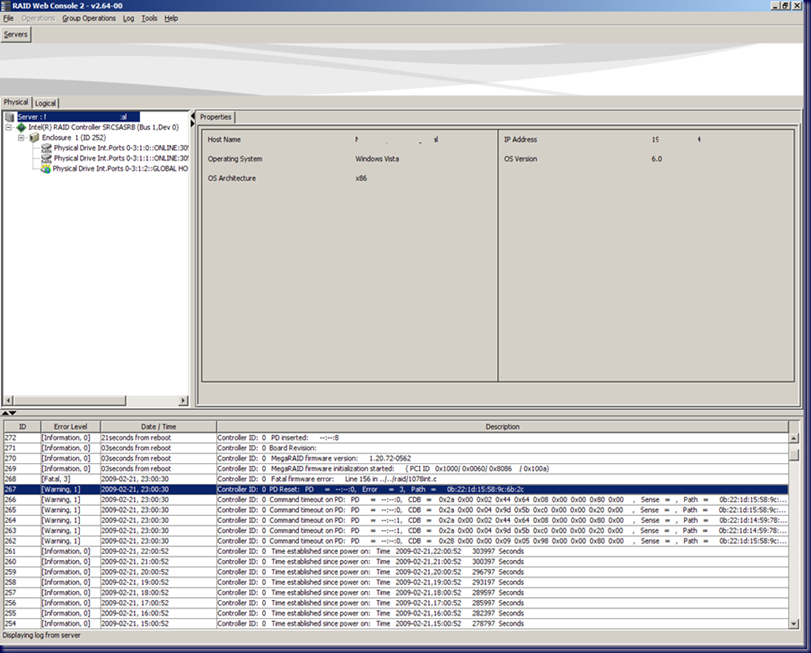
Okay, so this is a new one and lead to a near stoppage of the heart last evening:

image

The errors in order:

Controller ID: 0 Unrecoverable medium error during rebuild: PD –|—:0 Location 0x26f1640

Controller ID: 0 Puncturing bad block: PD –|—:0 Location 0x26f1640

Controller ID: 0 Puncturing bad block: PD –|—:1 Location 0x26f1640

PD 0 is the last original disk in this server that is giving us headaches. Both PD 1 and PD 2 (there are three hot swap bays in the SR1560SFH Intel Server System) were replaced with new drives.

The original PD 1 had failed during a server firmware including BMC update (previous blog post). The original PD 2, the then global hot spare, was rebuilt into the array with no errors . . . until a consistency check that ran later that afternoon produced some unrecoverable fatal errors.

Last night we dropped original PD 1 out of the configuration, replaced it with a new drive, had the new drive picked up as a hot spare. We then failed out the original hot spare PD 2 now RAID 1 array member assuming that it was the source of the errors we saw in the consistency check yesterday afternoon.

So, the above screenshot was taken after the new PD 1 was being rebuilt into the array with PD 0 as the source. Needless to say the heart definitely skipped a few beats with visions of index $0 running through my head (previous blog post)!

The rebuild did eventually finish successfully though?!?

We will be going back this evening to fail out the bad PD 0 and replace it with a new drive which will then be designated the new hot spare.

Once the PD 2, currently a hot spare, rebuild into the RAID 1 array has finished, Intel indicated to us that we need to run a consistency check. From there, hopefully ShadowProtect will finally give us a backup!

And one more thing, just what does “Puncturing bad block” really mean?

The suggestion in the above NEC linked document is to take the preventative measure and swap out the indicated drive(s) promptly. :)

It looks as though the RAID controller has found some bad sectors on the PD 0 and puncturing means to set those sectors as off limits on both array members.

But part of this whole puzzle is the fact that the RAID controller (Intel SRCSASRB with firmware 470) shows a media error level of 0 for both array members and a predictive failure count of 0 for both members!

Hopefully tomorrow we can rest easy with a backup in hand!

Philip Elder
MPECS Inc.
Microsoft Small Business Specialists
Co-Author: SBS 2008 Blueprint Book

*Our original iMac was stolen (previous blog post). We now have a new MacBook Pro courtesy of Vlad Mazek, owner of OWN.

Windows Live Writer

Thursday, 5 March 2009

Intel SRCSASRB Firmware 1.20.72-0572 = Fatal Firmware Error (Correction Post)

This is a repost to correct my mistaken identification for the RAID controller’s model number! We had two identical boxes on the bench while this testing was going on. One had the SRCSASBB8i (Server Core box) and the other had the SRCSASRB (SBS 2008).

My apologies for making that mistake!

The discovery of the mistake was made when we opened up the box to switch out the RAID controller with another SRCSASBB8i and noticing that I had made the mistake. I am correcting that mistake with the Intel folks too as we have called into them to escalate the problem beyond the first tier.

We changed out the card with a known good card, updated that RAID controller’s firmware to 1.20.72-0572 and let it go over night. Well, this morning we came in and one of the hot swap caddy’s LEDs was solid and the system was locked up.

The only other step for us now is to swap out the hard disks with new ones and see if the problem reappears.

The odd thing is that we do have this RAID controller with this firmware installed in a number of other server configurations and we have not been experiencing any lockups there. The problem may be particular to this one setup.

*Repost Starts Here*

We have just started to implement the SRCSASBB8i SRCSASRB RAID controller with the new 1.20.72-0562 firmware in it. The system this particular one is in is our bench SBS 2008 box.

We stress test any new RAID controller firmware for a couple of weeks prior to implementing the update in any client environment where it is applicable.

This is what we have been seeing with the newest firmware update on the SRCSASBB8i SRCSASRB:

090302SRCSASBB8iError_thumb4

Intel SRCSASRB

[Fatal, 3] … Fatal firmware error: Line 156 in ../../raid/1078in.c

The server will be completely locked up with either one or both of the RAID 1 array drive lights being solid green.

The 320GB Seagate drives have been tested and are in the clear.

The Intel SRCSASRB and SRCSASBB8i share the same engine, though the boards are completely different as the BB8i has a PCI-E 8x where the RB has a PCI-E 4x interface.

In our testing of what seems to be the same firmware on the SRCSASRB SRCSASBB8i, we have not seen an error like this at all.

We will back the SRCSASBB8i SRCSASRB off to the previous firmware revision 1.12.172_0470 and run things up again to see if we run into the same problem. If we do, then we may be dealing with a problematic RAID controller and not bad firmware.

UPDATE 2009-03-05: Please note that the RAID controller we are dealing with is not the SRCSASBB8i, it is the SRCSASRB. My bad for that. We had two identical boxes on the bench, one with each model of RAID controller and I got them mixed up!

My apologies for the mistaken identification.

Philip Elder
MPECS Inc.
Microsoft Small Business Specialists

*All Mac on SBS posts will not be written on a Mac until we replace our now missing iMac!

Windows Live Writer

Monday, 2 March 2009

Intel SRCSASBB8i Firmware 1.20.72-0572 = Fatal Firmware Error

We have just started to implement the SRCSASBB8i RAID controller. The system this particular one is in is our bench SBS 2008 box.

We stress test any new RAID controller firmware for a couple of weeks prior to implementing the update in any client environment where it is applicable.

This is what we have been seeing with the newest firmware update on the SRCSASBB8i:

09-03-02 SRCSASBB8iError

Intel SRCSASBB8i (shows SRCSASRB)

[Fatal, 3] … Fatal firmware error: Line 156 in ../../raid/1078in.c

The server will be completely locked up with either one or both of the RAID 1 array drive lights being solid green.

The 320GB Seagate drives have been tested and are in the clear.

The Intel SRCSASRB and SRCSASBB8i share the same engine, though the boards are completely different as the 8i has a PCI-E 8x where the RB has a PCI-E 4x interface.

In our testing of what seems to be the same firmware on the SRCSASRB, we have not seen an error like this at all.

We will back the SRCSASBB8i off to the previous firmware revision 1.12.172_0470 and run things up again to see if we run into the same problem. If we do, then we may be dealing with a problematic RAID controller and not bad firmware.

UPDATE 2009-03-05: Please note that the RAID controller we are dealing with is not the SRCSASBB8i, it is the SRCSASRB. My bad for that. We had two identical boxes on the bench, one with each model of RAID controller and I got them mixed up!

My apologies for the mistaken identification.

Philip Elder
MPECS Inc.
Microsoft Small Business Specialists

*All Mac on SBS posts will not be written on a Mac until we replace our now missing iMac!

Windows Live Writer

Thursday, 17 July 2008

Intel SR1560SFHS + SRCSASRB USB HDD lockup

One of the last things we do before putting a server into production is blow it away and restore it from the backup we create just before.

In this case, we are dealing with the ShadowProtect image of the new server that served as a replacement for this crashed server (previous blog post).

There are two particular purposes for this recovery:
  1. Test restore of the production server. We provide this service on a quarterly basis for most of our clients with some opting in on a monthly recovery test.
  2. Work with an exact replica of the production Exchange Information Store database as it is not behaving.
Since we managed to salvage the Exchange store from the somewhat corrupted ShadowProtect image, the store will mount, but it will not do so on its own. After a reboot, the store needs to be manually mounted via the Services.msc console.

We ran into a bit of a peculiarity in that the server we are restoring is the soon to be production server at another client that is identically configured.

After booting the ShadowProtect Windows Vista Recovery Environment, loading the SRCSASRB drivers and running the first volume's recovery the system was locking up. No matter what we tried, even going so far as to remove the hard drive from the Thermaltake Silver River Duo enclosure and connecting it via a Thermaltake BlacX SE USB hard drive connector, the system still locked up.

A couple presses of the Num Lock key on the keyboard would bring about a red trouble light on the front of the SR1560SFHS chassis.

The firmware on the motherboard, FRU, and SDR were up to date. But, as it turns out the firmware on the SRCSASRB RAID controller has a new update this last week.

After running the update for the RAID controller and rebooting back into the ShadowProtect Vista Recovery Environment, we were able to initiate a successful series of recoveries for the three volumes on this array.

Links to previous posts on the above crashed server: More to come on the Exchange issue.

Philip Elder
MPECS Inc.
Microsoft Small Business Specialists

*All Mac on SBS posts are posted on our in-house iMac via the Safari Web browser.

Wednesday, 2 July 2008

750GB Seagate ES.2 failure on SR1530AH plus SRCSASRB

Our Server Core system running Hyper-V on Server Core has had a drive failure.

The culprit:
  • 750GB Seagate Barracuda ES.2
    • ST3750330NS
    • Firmware: SN04
    • Date Code: 08277
    • Site Code: KRATSG
The failed drive is in the same batch as the last one: Seagate 750GB ES.2 Failure on SR1530AHLX swap experience. The replacement drive is also in this batch. This is the third 750GB ES.2 drive failure we have had in recent weeks. Given our volume of drives, this may not be indicative of a general batch problem, but, if we keep experiencing drive failures out of this batch then it may be safe to assume that we are probably dealing with a batch problem.

This particular server setup is in an Intel SR1530AH 1U with an Intel SRCSASRB add-in RAID controller installed. The drives were setup in a RAID 1 mirror in a fixed hard drive install. The 1U was installed in one of our rack enclosures in our shop data centre setup. The air is properly conditioned, so heat would not be a factor in this failure.

Due to the nature of Server Core and the fact that Intel's RAID Web Console Utility for Windows does not support being installed on Server Core installations, we were in a position where we needed to reboot the server into the RAID controller's BIOS in order to remove the now dead drive and configure its replacement.

With the inability to run the RAID Web Console on Server Core, the server will remain down until the RAID array rebuild completes. It does not look as though the array rebuild requires the server to be down during the rebuild process, but given the disk intensive nature of Hyper-V with multiple VMs running, we will let it alone for now.

The RAID Web Console does install on our full Windows Server 2008 installations, so, for those clients that require the least amount of downtime, a hot swap setup would require the full version of Server 2008 versus Server Core for their Hyper-V needs. This may involve a slight adjustment in server configurations to accommodate the additional resource requirements of the full Windows Server 2008 OS.

Philip Elder
MPECS Inc.
Microsoft Small Business Specialists

*All Mac on SBS posts are posted on our in-house iMac via the Safari Web browser.

Thursday, 22 May 2008

Intel SRCSASRB hot swap experience was excellent

A recent hard drive failure (previous blog post) of a drive connected to an Intel SRCSASRB gave us our first experience with the hot swap capabilities of the SRCSASRB.

The controller itself is relatively new to the market.

We had downloaded and installed the Intel RAID Web Console 2 on the server. We used the tool to verify that the beep code that our client had called about was indeed the RAID controller indicating a failed drive.

Once verified, we silenced the alarm so that those working close to the server closet would no longer need to listen to it. ;)

With the rebuild process moving along smoothly, we made a trip down to our client to swap out the defective drive.

Now, the Intel RAID Software User's Guide (download page) while useful, had a different GUI and menu layout than the product we were working with.

So, we needed to figure things out on our own to some extent. Nowhere in the manual was an indication that the drive needed to be stopped prior to it being removed from the server.

So, we pulled the drive. The SRCSASRB did not complain by firing up the alarm.

When we plugged the replacement drive back into the server nothing happened though.

It turned out we needed to launch a new drive scan:

Rescan F5

We ran the Rescan and once it finished we saw:

New Global Hot Spare

The new hard drive was automatically placed in the previous hot spare's spot! No messing around with the utility. Pretty sweet! :)

The fact that the rebuild did indeed end up taking about 4.5 hours for a 750GB RAID 1 array along with this hot swap being a breeze really shows how far Intel and LSI have come with their RAID technologies.

All in all, the stress levels relative to having a critical RAID array hanging on one more drive failure have been reduced significantly as a result of this experience.

Philip Elder
MPECS Inc.
Microsoft Small Business Specialists

*All Mac on SBS posts are posted on our in-house iMac via the Safari Web browser.

Wednesday, 21 May 2008

Seagate 750GB ST3750330NS Failure on SRCSASRB

We just had our first Seagate Enterprise ES.2 series drive failure on a client production server.

The server setup:
  • Server: SR1560SFNA 1U Dual E5440 Xeon server
  • Drive: ST3750330NS 750GB Seagate ES.2 7200RPM Enterprise Storage.
  • Controller: SRCSASRB RAID Controller
  • Array configuration: RAID 1 (2x ST3750330NS)
  • 750GB ST3750330NS Global Hot Spare
This server is running SBS 2003 Premium R2 Open License version.

A screen shot of the Intel RAID Web Console 2:

Seagate 750GB ES.2 Failed

One of the last times we had a RAID array fail on an add-in RAID controller was on an Intel SRCS16 RAID controller with a RAID 1 pair and the remaining 4 drives on a RAID 5 array for capacity.

One of the OS RAID 1 pairs failed. We had to down the server to replace the drive as that was a quirk with the SRCS16 and the then new SATA 300 drives.

The rebuild on the 250GB pair was over 20 hours with the server offline. Performance degradation while the server was online was tangible. This client ran CAD drawings off of the SBS box along with all of the other tasks required by SBS. We left the server on overnight in rebuild mode. It finished just after their office opened the following morning.

In this case, the rebuild rate on the SRCSASRB is significantly better:

750GB RAID 1 Rebuild: ~3-4 Hours: Server Online

Keep in mind that the above time may not accurately reflect the exact time the rebuild will take. Since this is our client's busy time, the rebuild times may be a lot slower due to the OS demand for disk time.

We will be popping in to hot swap replace the failed drive and subsequently setting up the replacement as the new hot spare.

The above mentioned SRCS16 failure was a nail biter. We did not have any ShadowProtect backups at that time and would have had to have rebuilt the server using the built-in SBS backup. While that would have worked, it would have been time consuming and our client would not have been pleased with the idea that their people would miss a day of work.

The most critical time in a failed RAID 1 or 5 array is the time to introduce a replacement drive and have it rebuilt.

In today's case we had an identical Seagate ES.2 drive setup as a hot spare.

In a case where there is no hot spare to begin a rebuild cycle as soon as an array drive member fails, there is that additional time for a technician to respond and replace that defective drive.

No hot swap? Then more time and lost production for the client to down the server and replace that defective drive. We then have to ask our client: Do you want to risk the possibility of total loss if another array member dies (goes for both RAID 1 and RAID 5 arrays), or do we down the server, replace the defective unit, and put the server back online in rebuild mode (a lot slower) - or leave it offline in rebuild mode (a lot faster)?

We must keep in mind that stress on the hard disks will increase markedly during the rebuild cycle too. This is because the RAID controller is demanding both the rebuild tasks and the regular server operations if the server is still online.

For clients with higher costs for down time, this is the primary reason to be promoting the hot swap option to them. There is a selling point for the add-in RAID controllers as well: The motherboard based RAID controller in this situation (S5400SF) would more than likely have locked up the server when the drive failed.

Philip Elder
MPECS Inc.
Microsoft Small Business Specialists

*All Mac on SBS posts are posted on our in-house iMac via the Safari Web browser.

Friday, 25 April 2008

Intel SRCSASRB on Intel SR1560SF/S5400SF Series requires PS/2 Keyboard

During the first phase of the SBS setup, there is a point right around 34 minutes where the USB ports are knocked out.

That is also right around the time that the Intel SRCSASRB RAID card drivers will have a WHQL warning pop-up message that one will need to acknowledge.

If there is only a USB keyboard and mouse installed on the server, one will not be able to click on the Continue button. One will need to reset the server and plug in a PS/2 keyboard or mouse to get to the pop-up window.

Once the pop-up driver windows have been acknowledged, the setup can proceed without the need for any further input via a PS/2 keyboard.

This situation is one reason to keep a PS/2 keyboard around besides the need for one on KVMs.

Philip Elder
MPECS Inc.
Microsoft Small Business Specialists

*All Mac on SBS posts are posted on our in-house iMac via the Safari Web browser.

Thursday, 17 April 2008

Intel SRCSASRB RAID Controller and SR1560SF Caveat

Intel's SRCSASRB RAID controller has a catch when it is to be installed on the S5400SF series server board that comes in the SR1560SF series server system: The PBA on the card needs to be D92806-153.

The MM# on the box needs to be 892598.

The PCN:

Intel Product Change Notification: 108057-00

The above mentioned PCN came to us via the Intel support technician we spoke with on the phone today.

Now, we have mentioned in the past on a number of occasions how we need to research our system components to see if there were any compatibility issues relative to the revision level of the components.

It is very important, because in the case of Intel desktop and server boards one runs into the board revision level being too low for a particular processor on a somewhat frequent basis.

The same is true for compatibility between RAID controllers and a given desktop or server board.

In the Tested Hardware and OS List document we see the following:

Intel Server Board S5400SF Successfully Tested with SRCSASRB

Note the BIOS, BMC, FRU/SDR, and HSC revision levels required.

At the bottom of the Tested Hardware document we find:

SRCSASRB Stepping C1 not compatible with Gen2 PCI-E

Intel's products all of a PBA number on them. In this case, the product we pulled out of the SRCSASRB box had a PBA number of: D928906-152.

As indicated in the above PCN, we needed to have -153 in order to have the correct stepping for the second generation PCI-E slot that the SR1560SF/S5400SF has.

But, our box has an MM# 892598, which by the above PCN should have had a -153 in the box.

We did not however find out about the above PCN and the correct PBA number until after the SR1560SF would freeze during POST with the SRCSASRB installed and the Intel technician supplied us with a link to the PCN.

It is truly amazing how Murphy's Law finds its way into situations where timing is of the essence! ;)

Our supplier has shipped us another SRCSASRB to replace this one. Hopefully it is correctly boxed! 8*O

Product related links: Philip Elder
MPECS Inc.
Microsoft Small Business Specialists

*All Mac on SBS posts are posted on our in-house iMac via the Safari Web browser.