Showing posts with label StorageCraft ShadowProtect. Show all posts

Friday, 17 May 2013

Creating a Fixed VHD in Windows 7 and a ShadowProtect P2V

We have a VHD creation process running in the Windows 7 Disk Management console:

image

The above VHD is being created on a network share hosted by one of our Hyper-V servers (2008 R2). It will be a 160GB fixed VHD that will host the Windows 7 machine’s OS once ShadowProtect is finished.

While that process is running ShadowProtect is taking an image of the Windows 7 machine as it will be P2Vd onto the above Hyper-V host.

image

This image is running to a 2008 R2 file server.

The machine is a Core i7-875K with a pair of 80GB Intel X25-M SSDs running in RAID 0 and is soon to be retired.

We will use our P2V Hyper-V Integration Services (previous blog post) step to get rid of the RAID signature and enable IS in the OS. Then, we will use our Hardware Independent Restore (previous blog post) steps to clean out any left-over devices from the physical machine.

We find out of all products available to us, including Microsoft’s own Disk2VHD too, that ShadowProtect gives us the most reliable method of moving a physical machine into a virtual setting or taking a VM and restoring it to hardware.

Philip Elder
MPECS Inc.
Microsoft Small Business Specialists
Co-Author: SBS 2008 Blueprint Book

Chef de partie in the SMBKitchen
Find out more at
www.thirdtier.net/enterprise-solutions-for-small-business/

Windows Live Writer

Friday, 28 December 2012

Western Digital USB Drives Use A Proprietary Drive PCB for USB

This comes via the SBS2K Yahoo Group.

Apparently, Western Digital in their great wisdom has decided to mass produce a hard drive controller with only one interface on it: USB.

image

And:

image

As a rule we have been using the StarTech 4 bay SuperSpeed drive dock with bare drives for our backup rotations that we run.

For clients that have been running their own backup rotations we have been recommending the WD non-Green USB drives as we have had pretty good success with them. The same goes for the Seagate USB drives that are not “Green” in nature.

The one thing we have noticed with the manufacturer built USB drives is that there is a tendency to use 5400 RPM drives. And now, perhaps we are limited in how we can access a drive if something goes wrong with the controller.

Our preference for bare backup drives are:

  1. Seagate Enterprise Storage (ES or Constellation) series SATA
  2. Western Digital Black Label (non-Advanced Format for VHD/Backup VHD)

Both drives are 7200 RPM with better firmware than the retail/consumer drives. So, they will perform better and last longer due to ongoing handling during rotations.

We may request that in the future clients only purchase a certain drive and USB enclosure for their backups so that we have some control over what drives are used for backups.

As usual, it is Buyer Beware.

Philip Elder
MPECS Inc.
Microsoft Small Business Specialists
Co-Author: SBS 2008 Blueprint Book

Windows Live Writer

Thursday, 20 December 2012

StorageCraft IT Edition: Network Backup at AES128bit Performance

This is _neat_ to see:

image

This is a Windows 7 Enterprise x64 machine being backed up across the wire (Gigabit) to a Windows Server 2008 R2 file server using ShadowProtect IT Edition (v4.x.x).

We used AES 128bit encryption with a pass phrase for this particular backup.

  • Intel Core i7-875K
  • Intel DP55KG (BIOS 3878)
  • 4GB Kingston ValueRAM

When at all possible it is our preference to run our backup and restore to a network location as USB 2 is just _too_ slow.

Philip Elder
MPECS Inc.
Microsoft Small Business Specialists
Co-Author: SBS 2008 Blueprint Book

Windows Live Writer

Friday, 13 July 2012

Windows Server 2012 Hyper-V How To: Convert VHD to VHDX

We stood up a VM on a Windows Server 2008 R2 Hyper-V server and are looking to test it on a newly installed Windows Server 2012 Beta Hyper-V.

First test, convert the VHD to VHDX:

  1. In Hyper-V Manager on 2012 click Edit Disk
    • image
  2. Read then click Next on the Before You Begin window.
  3. Click the Browse button and locate the VHD to be converted
    • We put the VHD into the default storage location we set up on this server.
    • image
    • Note the caveat:
      • image
  4. In the Choose Action window click the Convert radio button and click Next.
  5. In the Convert Virtual Hard Disk window choose the format which is VHDX in this case.
    • image
  6. Choose between Fixed or Dynamically expanding.
    • image
  7. Select the name and location.
    • image
  8. If Next is clicked then a summary screen will be presented along with the Finish button.
  9. Click Finish.
  10. The Editing process will start.
    1. image
  11. Check the folder the original VHD and the exported VHDX are in and:
    • image
    • We can see the progress being made. . .
    • image
      • On this particular system it looks as though we are seeing about 20GB of conversion over about 20 minutes.
      • Intel Xeon X3350, 8GB ECC, Intel RAID, 3x Seagate ES in RAID 5.
    • NOTE: There must be enough storage available for the exported VHDX!
      • If storage is shared then it is doubly important that the full capacity of the dynamically expanding VHDX be taken into consideration.

We had some trouble running the ShadowProtect restore in Windows Server 2012 Hyper-V. The best recovery rate we could get was about 1.5MB/Second.

But, on Server 2008 R2 SP1 with all of the recent hotfixes we were able to get 21MB/Second across a Gigabit LAN using a single vCPU and 1GB of fixed RAM for the being restored VM. ShadowProtect version was 4.2.5 or thereabouts (most recent edition).

Check out the following blog for tips on avoiding BSODs in a P2V situation:

Philip Elder
MPECS Inc.
Microsoft Small Business Specialists
Co-Author: SBS 2008 Blueprint Book

*Our original iMac was stolen (previous blog post). We now have a new MacBook Pro courtesy of Vlad Mazek, owner of OWN.

Windows Live Writer

Tuesday, 14 June 2011

P2V Using ShadowProtect V4.x – Quicker But with BSOD 0x0000007B for Windows Server 2003 R2 in Hyper-V

When we were running P2V processes using v3 of ShadowProtect we were waiting quite a while as the ShadowProtect Recovery Environment did not work too well on the Hyper-V side.

image

ShadowProtect version 4 uses the Win7/Win2K8 R2 codebase for its Recovery Environment so we get full keyboard and mouse functionality while working via RDP plus a pleasant 20MB/Second as shown above.

The P2V we were running was for a legacy Line of Business application running on Windows 2003 Standard R2 that cannot run on a current OS. Not only that, the LoB does an awesome job for what is does and there is no current application out there that comes even close.

On first boot after doing a straight restore we hit a BSOD: STOP: 0x0000007B

image

A problem has been detected and Windows has been shut down to prevent damage to your computer.

Nothing in our searches turned up anything really useful other than a similar error indicating an inaccessible boot device.

Since we did not do an HIR for this P2V we went back and ran the restore process again after extracting the Hyper-V Integration Services as explained here:

The commands are as follows:

  1. msiexec /a d:\support\amd64\Windows5.x-HyperVIntegrationServices-x64.msi TARGETDIR=C:\AIPx64
  2. msiexec /a d:\support\x86\Windows5.x-HyperVIntegrationServices-x86.msi TARGETDIR=C:\AIPx86

Once we had our x86 version drivers we were able to load all of the Integration Services drivers using the Hardware Independent Restore feature of ShadowProtect. About 20-30 minutes later we had our server back online.

We then ran through the Integration Services install via the Action drop down menu to load the ISO in the VM.

All was good to go from there.

Philip Elder
MPECS Inc.
Microsoft Small Business Specialists
Co-Author: SBS 2008 Blueprint Book

*Our original iMac was stolen (previous blog post). We now have a new MacBook Pro courtesy of Vlad Mazek, owner of OWN.

Windows Live Writer

Saturday, 4 June 2011

ShadowProtect Backup Via USB 3.0

This is pretty neat:

image

A standard 500GB Seagate 7200 SATA drive is plugged into one of the NexStar USB 3.0 docks to run a backup of the drive.

It is averaging about 90MB/Second for the job as of now. The job finished in a little over three minutes averaging 87.5MB/Second!

Compare that to the average 20MB/Second that same drive would have run on a USB 2.0 connection and we can see the time savings benefits right away for the refresh we did on this Data Mule system (previous blog post).

NOTE: We could not get the Vantec NexStar USB 3.0 dock (NST-D300S3) to work when it was plugged directly into the USB 3.0 port on the back of the Intel Desktop Board DQ67SW. We needed to plug a Vantec USB 3.0 Hub (UGT-MH430U3) into the motherboard’s port and then the NexStar into that before any drive would be picked up.

Philip Elder
MPECS Inc.
Microsoft Small Business Specialists
Co-Author: SBS 2008 Blueprint Book

*Our original iMac was stolen (previous blog post). We now have a new MacBook Pro courtesy of Vlad Mazek, owner of OWN.

Windows Live Writer

Thursday, 2 December 2010

ShadowProtect 4.0.1–Windows 7 Ultimate x64 Restore Good To Go

We supplied a number of new machines into a new client when we did a new SBS 2008 install not too long ago.

One of the machine’s hard disks was causing some flaky behaviour and throwing Disk errors in the Event Logs.

We installed ShadowProtect 4.0.1 Desktop edition on the machine yesterday and set up a scheduled backup to run every hour to a network share.

When we arrived this morning we ran a final Incremental backup prior to shutting down the system. We swapped out the bad drive for a new one and then booted off of our ShadowProtect IT Edition’s USB flash drive.

Once we created the necessary disk signature, rebooted, we were able to restore the 100MB partition that Windows 7 creates and then the actual system partition.

There was some initial concern because that 100MB partition normally does not have a drive letter associated with it plus the restore process flagged a bad BCD Database restore in red.

Once we ran through the actual system drive’s restore process there was a note in the Details pane that showed that the BCD Database was edited and successfully corrected.

We then closed ShadowProtect IT Edition and the system rebooted. It complained about not being shut down properly, but Windows 7 Ultimate did indeed boot up without a hiccup.

A quick check in Disk Manager showed that 100MB partition as not having a drive letter and everything was good to go!

Total time to swap out a bad drive and restore the system on an Intel Core 2 Duo E8500 on an Intel DQ45EK Mini-ITX motherboard with a 320GB 7200 RPM Momentus was about an hour and 10 minutes. A full OS install, driver install, updates, and application install would have been about 3-4 hours.

Note that ShadowProtect must be installed and configured on a Backup Schedule in order to have access to creating Incremental backups. A manual backup (Backup Once) will not allow for any incremental backups.

Philip Elder
MPECS Inc.
Microsoft Small Business Specialists
Co-Author: SBS 2008 Blueprint Book

*Our original iMac was stolen (previous blog post). We now have a new MacBook Pro courtesy of Vlad Mazek, owner of OWN.

Windows Live Writer

Friday, 22 October 2010

ShadowProtect – Garbage In = Garbage Out

The situation we are in is not the fault of ShadowProtect specifically, but one that we have encountered before where the system’s disks were starting to fail and the backup was image based. Thus, any image backup software can be found to have bad data within the image.

image

We are in the process of finalizing an SBS 2008 server setup for a new client on-site. Their “server” system was experiencing spontaneous reboots with Check Disk running on each start up. This morning the system refused to come back up.

We had set up a ShadowProtect backup on that machine to help protect the data that was on it.

However, as the above screenshot of a BeyondCompare data copy out of the mounted ShadowProtect image shows us, if the data going in is bad the data coming out will be bad.

We experienced a situation like this at an unprecedented level a few years ago where a client’s very large RAID 5 array decided to start dropping sectors on the drives. We ended up recovering that SBS domain using the Swing method and the data through a combination of backup recoveries across the two servers at that site.

In this case we have no other fallback methods other than some of the users may have a copy of the corrupted files on the own systems since the central “server” has been behaving quite flaky for a while now.

So, we will be mounting the ShadowProtect backups that have been running on the flaky system for a couple of weeks now to see if we can find any of the now corrupted files that still may be in good shape.

Philip Elder
MPECS Inc.
Microsoft Small Business Specialists
Co-Author: SBS 2008 Blueprint Book

*Our original iMac was stolen (previous blog post). We now have a new MacBook Pro courtesy of Vlad Mazek, owner of OWN.

Windows Live Writer

Thursday, 30 July 2009

Recovering Server 2003 with Dynamic Disks via ShadowProtect

One of our non-profit clients needed to replace an aging server with new hardware. Since their licensing covered moving the OS to another box, and the legacy app on that box would not run on Server 2008, we used ShadowProtect to move the OS to new hardware.

Unfortunately, virtualizing the legacy setup was not an option or we would have taken that approach.

The source server was set up with a pair of dynamic disks that were mirrored via an OS software RAID.

When recovering a server that uses a set of Dynamic disks for an OS based software RAID, there is an extra step to the image recovery process.

If the server is a member server, as was the case for us, make sure to reset the local admin password on the server and have that change reflected in the SP image before the image is used for a restore.

Once the SP image has been placed on the new drives, or in our case on a new server, we needed to boot to the Windows Server 2003 CD and log onto the recovery console.

At the recovery console we needed to run the following commands:

  1. fixboot c: [Enter]
  2. fixmbr [Enter]

This will reset the dynamic disks to basic and allow the OS to boot.

Remember to follow the required post Hardware Independent Restore steps (previous blog post) if moving the OS to new hardware as we were doing here.

StorageCraft’s white paper on dynamic disks:

Philip Elder
MPECS Inc.
Microsoft Small Business Specialists
Co-Author: SBS 2008 Blueprint Book

*All Mac on SBS posts will not be written on a Mac until we replace our now missing iMac! (previous blog post)

Windows Live Writer

Friday, 17 April 2009

BCDEdit Batch File To Reset BCD Prior to SP Vista Image

The blog post: First Successful Windows Vista ShadowProtect Restore! No Winload.exe Error!

In order to get Windows Vista to successfully restore from any imaging based backup solution, the Boot Configuration Data (BCD) needs to be reset to a generic setting before creating the image or the OS will not restore properly.

Here are the BCDEdit commands put into a batch file:

The batch file should be on every Technician’s Thumb Drive!

Philip Elder
MPECS Inc.
Microsoft Small Business Specialists
Co-Author: SBS 2008 Blueprint Book

*All Mac on SBS posts will not be written on a Mac until we replace our now missing iMac! (previous blog post)

Windows Live Writer

Tuesday, 14 April 2009

SBS Disaster Recovery with a Second DC Caveats

We went through one of the toughest recovery processes ever last year at this time.

The SBS had a catastrophic RAID array failure based on bad sectors that did not show up until a reboot for updates.

The slow corruption of the drive data found its way into the ShadowProtect backup images as well. Though, we were fortunate to have support via the StorageCraft forums on how to mount the image and run some clean-up utilities after the fact.

We had ended up managing to recover the SBS back here in the shop after we had moved the desktop clients over to their backup DC and mirrored shares. They were at least functional while we ran the recovery.

The recovery odyssey was chronicled in the following blog post:

Note that it is a rather long read as it covers the full gamut of the recovery process including all of the roadblocks presented by having a second DC on an SBS domain. There are a lot of pearls (Lieutenant Colonel Frank Slade) in that post! ;)

Even with all of the hiccups on the road to recovery, the only problem our client had the Monday morning we had Swung (SBS Migration) in the new hardware based SBS was with two users who had happened to have changed their passwords during the previous week while SBS was offline.

The scene:

  • SBS 2003 SP1 Premium on Intel hardware.
  • Win2K3 R2 Standard as backup DC, DHCP, mirrored shares, 2NIC NAT – team unpaired for failure state.
  • 18 users in an Accountant’s office (during peak season too).
  • Approximately 350-400GB of data to preserve.
  • Success Rate: 99.999% (two user’s password call)

Jeff Middleton’s SwingIT Kit tied into ShadowProtect’s backup and recovery abilities are the keys to this disaster recovery success.

Philip Elder
MPECS Inc.
Microsoft Small Business Specialists
Co-Author: SBS 2008 Blueprint Book

*All Mac on SBS posts will not be written on a Mac until we replace our now missing iMac! (previous blog post)

Windows Live Writer

Monday, 6 April 2009

A Fallback Measure – Image Everything!

We make a ShadowProtect image of absolutely every system and server that comes through our shop, or any system we touch while on-site.

In the case of our clients, the on-site servers are already running ShadowProtect.

For SBS 2008, we use the built-in SBS backup to run right before we touch the box.

Imaging or backing up the box before touching it is an absolute must.

This process is especially critical for stranger systems and networks where we have been called in to clean things up or make things right.

When it comes to the stranger situations there are just too many unknowns to walk in and begin the process of cleaning up without a fallback.

We can never know if the folks in there before us had data stashed in an unorthodox location, had users remote into the server to use their QuickBooks but the QB files were on a workstation, had data on the local workstations shared out to other users, and so much more.

We can never take things for granted when it comes to working with client data. One error, and it is game over for our company, or there will be a need for full restitution.

A ShadowProtect I.T. Edition license is required for use with client systems.

Philip Elder
MPECS Inc.
Microsoft Small Business Specialists
Co-Author: SBS 2008 Blueprint Book

*All Mac on SBS posts will not be written on a Mac until we replace our now missing iMac! (previous blog post)

Windows Live Writer

Friday, 3 April 2009

First Successful Windows Vista ShadowProtect Restore! No Winload.exe Error!

We have had a very disappointing series of problems with restoring any Windows Vista images made by ShadowProtect.

Many black screens later, there is finally information out there on the “why” the problem happens. The main reason has to do with the way Vista keeps track of the system’s partitioning and OS location.

Apparently the newer versions of Acronis’ imaging product compensates for this new partition management structure in Windows Vista. Unfortunately, the folks at StorageCraft are a little behind the game on this topic.

The last restore attempt we made with a client’s system failed with a WinLoad.exe error.

So, it turns out, after a lot of searching, that one needs to perform a preparatory step on the Windows Vista box before creating the ShadowProtect image:

bcdedit /set {default} device boot
bcdedit /set {default} osdevice boot
bcdedit /set {bootmgr} device boot
bcdedit /set {memdiag} device boot

Place the above series of commands into a batch file and run the batch file As Administrator on the soon to be imaged Windows Vista box.

09-04-03 BCDEdit Before and After

LEFT: Before the BCDEdit commands were run.

RIGHT: After the BCDEdit commands were run.

Running the commands on the Vista box strips out the specific partition=C: settings in the BCD in three places and replaces it with boot.

By making those settings generic, we were finally able to restore a box that we were having RAID array problems with once we replaced a faulty disk in the array and recreated the array instead of allowing the rebuild to run for multiple numbers of hours.

Previous posts:

Getting this problem figured out sure took a lot of stress off our work here in the shop and out in the field as we were not confident we could provide a fallback measure with ShadowProtect for Windows Vista or Windows Server 2008 which uses the same partitioning structures.

Philip Elder
MPECS Inc.
Microsoft Small Business Specialists
Co-Author: SBS 2008 Blueprint Book

*All Mac on SBS posts will not be written on a Mac until we replace our now missing iMac! (previous blog post)

Windows Live Writer

Tuesday, 10 March 2009

StorageCraft ShadowProtect and SBS 2008 Lock Ups?

It seems that there may be a problem running ShadowProtect version 3.3 on SBS 2008.

We have not loaded SP up on any of our client production SBS 2008 systems at this time as it is untested for us.

Given our experience so far with the built-in SBS 2008 backup, we were comfortable with its recovery abilities at this time.

There is no conclusive evidence that the problem is with ShadowProtect or within the Win2K8 OS foundation of SBS 2008 as of yet (see page two of the forum).

However, there is a lock-up problem when the ShadowProtect starts up its backup process.

FYI: We have 100% of our SBS 2003 production environments, both SBS and Win2K3 servers, covered by ShadowProtect and it has been virtually flawless in its abilities to facilitate system recoveries.

Philip Elder
MPECS Inc.
Microsoft Small Business Specialists
Co-Author: SBS 2008 Blueprint Book

*All Mac on SBS posts will not be written on a Mac until we replace our now missing iMac!

Windows Live Writer

Monday, 26 January 2009

ShadowProtect Best Practices and Documentation

StorageCraft has a couple of support white papers for us:

When we first signed up with StorageCraft, there was no real gander through the support white papers. There was an assumption made that a "white paper" in that part of the support site was more towards marketing than actual technical documentation.

That assumption was wrong.

To avoide NTFS Event ID 55 errors, and other problems, it is recommended that we do the following on our SBS installations where ShadowProtect is the principle backup:

  • Disable all VSS enabled applications such as the SBS Backup and NTBackup while SP is running.
  • Disable any Volume Shadow Copy snapshots being taken of your data volumes. SP will provide that functionality with the multiple daily incrementals.
Have a look through the various white papers contained on StorageCraft's Web site: StorageCraft Documentation.

There are a number of excellent recovery related documents and more.

Philip Elder
MPECS Inc.
Microsoft Small Business Specialists

*All Mac on SBS posts are posted on our in-house iMac via the Safari Web browser.

Thursday, 23 October 2008

ShadowProtect restore hiccups ... no restore! Anyone?

Today was a day of fires ... lots of them too!

We have a problem: We went to upgrade an Intel Extreme system with a pair of 150GB Raptors. We added a second set of Raptors and enabled RAID 0+1.

Just prior to that we had created a ShadowProtect image and verified it.

Upon restoring our SP image we received the following error when booting into Windows:


Vista Error 0xc000000e - winload.exe missing or corrupt.

Total choke happening. :(

A bunch of searching turned up a lot of bcdedit commands though none of them worked as we always received the following error:

The boot configuration data store could not be opened. The requested system device cannot be found.

No matter what we tried, that is the error we received. The bootrec command was a part of some of the procedures we tried, though not from the linked KB article. Might look into that a little more in the morning.

Unfortunately, Storagecraft support has not been any help and the Microsoft newsgroups will not support the situation due to a third party product being involved.

Our post on the Storagecraft Forum: Vista x64 Recovery: 0xc000000e winload.exe error on boot.

Now, this system has sat by the side due to time constraints, so this situation was not high on the priority list. It is now. We need to bring the system back online for an upcoming project that requires it.

Anyone have any suggestions on how to get this box back up and running without a rebuild? Any input would be greatly appreciated. Thanks.

Philip Elder
MPECS Inc.
Microsoft Small Business Specialists

*All Mac on SBS posts are posted on our in-house iMac via the Safari Web browser.

Thursday, 31 July 2008

SBS - Exchange Information Store is Corrupt? Recreating the Store

A while back we dealt with a catastrophic failure where our backup images were also toast. Links to the relevant posts are at the end of this one.

The Exchange databases managed to be recovered, and they actually mounted on the new SBS box we used the SwingIT method to replace the failed box with.

The databases would mount initially, but later on, they would not mount without a manual start of the Information Store service.

It was clear that we managed to get things back, but not back to 100% on the Exchange side of things.

Given that all of these events occured during the client's peak season, we left well enough alone until the time was right for us to start working on clearing up the issue.

That time was yesterday. Total time into this project based on 15 user mailboxes at about 2.5GB was 12-14 hours. Note that a good portion of this time was in testing things before going ahead with the proceedure. A good ShadowProtect backup was created just before beginning the process.

So, we attempt an integrity check on the offline store:

ESEUtil /G - Database is CORRUPTED!

Then, we try to run ESEUtil in defragment mode:

ESEUtil Error -613

Things are not looking too good by this point.

One pair of last ditch efforts:
  • C:\Program Files\Exchsrvr\bin>isinteg -fix -t "c:\program files\exchsrvr\mdbdata\priv1.edb" -test alltests
    • Once this utility finished, no errors were found! Huh?!?
  • eseutil /mh "c:\program files\exchsrvr\mdbdata\priv1.edb"
    • Results with no errors, but current databases are in Clean Shutdown state.
Where to next? We need to get rid of the bad databases while preserving all of the client Exchange data.

Enter Exmerge: The key instruction set that is particularly applicable to SBS: KB313184: How to recover the information store on Exchange 2000 Server or Exchange Server 2003 in a single site. After reading the ExMerge Manual, the other resources above, and following this Knowledgebase article, we were good to go through the process successfully.

We made sure to shutdown both the POP3Connector and the SMTP service before going any further. We did not unplug the DSL modem as Internet access may have been needed at some point through the process.

Note that when it comes time to begin the import process, the SMTP service needs to be running. At that point we unplugged the DSL modem and started the service.

We extracted ExMerge and its .ini file to the Exchange bin folder (C:\Program Files\Exchsrvr\bin), once the above temporary permissions are set, we were required to log off then on again for them to take, we were able to successfully run the Exmerge GUI by double clicking on the application and initiating the Two Step Export.

We chose to export all mailbox related items but the folder permissions as no Outlook user was sharing anything from their profile. Note that in our case ExMerge choked on the Dumpster during the export for all 15 mailboxes.

Critical step: Make sure to manually export all Outlook clients to PST before beginning the Import Steps!

Once we had the ExMerge and Outlook PST files in hand, we made a backup copy of the Exchange MDBDATA folder contents. We then proceeded to rename the two .edb files and delete the rest of the files as per the instructions.

A broadcast email was sent via our test account to the organization caused the new store to fire up everyone's mailboxes just as the instructions state. This step is critical to getting ExMerge to recognize the mailboxes we want to import into.

Run ExMerge in import mode and we were eventually greeted with:
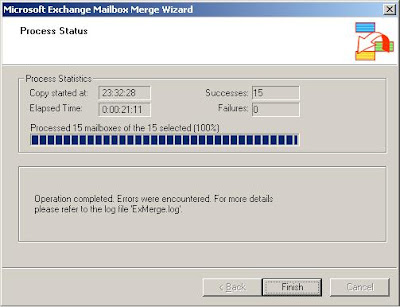
ExMerge Import succeeds with some errors

Most of the export and import errors were around the Dumpster, Deleted Items, and some Inbox issues.

The total volume of the stores increased by about 300MB once the process was finished.

A rebuild of the Offline Address Book will be required once the dust settles: KB 905813: You receive an error message when you try to synchronize the offline address list on an Exchange Server 2007 or Exchange Server 2003 server while you are using Outlook 2003: "0x8004010F".

For the Outlook clients themselves, once the process has completed, we need to kill the original Exchange Profile and reestablish it. There are keys associated with the user's Outlook OST and thus the existing OST will not work. Starting Outlook will only generate errors:

Outlook: Exchange is currently in recovery mode.

We made sure Outlook was not running, then via the Mail icon on both XP Pro and Vista we removed the default Exchange profile. In the case of those Outlook profiles that have not created an Archives.PST file yet, we created a Temp.PST file to point all new items to. The Outlook Profiles will complain if Mailbox - User Name is the only option.

Once an Exchange connection has been established by Outlook, and the post recovery email test message is in the user's inbox, we know that we are in the right place. For larger profiles the OST generation process will take some time, so be prepared to move onto another user profile while waiting.

If a Temp.PST file was created above, use the Data Files button to remove it once Outlook is happy.

One thing to keep in mind: When doing the manual PST creation from the Outlook clients, make sure to put those files somewhere on the network in one place. Once the entire organization's PST files are created, move those PST files, or rename the folder that they are in so that Outlook is not able to find them ... just in case.

The exported PST files will be needed ... that is almost 100% guaranteed.

Further blog posts related to this server crash: Further Exchange related reading and resources: This post is put together in what little time we have ... so it is not meant to be an exact step-by-step. It does flow according to the process, but the indicated documentation will facilitate the necessary deep dive that is required to get a complete grasp of what needs to happen.

So far so good, our client's users are happy. And, hopefully, we will no longer be hearing about strange Outlook behaviours!

This is one of the biggest recovery situations in the history of our company, and, also hopefully, it is now closed! :D

Philip Elder
MPECS Inc.
Microsoft Small Business Specialists

*All Mac on SBS posts are posted on our in-house iMac via the Safari Web browser.

Thursday, 17 July 2008

Intel SR1560SFHS + SRCSASRB USB HDD lockup

One of the last things we do before putting a server into production is blow it away and restore it from the backup we create just before.

In this case, we are dealing with the ShadowProtect image of the new server that served as a replacement for this crashed server (previous blog post).

There are two particular purposes for this recovery:
  1. Test restore of the production server. We provide this service on a quarterly basis for most of our clients with some opting in on a monthly recovery test.
  2. Work with an exact replica of the production Exchange Information Store database as it is not behaving.
Since we managed to salvage the Exchange store from the somewhat corrupted ShadowProtect image, the store will mount, but it will not do so on its own. After a reboot, the store needs to be manually mounted via the Services.msc console.

We ran into a bit of a peculiarity in that the server we are restoring is the soon to be production server at another client that is identically configured.

After booting the ShadowProtect Windows Vista Recovery Environment, loading the SRCSASRB drivers and running the first volume's recovery the system was locking up. No matter what we tried, even going so far as to remove the hard drive from the Thermaltake Silver River Duo enclosure and connecting it via a Thermaltake BlacX SE USB hard drive connector, the system still locked up.

A couple presses of the Num Lock key on the keyboard would bring about a red trouble light on the front of the SR1560SFHS chassis.

The firmware on the motherboard, FRU, and SDR were up to date. But, as it turns out the firmware on the SRCSASRB RAID controller has a new update this last week.

After running the update for the RAID controller and rebooting back into the ShadowProtect Vista Recovery Environment, we were able to initiate a successful series of recoveries for the three volumes on this array.

Links to previous posts on the above crashed server: More to come on the Exchange issue.

Philip Elder
MPECS Inc.
Microsoft Small Business Specialists

*All Mac on SBS posts are posted on our in-house iMac via the Safari Web browser.

Wednesday, 16 July 2008

SBS 2003 Premium - KB948110 SQL2K MS08-040 Caveat

One of our SBS 2K3 Premium servers stalled while running the security update for SQL 2000 KB948110: MS08-040: Description of the security update for SQL Server 2000 GDR and MSDE 2000: July 8, 2008.

We made sure to run the server updates first, then the Exchange ones, then we went to the SQL 2005 update for Service Pack 2.

After that, we ran the above update leaving WSUS V3 SP1 for last.

Susan makes a good point about SQL patching in her blog post: The Mess of SQL Patches. Essentially we can leave them lie for the most part.

Since we were here at the client site to talk about their upcoming server refresh, we also brought their backup drives to rotate out too.

Both servers needed updates so we ran them incrementally on both. We have the SBS 2K3 Premium SP1 with Windows Server 2003 SP2 installed and a Windows Server 2003 R2 Standard acting as a data mirror and second DC.

The Server 2003 R2 box took its updates with no issues.

The SBS 2K3 box hung up during the SQL 2000 update at the point of extracting the files. At least, that is the file process that came up when we tried to cancel the task and subsequently End Task on MSIEXEC when things had not changed 10 minutes later.

We ran an update to ShadowProtect to version 3.2 which also requires a reboot.

So, we rebooted the box and ran the WSUS SP1 update successfully.

For those running SBS 2K3 Premium and Standard there are caveats for this particular SQL 2000 update:
  • SharePoint users who upgraded from SQL Server 2000 Desktop Engine (WMSDE) to any other edition of SQL Server 2000 (for example, SQL Server 2000 Standard Edition) may be incorrectly offered a WMSDE update for this security release. This problem can occur if the SQL Server 2000 edition is not patched correctly with SQL Server 2000 Service Pack 4 after the upgrade from WMSDE. The WMSDE update may cause SharePoint to stop working. To resolve this problem if this occurs, follow these steps to restore SharePoint functionality...
  • Microsoft Internet Security and Acceleration (ISA) Server 2004 and ISA Server 2006 could be affected by this update in the following ways:
    • The MSSQL$MSFW service is stopped and then restarted when the associated database instances are updated. This action occurs if Microsoft SQL Server 2000 or Microsoft SQL Server 2000 Desktop Engine (MSDE 2000) is installed on the computer that is running ISA Server. This action also stops the Microsoft Firewall service. Therefore, the SQL Server installer tries to return the Microsoft Firewall service to the same state that it was in before the update was started. Because the update installer cannot control services on a remote server, you must monitor and possibly restart the Microsoft Firewall service and the dependent services if ISA Server is configured for remote SQL Server logging.
  • ISA Server 2006 installs MSDE 2000 together with SQL Server 2000 SP4.
Take note of these issues prior to installing. Make sure to have a good backup ... just in case.

Links: Philip Elder
MPECS Inc.
Microsoft Small Business Specialists

*All Mac on SBS posts are posted on our in-house iMac via the Safari Web browser.

Thursday, 26 June 2008

Seagate 750GB ES.2 Failure on SR1530AHLX swap experience

This is our second drive failure for this series within a short period of time.

The drive:
  • 750GB ST3750330NS Seagate ES.2
    • Firmware: SN04
    • Date Code: 08281
    • Site Code: KRATSG
    • Product of Thailand
In this case, there were two drives connected to the S3000AHLX on board RAID controller in a RAID 1 array.

The first indication of a problem was the lack of a server report in our reports folder for our client. The lack of response via RWW or VPN made it clear we were in for an on-site visit.

Once on-site, the hard drive light was solid. There was no response from the server when a monitor, keyboard, and mouse were connected. This particular 1U box is headless.

We pressed the power button for about 5 seconds to power the server down and pressed it again to power it back up and we were greeted with:
LSI RAID: Cannot detect array configuration
The only option we had was to enter the RAID BIOS. The server would not boot up.

In the RAID BIOS, we needed to tell the RAID controller what was going on. We entered the View/Add menu, chose the Port 0 drive, and was able to see that the drive on Port 1 was failed. We then needed to save the status update to the RAID BIOS.

Since we were there first thing in the morning, we booted the server up and verified that SBS 2003 R2 Premium was fully operational. Everything booted up fine. So, we left the server in that state for the business day.

When we came back at the end of the business day, we shut down the server and replaced the defective drive. This is a non-hot swap unit, so there was a little work involved pulling things apart and putting them back together.

And now comes the really big caveat: The RAID controller on this particular motherboard requires the rebuild to be accomplished while in the RAID controller BIOS. Thus, we needed to be back again first thing in the morning to reboot the server into the SBS OS. This is really surprising since all of the Intel Desktop Boards we have used the on board RAID controllers would run the rebuild in the background.

The rebuild was successful, and we had a fully functioning SBS box when it booted up, but the rebuild situation for the array was an eye opener as far as the need to initiate it manually in the RAID BIOS. FYI: The rebuild rate for the 750GB RAID 1 mirror was about 4-5 hours while the server was offline.

A little more research is in order for this situation. The new S3000SH and S3210SHLX boards show a download for the Intel RAID Web Console 2 available on the product Web page. We need to see if we can use the RAID Web Console to initiate a rebuild from within the OS. Having the ability to initiate the rebuild while the OS is online can be critical to a business with only one server.

Yes, performance will definitely be an issue as the on board RAID controller is busy trying to rebuild the array onto the new drive. But, there are ways to work with that situation versus not having the server online at all.

We were not able to install an add-in RAID controller on this particular 1U box since the only available slot was taken by a PCI-E Gigabit NIC.

For our smaller clients, there can be a struggle between cost versus performance and added redundancy and hot swap features. Having those features is just like having an insurance policy.

In this case, the insurance policy of an add-in RAID card and hot swap would have enabled us to change out the defective drive and rebuild the array without downing the server. That insurance policy would have allowed the server to keep on functioning too. It has been our experience that a drive failure on an on board RAID array tends to lock up the server or workstation.

And, one other thing: With our client having their ShadowProtect backups in place, with the last incremental taken just before the hard drive locked up, helped us to be quite confident once the situation had been assessed. Worst case scenario we were replacing the drive, recreating the array, and running the ShadowProtect recovery to recreate the SBS box's partitions. We had all of the bases covered.

Philip Elder
MPECS Inc.
Microsoft Small Business Specialists

*All Mac on SBS posts are posted on our in-house iMac via the Safari Web browser.