Showing posts with label Data Security. Show all posts

Friday, 30 November 2018

Some Thoughts on the Starwood/Marriott Reservations Database Breach

Note: This post will _not_ be a happy one.

First: The announcement page: Starwood Guest Reservation Database Security Incident Marriott International

That page is garbage, rubbish, and so much more. It exemplifies today's epidemic of spin instead of truth and responsibility for an error that harms others.

First:

image

"Marriott values our guests and understands the importance of protecting personal information."

That is a complete crock of male bovine excrement.

Especially when we look to the following:

image

"After receiving the internal security alert, we immediately engaged leading security experts to help us determine what occurred."

Okay, so just when did that security alert come in?

image

"On September 8, 2018, Marriott received an alert from an internal security tool regarding an attempt to access the Starwood guest reservation database."

Cool, so things look like they got caught really quick right? That seems to be the way this article is written right?

NOT:

image

"Marriott learned during the investigation that there had been unauthorized access to the Starwood network since 2014."

Let's rephrase all of the above shall we:

Marriott: We let unauthorized access to our reservation database happen for FOUR YEARS.

Yeah, "We at Marriott/Starwood really care about your data/PII." Really. All said with a smile.

***

In our case, the CC used for our various stays has expired very recently. So, we should be protected that way. And, to further protect things we use KeePass with unique passwords for any and all online resources with unique e-mail addresses set up for each of them (we're doing this more and more).

Suffice it to say, if the Marriott really cared about risk to our PII (Personally Identifiable Information) the reservations system would have been segmented with designated access and no Internet access. We've been applying our knowledge of network setup to segment our client's networks for years. Especially with PCI scans being somewhat generic and different depending on what org is running the scans.

Oh, and note that credit card information was stored in there too. How in the world did that pass muster with PCI scans?

image

LMHYWT (Let me help you with that) " … two components needed to decrypt payment card numbers and Marriott not able to rule out both were taken."

Tis a sad day indeed when spin and lawyer speak win out over a true "Mea Culpa" we really *insert expletive here* up.

This Marriott incident is a gross breach of trust and it is time companies be held liable for such.

Philip Elder
Microsoft High Availability MVP
MPECS Inc.
Co-Author: SBS 2008 Blueprint Book
www.s2d.rocks !
Our Web Site
Our Cloud Service

Friday, 14 September 2018

WARNING: Edge (Sync) Ate All Favourites - Favourites Gone!

We've been doing _a lot_ of work setting up a Grafana/InfluxDB/Telegraph monitoring and history system lately.

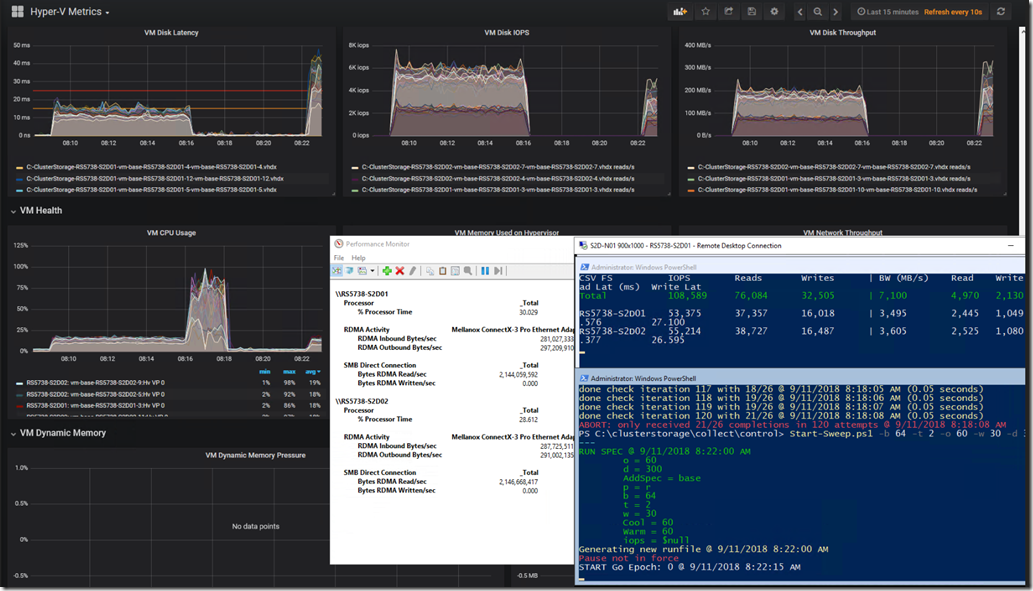
The following is our custom Kepler-64 Storage Spaces Direct 2-node cluster being tracked in a Grafana Dashboard that we've customized:

image

Grafana graphs, PerfMon RoCE RDMA Monitoring, and VMFleet Watch-AllCluster.PS1 (our mod)

Needless to say, a substantial number of links to various sites about running the above setup on both Windows and Ubuntu were lost after something seemingly went wrong. :(

Edge (Sync ?) Hiccups then Pukes

As we were quite busy throughout the day and Edge was being very uncooperative we started using Firefox for most of the browsing throughout the day.

image

Edge: Favourites Bar Shortcut Count Drastically Trimmed

The first response once things started misbehaving should have been was to use the Edge Favourites Backup feature and get them out!

When we opened Edge later in the day this is what we were greeted with:

image

Edge: Favourites Bar Shortcuts Gone!

As a small caveat one of the behaviours with Edge has been for it to either go unresponsive requiring a Task Manager Kill or when another Edge browser session was opened for it to not allow Paste or Right Click in the Address Bar or any Favourites, History, or other buttons to be shown.

So, Task Manager Kill? Nope. They were not there.

Log off and back on again? Nope.

Reboot the machine? Nope.

Both the Favourites Bar content and _all_ of our Favourites were gone.

Back Them Up!

During the above day when things started to misbehave the next step _should have been_ to grab one of the tablets they were syncing to and run a backup process without allowing the tablet to connect to WiFi and sync! Ugh, hindsight is 20/20. :P

And, much like the advice we always start out with when training users on the use of Office products the very first step they need to take is to _save_ their work before doing anything! And, once the work is done, to _save_ their work. Well, that advice is something that we will be taking from now on with regards to Edge and Favourites.

After a big day of Favourites building a backup should be taken.

So, Where Are Those Favourites?

Why, oh why do software vendors move my cheese?

In this case, the original location for those Favourites when using IE back in the day was OneDrive. If there was a hiccup somewhere between the number of different clients OneDrive Sync would append the name of the machine to the conflicting shortcuts and we'd be left with doing a quick Search & Destroy post mortem. No biggie. Not so with Edge.

Thanks to Michael B. Smith via a list we were pointed to:

The location that Edge stores those favourites is here:

  • Stored under %LOCALAPPDATA%\Packages\Microsoft.MicrosoftEdge_8wekyb3d8bbwe\AC\MicrosoftEdge\User\Default\DataStore\Data\nouser1\120712-0049\DBStore
  • Database Name: Spartan.edb

Change the somewhat hidden dropdown to Favourites and:

image

Some Edge Favourites Post Backup Import

What Does All This Mean? Edge Bug

It means that there's a serious bug somewhere in the Edge setup with Data Loss being one possible result.

It means that, for now one needs to run the Edge Export process to back those Favourites up after a serious day of adding to that list!

  1. In Edge click the Favourites/History/Downloads button
    • image
  2. Click the Favourites Star if they are not shown as above
  3. Click the Gear
  4. Click the Import from another browser button
    • image
  5. Click the Export to file button
    • image
  6. Choose a location and give the file a name
    • We drop ours in OneDrive to keep it backed up
    • image
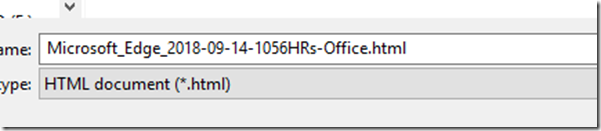
    • Naming convention: DATE-TIME-Location.HTML

The above process will at least help mitigate any choke in the Edge Favourites setup that may happen.

Warning Note

IMPORTANT NOTE: Edge does not have any kind of parsing structure for the import process.

We cannot pick and choose what to import, and, if there are still Favourites _in the database_ they may disappear/be deleted when importing!

If the bulk of the Favourites are still there then an alternative to a wholesale import would be to open the backup .HTML page and click on the needed links and Favourite them again. *sigh*

Conclusion

What does all of this mean?

Considering that we've lost data there's a very serious problem here. In our case, we're talking about a very long and full day's worth of bookmarks/favourites gone. :(

For now, it means back those favourites up _a lot_ when doing critical work that requires knowledge keeping!

Oh, and we need to set aside some time to delve into the NirSoft utility linked to above to see if there are features in there to help mitigate this situation.

Philip Elder
Microsoft High Availability MVP
MPECS Inc.
Co-Author: SBS 2008 Blueprint Book
www.s2d.rocks !
Our Web Site
Our Cloud Service
Monday, 10 September 2018

Security: RBC Royal Bank: Best laid plans of mice and men

We did some banking work with our bank, RBC Canada. In the process they sent us a few "Secure Document Access" requests that the agent provided the password for via a phone conversation.

When the first one came in, it was a bit of a system shock.

image

RBC Royal Bank "Secure Message"

The highlight is ours. Huh?!?

Given the nature of today's phishing attacks a phone call was very quick to happen to our contact after receiving the above to verify its legitimacy.

We received a number of subsequent "secure" e-mails using the same method.

The encryption process we use, and our clients use, on the ExchangeDefender (xD) system is a link to an Internet property owned by xD with the appropriate SSL properties in place to assure the recipient that they are in the right place. That's after we indicate to the recipient in a prior e-mail of the upcoming process to obtain the encrypted content.

The RBC Royal Bank method is close to that but why the .HTM attachment requirement? That's just plain weird. :S

Sure enough, this is what was in an Inbox here this morning:

image

Phishing Message

It's a poorly crafted phish attempt at best.

image

E-mail Header

The trail is pretty clear as far as where it came from and the "how" looks to be fairly clear as well.

All it would have taken was a bit better in the way of timing on the phisher's part and a bit of distraction on our part and BOOM we could have been hooked. :(

RBC Royal Bank Canada needs to change their secure document transmission methodologies please.

And, Microsoft, please give us built-in DKIM abilities for on-premises Exchange instead of keeping that to online properties only. That's not polite in the least.*See Note Below

Outlook Header How-To

Outlook users, here's how to get the header information shown above:

  1. Double click on the e-mail
  2. Click the Message tab
  3. Click the break-out button on the bottom right of the Tags category
    • image
  4. Click anywhere in the small information window
    • image
  5. Keyboard:  CTRL+A then CTRL+C
  6. Click Close and close the e-mail
  7. Paste the content into the destined app (we use Notepad)

After examining a few headers it gets pretty easy to identify the legit and illegitimate messages hitting our Inbox every day. While the process may be a bit time consuming, figuring out whether something is legit or not could be the difference between DELETE and an encryption event or Inbox/Contacts harvesting.

Happy Monday everyone and thanks for reading! :)

2018-09-10 EDIT: Oops, that Microsoft sentence should have been CUT along with the other sentences that were in a previous paragraph. Suffice it to say, we've been working on DMARC/DKIM requests and discovered that Microsoft seems to be holding DKIM off from on-premises Exchange. Thus, we need to go third party to get to use that business critical security feature. :(

Philip Elder
Microsoft High Availability MVP
MPECS Inc.
Co-Author: SBS 2008 Blueprint Book
www.s2d.rocks !
Our Web Site
Our Cloud Service

Wednesday, 29 August 2018

Legacy Windows XP for Industrial Machine Access and Management and Accounting Apps

There are quite a few systems out there that still use Windows XP or an earlier operating system to run the equipment.

So, what do we do when we need to get access to one of these kinds of machines?

Well for one, we make sure they are completely isolated and not accessible from anywhere except perhaps one secure jump point.

For another, when we do need to access the legacy system here's one method that allows for maintaining the legacy system's isolation:

  1. Enable RDP Inbound on the legacy system (Windows)
  2. Set up a vanilla Windows 7 Service Pack 1 VM that is set to not update
    • This would be our jump point
    • The Win7 VM would be left off except when needed
    • If need be, set this VM up on a laptop that can be plugged in to the legacy system's network
  3. Set up any needed tools on the Win7 VM
    • RMM, Remote Desktop Shadow/Sharing tools, Firefox (leave the base level IE in place), any needed tools
  4. Log on to the legacy Windows XP via RDP
    • Make sure Drive Redirection is enabled
    • Use Drive Redirection to transfer any files that won't go via Copy & Paste (Clipboard)
  5. Use the Win7 VM as the default work-from desktop
  6. When done, shut the Win7VM down
    • Unplug from the legacy network when done if using a laptop with the Win7VM

For legacy systems require some form of *NIX the above process can be used for a vanilla install of the needed distro and kept offline until needed.

The principle at work here is to keep the legacy systems isolated from everywhere especially the Internet. And, to keep any jump points running an intermediary operating system that is too far back to keep safe and secure offline until needed.

As an FYI, we keep one or two legacy Windows 7 and Windows XP VMs in an offline state with legacy accounting applications installed as a just-in-case. There are times where a firm may need to go way back for a client file.

Philip Elder
Microsoft High Availability MVP
MPECS Inc.
Co-Author: SBS 2008 Blueprint Book
www.commodityclusters.com
Our Web Site
Our Cloud Service

Monday, 4 September 2017

Enable 2FA (Two Factor Authentication) Everywhere It's Available!

Yes, it's a bit of an extra inconvenience.

But, that inconvenience may save the account and any data associated with it from being hijacked!

As an example, after logging into my Microsoft ID and heading into the Security section I can check and see if there is anything out of the ordinary.

image

And, low and behold what do I find? That I've attempted to log on from some interesting places!

image2FA is enabled on this Microsoft ID and all others. Amazon, Blogger, Microsoft,and any other that offer 2FA has it enabled.

There's absolutely no way in this day and age that it should not be used.

Thanks for reading. :)

Philip Elder
Microsoft High Availability MVP
MPECS Inc.
Co-Author: SBS 2008 Blueprint Book
Our Cloud Service

Friday, 15 November 2013

Some Mobile Phone Related Security Reading and Videos

This from Susan Bradley as far as what our mobile phone can say about us:

image

Now, take that the to the next level.

MVP Doug Spindler provided links to the following very informative videos.

image

Malte went to the extent to sue the mobile phone carrier his phone was hooked up with to acquire the "Metadata" they held on him. His talk brings to light some aspects of what that data does for the NSA and other intelligence gathering agencies.

Doug also shared the following TED Playlist called The dark side of data (11 talks).

image

All of the talks are worth watching . . . and not for the faint of heart!

Philip Elder
MPECS Inc.
Microsoft Small Business Specialists
Co-Author: SBS 2008 Blueprint Book

Chef de partie in the SMBKitchen
Find out more at
www.thirdtier.net/enterprise-solutions-for-small-business/

Windows Live Writer

Wednesday, 13 November 2013

Our Client CryptoLocker Warning E-Mail

This is a copy of an e-mail we are sending out on a somewhat frequent basis to our clients to keep being Internet Street Smart at the top of their minds:

Hello all,

I may have mentioned this in the past while but it bears being mentioned again.

There is a really bad malware being spread via links in e-mail that take the user to a bad site or attachments in an e-mail that contain the bad software. Its name is CryptoLocker.

If the link is clicked on or the attachment is opened the software starts up and goes on to encrypt, that is make unavailable, EVERY file the user has access to. There are two ways to get out of the mess once the infected system is found and quarantined:
1.    Best Option: Recover the files from Previous Versions (Volume Shadow Copy snapshot) … may be out by a few hours.
2.    Okay Option: Recover or from Backup … may be a bit out of time in the form of hours.
3.    Worst Option: Pay the bad guys to decrypt the data and risk identity theft among other problems of handing over a credit card number.

Simple rule of thumb: NEVER click on a link in an e-mail and avoid opening attachments if at all possible (Especially ZIP archives). And, if a link must be clicked on in an e-mail hover the mouse cursor over the link to see where it leads to. If it looks suspicious please ask!

Our systems are designed to provide maximum recoverability however the snapshots and backups are timed throughout the day. So, if there is an infection some work may be lost!

As always, please be very careful and aware that bad folks out there are always on the hunt for more victims. No business large or small is exempt from these folks nefarious activities.

We are aware of firms, fortunately not our own clients, that are on the brink of possibly being lost due to CryptoLocker and bad or unavailable backups!

Thanks and have a wonderful day! :)

We do our best to keep folks aware of what is happening out there but things are getting even more nasty for e-mail transmissions.

Philip Elder
MPECS Inc.
Microsoft Small Business Specialists
Co-Author: SBS 2008 Blueprint Book

Chef de partie in the SMBKitchen
Find out more at
www.thirdtier.net/enterprise-solutions-for-small-business/

Windows Live Writer

Thursday, 19 September 2013

Microsoft ID 2 Factor Authentication

If you have not already implemented the newly available 2FA for your Microsoft IDs then maybe it is time to look at doing that.

We’ve all seen the plethora of Yahoo and iTunes accounts compromised.

So, why not take a moment to update all Microsoft IDs used both within the business and personally to have up to date cell phone numbers for text verification and then download and configure the Microsoft Authentication App.

Once the app is on the smartphone enable and confirm 2FA in the Microsoft ID profile.

From then on any Microsoft ID protected property will prompt for the code that is presented in the Authentication App.

There is a check mark for don’t bug me here on those 2FA pages but it kind of defeats the purpose to check those on pretty much any online property now doesn’t it?

IMNSHO, this feature rocks!

Hopefully the banks catch up and start utilizing this kind of security beyond the second layer of personal question protection.

Philip Elder
MPECS Inc.
Microsoft Small Business Specialists
Co-Author: SBS 2008 Blueprint Book

Chef de partie in the SMBKitchen
Find out more at
www.thirdtier.net/enterprise-solutions-for-small-business/

Windows Live Writer

Wednesday, 31 July 2013

Blackhat 2013 – NSA General Alexander’s Keynote

The director of the NSA, General Alexander, gave a keynote address at the Blackhat conference.

Mark Maunder gives a good overview of the speech along with his thoughts around it.

The blog post is a good read and a link to an audio recording of the speech is at the bottom of the post.

But in all seriousness, headlines seen lately that the latest leaks are hurting US based Cloud businesses should be expected. Not only that, but folks need to keep in mind that pretty much all countries have some sort of monitoring agency or agencies in place.

So, again the question is begged: Who owns the data and has access to it the moment it leaves the on-premises setup?

EDIT: Hat Tip: Susan Bradley

Philip Elder
MPECS Inc.
Microsoft Small Business Specialists
Co-Author: SBS 2008 Blueprint Book

Chef de partie in the SMBKitchen
Find out more at
www.thirdtier.net/enterprise-solutions-for-small-business/

Windows Live Writer

Wednesday, 26 June 2013

Adobe Flash Player Cache Management

It’s always been a bit strange that we need to go to a third party site in order to manage content on a local computer.

image

Using that control panel we are able to see just what kind of things have been happening, at least to some degree, via the Adobe Flash plugin.

Besides that, there is Start –> Internet Options and DELETE to remove history.

Philip Elder
MPECS Inc.
Microsoft Small Business Specialists
Co-Author: SBS 2008 Blueprint Book

Chef de partie in the SMBKitchen
Find out more at
www.thirdtier.net/enterprise-solutions-for-small-business/

Windows Live Writer

Tuesday, 11 June 2013

Looking Cloudy: PRISM Reading

As things move along PRISM is making great waves throughout our industry.

Susan Bradley linked through to another awesome article on PRISM penned by Erica Absetz (eabsetz).

Erica does an excellent job of summarizing some critical aspects of PRISM with some valuable questions about how the program actually works.

Her article also contains a number of links to further articles discussing the PRISM program.

From her article:

Both Facebook and Google denied any previous knowledge of the PRISM surveillance program after concerns they may have been part of the program. Many other technology companies thought be be part of PRISM issued similar statements saying that they did not allow the government “direct access” to their systems. However, the NY Times reports that Google, Microsoft, Apple, Facebook, Yahoo, AOL, and Paltalk all negotiated with the government and were required to share information due to the Foreign Intelligence Surveillance Act (FISA). The Guardian also states that Microsoft has been a part of this information sharing program since the beginning in December of 2007 and was joined by Yahoo in 2008, Google, Facebook and PalTalk in 2009, YouTube in 2010, Skype and AOL in 2011, and Apple in 2012. At this point, it is a game of "who do you trust?" The government who finds such data incredibly valuable, or the corporations that sometimes rely on such data for their business model (e.g. Facebook). [emphasis ours]

Indeed, who can we trust?

As far as we are concerned the two words “Internet” and “Privacy” do not belong anywhere near each other.

Our Rule of Thumb: Want something to be private? Never publish it a public network like the Internet or cell network in any way shape or form. No e-mail, no picture texting, no SkyDrive, and so on. None. Nadda. Zippo. Zilch.

We here have been of the opinion that there is no sacred data sanctuary anywhere on the Internet.

Remember this?

    • Former AT&T technician Mark Klein is the key witness in the Electronic Frontier Foundation's class-action lawsuit against the telecommunications company, which alleges that AT&T cooperated in an illegal National Security Agency domestic surveillance program.

So, while PRISM is bringing to light the fact that government agencies are spying on the general population today, we seem to have very limited memories since the timelines on the above article go back to 2004!

Like any news, it is up to us to keep that squeaky wheel consistently squeaky to the _general population_ or like any other news item, and perhaps hoped for by the corporations and powers-that-be, PRISM and its implications will slowly wink out of our mind’s eye until the next “big story” breaks.

Philip Elder
MPECS Inc.
Microsoft Small Business Specialists
Co-Author: SBS 2008 Blueprint Book

Chef de partie in the SMBKitchen
Find out more at
www.thirdtier.net/enterprise-solutions-for-small-business/

Windows Live Writer

Monday, 10 June 2013

Monday Morning Monitor Cloth Reading: PRISM and it’s Cloud Implications

Yeah, the coffee may end up out there and not because we have a great moment to laugh about.

Most of us have seen bits and pieces of the news about the United States Government’s program called PRISM.

This article on Computer World is an excellent read on PRISM and the big Cloud vendor’s statements that they were oblivious.

Jonny Evans is bang on with his assessment on the big Cloud vendor’s denials place them in a very awkward position. Perhaps a better response would have been to wait things out a bit and then come clean with customers about government’s access to customer data.

We’ve all known about the possibility of governments accessing data with Cloud vendors being able to remain silent with their customers about that access.

The news about PRISM puts this reality in our faces and gives everyone a moment to have Cause for Pause.

For flat file data storage this situation presents an excellent opportunity for vendors of flat file encryption services that work on that data before it gets pushed up to the Cloud.

However, for things like hosted e-mail where raw content is sitting on the Cloud Vendor’s systems we know of no way to protect that data at all short of keeping in on-premises.

EDIT 2013-06-10: My fellow SMBKitchen author Susan Bradley has called me on my exclusion of the possibility of encrypted data hosted in Cloud based Exchange servers.

I do apologise for missing the fact that there _are_ vendors out there that can do just that.

CipherCloud is one such vendor that Susan mentioned.

So, off to their site we go and start a chat session to find out how much this service would cost us:

image

Holy Sugar Smacks!

Okay, so there are vendors out there that do this but at this time they are not very SMB friendly. :)

Philip Elder
MPECS Inc.
Microsoft Small Business Specialists
Co-Author: SBS 2008 Blueprint Book

Chef de partie in the SMBKitchen
Find out more at
www.thirdtier.net/enterprise-solutions-for-small-business/

Windows Live Writer

Wednesday, 6 March 2013

Nothing short of a shock: TDSSKiller says 2 threads detected during scan

Okay, when one hits something that may cause a question about the integrity of a system we delve into our tool chest to start pulling things apart.

TDSSKiller from Kaspersky is one such tool that we turn to if there is a suspected rootkit problem.

During the TDSSKiller scan we saw 2 Threats Found until the scan completed.

That was a bit of a heart stopping moment as the system that was being scanned is used for online banking and other such sensitive transactions (user runs as Standard though).

image

Once the process completed we were presented with the above.

It's almost laughable that the two "Threats Found" where HP driver related! :P

BTW, Kaspersky has an awesome free tools reference page.

Philip Elder
MPECS Inc.
Microsoft Small Business Specialists
Co-Author: SBS 2008 Blueprint Book

Chef de partie in the SMBKitchen
Find out more at
www.thirdtier.net/enterprise-solutions-for-small-business/

Windows Live Writer

Monday, 1 October 2012

QuickBooks Support at 1-888-414-6596 Warning

We had a client call this evening that indicated that they were having QuickBooks problems. The user must have done a search and came up with:

image

The “technician” asked to call back. When they did they brought up the Task Manager and tried to scare the user into allowing them to initiate a remote session to fix virus infections (they pointed to regular Windows processes as being the infections).

Fortunately the user stopped them in their tracks by stating they had an IT department and would get in touch with them instead.

As always, be very cautious about search results.

It is a better idea to go to the product’s Web site and initiate support contact there.

Philip Elder
MPECS Inc.
Microsoft Small Business Specialists
Co-Author: SBS 2008 Blueprint Book

Windows Live Writer

Monday, 17 September 2012

Microsoft Attack Surface Analyzer 1.0 Released

Need to know what kind of impact installing a Line of Business (LoB) application has on a server?

Run the Attack Surface Analyzer prior to installing that application to get a baseline.

After installing that LoB run the Analyzer again and compare against the baseline.

In some cases, be prepared to be surprised at the changes the LoB install made.

image

This is definitely one to keep on the Technician's Thumb Drive (blog category).

Hat Tip: Susan Bradley

Philip Elder
MPECS Inc.
Microsoft Small Business Specialists
Co-Author: SBS 2008 Blueprint Book

Windows Live Writer

Wednesday, 27 June 2012

Sage Simply Accounting Now Collects "Anonymous Information" By Default. How-To Opt Out

The following screen came up after updating a bunch of Simply Accounting systems:

image

Product Enhancement Program

Sage Simply Accounting has enrolled you in the Product Enhancement Program to help improve our software and services.

Got to like the fact that most folks may or may not pay attention to the above in a busy office or accounting firm. :(

We make sure to Opt-Out by default letting our client's users know that they can opt back in if they so desire.

Under Help click on the About Product Enhancement Program and then tick the I no longer want to participate option. Click OK to complete the process.

image

image

We prefer that vendors have OPT-IN by default not opt-out when it comes to monitoring telemetry from systems and/or software.

Philip Elder
MPECS Inc.
Microsoft Small Business Specialists
Co-Author: SBS 2008 Blueprint Book

*Our original iMac was stolen (previous blog post). We now have a new MacBook Pro courtesy of Vlad Mazek, owner of OWN.

Windows Live Writer

Tuesday, 8 May 2012

Security Video: TEDx – Avi Rubin – All Your Devices Can Be Hacked

This video is absolutely jaw dropping.

All Your Devices Are Belong To Us

Folks that develop systems, such as on board computer networks in vehicles or medical systems, that allow access via wire or wireless need to rethink the way those systems are made.

Fellow MVP Dana Epp also has some great security related videos that include simple step-by-step instructions on how to get past system security.

It’s getting to the point where the only “secure” way to live is to build a log cabin somewhere with a faraday cage and no inbound/outbound connections whatsoever. Note that there needs to be tree cover to deep keep the eyes in the sky out too.

Getting to know the risks is a part of what we do.

Philip Elder
MPECS Inc.
Microsoft Small Business Specialists
Co-Author: SBS 2008 Blueprint Book

*Our original iMac was stolen (previous blog post). We now have a new MacBook Pro courtesy of Vlad Mazek, owner of OWN.

Windows Live Writer

Wednesday, 25 April 2012

Some Thoughts on Google Drive and Internet “Privacy”

It seems that the new Google Drive service goes way beyond Dropbox and SkyDrive in their terms and conditions.

Your Content in our Services

Some of our Services allow you to submit content. You retain ownership of any intellectual property rights that you hold in that content. In short, what belongs to you stays yours.

When you upload or otherwise submit content to our Services, you give Google (and those we work with) a worldwide licence to use, host, store, reproduce, modify, create derivative works (such as those resulting from translations, adaptations or other changes that we make so that your content works better with our Services), communicate, publish, publicly perform, publicly display and distribute such content. The rights that you grant in this licence are for the limited purpose of operating, promoting and improving our Services, and to develop new ones. This licence continues even if you stop using our Services (for example, for a business listing that you have added to Google Maps). Some Services may offer you ways to access and remove content that has been provided to that Service. Also, in some of our Services, there are terms or settings that narrow the scope of our use of the content submitted in those Services. Make sure that you have the necessary rights to grant us this licence for any content you submit to our Services.

The originals are here: Google Terms of Service. Emphasis in the above is ours.

Article on the subject: CNET News: Who owns your files on Google Drive?

Dropbox and SkyDrive allow content on their services with no intent to use it to their own profit.

“Do no evil” eh Google?

We Bing for search, we Hotmail, we SkyDrive, and we Live Mesh our content sharing between systems. We avoid Google services as much as we can. Unfortunately moving off Blogger to another service would be a nightmare for the 2000+ posts on our blog so we leave that one lie.

If we are going to store information on Cloud services that requires keeping it from prying eyes we would set up a TrueCrypt container to encrypt the content prior to uploading.

We live in a day and age where SSL/TLS encryption between endpoints does not guarantee that a point in between has been compromised and is capable of decrypting and encrypting content passing through that point.

It pays to be aware of the consequences of posting everything and anything to _any_ Cloud service no matter what their Terms & Conditions are. Law Enforcement does not seem consider other folks’ content on Cloud servers when they are after something as we have seen in so many cases.

One last thing: Always assume that nothing, _nothing_ placed on any service anywhere on the Internet is secure.

So, those party pictures from last weekend? Assume they get out. The same goes for any image or video taken and shared via cell phone, tablet, or other image capture device.

Don’t want that content to get out? Then don’t post it!

There is no such thing as online privacy in the Internet Age. Period.

Hat tip: Dilip Naik of Niriva

Philip Elder
MPECS Inc.
Microsoft Small Business Specialists
Co-Author: SBS 2008 Blueprint Book

*Our original iMac was stolen (previous blog post). We now have a new MacBook Pro courtesy of Vlad Mazek, owner of OWN.

Windows Live Writer

Monday, 2 April 2012

Global Payments Inc. Breached: How Many Credit Card Numbers (says 1.5 Million) This Time?

NOTE: This is a _very_ opinionated post.

When are our government representatives going to stand up for us when it comes to data breaches that impact our day to day lives?!?

We can’t seem to embed the Bloomberg video at the following URL:

It is a good discussion of the unknown status around the hacking of payment processor Global Payments Inc.

We had our issues around the breach of Heartland Payment Systems (blog Breach category) given the way the whole thing played out. We were directly impacted by that particular breach.

Whether or not we are impacted by this current breach has yet to be seen but rest assured that we will be watching our CC online statements daily, as we regularly do anyway, for any fraudulent activities!

It is time to have legislation in place that does not allow breaches like this to fly under the radar or remain undisclosed as is the case here for _weeks_ after the breach. Our governments need to step up to protect their constituents.

It is _NOT_ up to the CEO of Global Payments Inc. to weigh things out with regards to breach disclosure.

Good on VISA for pulling their support of Global Payments Inc. Now, MasterCard, American Express, Discover, and others need to follow suit.

It is time for the credit card industry to start outright punishing payment processors for not having proper security elements in place to protect our credit card information.

Multi-Tier type authentication like AuthAnvil is not that expensive to implement. Training folks up and beyond the lowest common denominator is also a good step. That’s the cost of doing business in today’s hostile online environment.

And, no, there is NO excuse for a payment processor to not have our data protected using the best possible methods. Period.

Just ask the people that lose their life to trying to recover their identity, credit, and any other aspect of getting things straightened out after their credit card(s) and/or identity have been stolen.

Original Hat Tip: Susan Bradley

Philip Elder
MPECS Inc.
Microsoft Small Business Specialists
Co-Author: SBS 2008 Blueprint Book

*Our original iMac was stolen (previous blog post). We now have a new MacBook Pro courtesy of Vlad Mazek, owner of OWN.

Windows Live Writer

Monday, 28 November 2011

Is Intuit QuickBooks 2012 Phoning Home?

We are in the process of setting up the Intuit QuickBooks 2012 database manager on a relatively new SBS 2011 setup.

This is our first time seeing this software so we were a little surprised by the following during the QB 2012 setup routine:

image

The installer looks like the following when ready to install:

image

image

image

And finally:

image

The database management install only took a few minutes for this particular setup.

The next step in this process was to update the firewall rules on the SBS 2011 (running virtualized) to allow the database manager and its components to function. Once the firewall rules were updated we recycled both QB services.

image

image

For the moment we will be leaving the “…DB20” service alone.

To test the setup we went to install QB 2012 on the RDS server on this particular network. Again we received the prompt:

image

We choose the option to only install the QB client:

image

image

image

Now, we go and install the Intuit QB Connection Diagnostic Tool:

image

Once completed we run the tool. When the tool begins its start-up process we see the following warning several times:

image

We then run the Test Connectivity tool:

image

When we were done we clicked on the Close button and received several more prompts for the workplace URL.

We have yet to dig into Intuit’s Privacy Policy and documentation to figure out just what information is being transmitted back home. Neither the QB install routine nor the QB Connection Diagnostic Tool have any links anywhere that have any relevant information either.

image

The Help link was not very helpful either.

For now we have a look around to see if we can find any further information.

For now, the following may give us a clue as to what is going on as it was a Snip taken earlier this year:

image

With the new URL it looks as though Intuit has brought the analytics in-house.

Philip Elder
MPECS Inc.
Microsoft Small Business Specialists
Co-Author: SBS 2008 Blueprint Book

*Our original iMac was stolen (previous blog post). We now have a new MacBook Pro courtesy of Vlad Mazek, owner of OWN.