Showing posts with label Hyper-Converged. Show all posts

Wednesday, 12 December 2018

Intel Technology Provider for 2019

We just received word of our renewal for the Intel Technology Provider program:

image

We've been system builders since the company began in 2003 with my building systems for more than a decade before that!

One of the comments that gets made on a somewhat frequent basis is something along the lines of being a "Dinosaur". ;)

Or, this question gets asked quite a lot, "Why?"

There are many reasons for the "Why". Some that come off the top are:

  • We design solutions that meet very specific performance needs such as 150K IOPS, 500K IOPS, 1M IOPS and more
  • Our solutions get tested and thrashed before they ever get sold
    • We have a parts bin with at least five figures worth of broken vendor's promises
  • We have a solid understanding of component and firmware interactions
  • Our systems come with guaranteed longevity and performance
    • How many folks can say that when "building" a solution in a Vendor's "Solution Tool"?
  • We avoid the finger pointing that can happen when things don't live up to muster

The following is one of our lab builds. A two node Storage Spaces Direct (S2D) cluster utilizing 24 Intel SSD DC-4600 or D3-4610 SATA series SSDs flat meaning no cache layer. The upper graphs are built in Grafana while the bottom left is Performance Monitor watching the RoCE (RDMA over Converged Ethernet via Mellanox) and the bottom right is the VMFleet WatchCluster PowerShell.

image

We just augmented the two node setup with 48 more Intel SSD D3-4610 SATA SSDs for the other two nodes and are waiting on a set of Intel SSD 750 series NVMe PCIe AiCs (Add-in-Card) to bring our 750 count up to 3 per node for NVMe cache.

Why the Intel SSD 750 Series? They have Power Loss Protection built-in. Storage Spaces Direct will not allow any cache devices hold any data in the storage's local cache if it is volatile. What becomes readily discoverable is that writing straight through to NAND is a very _slow_ process relative to having that cache power protected!

We're looking to hit 1M IOPS flat SSD and well over that when the NVMe cache setup gets introduced. There's a possibility that we'll be seeing some Intel Optane P4800X PCIe AiCs in the somewhat near future as well. We're geared-up for a 2M+ run there. :D

Here's another test series we were running to saturate the node's CPUs and storage to see what kind of numbers we would get at the guest level:

image

Again, the graphs in the above shot are Grafana based.

The snip below is our little two node S2D cluster (E3-1270v6, 64GB ECC, Mellanox 10GbE RoCE, 2x Intel DC-4600 SATA SSD Cache, 6x 6TB HGST SATA) pushing 250K IOPS:

image

We're quite proud of our various accomplishments over the years with our high availability solutions running across North America and elsewhere in the world.

We've not once had a callback asking us to go and pick-up our gear and refund the payment because it did not meet the needs of the customer as promised.

Contrary to the "All in the Cloud" crowd there is indeed a niche for those of us that provide highly available solution sets to on-premises clients. Those solutions allow them to have the uptime they need without the extra costs of running all-in the cloud or hybrid with peak resources in the cloud. Plus, they know where their data is.

Thanks for reading!

Philip Elder
Microsoft High Availability MVP
MPECS Inc.
Co-Author: SBS 2008 Blueprint Book
www.commodityclusters.com
Our Web Site
Our Cloud Service

Tuesday, 13 November 2018

New PowerShell Guides and DISM Slipstream Process Updated

We've added two new PowerShell Guides:

We've also updated the page with some tweaks to using DISM to update images in the Install.WIM in Windows Server. The process can also be used to slipstream both Servicing Stack Updates (SSUs) and Cumulative Updates (CUs) for both Windows Server and Windows Desktop.

Thanks for reading! :)

Philip Elder
Microsoft High Availability MVP
MPECS Inc.
Co-Author: SBS 2008 Blueprint Book
www.s2d.rocks !
Our Web Site
Our Cloud Service

Monday, 6 August 2018

Cloud Hosting Architecture: Tenant Isolation

Cloud Vendors Compromised

Given the number of backchannels we are a part of we get to hear horror stories where Cloud Vendors are compromised in some way or get hit by an encryption event that takes their client/customer facing systems out.

When we architect a hosting system for a hosting company looking to deploy our solutions in their hosting setup, or to set up an entirely new hosting project, there are some very important elements to our configuration that would help to prevent the above from happening.

A lot of what we have put into our design is very much a result of our experiences on the frontlines with SMB and SME clients.

One blog post that provides some insight: Protecting a Backup Repository from Malware and Ransomware.

It is absolutely critical to isolate and off-site any and all backups. We've also seen a number of news items of late where a company is completely hosed as a result of an encryption event or other failure only to find out the backups were either wiped by the perps or no good in the first place.

Blog Post: Backups Should Be Bare Metal and/or Virtually Test Restored Right?

The full bare metal or virtual restore is virtually impossible at hyper-scale. Though, we've seen that the backups being done in some hyper-scale cloud vendor's environments have proven to be able to be restored while in others a complete failure!

However, that does not excuse the cloud customer or their cloud consultancy from making sure that any and all cloud based services are backed up _off the cloud_ and air-gapped as a just-in-case.

Now, to the specific point of this blog post.

Tenant Isolation Technique

When we set up a hosting solution we aim to provide maximum security for the tenant. That's the aim as they are the ones that are paying the bills.

To do that, the hosting company needs to provide a series of layered protections for tenant environments.

  1. Hosting Company Network
    • Hosting company AD
    • All hosting company day-to-day operations
    • All hosting company on-premises workloads specific to company operations and business
    • Dedicated hosting company edges (SonicWALL ETC)
  2. Tenant Infrastructure Network
    • Jump Point for managing via dedicated Tenant Infrastructure AD
    • High Availability (HA) throughout the solution stack
    • Dedicated Tenant Infrastructure HA edges
      • Risk versus Reward: Could use the above edges but …
    • Clusters, servers, and services providing the tenant environment
    • Dedicated infrastructure switches and edges
    • As mentioned, backups set up and isolated from all three!
  3. Tenant Environment
    • Shared Tenant AD is completely autonomous
    • Shared Tenant Resources such as Exchange, SQL, and more are appropriately isolated
    • Dedicated Tenant AD is completely autonomous
    • Dedicated Tenant Resources such as Exchange, SQL, and more are completely isolated to the tenant
    • Offer a built-in off-the-cloud backup solution

With the solution architected in this manner we protect the boundaries between the Hosting Company Network and the Tenant Environment. This makes it extremely difficult for a compromise/encryption event to make the boundary traversal without some sort of Zero Day involved.

Conclusion

We've seen a few encryption events in our own cloud services tenants. None of them have traversed the dedicated tenant environments they were a part of. None. Nada. Zippo.

Containment is key. It's not "if" but "when" an encryption event happens.

Thus, architecting a hosting solution with the various environment boundaries in mind is key to surviving an encryption event and looking like a hero when the tenant's data gets restored post clean-up.

Thanks for reading!

Philip Elder
Microsoft High Availability MVP
MPECS Inc.
Co-Author: SBS 2008 Blueprint Book
www.commodityclusters.com
Our Web Site
Our Cloud Service

Thursday, 26 July 2018

Hypervisor, Cluster, and Server Hardware Nomenclature (A quick what's what)

100 Level Post

When helping folks out there seems to be a bit of confusion on what means what when it comes to discussing the software or hardware.

So, here are some definitions to help clear the air.

  • NIC
    • Network Interface Card
    • The card can have one, two, four, or more ports
    • Get-NetAdapter
    • Get-NetLbfoTeam
  • Port
    • The ports on the NIC
  • pNIC
    • pNIC = NIC
    • A physical NIC in a hypervisor host or cluster node
  • vNIC
    • The virtual NIC in a Virtual Machine (VM)
    • In-Guest: Get-NetAdapter
    • In-Guest: Get-NetIPAddress
  • vSwitch
    • The Virtual Switch attached to a vNIC
    • Get-VMSwitch
  • Gb
    • Gigabit =/= Gigabyte (GB)
    • 1 billion bits
  • GB
    • Gigabyte =/= Gigabit (Gb)
    • 1 billion bytes
  • 10GbE
    • 10 Gigabit Ethernet
    • Throughput @ line speed ~ 1GB/Second (1 Gigabyte per Second)
  • 100GbE
    • 100 Gigabit Ethernet
    • Throughput @ line speed ~ 10GB/Second (10 Gigabytes per Second)
  • pCore
    • A physical Core on a CPU (Central Processing Unit)
  • vCPU
    • A virtual CPU assigned to a VM
    • Is _not_ a pCore or assigned to a specific pCore by the hypervisor!
    • Please read my Experts-Exchange article on Hyper-V especially the Virtual CPUs and CPU Cores section mid-way down it's free to access
    • Set-VMProcessor VMNAME -Count 2
  • NUMA
    • Non-Uniform Memory Access
    • A Memory Controller and the physical RAM (pRAM) attached to it is a NUMA node

A simple New-VM PowerShell script is here. This is our PowerShell Guide Series that has a number of PowerShell and CMD related scripts . Please check them out and back every once in a while as more scripts are on the works.

Think something should be in the above list? Please comment or feel free to ping us via email.

Philip Elder
Microsoft High Availability MVP
MPECS Inc.
Co-Author: SBS 2008 Blueprint Book
www.commodityclusters.com
Our Web Site
Our Cloud Service

Friday, 29 June 2018

Our Calgary Oil & Gas Show Booth & Slide Show

At the invitation of one of our suppliers, AVNET, I got to spend the day manning a spot in their booth.

image

Calgary International Oil & Gas Show 2018 AVNET Booth

Sitting on the table at the left is one of our Kepler-47 nodes and a series of storage devices one of which is a disassembled hard drive.

There were great conversations to be had with the folks at the other booths including Intel, Kingston, and Microsoft and their Azure IoT team among others.

Thanks to AVNET and the team. They were very gracious. :)

Here's the slideshow I put together for that monitor on the wall.

image

image

image

image

image

image

image

image

image

image

image

image

Just a note on the mentioned Intel OmniPath setup. In conversation with Intel post-slide creation it seems that OPA is not a Windows focused architecture so there's no opportunity for us to utilize it in our solutions.

To our Canuck readers have a great long weekend and to everyone else have a great weekend. :)

Thanks for reading!

Philip Elder
Microsoft High Availability MVP
MPECS Inc.
Co-Author: SBS 2008 Blueprint Book
Our Web Site
Our Cloud Service

Tuesday, 1 May 2018

PowerShell Guide Series: Storage Spaces Direct PowerShell Node Published

Apologies for the double post, one of the bulleted links was broken. :(

One of the difficult things about putting our setup guides on our blog was the fact that when we changed them, which was frequent, it became a bit of a bear to manage.
So, we're going to be keeping a set up guides on our site to keep things simple.

The first of the series has been published here:

This guide is a walkthrough to set up a 2-Node Storage Spaces Direct (S2D) cluster node from scratch. There are also steps in there for configuring RoCE to allow for more than two nodes if there is a need.
We will be updating the existing guides on a regular basis but also publishing new ones as we go along.

Thanks for reading!

Philip Elder
Microsoft High Availability MVP
MPECS Inc.
Co-Author: SBS 2008 Blueprint Book
Our Web Site
Our Cloud Service

Tuesday, 23 January 2018

Storage Spaces Direct (S2D): Sizing the East-West Fabric & Thoughts on All-Flash

Lately we've been seeing some discussion around the amount of time required to resync a S2D node's storage after it has come back from a reboot for whatever reason.

Unlike a RAID controller where we can tweak rebuild priorities, S2D does not offer the ability to do so.

It is with very much a good thing that the knobs and dials are not exposed for this process.

Why?

Because, there is a lot more going on under the hood than just the resync process.

While it does not happen as often anymore, there were times where someone would reach out about a performance problem after a disk had failed. After a quick look through the setup the Rebuild Priority setting turned out to be the culprit as someone had tweaked it from its usual 30% of cycles to 50% or 60% or even higher thinking that the rebuild should be the priority.

S2D Resync Bottlenecks

There are two key bottleneck areas in a S2D setup when it comes to resync performance:
  1. East-West Fabric
    • 10GbE with or without RDMA?
    • Anything faster than 10GbE?
  2. Storage Layout
    • Those 7200 RPM capacity drives can only handle ~110MB/Second to ~120MB/Second sustained
The two are not the mutually exclusive culprit depending on the setup as they both can play together to limit performance.

The physical CPU setup may also come into play but that's for another blog post. ;)

S2D East-West Fabric to Node Count

Let's start with the fabric setup that the nodes use to communicate with each other and pass storage traffic along.

This is a rule of thumb that was originally born out of a conversation at a MVP Summit a number of years back with a Microsoft fellow that was in on the S2D project at the beginning. We were discussing our own Proof-of-Concept that we had put together based on a Mellanox 10GbE and 40GbE RoCE (RDMA over Converged Ethernet) fabric. Essentially, at 4-nodes a 40GbE RDMA fabric was _way_ too much bandwidth.

Here's the rule of thumb we use for our baseline East-West Fabric setups. Note that we always use dual-port NICs/HBAs.
  • Kepler-47 2-Node
    • Hybrid SSD+HDD Storage Layout with 2-Way Mirror
    • 10GbE RDMA direct connect via Mellanox ConnectX-4 LX
    • This leaves us the option to add one or two SX1012X Mellanox 10GbE switches when adding more Kepler-47 nodes
  • 2-4 Node 2U 24 2.5" or 12/16 3.5" Drives with Intel Xeon Scalable Processors
    • 2-Way Mirror: 2-Node Hybrid SSD+HDD Storage Layout
    • 3-Way Mirror: 3-Node Hybrid SSD+HDD Storage Layout
    • Mirror-Accelerated Parity (MAP): 4 Nodes Hybrid SSD+HDD Storage Layout
    • 2x Mellanox SX1012X 10GbE Switches
      • 10GbE RDMA direct connect via Mellanox ConnectX-4 LX
  • 4-7 Node 2U 24 2.5" or 12/16 3.5" Drives with Intel Xeon Scalable Processors
    • 4-7 Nodes: 3-Way Mirror: 4+ Node Hybrid SSD+HDD Storage Layout
    • 4+ Nodes: Mirror-Accelerated Parity (MAP): 4 Nodes Hybrid SSD+HDD Storage Layout
    • 4+ Nodes: Mirror-Accelerated Parity (MAP): All-Flash NVMe cache + SSD
    • 2x Mellanox Spectrum Switches with break-out cables
      • 25GbE RDMA direct connect via Mellanox ConnectX-4/5
      • 50GbE RDMA direct connect via Mellanox ConnectX-4/5
  • 8+ Node 2U 24 2.5" or 12/16 3.5" Drives with Intel Xeon Scalable Processors
      • 4-7 Nodes: 3-Way Mirror: 4+ Node Hybrid SSD+HDD Storage Layout
      • 4+ Nodes: Mirror-Accelerated Parity (MAP): 4 Nodes Hybrid SSD+HDD Storage Layout
      • 4+ Nodes: Mirror-Accelerated Parity (MAP): All-Flash NVMe cache + SSD
      • 2x Mellanox Spectrum Switches with break-out cables
        • 50GbE RDMA direct connect via Mellanox ConnectX-4/5
        • 100GbE RDMA direct connect via Mellanox ConnectX-4/5
    Other than the Kepler-47 setup we always have at least a pair of Mellanox ConnectX-4 NICs in each node for East-West traffic. It's our preference to separate out the storage traffic and the rest.

    All-Flash Setups

    There's a lot of talk in the industry about all-flash.

    It's supposed to solve the biggest bottleneck of them all: Storage!

    The catch is, bottlenecks are moving targets.


    Drop in an all-flash array of some sort and all of a sudden the storage to compute fabric becomes the target. Then, it's the NICs/HBAs on the storage _and_ compute nodes, and so-on.

    If you've ever changed a single coolant hose in an older high miler car you'd see what I mean very quickly. ;)

    IMNSHO, at this point in time, unless there is a very specific business case for all-flash and the fabric in place allows for all that bandwidth with virtually zero latency, all-flash is a waste of money.

    One business case would be for a cloud services vendor that wants to provide a high IOPS and vCPU solution to their clients. So long as the fabric between storage and compute can fully utilize that storage and the market is there the revenues generated should more than make up for the huge costs involved.

    Using all-flash as a solution to a poorly written application or set of applications is questionable at best. But, sometimes, it is necessary as the software vendor has no plans to re-work their applications to run more efficiently on existing platforms.

    Caveat: The current PCIe bus just can't handle it. Period.

    A pair of 100Gb ports on one NIC/HBA can't be fully utilized due to the PCIe bus bandwidth limitation. Plus, we deploy with two NICs/HBAs for redundancy.

    Even with the addition of more PCIe Gen 3 lanes in the new Intel Xeon Scalable Processor Family we are still quite limited in the amount of data that can be moved about on the bus.

    S2D Thoughts and PoCs

    The Storage Spaces Direct (S2D) hyper-converged or SOFS only solution set can be configured and tuned for a very specific set of client needs. That's one of its beauties.

    Microsoft remains committed to S2D and its success. Microsoft Azure Stack is built on S2D so their commitment is pretty clear.

    So is ours!

    Proof-of-Concept (PoC) Lab
    S2D 4-Node for Hyper-Converged and SOFS Only
    Hyper-V 2-Node for Compute to S2D SOFS
    This is the newest edition to our S2D product PoC family:
    Kepler-47 S2D 2-Node Cluster

    The Kepler-47 picture is our first one. It's based on Dan Lovinger's concept we saw at Ignite Atlanta a few years ago. Components in this box were similar to Dan's setup.

    Our second generation Kepler-47 is on the way to being built now.
    Kepler-47 v2 PoC Ongoing Build & Testing

    This new generation will have an Intel Server Board DBS1200SPLR with an E3-1270v6, 64GB ECC, Intel JBOD HBA I/O Module, TPM v2, and Intel RMM. OS would be installed on a 32GB Transcend 2242 SATA SSD. Connectivity between the nodes will be Mellanox ConnectX-4 LX running at 10GbE with RDMA enabled.

    Storage in Kepler-47 v2 would be a combination of one Intel DC P4600 Series PCIe NVMe drive for cache, two Intel DC S4600 Series SATA SSDs for performance tier, and six HGST 6TB 7K6000 SAS or SATA HDDs for capacity. The PCIe NVMe drive will optional due it is cost.

    We already have one or two client/customer destinations for this small cluster setup.

    Conclusion

    Storage Spaces Direct (S2D) rocks!

    We've invested _a lot_ of time and money in our Proof-of-Concepts (PoCs). We've done so because we believe the platform is the future for both on-premises and data centre based workloads.

    Thanks for reading! :)

    Philip Elder
    Microsoft High Availability MVP
    MPECS Inc.
    Co-Author: SBS 2008 Blueprint Book
    Our Web Site
    Our Cloud Service

    Wednesday, 21 June 2017

    S2D: Mellanox Prep – Connecting to the Switches via SSHv2

    To update the Mellanox switch pair we can use the Web interface.

     image

    Or, we could use the command line.

    But, just what utility should we use to do that?

    For us, we’ve been using Tera Term for the longest time now.

    It’s a simple utility to use and best of all, it’s free!

    Now, it took a _long_ while to figure out how to get in via SSHv2! Note that in our case the two switches we have in our Proof-of-Concept (PoC) setup were demo units we ended up purchasing.

    During the first SSH connection the switch should prompt to run the Mellanox configuration wizard which it did for  as seen below:

    image

    Here are the steps we took to get connected:

    • HOSTNAME: 14 Characters or less (NETBIOS)
    • IP Address: Static or DHCP Reserved
    • DNS: Set up DNS A Record for HOSTNAME at IP
    • Tera Term: Use challenge/response to log in
      • image

    We’re now off to get our switches set up for RoCE (RDMA over Converged Ethernet).

    Philip Elder
    Microsoft High Availability MVP
    MPECS Inc.
    Co-Author: SBS 2008 Blueprint Book
    Our Cloud Service
    Twitter: @MPECSInc

    Friday, 16 June 2017

    S2D: Mellanox Prep for RoCE RDMA

    We are in the process of setting up a pair of Mellanox SX1012B (40GbE) switches and CX354A ConnectX-3 Pro NICs (CX3) for a Storage Spaces Direct (S2D) four node cluster.

    Setup:

    • (2) MSX1012B Switches
    • (2) NETGEAR 10GbE Switches
    • Intel Server System R2224WTTYS
      • (2) CX354A NICs per Node
      • (2) Intel X540-T2 10GbE NICs

    The Mellanox gear will provide the East-West path between nodes while the NETGEAR/Intel 10GbE will provide for node access and the virtual switch setup.

    Out of the box, the first thing to look at is … the Release Notes for the MLNX-OS version v3.6.3508 that is current as of this writing.

    As we can see, the firmware level we need to have on our CX3 NICs:

    image
    The most current version of the CX3 firmware is 2.4.7000 which we had downloaded prior to reading the release notes. ;)
    We will make sure to install 2.40.5030 once we are ready to do so:

    image
    Now, as far as the Mellanox switch OS goes (MLNX-OS), there may be a bit of a process needed depending on how old the current OS is on them!

    imageimage2.5Upgrade From Previous Releases
    Older versions of MLNX-OS may require upgrading to one or more intermediate versions prior to upgrading to the latest. Missing an intermediate step may lead to errors. Please refer to Table 2and Table 3 to identify the correct upgrade order.
    Note that there are two types of switch operating systems depending on the underlying hardware. In our case, it is PPC as opposed to x86.

    In our case, the current OS version is 3.4.0012, so our process will be:

    1. 3.4.0012 –> 3.4.2008
    2. 3.4.2008 --> 3.5.1016
    3. 3.5.1016 –> 3.6.2002
    4. 3.6.2002 –> 3.6.3004
    5. 3.6.3004 –> 3.6.3508

    Fortunately, the Mellanox download site makes picking and choosing the various downloads a simple process.

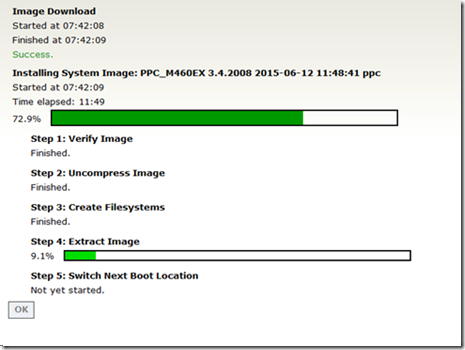
    This is what the update process looks like:

    image

    image

    One can expect to budget between 30-90 minutes per upgrade session.

    NOTE: When both switch management consoles were opened in separate IE tabs one would fail out on the upload after a minute or so. Once we opened a separate Firefox browser session for one of the switches the upgrade moved seamlessly.

    Once complete, we will move on to our preliminary settings scope for this project.

    Philip Elder
    Microsoft High Availability MVP
    MPECS Inc.
    Co-Author: SBS 2008 Blueprint Book
    Our Cloud Service
    Twitter: @MPECSInc

    Saturday, 4 February 2017

    Hyper-V Compute, Storage Spaces Storage, and S2D Hyper-Converged Solutions

    Lately, we here at MPECS Inc. have been designing, implementing, servicing, and supporting highly available solutions for hyper-converged, Hyper-V compute, Storage Spaces storage, and lab environments along with standalone Hyper-V server solutions.

    Here are some of the things we have been working on recently or have deployed within the last year.

    Cluster Solutions

    As has been posted here on our blog previously, we have invested heavily in the Windows Server 2016 story especially in Storage Spaces Direct (S2D) (S2D blog posts):

    image

    Proof-of-Concept (PoC) Storage Spaces Direct (S2D) Hyper-Converged or S2D SOFS cluster solution

    The above Storage Spaces Direct PoC, based on the Intel Server System R2224WTTYSR, provides us with the necessary experience to deliver the hundreds of thousands of real every-day IOPS that our client solutions require. We can tailor our solution for a graphics firm to allow for multiple 10GbE data reads to their user’s systems or an engineering and architectural firm that requires high performance storage for their rendering farms.

    Another Storage Spaces Direct PoC we are working on is the Kepler-47 (TechNet Blog Post):

    image

    Proof-of-Concept Storage Spaces Direct 2-Node for under $8K with storage!

    Our goal for Kepler-47 is to deploy this solution into all clients that were normally deploying a single or dual Hyper-V server setup with Hyper-V Replica. Our recipe includes Intel 3700, 3600, and 3500 series SSDs, SuperMicro Mini-ITX Intel Xeon Processor E5-1200v5 series board, the 8-bay chassis, and Mellanox ConnectX-3 for direct connected RDMA East-West traffic. Cost for the 2-node cluster is about the same as one bigger Intel Server System that would run a client’s entire virtualization stack.

    image

    2016: Deployed 2 Node SOFS via Quanta JB4602 with ~400TB Storage Spaces Parity

    In the late summer of 2016 we deployed the above SOFS cluster with the ultimate aim of adding three more JBODs for over 1.6PB (Petabytes) of very cost efficient Storage Spaces Parity storage for our client’s video and image files archive. The solution utilizes four 10GbE paths per node and SMB Multichannel to provide robust access to the files on the cluster. Six HGST SAS SSDs provide the needed high-speed cache for writes to the cluster.

    Our smallest cluster client is a 15 seat accounting firm with a 2 node clustered Storage Spaces and Hyper-V cluster (our blog post). Some of our largest clients are SME hosting companies with hundreds of tenants and VMs running on SOFS storage and Hyper-V compute clusters.

    We can deploy highly available solutions for $6K in hardware and up rendering standalone Hyper-V or VMware solutions moot!

    Server and Storage Hardware

    We primarily utilize Intel Server Systems and Storage as Intel’s support is second to none and our solution price points become way more than competitive to equivalent Tier 1 solutions. When required, we utilize Dell Server Systems and Storage for solutions that require a 4-hour on-site warranty over 3 to 5 years or more.

    Our primary go-to for disaggregated SOFS cluster storage (Storage Nodes + Direct Attached Storage JBOD(s)) are Quanta QCT JBODs and DataON Storage JBODs. We’ve had great success with both company’s storage products.

    For drives we deploy Intel NVMe PCIe and 2.5”, Intel SATA SSDs, and HGST SAS SSDs. We advise being very aware of each JBOD vendor’s Hardware Compatibility List (HCL) before jumping on just any SAS SSD listed in the Windows Server Catalog Storage Spaces Approved list (Microsoft Windows Server Catalog Site for Storage Spaces).

    Important: Utilizing just any vendor’s drive in a Storage Spaces or Storage Spaces Direct setting can be a _costly_ error! One needs to do a lot of homework before deploying any solution into production. BTDT (Been There Done That)

    The spinning media we use depends on the hyper-converged or storage solution we are deploying and the results of our thorough testing.

    Network Fabrics

    In a Storage Spaces Direct (S2D) setting our East-West (node to node) fabric is 10Gb to 100Gb Mellanox with RDMA via RoCEv1 and RoCEv2 (RDMA over Converged Ethernet) (our blog post) depending on the Mellanox NIC ConnectX version. We also turn to RoCE for North-South (Compute to Storage) for our disaggregated cluster solutions.

    For 10GbE starter solutions for both storage and compute network the NETGEAR XS716T is the go-to switch. We always deploy either the storage to compute or the workload Hyper-V virtual switch in pairs to provide network resilience. Their switches are very well priced for the entry-level to mid-level solutions we deploy.

    Cluster Lab

    It’s no secret that we invest a lot in our client solution labs and network shadow solutions (our blog post). It is a point of principle that we make sure our solutions work as promised _before_ we would even consider selling them to our clients.

    One does not need to look far for five figure, six figure, seven figure, or more solution failures. Recent catastrophic failures at the Australian Tax Office (Bing search) or 123-reg (Bing search) come to mind. It’s not difficult to find stories of very expensive solutions failing to deliver on their big promises with a big price tag.

    The onus is on us to make sure we can under promise and over deliver on every solution!

    Our Solutions

    We can deliver a wide variety of solutions with the following being a partial list.

    • Storage Spaces Direct (S2D)
      • 2 nodes to 16 Nodes
      • Hyper-Converged running both compute and storage
      • SOFS mode to provide high IOPS storage
      • Hardware agnostic solution sets
      • Host UPDs in Azure, on VMware, or our solutions
    • Scale-Out File Server Clusters (2 nodes to 5 1 JBOD or more) 
      • IOPS tuned for intended workload performance
      • Large Volume backup and archival storage
      • Multiple Enclosure Resilience for additional redundancy
    • Hyper-V Compute Clusters (2 nodes to 64)
      • Tuned to workload type
      • Tuned for workload density
    • Clustered Storage Spaces (2 nodes + 1 JBOD)
      • Our entry-level go-to for small to medium business
      • Kepler-47 fits in this space too
    • RDMA RoCE via Mellanox Ethernet Fabrics for Storage <—> Compute
      • We can deploy 10Gb to 100Gb of RDMA fabric
      • High-Performance storage to compute
      • Hyper-converged East-West fabrics
    • Shadow Lab for production environments
      • Test those patches or application updates on a shadow lab
    • Learning Lab
      • Our lab solutions are very inexpensive
      • Four node S2D cluster that fits into a carry-on
      • Can include an hour or more for direct one-on-one or small-group learning
        • Save _lots_ of time sifting through all the chaff to build that first cluster
    • Standalone Hyper-V Servers
      • We can tailor and deliver standalone Hyper-V servers
      • Hyper-V Replica setups to provide some resilience
      • Ready to greenfield deploy, migrate from existing, or side-by-side migrate

    Our solutions arrive at our client’s door ready to deploy production or lab workloads. Just ask us!

    Or, if you need help with an existing setup we’re here. Please feel free to reach out.

    Philip Elder
    Microsoft High Availability MVP
    MPECS Inc.
    Co-Author: SBS 2008 Blueprint Book

    Tuesday, 20 September 2016

    Windows Server 2016: Storage Spaces Direct (S2D) and VMware Virtual SAN IOPS?

    We’re not VMware experts here. Let’s make that very clear. 

    However, we do have the ear of many a VMware expert so we are able to ask: Is the Windows Server 2016 hyper-converged Storage Spaces Direct (S2D) setup similar to the VMware Virtual SAN platform? Apples to Apples if you will?

    The resounding answer has been, “Yes!”

    That leads us to the following articles that are about Intel NVMe all-flash hyper-converged setups:

    1. Record Performance of All Flash NVMe Configuration – Windows Server 2016 and Storage Spaces Direct - IT Peer Network
      • An Intel based four node S2D setup
    2. VMware Virtual SAN 6.2 Sets New Record - IT Peer Network
      • A VMware based 8 node Virtual SAN 6.2 setup

    What’s interesting to note is the following:

    1. Intel/S2D setup at 4 nodes
      • 3.2M IOPS at 4K Read
        • 930K IOPS at 70/30 Read/Write
    2. VMware setup at 8 nodes
      1. 1.2M IOPS @ Capacity Mode
        • 500K IOPS at 70/30 Read/Write
      2. ~830K IOPS @ Balance Mode
        • 800K IOPS at 70/30 Read/Write

    What is starting to become apparent, at least to us, is that the folks over at the newly minted Dell EMC _really_ need to pay attention to Microsoft’s feature depth in Windows Server 2016. In fact, that goes without saying for all vendors into virtualization, high performance computing (HPC), storage, and data centre products.

    We’re pretty excited about the hyper-converged S2D feature set in Windows Server 2016. So much so, we have invested quite heavily in our Proof-of-Concept (PoC).

    image

    The bill of materials (BoM) for the setup so far:

    • S2D Nodes (4)
      • Intel Server Systems R2224WTTYS with dual E5-2640, 256GB ECC, Intel JBOD HBA, Intel X540-T2 10GbE, Mellanox 56GbE NICs, Intel PCIe 750 NVMe, Intel SATA SSDs, and Seagate 10K SAS spindles
    • Hyper-V Nodes (2)
      • Intel Server Systems R2208GZ4GC with dual E5-2650, 128GB ECC, Intel X540-T2 10GbE, and Mellanox 56GbE NICs
    • Lab DC
      • An Intel Server setup including S1200BT series board and Intel Xeon E3 processor.

    Our testing includes using the S2D setup as a hyper-converged platform but also as a Scale-Out File Server (SOFS) cluster destination for a Hyper-V cluster on the two Hyper-V nodes. Then, some testing of various configurations beyond.

    We believe Windows Server 2016 is looking to be one of the best server operating systems Microsoft has ever released. Hopefully we won’t be seeing any major bugs in the production version!

    Philip Elder
    Microsoft High Availability MVP
    MPECS Inc.
    Our SMB/SME HA Solution
    Our Cloud Service