Showing posts with label Toshiba. Show all posts

Friday, 7 March 2014

Installing Windows 8.1 on a Toshiba Tecra Z50 with Secure Boot and uEFI

There seems to be a bit of a caveat installing Windows 8.1 onto a Tecra Z50 when Secure Boot and uEFI are enabled.

We cannot use an enclosure that mounts an ISO and presents it as a bootable optical drive or a USB flash drive formatted with NTFS. Whatever method we tried we ended up with various errors that lead nowhere.

Once we formatted a 4GB stick with FAT32, set it to active, and copied the Windows 8.1 content over to the flash drive we were able to install the OS as expected.

Thanks to Chris G. of Toshiba Canada for helping us to work through getting a new Tecra Z50-A set up.

Oh, and for now we need to get the required drivers from the Toshiba US site as the Canadian site is not hosting any yet.

Philip Elder
Microsoft Cluster MVP
MPECS Inc.
Co-Author: SBS 2008 Blueprint Book

Chef de partie in the SMBKitchen
Find out more at
Third Tier: Enterprise Solutions for Small Business

Monday, 25 February 2013

Troubleshooting System Instability– The MDOP Crash Analyzer Wizard

It is our preference to have Software Assurance and MDOP on all desktop operating systems in a client site. The SA benefits have been growing leaps and bounds over the last few years with MDOP being the cream of the crop.

We need to test a Toshiba Tecra R950 for some lockup issues.

The machine that we have the Crash Analyzer Wizard (a feature of DaRT via MDOP) has been around a few years.

After a couple of Next clicks we ended up with this:

image

That was one too many clicks since the files we need to analyze are MiniDump files pulled from the affected machine’s MiniDump folder. However, it’s nice to see that the machine we examined has not had a problem for about three years now! :)

image

The above check mark is the one we so blithely past by without unchecking. ;)

After unchecking that option and clicking next we get to choose our file:

image

And click Next . . .

image

Note that there are a couple of prerequisites for the tool to work:

Now, there are most certainly freebie tools out there that can run this task. But, none of them have been as simple and straightforward to get going as the Crash Analyzer Wizard.

In our first DMP we see:

image

And, in our second dump we see:

image

Both of our crashes were on the same driver. So, we have the most current ATI/AMD driver on its way down from Toshiba’s support site.

To cap it all off, the driver version indicated in Device Manager versus the individual file’s versions can be quite confusing since the files themselves have all sorts of version numbers.

Hopefully we see the problem fixed after this. Otherwise we may need to RMA this unit for a failed video subsystem. As a point of reference the Toshiba Tecra unit is an R950-00N (Canadian model).

Philip Elder
MPECS Inc.
Microsoft Small Business Specialists
Co-Author: SBS 2008 Blueprint Book

Chef de partie in the SMBKitchen
Find out more at
www.thirdtier.net/enterprise-solutions-for-small-business/

Windows Live Writer

Tuesday, 20 November 2012

Whoever Said Microsoft Burned the OEMs with Surface Was Wrong ...

We have the following product here in the shop:

WP_000887

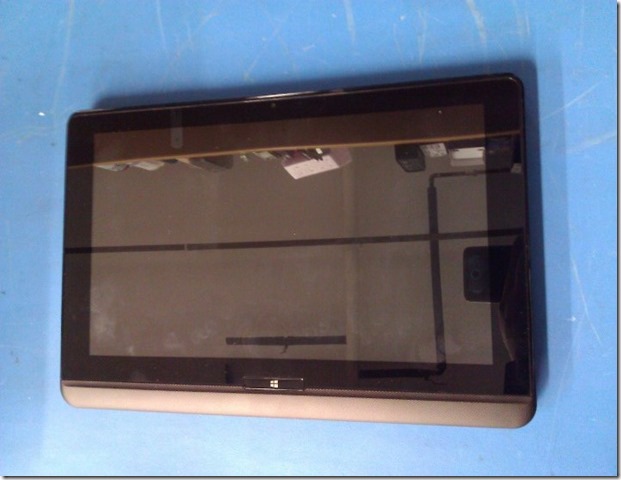
The above shot is of the Microsoft Surface sitting on top of a Toshiba Satellite U920t Ultrabook convertible.

Fernando of Toshiba Canada popped by yesterday to drop off the U920t to let us play with it for a couple of days.

Now, first off, this is an _engineering sample_ that is pre-production quality.

Let’s just say that again: The U920t is pre-production.

Let’s have a look:
WP_000882

And now the killer feature:

WP_000883

The screen slides upwards to reveal a keyboard and touch pad.

WP_000884

Now, we keep tilting the screen and:

WP_000886

We can bring that screen almost to 90 degrees perpendicular to the keyboard.

One of the principle gripes about the Surface is its one-size-fits-all stand that causes a cramp in taller folk’s neck or limits where the product can be placed for usage.

The Toshiba gives the user the freedom to tilt that display to whatever angle will be required for the given placement circumstances.

User Reaction

We have two Microsoft Surface 64GB units. One for Monique and one for myself. They have been put to good use since their purchase.

Monique’s initial reaction to the U920t was “Meh” it’s bigger and heavier.

However, as soon as the display was sliding up to reveal the keyboard her eyes absolutely lit up. The unit went over to her and we can all guess what happened next. :D

Needless to say Fernando indicated to us that the unit cannot be purchased on the spot!

They should hit Canadian distribution sometime in the next few weeks or so.

Microsoft And OEMs

IMNSHO, anyone claiming that Microsoft one-upped their OEMs was _way_ off base with those comments.

Why?

Because this _engineering sample_ once it was in our hands made it absolutely crystal clear that the Microsoft Surface is a v1 product.

The refinement and all-around integrity in the Toshiba product was and is vastly superior to the Surface in its current form.

In my mind, via my having roots in the auto industry, the Surface reminds me of the Hyundai Pony made by the then fledgling automaker. It accomplished its task but not without a lot of bugs and being technologically far behind other budget minded autos of the time.

Surface and Satellite Specs

Now, one thing to make clear.

The U920t is larger than the Surface and thus heavier. To have that keyboard tucked in as it does means more weight for the mechanism to keep things together.

Plus, we are talking about a mobile i5 processor next to the ARM in the Surface so battery weight will be greater in the U920t.

However, the Core i5 gives the U920t more grunt to work with those full Windows compatible applications.

In a way we are talking apples to oranges here in that the Surface does meet a very specific need for a light weight and ultra-portable device with a built-in keyboard. It also does almost everything that it’s PC/Laptop cousins do with a little help from a 3G/LTE hotspot.

However, despite the extra weight the size of the U920t makes it much more attractive as a laptop/portable replacement.

Oh, and the U920t solves the finger poking the screen thing that has been happening on the Portege Z830 since Windows 8 Enterprise x64 was installed on it. :)

Conclusion

We will probably have at least one Surface 64GB unit with Furry Keyboard Cover (that’s the first thought that came into my head when I saw the default keyboard – it looks furry) for sale once the U920t hits the market.

The point of this post is the following: Many took the whole Surface ecosystem as being a hit against the OEM Vendors. After seeing and working with the Toshiba Satellite U920t nothing can be further from the truth.

While in Las Colinas Texas last week for training at the Microsoft Campus for Windows Server 2012 Essentials and Multi-Point Server Lenovo did a vendor blitz in the Microsoft dining room one lunch hour. The Windows 8 convertibles and touch enabled laptops were flat out amazing to see, touch, and work with.

Again we were stymied when we wanted to purchase one on the spot! The touch enabled laptop was just _that good_.

While our thoughts on this subject may be based on a few samples of OEM Vendor’s Windows 8 products one conclusion can be drawn here: Microsoft has a _huge_ gap to make up to come even remotely close to the all-around product engineering, manufacturing, quality, and end-user experience that the current OEMs provide in their products.

The Windows 8 OS the product does not make.

One requires an attractive and solid hardware platform around the OS that provides the end-user with a platform that performs and remains relatively stable across its lifetime.

Prediction

Apple’s stock will be under a lot of pressure in the next year or two due to the loss of iDevice sales into schools and businesses as the Windows 8 portable RT and PRO platforms mature. Never mind their rumbling about dropping the Intel platform (Huh? Who the Chicken thought up that idea?!?)

While the phone side of things is still up in the air there is no doubt that Apple has a clear winner in their iOS platform across devices. The catch is that their platform is getting stale.

Microsoft and their OEM Vendor partners are only just beginning to bring about what we believe will be a revolution in personal computing like we have not seen in years.

Having the Windows 8 experience across device platforms is going to change things for WinTel and now WinARM ... big time!

Apple has gifted the industry with the freedom to produce products that no longer fit into the black or silver box mode. We believe we are now just beginning to see that happening in the PC industry across devices of all statures and abilities.

One word: Neat!

Philip Elder
MPECS Inc.
Microsoft Small Business Specialists
Co-Author: SBS 2008 Blueprint Book

Windows Live Writer

Thursday, 8 November 2012

Windows 8 x64 Enterprise Install on Portege Z830 Was Great

We tried to get the Release Candidate of Windows 8 installed on a Toshiba Portege Z830 with not very positive results.

This go around with the RTM bits was about 96% successful. We ended up needing the Bluetooth driver and the Fingerprint Reader driver from Toshiba's site.

After verifying the versions of the software we downloaded the versions attached to the Z930-007 for Windows 7 since they were newer.

In addition to those two drivers the Toshiba Service Station should be installed to keep the machine's drivers and BIOS up to date. Also, to get the special function keys to work and the ability to toggle the Touch Pad on and off requires the Toshiba Value Added Package.

In the RC we were not able to get our 14" Toshiba USB external monitor to initialize at all. The DisplayLink drivers were non-existent in the OS and the Windows 7 drivers refused to install at all. We are happy to report that the DisplayLink driver is built into RTM Windows 8.

So, we are able to run the external display via USB 2. Besides the ability to Extend the primary display for two distinct desktops we are able to Duplicate the primary display on the external display for small one or two person presentations.

A pico projector would be another option but a power supply is required. The Toshiba USB monitor is powered by the USB connection as well so no additional cables or power requirements are to be had.

There is one very noticeable addition in computing behaviour now that we have Windows 8 on the Surface, multi-monitor systems in the shop, and now the Portege Z830 with single or dual display: The tendency to reach over and touch the monitor. This tendency emerged after acquiring the Surface.  :)

Philip Elder
MPECS Inc.
Microsoft Small Business Specialists
Co-Author: SBS 2008 Blueprint Book

Windows Live Writer

Wednesday, 21 March 2012

Toshiba Finger Print Utility Error: Duplicate Records Already Exist

During a reload of the Windows 7 OS on the Toshiba Portege Z830 the Finger Print Utility kept throwing an error when we tried to set up the finger print log on.

Finger Print Utility: Error: Operation Failed. Duplicate templates already exist.

Well, that’s almost impossible unless there was something written to the BIOS/TPM set up.

Suggestions to use the Toshiba Security Assist utility failed.

The process to reset things turned out to be quite easy:

  1. Start the enrollment process.
  2. Cancel it.
  3. In the Utility Export to file.
    1. Set a password and file path.
  4. Import from that file.
  5. Run the Enrollment process again.

If there is a hiccup saving the new fingerprints make sure to elevate by clicking the Run As Administrator button on the bottom of the utility window.

Philip Elder
MPECS Inc.
Microsoft Small Business Specialists
Co-Author: SBS 2008 Blueprint Book

*Our original iMac was stolen (previous blog post). We now have a new MacBook Pro courtesy of Vlad Mazek, owner of OWN.

Windows Live Writer

Tuesday, 14 February 2012

How to Swap the mSATA SSD or RAM on a Toshiba Portege

There are a couple of gotchas when it comes to removing the bottom panel on the Toshiba Portege Ultrabook.

image

  1. Under the centre bumper is found a T8 Tamper-Proof Torx screw.
  2. The microphone and earphone jacks pin the cover in place on that side.

Once all of the screws have been removed including the tamper-proof centre screw one needs to make sure that the SD slot is empty.

Then, based on the image above gently grasp the two _opposite_ corners to the mic/ear jacks (right top and bottom) and pull up much like the cover of a book pivoting on the mic/ear side.

Once the cover is a couple of centimetres up (~1.5”) we can then slip the cover out and off over the mic/ear jacks.

When it comes to re-installing the back cover run through the opposite steps however one needs to be mindful of the VGA port as it has a slot on either side that the cover needs to nestle into.

Set the cover in place over the mic/ear jacks first and then guide it into place around the VGA port. It should essentially settle into its rightful spot with a little assistance from there.

NOTE: At no time is there any need to use force when working the back cover off or on. When removed or installed correctly the panel will essentially sit in place with no more effort than to guide it off or on.

Also, be mindful that making any changes to the default unit can and may void the Toshiba warranty.

Philip Elder
MPECS Inc.
Microsoft Small Business Specialists
Co-Author: SBS 2008 Blueprint Book

*Our original iMac was stolen (previous blog post). We now have a new MacBook Pro courtesy of Vlad Mazek, owner of OWN.

Monday, 12 December 2011

Toshiba Tecra R850 Unknown Device – VID_067B PID_2303

While setting up a new Tecra R850 with the Toshiba Hi-Speed Port Replicator II we noticed the following device in Device Manager that had an exclamation mark on it:

image

Note that the above Snip came after we found the driver for the device.

That in turn lead us to the mystery device:

image

After downloading, extracting, and running the small driver install utility we ended up with the above USB to Serial port that is found on the back of the Toshiba Hi-Speed Port Replicator II.

Philip Elder
MPECS Inc.
Microsoft Small Business Specialists
Co-Author: SBS 2008 Blueprint Book

*Our original iMac was stolen (previous blog post). We now have a new MacBook Pro courtesy of Vlad Mazek, owner of OWN.

Windows Live Writer

Friday, 9 December 2011

The New Toshiba Tecra R850–017 and Port Replicator II

The new Toshiba Tecra R850 –017 is quite the machine.

It’s killer features are:

  • 4GB of RAM out of the box.
  • True 1600x900 High Resolution Panel
  • Intel Core i7-2620M
  • SATA spindle replaced with 160GB Intel 320 Series SSD
    • This is our customization.
  • vPro enabled for remote out-of-band administration

These laptops are _quick_!

From OS load time to Line of Business application install and reboot times we have finished this batch of laptops in record time. In fact the machines were so quick we were having a hard time keeping up!

The Tecra R850 has a USB 3 port though it is using the same Renasys chipset as the Intel motherboards. So, we will be careful about which USB 3 devices we are having plugged into it since we have had some issues with NexStar USB 3 drive docks.

For our accounting firm clients the full size keyboard with integrated number pad may be a good thing. The one drawback to the keyboard is that the keys themselves are ultra glossy in their finish. The feel a bit slippery to work with. For some that prefer a matte finish to provide “finger holding power” these keys fall short.

The display panel is excellent. In this case we are rebuilding an Acer TravelMate TM6593G laptop beside the new Tecra R850s being deployed and there is a noticeable difference in the panel quality. The Tecra R850’s panel is far superior for its brightness and clarity.

Toshiba’s list of drivers for the laptop is straightforward. We were able to download all of the needed drivers and utilities to install after the laptops had Windows 7 Enterprise x64 installed.

Note that the custom button setup that the Tecra R850 has requires the Toshiba Value Added Package in order for them to function:

image

This package is _very_ important as the touchpad is very sensitive. Anyone that has a tendency to type with the palms fairly close to the laptop’s bezel will hit a frustration factor very quickly so the touchpad on/off button that sits just above it will get a lot of use.

Toshiba Hi-Speed Port Replicator II

It is important to note that the Toshiba Hi-Speed Port Replicator II that works with the Tecra R850 includes an HDMI to DVI-I adapter cable. But, the DVI-I is a male end. So, we needed to pick up some Display Port to DVI-I gender benders to plug into the Display Port instead.

The Tecra R850s were both being installed where the desks had a pair of monitors mounted on an Ergotron dual arm setup. The docks were a fair distance away so we had custom length DVI and VGA cables to accommodate these setups.

Any situation where the dock would sit behind, beside, or just below the monitors would be able to use the stock adapter cable.

In the end, the new Tecra R850 with its new port replicator are an awesome combination especially when boosted by an Intel 320 Series SSD! :)

Philip Elder
MPECS Inc.
Microsoft Small Business Specialists
Co-Author: SBS 2008 Blueprint Book

*Our original iMac was stolen (previous blog post). We now have a new MacBook Pro courtesy of Vlad Mazek, owner of OWN.

Windows Live Writer

Tuesday, 22 November 2011

Product Review: Toshiba 14” USB Mobile LCD Monitor is Excellent

Using multiple monitors on a day to day basis has become the norm for most computer users today.

For laptop users that dock their laptops it was not too much of a step to get into a couple of monitors plugged into the docking station. But, once they headed out on the road they were stuck with the one screen on the laptop which may be a low resolution HD (1366x768) panel.

Some laptop models have an HD+ LCD panel with a 1600x900 resolution. These may be a bit more bearable to work with but in the end working with only one monitor is almost always a step backwards in productivity.

Enter the Toshiba 14” USB Mobile LCD Monitor.

image

The unit itself is exactly the same size as a leather billfold that holds 8.5” x 11” paper:

image

The unit is not that heavy and packs away quite easily in the laptop bag.

image

image

The Toshiba Tecra S10 that we use here in the shop has four USB ports on it. So, we can connect two of these Toshiba USB LCD monitors without any issue. If we had a powered USB hub we could plug in more of the monitors.

The maximum number of monitors that one can plug into a laptop using powered USB is 6.

We see this product as extremely useful for those that do spot presentations with a couple or three people at a time.

We also see this product as being very useful for our accounting firm clients for on-site audits and other off-site type work where they would be a lot more productive with at least one extra monitor.

Now that we have started to use it here in the shop and while on-site there is no going back. We carry at least one or two of them with us wherever we go.

One more thing. There is an external A/C adapter available for the product to bring up the brightness of the panel. So far, we have not found a need to go beyond the brightness that the monitor provides while being powered via USB port.

If sales are really good hopefully we will be seeing larger versions of the monitor! It is a big hit wherever we go with it. And at $200 it is a phenomenal deal!

Philip Elder
MPECS Inc.
Microsoft Small Business Specialists
Co-Author: SBS 2008 Blueprint Book

*Our original iMac was stolen (previous blog post). We now have a new MacBook Pro courtesy of Vlad Mazek, owner of OWN.