Showing posts with label Microsoft Desktop Optimization Pack. Show all posts

Thursday, 29 August 2013

Microsoft Desktop Optimization Pack - Crash Dump Analyzer

This is probably one of the best tools, next to Lock Smith, in the Diagnostics and Recovery Toolset:

image

We are in the process of analyzing a bunch of MiniDump files from a system we just swapped an Asus motherboard in.

image

After each analysis it has become quite apparent that perhaps there is a bad memory stick in the system. ;)

Since our clients are on Desktop Operating System Software Assurance with the MDOP add-on for their systems we have access to this tool. It is a lot simpler to set up and get going than any other method out there.

Besides the DaRT one also receives some key virtualization rights for desktop operating systems! Software Assurance + MDOP for desktop OS is worth checking out.

Philip Elder
MPECS Inc.
Microsoft Small Business Specialists
Co-Author: SBS 2008 Blueprint Book

Chef de partie in the SMBKitchen
Find out more at
www.thirdtier.net/enterprise-solutions-for-small-business/

Windows Live Writer

Monday, 25 February 2013

Troubleshooting System Instability– The MDOP Crash Analyzer Wizard

It is our preference to have Software Assurance and MDOP on all desktop operating systems in a client site. The SA benefits have been growing leaps and bounds over the last few years with MDOP being the cream of the crop.

We need to test a Toshiba Tecra R950 for some lockup issues.

The machine that we have the Crash Analyzer Wizard (a feature of DaRT via MDOP) has been around a few years.

After a couple of Next clicks we ended up with this:

image

That was one too many clicks since the files we need to analyze are MiniDump files pulled from the affected machine’s MiniDump folder. However, it’s nice to see that the machine we examined has not had a problem for about three years now! :)

image

The above check mark is the one we so blithely past by without unchecking. ;)

After unchecking that option and clicking next we get to choose our file:

image

And click Next . . .

image

Note that there are a couple of prerequisites for the tool to work:

Now, there are most certainly freebie tools out there that can run this task. But, none of them have been as simple and straightforward to get going as the Crash Analyzer Wizard.

In our first DMP we see:
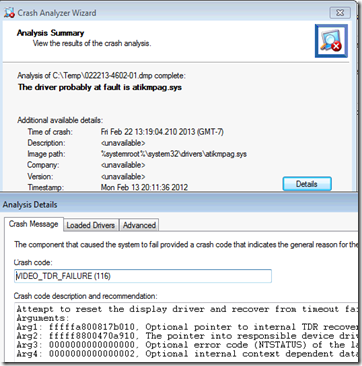
image

And, in our second dump we see:

image

Both of our crashes were on the same driver. So, we have the most current ATI/AMD driver on its way down from Toshiba’s support site.

To cap it all off, the driver version indicated in Device Manager versus the individual file’s versions can be quite confusing since the files themselves have all sorts of version numbers.

Hopefully we see the problem fixed after this. Otherwise we may need to RMA this unit for a failed video subsystem. As a point of reference the Toshiba Tecra unit is an R950-00N (Canadian model).

Philip Elder
MPECS Inc.
Microsoft Small Business Specialists
Co-Author: SBS 2008 Blueprint Book

Chef de partie in the SMBKitchen
Find out more at
www.thirdtier.net/enterprise-solutions-for-small-business/

Windows Live Writer

Tuesday, 27 December 2011

The _Right_ Way to Reset A Local Administrator’s Password

We have always been big on the Microsoft Desktop Optimization Pack.

Here is one big reason why:

image

This short video walks through the Locksmith utility that allows us to reset a password for a lost local admin account.

It has come in very handy for many of our client’s systems as well as our own. All of our clients are licensed for desktop OS Software Assurance + MDOP and so are we.

This one tool can pay for the cost of the yearly SA + MDOP subscription fee which is not very high many many times over.

Philip Elder
MPECS Inc.
Microsoft Small Business Specialists
Co-Author: SBS 2008 Blueprint Book

*Our original iMac was stolen (previous blog post). We now have a new MacBook Pro courtesy of Vlad Mazek, owner of OWN.

Windows Live Writer

Wednesday, 5 October 2011

Installing DaRT 7.0: Finding Debugging Tools for Windows?

Microsoft Diagnostics and Recovery Toolset:

image

We are installing the Diagnostics and Recovery Toolset on our back shop system to run a password recovery. We will be dropping the DaRT ISO onto a bootable flash drive but prior to doing so DaRT wants the Debugging Tools for Windows:

image

So, off we go to search for the correct download:

Unfortunately the link is to a bootstrapper that then goes on to download what we need by selecting Windows Debugging Tools under Windows Utilities:

image

Once we have completed the install process the Debugging Tools directory goes live and we can then move on to downloading definition updates for the Standalone System Sweeper:

image

We can then install any needed drivers into the bootable ISO image and choose a directory to drop the newly created ISO into.

image

Once complete we mount the ISO using Virtual CloneDrive and copy the files onto the bootable USB flash drive we will use to boot the server with.

Philip Elder
MPECS Inc.
Microsoft Small Business Specialists
Co-Author: SBS 2008 Blueprint Book

*Our original iMac was stolen (previous blog post). We now have a new MacBook Pro courtesy of Vlad Mazek, owner of OWN.

Windows Live Writer

Friday, 29 July 2011

Windows Thin PC On Its Way

We have been so busy lately that we have not had a chance to log onto the Microsoft Licensing portal and download the most current version of the Microsoft Desktop Optimization Pack (MDOP) and other products.

Today, we are downloading MDOP 2011 and Windows Thin PC both of which are a Windows Desktop Software Assurance Benefit:

image

We will drop Windows Thin PC into a VM to check out its base install size and its features. We are looking to deploy the OS on a bunch of Asus Eee PCs configured with 1GB of RAM and Compact Flash storage for a VDI setup in the near future.

MDOP has been an excellent SA benefit for us since Microsoft acquired the SysInternals toolset and turned that into an SA benefit. It is worth the look. We have SA + MDOP on all of our desktops and VMs based on retail packaged Windows 7 Pro, Vista Business and XP Pro.

Machines change so much around here that OEM does not make sense. Microsoft Action Pack desktop OS licenses could be used to add SA onto if there was a need for it but we are careful around the licensing language for the desktop OS.

Philip Elder
MPECS Inc.
Microsoft Small Business Specialists
Co-Author: SBS 2008 Blueprint Book

*Our original iMac was stolen (previous blog post). We now have a new MacBook Pro courtesy of Vlad Mazek, owner of OWN.

Windows Live Writer

Wednesday, 16 February 2011

MDOP – DaRT Crash Analysis Tools

We have a crashing laptop.

We downloaded and installed the latest MDOP so that we can access the Crash Analyzer Tool.

image

The Crash Analyzer Wizard requires the Windows Debugger Tools for whatever architecture the tools will be running on (x64 or x86):

image

Click the link in the above screen and we are taken here:

Once we have the SDK web install downloaded and running we need only install the needed tools:

image

Note that we are also going to download the Redistributable package so that we do not need to go through this process again for the 64-bit platform.

We also need both the 32-bit and 64-bit debugging symbols:

Once downloaded and installed we were able to go ahead and analyze the problematic laptop’s MiniDump files.

image

There is a native way to do this with the Windows Debugging Tools, but having the Crash Analyzer Wizard handy makes things a lot simpler for us when it comes to analyzing multiple systems throughout the day.

Philip Elder
MPECS Inc.
Microsoft Small Business Specialists
Co-Author: SBS 2008 Blueprint Book

*Our original iMac was stolen (previous blog post). We now have a new MacBook Pro courtesy of Vlad Mazek, owner of OWN.

Windows Live Writer

Monday, 20 December 2010

Windows XP Mode – Boot From An ISO Instead Of XP

We set up a user’s Windows XP Mode a while back, ran updates and left it until it was needed.

One thing we neglected to do was to keep a record of the XPMUser local admin account.

Now, the setup process for Windows XP Mode takes a fair amount of time, so we dropped an ISO of ERD Commander onto the machine (our clients have MDOP) and hooked it into the Windows XP Mode VM.

One catch however was this: How do we boot from that ISO?

The answer was found after some searching here:

Essentially, we disable the Integration Features in the VM’s settings, reboot, and hit the DEL key until we get into the VM’s vBIOS. We can then change the boot order for the task at hand, make the password change, and set things back once into the OS.

image

Total time spent was about 5-10 minutes.

Philip Elder
MPECS Inc.
Microsoft Small Business Specialists
Co-Author: SBS 2008 Blueprint Book

*Our original iMac was stolen (previous blog post). We now have a new MacBook Pro courtesy of Vlad Mazek, owner of OWN.

Windows Live Writer

Saturday, 20 September 2008

Further to MDOP ... Info for you to download

Feeling the need to look into the Microsoft Desktop Optimization Pack (previous blog post) a little more but only have a couple of minutes?

Then check this out: Microsoft Desktop Optimization Pack (MDOP) Demonstration By Christopher Perez Estonina, MDOP Specialist, Microsoft Asia Pacific Presentation Deck by Christopher Perez Estonina who is an MDOP specialist. Note that registration will be required.

You will find 16 slides that will give you a quick and simple presentation of some of the key MDOP features ... check it out ... it is well worth the time.

Philip Elder
MPECS Inc.
Microsoft Small Business Specialists

*All Mac on SBS posts are posted on our in-house iMac via the Safari Web browser.

Friday, 19 September 2008

MDOP - ERD Commander V6 - x86 or x64?

A bonus for having Software Assurance on all of our Windows Vista installations is the Microsoft Desktop Optimization Pack (MDOP).

One of the kewlest tools in the MDOP pack is ERD Commander. It is a product that gives us low level access to the OS to bring about repairs or changes to get things working when things break.

It was also quite expensive prior to Microsoft's acquiring of Winternals.

There is a small caveat when working with the new version of the product: The OS architecture installed on the machine we are using to create the ERD utilities disk is the architecture that goes onto the disk.

That is, when creating the rescue tools disk from a Windows Vista x86 based machine, the rescue disk created will be x86 based and only work on x86 OS based machines.

If the rescue tools disk is created on a Windows Vista x64 based machine, then the rescue disk will also carry the x64 architecture and only work on x64 OS based machines.

Check out ERD Commander ... it is an absolutely amazing product with some awesome tools. It has saved our client's bacon many a time!

Many of those tools are not known very well either ... since most people are looking for BartPE disks for certain tasks when the tools for those tasks are actually available right here on the ERD Rescue Disk and not requiring any build finagling to get working ... if they have SA on Vista that is! ;)

Philip Elder
MPECS Inc.
Microsoft Small Business Specialists

*All Mac on SBS posts are posted on our in-house iMac via the Safari Web browser.

Monday, 25 August 2008

SBS 2003 Open Value License Part Numbers

Any clients we are picking up or upgrading we are putting into an Open Value License with the 3 year spread payment option.

Here are some Open Value license + Software Assurance part numbers for you:
  • T75-00927: SBS 2K3 Premium with 5 CALs
  • T74-01746: SBS 5 User CAL Pack
  • P73-01420: Windows Server 2003/8 Standard

Office 2007:

  • 269-09046: Office 2007 Pro Plus
  • 269-09061: Office 2007 Pro Plus Software Assurance ONLY (for clients with Licenses)
  • W87-00356: Office 2007 Small Business Edition
  • 021-07257: Office 2007 Standard
  • 076-03395: Office Project Standard 2007

Desktop OS:

  • 66J-01418: Vista Business with Vista Enterprise Software Assurance Up + SA.
  • WSB-00073: Microsoft Desktop Optimization Pack (shown per month - need 12/seat)

System Center Essentials:

  • UCH-00357: Microsoft System Center Essentials - license & software assurance
  • DJA-00834: Microsoft System Center Essentials Server Management License - license & software assurance
  • 4PX-01112: Sys Cntr Essntls ClientML Sngl Lic/SA Pack OLV 20 NL 1YR Acq Y1 Promo
  • A5S-00457: Microsoft System Center Data Protection Manager - License & software assurance - 1 server - additional product, 1 Year Acquired Year 1 - Open Value - Win - English
  • CVA-00079: Microsoft System Center Data Protection Manager Standard Server ML - License & software assurance - 1 operating system environment (OSE) - additional product, 1 Year Acquired Year 1 - Open Value - Win - Single Language
  • SNA-00274: SYST CTR VRTL MACH MGRWGE SNGL LIC/SA PACK OLV NL 1YR ACQ Y1 PROMO
Remember, right now the best value on the planet for our clients is an Open Value Agreement on their new SBS 2003 purchase.

What client is going to argue with a substantially reduced price for the upgrade:
  • Included
  • Free
  • Aux Gratis
  • Etc ...
Philip Elder
MPECS Inc.
Microsoft Small Business Specialists

*All Mac on SBS posts are posted on our in-house iMac via the Safari Web browser.

Friday, 16 May 2008

Microsoft Desktop Optimization Pack Links

These links should have been with the last post! :D

Microsoft Desktop Optimization: A snapshot of the toolset included in MDOP:


The above PDF is here: Microsoft Diagnostics and Recovery Toolset.

Philip Elder
MPECS Inc.
Microsoft Small Business Specialists

*All Mac on SBS posts are posted on our in-house iMac via the Safari Web browser.

MDOP 2008 Available for download for Open Licensing Clients

This update must have appeared relatively recently, as we did not see it until we logged in today:

MDOP 2008 Download

The big thing for us and what was our current Microsoft Desktop Optimization Pack (MDOP) 2007 edition was the discovery of not being able to work with a Windows Vista installation that had a lost local admin password. The user had set things up so that once they were configured they did not need the admin account for any changes.

Booting to ERD Commander 2005 (a part of MDOP 2007) to change that admin password led us to the message that ERD Commander could not find any supported operating systems!

The MDOP 2008 download is a compressed file that upon extraction we could see:

ERD Commander 2005 plus two new files for 2008

Prior to running the Recovery Tools setup, the following files will be needed: We ran the x64 version of the MSI file as this workstation is running Windows Vista x64.

Here are some highlights from the install routine:
  1. A Windows Vista DVD will be required to create the image:

    • Vista DVD required. ISO will not work.

  2. Note that if the ERD setup is being run on x64 architecture, then the DVD for the image must also be an x64 based Vista OS.

  3. The setup will ask which tools need to be installed onto the bootable disk, we left the default which was the complete set.
  4. Setup will ask for the Windows Debugging tools. Note the default folder location setup requests:

  5. Once the above files have been downloaded and installed, the folder location will actually look like this:

  6. The Standalone System Sweeper will request a definition download which we allowed. Note that the download may take a few minutes.
  7. We are then presented with a request for additional drivers to be installed into the WinPE environment:

  8. Because we work primarily with Intel products, we made sure all of the regularly used RAID and NIC drivers were extracted and ready to install:

  9. We are then presented with the opportunity to add any additional files and folders that will be accessible once we boot to WinPE:

  10. Remember that any additional drivers and utilities that would be made available must be in the x64 flavour to work. We have a couple of bootable flash drives, one for x86 and one for x64 WinPE. We use them to install our lab images onto our lab systems. So, we pulled some of the necessary utilities from them to this WinPE setup too.
  11. The ISO image will be generated to a folder we select.
  12. Once the ISO image has been completed, we are presented with the option to burn it to a DVD.
The ERD Commander utility has more than paid for our Windows Vista Software Assurance. It provides us with a simple way to get into any system, whether DC, domain member, or standalone, to change the admin password. Thus we do not have to go through the pain of trying to figure out the plethora of other "admin password change solutions" out there.

There are also a huge number of additional utilities included with Windows Vista Software Assurance. It is well worth the expense.

Philip Elder
MPECS Inc.
Microsoft Small Business Specialists

*All Mac on SBS posts are posted on our in-house iMac via the Safari Web browser.

Thursday, 22 February 2007

System Builder Tip: Get the Winternal's Admin Pack - Or Vista SA & Get it Free!

Mark Minasi's Supporting Windows Vista audio CDs that I purchased a little while ago just paid for itself a thousand times over.

How?

He mentions during his introduction on CD 1 that the Winternal's Admin Pack would soon be introduced as one of the free parts of Vista's Software Assurance benefits.

So, off to Winternal's site I go to find out more. They do indicate that the Admin Pack is available for the time being, but soon to be only offered to Vista Software Assurance clients with a link to the Vista SA site.

On the Vista SA site, check out those tools at the bottom that are going to be included as well!

(Best Daffy Duck) Ohhh Booyyy! Ohh Booyyy!

Vista Software Assurance is really kewl!

SKU for Open Value Year 1: 66J-01283 (minimum 5 on the first order & 3 year commitment).
Vista Business Retail SKU: 66J-00002

If you need to use the Admin Pack tools now, go for it. One can save you from having to flatten a domain for a changed and forgotten SBS Admin password, or from having to muck around trying to figure out how to use the "tools" that are out there to do it. We have had very little success with those "tools".

We have worked with a company that has the Admin Pack tools, and they demonstrated the method to change the domain admin password in one server reboot on one of our virtual SBS test boxes. I was impressed to say the least.

Legit is where it's at! :D

Philip Elder
MPECS Inc.
Microsoft Small Business Specialists