Showing posts with label Windows Vista Enterprise. Show all posts

Saturday, 13 June 2009

XP Pro to Vista Enterprise In-Place Upgrade Error – Workstation Reboots

We are in the process of concluding a project for one of our non-profit clients upgrading their Windows XP Professional workstations to Windows Vista Enterprise with Service Pack 1.

One of the workstations refused to come back up on the reboot that takes us into the user name, password if any, computer name, and network type. It kept getting into the Windows Vista boot cycle to the point where the screen would go black just prior to the first question screen.

After watching the system do this for a couple of cycles, the one thing that seemed to be happening all the time was the optical drive light coming on solid just before the spontaneous reboot. The Windows Vista Enterprise DVD in the drive would not spin up though.

So, after trying to get into Safe Mode and being told that the install routine could not run in Safe Mode, we pulled the DVD just before the point where the light would come on.

The install routine kept happily humming along and eventually got to the requisite questions.

Here we are a number of hours later running the first round of WSUS delegated updates:

image

The troublesome workstation is not shown in this screenshot as it has seemingly started the update installs when we put it into a forced reboot cycle.

Philip Elder
MPECS Inc.
Microsoft Small Business Specialists
Co-Author: SBS 2008 Blueprint Book

*All Mac on SBS posts will not be written on a Mac until we replace our now missing iMac! (previous blog post)

Windows Live Writer

Sunday, 31 May 2009

Vista Service Pack 2 Not Applying Group Policy Preferences

We are collaborating on an SBS 2008 and Windows Server 2008 Core Hyper-V fresh installation.

The Hyper-V server will host 8 Windows Vista desktops for the organization that has users that are out of the office more than 85% of the time.

This solution keeps their data organized and protected as well as enables them to run a Line of Business application that is not Terminal Services friendly.

The Vista software is provided by a base retail OS purchase with Open Value Vista Upgrade + SA added.

The media that was downloaded for the VMs:

image

A fresh Windows Vista Service Pack 2 OS.

Well, we have discovered that the slipstreamed version of the OS does not have the Client Side Extensions functioning properly.

After troubleshooting our User and Computer based GPOs that contain Preferences, the following page came up in a search:

Ouch … this is not a happy scene because we had to burn critical time today troubleshooting this problem instead of placing the new SBS domain into production.

Jake Paternoster in the above TechArena page gave us a good lead towards the solution, but for some reason we could not come up with quite the right process to get the CSEs to install.

But almost every combination that we could come up with would fail with:
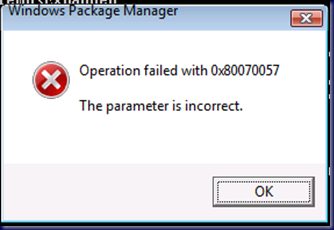
image

Or, at least UAC us but still fail ... with nothing in the Event Logs to even give us a clue as to what we were running up against.

But then, wait! It gets better! After leaving the first Vista SP2 VM alone for a while then coming back to work through the processes and see if we missed anything the GPPrefs were applied! 8O

So, was it the RSAT and GPMC that was enabled that made things work? Or, was it running the GP wizards in the GPMC that got things going?

Since we have 8 VMs to play with, we started with the next one and worked our way backwards through the process to figure out which step actually worked.

Gotta love these in the middle of everything too:

image

Windows 7 TS Client. They have not been very frequent, but they seem to hit when they are the least welcome!

Here is the methodology for getting things working:

  1. Download the CSEs (Microsoft KB site).
  2. Copy the KB file to C:\KB943729
  3. Open an elevated command prompt.
    • It is absolutely necessary that the command prompt be elevated with the domain admin credentials.
  4. Navigate to C:\KB943729
  5. expand Windows6.0-KB943729-x86.msu –F: *\KB943729 [Enter]
    • Note the space _ in between the –F:_*
  6. Delete the original Windows6.0-KB943729-x86.MSU
  7. start /w pkgmgr.exe /ip /m:C:\KB943729\Windows6.0-kb943729-x86.cab [Enter]
    • No quotes around the path.
    • Make sure the full path including the CAB is there.
    • A bunch of files and folders will show up in the directory. This indicates that the CSEs are seemingly installed.
  8. GPUpdate /Force [Enter] 
  9. shutdown –r –t 0 [Enter]

Note that the syntax of the PkgMgr.exe command is extremely important ...

The actual command line format is to be found in this link:

Lesson:

  • Question:
    • What is the definition of insanity?
  • Answer:
    • Doing the same thing over and over and over again and expecting a different result! ;)

Philip Elder
MPECS Inc.
Microsoft Small Business Specialists
Co-Author: SBS 2008 Blueprint Book

*All Mac on SBS posts will not be written on a Mac until we replace our now missing iMac! (previous blog post)

Windows Live Writer

Thursday, 1 November 2007

Windows Vista - Enterprise Edition and BitLocker

For Windows Vista Ultimate one only need download the BitLocker and EFS enhancements via the Ultimate Extras to obtain the BitLocker Drive Preparation Tool.

When setting up our Windows Vista Ultimate/Enterprise systems we made sure to leave the necessary partition space for the unencrypted boot files that BitLocker requires which is 1.5GB.

When we ran the BitLocker Drive Encryption utility it told us that the drive was not properly configured to enable BitLocker.

It seems that things did not work out as we thought from the instructions we read.

So, we needed the BitLocker Drive Preparation Tool. For Windows Vista Enterprise, we needed to contact Product Support Services (or the Online Concierge) and ask for the following Knowledgebase article: Be specific with them as far as why you are calling. And note that the tool comes in both a 32bit and 64bit version. We obtained both.

After downloading and installing the tool, we were greeted with the need to "shrink down the C: volume" and create the active volume R: for the BitLocker files:

BitLocker Drive Preparation Tool

Once the drive preparation tool finished, we were able to go on and run the BitLocker Drive Encryption Utility.

Both the 32bit and 64bit versions of this utility are definitely going onto the Technician's Thumb Drives!

Philip Elder
MPECS Inc.
Microsoft Small Business Specialists

*All Mac on SBS posts are posted on our in-house iMac via the Safari Web browser.

Wednesday, 31 October 2007

Windows Vista - Now ... Just Exactly What is in What Edition Again?!?

We have our Retail (Fully Packaged Product - FPP) boxed XP Pro and Vista Business on which we base our Open Value Software Assurance benefits.

We are eligible for the Windows Vista Ultimate upgrade or Windows Vista Enterprise upgrade editions with our Software Assurance Benefits.

Okay, now ... can someone tell us simply and clearly: What is the difference between Windows Vista Ultimate and Enterprise features in one page or less ... preferably via a grid?

Microsoft's Windows Vista Choose an Edition site does not clarify that.

So, we click the link at the bottom of the Vista Comparison Grid:
Large, global organizations with complex IT infrastructures should consider Windows Vista Enterprise edition.
Therein we find a link to Vista Enterprise's features. Still, we don't find a grid to compare to other Vista editions.

With a little bit of searching, we came up with this excellent Windows Vista Edition comparison article at Paul Thurrott's SuperSite for Windows: Windows Vista Review
Part 2: Understanding the Vista Product Editions
. We are provided with a grid, and the answer to the question we were asking.

The answer is: The primary difference between the two editions is the inclusion of Media Center features along with the Media Center Extensions and DVD making software in Vista Ultimate Edition.

For us, the differences are important as we need to explain to our client's senior partners the edition options that can be installed on their systems. We may also be required to run some training for our client's partners on the Ultimate feature set either here or on-site.

Philip Elder
MPECS Inc.
Microsoft Small Business Specialists

*All Mac on SBS posts are posted on our in-house iMac via the Safari Web browser.