Showing posts with label Mac on SBS. Show all posts

Monday, 30 May 2011

Office for Mac Standard 2011 with Service Pack 1

We are in the process of getting ready to re-install the OS on our MacBook Pro.

Prior to doing so, we were looking for the newest Microsoft Office for Mac on the Microsoft Licensing Web site since we have our Office for Mac licensed under Open Value Agreement.

image

The download is a healthy 1,033MB or just a hair over 1GB in size!

The reason for the reload?

The MacBook Pro has been sitting on the shelf due to our being so busy for quite a while now. Guess what? It was not AD integrated and neither the user nor the master passwords were documented. It happens. :)

Fortunately it does not contain any critical data in the encrypted user setup.

Philip Elder
MPECS Inc.
Microsoft Small Business Specialists
Co-Author: SBS 2008 Blueprint Book

*Our original iMac was stolen (previous blog post). We now have a new MacBook Pro courtesy of Vlad Mazek, owner of OWN.

Windows Live Writer

Monday, 9 May 2011

Mac Rogue Security Software

It was only a matter of time before folks started writing malware for Macs as Apple’s market share grew.

It is official: Sophos: Naked Security: Mother's Day search terms lead to Mac rogue security software

The following is a good demonstration of the malware’s attack on the Mac:

Malware Mac Attack

While Sophos goes on to plug their product for the Mac at the end of the article itself, this situation really begs the question: Will mainstream A/V vendors be in the same boat as they are today where we will need to go to a third party like Malwarebytes to remove the malware?

That is, will mainstream A/V products _still_ not be able to protect the Mac from this type of attack?

As is the case on the PC, one needs to be very aware of what they are doing at all times along with how to react when something like this happens.

In our opinion, Apple has lulled many into a false sense of security over the years. With their market share growing it was pretty obvious that these types of attacks were bound to happen. Now that they are we shall see if folks keep buying Macs.

UPDATE: Hat Tip: Jeremy of SFNIS via the SBS2K Yahoo List.

Philip Elder
MPECS Inc.
Microsoft Small Business Specialists
Co-Author: SBS 2008 Blueprint Book

*Our original iMac was stolen (previous blog post). We now have a new MacBook Pro courtesy of Vlad Mazek, owner of OWN.

Windows Live Writer

Monday, 16 November 2009

Sierra Wireless 306 USB Modem Install On The MacBook Pro

We picked up a new Sierra Wireless 306 HSPA cellular modem on Friday.

Unfortunately, our carrier seemingly had issues getting it activated so we had no cellular modem available to us over the weekend. A call from them this morning, and a flip of some sort of switch and we now have connectivity on our Windows machines.

The MacBook Pro did not install the same way for the 306 as the previous Sierra Wireless 598 CDMA 3G modem.

Once the post install reboot was finished, we had the strangest message about a New Network Found when the 306 was plugged into the MacBook Pro.

When we clicked through the message, we were presented with the following nondescript, and really strange window:


09-11-16 Sierra Wireless - New Network.png

Now, our provider did not give us any information to fill out the requested fields.

After searching around for a while, some information on Sierra Wireless's Web site provided a clue as to what we needed to do. We say clue because the instructions linked to do not apply specifically to Snow Leopard as there are differences in the set up routine.

Note that in the above screenshot that the Apply button is no longer available. That is because it was available and clicked on even though no specific information was entered in any of the fields.

Strangely enough, even with the empty fields, the 3G Watcher utility's Connect button showed up after clicking Apply.


09-11-16 Sierra Wireless 3G Watcher.png

The new 3G HSPA network is significantly faster than the "3G" CDMA network that the Sierra Wireless 598 connected to. As a result, we will need to keep an eye on the data usage as a true 3Mb connection can add up very quickly.

Philip Elder

MPECS Inc.

Microsoft Small Business Specialists

Co-Author: SBS 2008 Blueprint Book


*Our original iMac was stolen (previous blog post). We now have a new MacBook Pro courtesy of Vlad Mazek, owner of OWN.

Thursday, 12 November 2009

MacBook – You can’t turn on FileVault to protect the home folder of this user account.

Ack!

After finally figuring out how to get the MacBook to recognize the new Intel SSD (another post coming on this one), we ran into this lovely roadblock when enabling the home folder encryption setup called FileVault:

image

You can’t turn on FileVault to protect the home folder of this user account.

The home folder is located on a volume that isn’t in Mac OS Extended format.

Um, when we installed OS X 10.6 via the MacBook Pro DVD we chose the Mac OS Extended format for the hard drive. Though, we also included case sensitivity along with journaling.

So, what gives?

A few searches for the error turned up the following:

Essentially, we need to reinstall the OS via the DVD. Since this is a fresh install, it is not a really big deal. Apparently FileVault cannot be enabled when the disk was formatted to include case sensitivity in its structures.

This is a bit weird since the underlying OS for Snow Leopard is a UNIX derivative where case sensitivity has been a part of the OS setup since the beginning.

We have now learned that the type of disk format we use during an initial set up of any Mac will impact future uses of that Mac.

BTW, gotta love the non-descript error eh? It’s not like we haven’t seen those before in the Windows world! ;)

Philip Elder
MPECS Inc.
Microsoft Small Business Specialists
Co-Author: SBS 2008 Blueprint Book

*Our original iMac was stolen (previous blog post). We now have a new MacBook Pro courtesy of Vlad Mazek, owner of OWN.

Windows Live Writer

Force Eject a CD/DVD From the MacBook Pro

In the process of swapping the 160GB 5400RPM Hitachi hard drive for an Intel 160GB second generation SSD, there was a disk in the optical drive that would not come out when the eject button was pressed.

Now, on the MacBook Pro optical drive there is no pinhole for us to use a paperclip or the like to force eject a disk in the drive.

It turns out that all we needed to do was hold down the trackpad button prior to powering up the MacBook Pro.

Sure enough, after holding the button down and powering up the unit out came that disk.

Philip Elder
MPECS Inc.
Microsoft Small Business Specialists
Co-Author: SBS 2008 Blueprint Book

*Our original iMac was stolen (previous blog post). We now have a new MacBook Pro courtesy of Vlad Mazek, owner of OWN.

Windows Live Writer

Wednesday, 21 October 2009

Apple MacBook Pro - Simplicity And Elegance In Packaging

When I first received the MacBook Pro from Vlad, the first thing that impressed me about the package was the Apple branded high quality bag with a rather large slip cord that the MacBook's box came in.

So, the initial impression of the entire packaging was one of elegance.

Once the box was out of the bag, it was not difficult to see that a lot of thought went into the presentation of the MacBook's external packaging.

As much as we may not want to admit it, first impressions can make or break a deal, can really make or break our experiences with a product, or even make or break our initial contact with a prospect.

And, I must admit that Apple has really hit this one out of the park!

Upon opening up the box, the MacBook was laying in a cove of sorts with a black tab wrapped over it that had Designed by Apple in California in white lettering. The box itself being white in colour left no hint of brown cardboard anywhere.

Wow!

Pull up on the tab and the MacBook Pro gets lifted up enough to grab and pull out of the box. The unit itself along with the A/C adapter had a clear plastic wrap around them as protection. The wrap ends had resealable non-stick strips holding them down. So no there was no sticky mess to deal with.

Now, the kicker: The plastic wrap had a distinctive pattern and way about how it was wrapped around the MacBook Pro and the adapter. The pattern reminded me of the days when folks used to take care to wrap a package in the heavy brown paper with the folds just so and the corners buttoned down in a very symmetrical way. Think hospital corners in the sheets here.

Once the MacBook Pro was out of the box and I was able to have a closer look at the unit I was very impressed with its simplicity and elegance. The design of the MacBook is very clean and crisp with every line and curve having a purpose.

There is a very good reason why Mac users identify with their Mac and have a fairly strong attachment to it. It all starts with the unpacking experience. And it truly is an experience.

But then reality came home to roost:IMAG0194.png

As great as the whole unpacking experience and first impression was, the reality is that our systems, whether Mac or PC, are very complicated machines that sometimes don't behave as we would expect them too.

Not to worry though, I am still very impressed with the MacBook Pro. Apple has done an amazing job putting together a product that folks can get very excited about.

And, they are learning that users need Exchange integration to actually get some work done! ;)

Posted with MarsEdit that does support uploading to Blogger's Picasa Web Albums natively. Now hopefully the use of DIV tags instead of P tags makes the paragraphs look cleaner than the last post. MarsEdit gets the nod as editor of choice for us on the MacBook Pro!

Philip Elder

MPECS Inc.

Microsoft Small Business Specialists

Co-Author: SBS 2008 Blueprint Book


*Our original iMac was stolen (previous blog post). We now have a new MacBook Pro courtesy of Vlad Mazek, owner of OWN.

Excel 2008 Mac Excel 2007 PC Version Weirdness

Probably the one biggest hiccup that happens when working on the same Excel 2007 native (XLSX) spreadsheet at one point on the MacBook Pro and then on the PC is a mysterious margin change.

We have a number of fairly complicated quotation sheets that we have built in Excel on the PC.

When we set up the quote on the PC, then go in and tweak it later on via the MacBook Pro, the MacBook refuses to PDF or print the spreadsheet in the same manner as the PC.

For some really strange reason, the Mac will shift the right margin to the left by two columns (1 Pt each) and thus refuses to print the page out as we would expect.

Here is a screen clip of one of our quote sheets in Print Preview mode on a PC:

image

Note the fact that there is a border on the right hand side one column to the right of the Amount column. In the above screen clip, the Mac would actually clip off the column to the left of the bold boundary as well as the Amount column.

Go back to the PC though, and we will see the above properly formatted printout in the same worksheet after working on it with the MacBook Pro.

The other bit of weirdness that happens is the intermittent disabling of the auto-calculate feature in the Excel spreadsheet.

While working on this evening’s quote the sheet was mysteriously not updating any changes made. It took a few seconds and a settings check to figure out that the auto-calculate was turned off. This was after the quote was worked on while on the MacBook Pro.

When it comes to a multi-platform setup where both Macs and PCs are used to collaborate on projects, it is a really good idea to be familiar with these types of hiccups between platforms.

Philip Elder
MPECS Inc.
Microsoft Small Business Specialists
Co-Author: SBS 2008 Blueprint Book

*Our original iMac was stolen (previous blog post). We now have a new MacBook Pro courtesy of Vlad Mazek, owner of OWN.

Windows Live Writer

Friday, 16 October 2009

MacBook – Blogger Blog Editing With Ecto = Fail If Using Native Picasa Web Albums

Attempt number one at finding a blog post editor for Mac OS X: Ecto.

Simple and straight forward, but unfortunately no native support for Picasa Web Albums where Blogger posts images to.

Ecto does support Flikr, but why start a whole new location for images when our Picasa Web Albums account is only 20% full after close to three years of blogging?

While the editing abilities of Ecto are pretty good, due to the incompatibility with the Blogger native image location we unfortunately have to give Ecto a fail.

On to the next editor . . .

Windows Live Writer may be a bit clunky, but at least it works with the native tools.

Philip Elder
MPECS Inc.
Microsoft Small Business Specialists
Co-Author: SBS 2008 Blueprint Book

*Our original iMac was stolen (previous blog post). We now have a new MacBook Pro courtesy of Vlad Mazek, owner of OWN.

Windows Live Writer

Thursday, 15 October 2009

MacBook - Change The Default Search Provider In Safari

One of the pesky things about the Safari browser on the MacBook (Snow Leopard) is the fact that the Google search engine is hard coded into the browser's search bar:

image

Unlike Internet Explorer, we cannot go and change that default search provider without mucking about in the underlying code or downloading a third party utility to do it for us.

So, we ended up downloading a third party utility called Glims.
Once Glims was installed, getting the search provider changed in Safari required only a few clicks:
  1. Open Safari.
  2. Click on the down arrow just to the left of Google.
  3. A drop down list of search engines will come up.
  4. Click on the desired search engine: image
  5. The check mark should now be on the search engine of choice.
  6. From then on, when Safari opens the default search engine will be Bing in the case of our choice.
Our first line of search is Bing, if we are unable to turn up any satisfactory results we resort to Google or others depending on what we are searching for.

Philip Elder

MPECS Inc.

Microsoft Small Business Specialists

Co-Author: SBS 2008 Blueprint Book


*Our original iMac was stolen (previous blog post). We now have a new MacBook Pro courtesy of Vlad Mazek, owner of OWN.

Monday, 20 July 2009

OS X: Mac Mail POP Stops Working

We had a call to look into why the built-in OS X mail client was no longer pulling e-mail into the inbox.

The 24” iMac was running OS X 10.5 (Leopard) with most of the recent updates.

The e-mail stopped flowing on July 9 at 16:45hrs (4:45PM).

Click on the gear near the bottom left corner of Mac Mail and then click on Get Account Info and the window that came up would connect to the POP3 server and list all e-mail on the server including any new e-mail not being retrieved.

Because the Account Info dialogue allowed us to connect and view content on the POP3 server, we knew that we were not dealing with an authentication or improper credentials problem.

A search for a solution to the problem took a few different keyword iterations before anything reasonably close came up:

Now, the above link deals with an e-mail that is malformed with a 0KB size that causes the stall.

In our case, the e-mail that was next in line, when sorted by date, had a 35KB size and was a broadcast self-addressed e-mail with a number of BCC addresses in it.

Somehow, that e-mail was causing the hang-up because as soon as it was deleted using the Remove From Server button in the Account Info window the user’s e-mail started to flow.

Philip Elder
MPECS Inc.
Microsoft Small Business Specialists
Co-Author: SBS 2008 Blueprint Book

*All Mac on SBS posts will not be written on a Mac until we replace our now missing iMac! (previous blog post)

Windows Live Writer

Thursday, 19 March 2009

Exchange 2007 SP1 Rollup 7 Released for Download

The links:

There are a lot of Exchange 2007 as well as a number of Exchange/Entourage specific updates in this particular rollup.

Test this update on a lab box first, but given our experience installing the previous rollups, it should run fine.

If downloading and installing the update directly via Microsoft downloads, then this is how to do it: SBS 2008 – Exchange 2007 Update Error – Insufficient privileges to modify this file (previous blog post). The update will appear on MU/WSUS March 24.

Backup your SBS 2008 prior to install … just in case!

The Microsoft Exchange Team Blog: Update Roll-up 7 for Exchange Server 2007 Service Pack 1 has been released.

Thanks Susan!

Philip Elder
MPECS Inc.
Microsoft Small Business Specialists
Co-Author: SBS 2008 Blueprint Book

*All Mac on SBS posts will not be written on a Mac until we replace our now missing iMac! (previous blog post)

Windows Live Writer

Monday, 26 January 2009

New Mac RDC Client v2.0 does not support TS Gateway

The new Remote Desktop Client for Mac, version 2.0, does not support the new Terminal Services TS Gateway feature.

Since we are in the midst of working with our principle Mac based client on a new solution for their three sites, having the ability to remote into a dedicated desktop for a number of key people at their various sites would just rock!

We just downloaded and installed the new RDC v2 on our iMac that is still running Tiger.

As soon as we ran through the various Preferences for the new RDC with the hope of finding the TS Gateway setting, as it is on the RDC v6.x Windows Platform client, we were disappointed to find nothing there.

And, the comments in this Mac Mojo post confirms that there are others who would like to see the TS Gateway ability in the Mac RDC: RDC Beta Users Update: Making It Work...RDC Beta3 Available Today.

We realize that from a programming perspective, implementing this feature may have not been possible given the time lines for the v2 release. But, there is a definitely a need to implement it in the R2 version or next release of the client ... and soon!

Please note that our iMac's Safari will not load the Blogger site at all. So, this post is coming via one of our Windows systems. We will hopefully be able to flatten it and get Leopard on it soon!

Philip Elder
MPECS Inc.
Microsoft Small Business Specialists

*All Mac on SBS posts are posted on our in-house iMac via the Safari Web browser.

Tuesday, 15 July 2008

Office for Mac 2008 Service Pack 1

We just received a disk for our Open Value Licensing Office 2008 for Mac with service pack 1 integrated.

A download on the MVLS site for the service pack 1 integrated version is not available yet.

The Microsoft Office 2008 for Mac Service Pack 1 (12.1.0) download link. The download is approximately 180MB.

We have not applied this update yet, though Office 2008 for Mac is installed on our iMac with Mac OS X Tiger.

It looks as though the next step for us is to flatten the iMac and run through setting it up on SBS 2008. The new SBS 2008 WSUS management features actually allow us to exclude it from being monitored by WSUS and thus eliminates the "This computer has not registered with Update Services yet" errors we get here.

Philip Elder
MPECS Inc.
Microsoft Small Business Specialists

*All Mac on SBS posts are posted on our in-house iMac via the Safari Web browser.

Monday, 26 May 2008

Canuck Mac Users: Final Cut Tour Announced

Making a video on the Mac is probably one if the simplest tasks that we can do out of the box relative to our Windows PC based experience.

Besides our clients that are Mac based, the Mac's video making abilities are a big plus for us.

For those needing a more advanced video editing setup Apple has announced a 5 city tour across Canada for the new Final Cut Studio 2 and Final Cut Server product release:

Final Cut Tour

Seating space seems to be based on the specific venue with Edmonton at 112 seats. So, they are likely to go fast.

The links: For those outside of Canada, the worldwide registration page should get you to the appropriate geographical area.

Philip Elder
MPECS Inc.
Microsoft Small Business Specialists

*All Mac on SBS posts are posted on our in-house iMac via the Safari Web browser.

Friday, 9 May 2008

iMac Safari troubles and Office 2008 for Mac

Our iMac has been sitting here in the office relatively unused for the last while due to high demands on the Windows side.

It has our HP 5590 ScanJet connected to it since the HP driver setup on Vista, our office is essentially 100% Vista now, is rather flaky. We cannot get documents scanned with relative ease into PDFs anymore on the PC.

The iMac doesn't make it any easier, as the HP Scan to PDF always wants to OCR the input. That doesn't work so well for all of the handwritten notes we like to digitize for archival and wiki purposes.

So, we use the Scan to Print HP feature to Save as PDF in the iMac's print dialogue! ;) A bit of a funky way to get around the problems we are having, but it works.

We have since installed Office 2008 for Mac on the machine and began to work our way through the new product.

However, we cannot for whatever reason get Safari to work on any secure sites or to log into Blogger and get the Blogger editor up and running. This we are not able to do any blogging via the iMac at this point.

Suffice it to say that Office for Mac 2008 is a really neat update to the Office for Mac product.

When our priority bench catch-up projects get done here over the next week or so, we will format and install Leopard on the iMac and run through the setup on our SBS 2K3 network, install and configure Office 2008 for Mac, and then blow it away to start fresh connecting it to our Beta 2 of SBS 2008.

Philip Elder
MPECS Inc.
Microsoft Small Business Specialists

*All Mac on SBS posts are posted on our in-house iMac via the Safari Web browser.

Wednesday, 13 February 2008

Office for Mac 2008 is available to Volume Licensing Customers

This post comes a little late relative to the actual release date which was January 4, 2008.

Office for Mac 2008 Open License Download

Note that the download is 556MB and may take a while for slower connections.

Also, please note the following product install system requirements:
  • Processor: Intel, PowerPC G5, or PowerPC G4 (500 MHz or faster)
  • Memory: 512 MB of RAM or more
  • Hard Disk Space: 1.5 GB of available hard disk space
  • Operating System: Mac OS X version 10.4.9 or later
Note the requirement for a relatively up to date Tiger: 10.4.9

This post is not coming via our in-house Mac due to Safari's seemingly not wanting to open the Blogger editor without dying.

Microsoft's Product Licensing sites: Philip Elder
MPECS Inc.
Microsoft Small Business Specialists

*All Mac on SBS posts are posted on our in-house iMac via the Safari Web browser.

Monday, 22 October 2007

Mac on SBS - OS X Leopard ... Soon

We haven't had time to work on getting the iMac back online with the SBS network lately so this post comes via one of our PCs.

However, there are only a few more days to OS X Leopard according to Apple's OS X Leopard site.

Our Canadian suppliers have Leopard SKUd up and show stock coming in with no ETA.
  • OS X 10.5 Leopard Retail: MB021Z/A
  • OS X 10.5 Leopard Retail - French: MB021F/A
  • OS X 10.5 Leopard Retail Family Pack: MB022Z/A
  • OS X 10.5 Leopard Retail Family Pack - French: MB022F/A
One of our Canadian suppliers shows over four thousand Leopard Retail packs on the way. So, we think they are expecting it to be quite popular! ;)

We just put an order in so we can upgrade our iMac when the time comes. So, we might as well wait before adding it to the SBS network to see if there are any significant Windows Networking differences between Tiger and Leopard. Time will tell...

Philip Elder
MPECS Inc.
Microsoft Small Business Specialists

*All Mac on SBS posts are posted on our in-house iMac via the Safari Web browser.

Wednesday, 29 August 2007

Mac on SBS - Reloading OS X wireless keyboard/mouse caveat

The iMac is not configured on our network yet, so this post is coming via one of our Windows machines.

We replaced our iMac's original wired keyboard and mouse with Bluetooth versions not long ago.
When we reinstalled OS X today, which ultimately took over two hours on the iMac, there were a number of inputs that needed to happen.

Wireless would not work at that time either. So, we needed to dig up our wired keyboard and mouse to complete the install and post install tasks.

So, don't throw out that wired keyboard and mouse! Otherwise, there will be a mad scramble to the local store for a keyboard and mouse to complete the install of OS X.

Not sure if a non-Apple keyboard and/or mouse could be plugged in once the OS X install had already been started. They probably would if present from the start.

Philip Elder
MPECS Inc.
Microsoft Small Business Specialists

*All Mac on SBS posts are posted on our in-house iMac via the Safari Web browser.

Tuesday, 28 August 2007

Mac on SBS - WSUS and the iMac

We are in the process of formatting and reinstalling the iMac. We are going to run through the SBS setup steps a number of times so we can refine our setup procedures for OS X 10.4.x Tiger. So, this post is coming via one of our Windows workstations.

We were greeted with a warning from WSUS on SBS R2 not long after the iMac was added to the domain:


There are 1 computer(s) that have not registered with Update Services. For more information, click More Information, and then in the Troubleshooting section click Common Problems.

imac
So, WSUS wants the iMac to register as per the common Group Policy that requires all Active Directory registered workstations to be updated via WSUS if it is installed on SBS RTM or SBS SP1. SBS R2 has WSUS installed by default.

Well, we all know that a Mac cannot be updated via WSUS! ;)

Under Advanced Management on the SBS server, then in Group Policy Management, click on the Small Business Server Update Services Common Settings Policy. Click on the Settings tab on the right hand side. Click the Show All near the top right of the settings page. Right click anywhere in the page, and print it. You will need those settings for the next steps.

The simplest method to eliminate the WSUS error message is to create an OU beside SBSComputers called SBSMacs. You will find SBSComputers under Domain\My Business\Computers in Group Policy Management.

After adding a Mac to the domain, it will show up in the default Computers group under the domain in Active Directory Users & Computers. So, once the SBSMacs OU is created, open ADUC under Advanced Management and move any Mac computers out of the default Computers folder into the new SBSMacs OU. Answer Yes if you are warned about moving them.
Create and link a new Group Policy Object (GPO) to the SBSMacs OU and call it SBSMacs Update Policy or something to the like. Once you have created the GPO, right click on it and click "Enforced". The Enforced setting will override the relevant GP settings from the default domain level GP.

You will end up with the following:


Edit the SBSMacs Update Policy by right clicking on it under the SBSMacs OU and clicking on Edit..., and Disable any of the Enabled settings found in the Small Business Server Update Services Common Settings Policy that we printed out previously.

Once the settings are completed, Start-->Run-->GPUpdate /force [Enter] to update Active Directory on the SBS box and any other DCs on the domain.

Here is a screen shot of the default SBS Update Services Common Settings Policy GPO for reference:
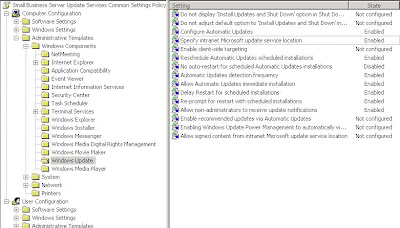

It is best to not have the SBS Update Services Common Settings Policy opened for edit while disabling the specific GP settings in the Mac specific GPO. This eliminates the possibility of confusion and the subsequent disabling of the settings in the wrong GPO!

This should eliminate any Mac based computer having to register with WSUS and thus the Yellow Shield warning in SBS R2.

Remember, it is always a good idea to create specific Organizational Units located in specific places within Active Directory for any Group Policy tasks we have in mind. Group Policy Objects are subsequently linked to those OUs with the appropriate settings for our specific requirements as we have done here. No GPO at the domain level should be created or modified there unless there is an absolute need for it!

Philip Elder
MPECS Inc.
Microsoft Small Business Specialists

*All Mac on SBS posts are posted on our in-house iMac via the Safari Web browser.

Tuesday, 14 August 2007

Mac on SBS - A Count Down Widget for the Focused!

I don't know about you, but when working on a large project on whatever computer that happens to be, I get focused.

To the point where the next time I look up a couple of hours may have passed.

Doing that for long durations over the day can drastically reduce one's productivity.

Because of that, taking a break for 10 minutes or so to walk around or do something else away from the computer is important.

While onsite, have a stopwatch with countdown timer with you.

While working on the computer, have some sort of countdown timer going to ring after 50 minutes or so.

For the Mac, we have installed a Widget called 3-2-1. It works really well. It can be found here: BaldGeeks: 3-2-1.

For Windows Vista, there is the Sphere Timer.

So, take a break. It's good for you!

Philip Elder
MPECS Inc.
Microsoft Small Business Specialists

*All Mac on SBS posts are posted on our in-house iMac via the Safari Web browser.