Thursday, 26 July 2018

Hypervisor, Cluster, and Server Hardware Nomenclature (A quick what's what)

100 Level Post

When helping folks out there seems to be a bit of confusion on what means what when it comes to discussing the software or hardware.

So, here are some definitions to help clear the air.

  • NIC
    • Network Interface Card
    • The card can have one, two, four, or more ports
    • Get-NetAdapter
    • Get-NetLbfoTeam
  • Port
    • The ports on the NIC
  • pNIC
    • pNIC = NIC
    • A physical NIC in a hypervisor host or cluster node
  • vNIC
    • The virtual NIC in a Virtual Machine (VM)
    • In-Guest: Get-NetAdapter
    • In-Guest: Get-NetIPAddress
  • vSwitch
    • The Virtual Switch attached to a vNIC
    • Get-VMSwitch
  • Gb
    • Gigabit =/= Gigabyte (GB)
    • 1 billion bits
  • GB
    • Gigabyte =/= Gigabit (Gb)
    • 1 billion bytes
  • 10GbE
    • 10 Gigabit Ethernet
    • Throughput @ line speed ~ 1GB/Second (1 Gigabyte per Second)
  • 100GbE
    • 100 Gigabit Ethernet
    • Throughput @ line speed ~ 10GB/Second (10 Gigabytes per Second)
  • pCore
    • A physical Core on a CPU (Central Processing Unit)
  • vCPU
    • A virtual CPU assigned to a VM
    • Is _not_ a pCore or assigned to a specific pCore by the hypervisor!
    • Please read my Experts-Exchange article on Hyper-V especially the Virtual CPUs and CPU Cores section mid-way down it's free to access
    • Set-VMProcessor VMNAME -Count 2
  • NUMA
    • Non-Uniform Memory Access
    • A Memory Controller and the physical RAM (pRAM) attached to it is a NUMA node

A simple New-VM PowerShell script is here. This is our PowerShell Guide Series that has a number of PowerShell and CMD related scripts . Please check them out and back every once in a while as more scripts are on the works.

Think something should be in the above list? Please comment or feel free to ping us via email.

Philip Elder
Microsoft High Availability MVP
MPECS Inc.
Co-Author: SBS 2008 Blueprint Book
www.commodityclusters.com
Our Web Site
Our Cloud Service

Tuesday, 24 July 2018

Mellanox SwitchX-2 MLNX-OS Upgrade Stall via WebGUI and MLNX-OS to Onyx Upgrade?

Yesterday, we posted about our OS update process and the grids that indicated the proper path to the most current version.

A catch that became apparent was that there were two streams of updates available to us:

  1. image-PPC_M460EX-3.6.4112.img
  2. onyx-PPC_M460EX-3.6.4112.img
    • ETC
    • image

As can be seen in the snip above we read an extensive number of Release Notes (RN) and User Manuals (UM) trying to figure out what was what and which was which. :S

In the end, we opened a support ticket with Mellanox to figure out why our switches were stalling on the WebGUI upgrade process and why there was a dearth of documentation indicating anything about upgrade paths.

The technician mentioned that we should use CLI to clean-up any image files that may be left over. That's something we've not had to do before.

Following the process in the UM to connect via SSH using our favourite freebie tool TeraTerm we connected to both switches and found only one file to delete:

  • WebImage.tbz

Once that file was deleted we were able to initiate the update from within the WebGUI without error on both switches.

Since we had MLNX-OS 3.6.4112 already installed the next question for the tech was, "How do we get to the most current version of Onyx?"

The process was as follows:

  1. Up to MLNX-OS 3.6.4112
  2. Up to Onyx 3.6.6000
  3. Up to Onyx 3.6.8008

As always, check out the Release Notes (RN) to make sure that the update will not cause any problems especially with in-production NICs and their firmware!

image

Happy News! Welcome to Onyx

Philip Elder
Microsoft High Availability MVP
MPECS Inc.
Co-Author: SBS 2008 Blueprint Book
www.s2d.rocks !
Our Web Site
Our Cloud Service

Monday, 23 July 2018

Mellanox SwitchX-2 and Spectrum OS Update Grids

We're in the process of building out a new all-flash based Kepler-64 2-node cluster that will be running the Scale-Out File Server Role. This round of testing will have several different rounds to it:

  1. Flat Flash Intel SSD DC S4500 Series
    • All Intel SSD DC S4500 Series SATA SSD x24
  2. Intel NVMe PCIe AIC Cache + Intel SSD DC S4500
    • Intel NVMe PCIe AIC x4
    • Intel SSD DC S4500 Series SATA SSD x24
  3. Intel Optane PCIe AIC + Intel SSD DC S4500
    1. Intel Optane PCIe AIC x4
    2. Intel SSD DC S4500 Series SATA SSD x24

Prior to running the above tests we need to update the operating system on our two Mellanox SwitchX-2 MSX1012B series switches as we've been quite busy with other things!

Their current OS level is 3.6.4006 so just a tad bit out of date.

image

The current OS level for SwitchX-2 PPC switches is 3.6.8008. And, as per the Release Notes for this OS version we need to do a bit of a Texas Two-Step to get our way up to current.

image

image

Now, here's the kicker: There is no 3.6.5000 on Mellanox's download site. The closest version to that is 3.6.5009 which provides a clarification on the above:

image

Okay, so that gets us to 3.6.5009 that in turn gets us to 3.6.6106:

image

And that finally gets us to 3.6.8008:

image

Update Texas Two Step

To sum things up we need the following images:

  1. 3.6.4122
  2. 3.6.5009
  3. 3.6.6106
  4. 3.6.8008

Then, it's a matter of time and a bit of patience to run through each step as the switches can take a bit of time to update.

image

A quick way to back up the configuration is to click on the Setup button then Configurations then click the initial link.

image

Copy and paste the output into a TXT file as it can be used to reconfigure the switch if need-be via the Execute CLI commands window just below it.

As always, it pays to read that manual eh! ;)

NOTE: Acronym Finder: AIC = Add-in Card so not U.2.

Oh, and be patient with the downloads as they are _slow_ as molasses in December as of this writing. :(

image

Philip Elder
Microsoft High Availability MVP
MPECS Inc.
Co-Author: SBS 2008 Blueprint Book
www.s2d.rocks !
Our Web Site
Our Cloud Service

Thursday, 19 July 2018

New PowerShell Guide Posted: Hyper-V Standalone Server

We've published a new PowerShell Guide for setting up a standalone Hyper-V server.
Please check it out and feel free to chime in via the comments or ping us to let us know if anything is missing or wrong.
Thanks for reading.
Philip Elder
Microsoft High Availability MVP
MPECS Inc.
Co-Author: SBS 2008 Blueprint Book
www.s2d.rocks !
Our Web Site
Our Cloud Service

Saturday, 7 July 2018

GitHub: SSH Key Error: Key is invalid FIX

We're following the GitHub Help instructions for Adding a new SSH key to your GitHub account.

The OS is Ubuntu 16.04 LTS on Azure for a service we're in the process of setting up.

The following _did not work_ for us:

$ clip < ~/.ssh/id_rsa.pub

So, we did this instead:

$cd .ssh

$ vi ~/.ssh/id_rsa.pub

And received the following:

image

Everything looked fine but no matter which way the Copy & Paste was done the Key is invalid. Ensure you've copied the file correctly error would happen.

image

In the end, the stackoverflow post at the bottom got us some joy.

We needed to run:

more id_rsa.pub

Highlight from the last character in the e-mail address to the front of ssh-rsa and it worked!

image

While it's been a few years since I've worked in a *NIX/*BSD environment it was just like riding a bicycle! Oh, and being somewhat fluent in PowerShell really helps too. :)

Thanks for reading!

Philip Elder
Microsoft High Availability MVP
MPECS Inc.
Co-Author: SBS 2008 Blueprint Book
Our Web Site
S2D.Rocks!
Our Cloud Service

Tuesday, 3 July 2018

Hyper-V Storage Live Migration Error: …not allowed because replication state is not initialized.

We had a Hyper-V server choke on some attached USB storage that was being used as a backup destination.

After getting things up and running we went to move one of the VM's VHDX file set and hit this:


image

Move Wizard

Storage migration for virtual machine 'VMName' failed.

Operation not allowed because the replication state is not initialized.

Storage Migration for virtual machine 'VMName' (GUID) failed with error 'The device is not ready.' (0x80070015).

Operation not allowed for virtual machine 'VMName' because Hyper-V state is yet to be initialized from the virtual machine configuration. Try again in a few minutes. (Virtual machine ID GUID)

The "fix" is to restart the VMM Service in an elevated PowerShell:

Restart-Service -Name VMMS

Once the service was restarted:

image

The move started without issue.

HT: Charbel Nemnom.

Philip Elder
Microsoft High Availability MVP
MPECS Inc.
Co-Author: SBS 2008 Blueprint Book
Our Web Site
Our Cloud Service

Friday, 29 June 2018

Our Calgary Oil & Gas Show Booth & Slide Show

At the invitation of one of our suppliers, AVNET, I got to spend the day manning a spot in their booth.

image

Calgary International Oil & Gas Show 2018 AVNET Booth

Sitting on the table at the left is one of our Kepler-47 nodes and a series of storage devices one of which is a disassembled hard drive.

There were great conversations to be had with the folks at the other booths including Intel, Kingston, and Microsoft and their Azure IoT team among others.

Thanks to AVNET and the team. They were very gracious. :)

Here's the slideshow I put together for that monitor on the wall.

image

image

image

image

image

image

image

image

image

image

image

image

Just a note on the mentioned Intel OmniPath setup. In conversation with Intel post-slide creation it seems that OPA is not a Windows focused architecture so there's no opportunity for us to utilize it in our solutions.

To our Canuck readers have a great long weekend and to everyone else have a great weekend. :)

Thanks for reading!

Philip Elder
Microsoft High Availability MVP
MPECS Inc.
Co-Author: SBS 2008 Blueprint Book
Our Web Site
Our Cloud Service

Wednesday, 20 June 2018

Windows Server: Black Screen with "Windows logon process failed to spawn user application."

After demoting a DC we were not able to get to the desktop with a black screen showing up and that was it.

Try and get Task Manager up and running produced the following in the server's Event Logs:

Log Name:      Application
Source:        Microsoft-Windows-Winlogon
Date:          6/20/2018 11:19:06 AM
Event ID:      4006
Task Category: None
Level:         Warning
Keywords:      Classic
User:          N/A
Computer:      SERVER.DOMAIN.COM
Description:
The Windows logon process has failed to spawn a user application. Application name: launchtm.exe. Command line parameters: launchtm.exe /3 .

In the end the solution ended up being to add the local administrator account to the local Users group after hitting CTRL+ALT+DEL/END to click Log Off/Sign Out.

Once we signed back in we got to the server's desktop and were able to continue with it's removal from the domain.

EDIT: Note that the change was done from a DC via Active Directory Users and Computers.

Philip Elder
Microsoft High Availability MVP
MPECS Inc.
Co-Author: SBS 2008 Blueprint Book
Our Web Site
Our Cloud Service

Thursday, 7 June 2018

Exchange 2013+: Set Up a Receive Connector for MFP/Copier/Device Relay

The following are the two steps required to enable an internal anonymous relay in Exchange 2013/2016/20*.

Step 1: Create the Receive Connector

New-ReceiveConnector –Name MFP-APP-AnonRelay –Usage Custom –Bindings 0.0.0.0:25 –RemoteIPRanges 192.168.25.1-192.168.25.10,192.168.25.225-192.168.25.254 –Comment “Allows anonymous relay” –TransportRole FrontEndTransport –AuthMechanism None –PermissionGroups AnonymousUsers

Variables:

  • -Name: Change this if needed but must match for both steps
  • -RemoteIPRanges: Only put trusted device IP addresses in this section

Once the receive connector is set up it can be managed via EAC.

Step 2: Allow Anonymous Rights

Get-ReceiveConnector “MFP-APP-AnonRelay” | Add-ADPermission -User “NT AUTHORITY\ANONYMOUS LOGON” -ExtendedRights “Ms-Exch-SMTP-Accept-Any-Recipient”

Variable:

  • The Receive Connector name must match the one set in Step 1

Conclusion

Once the above steps are set up there is no need to set a username and password on any device that has an allowed IP.

For obvious reasons one should never put an Internet IP address in this rule! But, that being said, one always denies all SMTP 25/587 inbound traffic to a third party sanitation provider's subnets right (we use ExchangeDefender for our own and our client's needs)?

Also, this setup is for on-premises Exchange.

Philip Elder
Microsoft High Availability MVP
MPECS Inc.
Co-Author: SBS 2008 Blueprint Book
Our Web Site
Our Cloud Service

Thursday, 31 May 2018

OS Guide: Slipstream Updates and Drivers Using DISM and OSCDImg

We've posted another guide to our Web site.

Using the script on this page in an elevated CMD allows us to take the base Install.WIM for Windows Server 2016 and slipstream the latest Cumulative Update into it.

Then, the script copies the updated Install.WIM into two separate folders where we keep two sets of installer files/folders. One is a Bare version that has only the Windows installer files. The other contains a whole host of drivers, BIOS and firmware updates, and a copy of the newly minted .ISO file. We use the FULL version for our USB flash drives (blog post) that get permanently plugged into all server systems we deploy.

This script is constantly updated.

Another will be posted at a later date that also includes the ability to update the Install.WIM file with drivers.

UPDATE 2018-06-04: Fixed the link!

Philip Elder
Microsoft High Availability MVP
MPECS Inc.
Co-Author: SBS 2008 Blueprint Book
Our Web Site
Our Cloud Service

Wednesday, 9 May 2018

Remote Desktop Client: An authentication error has occurred. *Workaround

Updates last night included one for CredSSP CVE-2018-0886.

For those of us that are hesitant to patch our servers the instant a patch is available we'll be seeing RD Clients unable to connect for the period prior to our regression testing and release cycle.

Remote Desktop Connection

An authentication error has occurred.
The function requested is not supported.

Remote Computer: SERVERNAME
This could be due to CredSSP encryption oracle remediation.
For more information, see https://go.microsoft.com/fwlink/?linkid=866660

For now, the workaround on the remotely connecting RD Clients is to set the following registry key:

Windows Registry Editor Version 5.00

[HKEY_LOCAL_MACHINE\SOFTWARE\Microsoft\Windows\CurrentVersion\Policies\System\CredSSP]

[HKEY_LOCAL_MACHINE\SOFTWARE\Microsoft\Windows\CurrentVersion\Policies\System\CredSSP\Parameters]
"AllowEncryptionOracle"=dword:00000002

Copy and paste the above into Notepad and Save As "CredSSP.REG" in a quickly accessible location.

Double click on the created file and MERGE. An elevated Registry Editor session would also allow for import via the FILE menu.

Once the above registry setting is in-place reboot the client machine and the connection should work.

Happy Patching! :)

UPDATE 2018-05-09 @ 10:47 MST: A caveat:

It is better to update the server backend, if possible, before making the above registry change.

If that is _not_ possible, then after the updates have been applied on the server(s) make sure to _change_ the registry setting to its most secure setting.

UPDATE 2018-05-10 @ 17:38 MST:

Update sources:

Philip Elder
Microsoft High Availability MVP
MPECS Inc.
Co-Author: SBS 2008 Blueprint Book
Our Web Site
Our Cloud Service

Tuesday, 1 May 2018

PowerShell Guide Series: Storage Spaces Direct PowerShell Node Published

Apologies for the double post, one of the bulleted links was broken. :(

One of the difficult things about putting our setup guides on our blog was the fact that when we changed them, which was frequent, it became a bit of a bear to manage.
So, we're going to be keeping a set up guides on our site to keep things simple.

The first of the series has been published here:

This guide is a walkthrough to set up a 2-Node Storage Spaces Direct (S2D) cluster node from scratch. There are also steps in there for configuring RoCE to allow for more than two nodes if there is a need.
We will be updating the existing guides on a regular basis but also publishing new ones as we go along.

Thanks for reading!

Philip Elder
Microsoft High Availability MVP
MPECS Inc.
Co-Author: SBS 2008 Blueprint Book
Our Web Site
Our Cloud Service

PowerShell Guide Series: Storage Spaces Direct PowerShell Node Published

One of the difficult things about putting our setup guides on our blog was the fact that when we changed them, which was frequent, it became a bit of a bear to manage.
So, we're going to be keeping a set up guides on our site to keep things simple.
The first of the series has been published here:
This guide is a walkthrough to set up a 2-Node Storage Spaces Direct (S2D) cluster node from scratch. There are also steps in there for configuring RoCE to allow for more than two nodes if there is a need.
We will be updating the existing guides on a regular basis but also publishing new ones as we go along.
Thanks for reading!
Philip Elder
Microsoft High Availability MVP
MPECS Inc.
Co-Author: SBS 2008 Blueprint Book
Our Web Site
Our Cloud Service

Wednesday, 25 April 2018

Working with and around the Cloud Kool-Aid

The last year and a half have certainly had their challenges. I've been on a road of both discovery and of recovery after an accident in November of 2016 (blog post).

Most certainly one of the discoveries is the amount of tolerance for fluff, especially marketing fluff, has been greatly reduced. Time is precious, even more so when one's faculties can be limited by head injury. :S

Microsoft's Cloud Message

It was during one of the last feedback sessions at MVP Summit 2018 that a startling realization came about: There's still anger, and to some degree bitterness, towards Microsoft and the cloud messaging of the last ten to twelve years. My session at SMBNation 2012 had some glimpses into that anger and struggle about our business and its direction.

After the MVP Summit 2018 session, when discussing it with a Microsoft employee that I greatly respect, his response to my apology for the glimpse into my anger and bitterness was, "You have nothing to apologize for". That affirmation brought a lot home.

One realization is this: The messaging from Microsoft, and others, around Cloud has not changed. Not. One. Bit.

That messaging started out oh so many years ago as, "Your I.T. Pro Business is going to die. Get over it" to paraphrase Microsoft's message to change business models or else when BPOS was launched.

The messaging was "successful" to some degree as the number of I.T. Pro consultants and small businesses that hung up their guns during that first four to six year period was substantial.

And yet, it wasn't as much of the SMB focused Microsoft Partner network basically left Cloud sales off the table when dealing with their clients.

Today, the content of the message and to some degree the method of delivering the message may be somewhat masked but it is still the same: Cloud or die.

At this last MVP Summit yet another realization came when listening to a fellow MVP and some Blue Badges (Microsoft employees) discussing various things around Cloud and Windows. It had never occurred to me to consider that the pain we were feeling out on the street would also be had within Microsoft and to some degree other vendors adopting a Cloud service.

The recent internal shuffle in Microsoft really brought that home.

On-Premises, Hybrid, and/or Cloud

We have a lot of Open Value Agreements in place to license our client's on-premises solution sets.

Quite a few of them came up for renewal this spring. Our supplier Microsoft licensing contact, and the contractor (v-) that kept calling, were trying to push us into Cloud Solution Provider (CSP) for all of our client's licensing.

Much of what was said in those calls was:

  • Clients get so much more in features
  • Clients get access anywhere
  • Clients are so much more agile.
  • Blah, blah, blah
  • Fluff, fluff, fluff

The Cloud Kool-Aid was being poured out by the decalitre. ;)

So, our response was, "Let's about our Small Business Solution (SBS)" and it's great features and benefits and how our clients have full features both on-premises, via the Internet, or anything in-between. And, oh, it's location and device agnostic. We can also run it on-premises or in someone else's Cloud.

That usually led to some sort of stunned silence on the other end of the phone.

It's as if the on-premises story has somehow been forgotten or folks have developed selective amnesia around it.

What's neat though is that our on-premises highly available solutions are selling really well especially for folks that want cloud-like resilience for their own business.

That being said, there _is_ a place for Cloud.

As a rule, Cloud is a great way to extend on-premises resources for companies that experience severe business swings such as construction companies that have slowdowns due to winter. The on-premises solution set can run the business through the quieter months then things get scaled-up during summer in the Cloud. In this case the Cloud spend is equitable.

Business Principled Clarity

There are two very clear realities for today's I.T. Pro and SMB/SME I.T. Business:

  1. On-Premises is not going away
  2. Building a business around Cloud is possible but difficult

The on-premises story is not going to change. One can repeat the Cloud message over and over and to some degree it becomes "truth". That's an old adage. However, the realities on the ground remain ... despite the messaging.

Okay, so maybe in the smaller 10 or less seat business where an all-in for Cloud may make sense (make sure to add all of those bills up and be sitting when doing so!).

That being said, our smallest High Availability client is 15 seats with a disaggregate converged cluster. That was before our Storage Spaces Direct Kepler-47 was finalized as that solution starts at a third of the cost.

For the on-premises story there are two primary principles operating here:

  1. The client wants to own it
  2. The client wants full control over their data and its access

Cloud vendors are not obligated, and in many cases can't say anything, when law enforcement shows up to either snoop or even, in some cases, to remove the vendor's physical server systems.

Many businesses are very conscious of this fact. Plus, many governments have a deep reach into other countries as the newly minted, as of this writing, EU privacy laws seem to be demonstrating.

Now, as far as building a business around another's Cloud offerings there are two ways that we see that happening with some success:

  1. Know a Cloud Vendor's products through and through
  2. Build a MSP (Managed Service Provider) business supporting endpoints

The first seems to be really big right now. There's a lot of I.T. companies out there selling cloud with no idea of how to put it all together. The companies that do know how to put it all together are growing in leaps and bounds.

The MSP method is, and has been, a way to keep that monthly income going. But, don't count on it being there for too much longer as _all_ Cloud vendors are looking to kill the managed endpoint in some way.

Our Direction

So, where do we fit in all of this?

Well, our business strategy has been pretty straightforward:

  1. Keep developing and providing cloud-like services on-premises with cloud-like resilient solutions for our clients
  2. Hybrid our on-premises solutions with Cloud when the need is there
  3. Continue to help clients get the most out of their Cloud services
  4. Cultivate our partnerships with SMB/SME I.T. organizations needing HA Solutions

We have managed to re-work our business model over the last five to ten years and we've been quite successful at it. Though, it is still a work in progress and probably will remain so given the nature of our industry.

We're pretty sure we will remain successful at it as we continue to put a lot of thought and energy into building and keeping our clients and contractors happy.

Ultimately, that goal has not changed in all of the years we've been in business.

We small to medium I.T. shops have the edge over every other I.T. provider out there.

"How is that?", you might ask.

Well, we _know_ how to run a small to medium business and all of the good and bad that comes with it.

That translates into great products and services to our fellow SMB/SME business clients. It really is that easy.

The hard part is staying on top of all of the knowledge churn happening in our field today.

Conclusion

Finally, as far as the anger, and to some degree bitterness, goes: Time. It will take time before it is fully dealt with.

In the mean time ...

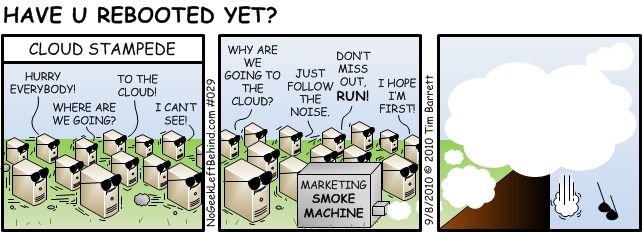
A friend of mine, Tim Barrett did this comic many years ago (image credit to NoGeekLeftBehind.com):

image

The comic definitely puts an image to the Cloud messaging and its results. :)

Let's continue to build our dreams doing what we love to do.

Have a fantastic day and thanks for reading!

Philip Elder
Microsoft High Availability MVP
MPECS Inc.
Co-Author: SBS 2008 Blueprint Book
Our Web Site
Our Cloud Service

Tuesday, 23 January 2018

Storage Spaces Direct (S2D): Sizing the East-West Fabric & Thoughts on All-Flash

Lately we've been seeing some discussion around the amount of time required to resync a S2D node's storage after it has come back from a reboot for whatever reason.

Unlike a RAID controller where we can tweak rebuild priorities, S2D does not offer the ability to do so.

It is with very much a good thing that the knobs and dials are not exposed for this process.

Why?

Because, there is a lot more going on under the hood than just the resync process.

While it does not happen as often anymore, there were times where someone would reach out about a performance problem after a disk had failed. After a quick look through the setup the Rebuild Priority setting turned out to be the culprit as someone had tweaked it from its usual 30% of cycles to 50% or 60% or even higher thinking that the rebuild should be the priority.

S2D Resync Bottlenecks

There are two key bottleneck areas in a S2D setup when it comes to resync performance:
  1. East-West Fabric
    • 10GbE with or without RDMA?
    • Anything faster than 10GbE?
  2. Storage Layout
    • Those 7200 RPM capacity drives can only handle ~110MB/Second to ~120MB/Second sustained
The two are not the mutually exclusive culprit depending on the setup as they both can play together to limit performance.

The physical CPU setup may also come into play but that's for another blog post. ;)

S2D East-West Fabric to Node Count

Let's start with the fabric setup that the nodes use to communicate with each other and pass storage traffic along.

This is a rule of thumb that was originally born out of a conversation at a MVP Summit a number of years back with a Microsoft fellow that was in on the S2D project at the beginning. We were discussing our own Proof-of-Concept that we had put together based on a Mellanox 10GbE and 40GbE RoCE (RDMA over Converged Ethernet) fabric. Essentially, at 4-nodes a 40GbE RDMA fabric was _way_ too much bandwidth.

Here's the rule of thumb we use for our baseline East-West Fabric setups. Note that we always use dual-port NICs/HBAs.
  • Kepler-47 2-Node
    • Hybrid SSD+HDD Storage Layout with 2-Way Mirror
    • 10GbE RDMA direct connect via Mellanox ConnectX-4 LX
    • This leaves us the option to add one or two SX1012X Mellanox 10GbE switches when adding more Kepler-47 nodes
  • 2-4 Node 2U 24 2.5" or 12/16 3.5" Drives with Intel Xeon Scalable Processors
    • 2-Way Mirror: 2-Node Hybrid SSD+HDD Storage Layout
    • 3-Way Mirror: 3-Node Hybrid SSD+HDD Storage Layout
    • Mirror-Accelerated Parity (MAP): 4 Nodes Hybrid SSD+HDD Storage Layout
    • 2x Mellanox SX1012X 10GbE Switches
      • 10GbE RDMA direct connect via Mellanox ConnectX-4 LX
  • 4-7 Node 2U 24 2.5" or 12/16 3.5" Drives with Intel Xeon Scalable Processors
    • 4-7 Nodes: 3-Way Mirror: 4+ Node Hybrid SSD+HDD Storage Layout
    • 4+ Nodes: Mirror-Accelerated Parity (MAP): 4 Nodes Hybrid SSD+HDD Storage Layout
    • 4+ Nodes: Mirror-Accelerated Parity (MAP): All-Flash NVMe cache + SSD
    • 2x Mellanox Spectrum Switches with break-out cables
      • 25GbE RDMA direct connect via Mellanox ConnectX-4/5
      • 50GbE RDMA direct connect via Mellanox ConnectX-4/5
  • 8+ Node 2U 24 2.5" or 12/16 3.5" Drives with Intel Xeon Scalable Processors
      • 4-7 Nodes: 3-Way Mirror: 4+ Node Hybrid SSD+HDD Storage Layout
      • 4+ Nodes: Mirror-Accelerated Parity (MAP): 4 Nodes Hybrid SSD+HDD Storage Layout
      • 4+ Nodes: Mirror-Accelerated Parity (MAP): All-Flash NVMe cache + SSD
      • 2x Mellanox Spectrum Switches with break-out cables
        • 50GbE RDMA direct connect via Mellanox ConnectX-4/5
        • 100GbE RDMA direct connect via Mellanox ConnectX-4/5
    Other than the Kepler-47 setup we always have at least a pair of Mellanox ConnectX-4 NICs in each node for East-West traffic. It's our preference to separate out the storage traffic and the rest.

    All-Flash Setups

    There's a lot of talk in the industry about all-flash.

    It's supposed to solve the biggest bottleneck of them all: Storage!

    The catch is, bottlenecks are moving targets.


    Drop in an all-flash array of some sort and all of a sudden the storage to compute fabric becomes the target. Then, it's the NICs/HBAs on the storage _and_ compute nodes, and so-on.

    If you've ever changed a single coolant hose in an older high miler car you'd see what I mean very quickly. ;)

    IMNSHO, at this point in time, unless there is a very specific business case for all-flash and the fabric in place allows for all that bandwidth with virtually zero latency, all-flash is a waste of money.

    One business case would be for a cloud services vendor that wants to provide a high IOPS and vCPU solution to their clients. So long as the fabric between storage and compute can fully utilize that storage and the market is there the revenues generated should more than make up for the huge costs involved.

    Using all-flash as a solution to a poorly written application or set of applications is questionable at best. But, sometimes, it is necessary as the software vendor has no plans to re-work their applications to run more efficiently on existing platforms.

    Caveat: The current PCIe bus just can't handle it. Period.

    A pair of 100Gb ports on one NIC/HBA can't be fully utilized due to the PCIe bus bandwidth limitation. Plus, we deploy with two NICs/HBAs for redundancy.

    Even with the addition of more PCIe Gen 3 lanes in the new Intel Xeon Scalable Processor Family we are still quite limited in the amount of data that can be moved about on the bus.

    S2D Thoughts and PoCs

    The Storage Spaces Direct (S2D) hyper-converged or SOFS only solution set can be configured and tuned for a very specific set of client needs. That's one of its beauties.

    Microsoft remains committed to S2D and its success. Microsoft Azure Stack is built on S2D so their commitment is pretty clear.

    So is ours!

    Proof-of-Concept (PoC) Lab
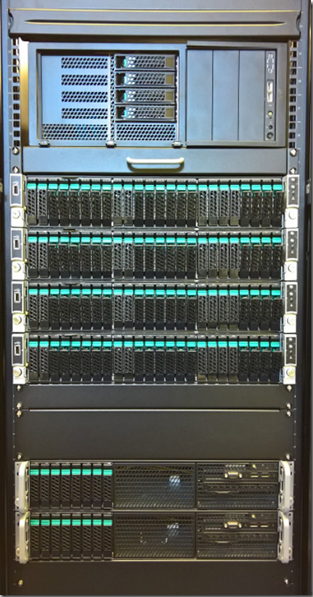
    S2D 4-Node for Hyper-Converged and SOFS Only
    Hyper-V 2-Node for Compute to S2D SOFS
    This is the newest edition to our S2D product PoC family:
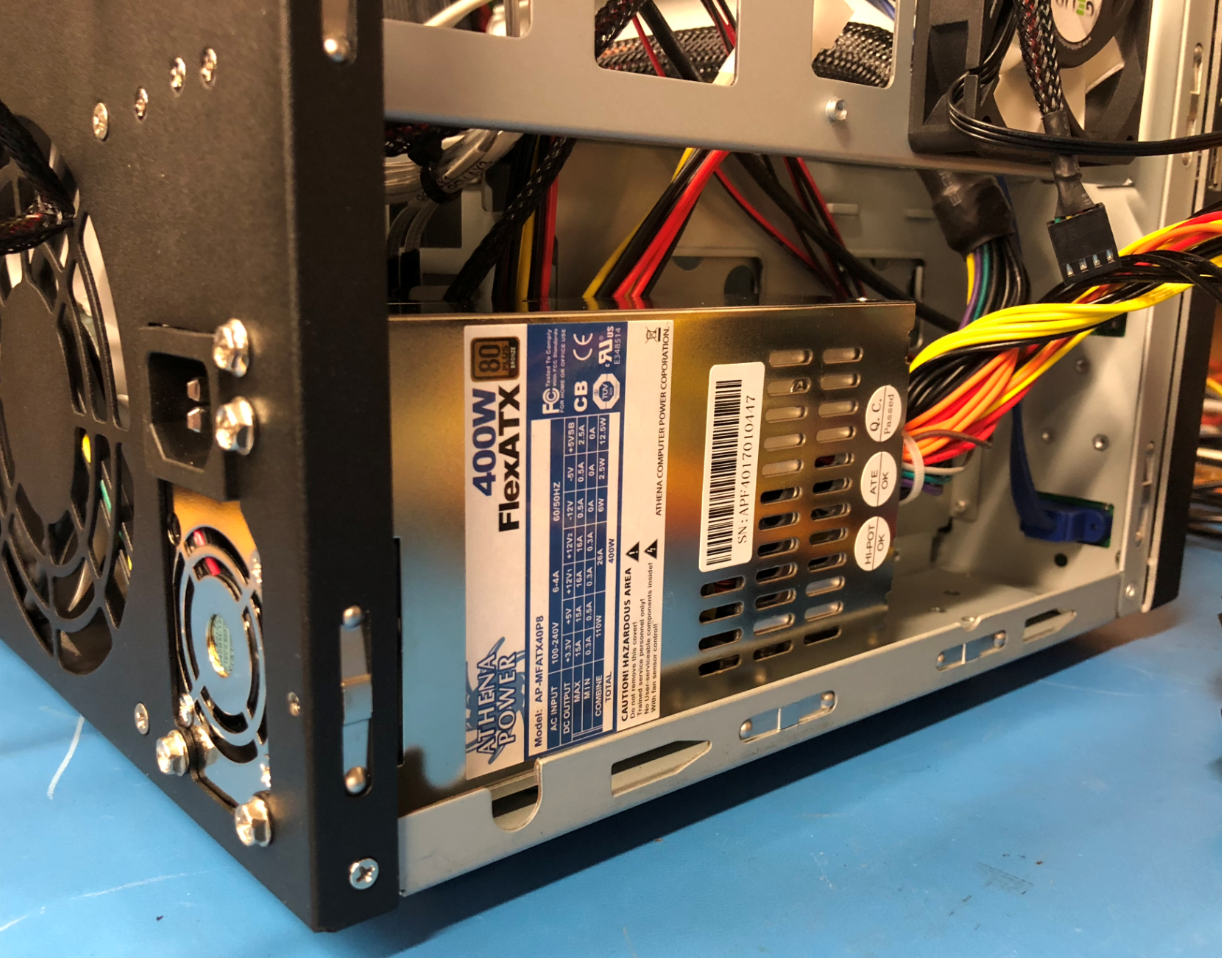
    Kepler-47 S2D 2-Node Cluster

    The Kepler-47 picture is our first one. It's based on Dan Lovinger's concept we saw at Ignite Atlanta a few years ago. Components in this box were similar to Dan's setup.

    Our second generation Kepler-47 is on the way to being built now.
    Kepler-47 v2 PoC Ongoing Build & Testing

    This new generation will have an Intel Server Board DBS1200SPLR with an E3-1270v6, 64GB ECC, Intel JBOD HBA I/O Module, TPM v2, and Intel RMM. OS would be installed on a 32GB Transcend 2242 SATA SSD. Connectivity between the nodes will be Mellanox ConnectX-4 LX running at 10GbE with RDMA enabled.

    Storage in Kepler-47 v2 would be a combination of one Intel DC P4600 Series PCIe NVMe drive for cache, two Intel DC S4600 Series SATA SSDs for performance tier, and six HGST 6TB 7K6000 SAS or SATA HDDs for capacity. The PCIe NVMe drive will optional due it is cost.

    We already have one or two client/customer destinations for this small cluster setup.

    Conclusion

    Storage Spaces Direct (S2D) rocks!

    We've invested _a lot_ of time and money in our Proof-of-Concepts (PoCs). We've done so because we believe the platform is the future for both on-premises and data centre based workloads.

    Thanks for reading! :)

    Philip Elder
    Microsoft High Availability MVP
    MPECS Inc.
    Co-Author: SBS 2008 Blueprint Book
    Our Web Site
    Our Cloud Service