Tuesday, 29 April 2014

QuickBooks: Save Open Windows For Next Session

Search Foo was turning up literally nothing on how to set a window, in this case Create Invoices, in QuickBooks to open by default the next time the company file was opened.

Why?

Because we invoice on the fly. When QuickBooks gets opened via RemoteApp it could be a bad thing to have things like vendor windows open, product properties with pricing opened, and so much more while the client is standing right there.

An ask via Intuit's Twitter account turned up the following resolution:

image

  • Edit --> Preferences --> Desktop View --> Desktop: Save when closing company

When the above window was opened the setting was "Don't save the desktop" which was a bit frustrating.

Prior to our upgrade to version 2013 the only window that would open was Create Invoices. After our upgrade that somehow was lost with any searching, when the thought arouse to look, turning up nothing due to improper search terms.

We can now safely open QuickBooks anywhere we are working to fire off an invoice via e-mail right there and then.

Philip Elder
Microsoft Cluster MVP
MPECS Inc.
Co-Author: SBS 2008 Blueprint Book

Chef de partie in the SMBKitchen ASP Project
Find out more at
Third Tier: Enterprise Solutions for Small Business

Monday, 21 April 2014

A Microsoft Cluster Troubleshooting Guide

Here are some of the tools we can use when troubleshooting a cluster, Scale-Out File Server, Hyper-V, and other cluster issues:

Failover Cluster Manager 

The FCM gives us the ability to dig into the various Windows Logs and delimit them by time, node, and log type.

  • FCM --> Cluster Name --> Cluster Events --> Query

image

We set up a few different queries out of the box. One with everything Cluster, Failover Clustering, and Hyper-V related. We then create a subset of queries. The various queries get saved to a local folder on the management DC/RSAT system.

Get-ClusterLog

The Get-ClusterLog PowerShell commandlet allows us to pull the full log set from one or all nodes. Note that the default output folder is \\NODE\C$\Windows\Cluster\Cluster.LOG (C:\Windows\Cluster\Cluster.LOG) unless specified in the command.

This log can be very busy and a bit of a challenge to work through. If one has a good idea of what to look for then the log can be quite informative.

  • Get-ClusterLog -Destination .
    • Places the log in the local directory (we create C:\Temp on all nodes for this kind of thing)
  • (get-cluster).ClusterLogLevel=5
    • There are five levels with 5 being the most verbose. Default level is 3 and best left there unless absolutely needed. Level 5 file can be large.

EDIT: The Default cluster log location is C:\Windows\Cluster\Reports\Cluster.log

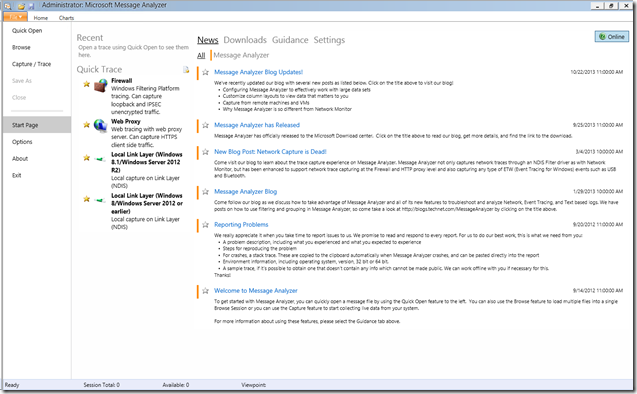
Microsoft Message Analyzer

This is an in-depth tool. There is no way around it. Thus, a learning curve is required.

However, there is an amazing amount of information that we can then have at our fingertips and not only that colour coded!
image

image

One can use a series of filters under the log file settings to delimit by time period among others.

image

We can set up our columns:

image

Once we have our Cluster column, for example when looking for a problematic cluster component, we can set up a filter:

image

And that is just the tip of the iceberg. One will need to spend some time with this tool to really get into its abilities such as colour coding source node, information levels, and so much more!

Please check the Message Analyzer Blog for more information.

Note that an absence of System Centre and its components is deliberate. We find, at least at this time, that Failover Cluster Manager provides a far superior cluster management experience.

Philip Elder
Microsoft Cluster MVP
MPECS Inc.
Co-Author: SBS 2008 Blueprint Book

Chef de partie in the SMBKitchen ASP Project
Find out more at
Third Tier: Enterprise Solutions for Small Business

Wednesday, 16 April 2014

A very cool blog milestone

We are not much on beating our own drums and blowing our own horns but this is really cool:

image

We are about to hit 3,000,000 page views.

Why that number over any other? Because it is the first time in a long while we've checked the stats. ;)

And, it just happens to tickle the kewl factor neat feeling area.

Thank you to all of our readers that have stuck it out over the years. We know there are some of you on our e-mail list that have been with us from pretty much the beginning of this blogging journey.

Thanks to all of you that have taken the time to comment, ping us with a question, and even reach out for assistance on various projects. It is very muchly appreciated.

Have a great day!

Philip Elder
Microsoft Cluster MVP
MPECS Inc.
Co-Author: SBS 2008 Blueprint Book

Chef de partie in the SMBKitchen ASP Project
Find out more at
Third Tier: Enterprise Solutions for Small Business

Tuesday, 15 April 2014

SMB Kitchen ASP Project Chat at 1700 MST - Join Us!

We are holding our last freebie author's chat this afternoon/early evening depending on where you are in North America or later for those of you across the Pond. :)

For Windows 8 and up please install Lync from the Store. Once installed and logged into the meeting hit the Charms --> Settings to verify both microphone and speaker settings.

We will cover some of the content we have published to date, some of the ongoing concerns for IT Professionals today, and what we are planning on publishing in the coming weeks.

If we have time we can have a Virtualization and Hyper-V Q&A session too!

Philip Elder
Microsoft Cluster MVP
MPECS Inc.
Co-Author: SBS 2008 Blueprint Book

Chef de partie in the SMBKitchen ASP Project
Find out more at
Third Tier: Enterprise Solutions for Small Business

Windows 8.1 and Windows Server 2012 R2 Update 1 Caveats

Whenever we hear about updates for any device firmware, application software, or operating system software it is _always_ a good idea to read the Release Notes (we probably all know the acronym that comes to mind here ;) ), README.TXT, _and_ do a search for the update to see if anyone is complaining about it. Unfortunately, this major update for Windows 8.1 and Windows Server 2012 R2 has its issues some of which are full-stop problems. The first place to start for this update is here:
There is a lot of information there.
  1. Update 1 is the new baseline for all updates going forward.
    • Meaning, no more updates to that OS if the bits are earlier than 8.1 U1 or 2012 R2 U1.
  2. Update 1 breaks SSL communications between endpoints and WSUS
This last one is a deal breaker for many enterprises, medium enterprises, and especially in our own SMB/SME environments where WSUS is virtually everywhere for patch management.
We just stood up a new cluster on 2012 R2. After our Cluster-Aware Update run:
image
Our cluster nodes now have the update. Since this cluster setup is Greenfield with WSUS ultimately ending up _on_ the cluster the nodes were updated via Microsoft Update.
The workaround for this situation is to enable TLS 1.2 as instructed in the above blog post. Since we are deploying Windows Server 2012 R2 into client sites we will have no choice but to make this change.
Then, when Microsoft releases an update to the update to hopefully fix the problem we will need to test that update extensively _especially_ in a cluster setting!
Yo Microsoft! There is a huge pool of folks willing to test and break this stuff for you! Please get us involved in the early bits for operating systems, applications, and updates again. This ongoing situation of releasing patches and updates to the public without testing them on disparate systems is a _bad_ thing. :(
EDIT: Updated the Gladiator link since between Live Writer and Blogger it got mangled.
Philip Elder
Microsoft Cluster MVP
MPECS Inc.
Co-Author: SBS 2008 Blueprint Book
Chef de partie in the SMBKitchen ASP Project
Find out more at
Third Tier: Enterprise Solutions for Small Business


Monday, 14 April 2014

A Small Chunk of Bandwidth for Windows Server 2012 R2 and Windows 8.1 Pro/Enterprise with Update 1

Okay, so here we go updating our ISO library:

image

image

And:

image

image

And finally:

image

image

Note that all Windows 8.1/Server 2012 R2 operating systems in the field _must_ be updated to Update 1 or they will not receive any further starting with Patch Tuesday this coming May!

That does not give us a lot of time to test the patch setup. But test we must! :(

By the way, is there any need to download the 32-bit version of a desktop OS anymore? We've not had to use one in ages!

Philip Elder
Microsoft Cluster MVP
MPECS Inc.
Co-Author: SBS 2008 Blueprint Book

Chef de partie in the SMBKitchen ASP Project
Find out more at
Third Tier: Enterprise Solutions for Small Business

Intel NUC: Wall Mount Monitor And NUC

We initially had a bit of a puzzle as to how to mount both a monitor and the Intel NUC on the same wall mount monitor arm.

image

In the end the solution proved to be quite simple.

As seen above we took the stock Intel NUC mounting plate and attached it on top of the Ergotron's mounting plate using the Erogotron supplied mounting screws. The Intel supplied screws were a bit too short to pass through both mounting plates.

The finished product looks like this:

image

It will be used as a training station for our client. The keyboard and mouse are wireless so they can sit or stand anywhere in the area to work on the machine.

Philip Elder
Microsoft Cluster MVP
MPECS Inc.
Co-Author: SBS 2008 Blueprint Book

Chef de partie in the SMBKitchen ASP Project
Find out more at
Third Tier: Enterprise Solutions for Small Business

Friday, 11 April 2014

Cluster-Aware Update Runs: How Long?

When one needs to provision a new Windows Server 2012 RTM/R2 cluster one of the time factors to keep in mind is the Cluster-Aware Update runs that will happen once the cluster has been brought up.

image

The above is a new Windows Server 2012 R2 four node cluster that we finished configuring last night.

The first CAU run started around 2300Hrs. As can be seen each node took about an hour to run through the process.

Even though we are not too far into the product release cycle for R2 one needs to keep in mind the update maintenance process if one is not using an up-to-date image for deployment. This would be especially true if deploying 2012 RTM or 2008 R2 clusters.

Cluster node configuration:

  • Intel Server System SR1695GPRX2AC with RMM
    • Intel Xeon Processor X3470, 32GB ECC, 120GB Intel SSD RAID 1, Dual Intel SAS HBAs

Some important Cluster update tracking links:

Philip Elder
Microsoft Cluster MVP
MPECS Inc.
Co-Author: SBS 2008 Blueprint Book

Chef de partie in the SMBKitchen ASP Project
Find out more at
Third Tier: Enterprise Solutions for Small Business

Wednesday, 9 April 2014

A couple of Published Articles and an ASP Document Published

While we have been quite busy I have managed to put some aside to do some writing.

I have also posted the first of many documents to the SMB Kitchen ASP Project that we use for our ongoing day-to-day business here:

image

This document is the foundation on which we manage all of our clients. We track _everything_ in this document. It gets posted to a SharePoint library with versioning enabled for major and minor versions as well as mandatory check-out and check-in.

Soon to come will be some of the quote templates we use to cost out or IT Solution Sets for our clients.

Philip Elder
Microsoft Cluster MVP
MPECS Inc.
Co-Author: SBS 2008 Blueprint Book

Chef de partie in the SMBKitchen ASP Project
Find out more at
Third Tier: Enterprise Solutions for Small Business

Monday, 7 April 2014

Allowing Expired or Forced Password Changes on RDWeb

When we deploy a greenfield Windows Server 2012 setup or migrate to one we always make the following small change to the RDWeb configuration:

image

  • IIS --> Sites --> Default Web Site --> RDWeb --> Pages --> Application Settings

This allows the user to change their password if it has expired which would otherwise be a helpdesk call.

image

When the user goes to log on to RDWeb they will see the following:

image

  • Your password is expired. Click here to change it.

Once they click the link:

image

The page will indicate the change was successful:

image

Click OK and the user will be directed back to the logon page.

When we access a user's profile for whatever reason we trigger a password change on the DC and they know to hit RDWeb to log on the first time if they are remote.

Philip Elder
Microsoft Cluster MVP
MPECS Inc.
Co-Author: SBS 2008 Blueprint Book

Chef de partie in the SMBKitchen ASP Project
Find out more at
Third Tier: Enterprise Solutions for Small Business

Monday, 31 March 2014

Scale-Out File Server Cluster: Where Is the Witness Disk?

We were in a bit of a quandary as far as the how/what/where for a Witness Disk (quorum disk) for Scale-Out File Server (SOFS) cluster.

Our setup:

  • (2) Intel Server Systems R2208GZ4GC
    • Dual SAS HBAs, Dual Intel X540T2 10GbE
    • Scale-Out File Server Nodes
  • (2) Intel Storage Systems JBOD2224S2DP JBOD
    • Mix of 10K SAS, 15K SAS, and SSD SAS drives mirrored in each JBOD
  • (2) Intel Server Systems R2208GZ4GC
    • Dual Intel X540T2 10GbE
    • Hyper-V Nodes

In the case where we had a Hyper-V Failover Cluster using Direct Attached Storage via Promise VTrak E610sD dual SAS, Dell MD3220 dual SAS, or HP P2000 dual SAS we would set up a 1.5GB shared LUN for the quorum disk.

Well, in this case we don't have the logic in the storage to do that.

So, where do we put our Witness Disk for a SOFS based Storage Spaces cluster?

The only real clue we had was in Jose Barreto's blog post:

Specifically this line in the Storage Spaces setup:

New-VirtualDisk -FriendlyName Space1 -StoragePoolFriendlyName Pool1 -ResiliencySettingName Mirror –Size 1GB

An e-mail to Jose asking about that command, and also an e-mail to my fellow Cluster MVPs, came back with Jose confirming that the 1GB Virtual Disk (Storage Space) would be used for the Witness Disk.

We have two options when it comes to configuring the disk. Either we set it up as per Jose's blog post and verify in Failover Cluster Management (FCM) that the Witness Disk is the allocated 1GB or we stand up the cluster, configure the 1GB Storage Space, and then designate the Witness Disk in FCM.

Further reading:

Thanks to Jose Barreto and my fellow Cluster MVPs that answered the N00b questions! :)

Philip Elder
Microsoft Cluster MVP
MPECS Inc.
Co-Author: SBS 2008 Blueprint Book

Chef de partie in the SMBKitchen ASP Project
Find out more at
Third Tier: Enterprise Solutions for Small Business

Friday, 28 March 2014

Flash Multiple Intel or LSI RAID and SAS HBAs Together

We ran into a bit of a question mark around updating the SAS HBAs (Host Bus Adapters) in our Scale-Out File Server nodes. The question being how do we update all of the SAS HBAs in the server without having to take things a part physically.

When looking at the HBA.NSH file that comes with the firmware update for EFI Shell we see the default command line in the batch:

  • sas2flash -f Intel\gb.fw -b mptsas2.rom -b x64sas2.rom

A quick search on the SAS2Flash utility and we found the LSI manual here:

In the guide we find what we need:

  • sas2flash -fwall Intel\gb.fw -b mptsas2.rom -b x64sas2.rom

Once we power cycled through POST and CTRL+C into the HBA BIOS we saw:

image

Happiness is not having to pull apart the server systems to update things one at a time!

Philip Elder
Microsoft Cluster MVP
MPECS Inc.
Co-Author: SBS 2008 Blueprint Book

Chef de partie in the SMBKitchen ASP Project
Find out more at
Third Tier: Enterprise Solutions for Small Business

Thursday, 27 March 2014

A Hyper-V Hardware and Software Configuration Guide

We install iDRAC Enterprise, iLO Advanced, or Intel RMM in the server for out-of-band KVM over IP management. Of course one needs to set a static IP address to that unit in order to gain access when DHCP goes offline. :)

The host should have a static IP address. We add the host to DNS so we can resolve the name while the guest DC is online.

We do _not_ join the guest's domain. We use John Howard's HVRemote to configure the host and a desktop OS based machine on the domain that has RSAT installed to manage that host. The Windows desktop OS machine or VM will also have a static IP address.

We plug a bootable USB flash drive with the host OS installer files, drivers, and management utilities into the host and _leave it there_ for the host's entire life. With the KVM over IP we are able to re-install the host OS and reconfigure it in short order if there is a need.

  • System Configuration
    • BIOS: Disable C3/C6 States
    • Fastest GHz on CPU over number of Cores
    • Correct memory speed for that CPU
    • 1 memory stick per channel (16GB sticks are not that expensive anymore)
    • Populate slot 0 on _all_ memory channels with same stick size for best performance
    • Hardware RAID on Chip with 1GB of Non-Volatile or flash backed cache
    • RAID 6 across (8) 10K SAS (blog post on why we only use SAS) spindles minimum
    • Two Logical Drives set up on RAID Controller
      • 90GB for host OS
      • Balance to VHDX files
    • A minimum of two (2) Intel Gigabit Server NICs
      • Port 0 on both teamed for management
      • Port 1+ on both teamed for exclusive vSwitch usage

We set a static page file of 4,192MB on the system partition as one of our first steps. A Hyper-V Role only server should never need the swap file. That would just kill the system.

We do not use Broadcom NICs. They get disabled in the BIOS.

We always have a standalone DC in a cluster setting. Some will forgo such a step but that DC can be critical to keeping time on the domain for guest OS DCs and especially high load SQL, Exchange, and other data driven Line-of-Business applications. It can also be critical to bringing a cluster back online of something goes awry.

Philip Elder
Microsoft Cluster MVP
MPECS Inc.
Co-Author: SBS 2008 Blueprint Book

Chef de partie in the SMBKitchen ASP Project
Find out more at
Third Tier: Enterprise Solutions for Small Business

Tuesday, 25 March 2014

Use Group Policy Preferences to Reveal Extensions in Windows Explorer

We have a number of different default Group Policy Objects that are set up and linked to specific Organizational Units.

With the advent of a flat OU setup in Windows Server Essentials we made an active decision to maintain a similar OU structure to Small Business Server Standard as it made more sense from so many perspectives.

One of our default GPOs that is created and linked at the domain level is the Default Domain User Security Policy. Once created we edit the GPO's properties to disable Computer Configuration settings and set a comment in place for the date created and by whom.

image

In this GPO we have a number of settings but the one we are focusing on here has to do with the recent RTF zero-day vulnerability we are hearing about.

image

Under User Configuration --> Preferences --> Control Panel Settings --> Folder Options we see the above.

We set Show hidden files and folders and uncheck Hide extensions for known file types.

image

Since these settings are user oriented they will be picked up by users on their next logon.

Note that while these settings help users to understand what they are seeing nothing replaces training users to hover over links, not click on links in an e-mail, or be cautious about the sites they visit.

Philip Elder
Microsoft Cluster MVP
MPECS Inc.
Co-Author: SBS 2008 Blueprint Book

Chef de partie in the SMBKitchen ASP Project
Find out more at
Third Tier: Enterprise Solutions for Small Business

Tuesday, 18 March 2014

HP Driver Clean-up Utility NTScrubber

If there are any problems with HP drivers then the NTScrubber utility is the one to use.

image

The utility will completely remove any remnants of HP's driver set on a machine. Once rebooted one can then work towards installing the printer or printers again.

Philip Elder
Microsoft Cluster MVP
MPECS Inc.
Co-Author: SBS 2008 Blueprint Book

Chef de partie in the SMBKitchen ASP Project
Find out more at
Third Tier: Enterprise Solutions for Small Business