Tuesday, 10 November 2009

HP MediaSmart Server Power Consumption

As we go through testing the various components in the home network we are installing, one of the neat things that was noticed:

HP MediaSmart Server
EX485 with Intel Celeron
2x 1TB Drives with folder redundancy
WHS Update 2.5 installed
Total power consumption:
Boot: 35Watts
Idle/Working: 25-30Watts

That is not a whole lot of power being consumed relative to the services provided by the HP for the home network.

Philip

Sent from my SBS Integrated Windows Mobile® phone.
--
ExchangeDefender Message Security provided by MPECS Inc: Click below to verify authenticity
http://www.exchangedefender.com/verify.asp?id=nAAM24F0011507&from=philipelder@mpecsinc.ca

Thursday, 5 November 2009

So, How Responsible Are We For Our Client's Networks?

The last new drive is in and the array is now in rebuild mode. So far, there are no errors coming up.

There is about 3 hours give or take for this rebuild process to complete.

These types of situations really bring home the depth and the weight of our responsibility for our client's livelihoods. If this box dies before the rebuild completes, we are ready to Swing and recover. The Swing could be done before they get in tomorrow morning and thus not cost them anything in lost productivity.

Do we really, and I mean _really_, know the value of our client's business in terms of dollars per hour?

If the hardware quit anytime during business hours or before we had the chance to prepare our disaster recovery plans the costs to our client would have been huge.

It would take us at least an hour or two to fail them over to the second server and sync the data on it from the ShadowProtect backup. There would also be lost time due to their client files that would not be up to speed.

Anyone hazard a guess as to the productivity costs per hour for this 15 seat accounting firm?

How about a thousand dollars per hour? How about two thousand per hour or even more since most of the folks in this firm are CGAs and up?

When this type of situation is at hand, getting to sleep at night can be very difficult. Yes, in this case we are now prepared. But, the possible impact to our client's business is not an easy thing to pass off as superfluous and thus weighs heavy on the back of the mind.

In this day and age where small businesses are totally reliant on their technology we truly do hold our client's livelihoods in our hands.

Philip

Sent from my SBS Integrated Windows Mobile® phone.
--
ExchangeDefender Message Security provided by MPECS Inc: Click below to verify authenticity
http://www.exchangedefender.com/verify.asp?id=nA61Gt4p016106&from=philipelder@mpecsinc.ca

RAID Controller Log: Unrecoverable Medium Error – Puncturing Bad Block?!?

Okay, so this is a new one and lead to a near stoppage of the heart last evening:

image

The errors in order:

Controller ID: 0 Unrecoverable medium error during rebuild: PD –|—:0 Location 0x26f1640

Controller ID: 0 Puncturing bad block: PD –|—:0 Location 0x26f1640

Controller ID: 0 Puncturing bad block: PD –|—:1 Location 0x26f1640

PD 0 is the last original disk in this server that is giving us headaches. Both PD 1 and PD 2 (there are three hot swap bays in the SR1560SFH Intel Server System) were replaced with new drives.

The original PD 1 had failed during a server firmware including BMC update (previous blog post). The original PD 2, the then global hot spare, was rebuilt into the array with no errors . . . until a consistency check that ran later that afternoon produced some unrecoverable fatal errors.

Last night we dropped original PD 1 out of the configuration, replaced it with a new drive, had the new drive picked up as a hot spare. We then failed out the original hot spare PD 2 now RAID 1 array member assuming that it was the source of the errors we saw in the consistency check yesterday afternoon.

So, the above screenshot was taken after the new PD 1 was being rebuilt into the array with PD 0 as the source. Needless to say the heart definitely skipped a few beats with visions of index $0 running through my head (previous blog post)!

The rebuild did eventually finish successfully though?!?

We will be going back this evening to fail out the bad PD 0 and replace it with a new drive which will then be designated the new hot spare.

Once the PD 2, currently a hot spare, rebuild into the RAID 1 array has finished, Intel indicated to us that we need to run a consistency check. From there, hopefully ShadowProtect will finally give us a backup!

And one more thing, just what does “Puncturing bad block” really mean?

The suggestion in the above NEC linked document is to take the preventative measure and swap out the indicated drive(s) promptly. :)

It looks as though the RAID controller has found some bad sectors on the PD 0 and puncturing means to set those sectors as off limits on both array members.

But part of this whole puzzle is the fact that the RAID controller (Intel SRCSASRB with firmware 470) shows a media error level of 0 for both array members and a predictive failure count of 0 for both members!

Hopefully tomorrow we can rest easy with a backup in hand!

Philip Elder
MPECS Inc.
Microsoft Small Business Specialists
Co-Author: SBS 2008 Blueprint Book

*Our original iMac was stolen (previous blog post). We now have a new MacBook Pro courtesy of Vlad Mazek, owner of OWN.

Windows Live Writer

How A Capacitor Is Not Supposed To Look

This is on an Intel X38BT Extreme series motherboard:

image

There is something definitely growing on top of the one capacitor down near the video card and just to the right of the memory stick on the right. It is brown and crusty and reminds me of a barnacle.

The system and board happen to be running quite stable as it does run 24x7 with the occasional reboot for an update.

The situation was discovered when showing a client the internal workings of this particular system which just happens to be sitting on my desk.

An RMA request has been placed with Intel for a replacement which we should see tomorrow.

Philip Elder
MPECS Inc.
Microsoft Small Business Specialists
Co-Author: SBS 2008 Blueprint Book

*Our original iMac was stolen (previous blog post). We now have a new MacBook Pro courtesy of Vlad Mazek, owner of OWN.

Windows Live Writer

Wednesday, 4 November 2009

Preparing for the Distinct Possibility of a Server Disaster

Besides being an awesome method for migrating SBS to SBS on the same or different hardware, Jeff Middleton’s Swing method brings about a whole new way of viewing disasters and disaster recovery situations.

Because of our previous experiences using the Swing method in past recoveries, we are in the process of preparing our OS backup-less server for the possibility of an all-out failure.

As mentioned in our earlier post this morning on the missing backup and the previous post to that we had a hardware hiccup on one of our client’s SBS servers. The hiccup is enough to cause ShadowProtect to not be able to take an image of the OS partition.

So far, despite the RAID controller throwing the fatal error, no NTFS 55 errors have shown up in SBS’s Event Logs. Hopefully this means that the bad section on the drive is in an empty area. We will be flipping out the array members this afternoon and rechecking the consistency to see if the error has disappeared.

Array member number one’s status:

image

Array member number two’s status:

image

Note the distinct lack of error counts for both drive’s media as well as a zero for the Predictive Fail Count on both drives. This is indeed a real puzzle.

So, here are a few of the things we are doing to prepare for the possibility of the main SBS crashing:

  • We have moved the live Exchange private and public stores to the data partition that is being backed up.
  • We have installed Win2k3 using the SBS media into Hyper-V on the second server and using the Swing method have introduced it as a DC on the network.
  • We have the previous backup drive with ShadowProtect Images that can be used to restore SBS into Hyper-V thus providing us with a frame of reference for the setup.
    • It is a little too far out of date to use as a recovery source though . . . maybe.

The second bullet will thus eliminate a step if we need to do a fresh build of the SBS box and re-introduce it back into the network using the Swing method.

We will be that much further ahead for recovery if this happens between the temporary DC and having the existing server recovered on our own lab Hyper-V box for reference.

In this particular case, our client’s second server also has a mirror of their own client data on it. We will be able to mount the ShadowProtect image from the good SBS backup and copy the changed files over using BeyondCompare.

While we are not in an ideal state with this particular server situation, we are in a position to expedite a recovery in short order thus leaving our client with very little down time.

ExchangeDefender will be very helpful in this situation too. If things do go sideways and the stores take a hit, we will have access to our client’s LiveArchive so that they can keep active with their e-mail.

More to come . . . hopefully a happy resolution with the new replacement drives cleaning things up!

Philip Elder
MPECS Inc.
Microsoft Small Business Specialists
Co-Author: SBS 2008 Blueprint Book

*Our original iMac was stolen (previous blog post). We now have a new MacBook Pro courtesy of Vlad Mazek, owner of OWN.

Windows Live Writer

We Know We Are In Trouble When? An Image Based Backup Flaw

Have a look at this and ask yourself, “What is missing here?”

image

The bottom two items in the above screenshot were just added the previous evening when this post was written.

The next screenshot of the ShadowProtect console tells us that we have a real problem:

image

Okay, so, now what is going on with our backups?

We replaced the troublesome Thermaltake USB hard drive enclosure with a new NexStar3 by Vantec since a hard drive size increase was needed anyway.

The BIOS in this particular server was quite out of date so we did the necessary updates to eliminate the warm boot hang when the NexStar3 was plugged into the server and turned on.

The BMC refused to take a proper update. We needed to force recover the BMC firmware though the BMC firmware still choked when we attempted an update to the backplane.

Once we powered up the server after the last BMC recovery attempt one of the drives in the RAID 1 array decided it was no longer a member. We verified in the RAID controller’s BIOS (SRCSASRB) that the hot spare had jumped into the array and began to be rebuilt which it had.

With that confirmed, we booted into the OS. Now, we had also updated the ShadowProtect version to 3.5 before running the BIOS/firmware updates too.

We logged into the RAID Web Console to have a look at what was up there because a pop-up came up indicating a fatal error:

image

So, where does that leave us?

In a pretty bad position. We shut down the Information Store and copied out the databases and took a System State. The second server on this network is not a DC since that is just too much of a hassle to work with in recovery situations.

The second server does have the Hyper-V role installed and is serving virtual desktops for RWW access.

We have the SBS 2003 R2 ISO as well as the Windows Server 2003 SP1 ISO being downloaded from Microsoft’s site at this moment. Tomorrow morning we will do a test install of one of them and recover the System State backup to make sure that things will recover enough to Swing back to the original server if things go completely sideways.

Our StorageCraft forum post on the ShadowProtect error:

So, we have inadvertently discovered another ShadowProtect/image based backup flaw. If the underlying hardware hiccups as is the case here, the backup will not run successfully until that hardware hiccup is fixed or things really go south on us.

Philip Elder
MPECS Inc.
Microsoft Small Business Specialists
Co-Author: SBS 2008 Blueprint Book

*Our original iMac was stolen (previous blog post). We now have a new MacBook Pro courtesy of Vlad Mazek, owner of OWN.

Windows Live Writer

Tuesday, 3 November 2009

Intel BIOS and Firmware Updates in EFI Shell

When it comes to updating some of the Intel server configurations that we have put together, we use the EFI Shell to update any server related BIOS and firmware.

The update being run on an Intel Server System SR1560SF this evening choked. It turned out to be some bad files on the USB Flash drive.

The benefit to using the EFI Shell was the ability to pull the USB flash drive, update the files on it, and plug it back in without losing connection to the drive.

Once we forced the BMC update to run we had things up to where we wanted them to be and were able to move on.

Philip Elder
MPECS Inc.
Microsoft Small Business Specialists
Co-Author: SBS 2008 Blueprint Book

*Our original iMac was stolen (previous blog post). We now have a new MacBook Pro courtesy of Vlad Mazek, owner of OWN.

Windows Live Writer

Friday, 30 October 2009

Intel ICC & TST Edmonton

Are you at the Intel Channel Conference Edmonton at the Delta (Gateway Blvd) this morning?

I am and am wearing the black Microsoft Geek shirt.

Lots of good info. If you are an Intel Partner then check into whether ICC will be in or near your city and check it out.

Product knowledge is a good thing! :)

Philip

Sent from my SBS Integrated Windows Mobile® phone.
--

ExchangeDefender Message Security provided by MPECS Inc: Click below to verify authenticity

http://www.exchangedefender.com/verify.asp?id=n9UFDrCS000671&from=philipelder@mpecsinc.ca

Thursday, 29 October 2009

Windows Home Server IE8 Update Hangs?

In our case, we are just setting up the HP MediaSmart Server and thus running the available updates.

This update run seemingly stalled:

image

Notice that it is stalled at IE8.

Now, the above screenshot is actually a clipping since the Update Windows Home Server screen covers the entire WHS Console window (it is maximized).

Having seen so many IE8 updates, it was readily apparent as to why things were at a standstill.

But, how do get to the IE8 setup dialogue box?

An old Windows 3.x method: Click on the top left corner of the update window on the Windows icon:

image 

Click Move and hit any arrow key on the keyboard and the updates window should actually window itself to reveal the IE8 dialogue sitting in the background waiting:

image

While we have come a long way in the Windows world, there are still some threads of Windows Past included in each and every version. :)

Philip Elder
MPECS Inc.
Microsoft Small Business Specialists
Co-Author: SBS 2008 Blueprint Book

*Our original iMac was stolen (previous blog post). We now have a new MacBook Pro courtesy of Vlad Mazek, owner of OWN.

Windows Live Writer

Wednesday, 28 October 2009

HP MediaSmart Server = Neat

We are setting up a home network for one of our clients.

We are just in the process of setting up the Windows Home Server box by HP.

What a neat little box! It is almost bullet-proof in its set up routines and uses a very easy console for management.

At the SMB Nation Fall conference fellow MVP Kevin Royalty crashed a laptop that was being backed up by a WHS box. He had it restored to a new hard disk in under 2 hours.

That was a pretty killer demo and sold me on installing WHS HP boxes at client sites to backup key workstations.

And ... The HPs do Mac backup and selective restores! The HP Media Vault series coming down the pipe will actually do a full backup and restore of OS X Macs.

They are definitely something to look into.

Philip

Sent from my SBS Integrated Windows Mobile® phone.
--

ExchangeDefender Message Security provided by MPECS Inc: Click below to verify authenticity

http://www.exchangedefender.com/verify.asp?id=n9SJcxLs026235&from=philipelder@mpecsinc.ca

Tuesday, 27 October 2009

Toshiba Tecra S10 – Unknown USB-To-Serial Device USB\Vid+067B&PID_2303

After downgrading a client’s new Tecra S10 to Windows XP Professional with Service Pack 3 we ended up with a mysterious device in the Device Manager.

image

USB\VID_067B&PID_2303\7&2DDF17D&0&2

As it turns out, the device is a Prolific PL-2303 USB to Serial Bridge.

We needed to download the driver from here:

Note that the driver we downloaded was released in July of 2009 and is v1.0.5.18.

Once we extracted the zip file we ran the update driver routine from within the device’s properties.

Once properly installed we saw the following in the Device Manager:

image

Prolific USB-to-Serial Comm Port (COM4)

One other oddity with this downgrade was the default Realtek audio drivers being knocked out when we set the laptop into its port replicator. We needed to download the latest driver from Toshiba’s Web site for this particular model.

Philip Elder
MPECS Inc.
Microsoft Small Business Specialists
Co-Author: SBS 2008 Blueprint Book

*Our original iMac was stolen (previous blog post). We now have a new MacBook Pro courtesy of Vlad Mazek, owner of OWN.

Windows Live Writer

Windows 7 XP Mode – Those VHDs Are Portable!

We just rebuilt a client’s Lenovo T500 that we had installed Windows 7 RTM and XP Mode RC onto.

Besides the need to start fresh with an RTM version of XP Mode, our client also had us install a 160GB Intel second generation Solid-State Drive.

So, we decided to start with a fresh install of the Windows 7 Enterprise x64 OS and XP Mode.

The main thing to keep in mind when it comes to working with RTM versions of XP Mode and users changing out their hardware is the ability to take that XP Mode VM with them to the new system.

Another reason to keep this in mind is that the previous drive in this case was encrypted with BitLocker. We may have been able to gain access to it if we had a similar T500 series around the shop and the original BitLocker backup key . . . maybe.

Thus, a new consideration when it comes to migrating a user’s profile to a new workstation (workstation setup checklist post) is to get those VHDs.

Philip Elder
MPECS Inc.
Microsoft Small Business Specialists
Co-Author: SBS 2008 Blueprint Book

*Our original iMac was stolen (previous blog post). We now have a new MacBook Pro courtesy of Vlad Mazek, owner of OWN.

Windows Live Writer

Monday, 26 October 2009

Windows 7 - Need XP Mode IE7 Available In Win7 Host. How?

One of the advantages of XP Mode on Windows 7 is the ability to limit the browser version in the XP Mode VM to IE7. Out of the box, the VM actually has IE6 installed, so for some developers that still see a good chunk of IE6 browsers to their site, can make sure to deny any version upgrades to Internet Explorer to keep IE6 available to them.

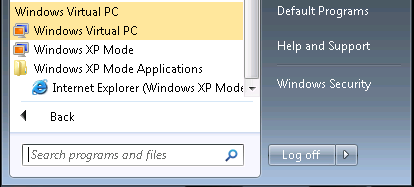
Okay, so we have our XP Mode VM set up and configured to access the Internet. We have IE7 installed and ready to go. But, there is no Blue E in the list of available XP Mode Applications. In fact, there are no XP Mode applications listed at all!

So, we want that Blue E to appear to our Windows 7 host.

Now, one of the catches to needing that shortcut to appear is the need to manipulate the Start Menu folders. Our user that needs access to IE7 does not need any further access to the XP Mode VM, so we are not allowing them to reside in the Local Administrators group.

The only group they will be in will be the Remote Desktop Users group as they will not be allowed into the VM otherwise. Don't forget, the application virtualization is actually a Terminal Services session! So, if the user needing access to applications in the XP Mode VM is not in at least the Remote Desktop Users group they will not have any access to the VM and its virtualized applications at all.

Now, to get the Blue E to appear as an available XP Mode Application, we need to drag the IE shortcut into the following location:

  • C:\Documents and Settings\All Users\Start Menu\Programs\


Once the shortcut is under the Programs folders it will appear in the Windows XP Mode Applications folder:

09-10-24 XP Mode IE Shortcut.png

Right click and hold on the IE shortcut and drag it up to the desktop and the user is good to go.

Since we do not want the XP Mode VM to catch the update to IE8 via WSUS we are running the following script on the XP Mode VM to make sure we gain access to all of the available updates:


  • wuauclt /resetauthorization /detectnow


We will also download the IE8 Blocker utility and run it on the XP Mode VM to make sure that IE8 does not automatically get installed via WSUS.

Yes, in this case the XP Mode VM is domain joined. It, and the other XP Mode VM that will be used for this purpose as well are in a unique OU under SBSComputers and will have a very specific Group Policy Object settings structure in place to keep them as buttoned up as we can.

The reason for this setup in this particular client's case is due to an online Web facing database they use where the developer has insisted that no IE8 browsers access the application until IE8 has been fully tested. Unfortunately, that will not be until next year due to the lack of funds on their part (non-profit).

The Windows 7 host user will be the user account to be found in the Remote Desktop Users group. They will not have local admin rights on the XP Mode VM with the only task being accomplished being accessing the online Web application via IE7.

Philip Elder

MPECS Inc.

Microsoft Small Business Specialists

Co-Author: SBS 2008 Blueprint Book


*Our original iMac was stolen (previous blog post). We now have a new MacBook Pro courtesy of Vlad Mazek, owner of OWN.

Saturday, 24 October 2009

Intel Memory Configuration Tool – Relieve That Pain!

One of the most significant brain busters with Intel’s new Core i7 architecture as well as the new Intel Xeon Processor 3400 Series and 5500 Series architectures is trying to get a straight answer on how to come out with a certain amount of RAM in the system.

This is the Intel Server Board S3420GP Xeon 3400 series memory page out of the product’s technical product specifications manual:

image

There are more pages both before and after this one that get into how to configure memory for this particular server board without really making things entirely clear.

There is the Intel Server Configurator Tool that will only allow certain RAM part combinations during the configuration process, but it does not tell us why it allows or does not allow us to choose a certain amount of RAM like 24GB for one box.

In comes Intel’s new Memory Configurator Tool:

image

We are looking to have a Xeon 3400 series server configured with 24GB. This tool will actually show us the how/what/where/why of getting there.

The tool at least takes some of the guess work out of configuring servers.

The above 24GB configuration request yielded the following result:

image

It says we can do 6x 4GB Registered DIMMs at 800MHz up top with the bottom right quadrant indicating the DIMMs can be Single, Dual, or Quad Rank when it comes to the memory chips on the DIMMs themselves.

Now, is the tool right?

Well, we will find out in short order since we have an SR1630HGP 1U server system based on the S3420GPLC series server board with six 4GB Kingston quad ranked registered ECC RAM sitting in the shop waiting to be built.

When we run through the Intel Server Configurator Tool and come to the memory configuration portion, we get the following:

image

The Configurator indicates up to 4x 4GB Registered Quad Rank DIMMs which does not meet our 24GB need. So, we shall see soon enough which one is right.

Philip Elder
MPECS Inc.
Microsoft Small Business Specialists
Co-Author: SBS 2008 Blueprint Book

*Our original iMac was stolen (previous blog post). We now have a new MacBook Pro courtesy of Vlad Mazek, owner of OWN.

Windows Live Writer

Intel Virtualization Tech (Intel VT-c) Capable Server NICs

With solutions built upon virtualization becoming all the more common, it is important to understand how the underlying hardware may or may not work with the chosen hypervisor platform.

Whether putting together a server solution based on Tier 1 or Intel’s server products, it is up to us to be “in the know” when it comes to how the hardware will work or not work for virtualization.

For instance, Intel’s add-in server class NICs have older versions that do not support advanced virtualization capabilities such as Intel Virtualization Technology for Connectivity (Intel VT-c).

The new VT-c enabled NICs enable some task offloading from the CPUs as well as direct hypervisor access to the NIC hardware.

The following screenshot of Intel’s NIC site show clearly which NICs are VT-c enabled and which ones are not:

image

From Intel’s VT-c site linked above:

To optimize these opportunities, Intel® VT-c provides I/O technologies that optimize virtualized performance:

  • Enhanced data acceleration across the Intel® multi-core processors platforms
  • Improved data processing performance across multiple queues on the network controller
  • Direct VM connectivity and data protection between the VMs

Server hardware is evolving at an extremely fast rate. We are fortunate that Intel has structured their product releases in a Tick-Tock Model thus giving us adoption room around each Tick-Tock cycle.

Otherwise we would be completely inundated and that would be a real problem.

For us, being at the Associate Level in the Intel Reseller Partner Program is also very helpful in providing us with the directions Intel is taking with their products. There are a lot more benefits to becoming a part of the program for us small I.T. shops too.

Philip Elder
MPECS Inc.
Microsoft Small Business Specialists
Co-Author: SBS 2008 Blueprint Book

*Our original iMac was stolen (previous blog post). We now have a new MacBook Pro courtesy of Vlad Mazek, owner of OWN.

Windows Live Writer