Showing posts with label Windows. Show all posts

Saturday, 22 December 2018

VS Code for PowerShell: IntelliSense Code Highlighting Not Working?

This is what VS Code looks like on _all_ machines used in the shop and elsewhere but one:

image

Note the great colour coding going on. That's IntelliSense working its magic to render the code in colour!

The errant machine looks like this:

image

Note the distinct lack of colour coding going on. :(

We removed and re-installed VS Code, the Extensions, and anything else we could with no change.

After an ask on a PowerShell list a suggestion was made to check the VS Code theme.

Sure enough, on the problematic one:

image

VS CODE: Dark (Visual Studio) Colour Theme

While on a functioning setup:

image

VS CODE: Dark+ (default dark)

For whatever reason, the latter colour theme seems to break things.

Now that we have that figured out, we can move on to coding! :D

Merry Christmas and a Happy New Year's to everyone!

Hat Tip: Shawn Melton MVP

Philip Elder
Microsoft High Availability MVP
MPECS Inc.
Co-Author: SBS 2008 Blueprint Book
www.s2d.rocks !
Our Web Site
Our Cloud Service

Thursday, 6 December 2018

Error Fix: Trust Relationship is Broken

Here's a quick post on fixing a broken trust situation when the local administrator username and password is a known commodity.

On Windows 7:

  1. Windows Explorer
  2. Right click My Computer/This PC --> Properties
  3. Change settings for Computer Name
  4. Change button
  5. Domain: Setting Now: DOMAIN.LOCAL
    1. Change to DOMAIN (delete .Local)
    2. Credential
  6. Reboot

That process will fix things for Windows 7 unless PowerShell is up to date then for all others including it:

  1. Log on with local admin user
  2. Reset-ComputerMachinePassword -Credential DOMAIN\DomainAdmin
  3. Log off
  4. Log on with domain user account

That's it.

If you know any other methods, especially for situations where the local admin username and password is an unknown or all local admin accounts are disabled feel free to comment or ping!

Thanks for reading. :)

Philip Elder
Microsoft High Availability MVP
MPECS Inc.
Co-Author: SBS 2008 Blueprint Book
www.commodityclusters.com
Our Web Site
Our Cloud Service

Friday, 14 September 2018

WARNING: Edge (Sync) Ate All Favourites - Favourites Gone!

We've been doing _a lot_ of work setting up a Grafana/InfluxDB/Telegraph monitoring and history system lately.

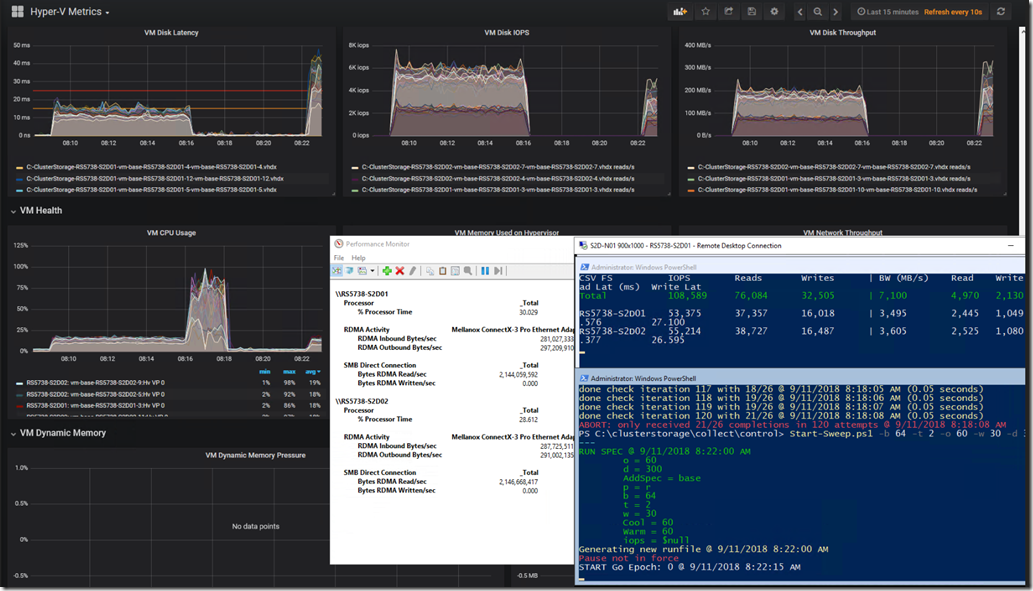
The following is our custom Kepler-64 Storage Spaces Direct 2-node cluster being tracked in a Grafana Dashboard that we've customized:
image

Grafana graphs, PerfMon RoCE RDMA Monitoring, and VMFleet Watch-AllCluster.PS1 (our mod)

Needless to say, a substantial number of links to various sites about running the above setup on both Windows and Ubuntu were lost after something seemingly went wrong. :(

Edge (Sync ?) Hiccups then Pukes

As we were quite busy throughout the day and Edge was being very uncooperative we started using Firefox for most of the browsing throughout the day.

image

Edge: Favourites Bar Shortcut Count Drastically Trimmed

The first response once things started misbehaving should have been was to use the Edge Favourites Backup feature and get them out!

When we opened Edge later in the day this is what we were greeted with:

image

Edge: Favourites Bar Shortcuts Gone!

As a small caveat one of the behaviours with Edge has been for it to either go unresponsive requiring a Task Manager Kill or when another Edge browser session was opened for it to not allow Paste or Right Click in the Address Bar or any Favourites, History, or other buttons to be shown.

So, Task Manager Kill? Nope. They were not there.

Log off and back on again? Nope.

Reboot the machine? Nope.

Both the Favourites Bar content and _all_ of our Favourites were gone.

Back Them Up!

During the above day when things started to misbehave the next step _should have been_ to grab one of the tablets they were syncing to and run a backup process without allowing the tablet to connect to WiFi and sync! Ugh, hindsight is 20/20. :P

And, much like the advice we always start out with when training users on the use of Office products the very first step they need to take is to _save_ their work before doing anything! And, once the work is done, to _save_ their work. Well, that advice is something that we will be taking from now on with regards to Edge and Favourites.

After a big day of Favourites building a backup should be taken.

So, Where Are Those Favourites?

Why, oh why do software vendors move my cheese?

In this case, the original location for those Favourites when using IE back in the day was OneDrive. If there was a hiccup somewhere between the number of different clients OneDrive Sync would append the name of the machine to the conflicting shortcuts and we'd be left with doing a quick Search & Destroy post mortem. No biggie. Not so with Edge.

Thanks to Michael B. Smith via a list we were pointed to:

The location that Edge stores those favourites is here:

  • Stored under %LOCALAPPDATA%\Packages\Microsoft.MicrosoftEdge_8wekyb3d8bbwe\AC\MicrosoftEdge\User\Default\DataStore\Data\nouser1\120712-0049\DBStore
  • Database Name: Spartan.edb

Change the somewhat hidden dropdown to Favourites and:

image

Some Edge Favourites Post Backup Import

What Does All This Mean? Edge Bug

It means that there's a serious bug somewhere in the Edge setup with Data Loss being one possible result.

It means that, for now one needs to run the Edge Export process to back those Favourites up after a serious day of adding to that list!

  1. In Edge click the Favourites/History/Downloads button
    • image
  2. Click the Favourites Star if they are not shown as above
  3. Click the Gear
  4. Click the Import from another browser button
    • image
  5. Click the Export to file button
    • image
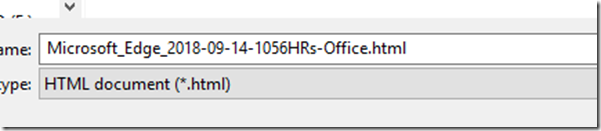
  6. Choose a location and give the file a name
    • We drop ours in OneDrive to keep it backed up
    • image
    • Naming convention: DATE-TIME-Location.HTML

The above process will at least help mitigate any choke in the Edge Favourites setup that may happen.

Warning Note

IMPORTANT NOTE: Edge does not have any kind of parsing structure for the import process.

We cannot pick and choose what to import, and, if there are still Favourites _in the database_ they may disappear/be deleted when importing!

If the bulk of the Favourites are still there then an alternative to a wholesale import would be to open the backup .HTML page and click on the needed links and Favourite them again. *sigh*

Conclusion

What does all of this mean?

Considering that we've lost data there's a very serious problem here. In our case, we're talking about a very long and full day's worth of bookmarks/favourites gone. :(

For now, it means back those favourites up _a lot_ when doing critical work that requires knowledge keeping!

Oh, and we need to set aside some time to delve into the NirSoft utility linked to above to see if there are features in there to help mitigate this situation.

Philip Elder
Microsoft High Availability MVP
MPECS Inc.
Co-Author: SBS 2008 Blueprint Book
www.s2d.rocks !
Our Web Site
Our Cloud Service

Tuesday, 11 July 2017

ALPS “Touch Pad Diagnostics” Pop-Up Fix

One of our newly set up Windows 10 Enterprise 64-bit Toshiba Tecra Z50-C laptops was throwing the following pop-up seemingly at random:

image

ALPS Touch Pad Diagnostics

Collect Diagnostics
Press the button to collect the result to log file.

The pop-up got to be quite annoying very quickly.

Fix Steps

A quick search turned up the following:

1: Elevate a CMD
2: Copy and Paste the following into CMD:
reg add HKEY_LOCAL_MACHINE\SYSTEM\CurrentControlSet\services\SynTP\Parameters\Debug /v DumpKernel /d 00000000 /t REG_DWORD /f
3: Reboot

Conclusion

Note that the above registry setting is on one line. Once it was set up in the registry the problem went away

As always, make sure to test the fix first!

Philip Elder
Microsoft High Availability MVP
MPECS Inc.
Co-Author: SBS 2008 Blueprint Book
Our Cloud Service
Twitter: @MPECSInc

Monday, 15 May 2017

WannaCry Mitigation plus Windows XP and Server 2003 Patch

By now most of the world has heard about the WannaCry malware put together from purported NSA exploit "tools".

The simplest thing to do is to disable or remove SMBv1 on our networks: How to enable and disable SMBv1, SMBv2, and SMBv3 in Windows and Windows Server (Microsoft Support).

Dealing with SMBv1

On Windows 7:

First, we need the following put into a text file:

sc.exe config lanmanworkstation depend= bowser/mrxsmb20/nsi
sc.exe config mrxsmb10 start= disabled
pause
shutdown -r -t 0 -f

image

In Notepad click File then Save As and name exactly as follows:

"Windows7 SMBv1 DISABLE.BAT"

image

NOTE: The quotes " are necessary

Right click on the resulting BATCH file and Run As Administrator:

image

An administrator's username and password will be required for this step. A local admin or domain account would work.

A status window will show:

image

NOTE: Windows 7 should show SUCCESS for both steps

As the message says, press any key to continue.

NOTE: The script automatically reboots the machine so make sure users save and close before running.

On Windows 10:

  1. Click Start and type PowerShell
  2. Right click on the result and Run as Administrator
  3. Remove-WindowsOptionalFeature –Online –FeatureName SMB1Protocol
    • You should see:
    •      image

That fully removes the problematic component in Windows.

Windows Server

Open an elevated PowerShell window:

Remove-WindowsFeature –Name FS-SMB1

image

Backup & Restore

For users that almost exclusively work from their computer over server or cloud based resources with no local backup it's important that they back up their machines daily! They should have at least three 2.5" USB3 fast disk drives in rotation.

We use ShadowProtect Desktop by StorageCraft to back up our client's endpoints.

A critical component in the backup regime is an air-gap. Just as it is for the entire organization's server infrastructure.

Windows XP and Server 2003

Get the Security Updates ASAP and install them!

The files may be able to be set up to be delivered via your favourite patching mechanism. Please check that out to get these patches out to as many systems as is possible.

Windows Firewall

One mitigation step would be to set up a Group Policy object that denies File & Print (445) Inbound from any system but necessary such as servers and/or domain controllers.

Malware Mitigation

As always, the best form of mitigation is a well trained user. Patch and train the human is the best methodology going.

A a small plug, our xD mail sanitation and continuity service flags and renders inert links that say one thing but point to another location. This has put link shortening services like Bit.Ly at a disadvantage but we're willing to pay that price to keep our users sage. Just ask us how!

Philip Elder
Microsoft High Availability MVP
MPECS Inc.
Co-Author: SBS 2008 Blueprint Book
Our Cloud Service

Monday, 25 January 2016

Windows 7, 10, and Skylake?

There’s been a lot of furor and FUD around Windows 7 on the upcoming Skylake platform being blocked or not?

Has anyone seen a revision to the x86 instruction set? We certainly haven’t. We’d most certainly have seen something somewhere about it.

There most certainly has been changes to the processor’s periphery in additional instruction sets for various tasks the CPU would perform in a given era. The Intel/AMD platforms are littered with their various efforts over the last two decades.

The only way we see something like this happening, where an OS won’t run on a certain platform, is by hard coding that into the OS. In the case of Windows 7, that would mean backporting a patch of some sort. Folks would figure out RPQ what patch caused the hard-code and that would be the end of that for many.

We realize Microsoft wants folks to move to Windows 10. There’s a huge revenue opportunity to be had there.

However, surreptitiously going about it with sneaky ads, involuntary downloads to users computers, delivery of the OS to ADDS based environments unannounced (coming to a domain near you), and any other clandestine methodology will, and is, do a lot of harm.

Pushing, pulling, and dragging folks who are kicking and screaming to be left where they are is not a good way to go about it.

[/.25c]

Philip Elder
Microsoft High Availability MVP
MPECS Inc.
Co-Author: SBS 2008 Blueprint Book

Thursday, 23 July 2015

User Profile Tip: Windows Explorer Favorites

Some of us are big on redirecting most folders to the server.

Some of us have learned the hard way to leave AppData and its contents alone on the local desktop. ;)

By default we redirect Desktop, My Documents/Documents, and Favorites.

We recently did a profile refresh using our Event ID 1511, 1515 Profile loss to TEMP method for one of our clients. Their profile had become hopelessly corrupted.

Now, to date we’ve not encountered too many folks that avidly use the Windows Explorer Favorites (pinning):

image

The above is a snip of my own Windows Explorer pins.

Okay, so we don’t redirect that folder and we’ve not really had to migrate those links before.

That begged the question: Where the chicken are they?!?

Our search foo both on the local machine, via AppData where we thought they should be, and via Internet turned up nothing but one clue: %UserProfile%\Links.

image

Bingo!

We copied the files from the UserProfile–OLD folder into their new UserProfile\Links folder and they were happy to have them back.

We’ve since added this step to our checklist and will pay a bit more attention to our client’s environments to see if we need to redirect %UserProfile%\Links to save on some time later on.

Philip Elder
Microsoft Cluster MVP
MPECS Inc.
Co-Author: SBS 2008 Blueprint Book

Tuesday, 20 May 2014

Some Mandatory Reading for Sys Admins

There have been some critical human attributable error related news stories that we have seen lately.

Many of us, if not all of us, have had situations that have had negative impacts on our client's networks or our own networks due to something we did or did not do.

The following four links come via the Patch Management list serve (Ben S.):

As with anything out there on the Interwebs take a PDF of the four parts to keep them safe. :)

There are many pearls of wisdom contained in the above pages as well as some humorous stories that we _all_ can relate to.

  • Lesson #1: Learn from our mistakes
  • Lesson #2: Keep a detailed history of our mistakes
  • Lesson #3: Learn from our mistakes

When we make a mistake that directly impacts our clients we make sure to apologize and make some sort of restitution offer to them.

Contrary to some folks that claim that admitting mistakes can kill a business we have found over the years that being honest with our clients actually builds up their trust in us.

Philip Elder
Microsoft Cluster MVP
MPECS Inc.
Co-Author: SBS 2008 Blueprint Book

Chef de partie in the SMBKitchen ASP Project
Find out more at
Third Tier: Enterprise Solutions for Small Business

Tuesday, 15 April 2014

Windows 8.1 and Windows Server 2012 R2 Update 1 Caveats

Whenever we hear about updates for any device firmware, application software, or operating system software it is _always_ a good idea to read the Release Notes (we probably all know the acronym that comes to mind here ;) ), README.TXT, _and_ do a search for the update to see if anyone is complaining about it. Unfortunately, this major update for Windows 8.1 and Windows Server 2012 R2 has its issues some of which are full-stop problems. The first place to start for this update is here:
There is a lot of information there.
  1. Update 1 is the new baseline for all updates going forward.
    • Meaning, no more updates to that OS if the bits are earlier than 8.1 U1 or 2012 R2 U1.
  2. Update 1 breaks SSL communications between endpoints and WSUS
This last one is a deal breaker for many enterprises, medium enterprises, and especially in our own SMB/SME environments where WSUS is virtually everywhere for patch management.
We just stood up a new cluster on 2012 R2. After our Cluster-Aware Update run:
image
Our cluster nodes now have the update. Since this cluster setup is Greenfield with WSUS ultimately ending up _on_ the cluster the nodes were updated via Microsoft Update.
The workaround for this situation is to enable TLS 1.2 as instructed in the above blog post. Since we are deploying Windows Server 2012 R2 into client sites we will have no choice but to make this change.
Then, when Microsoft releases an update to the update to hopefully fix the problem we will need to test that update extensively _especially_ in a cluster setting!
Yo Microsoft! There is a huge pool of folks willing to test and break this stuff for you! Please get us involved in the early bits for operating systems, applications, and updates again. This ongoing situation of releasing patches and updates to the public without testing them on disparate systems is a _bad_ thing. :(
EDIT: Updated the Gladiator link since between Live Writer and Blogger it got mangled.
Philip Elder
Microsoft Cluster MVP
MPECS Inc.
Co-Author: SBS 2008 Blueprint Book
Chef de partie in the SMBKitchen ASP Project
Find out more at
Third Tier: Enterprise Solutions for Small Business


Monday, 14 April 2014

A Small Chunk of Bandwidth for Windows Server 2012 R2 and Windows 8.1 Pro/Enterprise with Update 1

Okay, so here we go updating our ISO library:

image

image

And:

image

image

And finally:

image

image

Note that all Windows 8.1/Server 2012 R2 operating systems in the field _must_ be updated to Update 1 or they will not receive any further starting with Patch Tuesday this coming May!

That does not give us a lot of time to test the patch setup. But test we must! :(

By the way, is there any need to download the 32-bit version of a desktop OS anymore? We've not had to use one in ages!

Philip Elder
Microsoft Cluster MVP
MPECS Inc.
Co-Author: SBS 2008 Blueprint Book

Chef de partie in the SMBKitchen ASP Project
Find out more at
Third Tier: Enterprise Solutions for Small Business

Thursday, 5 September 2013

BitLocker Encrypted Drive: Unable to Unlock

We have a number of external BitLocker encrypted drives that we use to tote around our business data with.

After plugging one of the drives into our newly stood up system with Windows Server 2012 RTM being slowly configured as a desktop we hit this:

image

Normally, a BitLocker encrypted drive gets plugged into any Windows Vista and above operating system and a prompt happens to unlock it for full access.

Double clicking on the drive in Explorer did nothing. Nada. Zippo.

In the end we had missed installing the BitLocker components on the machine:

image

Note that a restart would be required once the installer routine completed.

Sure enough, after the reboot we were prompted for the pass phrase after double clicking on the drive’s icon:

image

With BitLocker now included in Windows 8 Pro there is no reason why organizations that do move their desktop operating system platforms over to Windows 8 should not use BitLocker to encrypt every system and external storage device by default.

In fact, for any organization that has sensitive data housed on their systems the only thing stopping the migration to Windows 8 Professional would be Line of Business applications ... maybe. One could work around that with application virtualization or RemoteApps depending on the LoB.

The tools for BitLocker management are also available in Windows Server as well as a part of the Desktop OS Software Assurance and MDOP offering.

And one more thing: With the horsepower that today’s systems offer whole disk encryption as opposed to encrypting only contents is always the best option. BitLocker Content Only Encryption is a new feature in Windows 8.

Philip Elder
MPECS Inc.
Microsoft Small Business Specialists
Co-Author: SBS 2008 Blueprint Book

Chef de partie in the SMBKitchen
Find out more at
www.thirdtier.net/enterprise-solutions-for-small-business/

Windows Live Writer

Thursday, 6 December 2012

Internet Explorer: Click On Links And Nothing Happens

We have come across some strange behaviours in IE over the last number of months.

Mainly, the user clicks on a link and nothing happens.

Run the following steps and test after each one. A reboot may be best after each step to reseat things.

  1. Step 1
    1. Microsoft KB281679 You cannot open a new Internet Explorer window or nothing occurs after you click a link
  2. Step 2
    1. Microsoft KB555027 Internet Explorer open with a blank page instead of web site
  3. Step 3
    1. Windows Networking: Internet Explorer is corrupted... how do I fix it?
      • Nuke and Pave
      • Takes time especially on older units.

In most cases step 3 resolved the problem.

Philip Elder
MPECS Inc.
Microsoft Small Business Specialists
Co-Author: SBS 2008 Blueprint Book

Windows Live Writer

Tuesday, 6 November 2012

Independent AntiVirus Vendor Product Review Resources

We need some independent voices when it comes to the plethora of AntiVirus products out there.

In our search we have come up with the following resources that provide some insight into the various AntiVirus products out there and how affective they are.

virus BULLETIN

So far the best one we have come up with is:

Their Magic Quadrant is an awesome at-a-glance view of current product:

image

The above chart is a great comparison of a great many AntiVirus vendor’s products.

AV-comparatives

This site has some great charts with a number of important factors that should be a part of our A/V product analysis.

There are a number of different reports available on this site.

image

image

The above charts give us some inclination on how the product protects the endpoint but also how it impacts the performance of the endpoint machine.

It used to be that A/V products could greatly hinder a user’s day-to-day duties. With today’s PCs that is not so much a problem anymore but one should still be mindful of any possible impact especially for power users.

AV-Test

This site has a limited product list with a few informative charts based on the host operating system being protected.

The link above is to their corporate products list:

image

Note the lack of AVG listed anywhere on this chart.

Based on the Virus Bulletin results and the A-V Comparatives results we are confident that AVG can be a viable alternative to Symantec’s EndPoint Protection.

We will be looking at deploying the AVG product here and as a pilot at one of our more active accounting firms to get some real-world experience with it.

Philip Elder
MPECS Inc.
Microsoft Small Business Specialists
Co-Author: SBS 2008 Blueprint Book

Windows Live Writer

Wednesday, 25 July 2012

Quick Software Installed Poll to Text Command

Hat Tip: Fellow MVP David Nickason

Here is a command to run in an elevated command prompt to get a comprehensive list of installed software products on a machine:

  • wmic /output:WMIInstall.txt product get name,version

Here is a sample output from our Windows 8 client:

Name                                                              Version        
Microsoft Lync 2010 Attendee                                      4.0.7577.4098  
Microsoft Application Error Reporting                             12.0.6015.5000 
Microsoft Office Professional Plus 2010                           14.0.6029.1000 
Microsoft Office OneNote MUI (English) 2010                       14.0.6029.1000 
Microsoft Office InfoPath MUI (English) 2010                      14.0.6029.1000 
Microsoft Office Access MUI (English) 2010                        14.0.6029.1000 
Microsoft Office Shared Setup Metadata MUI (English) 2010         14.0.6029.1000 
Microsoft Office Excel MUI (English) 2010                         14.0.6029.1000 
Microsoft Office Shared 64-bit Setup Metadata MUI (English) 2010  14.0.6029.1000 
Microsoft Office Access Setup Metadata MUI (English) 2010         14.0.6029.1000 
Microsoft Office PowerPoint MUI (English) 2010                    14.0.6029.1000 
Microsoft Office Publisher MUI (English) 2010                     14.0.6029.1000 
Microsoft Office Outlook MUI (English) 2010                       14.0.6029.1000 
Microsoft Office Office 64-bit Components 2010                    14.0.6029.1000 
Microsoft Office Shared 64-bit MUI (English) 2010                 14.0.6029.1000 
Microsoft Office Groove MUI (English) 2010                        14.0.6029.1000 
Microsoft Office Word MUI (English) 2010                          14.0.6029.1000 
Microsoft Office Proofing (English) 2010                          14.0.6029.1000 
Microsoft Office Shared MUI (English) 2010                        14.0.6029.1000 
Microsoft Office Proof (English) 2010                             14.0.6029.1000 
Microsoft Office Proof (Spanish) 2010                             14.0.6029.1000 
Microsoft Office Proof (French) 2010                              14.0.6029.1000 
Windows Live Essentials                                           15.4.3502.0922 
Windows Live Writer                                               15.4.3502.0922 
Zune Language Pack (NLD)                                          04.08.2345.00  
Intel(R) Processor ID Utility                                     4.50.0000      
Zune Language Pack (PTG)                                          04.08.2345.00  
Zune Language Pack (PLK)                                          04.08.2345.00  
Zune Language Pack (FRA)                                          04.08.2345.00  
Zune Language Pack (KOR)                                          04.08.2345.00  
Cisco AnyConnect VPN Client                                       2.5.2014       
Windows Live SOXE Definitions                                     15.4.3502.0922 
Windows Live Communications Platform                              15.4.3502.0922 
Zune Language Pack (FIN)                                          04.08.2345.00  
Windows Live UX Platform Language Pack                            15.4.3508.1109 
LogMeIn Rescue Technician Console                                 7.0.1148       
Java(TM) 6 Update 33                                              6.0.330        
Java(TM) 6 Update 31 (64-bit)                                     6.0.310        
Java(TM) 7 Update 5 (64-bit)                                      7.0.50         
Windows Live Writer                                               15.4.3502.0922 
Zune Language Pack (RUS)                                          04.08.2345.00  
Zune Language Pack (HUN)                                          04.08.2345.00  
Zune Language Pack (NOR)                                          04.08.2345.00  
Windows Live PIMT Platform                                        15.4.3508.1109 
D3DX10                                                            15.4.2368.0902 
Zune Language Pack (DAN)                                          04.08.2345.00  
Zune Language Pack (PTB)                                          04.08.2345.00  
Zune Language Pack (CHT)                                          04.08.2345.00  
Zune Language Pack (CHS)                                          04.08.2345.00  
Zune Language Pack (ELL)                                          04.08.2345.00  
Zune Language Pack (JPN)                                          04.08.2345.00  
Zune Language Pack (IND)                                          04.08.2345.00  
Microsoft IntelliPoint 8.2                                        8.20.468.0     
MSVCRT                                                            15.4.2862.0708 
Zune Language Pack (DEU)                                          04.08.2345.00  
Zune Language Pack (ITA)                                          04.08.2345.00  
Zune Language Pack (CSY)                                          04.08.2345.00  
Zune Language Pack (MSL)                                          04.08.2345.00  
Zune                                                              04.08.2345.00  
Windows Live Language Selector                                    15.4.3555.0308 
Microsoft IntelliType Pro 8.2                                     8.20.469.0     
Windows Mobile Device Updater Component                           04.08.2345.00  
Windows Live Writer                                               15.4.3502.0922 
Microsoft Silverlight                                             5.1.10411.0    
Zune Language Pack (SVE)                                          04.08.2345.00  
Zune Language Pack (ESP)                                          04.08.2345.00  
Windows Live UX Platform                                          15.4.3502.0922 
Windows Live Writer Resources                                     15.4.3502.0922 
Windows Live Installer                                            15.4.3502.0922 
Windows Live SOXE                                                 15.4.3502.0922 
Java Auto Updater                                                 2.0.7.1        

This is one to get familiar with!

Philip Elder
MPECS Inc.
Microsoft Small Business Specialists
Co-Author: SBS 2008 Blueprint Book

*Our original iMac was stolen (previous blog post). We now have a new MacBook Pro courtesy of Vlad Mazek, owner of OWN.

Windows Live Writer

Wednesday, 11 July 2012

Software Assurance for SBS And PAO Ending and Some Stack Configurations And How SBS 2011 Standard Can Continue To Teach Us

[EDIT] Please note that Server STD in this case is Windows Server 2012 Standard that comes with 1+2 virtualization rights.

[2012-07-14: EDIT] We updated the two cluster solution sets with the appropriate license structure for Windows Server 2012 Standard. My apologies for the initial error.

So, we now know that Microsoft will be officially releasing Windows Server 2012 next month.

Software Assurance

As a result, Software Assurance for SBS and the Premium Add-On will no longer be offered after the end of this month.

So, we have been encouraging clients that are looking for an on-premises solution that SBS 2011 Standard fits to start their Open Value Agreements by the end of the month.

The SA make-good should be about even or in their favour to some degree.

Going forward we will still have access to SBS 2011 Standard through the OEM channel and Open License for outright license purchase but no more Software Assurance.

Third Tier had a Webinar/Discussion last night about the Future of Small Business IT. Unfortunately I was not able to attend but a recording should be available sometime soon. The Webinar would be a good way to spend some time catching up on how things may be moving forward.

Our Guides and Solution Set

For now, we will be looking to build out our guides for the new solution set. We will include licensing structures as well as our usual in-depth setup guides for each component we need to deliver an on-premises solution.

Here are some solution sets we have on our plate at the moment:

  1. Simple Solution (1x Server STD, 1x Exchange, Server/Exchange CALs):
    1. VM1: DC, File Services, Folder Redirection, Fax
      1. GPOs defined for Microsoft Update (MU) via Internet
    2. VM2: Exchange/OWA/ActiveSync
  2. Simple Solution - Advanced (2x Server STD, 1x Exchange, Server/Exchange/RDS CALs)
    1. VM1: DC, File Services, Folder Redirection, Fax, Reverse Proxy
    2. VM2: Exchange/OWA/ActiveSync
      1. Reverse Proxy provides for 1 public IP for OWA/ActiveSync/WSS
    3. VM3: WSUS and SharePoint Foundation
      1. GPOs defined for all systems to pull updates from WSUS.
      2. SQL Express for WSF here.
    4. VM4: Remote Desktop Services/RemoteApp
  3. Advanced Solution - Basic 2 Node Cluster (2x Server STD/Node, 1x Exchange, Server/Exchange/RDS CALs)
    1. VM1: DC, File Services, Folder Redirection, Fax, Reverse Proxy
    2. VM2: Exchange/OWA/ActiveSync
      1. Reverse Proxy provides for 1 public IP for OWA/ActiveSync/WSS
    3. VM3: WSUS and SharePoint Foundation
      1. GPOs defined for all systems to pull updates from WSUS.
      2. SQL Express for WSF/WSUS here.
    4. VM4: Remote Desktop Services/RemoteApp
      1. RDWeb can replace RWW/RWA with some tweaking.
  4. Advanced Solution - Advanced 2 Node Cluster (4x 3x Server STD/Node, 1x Exchange, 1x SQL STD, Server/Exchange/RDS/SQL CALs)
    1. VM1: DC, File Services, Folder Redirection, Fax, Reverse Proxy
    2. VM2: Exchange/OWA/ActiveSync
      1. Reverse Proxy provides for 1 public IP for OWA/ActiveSync/WSS
    3. VM3: WSUS and SharePoint Foundation
      1. GPOs defined for all systems to pull updates from WSUS.
    4. VM4: Remote Desktop Services/RemoteApp
      1. RDWeb can replace RWW/RWA with some tweaking.
    5. VM5: SQL and SQL Services
      • NOTE: For full VM portability, that is the ability to move guests between nodes or onto 1 node for things like maintenance that node must have the correct number of either STD licenses or a Datacenter license.

The above four options are not far off from what we have been deploying all along. The catch is that we now need to delve into the bits and pieces.

SBS Can Teach Us

But, we have been doing that already haven't we? We have been ripping apart the SBS wizards for over 10 years now to see what they do and how they do it.

The SBS Development Team has given us an awesome model/template in SBS 2011 Standard for all of our networks going forward.

  • Active Directory
    • Organizational Unit Structures
    • Group Policy Configuration
    • WMI Filtering
  • Exchange
    • Receive and Send Connector Structures
    • Private and Public Mailbox Setup
    • Mailbox Migration Techniques
  • File Services
    • Folder Redirection
    • Folder Sharing
  • SharePoint
    • Site configuration for URL sets
    • Alternate port mapping
    • E-mail in and out

Obviously this list is really brief, however, we have a goldmine of knowledge in the SBS product line that should not be left untapped.

We _highly_ suggest that digging into SBS 2011 Standard and working out what the wizards do and how they do it (logs) will be a significant part of moving forward in today's ever changing IT World!

Conclusion

We are feeling pretty positive about where things are going with the changes here. We have yet to see what the prices for our solution stacks will be going forward relative to the current stacks but we are confident that the price increases to SMB will be reasonable.

Remember, take that upfront sticker price (if not doing Open Value) and divide by 36 (life of the solution in months) then divide the result by the number of users to get the total cost _per user_ per month to put everything into perspective.

UPDATE: 2012-07-14: We have changed the solution sets for the cluster setups since the total number of VMs running on a 2 node cluster must be _fully_ licensed on each node. So, 4 VMs means we need two Windows Server 2012 Standard licenses per node.

Philip Elder
MPECS Inc.
Microsoft Small Business Specialists
Co-Author: SBS 2008 Blueprint Book

*Our original iMac was stolen (previous blog post). We now have a new MacBook Pro courtesy of Vlad Mazek, owner of OWN.

Windows Live Writer

Wednesday, 9 May 2012

Group Policy Settings Reference for Windows and Windows Server Excel Spreadsheets

Microsoft downloads:

image

Note the new spreadsheet for Windows Server 2012 (8).

image

The spreadsheets support Pivot Tables so it is fairly straightforward to find a specific or group of settings. The Excel Find feature allows for a quick search of the content.

Philip Elder
MPECS Inc.
Microsoft Small Business Specialists
Co-Author: SBS 2008 Blueprint Book

*Our original iMac was stolen (previous blog post). We now have a new MacBook Pro courtesy of Vlad Mazek, owner of OWN.

Windows Live Writer

Tuesday, 6 March 2012

Windows 8 Metro is a Paradigm Shift: Some Good Reads

There is a lot of buzz out there about the new Metro GUI on Windows 8.

We like it due to previous experience with Windows Phone 7 and ZuneHD 32GB.

One of the pearls of wisdom at MVP Summit came from Mikael Nyström during a conversation with other MVPs one of whom had a Samsung Slate and was complaining about Metro.

He stated that Metro requires a paradigm shift in the way we work with Windows. The shift is in realizing that Metro is the old Start Menu _covering the whole screen_ instead of staying close to the left side of the screen.

Keyboard shortcuts and “gestures” are to become the norm for working in Windows 8.

By the way, the little Windows button on the keyboard is worth it’s weight in gold. There are a lot of keyboard shortcuts associated with that one key.

The above two articles are excellent in their discussion of Windows 8 and Metro.

We see Metro as a natural progression from the functionality that Windows 7 brought to the Start Menu table.

Philip Elder
MPECS Inc.
Microsoft Small Business Specialists
Co-Author: SBS 2008 Blueprint Book

*Our original iMac was stolen (previous blog post). We now have a new MacBook Pro courtesy of Vlad Mazek, owner of OWN.

Windows Live Writer

Friday, 23 December 2011

Blast From the Past Videos

Here are some neat videos for your down moments. :)

Our SBS roots:

SBS BackOffice Server

Windows desktop:

Windows 386

Enjoy and have a great Holiday break! :)

Philip Elder
MPECS Inc.
Microsoft Small Business Specialists
Co-Author: SBS 2008 Blueprint Book

*Our original iMac was stolen (previous blog post). We now have a new MacBook Pro courtesy of Vlad Mazek, owner of OWN.

Windows Live Writer

Monday, 8 August 2011

Windows Thin PC Release Notes

The following is a copy and paste of the Windows Thin PC (Microsoft Micro Site) “Release Notes.htm” content found on the OS’s ISO. The hyperlinks have been removed from the first section since they point to the ISO’s virtual drive letter as the root:

Windows Thin PC Release Notes

5/20/2011

This document contains important information about known issues in Windows Thin PC.

Known Issues

Recommended hardware configuration

Missing Search functionality in Start menu

Adding and removing Windows features in Thin PC

Keyboard Filter may block accessibility

Cannot install .NET Framework 3.5

No support for certain Windows products and features

Write Filters: System goes into safe mode on reboot

Enhanced Write Filter cannot be disabled without commit

Recommended hardware configuration
  • 1 GHz or faster 32-bit (x86)
  • 1 GB RAM
  • 4 GB available hard disk space
  • DirectX 9 graphics device with WDDM 1.0 or a later version driver

Missing Search functionality in Start menu

To reduce the Thin PC image size, Search functionality is not included in Thin PC. As a result, the Search bar does not exist on the Start menu. In addition, the File Open, Save, Save As, and Browse dialogs do not provide support for wildcard searches.

Adding and removing Windows features in Thin PC

Due to the locked-down mode of the Thin PC image, adding and removing Windows features is not supported in Thin PC.

Keyboard Filter may block accessibility

By design, Keyboard Filter may enable you to block certain features that may be important for accessibility. If your application scenarios require specific accessibility functionality, make sure that you verify those scenarios after enabling Keyboard Filter.

Cannot install .NET Framework 3.5

.NET Framework 3.5 is not a supported environment. The alternative is to download .NET Framework 4.x, then recompile and test your managed applications. Only .NET Framework 2.0 is shipped as part of Windows Thin PC.

No support for certain Windows products and features

Windows Thin PC does not support the following products and features:

  • .NET Framework 3.5
  • Premium codecs: Microsoft AC3 Encoder (Dolby), Microsoft DTV-DVD Audio Decoder (MPEG-2, AAC), Microsoft DTV-DVD Video Decoder (MPEG-2, H.264), MPEG-2 Audio and Video Encoder, MPEG Layer-3 Audio Codec (MP3), MPEG-4 Decoders, Windows Media Video Codecs (VC-1)
  • Microsoft Security Essentials
  • Windows Live Essentials

Write Filters: System goes into safe mode on reboot

When you use the Enhanced Write Filter Manager (ewfmgr.exe) or File Base Write Filter Manager (fbwfmgr.exe) with the /enable command and then reboot, your device goes to a screen with options to Start Windows Normally or in Safe Mode. This can be fixed by setting the Boot Configuration Data (BCD) store to ignore all boot errors, which is a default setting for write filter in the Thin PC image.

Type the following command to set the Boot Configuration Data (BCD) BootStatusPolicy to ignore faults:

bcdedit.exe /set {current} bootstatuspolicy ignoreallfailures


Enhanced Write Filter cannot be disabled without commit


When in EWF RAM Reg mode, you cannot disable the write filter without committing changes. RAM Reg mode requires you to commit the overlay to disable the write filter. The settings are stored in the registry and the /disable command will not persist without a /commit command. This is a limitation of RAM Reg mode. The workaround is to restart the device before disabling write filter.


© 2011 Microsoft. All rights reserved.


With some of the noted restrictions it becomes quite clear that this OS is truly intended to be a thin client for an already existing or soon to be set up VDI/VDA infrastructure or virtualized application delivery.


We will be installing the OS onto an Asus EeeBox PC barebones unit (EB1012P-B0320) that we just received to get a better idea of what the OS is about, its usefulness, how we can further lock it down via Group Policy, and more.


Philip Elder

MPECS Inc.


Microsoft Small Business Specialists


Co-Author: SBS 2008 Blueprint Book


*Our original iMac was stolen (previous blog post). We now have a new MacBook Pro courtesy of Vlad Mazek, owner of OWN.


Windows Live Writer

Monday, 7 March 2011

HTC HD7 Windows Phone 7 First Impressions

My old HTC Touch Pro died this last weekend. So, despite wanting to wait until the summer before picking up a new Windows Phone 7 based device my hand was forced.

After evaluating the three main cellular provider’s Windows Phone 7 (WP7) devices I settled on the HTC HD7 offered by Bell Mobility.

This essentially killed two birds with one stone:

  1. Discontinued our longstanding TELUS Mobility (TELUS) service (previous blog post on some of the pain points with them).
  2. Replaced the now dead HTC Touch Pro.

First off, engadget has a couple of really good posts on the HD7 and WP7:

Now, since I have had a Zune HD since last year that gets used a lot the Metro GUI on the HD7 has been pretty straight forward to get used to.

Initial Impressions
  • The screen is huge, clear, and rich in colour compared to my old HTC Touch Pro.
    • Almost anything would look better! ;)
  • Exchange configuration was very straight forward.
  • The integration between Outlook, Hotmail, Facebook, and other social media sites is amazing.
  • In Phone mode the screen blanks when the phone is at the ear but immediately goes active when the phone is taken away from the ear.

I like it. :)

The phone did require an update right from the start. In order to do that though the Zune software was required.

Once done, the Zune software picked up the phone right away though it required an update for itself:

image

Once the Zune software was up to date we were able to move forward with updating the phone.

image

The update was downloaded to the phone and then:

image

Once the phone rebooted it came up into an update mode with an icon of a laptop tethered to a Windows phone. There was a progress bar that ran up the left hand side of the phone’s screen.

I was not able to watch the update complete, but the first third took about 10 minutes. The progress bar then sat there for quite a while.

image

Once completed, the phone was sitting at the lock screen. The approximate time for the update was about 30-45 minutes.

Philip Elder
MPECS Inc.
Microsoft Small Business Specialists
Co-Author: SBS 2008 Blueprint Book

*Our original iMac was stolen (previous blog post). We now have a new MacBook Pro courtesy of Vlad Mazek, owner of OWN.

Windows Live Writer