This is probably one of the more interesting things to see on any given day:

Google has detected unregistered (sic) AntiVirus 2009 copy on your computer.
Now, besides the bad grammar, it is a little surprising that Google would be supporting any kind of A/V product.
If one is careful enough, the so-called IE Information Bar actually hides a bit of bad code that shows itself.
BleepingComputer.com has some great articles on removing the malware.
The articles point to a MalwareByte's A/V freeware product that actually does the removal: Malwarebytes' Anti-Malware.
In the above screenshot, the malware shows in the tray. The user knew that there was something up on the initial window, but did not realize that the only way to get rid of that window was via the Task Manager. So, clicking on the red X only served to give A/V 2009 a foothold into the system.
So, we downloaded the tool and ran it through. It cleaned out the system, but missed something. After the clean we were still getting the A/V 2009 hook on the Google Web page.
So, back to BleepingComputer.com: Antivirus 2009 Hijacks The Google Web Site. But, the winsrc.dll file mentioned in the article did not exist on this system.
Run IE with no add-ons and Google was clean.
So, a look into the Add-Ons manager in IE turned up:
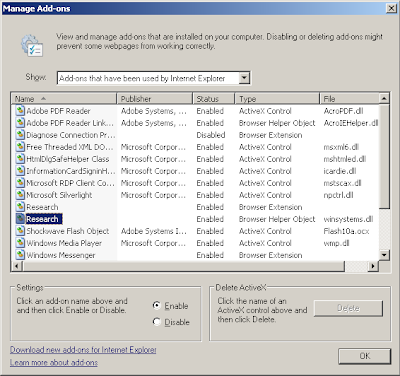
IE Add-On for Research? winsystems.dll
Disable that add-on, and sure enough there was no more A/V 2009 on Google's home page.
A quick search for the file and a SHIFT+DEL and the file was gone.
The lesson here is quite simple: MalwareBytes is a great tool, but like any other malware fighting tool, it may miss on its searches once in a while. It managed to scan through and find a whole bunch of different stuff like the original A/V 2009 programs, search bars and the like, but it missed the winsystems.dll.
For users with Windows Vista, the UAC lesson is very simple: Cancel.
For users of Windows XP: Do Not Touch. Bring up the Task Manager and kill the software there.
The process in the Processes tab was AntiVirus2009.exe, so it was not too difficult to kill so we could get to the MalwareBytes site and download the cleaner tool as A/V 2009 always redirected to a "Get our product now or else you are doomed" type message page.
We really need to keep on top of training our users! In this case, we are dealing with a new client. So, in time, and with some Internet "Street Smarts" training, our new client's users will be more prone to avoid any malware infections.
Working against malware is one area where our experience, that is our working with the same settings and Internet Explorer Add-Ons, and knowing which Windows processes are the right ones to be there, can pay dividends in finding the source of the problem quickly and efficiently.
Philip Elder
MPECS Inc.
Microsoft Small Business Specialists
*All Mac on SBS posts are posted on our in-house iMac via the Safari Web browser.


