Showing posts with label Microsoft Downloads. Show all posts

Monday, 22 September 2014

KB913086: Security Updates Available as ISO Files at Microsoft Download Centre

Microsoft’s security updates can be downloaded in ISO form.

The above site has a list of links to the ISO downloads.

image

We have set up a link on Microsoft’s Download Centre site to sort the ISO files with newest at the top:

image

We suggest bookmarking this link to gain quick access to the newest or latest ISO downloads.

Hat Tip: Thanks to Derek Knight and Russ Stamm (quietman7).

Philip Elder
Microsoft Cluster MVP
MPECS Inc.
Co-Author: SBS 2008 Blueprint Book

Chef de partie in the SMBKitchen ASP Project
Find out more at
Third Tier: Enterprise Solutions for Small Business

Monday, 21 April 2014

A Microsoft Cluster Troubleshooting Guide

Here are some of the tools we can use when troubleshooting a cluster, Scale-Out File Server, Hyper-V, and other cluster issues:

Failover Cluster Manager 

The FCM gives us the ability to dig into the various Windows Logs and delimit them by time, node, and log type.

  • FCM --> Cluster Name --> Cluster Events --> Query

image

We set up a few different queries out of the box. One with everything Cluster, Failover Clustering, and Hyper-V related. We then create a subset of queries. The various queries get saved to a local folder on the management DC/RSAT system.

Get-ClusterLog

The Get-ClusterLog PowerShell commandlet allows us to pull the full log set from one or all nodes. Note that the default output folder is \\NODE\C$\Windows\Cluster\Cluster.LOG (C:\Windows\Cluster\Cluster.LOG) unless specified in the command.

This log can be very busy and a bit of a challenge to work through. If one has a good idea of what to look for then the log can be quite informative.

  • Get-ClusterLog -Destination .
    • Places the log in the local directory (we create C:\Temp on all nodes for this kind of thing)
  • (get-cluster).ClusterLogLevel=5
    • There are five levels with 5 being the most verbose. Default level is 3 and best left there unless absolutely needed. Level 5 file can be large.

EDIT: The Default cluster log location is C:\Windows\Cluster\Reports\Cluster.log

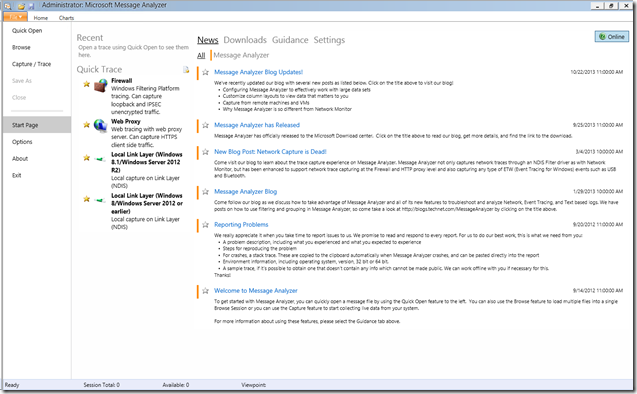
Microsoft Message Analyzer

This is an in-depth tool. There is no way around it. Thus, a learning curve is required.

However, there is an amazing amount of information that we can then have at our fingertips and not only that colour coded!
image

image

One can use a series of filters under the log file settings to delimit by time period among others.

image

We can set up our columns:

image

Once we have our Cluster column, for example when looking for a problematic cluster component, we can set up a filter:

image

And that is just the tip of the iceberg. One will need to spend some time with this tool to really get into its abilities such as colour coding source node, information levels, and so much more!

Please check the Message Analyzer Blog for more information.

Note that an absence of System Centre and its components is deliberate. We find, at least at this time, that Failover Cluster Manager provides a far superior cluster management experience.

Philip Elder
Microsoft Cluster MVP
MPECS Inc.
Co-Author: SBS 2008 Blueprint Book

Chef de partie in the SMBKitchen ASP Project
Find out more at
Third Tier: Enterprise Solutions for Small Business

Wednesday, 4 December 2013

Microsoft Downloads: TechNet Libraries PDF Downloads Search List

This link opens the Microsoft Downloads site:

image

Note the third one listed in the search results (sorted by newest publish date) is the _entire_ Windows Server 2012 R2 and Windows Server 2012 RTM TechNet Library Documentation! It weighs in at a paltry 110MB in PDF form too.

image

An example of how great it is to have one searchable document is in the search results _within_ the document for the search term "RDMA".

Try searching for Windows Server and RDMA and come up with a Microsoft product focused set of search results on any search engine.

Philip Elder
Microsoft MVP
MPECS Inc.
Co-Author: SBS 2008 Blueprint Book

Chef de partie in the SMBKitchen
Find out more at
Third Tier: Enterprise Solutions for Small Business

Thursday, 12 September 2013

Office Pro Plus: Setup Error - Files necessary to run the Office Customization Tool were not found. Run Setup from the installation point of a qualifying product.

That was the error we had when we ran setup /admin from our Office 2013 Pro Plus distribution point.

image

It turns out that we do need to download some additional files from Microsoft's download site.

We downloaded the 32-bit version of the tools and extracted them to a folder.

Once the extraction is complete copy the Admin folder to the root of the Office distribution point.

image

We could then run the setup /admin command from the distribution point and voila:

image

We can now go on and create our MST file to allow for automatic installation, activation, and base configuration of the products.

Philip Elder
MPECS Inc.
Microsoft Small Business Specialists
Co-Author: SBS 2008 Blueprint Book

Chef de partie in the SMBKitchen
Find out more at
www.thirdtier.net/enterprise-solutions-for-small-business/

Windows Live Writer

Wednesday, 13 March 2013

Windows 7 and Server 2008 R2 New Cumulative Enterprise Hotfix Rollup Released

Microsoft has released a series of updates that aggregate a number of hotfixes released since Windows 7/Server 2008 R2 Service Pack 1 into one spot. Note that this spot is not Microsoft Update _or_ WSUS.

Normally for hotfixes we would have to link into each hotfix’s download site and go through the e-mail return with password protected ZIP archive (in most cases) process for _each_ hotfix contained in this one update set.

To get the updates we are required to step out of our normal update routines and download them from the Windows Catalogue site.

  1. Go to the Windows Update Catalogue site.
    • Note for users running as Standard User a UAC with admin credentials will be required due to a plug-in requesting install rights.
    • image
    • IE10 on Win8 with Compatibility mode enabled ends up with:
      • image
  2. Type 2775511 in the Search field and click Search.
    • image
  3. We can then add the required update download files to our “Basket”.
    • image
  4. Click the View Basket link.
  5. Click the Download button.
    • image
  6. Click the Browse button and choose a folder to download the updates to.
    • A UAC Prompt will happen at this point.
    • Though, Win7 with IE9 seems to have stalled at this point on our download attempts. :(
    • image
  7. We ended up needing to Run As Admin and elevating Internet Explorer when starting the browser before we finally saw this:
    • image
    • But, then we get this:
    • image

Oh well, we tried Win8 with IE10, Win7 with IE9, and Win7 with IE8 with all failing.

image

We tried Run As Admin with UAC via the domain admin account to start all of the IE versions on each OS and still hit a roadblock.

We shall try again later. :(

Once we do have the files we will be able to see about how we will deploy them at client sites.

Hat Tip: Susan Bradley the SBS Diva

Philip Elder
MPECS Inc.
Microsoft Small Business Specialists
Co-Author: SBS 2008 Blueprint Book

Chef de partie in the SMBKitchen
Find out more at
www.thirdtier.net/enterprise-solutions-for-small-business/

Windows Live Writer

Monday, 17 September 2012

Microsoft Attack Surface Analyzer 1.0 Released

Need to know what kind of impact installing a Line of Business (LoB) application has on a server?

Run the Attack Surface Analyzer prior to installing that application to get a baseline.

After installing that LoB run the Analyzer again and compare against the baseline.

In some cases, be prepared to be surprised at the changes the LoB install made.

image

This is definitely one to keep on the Technician's Thumb Drive (blog category).

Hat Tip: Susan Bradley

Philip Elder
MPECS Inc.
Microsoft Small Business Specialists
Co-Author: SBS 2008 Blueprint Book

Windows Live Writer

Tuesday, 28 August 2012

Microsoft Windows 8 and Server 2012 SHA-1/MD5 Results and HASH Utility

We have fresh downloads of the RTM bits from the Microsoft Volume Licensing Center using the default Download Manager.

For some reason the Web site does not have any notes as far as checksum is concerned.

  • Windows Server 2012 Standard/Datacenter
    • SHA-1: 063BC26ED45C50D3745CCAD52DD7B3F3CE13F36D
    • MD5: FF95A8C5207C880B099B7F34DBA941B6
  • Windows 8 Enterprise x64
    • SHA-1: 4EADFE83E736621234C63E8465986F0AF6AA3C82
    • MD5: 27AA354B8088527FFCD32007B51B25BF
  • Windows 8 RTM x64
    • SHA-1: 1CE53AD5F60419CF04A715CF3233F247E48BEEC4
    • MD5: 0E8F2199FAE18FE510C23426E68F675A

Note that we used the following:

image

Please use the Direct Download Link tucked under the big green button:

image

Also, when installing the utility make sure to uncheck the third party software (in this case Snap.do) tucked into the Terms And Conditions.

image

As always, YMMV. :)

Philip Elder
MPECS Inc.
Microsoft Small Business Specialists
Co-Author: SBS 2008 Blueprint Book

*Our original iMac was stolen (previous blog post). We now have a new MacBook Pro courtesy of Vlad Mazek, owner of OWN.

Windows Live Writer

Friday, 24 August 2012

Active Directory Replication Status Tool

The Active Directory Replication Status Tool is definitely one that should be installed on all management (RSAT) machines that domain administrators use. It _requires_ .NET 4.0 and .NET 3.5.1 so may not be practical on domain DCs depending on security configurations for them.

image

This tool along with the required .NET installer files are definitely required on the Technician's Thumb Drive (Blog Category - check it out as there are lot's of goodies in there).

Hat Tip: Susan Bradley

Philip Elder
MPECS Inc.
Microsoft Small Business Specialists
Co-Author: SBS 2008 Blueprint Book

*Our original iMac was stolen (previous blog post). We now have a new MacBook Pro courtesy of Vlad Mazek, owner of OWN.

Windows Live Writer

Wednesday, 22 August 2012

Windows Server 2012 RTM Bits On The Way Down

We have Open Value Agreements that cover most of our server setups as the Action Pack tends to be behind on product release timing.

So, it was mentioned by fellow MVP Tim Barrett that we should see the bits available in the Microsoft Volume Licensing portal and sure enough the download is there:

image

Neat!

We have a few projects that were pending RTM bits that can now move forward.

Philip Elder
MPECS Inc.
Microsoft Small Business Specialists
Co-Author: SBS 2008 Blueprint Book

*Our original iMac was stolen (previous blog post). We now have a new MacBook Pro courtesy of Vlad Mazek, owner of OWN.

Windows Live Writer

Wednesday, 15 August 2012

Windows 8 Client is Now Live on MSDN

We are in the process of downloading the RTM bits for Windows 8:

image

So far, the downloads for the RTM bits only show on the MSDN site with RC showing on TechNet.

There are a lot of servers working these downloads so the downloads may or may not be available in other geographical areas.

Philip Elder
MPECS Inc.
Microsoft Small Business Specialists
Co-Author: SBS 2008 Blueprint Book

*Our original iMac was stolen (previous blog post). We now have a new MacBook Pro courtesy of Vlad Mazek, owner of OWN.

Windows Live Writer

Thursday, 31 May 2012

Windows Server 2012 Release Candidate On the Way Down!

The Windows Server 2012 Release Candidate is available for download here:

LiveID sign-in is required.

image

Hat Tip: Susan Bradley

Philip Elder
MPECS Inc.
Microsoft Small Business Specialists
Co-Author: SBS 2008 Blueprint Book

*Our original iMac was stolen (previous blog post). We now have a new MacBook Pro courtesy of Vlad Mazek, owner of OWN.

Windows Live Writer

Thursday, 1 March 2012

Windows 8 Documentation Download Links

All of these links come via Susan Bradley:

Download: Understand and Troubleshoot BitLocker in Windows Server "8" Beta - Microsoft Download Center - Download Details: http://www.microsoft.com/download/en/details.aspx?id=29032&utm_source=feedburner&utm_medium=feed&utm_campaign=Feed%3A+MicrosoftDownloadCenter+%28Microsoft+Download+Center%29#tm

Download: Understand and Troubleshoot Servicing in Windows Server "8" Beta - Microsoft Download Center - Download Details: http://www.microsoft.com/download/en/details.aspx?id=29030&utm_source=feedburner&utm_medium=feed&utm_campaign=Feed%3A+MicrosoftDownloadCenter+%28Microsoft+Download+Center%29#tm

Download: Test Lab Guide: Demonstrate Remote Desktop Services Desktop Virtualization in Windows Server "8" Beta - Microsoft Download Center - Download Details: http://www.microsoft.com/download/en/details.aspx?id=29028&utm_source=feedburner&utm_medium=feed&utm_campaign=Feed%3A+MicrosoftDownloadCenter+%28Microsoft+Download+Center%29#tm

Download: Understand and Troubleshoot DNS Security Extensions (DNSSEC) in Windows Server "8" Beta - Microsoft Download Center - Download Details: http://www.microsoft.com/download/en/details.aspx?id=29018&utm_source=feedburner&utm_medium=feed&utm_campaign=Feed%3A+MicrosoftDownloadCenter+%28Microsoft+Download+Center%29#tm

Download: Understand and Troubleshoot AD DS Simplified Administration in Windows Server "8" Beta - Microsoft Download Center - Download Details:

http://www.microsoft.com/download/en/details.aspx?id=29019&utm_source=feedburner&utm_medium=feed&utm_campaign=Feed%3A+MicrosoftDownloadCenter+%28Microsoft+Download+Center%29#tm

Download: Test Lab Guide: Demonstrate IP Address Management (IPAM) in Windows Server "8" Beta - Microsoft Download Center - Download Details: http://www.microsoft.com/download/en/details.aspx?id=29020&utm_source=feedburner&utm_medium=feed&utm_campaign=Feed%3A+MicrosoftDownloadCenter+%28Microsoft+Download+Center%29#tm

Download: Understand and Troubleshoot Dynamic Access Control in Windows Server "8" Beta - Microsoft Download Center - Download Details: http://www.microsoft.com/download/en/details.aspx?id=29023&utm_source=feedburner&utm_medium=feed&utm_campaign=Feed%3A+MicrosoftDownloadCenter+%28Microsoft+Download+Center%29#tm

Download: Understand and Troubleshoot Hyper-V Replica in Windows Server "8" Beta - Microsoft Download Center - Download Details: http://www.microsoft.com/download/en/details.aspx?id=29016&utm_source=feedburner&utm_medium=feed&utm_campaign=Feed%3A+MicrosoftDownloadCenter+%28Microsoft+Download+Center%29#tm

Download: Understand and Troubleshoot Cluster-Aware Updating_(CAU) in Windows Server "8" Beta - Microsoft Download Center - Download Details: http://www.microsoft.com/download/en/details.aspx?id=29015&utm_source=feedburner&utm_medium=feed&utm_campaign=Feed%3A+MicrosoftDownloadCenter+%28Microsoft+Download+Center%29#tm

Download: Understand and Troubleshoot IP Address Management (IPAM) in Windows Server "8" Beta - Microsoft Download Center - Download Details: http://www.microsoft.com/download/en/details.aspx?id=29012&utm_source=feedburner&utm_medium=feed&utm_campaign=Feed%3A+MicrosoftDownloadCenter+%28Microsoft+Download+Center%29#tm

Download: Understand and Troubleshoot Activation Technologies in Windows Server "8" Beta - Microsoft Download Center - Download Details: http://www.microsoft.com/download/en/details.aspx?id=29014&utm_source=feedburner&utm_medium=feed&utm_campaign=Feed%3A+MicrosoftDownloadCenter+%28Microsoft+Download+Center%29#tm

Download: Understand and Troubleshoot High Availability Printing in Windows Server "8" Beta - Microsoft Download Center - Download Details: http://www.microsoft.com/download/en/details.aspx?id=29013&utm_source=feedburner&utm_medium=feed&utm_campaign=Feed%3A+MicrosoftDownloadCenter+%28Microsoft+Download+Center%29#tm

Download: Test Lab Guide: Demonstrate Windows Server "8" Beta Print and Document Services - Microsoft Download Center - Download Details: http://www.microsoft.com/download/en/details.aspx?id=29021&utm_source=feedburner&utm_medium=feed&utm_campaign=Feed%3A+MicrosoftDownloadCenter+%28Microsoft+Download+Center%29#tm

Download: Test Lab Guide: Demonstrate Remote Desktop Services in Windows Server "8" Beta - Microsoft Download Center - Download Details: http://www.microsoft.com/download/en/details.aspx?id=29011&utm_source=feedburner&utm_medium=feed&utm_campaign=Feed%3A+MicrosoftDownloadCenter+%28Microsoft+Download+Center%29#tm

Download: Understand and Troubleshoot Remote Desktop Services Desktop Virtualization in Windows Server "8" Beta - Microsoft Download Center - Download Details: http://www.microsoft.com/download/en/details.aspx?id=29022&utm_source=feedburner&utm_medium=feed&utm_campaign=Feed%3A+MicrosoftDownloadCenter+%28Microsoft+Download+Center%29#tm

Download: Understand and Troubleshoot Microsoft Online Backup Service in Windows Server "8" Beta - Microsoft Download Center - Download Details: http://www.microsoft.com/download/en/details.aspx?id=29005&utm_source=feedburner&utm_medium=feed&utm_campaign=Feed%3A+MicrosoftDownloadCenter+%28Microsoft+Download+Center%29#tm

Download: Test Lab Guide: Base Test Lab Guide for Windows Server "8" Beta - Microsoft Download Center - Download Details: http://www.microsoft.com/download/en/details.aspx?id=29010&utm_source=feedburner&utm_medium=feed&utm_campaign=Feed%3A+MicrosoftDownloadCenter+%28Microsoft+Download+Center%29#tm

Download: Test Lab Guide: Demonstrate DNS Security Extensions (DNSSEC) in Windows Server "8" Beta - Microsoft Download Center - Download Details: http://www.microsoft.com/download/en/details.aspx?id=29007&utm_source=feedburner&utm_medium=feed&utm_campaign=Feed%3A+MicrosoftDownloadCenter+%28Microsoft+Download+Center%29#tm

Download: Understand and Troubleshoot Virtualized Domain Controller (VDC) in Windows Server "8" Beta - Microsoft Download Center – Download Details: http://www.microsoft.com/download/en/details.aspx?id=29001&utm_source=feedburner&utm_medium=feed&utm_campaign=Feed%3A+MicrosoftDownloadCenter+%28Microsoft+Download+Center%29#tm

Download: Understand and Troubleshoot Storage Spaces in Windows Server "8" Beta - Microsoft Download Center - Download Details: http://www.microsoft.com/download/en/details.aspx?id=29002&utm_source=feedburner&utm_medium=feed&utm_campaign=Feed%3A+MicrosoftDownloadCenter+%28Microsoft+Download+Center%29#tm

Download: Understand and Troubleshoot DHCP Failover in Windows Server "8" Beta - Microsoft Download Center - Download Details: http://www.microsoft.com/download/en/details.aspx?id=29008&utm_source=feedburner&utm_medium=feed&utm_campaign=Feed%3A+MicrosoftDownloadCenter+%28Microsoft+Download+Center%29#tm

Download: Understand and Troubleshoot Remote Desktop Services in Windows Server "8" Beta - Microsoft Download Center - Download Details: http://www.microsoft.com/download/en/details.aspx?id=29006&utm_source=feedburner&utm_medium=feed&utm_campaign=Feed%3A+MicrosoftDownloadCenter+%28Microsoft+Download+Center%29#tm

Download: Understand and Troubleshoot Remote Access in Windows Server "8" Beta - Microsoft Download Center - Download Details: http://www.microsoft.com/download/en/details.aspx?id=29004&utm_source=feedburner&utm_medium=feed&utm_campaign=Feed%3A+MicrosoftDownloadCenter+%28Microsoft+Download+Center%29#tm

Download: Understand and Troubleshoot Printing in Windows Server "8" Beta - Microsoft Download Center - Download Details: http://www.microsoft.com/download/en/details.aspx?id=29003&utm_source=feedburner&utm_medium=feed&utm_campaign=Feed%3A+MicrosoftDownloadCenter+%28Microsoft+Download+Center%29#tm

Download: Understand and Troubleshoot Scale-out File Servers in Windows Server "8" Beta - Microsoft Download Center - Download Details: http://www.microsoft.com/download/en/details.aspx?id=29009&utm_source=feedburner&utm_medium=feed&utm_campaign=Feed%3A+MicrosoftDownloadCenter+%28Microsoft+Download+Center%29#tm

Download: Task-based Asynchronous Pattern - Microsoft Download Center - Download Details: http://www.microsoft.com/download/en/details.aspx?id=19957&utm_source=feedburner&utm_medium=feed&utm_campaign=Feed%3A+MicrosoftDownloadCenter+%28Microsoft+Download+Center%29#tm

Download: Windows ADK for Windows 8 Consumer Preview - Microsoft Download Center - Download Details: http://www.microsoft.com/download/en/details.aspx?id=28997&utm_source=feedburner&utm_medium=feed&utm_campaign=Feed%3A+MicrosoftDownloadCenter+%28Microsoft+Download+Center%29#tm

Download: Windows and Windows Server Compatibility Cookbook - Microsoft Download Center - Download Details: http://www.microsoft.com/download/en/details.aspx?id=27416&utm_source=feedburner&utm_medium=feed&utm_campaign=Feed%3a+MicrosoftDownloadCenter+(Microsoft+Download+Center)

Download: Background Networking - Microsoft Download Center – Download Details: http://www.microsoft.com/download/en/details.aspx?id=28999&utm_source=feedburner&utm_medium=feed&utm_campaign=Feed%3A+MicrosoftDownloadCenter+%28Microsoft+Download+Center%29#tm

Download: Background Tasks - Microsoft Download Center - Download Details: http://www.microsoft.com/download/en/details.aspx?id=27411&utm_source=feedburner&utm_medium=feed&utm_campaign=Feed%3A+MicrosoftDownloadCenter+%28Microsoft+Download+Center%29#tm

Thanks Susan! :)

Philip Elder
MPECS Inc.
Microsoft Small Business Specialists
Co-Author: SBS 2008 Blueprint Book

*Our original iMac was stolen (previous blog post). We now have a new MacBook Pro courtesy of Vlad Mazek, owner of OWN.

Windows Live Writer

Thursday, 6 October 2011

Synchronize Zune Music Between 2 PCs Successfully

Out of the box we left the Zune software to synchronize the downloaded music and playlists to the default locations.

This has proven to be a bear to manage as the device then locks a portion of its storage to the PC the downloaded content came from originally.

So, we needed to come up with a method where the path to the downloaded music was the same on both PCs (home and office) and have it synchronize between them.

Enter Windows Live Mesh:

image

In order for this process the following must be kept in mind:

  • The path to the root Zune folders _must_ be the same!

So, since the profile names on both PCs on both PCs are identical we set up the following paths:

  1. PC1:
    1. C:\Users\UserName\Downloads\Zune\Music
    2. C:\Users\UserName\Downloads\Zune\Photos
    3. C:\Users\UserName\Downloads\Zune\Podcasts
    4. C:\Users\UserName\Downloads\Zune\Videos
  2. PC2:
    1. C:\Users\UserName\Downloads\Zune\Music
    2. C:\Users\UserName\Downloads\Zune\Photos
    3. C:\Users\UserName\Downloads\Zune\Podcasts
    4. C:\Users\UserName\Downloads\Zune\Videos

We then directed Live Mesh to sync the root Zune folder between the two PCs.

Once the synchronization process has completed between the two PCs we will wipe both of them and start fresh.

NOTE:

  • If there are files already on both PCs named the same then Live Mesh will create a copy with (PCName) appended to the file name. Once the synchronization has completed it is safe to delete them.
  • On PC per device must be the sync master for that device’s Zune software.
    • We will set the HTC HD7 to sync from the office PC and the Zune HD to sync from the home office PC.
    • Any new content will be synced to both devices eventually!

This methodology is certainly better than what we started to do. The reason why we looked into a different setup was because all of the music downloaded last night to the HD7 refused to be recognized by the Zune software on the office PC.

Windows Live Mesh can be downloaded from here:

UPDATE: Do _not_ seed one side. It Live Mesh will push those files _back_ to the second PC.

So, the best thing to do is to make sure all of the music needed is on one device and one PC and have that sync to the second PC and the second device.

Since Live Mesh has a remote desktop feature built-in we will be using it to connect to PC1 to download any additional music.

Thus, this method, while it will work, requires a bit of self control over music downloading on PC2. :S

Philip Elder
MPECS Inc.
Microsoft Small Business Specialists
Co-Author: SBS 2008 Blueprint Book

*Our original iMac was stolen (previous blog post). We now have a new MacBook Pro courtesy of Vlad Mazek, owner of OWN.

Windows Live Writer

Saturday, 16 July 2011

Some Microsoft iSCSI Software Target 3.3 Resources

As we are delving into Microsoft’s free iSCSI Target software there are a number of key resources available to us for the product.

The download is available here:

There are a number of different resources available to us:

The following link is the the Microsoft iSCSI Software Target 3.3 Product Help:

Under Product Help we find a list of operating systems that it can be installed on. Unfortunately it looks as though Windows Storage Server 2008 R2 Essentials is not one of them.

iSCSI Target and Adapter Teaming

One of the notes in the KB and Scalability pages talk about network adapter teaming _not_ being supported.

From that article we find:

Note

Use Microsoft MultiPath IO (MPIO) to manage multiple paths to iSCSI storage. Microsoft does not support teaming on network adapters that are used to connect to iSCSI-based storage devices. This is because the teaming software that is used in these types of configurations is not owned by Microsoft, and it is considered to be a non-Microsoft product. If you have an issue with network adapter teaming, contact your network adapter vendor for support. If you have contacted Microsoft Support, and they determine that teaming is the source of your problem, you might be required to remove the teaming from the configuration and/or contact the provider of the teaming software.

So, we see that the reason given here has to do with the teaming being provided by third parties.

So, off to Intel we go to see what they state:

The answer is “No”. Unequivocally “No”. From the Intel support page:

Adapter Teaming using Intel's ANS is not supported for those ports transferring iSCSI traffic. This is due to limitations of the third-party iSCSI target/initiator software.

For load balancing and failover support in Microsoft Windows* operating systems, you can use Microsoft's* MPIO (MultiPath I/O). Check the Microsoft Initiator User Guide on how to setup MPIO.

If you are planning to use Microsoft MPIO on an Intel® Storage System, please ensure that your firmware supports multi path I/O.

Now, so far our test iSCSI Target box (previous post) has been running fine with the three NICs teamed in Load Balancing Mode. However, since we are running in an unsupported configuration we will look to see about how to configure MPIO on that box.

iSCSI Initiator

Once we have our iSCSI Target set up we need to connect to it!

The iSCSI Initiator Guide for Windows 7 and Windows Server 2008 R2 can be downloaded here:

When working with Server Core R2 installations the iSCSI Initiator GUI can be started by the following command:

  • iscsicpl.exe [Enter]

Server Core iSCSI Initiator GUI

Here is a blog post on enabling this functionality in Server Core 2008 RTM:

iSCSI MPIO Configurations

One aspect that we will need to look into will be how to enable and configure multiple I/O paths to our iSCSI located storage if we were looking to use that storage for clustered VM VHD storage.

For now we will be sticking with our DAS configurations, but there may be a need to look at iSCSI MPIO as an failover cluster storage alternate especially if this type of configuration brings the cost of a 2 node cluster down.

Conclusion

As we can see, there is a _lot_ of reading that needs to be done in order to understand the ins and outs of using Microsoft’s iSCSI Software Target. Plus, we need to check into our backup box’s configuration to figure out how to work iSCSI with multiple NIC ports.

KB2535811 Hat Tip: Susan Bradley

Our previous post: MPECS Inc. Blog: Microsoft Releases iSCSI Software Target Version 3.3 For Windows Server 2008 R2 . . . For Free!

Philip Elder
MPECS Inc.
Microsoft Small Business Specialists
Co-Author: SBS 2008 Blueprint Book

*Our original iMac was stolen (previous blog post). We now have a new MacBook Pro courtesy of Vlad Mazek, owner of OWN.

Windows Live Writer

Wednesday, 29 June 2011

Office 2010 Service Pack 1 Is Released

The Microsoft Office Blog post:

The post has a nice grid with links to all of the various Office 2010 SP1 downloads:

image

Some helpful links:

Note that the Office 2010 SP1 download weighs in at 361MB.

Once we have the download we will extract its contents:

We then place the extracted files into the Updates folder of our Office 2010 Group Policy based distribution points. Any new installation would be up to date.

Note that we will not be distributing the service pack files to clients as of yet. We will test the service pack prior to releasing it for general use.

Hat Tip: Susan Bradley

Philip Elder
MPECS Inc.
Microsoft Small Business Specialists
Co-Author: SBS 2008 Blueprint Book

*Our original iMac was stolen (previous blog post). We now have a new MacBook Pro courtesy of Vlad Mazek, owner of OWN.

Windows Live Writer

Tuesday, 26 April 2011

Microsoft Download: Migrating SBS 2003 to SBS 2011 Essentials Document

The document with Microsoft’s method for migrating SBS 2003 to the new SBS 2011 Essentials product can be found here:

Note that the SBS 2011 Essentials Web site’s section on migration is a bit buried.

  1. SBS 2011 Essentials Online Help page.
  2. Click Manage Your Server.
  3. Click Migrate Server Data.

We then end up at this page:

image

The migration process itself looks to be quite a bit different than it is for migrating SBS 2003 to SBS 2008/2011. The requirements for a healthy source server network still stand along with the prerequisite of an up to date source server.

We will be doing a couple of dry runs through the process with a client’s SBS 2003 R2 Premium OS image to make sure that we don’t run into any real problems.

Since the number one hang-up in our own SBS 2003 to SBS 2008/2011 migrations tend to be Public Folder related we are hoping that we will not run into too much difficulty!

Philip Elder
MPECS Inc.
Microsoft Small Business Specialists
Co-Author: SBS 2008 Blueprint Book

*Our original iMac was stolen (previous blog post). We now have a new MacBook Pro courtesy of Vlad Mazek, owner of OWN.

Windows Live Writer

Monday, 18 April 2011

Excellent How-To: Creating a SAN Using the Free Microsoft iSCSI Software Target 3.3

The Canadian IT Pro Connection blog has a series on how to get things going with the new iSCSI Target software from Microsoft.

The How-To includes lots of good information on _why_ things are being set up the way they were. The article was written by fellow MVP Mitch Garvis who has an awesome ability to teach.

The above article also written by Mitch gives a good explanation for the various types of shared storage and how they operate.

Philip Elder
MPECS Inc.
Microsoft Small Business Specialists
Co-Author: SBS 2008 Blueprint Book

*Our original iMac was stolen (previous blog post). We now have a new MacBook Pro courtesy of Vlad Mazek, owner of OWN.

Windows Live Writer

Tuesday, 12 April 2011

Microsoft Hyper-V Server 2008 R2 SP1 Available for Download

The download is here:

image

Note the caveat for remote administration of the SP1 integrated product:

Remote Administration:
In order to configure the new Hyper-V Server 2008 R2 SP1 feature settings (RemoteFX, Dynamic Memory), make sure to use the the latest Windows 7 SP1 Remote Server Administration Tool(RSAT) for the client or use Windows Server 2008 R2 SP1. The Windows 7 SP1 RSAT tool can be downloaded from here.

Note that the download is quite large so it may take a while:

image

We will blog about our experiences with setting up the revised version of Hyper-V Server 2008 R2 in the coming weeks. One of the first steps will be to stand up a cluster based on it.

Hat Tip: Susan Bradley

Philip Elder
MPECS Inc.
Microsoft Small Business Specialists
Co-Author: SBS 2008 Blueprint Book

*Our original iMac was stolen (previous blog post). We now have a new MacBook Pro courtesy of Vlad Mazek, owner of OWN.

Windows Live Writer

Tuesday, 5 April 2011

Microsoft Releases iSCSI Software Target Version 3.3 For Windows Server 2008 R2 . . . For Free!

This is a pretty kewl bit of news since messing around with third party free iSCSI Target software is not always easy.

What do we use iSCSI Targets for?

Primarily for shared storage located on a device that is used by a Hyper-V Cluster and available across a LAN.

So, with a couple of no-name desktops and a small NAS that is iSCSI Target enabled we can build a lab based Hyper-V Cluster.

Since we already have a TechNet Plus subscription we have Windows Server 2008 R2 licensed for a lab based environment.

So, downloading the Microsoft iSCSI Software Target 3.3 and tying it into Windows Server 2008 R2 in a lab setting is pretty much straight forward as far as the licensing side of things go. Getting it installed, configured, and then a Hyper-V cluster up and running and Live Migration functioning as expected is a whole different ball game! ;)

A great candidate for Win2K8 R2 + iSCSI Software Target would the the HP MicroServer. We can drop an Intel PRO series dual or quad port server NIC to allow for some teaming if required, or even drop in a hardware RAID controller to bump up the performance on the disk subsystem.

After downloading the software have a look at the following:

Jose’s blog post is an excellent resource:

Hat Tip: Mikael Nystrom – The Deployment Bunny Blog - Microsoft iSCSI Software Target 3.3 for Windows Server 2008 R2 available for public download

Philip Elder
MPECS Inc.
Microsoft Small Business Specialists
Co-Author: SBS 2008 Blueprint Book

*Our original iMac was stolen (previous blog post). We now have a new MacBook Pro courtesy of Vlad Mazek, owner of OWN.

Windows Live Writer

Tuesday, 8 March 2011

Open Value Agreements – It’s Official There Will Be No More Media Shipments . . . Almost

From a Microsoft e-mail that is applicable to Open Value Agreements that by default would have an automatic shipment of new product versions to the agreement holders.

image

Dear Customer

Microsoft is committed to evolving its business practices to better support you as a Volume Licensing customer. Based on improvements in internet access and customer feedback we want to inform you of an important upcoming change in how we will deliver products to you in the future.

As a Microsoft Volume Licensing customer enrolment no. AGREEMENT#; you receive Microsoft software updates through a physical media subscription kit. Beginning in April 2011, we will convert your physical media subscription to digital delivery through the Microsoft Volume Licensing Service Center (VLSC). This means we will stop sending you physical CD/DVD software updates. You will be able to access your updates by digital download on the VLSC.

In April 2011 you will receive a confirmation e-mail for each Volume License agreement enrolment which is converted to digital delivery and after which all future media subscription kit shipments will end. We will also send you instructions about how to access your updates on the VLSC. Note: MSDN , Software Assurance or any additional media subscriptions that you have paid for will not be affected, these will continue to be sent to you.

If your organization is unable to take advantage of downloading from VLSC, due to internet access limitations, or other factors, and you prefer to continue receiving your updates by CD/DVD media, please indicate this before 15 March 2011, by CLICKING HERE.

Thank you in advance for recognizing the importance of online software delivery. Since 2008 our "Digital by Choice" campaign has helped many customers move to software downloads. With software downloads you help reduce the need to manufacture, ship, and ultimately dispose of disks; you get updates more quickly as you can download them immediately; and you help yourself save time and resources as you do not have to manage the receipt, cataloguing, distribution, archiving and disposal of disks.
Thank you,
Microsoft Operations

Note that there is a deadline for the digital delivery opt-out of March 15, 2011. So, for any OVL clients that have ultra slow ISP connections or none at all they will need to make sure that they opt-out of digital only before that date.

Philip Elder
MPECS Inc.
Microsoft Small Business Specialists
Co-Author: SBS 2008 Blueprint Book

*Our original iMac was stolen (previous blog post). We now have a new MacBook Pro courtesy of Vlad Mazek, owner of OWN.

Windows Live Writer