Showing posts with label Windows Phone. Show all posts

Monday, 29 April 2013

Android, Apple, and Windows Ad = Funny . . . and a bit of snow!

This is our wonderful Spring weather in North Central Alberta this morning:

image

We’ve had a wet and heavy snow falling for quite a while now. It made for some interesting driving into town this morning. :)

Fellow SBS MVP Dave Nickason posted this to a list this morning and it’s hilarious!

Don’t fight. Switch to the Nokia Lumia 920 Windows 8 Phone

The video is very well done and quite funny to boot!

Happy Monday everyone. :)

Philip Elder
MPECS Inc.
Microsoft Small Business Specialists
Co-Author: SBS 2008 Blueprint Book

Chef de partie in the SMBKitchen
Find out more at
www.thirdtier.net/enterprise-solutions-for-small-business/

Windows Live Writer

Friday, 28 December 2012

Samsung ATIV S Camera Shots and Thoughts

The Samsung ATIV S is a great Windows Phone 8 device.

The voice command capability and voice recognition via Bluetooth is the best we have seen so far.

The camera also takes some pretty decent shots. Here are some shots taken while on the road this morning.

WP_20121228_027

Edmonton City Skyline:

WP_20121228_017

The city’s buildings are in the right side of the sunrise glow. Obviously with a sensor as small as the one is in the camera we are not able to get too detailed on those distance type shots.

Another of the skyline:

WP_20121228_022

And yes, we have had around 24” of snow fall in the last few months:

WP_20121228_030

One storm in around 14” (35cm-40cm) and another in at around 6” (15cm to 18cm). Then a whole smattering of smaller snowfalls.

Our really big beef with the ATIV S camera: The first shot takes EONS to focus and shoot. We have missed plenty a shot as a result of that. :(

Philip Elder
MPECS Inc.
Microsoft Small Business Specialists
Co-Author: SBS 2008 Blueprint Book

Windows Live Writer

Thursday, 9 August 2012

Found: A Car Charger with Two 10 Watt (2.1A) USB Ports!

After a number of days looking around for a charging setup that can accommodate at least two devices that require a 2 Amp draw on the USB port we settled on the following:

image

The reason we ordered these units was that the basic USB chargers we have in our vehicles only support 500mAh draws. That is one quarter the capability of these units.

So, when using a Windows Phone like my HD7 or Monique's Lumia 710 while plugged in they were still losing charge if frequent calls were being made or we were streaming 8Tracks or listening to Zune content.

The HTC HD7 charger's USB port has a little over 1A at the port. The Nokia charger has 1.2A at the port.

So, we figure that 2.1A should be more than enough to provide a charge and run the phones at 110% _all of the time_ and not be stranded with a dead phone at our destination.

Next up will be to pick up their ISUBH4 wall wart (dual 2.1A USB port A/C charger).

We may also pick up a couple of the goBAT II - Portable Charger & Backup Battery units for those days when out and about to provide a backup power source while at a client site. They would be handy for long plane trips too.

Have any pointers to power accessories used to keep things charged up? Please do point them out to us!

Philip Elder
MPECS Inc.
Microsoft Small Business Specialists
Co-Author: SBS 2008 Blueprint Book

*Our original iMac was stolen (previous blog post). We now have a new MacBook Pro courtesy of Vlad Mazek, owner of OWN.

Windows Live Writer

Thursday, 12 July 2012

Windows Phone 7 Update 7.10.8112.7

We just got offered the following:

image

The more info link takes us to this page:

Note that the latest listed update on the Windows Phone site says 7.10.8773.98 and ours says 7.10.8112.7. That's quite the difference.

A bit of searching brought us to this page:

According to the above site 7.10.8773.98 is Tango and provide an update method though we are a bit wary of using a third party tool to run this process.

Of course, the above was written while the update was running. Once it was completed though the following showed up:

image

It seems that Tango will be on the phone today.

We shall see if it makes a difference with the phone.

From what I can see, nothing outright. Still no mobile hot spot. :(

Philip Elder
MPECS Inc.
Microsoft Small Business Specialists
Co-Author: SBS 2008 Blueprint Book

*Our original iMac was stolen (previous blog post). We now have a new MacBook Pro courtesy of Vlad Mazek, owner of OWN.

Windows Live Writer

Monday, 2 April 2012

Windows Phone: Nokia Lumia 900 Coming to Rogers in Canada

The Nokia Lumia 900 is coming to Rogers in Canada:

image

The second bullet link above is the following page:

image

It looks as though we would have to sign a contract in order to “pre-order” (whoever thought of using the prefix “pre” should be taught a grammar lesson or four :P ) the Lumia 900.

We have not signed a cellular contract for any Smartphone that we have had for quite a few years now.

We prefer to purchase our phones outright on a Month-To-Month contract.

We do so because it gives us the flexibility to move about as we please. It may be a bit more costly in up-front fees but in the long run it gives us the ability to be “mobile” with our cellular needs which is one of the things the carriers _don’t_ want. They want us locked in for the entire three years.

When the Lumia 900 comes available on Rogers we will be transferring my cell number to the 900 and purchasing one outright.

Thus, when the next new Windows Phone comes out that has more than 16GB of RAM in it we will be _jumping_ on it ASAP!

Philip Elder
MPECS Inc.
Microsoft Small Business Specialists
Co-Author: SBS 2008 Blueprint Book

*Our original iMac was stolen (previous blog post). We now have a new MacBook Pro courtesy of Vlad Mazek, owner of OWN.

Windows Live Writer

Friday, 2 December 2011

Windows Phone 7.5 Mango Gets An Update 7.10.7740.16

We saw the update request on our Mango phone this morning.

After plugging in here at the shop where the phone is synchronized we saw:

image

So, we clicked the UPDATE NOW button and then:

image

Hopefully that does not mean that it will be backing up all of the tunes on there as there are roughly 12GB of media content.

As per the above snip the update is supposed to fix an Exchange issue and a “Voicemail notification issue”.

Hopefully that voicemail fix means that when we have 5 voicemails waiting the phone says that there are 5 voicemails in the queue. Currently, no matter how many voicemails there are waiting the phone only puts a 1 with the little tape symbol.

This can be really annoying on a busy day when folks have called and we do not realize that they have left us a voicemail! So, when we call in we get, “You have 5 messages waiting!” and boy are we surprised!

Total time to update the HTC HD7: ~10 Minutes.

On another note I finished the _entire_ Angry Birds version for Windows Phone with three stars at all levels. The only achievement not reached was the Rock Crusher or something like that (250K blocks). I had to use YouTube for six of the levels to figure out where the weak spot was in the puzzle because spending more than a day or two on one frustrated both me and the kids watching me! :)

Thanks for reading.

Philip Elder
MPECS Inc.
Microsoft Small Business Specialists
Co-Author: SBS 2008 Blueprint Book

*Our original iMac was stolen (previous blog post). We now have a new MacBook Pro courtesy of Vlad Mazek, owner of OWN.

Windows Live Writer

Tuesday, 18 October 2011

Angry Birds? It’s a Really Neat Game!

I have not played any sort of game on a computer or other device in _years_.

Zuma was the last one that came to mind on MSN’s game site back when.

After seeing all of the discussion in various groups about Angry Birds I downloaded it to my HTC HD7 now Mango phone and played a few levels. It took all of 10 minutes before the game was purchased and levels were unlocked.

My kids love watching while I run through the various levels. We have even collaborated on them too! :D

The game is so successful that it has spawned an entire stuffed toy and t-shirt industry from the looks of their Web site.

Good on them as the game is an awesome brain buster.

image

It’s even available for PC!

Philip Elder
MPECS Inc.
Microsoft Small Business Specialists
Co-Author: SBS 2008 Blueprint Book

*Our original iMac was stolen (previous blog post). We now have a new MacBook Pro courtesy of Vlad Mazek, owner of OWN.

Windows Live Writer

Thursday, 6 October 2011

Synchronize Zune Music Between 2 PCs Successfully

Out of the box we left the Zune software to synchronize the downloaded music and playlists to the default locations.

This has proven to be a bear to manage as the device then locks a portion of its storage to the PC the downloaded content came from originally.

So, we needed to come up with a method where the path to the downloaded music was the same on both PCs (home and office) and have it synchronize between them.

Enter Windows Live Mesh:

image

In order for this process the following must be kept in mind:

  • The path to the root Zune folders _must_ be the same!

So, since the profile names on both PCs on both PCs are identical we set up the following paths:

  1. PC1:
    1. C:\Users\UserName\Downloads\Zune\Music
    2. C:\Users\UserName\Downloads\Zune\Photos
    3. C:\Users\UserName\Downloads\Zune\Podcasts
    4. C:\Users\UserName\Downloads\Zune\Videos
  2. PC2:
    1. C:\Users\UserName\Downloads\Zune\Music
    2. C:\Users\UserName\Downloads\Zune\Photos
    3. C:\Users\UserName\Downloads\Zune\Podcasts
    4. C:\Users\UserName\Downloads\Zune\Videos

We then directed Live Mesh to sync the root Zune folder between the two PCs.

Once the synchronization process has completed between the two PCs we will wipe both of them and start fresh.

NOTE:

  • If there are files already on both PCs named the same then Live Mesh will create a copy with (PCName) appended to the file name. Once the synchronization has completed it is safe to delete them.
  • On PC per device must be the sync master for that device’s Zune software.
    • We will set the HTC HD7 to sync from the office PC and the Zune HD to sync from the home office PC.
    • Any new content will be synced to both devices eventually!

This methodology is certainly better than what we started to do. The reason why we looked into a different setup was because all of the music downloaded last night to the HD7 refused to be recognized by the Zune software on the office PC.

Windows Live Mesh can be downloaded from here:

UPDATE: Do _not_ seed one side. It Live Mesh will push those files _back_ to the second PC.

So, the best thing to do is to make sure all of the music needed is on one device and one PC and have that sync to the second PC and the second device.

Since Live Mesh has a remote desktop feature built-in we will be using it to connect to PC1 to download any additional music.

Thus, this method, while it will work, requires a bit of self control over music downloading on PC2. :S

Philip Elder
MPECS Inc.
Microsoft Small Business Specialists
Co-Author: SBS 2008 Blueprint Book

*Our original iMac was stolen (previous blog post). We now have a new MacBook Pro courtesy of Vlad Mazek, owner of OWN.

Windows Live Writer

Monday, 3 October 2011

Finally! Zune Pass is Available to Canucks?!?

Microsoft announced last week that we would be getting the new Zune Pass today. After checking earlier this morning the old page was still there.

October 3: 1030Hrs

Not any more!

image

Oops . . . click on the Get Zune Music Pass link and we get:

image

Just in case, we signed in using the LiveID that is hooked into both the ZuneHD and the HTC HD7 devices.

And we waited:

image

And waited . . . and waited. :(

Eventually we saw the first page above with the get it button. And then back to square one: Country not supported.

October 3: 1500Hrs

We now see the following after a long wait:

image

After selecting the 12-month option and clicking next we were presented with a credit card verification page. We verified that everything was correct and then after waiting yet again:

image

There must be more than a few Canucks attempting to get one their Zune Passes as the servers are seemingly overloaded! :(

We will try again later on tonight. Hopefully things will not be so overloaded.

Philip Elder
MPECS Inc.
Microsoft Small Business Specialists
Co-Author: SBS 2008 Blueprint Book

*Our original iMac was stolen (previous blog post). We now have a new MacBook Pro courtesy of Vlad Mazek, owner of OWN.

Windows Live Writer

Thursday, 29 September 2011

Windows Phone 7 “Mango” – Some Initial Thoughts

“Is this my phone?!?”

The first thing that has been noticed is that the HTC HD7 (Bell Mobility) runs quite a bit faster than it did before.

Apps come up a lot quicker with menu animation and flip happening in a much smoother manner along with that speed.

Big pluses seen so far:

  • Tasks/To Do is now integrated into the phone!
    • Swipe left or right to get to them.
  • When a Reminder comes up it can be Snoozed longer than 5 minutes.
    • The time options are a bit limited, but certainly better than the lack of control in the previous version.
    • 5 minutes, 10 minutes, 1 hour, 4 hours, 1 day.
  • Unlock time before the phone is locked has been increased to 15 minutes for those of us that get distracted! ;)
    • Now up to 15 minutes of unlock time.
    • Note the extra drain on the battery though.
  • Phone features
    • Merge Call is now available.
    • Hold and Swap are a lot easier to get to.
    • Buttons on all calling features have been improved for those of us that are visually challenged.
    • Customized ring tones!
  • Security
    • PIN can be more than 4 digits (was the previous version locked down at 4?)
  • Twitter is now integrated into the phone.
    • Settings –> Accounts –> New –> Twitter.
    • LinkedIn and Facebook are also integrated.
  • The Clipboard now behaves more like a true Windows machine’s Clipboard would.
    • Copy and Paste is sticky across apps and also capable of multiple pastes.
  • Battery Saver
    • The phone will cut out all non-essential services to reduce battery consumption.
  • Talk and Text/Message
    • Tap a Bluetooth headset button and say, “Text My Wife” and go.
    • Reply to text and Messenger messages too though it worked out of the box and are not sure how to get it going again!
  • Improvements to cursor control
    • Controlling the cursor has been a bit of a bear since day one. The last major update greatly improved things while Mango seems to have improved even more on precise placement.
  • The Me tile is tied into Twitter, Messenger, and other social media.
    • It actually means something now (at least for those of us that may be behind the social media curve).

The one drawback that will take a bit of getting use to is the loss of the Folders access button in Outlook to allow us to get into the Inbox’s subfolders quickly. It is now hidden behind the “…” More option at the bottom.

In the end Mango is a big win. It is as though the phone is new! :)

Philip Elder
MPECS Inc.
Microsoft Small Business Specialists
Co-Author: SBS 2008 Blueprint Book

*Our original iMac was stolen (previous blog post). We now have a new MacBook Pro courtesy of Vlad Mazek, owner of OWN.

Windows Live Writer

Wednesday, 28 September 2011

Force Updating Windows Phone 7 to Mango

Thanks Leen Kleijwegt of CORBUS for an e-mail pointing us to instructions on how to force the Mango update onto our Windows Phone 7 devices! :)

The instructions are here:

To quote from the above site that takes a long time to load due to the comments the process is as follows:

Steps to force a Mango update on phones for which Mango has started rolling out:

  1. Connect your Windows Phone to a PC and launch the Zune software
  2. Click on Phone > Settings > Update. Allow the software to tell you whether an update is available. If so, skip this guide. If not continue to the next step.
  3. Time to force the update. Click another button (any of the options above or below the word Update). Then click the Update button again, and this time disconnect your computer from the internet after 1-2 seconds. Do this by pulling out the Ethernet cable, disabling Wi-Fi, etc. If it says your phone is already up to date, you didn't disconnect quickly enough and need to try this step again.
  4. Wait 30 seconds or so and Zune should display a notification that an update is available. This is 7392, the first Mango pre-update.
  5. Now reconnect to the internet and continue with the update process through the Zune software.
  6. After 7392 is fully installed, you may receive a notification that another update is available. If so, install it now. If not, proceed to the next step.
  7. If the second update isn't popping up on its own, repeat steps 3-5, causing the 7403 update to appear.
  8. Install 7403, brave reader. Speeding right along, isn't it? ;)
  9. Mango time! At this point, Zune should automatically start installing the last update, 7720, aka Mango. If it doesn't happen automatically, force it like we did in previous steps.
  10. This last step is very important! Celebrate your phone’s new found Mango status by purchasing a mango smoothie at your nearest Smoothie King, Jamba Juice, Baskin Robbins, or similar establishment.

After a few tries with the Zune software and Ethernet cable process we received:

image

But Zune wants to be updated first:

image

image

Once that update finished we saw:

image

Update 7403 is Mango! Whoo Hoo! :)

image

Ah, but wait! All is not well in Zune update land:
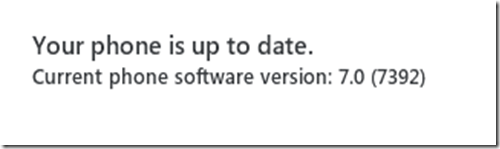
image

Something burped in the process and the Zune software dropped out. So, off to flip between the update and Ethernet cable again to see what happens. That failed because the Zune software had seemingly disappeared.

We needed to restart the Zune software manually because it did not start when the phone was pulled and then plugged back into the shop PC again.

Once we started the Zune software, ran the Update/Ethernet step, we received the following:

image

image

We were finally able to run the Mango update on the phone!

image

Note that a full backup of the phone was done but we only have about 4GB of data on it so it should not take too long. The process is looking to take an hour or more. So, patience is definitely on order . . . whether it gets here in time is another story. ;)

Anticipation . . .

Hat Tip: Again thanks to Leen Kleijwegt of CORBUS

Now to get some reading in on all of the new features.

Philip Elder
MPECS Inc.
Microsoft Small Business Specialists
Co-Author: SBS 2008 Blueprint Book

*Our original iMac was stolen (previous blog post). We now have a new MacBook Pro courtesy of Vlad Mazek, owner of OWN.

Windows Live Writer

Tuesday, 27 September 2011

The Race Is On – Mango on Bell Mobility? Not Yet :(

So far there has been no update flag on my HTC HD7 phone. :(

According to this grid, Bell Mobility is “Delivering update”:

image

What does this mean? Well, I suppose that it means that we just need to be patient! ;)

But, I don’t want to. :(

Mango Features

Rick Claus of Microsoft showed me a lot of Mango goodness well at the iTech Summit in Calgary last week and they sure looked great.

One of the features that would make life a lot easier will be the ability to transition text messaging with someone to Windows Live Messenger and then back again to text messaging seamlessly. We text a lot here with those conversations moving to WL Messenger and back again with IT support folks.

Another feature that looked really neat was the ability to text message someone totally hands free. Though the interpretation may or may not come across properly. I love spell check’s occasional replacement for a mistyped “things” with “thongs”. We all know where that could lead depending on the recipient if not paying attention! 8*O

Philip Elder
MPECS Inc.
Microsoft Small Business Specialists
Co-Author: SBS 2008 Blueprint Book

*Our original iMac was stolen (previous blog post). We now have a new MacBook Pro courtesy of Vlad Mazek, owner of OWN.

Windows Live Writer

Friday, 24 June 2011

Windows Phone 7 – Terms of Use

Derek Knight pointed out an article that draws attention to certain aspects of Google’s Terms & Conditions for the use of an Android based phone:

Essentially, both Apple and Google are quite aggressive about how they go about collecting, storing, and using data on any mobile device that is on their platform.

Since we carry a Windows Phone 7 device, we went back to the Terms Of Use that Microsoft has on the phone:

In the TOU note Point 9 that indicate data is collected, but

In order to operate and provide the service, we collect certain information about you. We use and protect that information as described in the Microsoft Online Privacy Statement, http://go.microsoft.com/fwlink/?LinkId=74170. In particular, we may access or disclose information about you, including the content of your communications, in order to: (a) comply with the law or respond to lawful requests or legal process; (b) protect the rights or property of Microsoft or our customers, including the enforcement of our agreements or policies governing your use of the service; or (c) act on a good faith belief that such access or disclosure is necessary to protect the personal safety of Microsoft employees, customers or the public.

The service is a private computer network that Microsoft operates for the benefit of itself and its customers. Microsoft retains the right to block or otherwise prevent delivery of any type of email or other communication to or from the service as part of our efforts to protect the service, protect our customers or stop you from breaching this contract. The technology or other means we use may hinder or break your use of the service.

In order to provide you the service, we may collect certain information about service performance, your machine and your service use. We may automatically upload this information from your machine. This data will not be used to personally identify you. You may read about this information collection in more detail in the privacy statement at http://go.microsoft.com/fwlink/?LinkId=74170.

Personal information collected through the service may be stored and processed in the United States or any other country in which Microsoft or its affiliates, subsidiaries or agents maintain facilities. By using the service, you consent to any such transfer of information outside of your country. Microsoft abides by the safe harbor framework as set forth by the U.S. Department of Commerce regarding the collection, use and retention of data from the European Union.

In the Privacy Policy we find:

Uses of Information

Additional Details

  • We use the information we collect to provide the services you request. Our services may include the display of personalized content and advertising.
  • We use your information to inform you of other products or services offered by Microsoft and its affiliates, and to send you relevant survey invitations related to Microsoft services.
  • We do not sell, rent, or lease our customer lists to third parties. In order to help provide our services, we occasionally provide information to other companies that work on our behalf.

For the most part, the Microsoft TOU and Privacy Policy are standard fair across many types of services providers.

It is _always_ a good idea to read the Terms & Conditions of any services provider. When we discover terms that are very invasive such as the Google and Apple terms we need to evaluate the risks versus benefits very carefully.

And, as always for us Canadians, the Patriot Act is something to be aware of on behalf of our clients when it comes time to discuss putting data in the Cloud.

Hat Tip: Derek Knight

Philip Elder
MPECS Inc.
Microsoft Small Business Specialists
Co-Author: SBS 2008 Blueprint Book

*Our original iMac was stolen (previous blog post). We now have a new MacBook Pro courtesy of Vlad Mazek, owner of OWN.

Windows Live Writer

Wednesday, 4 May 2011

Windows Phone 7 Security Update Available

We are getting notice of an update that is related to fraudulent digital certificates:

image

While the update helps to mitigate the malicious use of Web site SSL certificates ultimately we need to be very wary of any and all Web sites that we visit where we are planning on logging or making any purchases. It should be second nature to check that URL.

Hat Tip: Susan Bradley

Philip Elder
MPECS Inc.
Microsoft Small Business Specialists
Co-Author: SBS 2008 Blueprint Book

*Our original iMac was stolen (previous blog post). We now have a new MacBook Pro courtesy of Vlad Mazek, owner of OWN.

Windows Live Writer

Tuesday, 9 November 2010

Windows Phone 7 – No GAL Access on Exchange 2003

It looks as though ActiveSync connectivity on the newly released Windows Phone 7 may not be totally there yet.

Quote:

When using a Windows Phone 7 device to connect to Exchange Server 2003 using Exchange ActiveSync, you are unable to resolve user names within your Global Address List (GAL). 

When creating a new e-mail message, you type the name or alias of an e-mail recipient in your organization's GAL in the TO field and the name is not resolved.  In addition, you are unable to Search the GAL, and can only search local Contacts.

A workaround for now is to use the full e-mail info@sbscougar.ca in order to send an e-mail on a Windows Phone 7.

Judging by the Windows Phone site, the release version of the product looks as though it is more focused on consumers as opposed to corporate users:

image

There is no real indication as far as ActiveSync feature integration other than Email, Calendar, and some sort of “Social networking” address book integration. People Hub may pull from Contacts on Exchange, but the Tasks synchronization seems to be missing completely.

If Tasks are indeed missing, then there will be no real incentive to drop the ailing HTC Touch Pro that I currently use until Windows Phone 7 gets a more business like approach. The Tasks/To Do list is needed to manage the little things that may get lost in the rush of day-to-day business.

Philip Elder
MPECS Inc.
Microsoft Small Business Specialists
Co-Author: SBS 2008 Blueprint Book

*Our original iMac was stolen (previous blog post). We now have a new MacBook Pro courtesy of Vlad Mazek, owner of OWN.

Windows Live Writer