Showing posts with label Cloud. Show all posts

Monday, 3 December 2018

A word of caution: Verify! Everything!

We get to work with a whole host of clients and their industries but as a contractor we also get to work with a wide variety of IT Pros and IT Companies.

Many times we get involved in a situation that's an outright pickle.

Something has gone sideways and the caller is looking for some guidance, some direction, and a bit of handholding because they are at a loss.

Vendor Blame Game

Some of those times the caller is in the middle of a tongue wagging session between a set of vendors blaming the other for the pickle.

We were in that situation back in the day when a Symantec BackupExec (BUE) solution failed to restore. The client site had two HP DAT tape libraries with BUE firing "All Good" reports.

We found out those reports were bad when the client's main file server went blotto.

We were in between the storage vendor and their products, Symantec, and HP. It was not a pretty scene at all. In the end, it was determined _by us_ that BUE was the source of the problem because it did not do any kind of verify on the backups being written to tape despite the setting being there to do so.

We were fortunate that we had multiple redundant systems in place and managed to get most of the data back except one partner's weeks' worth of work. We had to build out a new domain though.

So, why the blog post?

Because, it's still happening today.

Verify, Verify, and Verify Again

We _highly suggest_ verifying that all backup products and backup services are doing what they say they are doing.

If the service provider charges for a test failover then do it anyway. Charge the fee back to the client because once the process has run successful or not things are in a better place either way.

Never, _ever_ walk into a disaster recovery situation without ever having tested the products that are supposed to save the client's business. Period.

Yeah, there are times where something may happen before that planned failover. That's not what we're talking about here.

What we are after is testing to make sure that the vendor's claims are indeed true and that the solution set is indeed working as planned.

The last place we need to find out that our client's backups are _not_ working is when their servers, virtual machines, cloud services vendors have gone blotto.

Out of the Cloud Backup

We always make sure we have a way to back up any cloud vendor's services to our client's site. It just makes sense.

Our trust is a very fickle thing.

When it comes to our client's data we don't give our full trust to any vendor or solution set.

We _always_ test the backup and recovery processes so that we're not blindsided by things not going as planned or any "hidden fees" for accessing the client's data in a disaster recovery situation.

Philip Elder
Microsoft High Availability MVP
MPECS Inc.
Co-Author: SBS 2008 Blueprint Book
www.s2d.rocks !
Our Web Site
Our Cloud Service

Monday, 6 August 2018

Cloud Hosting Architecture: Tenant Isolation

Cloud Vendors Compromised

Given the number of backchannels we are a part of we get to hear horror stories where Cloud Vendors are compromised in some way or get hit by an encryption event that takes their client/customer facing systems out.

When we architect a hosting system for a hosting company looking to deploy our solutions in their hosting setup, or to set up an entirely new hosting project, there are some very important elements to our configuration that would help to prevent the above from happening.

A lot of what we have put into our design is very much a result of our experiences on the frontlines with SMB and SME clients.

One blog post that provides some insight: Protecting a Backup Repository from Malware and Ransomware.

It is absolutely critical to isolate and off-site any and all backups. We've also seen a number of news items of late where a company is completely hosed as a result of an encryption event or other failure only to find out the backups were either wiped by the perps or no good in the first place.

Blog Post: Backups Should Be Bare Metal and/or Virtually Test Restored Right?

The full bare metal or virtual restore is virtually impossible at hyper-scale. Though, we've seen that the backups being done in some hyper-scale cloud vendor's environments have proven to be able to be restored while in others a complete failure!

However, that does not excuse the cloud customer or their cloud consultancy from making sure that any and all cloud based services are backed up _off the cloud_ and air-gapped as a just-in-case.

Now, to the specific point of this blog post.

Tenant Isolation Technique

When we set up a hosting solution we aim to provide maximum security for the tenant. That's the aim as they are the ones that are paying the bills.

To do that, the hosting company needs to provide a series of layered protections for tenant environments.

  1. Hosting Company Network
    • Hosting company AD
    • All hosting company day-to-day operations
    • All hosting company on-premises workloads specific to company operations and business
    • Dedicated hosting company edges (SonicWALL ETC)
  2. Tenant Infrastructure Network
    • Jump Point for managing via dedicated Tenant Infrastructure AD
    • High Availability (HA) throughout the solution stack
    • Dedicated Tenant Infrastructure HA edges
      • Risk versus Reward: Could use the above edges but …
    • Clusters, servers, and services providing the tenant environment
    • Dedicated infrastructure switches and edges
    • As mentioned, backups set up and isolated from all three!
  3. Tenant Environment
    • Shared Tenant AD is completely autonomous
    • Shared Tenant Resources such as Exchange, SQL, and more are appropriately isolated
    • Dedicated Tenant AD is completely autonomous
    • Dedicated Tenant Resources such as Exchange, SQL, and more are completely isolated to the tenant
    • Offer a built-in off-the-cloud backup solution

With the solution architected in this manner we protect the boundaries between the Hosting Company Network and the Tenant Environment. This makes it extremely difficult for a compromise/encryption event to make the boundary traversal without some sort of Zero Day involved.

Conclusion

We've seen a few encryption events in our own cloud services tenants. None of them have traversed the dedicated tenant environments they were a part of. None. Nada. Zippo.

Containment is key. It's not "if" but "when" an encryption event happens.

Thus, architecting a hosting solution with the various environment boundaries in mind is key to surviving an encryption event and looking like a hero when the tenant's data gets restored post clean-up.

Thanks for reading!

Philip Elder
Microsoft High Availability MVP
MPECS Inc.
Co-Author: SBS 2008 Blueprint Book
www.commodityclusters.com
Our Web Site
Our Cloud Service

Wednesday, 25 April 2018

Working with and around the Cloud Kool-Aid

The last year and a half have certainly had their challenges. I've been on a road of both discovery and of recovery after an accident in November of 2016 (blog post).

Most certainly one of the discoveries is the amount of tolerance for fluff, especially marketing fluff, has been greatly reduced. Time is precious, even more so when one's faculties can be limited by head injury. :S

Microsoft's Cloud Message

It was during one of the last feedback sessions at MVP Summit 2018 that a startling realization came about: There's still anger, and to some degree bitterness, towards Microsoft and the cloud messaging of the last ten to twelve years. My session at SMBNation 2012 had some glimpses into that anger and struggle about our business and its direction.

After the MVP Summit 2018 session, when discussing it with a Microsoft employee that I greatly respect, his response to my apology for the glimpse into my anger and bitterness was, "You have nothing to apologize for". That affirmation brought a lot home.

One realization is this: The messaging from Microsoft, and others, around Cloud has not changed. Not. One. Bit.

That messaging started out oh so many years ago as, "Your I.T. Pro Business is going to die. Get over it" to paraphrase Microsoft's message to change business models or else when BPOS was launched.

The messaging was "successful" to some degree as the number of I.T. Pro consultants and small businesses that hung up their guns during that first four to six year period was substantial.

And yet, it wasn't as much of the SMB focused Microsoft Partner network basically left Cloud sales off the table when dealing with their clients.

Today, the content of the message and to some degree the method of delivering the message may be somewhat masked but it is still the same: Cloud or die.

At this last MVP Summit yet another realization came when listening to a fellow MVP and some Blue Badges (Microsoft employees) discussing various things around Cloud and Windows. It had never occurred to me to consider that the pain we were feeling out on the street would also be had within Microsoft and to some degree other vendors adopting a Cloud service.

The recent internal shuffle in Microsoft really brought that home.

On-Premises, Hybrid, and/or Cloud

We have a lot of Open Value Agreements in place to license our client's on-premises solution sets.

Quite a few of them came up for renewal this spring. Our supplier Microsoft licensing contact, and the contractor (v-) that kept calling, were trying to push us into Cloud Solution Provider (CSP) for all of our client's licensing.

Much of what was said in those calls was:

  • Clients get so much more in features
  • Clients get access anywhere
  • Clients are so much more agile.
  • Blah, blah, blah
  • Fluff, fluff, fluff

The Cloud Kool-Aid was being poured out by the decalitre. ;)

So, our response was, "Let's about our Small Business Solution (SBS)" and it's great features and benefits and how our clients have full features both on-premises, via the Internet, or anything in-between. And, oh, it's location and device agnostic. We can also run it on-premises or in someone else's Cloud.

That usually led to some sort of stunned silence on the other end of the phone.

It's as if the on-premises story has somehow been forgotten or folks have developed selective amnesia around it.

What's neat though is that our on-premises highly available solutions are selling really well especially for folks that want cloud-like resilience for their own business.

That being said, there _is_ a place for Cloud.

As a rule, Cloud is a great way to extend on-premises resources for companies that experience severe business swings such as construction companies that have slowdowns due to winter. The on-premises solution set can run the business through the quieter months then things get scaled-up during summer in the Cloud. In this case the Cloud spend is equitable.

Business Principled Clarity

There are two very clear realities for today's I.T. Pro and SMB/SME I.T. Business:

  1. On-Premises is not going away
  2. Building a business around Cloud is possible but difficult

The on-premises story is not going to change. One can repeat the Cloud message over and over and to some degree it becomes "truth". That's an old adage. However, the realities on the ground remain ... despite the messaging.

Okay, so maybe in the smaller 10 or less seat business where an all-in for Cloud may make sense (make sure to add all of those bills up and be sitting when doing so!).

That being said, our smallest High Availability client is 15 seats with a disaggregate converged cluster. That was before our Storage Spaces Direct Kepler-47 was finalized as that solution starts at a third of the cost.

For the on-premises story there are two primary principles operating here:

  1. The client wants to own it
  2. The client wants full control over their data and its access

Cloud vendors are not obligated, and in many cases can't say anything, when law enforcement shows up to either snoop or even, in some cases, to remove the vendor's physical server systems.

Many businesses are very conscious of this fact. Plus, many governments have a deep reach into other countries as the newly minted, as of this writing, EU privacy laws seem to be demonstrating.

Now, as far as building a business around another's Cloud offerings there are two ways that we see that happening with some success:

  1. Know a Cloud Vendor's products through and through
  2. Build a MSP (Managed Service Provider) business supporting endpoints

The first seems to be really big right now. There's a lot of I.T. companies out there selling cloud with no idea of how to put it all together. The companies that do know how to put it all together are growing in leaps and bounds.

The MSP method is, and has been, a way to keep that monthly income going. But, don't count on it being there for too much longer as _all_ Cloud vendors are looking to kill the managed endpoint in some way.

Our Direction

So, where do we fit in all of this?

Well, our business strategy has been pretty straightforward:

  1. Keep developing and providing cloud-like services on-premises with cloud-like resilient solutions for our clients
  2. Hybrid our on-premises solutions with Cloud when the need is there
  3. Continue to help clients get the most out of their Cloud services
  4. Cultivate our partnerships with SMB/SME I.T. organizations needing HA Solutions

We have managed to re-work our business model over the last five to ten years and we've been quite successful at it. Though, it is still a work in progress and probably will remain so given the nature of our industry.

We're pretty sure we will remain successful at it as we continue to put a lot of thought and energy into building and keeping our clients and contractors happy.

Ultimately, that goal has not changed in all of the years we've been in business.

We small to medium I.T. shops have the edge over every other I.T. provider out there.

"How is that?", you might ask.

Well, we _know_ how to run a small to medium business and all of the good and bad that comes with it.

That translates into great products and services to our fellow SMB/SME business clients. It really is that easy.

The hard part is staying on top of all of the knowledge churn happening in our field today.

Conclusion

Finally, as far as the anger, and to some degree bitterness, goes: Time. It will take time before it is fully dealt with.

In the mean time ...

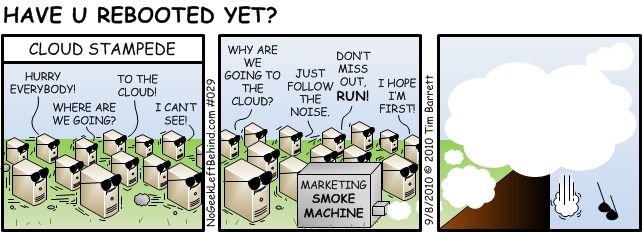
A friend of mine, Tim Barrett did this comic many years ago (image credit to NoGeekLeftBehind.com):

image

The comic definitely puts an image to the Cloud messaging and its results. :)

Let's continue to build our dreams doing what we love to do.

Have a fantastic day and thanks for reading!

Philip Elder
Microsoft High Availability MVP
MPECS Inc.
Co-Author: SBS 2008 Blueprint Book
Our Web Site
Our Cloud Service

Thursday, 9 November 2017

Intel Server System R2224WFTZS Integration & Server Building Thoughts

We have a brand new Intel Server System R2224WFTZS that is the foundation for a mid to high performance virtualization platform.

image

Intel Server System R2224WFTZS 2U

Below it sits one of our older lab Intel Server System SR2625URLX 2U. Note the difference in the drive caddy.

That change is welcome as the caddy no longer requires a screwdriver to set the drive in place:

image

Intel 2.5" Tooless Drive Caddy

What that means is the time required to get 24 drives installed in the caddies went from half an hour or more to five or ten minutes. That, in our opinion, is a great leap ahead!

The processors for this setup are Intel Xeon Gold 6134s with 8 cores running at 3.2GHz with a peak of 3.7GHz. We chose the Gold 6134 as a starting place as most of the other CPUs have more than eight cores thus pushing up the cost of licensing Microsoft Windows Server Standard or Datacenter.

image

Intel Xeon Gold 6134, Socket, Heatsink, and Canadian Loonie $1 Coin

The new processors are huge!

The scale difference between the E3-1200 series, E5-2600 series is orders of magnitude larger. The jump in size reminds me of the Pentium Pro's girth next to the lesser desktop/server processors of the day.

image

Intel Xeon Processor E3-1270 sits on the Intel Xeon Gold 6134

The server is nearly complete.

image

Intel Server System R2224WFTZS Build Complete

Bill of Materials

In this setup the server's Bill of Materials (BoM) is as follows:

  • (2) Intel Xeon Gold 6134
  • 384GB via 12x 32GB Crucial DDR4 LRDIMM
  • Intel Integrated RAID Module RMSP3CD080F with 7 Series Flash Cache Backup
  • Intel 12Gbps RAID Expander Module RES3TV360
  • (2) 150GB Intel DC S3520 M.2 SSDs for OS
  • (5) 1.9TB Intel DC S4600 SATA SSDs for high IOPS tier
  • (19) 1.8TB Seagate 10K SAS for low to mid IOPS tier
  • Second Power Supply, TPM v2, and RMM4 Module

It's important to note that when setting up a RAID controller instead of a Host Bus Adapter (HBA) that does JBOD only we require the flash cache backup module. In this particular unit one needs to order the mounting bracket: AWTAUXBBUBKT

I'm not sure why we missed that, but we've updated our build guides to reflect the need for it going forward.

One other point of order is the rear 2.5" hot swap drive bay kit (A2UREARHSDK2) does not come installed from the factory in the R2224WFTZS as it did in the R2224WTTYS. I'm still not sold on M.2 for the host operating system as they are not hot swap capable. That means, if one dies we have to down a node in order to change it. With the rear hot swap bay we can do just that, swap out the 2.5" SATA SSD that's being used for the host OS.

For the second set of two 10GbE ports we used an Intel X540-T2 PCIe add-in card as the I/O modules are not in the distribution channel as of this writing.

NOTE: One requires a T30 hex screwdriver for the heatsinks! After installing the processor please make sure to start all four nuts prior to tightening. As a suggestion, from there snug each one up gradually starting with the two middle nuts then the outer nuts similar to the process for installing a head on an engine block. This process provides an even amount of pressure from the middle of the heatsink outwards.

Firmware Notes

Finally, make sure to update the firmware on all components before installing an operating system. There are some key fixes in the motherboard firmware updates as of this writing (BIOS 00.01.0009 ReadMe). Please make sure to read through to verify any caveats associated with the update process or the updates themselves.

Next up on our build process will be to update all firmware in the system, install the host operating system and drivers, and finally run a burn-in process. From there, we'll run some tests to get a feel for the IOPS and throughput we can expect from the two RAID arrays.

Why Build Servers?

That's got to be the burning question on some minds. Why?

The long and the short of it is because we've been doing so for so many years it's a hard habit to kick. ;)

Actually, the reality is much more mundane. We continue to be actively involved in building out our own server solutions for a number of reasons:

  • We can fine tune our solutions to specific customer needs
    • Need more IOPS we can do that
    • Need more throughput we can do that
    • Need a blend of the two as is the case here, then we can do that too.
  • Direct contact with firmware issues, interoperability, and stability
    • Making the various firmware bits play nice together can be a challenge
  • Driver issues, interoperability, and stability
    • Drivers can be quite finicky about what's in the box with them
  • Hardware interoperability
    • Our parts bin is chalk full of parts that refused to work with one another
    • On the other hand our solution sets are known good configurations
  • Cost
    • Our server systems are a fraction of the cost of Tier 1
  • Overall system configuration
    • As Designed Stability out of the box
  • He said She said
    • Since we test our systems extensively prior to deploying we know them well
    • Software Vendors that point the finger have no leg to stand on as we have plenty of charts and graphs
    • Performance issues are easier to pinpoint in software vendor's products
    • We remove the guesswork around an already configured Tier 1 box

Business Case

The business case is fairly simple: There are _a lot_ of folks out there that do not want to cloud their business. We help customers with a highly available solution set and our business cloud to give them all of the cloud goodness but keep their data on-premises.

We also help I.T. Professional Shops who may not have the skill-set on board that have customers with a need for High Availability and a cloud like experience but want the solution deployed on-premises.

For those customers that do want to cloud their business we have a solution set for the Small to Medium I.T. Shops that want to provide multi-tenant solutions in their own data centres. We provide the solution and backend support at a very reasonable cost while they spend their time selling their cloud.

All in all, we've found ourselves a number of different great little niches for our highly available solutions (clusters) over the last few years.

Thanks for reading! :)

Philip Elder
Microsoft High Availability MVP
MPECS Inc.
Co-Author: SBS 2008 Blueprint Book
Our Web Site
Our Cloud Service
Twitter: @MPECSInc

Tuesday, 26 July 2016

Some Disaster Recovery Planning On-Premises, Hybrid, and Cloud Thoughts

This was a post to the SBS2K Yahoo list in response to a comment about the risks of encrypting all of our domain controllers (which we have been moving towards for a year or two now). It’s been tweaked for this blog post.

***

We’ve been moving to 100% encryption in all of our standalone and cluster settings.

Encrypting a setup does not change _anything_ as far as Disaster Recovery Plans go. Nothing. Period.

The “something can go wrong there” attitude should apply to everything from on-premises storage (we’ve been working with a firm that had Gigabytes/Terabytes of data lost due to the previous MSP’s failures) and services to Cloud resident data and services.

No stone should be left unturned when it comes to backing up data and Disaster Recovery Planning. None. Nada. Zippo. Zilch.

The new paradigm from Microsoft and others has migrated to “Hybrid” … for the moment. Do we have a backup of the cloud data and services? Is that backup air-gapped?

Google lost over 150K mailboxes a number of years back, we worked with one panicked call who lost everything, with no return. What happens then?

Recently, a UK VPS provider had a serious crash and, as it turns out lost _a lot_ of data. Where are their clients now? Where’s their client’s business after such a catastrophic loss?

Some on-premises versus cloud based backup experiences:

  • Veeam/ShadowProtect On-Premises: Air-gapped (no user access to avoid *Locker problems), encrypted, off-site rotated, and high performance recovery = Great.
  • Full recovery from the Cloud = Dismal.
  • Partial recovery of large files/numerous files/folders from the Cloud = Dismal.
  • Garbage In = Garbage Out = Cloud backup gets the botched bits in a *Locker event.
  • Cloud provider’s DC goes down = What then?
  • Cloud provider’s Services hit a wall and failover fails = What then (this was a part of Google’s earlier mentioned problem me thinks)?
    • ***Remember, we’re talking Data Centers on a grand scale where failover testing has been done?!?***
  • At Scale:
    • Cloud/Mail/Services providers rely on a myriad of systems to provide resilience
      • Most Cloud providers rely on those systems to keep things going
    • Backups?
      • Static, air-gapped backups?
      • “Off-Site” backups?
        • These do not, IMO, exist at scale
  • The BIG question: Does the Cloud service provider have a built-in backup facility?
    • Back up the data to local drive or NAS either manually or via schedule
    • Offer a virtual machine backup off their cloud service

There is an assumption, and we all know what that means right?, that seems to be prevalent among top tier cloud providers that their resiliency systems will be enough to protect them from that next big bang. But, has it? We seem to already have examples of the “not”.

In conclusion to this rather long winded post I can say this: It is up to us, our client’s trusted advisors, to make bl**dy well sure our client’s data and services are properly protected and that a down-to-earth backup exists of their cloud services/data.

We really don’t enjoy being on the other end of a phone call “OMG, my data’s gone, the service is offline, and I can’t get anywhere without it!” :(

Oh, and BTW, our SBS 2003/2008/2011 Standard/Premium sites all had 100% Uptime across YEARS of service. :P

We did have one exception in there due to an inability to cool the server closet as the A/C panel was full. Plus, the building’s HVAC had a bunch of open primary push ports (hot in winter cold in summer) above the ceiling tiles which is where the return air is supposed to happen. In the winter the server closet would hit +40C for long periods of time as the heat would settle into that area. ShadowProtect played a huge role in keeping this firm going plus technology changes over server refreshes helped (cooler running processors and our move to SAS drives).

*** 

Some further thoughts and references in addition to the above forum post.

The moral of this story is quite simple. Make sure _all_ data is backed up and air-gapped. Period.

Philip Elder
Microsoft High Availability MVP
MPECS Inc.
Co-Author: SBS 2008 Blueprint Book
Our Cloud Service

Thursday, 14 July 2016

Hyper-V and Cluster Important: A Proper Time Setup

We’ve been deploying DCs into virtual settings since 2008 RTM. There was not a lot of information on virtualizing anything back then. :S

In a domain setting having time properly synchronized is critical. In the physical world the OS has the on board CMOS timer to keep itself in check along with the occasional poll of ntp.org servers (we use specific sets for Canada, US, EU/UK, and other areas).

In a virtual setting one needs to make sure that time sync between host and guest PDCe/DC time authority is disabled. The PDCe needs to get its time from an outside, and accurate, source. The caveat with a virtual DC is that it no longer has a physical connection with the local CMOS clock.

What does this mean? We’ve seen high load standalone and clustered guests have their time skew before our eyes. It’s not as much of a problem in 2012 R2 as it was in 2008 RTM/R2 but time related problems still happen.

This is an older post but outlines our dilemma: MPECS Inc. Blog: Hyper-V: Preparing A High Load VM For Time Skew.

This is the method we use to set up our PDCe as authority and all other DCs as slaves: Hyper-V VM: Set Up PDCe NTP Time Server plus other DC’s time service.

In a cluster setting we _always_ deploy a physical DC as PDCe: MPECS Inc. Blog: Cluster: Why We Always Deploy a Physical DC in a Cluster Setting. The extra cost is 1U and a very minimal server to keep the time and have a starting place if something does go awry.

In higher load settings where time gets skewed scripting the time sync with a time server within the guest DC to happen more frequently means the time server will probably send a Kiss-O-Death packet (blog post). When that happens the PDCe will move on through its list of time servers until there are no more. Then things start breaking and clusters in the Windows world start stalling or failing.

As an FYI: A number of years ago we had a client call us to ask why things were wonky with the time and some services seemed to be offline. To the VMs everything seemed to be in order but their time was whacked as was the cluster node’s time.

After digging in and bringing things back online by correcting the time on the physical DC, the cluster nodes, and the VMs everything was okay.

When the owner asked why things went wonky the only explanation I had was that something in the time source system must have gone bad which subsequently threw everything out on the domain.

They indicated that a number of users had complained about their phone’s time being whacked that morning too. Putting two and two together there must have been a glitch in the time system providing time to our client site and the phone provider’s systems. At least, that’s the closest we could come to a reason for the time mysteriously going out on two disparate systems.

Philip Elder
Microsoft High Availability MVP
MPECS Inc.
Co-Author: SBS 2008 Blueprint Book
Our Cloud Service

Tuesday, 5 July 2016

Outlook Crashes - Exchange 2013 or Exchange 2016 Backend

We’ve been deploying Office/Outlook 2016 and Exchange 2016 CU1 in our Small Business Solution (SBS) both on-premises and in our Cloud.

Since we’re deploying Exchange with a single common name certificate we are using the _autodiscover._tcp.domain.com method for AutoDiscover.

A lot of our searching turned up “problems” around AutoDiscover but pretty much all of them were red herrings.

It turns out the Microsoft has deprecated the RPC over HTTPS setup in Outlook 2016. What does this mean?

MAPI over HTTPS is the go-to for Outlook communication with Exchange going forward.

Well, guess what?

MAPI over HTTPS is _disabled_ out of the box!

In Exchange PowerShell check on the service’s status:

Get-OrganizationConfig | fl *mapi*

To enable:

Set-OrganizationConfig -MapiHttpEnabled $true

Then, we need to set the virtual directory configuration:

Get-MapiVirtualDirectory -Server EXCHANGESERVER | Set-MapiVirtualDirectory -InternalUrl  https://mail.DOMAIN.net/MAPI -ExternalUrl https://mail.DOMAIN.net/MAPI

Verify the settings took:

Get-MapiVirtualDirectory -Server EXCHANGESERVER | FL InternalUrl,ExternalUrl

And finally, test the setup:

Test-OutlookConnectivity -RunFromServerId EXCHANGESERVER -ProbeIdentity OutlookMapiHttpSelfTestProbe

EXCHANGESERVER needs to be changed to the Exchange server name.

Hat Tip: Mark Gossa: Exchange 2013 and Exchange 2016 MAPI over HTTP

Philip Elder
Microsoft High Availability MVP
MPECS Inc.
Co-Author: SBS 2008 Blueprint Book
Our Cloud Service

Tuesday, 26 April 2016

Remote Desktop Services 301: Some Advanced RDS Setup Guidelines

Here are some of the key tenants we’ve picked up deploying standalone and farm based Remote Desktop Services (RDS) for our Small Business Solution (SBS) on-premises and in our cloud.

Virtual Desktop Infrastructure, or VDI for short, covers both Remote Desktop Services standalone, farm, and desktop operating system deployments.

This list, while not totally comprehensive, covers a lot of ground.

  • Hardware, Storage, and Networking
    • GHz and Cores are king
      • Balance core count and GHz versus cost
      • NOTE: Server 2016 licensing will be, and is as of this writing, based on core count!
        • Today is 2 sockets tomorrow is a server total of 16 cores
        • Additional Cores purchased in pairs
        • Example 1: Dual Socket 8 Core pair = 16 Cores total so OK in current and 2016 licensing
        • Example 2: Dual Socket 12 Core pair = 24 Cores total so base license of 16 Cores plus a purchase of 4 licenses (2 cores per license) would be required
        • NOTE: Examples may not line up with actual license terms! Please verify when 2016 goes live.
    • RAM is cheap so load up now versus later
    • Balanced RAM setup is better than Unbalanced
      • Balanced: 4x 16GB in primary memory channel slot
        • Best performance
      • Unbalanced: 4x 16GB in primary and 4x 8GB in secondary
        • Performance hit
    • ~500MB of RAM per user per session to start
    • 25-50 IOPS per user depending on workloads/workflows RDS/VDI
      • Average 2.5” 10K SAS is ~250 to 400 IOPS depending on stack format (stripe/block sizes)
    • Latency kills
      • Direct Attached SAS or Hyper-Converged is best
      • Lots of small reads/writes
    • Average 16bpp RDS session single monitor 23” or 24” wide: ~95KB/Second
      • Average dual monitor ~150KB/Second
      • Bandwidth use is reduced substantially with a newer OS serving and connecting remotely (RDP version)
  • LoBs (Line of Business applications)
    • QuickBooks, Chrome, Firefox, and Sage are huge performance hogs in RDSH
      • Be mindful of LoB requirements and provision wisely
    • Keep the LoB database/server backend somewhere else
    • In larger settings dedicate an RDSH and RemoteApp to the resource hog LoB(s)
  • User Profile Disks
    • Office 2013 and Exchange 2013 are a wash in this setting
      • Search is difficult if not broken
    • Search Index database will bloat and fill the system disk! (Blog post with “fix”)
    • Office 2016, though still a bit buggy as of this writing, and Exchange 2016 address UPDs and search
    • Be mindful of network fabrics between UPDs and RDSH(s)
    • Set the UPD initial size a lot larger than needed as it can’t be changed later without a series of manual steps
      • UPDs are dynamic
      • Keep storage limits in mind because of this
  • Printing
    • Printers with PCL 5/6 engines built-in are preferred
      • Host-based printers are a no-go for us
    • HP Professional series LaserJet printers are our go-to
    • HP MFPs are preferred over Copiers
      • Copier engines tend to be hacked into Windows while the HP MFP is built as a printer out of the box

Previous post on the matter: Some Remote Desktop Session Host Guidelines.

Here’s a snippet of Intel’s current Intel Xeon Processor E5-2600v4 line sorted by base frequency in GHz:

image

Depending on the deployment type we’re deploying either E5-2643v4 or E5-2667v4 processors for higher density setups at this time. We are keeping at or under eight cores per socket unless we absolutely require more due to the upcoming sockets to cores changes in Windows Server licensing.

If you’d like a copy of that spreadsheet ping us or visit the Intel Ark site.

Philip Elder
Microsoft High Availability MVP
MPECS Inc.
Co-Author: SBS 2008 Blueprint Book
Our Cloud

Monday, 8 February 2016

Remote Desktop Session Host: The System Partition is Getting Full?

In our on-premises and Cloud Desktop RDSenvironments we’ve discovered a number of different things that cause problems for users in Windows Server 2012 R2, Exchange 2013, and Office 2013.

All of our Remote Desktop Session Hosts (RDSHs) are set up with two VHDX files. One for the operating system and one for the data and User Profile Disks (UPDs).

Unfortunately, while UPDs give us a great flexbility option that allow us to have then on the network thus avoid local profile pains in a RDS Farm setting they have a number of different negative impacts on user experience and RDSH health.

One that impacts both is the mysterious filling up of the system partition.

As it turns out, Outlook 2013 and Exchange 2013 plus UPDs means Outlook search is almost completely broken.

But, that doesn’t stop the Windows Server Search Service from doing its best to catalog everything anyway!

What does that mean?

Well, eventually we have a search database that can grow to epic proportions.

Since all of our OS partitions are rather small we end up with session hosts getting their system partition filled rather quickly on a busy RDSH. This is especially true in a Farm setting.

So, what are our options?

Well, we could disable the Windows Search Service. This would be a bad idea since users wouldn’t be able to find _anything_ anymore. We’d go from the occasional complaint to constant complaints. So, not good.

The alternative is to reset the Windows Search index.

  1. Start –> Indexing Options
  2. Advanced button (UAC)
  3. Click the Rebuild button

And, voila! In some cases we get 45GB to 60GB of space back in short order!

Philip Elder
Microsoft High Availability MVP
MPECS Inc.
Co-Author: SBS 2008 Blueprint Book

Friday, 5 February 2016

Some Remote Desktop Session Host Guidelines

We’ve put about four years and two versions into our Small Business Solution (SBS). We have it running on-premises on standalone Hyper-V servers as well as on Hyper-V clusters (Clustered Storage Spaces and Hyper-V cluster we just deployed for a 15 seat accounting firm).

It is the foundation for the Cloud Office services we’ve been offering for the last year or so.

Since our Cloud Office solution runs in Remote Desktop Services we figured we’d share some pearls around delivering Remote Desktop Session Host based environments to clients:

  • ~512MB/User is cutting it tight
  • ~20 to 25 users in a 12GB to 16GB vRAM Hyper-V VM works okay with 2-3 vCPUs
  • RDP via 8.1 RDP clients saturates a 1Mb DSL uplink at ~13-15 users depending on workload
  • ALL browsers can bring the RDSHs to their knees
  • Printing can be a bear to manage (Use Universal Print Drivers and Isolation where possible)
  • Group Policy configuration and lockdown is mandatory
  • Two partitions with User Profile Disks (UPDs), if used, on the second partition
  • NOTE: UPDs + Office 2013 and earlier + Exchange 2013 and earlier = Broken Search!!!
  • NOTE: RDSH Search Indexes for Outlook OSTs in UPDs can fill up the C: partition!
    • Office 2016 and Exchange 2016 together are supposed to address the broken search situation in RDSH setups were UPDs are used. We have yet to begin testing the two together.

Our Cloud Office (SBS) is running on clusters we’ve designed based on Scale-Out File Server and Hyper-V.

Need a clustered solution for your SMB/SME clients? Drop us a line. They are _very_ affordable. ;)

Philip Elder
Microsoft High Availability MVP
MPECS Inc.
Co-Author: SBS 2008 Blueprint Book

Thursday, 23 October 2014

Azure VMs: A Series Versus D Series

We’ve been working with our Microsoft Partner Azure credit to see just how it all works as we have a client that needs a highly redundant, scalable, and global infrastructure setup.

Here is an A Series VM setup:

image

image

This is the setup for the D Series VM:

image

image

Cost wise the D series would be a bit more but the performance difference is noticeable.

When it comes to evaluating where to place client workloads one definitely needs to keep in mind what grade of VM to be utilizing.

Note that it looks as though one cannot mix A and D VMs in the same Cloud Services container. Please verify as to whether that is the case in your particular Azure Portal.

Philip Elder
Microsoft Cluster MVP
MPECS Inc.
Co-Author: SBS 2008 Blueprint Book

Chef de partie in the SMBKitchen ASP Project
Find out more at
Third Tier: Enterprise Solutions for Small Business

Monday, 6 October 2014

Microsoft: Excitement Rekindled

Back in the day, heh ;) , I was privileged to work with the SBS team both prior and post MVP award.

Many of us in SBS Land can remember just how active the team was around SBS 2003 RTM/R2, SBS 2008 Standard/Premium, and finally SBS 2011 Standard.

By the latter product release much of the old guard had moved on but the new team and us SBS MVPs had a strong business relationship.

The key here is in the relationships and communication levels we were experiencing with the teams.

For must of us both within the MVP realms but also in the public that came to a full-stop when development of the then Windows Server 2012 pre-release cycle became better known.

We were all held in the dark. This situation continued with the 2012 R2 development cycle.

Silence. Dead Silence *insert sound of crickets here*

For those of us both within the MVP community and outside the MVP community that are truly passionate about the clients we serve, the products we work with, and just all-around geeking out about tech the silence was deafening and deadening.

Tie that into the seemingly endless “Death to the IT Pro” messages coming out of Microsoft over the last number of years and there were a lot of flames snuffed out these last two product release cycles.

Change for the Good

One thing is for certain: Something has changed at Microsoft.

While I most certainly cannot provide “insight” into Microsoft’s motivations for the recent change I can most certainly say that the change is welcome. Big Time!

We now have a public release of Windows vNext bits. We have forums to discuss these bits.

For many of us MVPs we have, and I can’t say “unprecedented” given previous experience, an amazing amount of information flowing from our product teams.

The conversations we’ve been having with the team(s) lately have been refreshing. Yes, they’ve been listening to us.

And, I’ll make no bones about it, I feel very excited about this upcoming product release like I had been with the then new versions of SBS Standard!

So, hat’s off to you in Microsoft whoever you are that allowed the floodgates of communication, shared tech passion, and business relationships to happen again!

And thanks to the Microsoft Teams that have been sharing your product excitement. It is refreshing and invigorating for us to experience and work with!

We both stand to benefit greatly from this “new” openness from Microsoft.

Oh, and Cluster is definitely key to our company’s future. ;)

Philip Elder
Microsoft Cluster MVP
MPECS Inc.
Co-Author: SBS 2008 Blueprint Book

Chef de partie in the SMBKitchen ASP Project
Find out more at
Third Tier: Enterprise Solutions for Small Business

Monday, 24 February 2014

Netflix to Pay Comcast to Shape in Their Favour

The following link is a Bing New Search:

image

We don't shape. We've heard that statement time and time again from ISPs during the "discussions" around Net Neutrality on both sides of the border.

For those of us that work in technology supporting clients in various regions around the world the reality is quite different.

How many of us have been stuck where a client is unable to reach a resource via point-to-point because a hop in between the two sites happened to belong to a competing Internet infrastructure provider that just happened to be in the middle of a spat with the provider at both ends?

How many of us have experienced quality degradation in services we access on the Internet that reside outside our ISP's borders and the ISP just happened to provide a similar _paid_ service?

Unfortunately for us the Internet and its infrastructure is not treated in the same way as our public road systems.

That means that the IPSs have the upper hand. They control what packets go where. They control how fast those packets get from point to point. And, it all remains hidden.

They can 401 their own service's packets (the 401 is a high speed high-volume highway here in Canada) while they restrict packets destined for YouTube, Netflix, and others to 80KM/H or sideline them on a two lane low speed highway.

We here pay quite high prices for our "high speed" access. Our connections are shaped and have quotas assigned to them. We've grown accustomed to this practice however we still have fairly open access to most sites.

The Sad Direction We Are Going In

At some point our regulators need to have ISPs clarify their shaping policies like ingredients in food.

Or, our ISPs could offer "streaming" plans and the like that more than likely will be a lot more expensive but allow the end user to be free to view whatever content they choose with little to no shaping.

Whether either happens will be left to be seen. In the end we lose out.

ISPs have been crying for a piece of the pie for years, now they will get it and more as they hold keys to the kingdom.

Philip Elder
Microsoft Cluster MVP
MPECS Inc.
Co-Author: SBS 2008 Blueprint Book

Chef de partie in the SMBKitchen
Find out more at
Third Tier: Enterprise Solutions for Small Business

Friday, 22 November 2013

Questions to ask about Cloud and Backup

Local Backup To Cloud

Okay, let's say our on-premises servers are being backed up to a local NAS or storage server.

From there they are copied up to an online Cloud backup service as the default off-site backup location. Assume at least a 10Mbit upload speed to allow for the initial image upload or a seed done via courier to the backup service provider.

Now, the on-site servers fail. The cluster or standalone host is hosed.

Then, it turns out that the backup destination NAS/storage server was also hosed.

What then?

Well, we have our off-site now don't we?

Yeah, we do ... sorta.

Even at 1Gbit/Second how long would it take to download the full backup image and its incremental images? If image consolidation was ongoing, okay fine, how long to bring down that full image and possibly the extra few incremental backups?

One would imagine that if a business is not able to tolerate at least two to three days of downtime just for the restoration process, never mind replacement hardware procurement, then one really needs to evaluate another tier of local storage for an off-site rotation.

Cloud Services and Storage

Well now, how about the Cloud service vendor's services?

An SLA is only as good as the bond paper it is printed on right? Or, at least as good as the vendor making the promise that our data will never disappear.

Oh really?

What about the mailboxes on GMail that seemingly disappeared? Did they ever get fully recovered?

What about that Cloud based ERP and accounting solution? What do they do to protect the multi-million dollar company's Solution in the event of an internal failure at the Cloud vendor's site?

Thus, that begs the question: Does the Cloud service provider facilitate the ability to back up the Cloud based data set to our own premises? If not, it may be in the company's best interest to look for other Cloud vendors that do provide a facility to back up the company's data to on-premises.

We have all seen failures of all sorts at all levels of IT Solution sets.

Given the scale of Cloud computing and its relative newness it is only a matter of time before we see catastrophic failures at the Cloud service vendor level.

When that happens what will become of the business that now depends on that Cloud service provider to restore the service _and_ data back to the way things were but that does not happen?

Please remember that when it comes to technology we are not talking about an "if it happens" we are talking about a "when it happens".

Being prepared whether the service is on-premises or in the Cloud is key to business survival in today's hybrid environments.

Philip Elder
Microsoft MVP
MPECS Inc.
Co-Author: SBS 2008 Blueprint Book

Chef de partie in the SMBKitchen
Find out more at
www.thirdtier.net/enterprise-solutions-for-small-business/

Wednesday, 11 September 2013

Outlook: Cannot open this item. Outlook has already begun transmitting this message

We had a strange one this morning:

image

A couple of messages were stuck in the Outbox.

This site has some good troubleshooting tips:

However, after running through all of the steps Outlook eventually did step up and send the messages. Though, that happened when Outlook was _in_ Offline Mode.

It turns out that we now know why the Send/Receive process is being hung up:

image

Our Office 365 account was stuck?

image

Apparently there were no issues? Hmmm...

We tried to add the O365 account to a different system's Outlook and we hit this:

image

Using Men&Mice's awesome freebie online DIG tool we checked to make sure that AutoDiscover was indeed set up (which it was when we configured things back when).

image

So, at least at this point it is looking like the service is indeed having an issue.

And finally, after a huge pause Outlook's Send/Receive coughed up an error:

image

With the volume of e-mail we have flowing about right now having Outlook getting hung up on one of the mailboxes during Send/Receive is outright frustrating! :S

We removed the O365 account and sure enough Outlook has started sending and receiving without a hiccup.

Philip Elder
MPECS Inc.
Microsoft Small Business Specialists
Co-Author: SBS 2008 Blueprint Book

Chef de partie in the SMBKitchen
Find out more at
www.thirdtier.net/enterprise-solutions-for-small-business/

Windows Live Writer

Wednesday, 28 August 2013

Some Thoughts on Microsoft in the SMB Space

If one approaches this post from an emotional level, that is built on all of the angst, struggles, and pain born of the Cloud drums out of Microsoft, that is their message but also the many products and services cancellations, over these last three or so years then it would not be hard to go down a very not-so-happy path.

So many bridges between Microsoft and us IT Solution Providers that work on the front lines of the SMB IT space (by our definition SMB is 1-75 seats or so) have been burned or even out-right blown up.

Many of us have struggled with the angst over where we were going to take our business and what kind of business model we would have two, five, and even ten years down the road. After all, we are in it for the long-haul right?

Why We Do IT

This post is more a reflection of the SMB IT Provider that is in the business out of passion for the products and services we get to work with. But, most especially for the joy it brings us to have a set of very happy clients on the other end of our IT practices.

That is our greatest reward. That is clients whose businesses are in the business to make money and do so as efficiently as possible on their IT because of what we do for them.

For us, the reality has come home to roost that Microsoft is much less a partner today than a competitor.

Yes, we are still building our solutions on the Microsoft stack and will continue to do so. Our solutions absolutely rock utilizing the products we do. We will continue building solutions that our competitors, like Microsoft and other large IT Solutions providers, could hardly hope to develop for their clients.

Why?

Because we as small business IT Solutions Providers live, breath, and work in the SMB Trenches. We understand small business in a way that a Gartner Survey or any other such knowledge peddlers could never hope to. This is because we _are_ a small business.

We small businesses are _not_ consumers, pro-sumers, or any other such "consumer" of goods and services.

We _produce_ products and services for others to consume. Or, we develop and sell products and services for other businesses to utilize in their _production_ of goods and services (Business to Business).

Microsoft's Value in SMB

So, what value do we see in Microsoft in today's SMB IT marketplace?

  • Products/Features
    • Hyper-V
      • Virtualization solutions have become affordable, both on VMware and Hyper-V, as a result of the competition between the two.
        • All one needs to do is watch VMware's stock and current restructuring efforts to see the impact Hyper-V has had on their margins.
      • Stack builds on a single box save our clients a lot on hardware, power consumption, cooling, and noise.
      • Clusters are very affordable for our clients when truly commodity based hardware (Intel Server Systems) are utilized over Tier 1.
    • Windows Server Essentials Experience Role
      • Finally, the Remote Web Access portal, RD Gateway, and other SBS-Like goodies can be dropped into a Windows Server Standard server setup.
    • Storage Spaces
      • Still new, but with lots of potential to impact how we do things for our clients with larger data sets.
    • Exchange
      • Despite the poor start to the product at what was probably Early Preview bits branded as RTM, Exchange Server 2013 is an awesome product with great potential for on-premises mail and BYOD management.
  • Partner Program
    • Loss of the Small Business Specialist program.
      • This is probably the "nail in the coffin" as far as the Cloud message to SMB IT Providers.
    • Competency Program structures drive us to expand or further distance ourselves from the Partner Program
      • Some of us are not comfortable with the idea of hiring on.
      • Plus, there are any number of other reasons for us to remain where we are at for now.
      • There are opportunities though. We just need the vision, time, and energy to pick them out and develop them.
    • Cloud, Cloud, Cloud, Cloud (Monty Python-esque theme here :) )
      • The drums are still beating.
      • The message is becoming all the clearer: Folks in SMB do not require any outside IT help. You can do it all yourself!
    • Cloud Essentials Program
      • Better get on board and start playing around with the freebie credit for Azure as this is one spot where we can develop some business opportunities.
  • TechNet
    • Now, keep in mind that folks that are Open Licensed will continue on with their TechNet subscriptions that are a Software Assurance benefit.
    • The loss of TechNet for lab use is most certainly of concern, but one has to wonder why it was terminated.
      • IMNSHO, we are at a point where the passionate SMB IT Provider, and Microsoft, have received yet another black eye due to the unscrupulous folks that abuse the system.

We are of the opinion that the current wave of Microsoft products, with the exception of Office 2013, are probably some of the best that we've seen in years.

Yes, mousers cried foul over the loss of the Start Button in Windows 8. But keyboarders never missed it. :) And yeah, there is a bit of a training struggle for folks to understand that there are two "rooms" if you will in Windows 8.

Microsoft "Partner"

With all of the changes that we've seen in Microsoft over these last two to three years we really have to wonder where they are going to be in two, three, or even five years.

Sadly the reality that the desktop PC is not really going to disappear in a business setting does not seem to phase anyone in stratosphere management at large corporations like Microsoft. :(

To top it all off, IMNSHO, the server is _not_ going to disappear in the SMB space.  Nor will the need for on-premises mail.

However, with the advent of so many failed/bad Microsoft product updates lately on so many products, some bringing down Hyper-V Failover Clusters, one really has to wonder how far off the vision has gone from providing a rock solid on-premises product experience from RTM to retirement?

Hopefully the bad patching situation that has been happening lately is only temporary and Microsoft moves some development back into actually testing those updates before deploying them to the world.

After all, being in business is about the products and services right? It's about providing the best possible value to the end-customer/client isn't it?

Can folks _really trust_ a company to provide a great Cloud experience when it seems like the on-premises products and services may be on their death-beds? Why develop patches and _test_ them if there is no will to keep the on-premises products alive?

And that begs this question: Can we SMB IT Solution Providers trust a company that has not come right out and said it, but has essentially drummed the message all the more clearly in these last 12-18 months that the "end is nigh" for the SMB IT Solution Provider? SMB belongs in the Cloud after all. Right?

Be straight with us. Be clear with us. If we knew where we truly stood as a "Partner" of Microsoft we would be better able to make decisions about where we are and where we need to go in the new era of competition _with_ Microsoft.

Trust is based on honesty between the parties. The messages out of Microsoft have been so mixed, and sometimes outright confusing, these last few years that one is never sure where we stand anymore.

Most certainly we need to be very aware, and wary, of what is happening both within the companies that produce the products we utilize and then within the product groups themselves.

Business Opportunities

On the flip-side the current state of SMB IT can provide an awesome opportunity for us to advance our on-premises and hybrid solution sets and skillsets. While it may seem daunting at first, we can indeed continue to build our SMB IT practice and triumph despite the naysayer's constant messages!

And, perhaps in the midst of all of this we could end up growing our businesses into that Microsoft Partner Competency holder that would get noticed and direct Partner support (note the absence of the quotes).

In the end, we may not reach those competency levels and/or even get noticed.

But, we can go home at the end of the day, maybe work a bit in the evening for our clients, knowing full well that there is a great group of folks, our clients, on the receiving end of our products and services that are very happy with us and what we do.

And that my friends is why, for the most part, we can sleep well at night eh? ;)

Well, maybe most nights. We are, after all, small business owners so the occasional sleepless night is a prerequisite! :D

Thanks for reading.

Philip Elder
MPECS Inc.
Microsoft Small Business Specialists
Co-Author: SBS 2008 Blueprint Book

Chef de partie in the SMBKitchen
Find out more at
www.thirdtier.net/enterprise-solutions-for-small-business/

Windows Live Writer

Wednesday, 14 August 2013

Microsoft Slaughtering It’s Own Cash Cow?

We in SMB IT have been hearing the Microsoft Cloud Drums for quite a few years now.

In the first year or two the call was along the lines of how great Microsoft’s new Cloud was to be and how we were all going to do well selling it.

Well, in SMB IT that pretty much fell flat on its face once it became apparent the SMB IT Provider was not be be billing the customer Microsoft was.

Plus, where was the SMB IT Provider supposed to fit in to the picture anyway?

The drums kept beating but the SMB IT Solution Provider did not listen.

Microsoft made some changes in their sales model for the Microsoft Cloud product line that allowed the SMB IT Provider to bill their clients, but uptake was probably very slow if at all.

Off to conferences and Webinars we go where “Partners” trumpet their great success selling Microsoft and other Cloud Vendor’s wares. How great their success was they were proclaiming but in the end we received a lot of fluff with little substance.

The drums are still beating today. However, they no longer beat for us to take up the call and sell Microsoft Cloud.

IMNSHO, they now beat the message to the end customer to avoid working with us altogether.

You don’t need the SMB IT Provider! You can do it all yourself! We’re making it really easy for you!

To be fair, Microsoft pushed really hard to get the SMB IT Provider on board with training and certification. They spent hundreds of thousands if not millions on getting us to on-board with the Small Business Specialist Community and the certification structures it required.

Those of us that took up to that beat, that is the SBSC and all it entailed, did really well and Microsoft took great pains to support us.

Unfortunately, in the end, the folks that drove Microsoft to create the SBSC and make efforts to bring things up to par kept on doing what they were doing: Giving Microsoft and other legitimate SMB IT Providers a black eye.

As much as the “Trusted Advisor” role has been poo poo’d by many behind the Cloud drum beating we are the ones that the SMB Business Owner will listen to over commercials, surveys, and Consumer Reports.

Yes, the ones responsible for the black eyes for both Microsoft and those SMB IT Providers doing the right thing will be the ones most hurt by their customers bailing away from the pain they’ve been in for however many years by adopting the Cloud over on-premises.

Why would those customers, that is the ones that have been repeatedly burned, trust us anyway? And why would they trust Microsoft to provide a Cloud service that say Google or Amazon may be able to do just as well if not better?

While we and our client population may not be in the majority as far as SMB IT, we do represent a substantial number of small to medium businesses and the directions they take with the IT infrastructure.

A sales driver within SMB is the excited Geek coming in with a new product that perfectly fits in to their client’s business model. In fact, the Geek would have a demo prepared that directly relates to _that specific client_ without even thinking about it.

That situation translates into sales. _Lots_ of sales. And business owners talk.

Perhaps I’m overestimating our worth here? Maybe I am but then again, maybe I am not.

The drums today are beating “You SMB Business go Cloud. Period.”

We are cautioning our clients that a hybrid approach may be a better rule of thumb for so many reasons. Think PRISM for one and the Patriot Act for another.

Now, given the Microsoft’s position for us is all-in for the Cloud one has to wonder how long it will be before Microsoft removes the “choice” in SME and Enterprise environments?

Meaning, how long before Microsoft makes on-premises a lot more expensive than their Cloud offerings to in effect remove that option?

Certainly the restructuring that has happened around a services model this new Microsoft fiscal year may indicate such.

Most certainly Microsoft is at a crossroads.

Depending on the tact they take over the next 12 to 24 months we could see a vastly different company down the road that may in fact be more like Apple was before it was bailed out or like RIM is today.

Drum beating the message and forcing us in SMB into a direction because as single units we are essentially powerless against them is one thing (though we’ve been seeing that we are not so powerless after all over this last year or so).

However, trying the same tact with SME and Enterprise businesses may well fall flat on its face.

No one person or business has ever liked being shoe-horned into an option.

If given no option by a vendor, then it is more likely that another will be found, or much to the possible surprise of Microsoft, and others before them, the business may carry on and/or build what is needed from within.

Most certainly changes are afoot and we need to be very aware of what is happening around us!

Philip Elder
MPECS Inc.
Microsoft Small Business Specialists
Co-Author: SBS 2008 Blueprint Book

Chef de partie in the SMBKitchen
Find out more at
www.thirdtier.net/enterprise-solutions-for-small-business/

Windows Live Writer

Friday, 2 August 2013

A Really Good Read on the State of IT and Cloud Outsourcing

It seems that Aidan Finn and I are somewhat on the same page as far as how the Cloud has been significantly strong due to the “Bad IT Pro”.

Indeed, if we in the SMB community especially had a majority of IT Pros that fit into the “Good IT Pro” category as defined by Aidan the Cloud would probably have little place in the small to medium business.

Now, have a listen to my interview podcast with Robert Crane of CIAOPS in Australia that was done in December of 2012:

Robert and I have a pretty good parlay around the Cloud versus on-premises situation in SMB IT with my touching on the need to be trained, keep up on the tech, and work hard at IT!

Ultimately, it is our responsibility to make sure our skill-set is up to the task of providing the best IT Solutions for our clients. This task costs in both time and money with the investment, yes it _is_ an investment to get trained, paying off in ways we sometimes are not able to anticipate!

Philip Elder
MPECS Inc.
Microsoft Small Business Specialists
Co-Author: SBS 2008 Blueprint Book

Chef de partie in the SMBKitchen
Find out more at
www.thirdtier.net/enterprise-solutions-for-small-business/

Windows Live Writer

Wednesday, 31 July 2013

Blackhat 2013 – NSA General Alexander’s Keynote

The director of the NSA, General Alexander, gave a keynote address at the Blackhat conference.

Mark Maunder gives a good overview of the speech along with his thoughts around it.

The blog post is a good read and a link to an audio recording of the speech is at the bottom of the post.

But in all seriousness, headlines seen lately that the latest leaks are hurting US based Cloud businesses should be expected. Not only that, but folks need to keep in mind that pretty much all countries have some sort of monitoring agency or agencies in place.

So, again the question is begged: Who owns the data and has access to it the moment it leaves the on-premises setup?

EDIT: Hat Tip: Susan Bradley

Philip Elder
MPECS Inc.
Microsoft Small Business Specialists
Co-Author: SBS 2008 Blueprint Book

Chef de partie in the SMBKitchen
Find out more at
www.thirdtier.net/enterprise-solutions-for-small-business/

Windows Live Writer

Monday, 8 July 2013

Things are Cloudy: Some Monday Morning Cloud Reading and Thoughts on Trust

Here are a few interesting articles that paint some reality on the ongoing Cloud picture.

Both articles are a good read and provide some insight into company’s perspectives on being in the Cloud and Microsoft’s vision for the Cloud.

BTW, what exactly is meant by an “update” anyway? We are not too sure on that one.

Conflicting Messages for SMB IT

Now, the kicker that really brings about the meaning of the word “irony” is in this quote from the Business Week article.

The Office unit says packaged releases will still be available to users who are resistant to Office 365 and its frequent updates, but most of the team’s energy will be focused online. “Microsoft has an established history and trust with customers [emphasis ours],” says Pisoni. “So far those who are hesitant about going to the cloud, they’re willing to put their trust in Microsoft. No other competitor—Google, Box—has that established trust.” Raman Padmanabhan, chief information officer for Xerox’s (XRX) business services unit, has been briefed on Microsoft’s move to faster updates and says he supports the shift as long as the product is good. “It’s all about service and quality,” he says. “You have to have a certain quality or it just kills your business.”

How many of us in SMB have been banging our heads against the wall, so to speak, trying to make the message clear that in SMB IT it is the face-to-face time and relationship trust that we build up with our clients that are keys to both business’s success?

The business relationship and trust have always been, and will always be, the foundation to our way of doing business.

The Cloud Message and many of the Cloud Prophets have been trying to blow that off for SMB IT for the last three or four years now and yet here we have it straight from Microsoft. _Trust_ is the foundation for moving forward.

Yes, there is a little bit of frustration here and it may show so our apologies for that. :S

But, at least it is good to see in print that our own SMB IT way of doing things is confirmed, though not directly. :)

As time goes on we shall see how all things play out.

From this arm chair it looks like Microsoft is in the process of slaughtering their cash cows and diving in for the lowest common denominator ... which in the end means that they will be on the same, and level, playing field as the other Cloud Vendors.

IMNSHO, this is _not_ a good place for Microsoft to go.

Most especially because a huge chunk of the Microsoft Partner base, that is those of us IT Providers in SMB, is being stepped on to get to wherever Microsoft’s current Cloudy Vision is leading them.

Philip Elder
MPECS Inc.
Microsoft Small Business Specialists
Co-Author: SBS 2008 Blueprint Book

Chef de partie in the SMBKitchen
Find out more at
www.thirdtier.net/enterprise-solutions-for-small-business/

Windows Live Writer