Showing posts with label SQL 2000. Show all posts

Monday, 23 November 2009

What Version of SQL Is That?

We have a client that needs to update a Line of Business application that is using a SQL 2005 Express instance.

The LoB has a major update coming down the pipe and the product developer has stated that we need to have SQL 2005 SP2 at the minimum to support the newest features in the update.

The following SQL version comes via a screenshot of SQL Server Management Studio Express:

image

Okay, so, now what version and service pack level are we at?

Apparently SP2+Q954606 (GDR):

image

The above screenshot was taken from this site:

The SQLSecurity.com site has an extremely comprehensive list of each version level depending on which SQL patches were installed.

So, we now know that we have SQL 2005 Service Pack 2 installed with Service Pack 3 looming in the near future and that our LoB can be safely updated.

Philip Elder
MPECS Inc.
Microsoft Small Business Specialists
Co-Author: SBS 2008 Blueprint Book

*All Mac on SBS posts will not be written on a Mac until we replace our now missing iMac! (previous blog post)

Windows Live Writer

Friday, 23 October 2009

Practice CS (Creative Solutions) To Discontinue Windows 2000 and SQL 2000 Support With Upcoming 2009.2.0 Release

In a User Bulletin, Thomson Reuters indicates that Practice CS will no longer support the Windows 2000 OS and SQL 2000 Server (All Editions).

From User Bulletin 4607:

NEW SYSTEM REQUIREMENTS

With the next release of Practice CS version 2009.2.0, we will be discontinuing support for Microsoft® Windows® 2000 (all editions) and Microsoft SQL Server 2000 (all editions). Practice CS will no longer function on these operating systems. Please see the System Requirements under the Support section of our website at CS.ThomsonReuters.com for additional information on supported operating systems.

While most firms may be fairly current with the desktop operating systems and their backend server setups, there are some that are still running on Windows 2000 era Microsoft products.

Apparently the next update cycle for Practice CS will be in this coming November.

The current version is 2009.1.3:

image

Also, among the fixes coming down the pipe in that update will be one for client contacts integrated into Exchange Public Folders that are not seemingly synchronizing properly. This was the reason we were calling support in the first place.

Philip Elder
MPECS Inc.
Microsoft Small Business Specialists
Co-Author: SBS 2008 Blueprint Book

*Our original iMac was stolen (previous blog post). We now have a new MacBook Pro courtesy of Vlad Mazek, owner of OWN.

Windows Live Writer

Wednesday, 16 July 2008

SBS 2003 Premium - KB948110 SQL2K MS08-040 Caveat

One of our SBS 2K3 Premium servers stalled while running the security update for SQL 2000 KB948110: MS08-040: Description of the security update for SQL Server 2000 GDR and MSDE 2000: July 8, 2008.

We made sure to run the server updates first, then the Exchange ones, then we went to the SQL 2005 update for Service Pack 2.

After that, we ran the above update leaving WSUS V3 SP1 for last.

Susan makes a good point about SQL patching in her blog post: The Mess of SQL Patches. Essentially we can leave them lie for the most part.

Since we were here at the client site to talk about their upcoming server refresh, we also brought their backup drives to rotate out too.

Both servers needed updates so we ran them incrementally on both. We have the SBS 2K3 Premium SP1 with Windows Server 2003 SP2 installed and a Windows Server 2003 R2 Standard acting as a data mirror and second DC.

The Server 2003 R2 box took its updates with no issues.

The SBS 2K3 box hung up during the SQL 2000 update at the point of extracting the files. At least, that is the file process that came up when we tried to cancel the task and subsequently End Task on MSIEXEC when things had not changed 10 minutes later.

We ran an update to ShadowProtect to version 3.2 which also requires a reboot.

So, we rebooted the box and ran the WSUS SP1 update successfully.

For those running SBS 2K3 Premium and Standard there are caveats for this particular SQL 2000 update:
  • SharePoint users who upgraded from SQL Server 2000 Desktop Engine (WMSDE) to any other edition of SQL Server 2000 (for example, SQL Server 2000 Standard Edition) may be incorrectly offered a WMSDE update for this security release. This problem can occur if the SQL Server 2000 edition is not patched correctly with SQL Server 2000 Service Pack 4 after the upgrade from WMSDE. The WMSDE update may cause SharePoint to stop working. To resolve this problem if this occurs, follow these steps to restore SharePoint functionality...
  • Microsoft Internet Security and Acceleration (ISA) Server 2004 and ISA Server 2006 could be affected by this update in the following ways:
    • The MSSQL$MSFW service is stopped and then restarted when the associated database instances are updated. This action occurs if Microsoft SQL Server 2000 or Microsoft SQL Server 2000 Desktop Engine (MSDE 2000) is installed on the computer that is running ISA Server. This action also stops the Microsoft Firewall service. Therefore, the SQL Server installer tries to return the Microsoft Firewall service to the same state that it was in before the update was started. Because the update installer cannot control services on a remote server, you must monitor and possibly restart the Microsoft Firewall service and the dependent services if ISA Server is configured for remote SQL Server logging.
  • ISA Server 2006 installs MSDE 2000 together with SQL Server 2000 SP4.
Take note of these issues prior to installing. Make sure to have a good backup ... just in case.

Links: Philip Elder
MPECS Inc.
Microsoft Small Business Specialists

*All Mac on SBS posts are posted on our in-house iMac via the Safari Web browser.

Monday, 11 June 2007

SBS 2K3 Premium - Setup a DB on SQL 2000 & test it

We received a request to setup a database on the default SQL 2000 instance and verify connectivity.

We went through the following steps (change italics to your own names):

  1. Server Management Console
  2. Advanced Management
  3. Computer Management
  4. Services and Applications
  5. Microsoft SQL Servers (local) (Windows NT)
  6. Databases
  7. Right click: New Database
  8. Name: mynewdb
    • Leave the defaults
  9. Down to: Security
  10. Logins
  11. Right click: New Login
  12. Name: newdbuser
  13. SQL Server Authentication with password: dbpassword01
  14. Database: mynewdb
  15. No Server Roles
  16. Database Access Tab: check mynewdb
  17. Check: db_owner
  18. OK
Your database should now be setup and ready to role. Or at least it should.

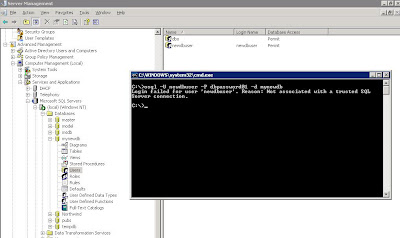
Next step, at the SBS server from the command line we test connectivity to the database:

osql -U newdbuser -P dbpassword01 -d mynewdb

Here is the result of that osql command:


Login failed for user 'newdbuser'. Reason: Not associated with a trusted SQL Server connection.
A search of the Microsoft KB turned up the following articles:

Microsoft KB 889615: You may receive a "Not associated with a trusted SQL Server connection" error message when you try to connect to SQL Server 2000 or SQL Server 2005.

and

Microsoft KB 555332: Login failed for user 'username'. The user is not associated with a trusted SQL Server connection. (Microsoft SQL Server, Error: 18452).

The second article contains the solution:

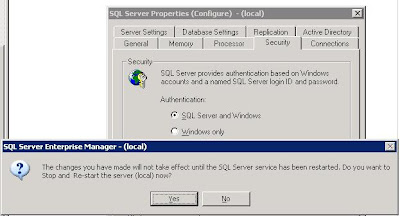
Switch the authentication mode to SQL Server and Windows:


Note that the change requires a restart of the SQL Server services. If there are any client databases online at the time, either everyone needs to shutdown their access, or we need to wait until later on when no connections to any databases on the server are happening.

Also note that we did not receive any indication as to why the database was not accepting connections via the SQL Enterprise Manager on another workstation. It just refused to connect which is why we went to the osql commands directly on the server.

Some links:

When looking for the commands we needed on the command line, it was a bit of a trial at first. We finally came up with: MSDN Forums - Command Line connect to SQL Server Database.

That in turn led us to:

The osql Utility and its commands on MSDN.

Lots of database fun on this one! :D

Philip Elder
MPECS Inc.
Microsoft Small Business Specialists