Tuesday, 12 June 2007

SBS 2K3 R2 - Green Check of Health ... The best it is going to get?

Recently, one of our SBS 2K3 R2 Premium boxes came up with the following:


We see the green checks for the Auto-start services, Critical Alerts, and Critical Errors.

The Yellow Shield for Update Services is pretty much common place now.

We have updated this particular server to WSUS 3.0 so we have setup the Definition Update automatic allow rule that doesn't break the built-in R2 configured WSUS.

This means we are not seeing a Red Shield every time Windows Defender received an update. :*Þ

Given the fact that the Exchange IMF is updated sporadically as an Update Rollup, we almost always see the Yellow Shield because the SBS server is set to "Download and Notify" for updates.

None of our server installations are set to "Download and Install". That is just plain risky!

Philip Elder
MPECS Inc.
Microsoft Small Business Specialists

Monday, 11 June 2007

SBS - Online SBS installation survey.

Have a moment?

How about letting a fellow SBSer know what kind of SBS installations you are working with:

CIAOPS Supportweb: Your SBS Survey.

If we can get enough SBSers to fill out the quick form, we could get a fairly representative sample of our SBS installations.

Courtesy of Susan Bradley: Your SBS.

Philip Elder
MPECS Inc.
Microsoft Small Business Specialists

SBS 2K3 Premium - Setup a DB on SQL 2000 & test it

We received a request to setup a database on the default SQL 2000 instance and verify connectivity.

We went through the following steps (change italics to your own names):

  1. Server Management Console
  2. Advanced Management
  3. Computer Management
  4. Services and Applications
  5. Microsoft SQL Servers (local) (Windows NT)
  6. Databases
  7. Right click: New Database
  8. Name: mynewdb
    • Leave the defaults
  9. Down to: Security
  10. Logins
  11. Right click: New Login
  12. Name: newdbuser
  13. SQL Server Authentication with password: dbpassword01
  14. Database: mynewdb
  15. No Server Roles
  16. Database Access Tab: check mynewdb
  17. Check: db_owner
  18. OK
Your database should now be setup and ready to role. Or at least it should.

Next step, at the SBS server from the command line we test connectivity to the database:

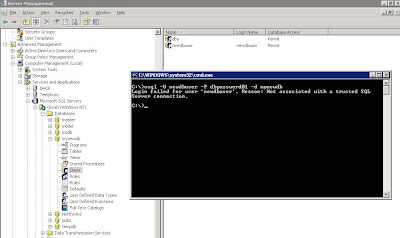
osql -U newdbuser -P dbpassword01 -d mynewdb

Here is the result of that osql command:


Login failed for user 'newdbuser'. Reason: Not associated with a trusted SQL Server connection.
A search of the Microsoft KB turned up the following articles:

Microsoft KB 889615: You may receive a "Not associated with a trusted SQL Server connection" error message when you try to connect to SQL Server 2000 or SQL Server 2005.

and

Microsoft KB 555332: Login failed for user 'username'. The user is not associated with a trusted SQL Server connection. (Microsoft SQL Server, Error: 18452).

The second article contains the solution:

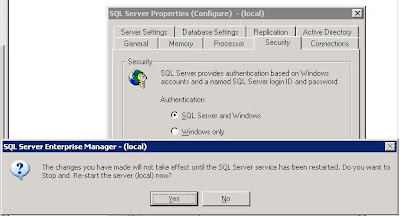
Switch the authentication mode to SQL Server and Windows:


Note that the change requires a restart of the SQL Server services. If there are any client databases online at the time, either everyone needs to shutdown their access, or we need to wait until later on when no connections to any databases on the server are happening.

Also note that we did not receive any indication as to why the database was not accepting connections via the SQL Enterprise Manager on another workstation. It just refused to connect which is why we went to the osql commands directly on the server.

Some links:

When looking for the commands we needed on the command line, it was a bit of a trial at first. We finally came up with: MSDN Forums - Command Line connect to SQL Server Database.

That in turn led us to:

The osql Utility and its commands on MSDN.

Lots of database fun on this one! :D

Philip Elder
MPECS Inc.
Microsoft Small Business Specialists

Saturday, 9 June 2007

System Builder Tip: Have dirty power? Will blow up!

The summer is a bad time for us in St. Albert. It is guaranteed that someone somewhere will be putting a shovel or something through our power lines at least twice or more.

When we build systems, we are responsible for the immediate warranty fulfilment. We must keep enough system parts around to support our warranties. This is especially important as various components within the system may not be available at a later time if we are supporting a two (2) or even a three (3) year warranty.

Ever have a piece of equipment blow up from power spikes? We have.

Ever have a database get so badly corrupted because one workstation went boom during a high intensity lightning storm and it wasn't properly protected? We have. It was a door through which A/C current could hit the network.

Any power bar that is does not have a Joule suppression (eP Joule) rating on it is NOT a surge suppressor. It don't matter if it says so on the box! No eP Joule suppression rating? Then it ain't no surge suppressor.

The higher the eP Joule suppression rate, the better the surge protection. An eP Joule rating of 2500 or more is where to start when protecting workstations. Preferably one with RJ45 and/or RJ11 connectors too. This provides another level of protection for the network.

Every avenue that power gets into the network infrastructure, that includes RJ45 Ethernet, RJ11 Phone, AC receptacles, and any other external power source must be protected.

Think network switches plugged into the wall. Think ADSL or cable modems plugged into the wall. Think of the cable Internet COAX plugged into the cable modem that heads outside! Think phone lines providing ADSL. All are paths through which sensitive network infrastructure equipment can be killed by A/C.

Here is what a typical summer day looks like in St. Albert as far as power is concerned:


The 20 minute power outage was very recent. Somehow a transformer got popped and that wiped out the power for an entire city burrow. Our client's offices were in that burrow.

Fortunately, all of their systems were protected by both surge protection for the workstations as well as UPS with line conditioners for the servers, switches, and Internet connectivity equipment.

The overages show just how dirty the power is here in town. We are a small city of about 60K bordering on Edmonton with around 800K.

We always highly recommend that any workstation where an employee is working on databases, whether SQL, Access, QuickBooks, Simply Accounting, CCH programs, and more must have a UPS with power conditioning capabilities attached to their system. The UPS must provide enough battery based up time to safely shut down the database application attached to their system.

Just to repeat: Working with databases? A UPS with line conditioning is mandatory on the workstation as well as the server and network infrastructure.

And yes, we only use APC UPS and Surge Protection products. We have had great success with their products and have never been given a reason to switch. We have no qualms with recommending them.

Philip Elder
MPECS Inc.
Microsoft Small Business Specialists

System Builder Tip: Server processor/CPU caveats when Intel server system building.

Yesterday, I mentioned that we had a bit of a struggle getting some Xeon 5130s working on what turned out to be a pre-production S5000PSL server board back when the Xeon 5130s were newly released. Blog post here: System Builder Tip: Intel S3000AH Server Board Series BIOS Updates Available.

When we sell server product, one of the selling "features" should be future upgrades to the server to meet further growth of the company. Yet, in today's server world, this is not the case.

How is that?

Let's say that in the case of the above S5000PSL we only installed a single Xeon processor. Say, the Intel Xeon 5130 SL9RX. We note that the Core Stepping is B2.

So, a year and a half down the road we need to add a second processor. The Xeon 5130 processor may still be in production, but we can only install a CPU with the same stepping code as the existing one, that is B2. More than likely, the stepping code on the then in production Xeon 5130 would be B3 or B4 or even higher! So, we would need to comb the Internet looking for the right one. Or, we would have to buy two (2) processors from our supplier anyway.

And therein lies a very serious caveat: The earlier revision of the server board may not support the newer stepping code CPUs or more Cores even with a BIOS update!

Here is a practical example based on an experience we just had with a server upgrade:

Here is a picture of the PBA code on the existing S3000AH that we attempted to upgrade yesterday to a Xeon X3210 Quad Core processor:


Note that the last three digits in the PBA number are -204. This is the board's revision level.

Now, here is what Intel's Web site states for X3210 compatibility:


In the last column we have some Notes numbers.

Here they are:

Our Intel Xeon X3210 CPU in note 7 requires a server board revision of -206 or above.

Thus, our installed S3000AH board at revision -204 does not qualify. Even with a BIOS update, the -204 board will not support the X3210 or X3220 Xeon Quad Core processors as indicated in the above Notes. In every other way, they are essentially identical!

We were fortunate that we had an S3000AH with a newer revision level here in the shop:


Our in-shop server board was revision -207.

When doing a straight across upgrade like this, that is, one S3000AH -204 for one S3000AH -207 one must make sure to flash the -204 to the newest BIOS version FIRST. Then boot the system up into the BIOS to verify the settings, then boot into the OS, with the -204 board still in the system, to make sure the OS doesn't take a fit over the BIOS update. Everything should work out okay up to this point.

To rephrase: Before making any physical changes to the server:
  1. Update the BIOS.
  2. Boot into the BIOS and verify settings especially the RAID controller LSI vs. Intel Matrix, save, and reboot if any changes were made by the BIOS update.
  3. Boot into the OS to verify its acceptance of the new BIOS.
  4. Shutdown the system.
Begin the hardware swap after that.

As soon as the server board swap is complete, boot directly to your BIOS update thumb drive and update the -207 to the S3000AH BIOS version as above (revision 42 as of this post).

Once the BIOS update is complete verify your BIOS settings as above!

There are two (2) RAID controllers built into this server board: The LSI based one and the Intel Matrix Technology one. Your OS may choke and not boot if the wrong one is configured.

If you had RAID array(s) configured on the previous server board, they will be picked up by the newer server board RAID controller with no issues. At least, that is what happened here with us as we verified the RAID controller type beforehand. Take note, both RAID controller versions picked up the RAID arrays, but the OS may still choke on the wrong controller!

When explaining to the client what may happen, we qualify our quote with options as far as what may happen if we run into this situation. Best case scenario and worst case scenario. We get approval for both as we provide costs for both.

Due to the complexity of inter-CPU stepping compatibility along with CPU type to server board revision level compatibility we always build our dual processor servers with two processors installed.

If our client is planning on having a large influx of employees over the life of the server, then we will install faster CPUs and more RAM too. We will build a server that will meet our client's needs for a minimum of two years as best as we can based on their budget.

If we are dealing with a smaller client with a rather static employee pool that only needs a one processor based server, we will sell a uniprocessor server system.

Given the above S3000AH server board revision compatibility situation, as well as the S5000PSL revision compatibility situation we were in before, we are careful about adopting new server technology.

In the case of early adopting, there are no guarantees that the server board revision purchased will be compatible with future CPUs. Thus, virtually no future upgrade scenarios will exist.

Some S3000AH specific Intel links:

Philip Elder
MPECS Inc.
Microsoft Small Business Specialists

Friday, 8 June 2007

System Builder Tip: Intel S3000AH Server Board Series BIOS Updates Available

The Intel S3000AH series server board has received a recent BIOS update to version 42.

Product page can be found here: Intel S3000AH Server Board.

Gotta make sure that BIOS is up to date, especially in this case as we are installing a Xeon X3210 Quad Core processor into an existing server that had a Xeon 3050 installed.

Previous BIOS versions may not be compatible with Quad Core, so the BIOS should be updated before hand if possible.

For new system builds, having a Xeon 3000 series processor around can facilitate that.

That goes for any server board BTW.

A while back, we got caught with an early revision S5000PSL board that did not support the 5100 series processors we were installing into it. It was not a known issue at that time as the 5100 series Xeons were just released and we happened to get a couple of the early ones. It took a BIOS update to get things to spec, but we did not have a 5000 series processor to install in the board to update the BIOS!

It worked out in the end, as we were fortunate our supplier had later revision boards in stock, so we were no further behind on our build time! We had the replacement board next day.

Philip Elder
MPECS Inc.
Microsoft Small Business Specialists

SBS 2K3 - All Versions: SBS KB926505 RipCurl update available via WSUS

One of the first steps in the SBS RipCurl (previous blog post on our RipCurl experiences & a RipCurl checklist PDF download) is to apply the KB926505 Vista and Outlook 2007 compatibility update.

It is now coming down to us as a critical update on WSUS:


Keep that in mind when considering to RipCurl your SBS boxes.

If you have approved the update in WSUS, and let it run via the Yellow Shield update installation request, then there is one less step to getting your SBS network Vista and Outlook 2007 compliant.

Microsoft KB 926505: Windows Small Business Server 2003: Windows Vista and Outlook 2007 compatibility update.

UPDATE: Added the above URL to KB926505.

Philip Elder
MPECS Inc.
Microsoft Small Business Specialists

SBS 2K3 - All Versions: SBS RSS Update for W2K3 SP2 released via WSUS

For those who have been struggling with Windows Server 2003 Service Pack 2 on SBS, an update has been released via WSUS to deal with the Receive Side Scaling (RSS) network issue:


The update disables RSS!

The original Microsoft KB936594: You may experience network-related problems after you install Windows Server 2003 SP2 or the Scalable Networking Pack on a Windows Small Business Server 2003-based computer that has an advanced network adapter.

Philip Elder
MPECS Inc.
Microsoft Small Business Specialists
Thursday, 7 June 2007

Bleeding Edge: One time we got bloody ...

Working on a couple of different projects brought me to stumble across something I haven't seen in a very long time (image is freely available on the Web):

The above is an image of the ATI Rage Fury MAXX. A dual GPU card with 32 MB of DDR RAM dedicated to each GPU. It was released in approximately 1999.

In its day, it was truly bleeding edge. It was competing with VooDoo (remember them?), and nVidia's high end cards. We had a client who insisted on having it in a box we put together for him. Bleeding edge is always expensive, so this box was no different.

We made sure to let him know in writing and verbally that the card was not returnable, and that the system may not perform as he expected. He understood what he was getting himself into! ;)

Guess what? It didn't perform as he expected! 8*O

Those were the days that ATI had a bad rap for their drivers. And this card was a prime example of that situation.

It took less than a week for him to come back with the system to show us some absolutely wacky artifacts, and strange video breaking - the game would all of a sudden be missing the bottom corner and you could see the desktop behind. Sometimes it would be the top right corner or any of the corners.

We were on the phone with ATI support quite a bit in those days, and we paid for it.

Subsequent driver releases helped, but in the end the product was essentially discontinued (read abandoned) by ATI. :(

Our client was pretty good about the whole situation knowing to some degree what he was getting into. We made good on the situation by providing hours of free support time in shop.

Why bring this up?

Because, even today, the Bleeding Edge can hurt us.

From driver immaturity, or even the lack of drivers for bleeding edge products, we sometimes cannot provide a requested product to a client. Sometimes initial manufacturing deficiencies will show up in the first products of a production line. There are many reasons why first generation can be painful. ;)

How do we find that out today?

We research other people's experience with the product via the Internet. If there is very little information out there due to the newness of the product, depending on our client, we would then purchase the product and test it.

We pay the price in time investigating the product. We try and take the risk for our client. If things don't work out as in the above situation, we try and make sure that we make it right as best as we can.

It is the part of client service that we deem the cost of doing business.

It also provides us with the knowledge we need to advise our clients on what products and solutions will work best for their given needs and network infrastructure.

If something doesn't work as advertised, then we avoid it! :D

Philip Elder
MPECS Inc.
Microsoft Small Business Specialists
SBS - Hard Drive Partitioning Schemes

There doesn't seem to be one guideline out there as far as how to partition a hard drive, or hard drives for Small Business Server.

Do we RAID our drives? Most certainly! We need that extra level of redundancy.

Surely no one puts together servers with only one hard disk or two hard disks without redundancy in it anymore?

Over the years, we have come up with a number of different hard drive setups depending on our client's business size and data volume needs.

A small client, say 5 to 15 seats, with a small volume of data would be setup as follows (physical disk properties & setup first with partitioning sub'd) :

  • 2 x 320 GB RAID 1 array (non-hot swap)
    • Primary System Partition: C: (310 GB)
    • Swap and URL Cache Partition S: (10 GB)
  • 2 x 320 GB RAID 1 array (non-hot swap)
    • Data Partition I: (320 GB)
In the above setup, VSS snapshot data would be stored on the C: partition leaving the I: partition totally to client data.

We have clients with higher data volume demands, some growing as fast as 15 GB per month during their peak seasons.

For some of them, and our larger firms in the 25-45 seat range we would configure the following:

  • 2 x 320 GB RAID 1 array (hot swap)
    • Primary System Partition: C: (310 GB)
    • Swap and URL Cache Partition S: (10 GB)
  • 3 x 320 GB RAID 5 array - 620 GB usable (hot swap)
    • Data Partition I: (620 GB)
  • 1 x 320 GB Global Hot Spare (hot swap)
We keep all of the drives the same size for the principle reason of having the hot spare available for either of the arrays. That is why it is considered Global, because it can be inserted into any array on the RAID controller. A hot spare can also be dedicated to any one of the specific arrays.

For the larger data volume clients:

  • 2 x 500 GB RAID 1 array (hot swap)
    • Primary System Partition: C: (480 GB)
    • Swap and URL Cache Partition S: (10 GB)
  • 5 x 500 GB RAID 5 array - 2.0 TB usable (hot swap)
    • Client Data Partition I: (500 GB)
  • 2 x 500 GB RAID 1 array (hot swap)
    • VSS & Server Data Partition J: (500 GB)
  • 1 x 500 GB Global Hot Spare (hot Swap)
We put the swap file and ISA's URL cache (99.9% Premium installs) on a separate partition to prevent them from being fragmented on the system C: partition. It facilitates increased system speed.

The same reason is used for setting up the VSS (Volume Shadow copy Service) snapshot files on a different drive/partition than the volume that is being shadow copied.

Relative to the other components that are being configured in a server, hard drive storage is cheap. Seagate's ES Series Enterprise SATA drives command a 10% premium over their desktop drives for extra reliability built in. That figure is a small price to pay for drives designed to be always on and serving huge chunks of data on a daily basis.

At this point, SCSI/SAS does not provide the cost/size ROI benefit for pretty much all of our clients that SATA does. There are a few exceptions to that rule though not many in our SMB environment.

Of course, your mileage will vary! ;)

Philip Elder
MPECS Inc.
Microsoft Small Business Specialists

Wednesday, 6 June 2007

Outlook 2003 - The messaging interface has returned an unknown error

We have a client that was receiving the following error when trying to print a public calendar:

The messaging interface has returned an unknown error
Okay, a simple search turns up the following Microsoft KB articles, but they are not relevant: None of them applied.

Once, and only once did we get an error indicating permissions problems on the task list folder before the above mentioned error.

So, when printing the calendar view, we went to the Page Setup button, and disabled printing the tasks list.

It worked.

So far, we haven't been able to find out just where the permissions conflict is yet.

But, they are happy about being able to print out their calendar again.

Honourable mention to the following who provided the key to figuring out how to get things going again:

Experts-Exchange: The messaging interface has returned an unknown error.

MCSE.MS: The messaging interface has returned an unknown error.

Philip Elder
MPECS Inc.
Microsoft Small Business Specialists

Microsoft Partner - Promoting your business on the new Solution Profiler

Apparently, we will need to build a solutions profile for our companies in order for clients to find us soon.

From what I understand, the client types in a problem/solution they are looking at and those partners that have the right key solution words would be brought up in the results.

Hopefully it will eliminate the Resource Directory's promotion of Gold and Certified members over us Registered level Small Business Specialists. Hopefully, it will avoid the snafu of trying to get our company properly listed in the Resource Directory! 8*0

Why is this important? As Susan Bradley points out in her introduction in the book Advanced Small Business Server 2003 Best Practices, the Gold Certified partners tried to convince her and her firm to avoid SBS (pg. xxxvii)! When we Registered level partners tend to know that SBS is an awesome product that can meet a broad range of client I.T. needs for a very reasonable cost.

It is in our experience as well, that small business I.T. shops that have obtained their Microsoft Small Business Specialist designation, are a lot more understanding of a small business' needs. Howz that? Well, we run our own small businesses don't we?

We understand the need to juggle our business needs according to cash flow, productivity and knowledge of our employees, applications that can serve our business needs, the technology needed today and tomorrow to meet those needs, and more.

As a result, we smaller Microsoft Small Business Specialists have a particular ability to address our client's small business needs.

We also have the time to invest in getting to know our client's business, their business model, and the special software application needs they may have for their industry. By investing this time, we are better able to design an SBS based solution that will meet their very specific needs.

We could not justify that kind of time investment in our client's business I.T. needs if we worked for a larger I.T. support company.

This time investment pays off in the end, as we can foster business relationships that can last decades!

So, invest some time in setting up your Solution Profile. Log on to the Partner site: Microsoft Partners Site (Worldwide Portal). Once signed in, click on the View/Manage your membership account button and head over to the Membership Center (has your little graph status level). The Solution Finder is under the "Requirements & Assets" heading/button.

It will be time consuming, especially for us small shops, but in the end, it will hopefully be worth it.

Thanks to David Overton's Blog for pointing this out: So your profile info is on MS Partner site and partner finder, so now you MUST update your solution profiles to be found - here is why and how it takes 10 mins.

Philip Elder
MPECS Inc.
Microsoft Small Business Specialists

Tuesday, 5 June 2007

Windows Vista - VHD Evaluation Version Available

A Windows Vista Enterprise Evaluation VHD (Virtual Hard Drive) version is now available for download.

You can get it here: Microsoft Windows Vista 30-Day Eval VHD (Registration is required).

Once we downloaded and set it up on one of our Virtual Server 2005 R2 servers, we were greeted with the following:


The Automatic Activation shows 2 days before its next try.

The VHD's download page indicates that it is good for 30 days and then it should be discarded after that time period. There is also mention that the VHD should not be activated. So, what will happen after the Automatic Activation deadline and the 30 days beyond today will be interesting to see.

We ran the Microsoft KB930955: Moveuser.exe is incompatible with Windows Vista and is replaced by the new Win32_UserProfile WMI functionality in anticipation of installing the Vista Eval VM on our SBS 2K3 R2 (RipCurled) virtual domain.

No matter what we did, the Vista VHD refused to allow the update. No indications were given as to what the problem was. If we have time, more effort will be put into the investigation.

We were able to run the Connect Computer Wizard and begin the install onto the SBS domain with no issues. Because of the above, if we had local accounts to migrate, they would have been left behind (Though there is a fix for that).

The _sbs_netsetup_ portion after the first reboot would not log off and reboot the system. We had to manually log the SBS setup user off, then log on as domain admin and reboot the VM.

After the second reboot and the subsequent logon with an SBS domain user account, the Client Install wizard ran without incident. Outlook 2003 was there and functional with the domain user's Exchange connection.

For those without a TechNet subscription, this will provide a means of configuring, installing software, and all around messing around with Windows Vista.

It is definitely a step in the right direction for those who need to test their network infrastructure and applications with Windows Vista.

Thanks to Susan Bradley for pointing out the download: Vista in a VHD.

Philip Elder
MPECS Inc.
Microsoft Small Business Specialists

D5 - Video of an interview of Steve Jobs & Bill Gates

If you have some time to burn and are interested in a little computer history, as well seeing Bill Gates and Steve Jobs on a stage together for the first time in ages, then check out the following:

D5All Things Digital: Joint Interview with Steve Jobs & Bill Gates by Walt Mossberg and Kara Swisher.

There are seven parts to the interview plus the prologue.

The Prologue is initially quite funny as it is a parody on the Dating Game. And, it is pretty neat to see out of the three industry leaders introduced at the beginning, only Gates is standing today. We go on to see some bits of history in the relationship between Microsoft and Apple.

The Highlight Reel spotlights some dialogue where Jobs says some things that render Gates completely speechless. It was good for a laugh.

Check it out ... it is a little bit of history in the making for our industry as well as a good history lesson about our industry.

It is also really neat to get a glimpse of both Gates and Jobs' thoughts and personalities.

Thanks to Todd Bishop's Microsoft Blog: Steve Jobs, Bill Gates discuss their relationship for pointing this one out.

Philip Elder
MPECS Inc.
Microsoft Small Business Specialists

Monday, 4 June 2007

SBS 2K3 - All Versions: Yet another issue with W2K3 Service Pack 2

It seems to be a fact on SBS that service packs break things. This fact has been around for a very long time.

It is one of the reasons we never apply service packs immediately, especially the OS ones, to our SBS boxes.

The SBS blog has pointed out another issue on SBS with Windows Server 2003 Service Pack 2: Unable to RDP/RWW into the SBS server after applying SP2.

The service pack breaks Terminal Services. The solution it seems, is to head over to the server console and reapply the service pack.

This can be especially painful for us SBSers, as we are generally RDPd into our SBS boxes for the updates. Sometimes, depending on the updates, we will need a fail safe scheduled reboot (previous blog post how-to) that would run an hour or so after starting the updates just in case the RDP connection is killed. Exchange and ISA updates are bad for that.

Susan Bradley has a current W2K3 SP2 install on SBS caveat page: Before You Install. And, there are LOTS of them!

As I see it, Service Packs are a throwback to a time when the Internet was in its infancy or even non-existent. We were required to either pay for the floppies, CD, or now DVD media, or after the coming of the Internet, download them from Microsoft's product page. Keep in mind we are talking about the SMB environment here. No SMS & MOM.

There was really no incremental updates until the advent of Windows Update. With Windows Update, we were able to patch and update our operating systems on an ongoing basis. We no longer had to wait for the service pack.

The same is true of our Microsoft Applications with the advent of the comprehensive update site for all Microsoft products: Microsoft Update.

A really huge portion of the current Service Pack 2 for Windows Server 2003 has already been delivered to us via WSUS/MSUpdate.

For us SBSers, the adoption of WSUS 2.0 was quite wide spread. Why else was WSUS 2.0 incorporated into the R2 release of SBS? Because it works, it facilitates an accurate picture of an organization's patch level status, and it gives the remote consultant full control over what patch is released and when.

Now, with the release of WSUS 3.0 and its ability to seamlessly be installed on SBS 2K3 SP1 and R2, we obtain the ability to manage Windows Vista patching as well. Here is a previous blog post on one particular WSUS 3.0 installation.

Given our current abilities to keep our patching levels current via WSUS, to test those incremental patches and publish our experiences with them, and to monitor our client's installations simply via the SBS R2 reports, we need to retire the Service Pack for the mainstream, but especially for SBSers.

Give us those incremental updates that were contained in the current Service Pack via WSUS. Give us the chance to test each component in our labs and on our own networks before having to chew on a chunky Service Pack that may, and does, break things on our client's SBS boxes.

Microsoft, our SBS boxes are as varied as any out there. Each client installation will be different. Hardware configurations are myriad, different critical corporate software installations on the SBS box are numerous, and no two SBS installations are identical.

We as Microsoft Small Business Specialists take great pains to try and configure servers based on one hardware platform to ease what can be a hardware support nightmare.

We also take great pains to make sure that our solutions meet our client's very specific needs.

And, our solutions need to be stable. It is tough to sell solutions based on SBS if we see a huge splattering of SBS pain on a Service Pack install. That, it seems, is what is happening now.

Think about the consultant or small I.T. support company that is not as experienced with SBS. Will the current debacle with W2K Service Pack 2 deter them from installing SBS based solutions? It sure may!

Also, keep in mind that the small business client, though not an I.T. Professional, may have at least a good grasp on the technologies used in their business, and know where to find information on products that a consultant may be recommending to them. The current Service Pack 2 issues on SBS may not show SBS in a good light at all.

Microsoft, having SBS pain expressed around Windows Server 2003 Service Pack 2 is definitely not a good way to sell a product.

All that being said, we still maintain that SBS 2K3 Premium R2 is the best server software product for our SMB clients. To date, SBS 2K3 is the best SBS version we have worked with. And, we plan on working with it as well as SBS Cougar into the future!

We will just continue to be very cautious around service packs! ;)

Philip Elder
MPECS Inc.
Microsoft Small Business Specialists