Showing posts with label Windows Server 2016. Show all posts

Saturday, 19 August 2017

Server 2012 R2 BitLocker Post Install Error: Unspecified Error

The following error happened on a DC we recently set up and were going to encrypt via BitLocker:

image

C:\Users\USERNAME\AppData\Local\Packages\windows.immersivecont...
C:\Users\USERNAME\Classic_{GUID}.settingcontent-ms
Unspecified error

A quick search turned up a simple fix: Reboot the server a second time.

Sure enough, good to go:

image

As a rule, we deploy a TPM in all of our physical DCs that are deployed with our clusters. They are then encrypted using BitLocker. This greatly reduces the exposure to compromise if someone has physical access to that DC. For virtual DCs, we now have the ability to pass a vTPM through to the guests in Server 2016. We're still in the testing phase, but our plan is to have _all_ domain controllers on networks we manage encrypted!

Philip Elder
Microsoft High Availability MVP
MPECS Inc.
Co-Author: SBS 2008 Blueprint Book
Our Cloud Service

Thursday, 20 July 2017

Windows Server 2016 July 18, 2017 CU is Important!

The July 18, 2017-KB4025334 (OS Build 14393.1532) Update is _important_!

There are fixes in there for a lot of cluster specific products.
  • iSCSI
  • S2D
  • ReFS
  • DeDup
  • MPIO
  • NTFS
The specifics are in the Microsoft page linked to above as is a download link.

We are in the process of updating our base Install.WIM image (blog post) with this update as I write this!


Philip Elder
Microsoft High Availability MVP
MPECS Inc.
Co-Author: SBS 2008 Blueprint Book
Our Cloud Service
Twitter: @MPECSInc

Wednesday, 15 March 2017

Windows Server 2016 March 2017 Update: Full & Delta Available

We can download both the full March Cumulative Update or there is now a Delta available.

image

Delta Update Windows Server 2016

The update is quite critical for those of us that run clusters on Windows Server 2016.

  • Addresses issue which could cause ReFS metadata corruption
  • Several fixes for Enable-ClusterS2D cmdlet for setting up Storage Spaces Direct
  • Addresses issue with Update-ClusterFunctionalLevel cmdlet during rolling upgrades if any of the default resource types are not registered
  • Optimization to the ordering when draining a S2D node with Storage Maintenance Mode
  • Addresses servicing issue where the Cluster Service may not start automatically on the first reboot after applying an update
  • Improved the bandwidth of SSD/NVMe drives available to application workloads during S2D rebuild operations.
  • Addresses issue with all flash S2D systems with cache devices where there was unnecessary read data from both tiers that would degrade performance

A full list is here: March 14, 2017—KB4013429 (OS Build 14393.953)

The Delta Update can be used to update our .WIM files for our Windows Server 2016 flash drive based installers (Blog post How-To).

Note that the last Cumulative Update took a good hour to run on our VMs and nodes. This one is sounding like it may take as long or longer depending on whether the Delta of full Cumulative Update gets installed.

Here’s a direct link to the Microsoft Update Page for KB4013429.

Happy Patching! ;)

Philip Elder
Microsoft High Availability MVP
MPECS Inc.
Co-Author: SBS 2008 Blueprint Book
Our Cloud Service

Saturday, 12 November 2016

Server Hardware: The Data Bus is Playing Catch-Up

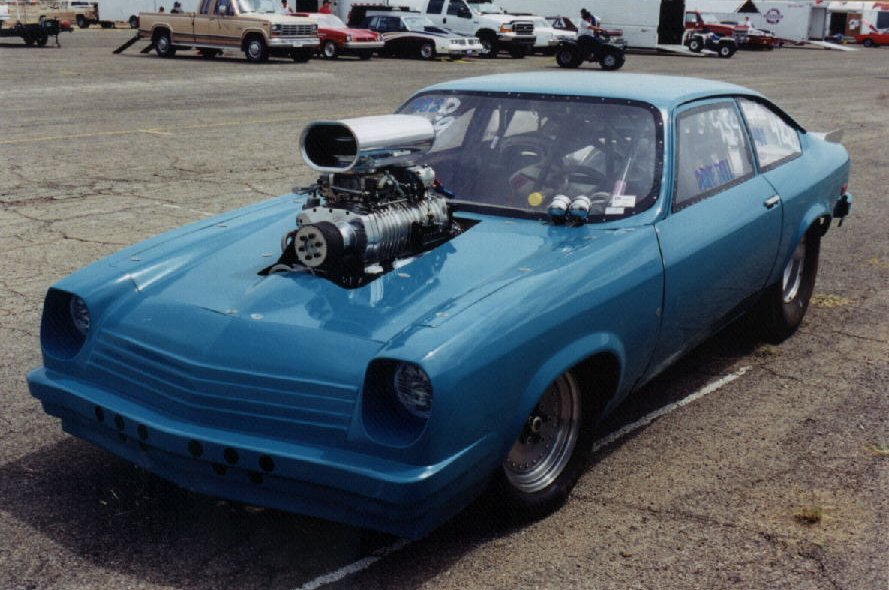
After seeing the Mellanox ConnectX-6 200Gb announcement the following image came to mind:

image

Image credit

The Vega/Monza was a small car that some folks found the time to stuff a 454CID Chevy engine into then drop a 671 or 871 series roots blower on (they came off trucks back in the day). The driveline and the "frame" were then tweaked to accommodate it.

The moral of the story? It was great to have all of that power but putting down to the road was always a problem. Check out some of the "tubbed" Vega images out there to see a few of the ways to do so.

Our server hardware today does not, unfortunately, have the ability to be "tubbed" to allow us to get things moving.

PCI Express

The PCI Express (PCIe) v3 spec (Wikipedia) at a little over 15GB/Second (that's Gigabytes not Gigabits) across a 16 lane connector falls far short of the needed bandwidth for a dual port 100Gb ConnectX-5 part.

As a point of reference, the theoretical throughput of one 100Gb port is about 12.5GB/Second. That essentially renders the dual port ConnectX-5 adapter a moot point as that second port has very little left for it to use. So, it becomes essentially a "passive" port to a second switch for redundancy.

A quick search for "Intel Server Systems PCIe Gen 4" yields very little in the way of results. We know we are about due for a hardware step as the "R" code (meaning refresh such as R2224WTTYSR) is coming into its second to third year in 2017.

Note that the current Intel Xeon Processor E5-2600 v4 series only has a grand total of 40 PCI Express Generation 3 lanes available. Toss in two PCIe x16 wired lanes with two ConnectX-4 100Gb adapters and that's going to be about it for real throughput.

Connectivity fabric bandwidth outside the data bus is increasing in leaps and bounds. Storage technologies such as NVMe and now NVDIMM-N, 3D XPoint, and other such memory bus direct storage technologies are either centre stage or coming on to the stage.

The current PCIe v3 pipe is way too small. The fourth generation PCI Express pipe that is not even in production is _already_ too small! It's either time for an entirely new bus fabric or a transitioning of the memory bus into either a full or intermediate storage bus which is what NVDIMM-N and 3D XPoint are hinting at.

Oh, and one more tiny point: Drawing storage into the memory bus virtually eliminates latency ... almost.

Today's Solutions

Finally, one needs to keep in mind that the server platforms we are deploying on today have very specific limitations. We've already hit some limits in our performance testing (blog post: Storage Configuration: Know Your Workloads for IOPS or Throughput).

With our S2D solutions looking to three, five, or more years of service life these limitations _must_ be at the forefront of our thought process when in discovery and then solution planning.

If not, we stand to have an unhappy customer calling us to take the solution back after we deploy or a call a year or two down the road when they hit the limits.

***

Author's Note: I was just shy of my Journeyman's ticket as a mechanic, in a direction towards high-performance, when the computer bug bit me. ;)

Philip Elder
Microsoft High Availability MVP
MPECS Inc.
Co-Author: SBS 2008 Blueprint Book
Our Cloud Service

Monday, 24 October 2016

Windows Server 2016 Feature Comparison Summary

This is a direct snip of the differences between Windows Server Standard and Datacenter from this PDF: image
image
image
image

Game Changing

A _lot_ of folks use the words “game changing” to somehow set their productions and/or service apart from others. Most of the time when we hear those words the products and/or services are “ho-hum” with little to no real impact on a company’s or user’s day-to-day work/personal life.
We’ve heard those words in our industry _a lot_ over the last number of years. The reality has been somewhat different for most of us.
We believe, based on our experience deploying inexpensive storage (clustered Scale-Out File Server/Storage Spaces) and compute (clustered Hyper-V) high availability solutions that Windows Server 2016 is indeed _game changing_ on three fronts:
  1. Compute
  2. Storage
  3. Networking
The Software Defined Data Centre (SDDC) story in Windows Server 2016 has traditional cluster, storage, and networking vendors concerned. In our opinion, deeply concerned. Just watch key vendor’s stocks, as we’ve been doing these last four or five years, to see just how much of an impact the Server 2016 SDDC story will have over the next two to five years. Some stocks have already reflected the inroads Hyper-V and recently (2 years) Storage Spaces have made into their markets. We’re a part of that story! :)
Using true commodity hardware we are able to set up an entire SDDC for a fraction of the cost of traditional data centre solutions. Not only that, with the Hyper-Converged Storage Spaces Direct platform we can provide lots of IOPS and compute in a small footprint without all of the added complexity and expense in traditional data centre solutions.

First Server 2016 Deployment

We’ve already deployed our first Windows Server 2016 Clustered Storage Spaces cluster on the General Availability (GA) bits while in Las Vegas two weeks ago:
image
That’s two Intel Server Systems R1208JP4OC 1U servers and a Quanta QCT JB4602 JBOD outfitted with (6) 200GB HGST SAS SSDs and (54) 8GB 8TB Seagate NearLine SAS drives. We are setting up for a Parity space to provide maximum storage availability as this client produces lots of 4K video. (EDIT NOTE: Updated the drive size)
Cost of the highly available storage solution is a fraction of the cost we’d see from Tier 1 storage or hardware vendors.

Going Forward

It’s no secret that we are excited about the Server 2016 story. We plan on posting a lot more about why we believe Windows Server 2016 is a game changer with the specifics around the above mentioned three areas. We may even mention some of the vendor’s stock tickers to add to your watch list too! ;)

Who is MPECS Inc.?

A bit of a shameless plug.
We’ve been building SDDC setups for small to medium hosting companies along with SMB/SME consultants and clients that are concerned about “Cloud being their data on someone else’s computer” since 2008/2009.
Our high availability solutions are designed with SMB (think sub $12K for a 2-node cluster) and SME (think sub $35K cluster) in mind along with SMB/SME focused hosting providers (think sub $50K to start). Our solutions are flexible and can be designed with the 3 year and 5 year stories, or more, in mind.
We run our Cloud on-premises, hybrid, or in _our_ Cloud that runs on _our_ highly available solutions.
Curious how we can help you? Then, please feel free to ask!
Have a great day and thanks for reading.
Philip Elder
Microsoft High Availability MVP
MPECS Inc.
Co-Author: SBS 2008 Blueprint Book
Our Cloud Service

Tuesday, 18 October 2016

Some Thoughts on the New Windows Server Per Core Licensing Model

This is a post sent to the SBS2K Yahoo Group.

***

Let’s take things from this perspective: Nothing has changed at our level.

How’s that?

We deploy four, six, and eight core single socket and dual socket servers.

We have not seen the need for four socket servers since one can set things up today with eight processors in one 2U space (4 nodes) without too much finagling and end up with way more performance.

Until Intel has conquered the GHz to core count ratio we will be deploying high GHz low core count CPUs for the time being. Not that eight cores is a “low” count in our world. ;)

Most of us will never see the need to set up a dual socket server with more than 12 cores with 16 being not as common a setup for us.

Our sweet spot right now in dual socket server cluster nodes is the E5-2643v4 at 6 cores and 3.4 GHz. For higher intensity workloads we run with the E5-2667v4 at 8 cores and 3.2 GHz. Price wise, these are the best bang for the buck relative to core count versus GHz.

With the introduction of the two node configuration for Storage Spaces Direct (S2D) we have an option to provide high availability (HA) in our smaller clients using two single socket 1U servers (R1208SPOSHOR or Dell R330) for a very reasonable cost. A Datacenter license is required for each node. Folks may balk at that, but keep this in mind:

clip_image001

What does that mean? It means that we can SPLA the Datacenter license whether the client leases the equipment, which was standard fair back in the day, or they own it but we SaaS the Windows Server licenses. Up here in Canada those licenses are about $175 per 16 cores. That’s $350/Month for a HA setup. We see a _huge_ market for this setup in SMB and SME. Oh, and keep in mind that we can then be very flexible about our VM layout. ;)

The licensing change reminds me of VMware’s changes a number of years back where they received so much backpressure that the “Core Tax” changes got reverted. So far, there’s not been a lot of backpressure that we’ve seen about this change. But then, the bulk of the on-premises SMB/SME world, where we spend most of our time, don’t deploy servers with more than 16 cores.

In the end, as I stated at the beginning, nothing has changed for us.

We’re still deploying “two” Server Standard licenses, now in this case with 16 cores per server, for our single box solutions with four VMs. And, we’re deploying “four” Server Standard licenses four our two node Clustered Storage Spaces and Hyper-V via shared storage that also yields four VMs in that setting.

If, and when, we broach into the higher density core counts for our cluster setups, or even standalone boxes, we will cross that bridge when we come to it.

Have a great day everyone and thanks for reading. :)

Philip Elder
Microsoft High Availability MVP
MPECS Inc.
Co-Author: SBS 2008 Blueprint Book
Our Cloud Service

Tuesday, 20 September 2016

Windows Server 2016: Storage Spaces Direct (S2D) and VMware Virtual SAN IOPS?

We’re not VMware experts here. Let’s make that very clear. 

However, we do have the ear of many a VMware expert so we are able to ask: Is the Windows Server 2016 hyper-converged Storage Spaces Direct (S2D) setup similar to the VMware Virtual SAN platform? Apples to Apples if you will?

The resounding answer has been, “Yes!”

That leads us to the following articles that are about Intel NVMe all-flash hyper-converged setups:

  1. Record Performance of All Flash NVMe Configuration – Windows Server 2016 and Storage Spaces Direct - IT Peer Network
    • An Intel based four node S2D setup
  2. VMware Virtual SAN 6.2 Sets New Record - IT Peer Network
    • A VMware based 8 node Virtual SAN 6.2 setup

What’s interesting to note is the following:

  1. Intel/S2D setup at 4 nodes
    • 3.2M IOPS at 4K Read
      • 930K IOPS at 70/30 Read/Write
  2. VMware setup at 8 nodes
    1. 1.2M IOPS @ Capacity Mode
      • 500K IOPS at 70/30 Read/Write
    2. ~830K IOPS @ Balance Mode
      • 800K IOPS at 70/30 Read/Write

What is starting to become apparent, at least to us, is that the folks over at the newly minted Dell EMC _really_ need to pay attention to Microsoft’s feature depth in Windows Server 2016. In fact, that goes without saying for all vendors into virtualization, high performance computing (HPC), storage, and data centre products.

We’re pretty excited about the hyper-converged S2D feature set in Windows Server 2016. So much so, we have invested quite heavily in our Proof-of-Concept (PoC).

image

The bill of materials (BoM) for the setup so far:

  • S2D Nodes (4)
    • Intel Server Systems R2224WTTYS with dual E5-2640, 256GB ECC, Intel JBOD HBA, Intel X540-T2 10GbE, Mellanox 56GbE NICs, Intel PCIe 750 NVMe, Intel SATA SSDs, and Seagate 10K SAS spindles
  • Hyper-V Nodes (2)
    • Intel Server Systems R2208GZ4GC with dual E5-2650, 128GB ECC, Intel X540-T2 10GbE, and Mellanox 56GbE NICs
  • Lab DC
    • An Intel Server setup including S1200BT series board and Intel Xeon E3 processor.

Our testing includes using the S2D setup as a hyper-converged platform but also as a Scale-Out File Server (SOFS) cluster destination for a Hyper-V cluster on the two Hyper-V nodes. Then, some testing of various configurations beyond.

We believe Windows Server 2016 is looking to be one of the best server operating systems Microsoft has ever released. Hopefully we won’t be seeing any major bugs in the production version!

Philip Elder
Microsoft High Availability MVP
MPECS Inc.
Our SMB/SME HA Solution
Our Cloud Service

Thursday, 12 May 2016

RDMA via RoCE 101 for Storage Spaces Direct (S2D)

We’ve decided to run with RoCE (RDMA over Converged Ethernet) for our Storage Spaces Direct (S2D) proof of concept (PoC).

image

  • (4) Intel Server Systems R2224WTTYS
    • Dual Intel Xeon Processors, 256GB ECC, Dual Mellanox ConnectX-3, and x540-T2
    • Storage is a mix of 10K SAS and Intel SATA SSDs to start
  • (2) Mellanox MSX1012 56Gbps Switches
  • (2) NETGEAR XS712T 10GbE Switches
  • (2) Cisco SG500x-48 Gigabit Switches
  • APC 1200mm 42U Enclosure
  • APC 6KV 220v UPS with extended runtime batteries

The following is a list of resources we’ve gathered together as of this writing:

This is, by far, not the most comprehensive of lists. The best place to start in our opinion is with Didier’s video and the PDF of the slides in that video. Then move on to the Mellanox resources.

We’ll update this blog post as we come across more materials and eventually get a process guide in place.

Philip Elder
Microsoft High Availability MVP
MPECS Inc.
Co-Author: SBS 2008 Blueprint Book
Our Cloud Service