A while back in March we did a product review: Microsoft Wireless Laser Keyboard 6000 V2.0.
After about 4 months of use, the keyboard is starting to drive me nuts! :(
Actually, it is not the keyboard, but the wireless radio that is giving me hassles.
I have since found out that one cannot run two Microsoft wireless (not Bluetooth) keyboards close to each other, or another wireless keyboard and/or mouse close by as the unit is quite finicky.
I keep getting signal quality warnings from the keyboard software and tons of lost keystrokes. It gets really bad when I am using my Logitech MX Laser mouse a lot . The more mousing, the more I have radio problems with the keyboard! :(
We will have to let it go and pick up a Bluetooth version of the keyboard.
Hopefully the newer 7000 or 8000 series keyboard has the same feel in the keystrokes as this one does because I really like that aspect of the keyboard.
Philip Elder
MPECS Inc.
Microsoft Small Business Specialists
Friday, 22 June 2007
Have a few minutes to spare? A Client Focus suggestion...
Have a few minutes to spare?
Call a client. Call one you haven't spoken with for a while.
Say hello, chat, ask them how things are. See if they need anything.
This kind of proactive contact with clients goes a long way towards building up a strong business relationship with them.
Have a little more than a few minutes to spare?
Then it is time for a "Client Focus" session.
We all can get very busy. Even with our PDAs, Outlook, CRM, and more we can let things fall through the cracks.
A Client Focus session is an opportunity to take anywhere from 10 to 30 minutes and discover what we have missed or new opportunities with our existing clients.
It gets us to focus specifically on our client's current needs. It provides us with an opportunity to discover things that we may have missed, but also allow client specific ideas that have been sitting at the back of our minds to come forward.
Once one becomes comfortable with this methodology, or some derivative of it, another column can be added for Future Needs or any other aspect of client management.
One factor that is very important for the success of the Client Focus, is knowing our client's environments. That is, having first hand contact with our clients and not being just "someone on the other end of the phone" or e-mail to them.
Whether working remotely or locally, we need to spend time within our client's network infrastructure, but also within our client's business environment.
Clients love it when we ask them questions about what they are doing and how they are trying to do it. They appreciate us taking the time to get to know their given business environment. In most cases, they won't mind spending some time answering questions about their business and the environment they do business in.
In pretty much all cases, a client will be more likely to deal with us as a result of our getting to know their business and its needs first hand over the "other guy". This is especially true when the suggestions we make are based on our actually understanding their business.
We have all probably had the experience of the sales guy saying, "Oh yes Mr. Customer, this product won the Editor's Choice in the Reseller Reviews and it is a perfect fit!" And then turning to us and saying, "Okay guys, make it fit!"
I can hear the Tech department shuddering over that one! ;)
There is no excuse for the lack of knowledge and understanding of a client's infrastructure or the technology needed to make that infrastructure work. None. Period.
In the case of I.T. companies with separate Sales & Tech departments, that means that your Sales people and Tech people are getting together regularly to hash things out right?
Philip Elder
MPECS Inc.
Microsoft Small Business Specialists
Call a client. Call one you haven't spoken with for a while.
Say hello, chat, ask them how things are. See if they need anything.
This kind of proactive contact with clients goes a long way towards building up a strong business relationship with them.
Have a little more than a few minutes to spare?
Then it is time for a "Client Focus" session.
We all can get very busy. Even with our PDAs, Outlook, CRM, and more we can let things fall through the cracks.
A Client Focus session is an opportunity to take anywhere from 10 to 30 minutes and discover what we have missed or new opportunities with our existing clients.
- Let the appropriate people know where you will be and to Do Not Disturb (DND) if at all possible.
- A decision must be made by us within to use the following time to focus on client needs.
- That decision must be a committed one. No distractions!
- That decision is an internal one and provides the foundation for a successful Client Focus session.
- An office or space where the DND time is possible.
- Sit down with a pad of paper and a couple of pens or a pencil with plenty of lead.
- Nothing more annoying than a pen running out of ink during a critical moment.
- Be comfortable as being relaxed is important.
- Relax for a couple of minutes and let the stresses of the day go.
- Take a couple of deep breaths to get the blood flowing in the brain and to deepen the relaxation.
- On the pad of paper:
- Draw one line down the middle of the page.
- Write "Client" at the top of the Left Column.
- Write "Needs" above the Right Column.
- Start listing your clients leaving a large space between each name.
- If a particular client need comes up while writing their name down, put it in the Right Column.
- Keep writing client names, but as soon as a Need presents itself, write it in the Needs Column beside their name immediately.
- Once the client names are filled out, continue thinking about each client's respective infrastructure. More Needs should present themselves.
- Use different sheets of paper to diagram aspects of the client's infrastructure.
- Look at the big picture: servers, workstations, switches, software, etc and their purposes.
It gets us to focus specifically on our client's current needs. It provides us with an opportunity to discover things that we may have missed, but also allow client specific ideas that have been sitting at the back of our minds to come forward.
Once one becomes comfortable with this methodology, or some derivative of it, another column can be added for Future Needs or any other aspect of client management.
One factor that is very important for the success of the Client Focus, is knowing our client's environments. That is, having first hand contact with our clients and not being just "someone on the other end of the phone" or e-mail to them.
Whether working remotely or locally, we need to spend time within our client's network infrastructure, but also within our client's business environment.
Clients love it when we ask them questions about what they are doing and how they are trying to do it. They appreciate us taking the time to get to know their given business environment. In most cases, they won't mind spending some time answering questions about their business and the environment they do business in.
In pretty much all cases, a client will be more likely to deal with us as a result of our getting to know their business and its needs first hand over the "other guy". This is especially true when the suggestions we make are based on our actually understanding their business.
We have all probably had the experience of the sales guy saying, "Oh yes Mr. Customer, this product won the Editor's Choice in the Reseller Reviews and it is a perfect fit!" And then turning to us and saying, "Okay guys, make it fit!"
I can hear the Tech department shuddering over that one! ;)
There is no excuse for the lack of knowledge and understanding of a client's infrastructure or the technology needed to make that infrastructure work. None. Period.
In the case of I.T. companies with separate Sales & Tech departments, that means that your Sales people and Tech people are getting together regularly to hash things out right?
Philip Elder
MPECS Inc.
Microsoft Small Business Specialists
Thursday, 21 June 2007
Even Mac software gets the blues ... or at least IE does
In our ongoing audit for one of our clients that has a very high Mac count in their organization, we are trying to learn as much as possible about them.
This error, captured by the screen capture software called Grab, happens every time Microsoft Explorer is opened on one particular iMac G5:

It took a few tries to figure out a way around it.
It seems that whatever page Explorer is trying to open is causing it to crash.
Hit the stop button and things seem to be okay. One could browse to another site with no issues.
The current MS E (IE) version for Mac does not support the SBS self signed certificate which is a pain. Mac users have to use Safari to get access to the RWW features with the exception of RDP.
A note to Microsoft: Get developing a browser for Mac that works with self signed certificates please.
Philip Elder
MPECS Inc.
Microsoft Small Business Specialists
This error, captured by the screen capture software called Grab, happens every time Microsoft Explorer is opened on one particular iMac G5:

The application Explorer quit unexpectedly.The details don't necessarily provide clues as to what was going on.
It took a few tries to figure out a way around it.
It seems that whatever page Explorer is trying to open is causing it to crash.
Hit the stop button and things seem to be okay. One could browse to another site with no issues.
The current MS E (IE) version for Mac does not support the SBS self signed certificate which is a pain. Mac users have to use Safari to get access to the RWW features with the exception of RDP.
A note to Microsoft: Get developing a browser for Mac that works with self signed certificates please.
Philip Elder
MPECS Inc.
Microsoft Small Business Specialists
Labels:
Apple,
Error,
Error Workaround,
Mac,
SBS,
SBS 2003 All Editions


Business Principles: How not to handle a mistake!?!
It is very important for our clients to know where we stand if we make a mistake. We must take responsibility for it. We must make every effort to make it right. They need to know that.
In the long run, it builds trust between us and our clients.
Yes, we may loose a couple. But, if the mistake we made costs them, do you blame them for leaving? No. Hopefully we are given another chance though.
For example, Toyota's newly released Tundra full sized trucks have had a cam failure problem on what looks like early production run versions of the vehicle with a certain cam supplier's product in the engine. The number of cam failures have been relatively minor compared to the volume of trucks produced, but Toyota has implemented a replace the whole thing for free policy.
Not just fix it, replace it.
An article on the subject: autoblog: Toyota expresses regret for Tundra camshaft failures on internet forums.
Ford on the other hand, has a different stance on a cam failure issue that affects the Ford Taurus SHO V8 engine co-produced with Yamaha. Around 20,000 of these hand built in Atlanta vehicles were sold across the 1996-99 life of the car. The 1997 year was the largest run of the vehicle.
Some would say that the number of cars produced warrants a "no response" attitude. Some would say that it isn't worth Ford's time to recognize and take responsibility for the issue.
The number of known affected vehicles is approaching 5% (1,000) of the entire product run.
This is not a statistical anomaly as the Tundra's failures will be over the entire production run of the Tundra.
Wikipedia: Ford Yamaha V8 engine.
V8SHO.com: Cam Failure Links.
Ford took the same stand with the vehicle fires due to a faulty seal in the break booster, and with the ~1997-2000 F-150 door latch failures.
As a result, owners of the affected vehicles have had to initiate class action lawsuits to get any recompense or recognition for their problems.
So I ask you:
Those questions in turn need to be asked towards our own companies and our own attitudes with regards to the products and services we provide our clients.
For whose best interest do we operate our business? That is a critical question, and the answer to it colours everything we say and do as representatives our company and the products and services provided by it.
Philip Elder
MPECS Inc.
Microsoft Small Business Specialists
In the long run, it builds trust between us and our clients.
Yes, we may loose a couple. But, if the mistake we made costs them, do you blame them for leaving? No. Hopefully we are given another chance though.
For example, Toyota's newly released Tundra full sized trucks have had a cam failure problem on what looks like early production run versions of the vehicle with a certain cam supplier's product in the engine. The number of cam failures have been relatively minor compared to the volume of trucks produced, but Toyota has implemented a replace the whole thing for free policy.
Not just fix it, replace it.
An article on the subject: autoblog: Toyota expresses regret for Tundra camshaft failures on internet forums.
Ford on the other hand, has a different stance on a cam failure issue that affects the Ford Taurus SHO V8 engine co-produced with Yamaha. Around 20,000 of these hand built in Atlanta vehicles were sold across the 1996-99 life of the car. The 1997 year was the largest run of the vehicle.
Some would say that the number of cars produced warrants a "no response" attitude. Some would say that it isn't worth Ford's time to recognize and take responsibility for the issue.
The number of known affected vehicles is approaching 5% (1,000) of the entire product run.
This is not a statistical anomaly as the Tundra's failures will be over the entire production run of the Tundra.
Wikipedia: Ford Yamaha V8 engine.
V8SHO.com: Cam Failure Links.
Ford took the same stand with the vehicle fires due to a faulty seal in the break booster, and with the ~1997-2000 F-150 door latch failures.
As a result, owners of the affected vehicles have had to initiate class action lawsuits to get any recompense or recognition for their problems.
So I ask you:
- Which company took the best approach with their clients? Ford or Toyota?
- Which company will build long standing relationships with their clients? Ford or Toyota?
- Which company took responsibility for the quality of their products? Ford or Toyota?
Those questions in turn need to be asked towards our own companies and our own attitudes with regards to the products and services we provide our clients.
For whose best interest do we operate our business? That is a critical question, and the answer to it colours everything we say and do as representatives our company and the products and services provided by it.
Philip Elder
MPECS Inc.
Microsoft Small Business Specialists
Wednesday, 20 June 2007
TechNet - Future of the Server Room Tour - Presenter's Post Posts!
We attended the Future of the Server Room Tour in Calgary a while back.
Our post conference take: TechNet: Future Of the Server Room - Longhorn/Server 2008, SBS, & SBS Cougar.
Rodney Buike has just posted information including the most popular questions (text messaged or e-mailed) and their answers, as well as some great resources on the Canadian IT Pro Blog: FoSR Interesting Q&A.
One thing he pointed out was a free PowerShell book that we can download from Microsoft: Free PowerShell Book (Zipped PDF with registration required).
There is also a link to the demo files: FoSR Demo Files (Zipped file).
And, a link to the Microsoft TechNet Command-line Reference.
The demonstrations on this tour were some of the most in depth into the new OS that we have seen to date. So, we suggest having a look into Rodney's post and the current Longhorn/Server 2008 beta. It will be well worth your while.
Philip Elder
MPECS Inc.
Microsoft Small Business Specialists
Our post conference take: TechNet: Future Of the Server Room - Longhorn/Server 2008, SBS, & SBS Cougar.
Rodney Buike has just posted information including the most popular questions (text messaged or e-mailed) and their answers, as well as some great resources on the Canadian IT Pro Blog: FoSR Interesting Q&A.
One thing he pointed out was a free PowerShell book that we can download from Microsoft: Free PowerShell Book (Zipped PDF with registration required).
There is also a link to the demo files: FoSR Demo Files (Zipped file).
And, a link to the Microsoft TechNet Command-line Reference.
The demonstrations on this tour were some of the most in depth into the new OS that we have seen to date. So, we suggest having a look into Rodney's post and the current Longhorn/Server 2008 beta. It will be well worth your while.
Philip Elder
MPECS Inc.
Microsoft Small Business Specialists
SBS 2K3 - Group Policy computer settings not applied
In the continuing saga of merging two FAT32 partitions on a set of TravelMate 8210 laptops we just delivered, we ran into a strange problem.
We have a set of GPOs set at the domain level for the various security needs of this particular firm.
We kept getting the following error when the policies from those GPOs were trying to be set:

Scroll down to the 0x4b8 section and they ask you to change a registry setting to enable debug logging. Run a gpupdate /force instead of secedit BTW.
That didn't work for us, so, off to the next search that landed us on: KB 260715: Event ID 1000 and 1202 After Configuring Policies. Again, no help or at least the article couldn't help us, but it did bring up the following error when we went to check the local policy settings for the administrator:

To check the local GP:
A quick search for the first line in the error error turned up the process we use to fix the database. Run the following command from the command line:
esentutl /p %windir%\security\database\secedit.sdb
And you will see the results will below:

Once that process finishes, run the following line from the same command line:
gpupdate /force
The system should ask to be rebooted once the domain GPOs have been processed. A successful SceCli should also now be in the App log.
Sure enough, once the system rebooted, all security policies were in place.
Buried about half way down (could have missed it) is the above command line fix: MCSE.MS: Re: Group Policy Security setting could not be determined.
Thanks to Doug Knox for sharing that fix!
Philip Elder
MPECS Inc.
Microsoft Small Business Specialists
We have a set of GPOs set at the domain level for the various security needs of this particular firm.
We kept getting the following error when the policies from those GPOs were trying to be set:
Event ID 1202 - SceCli: Security policies were propagated with warning: 0x4b8: An extended error has occur ed.Clicking on the link in the error brings up the Help & Support Center pointing to KB 324383: Troubleshooting SCECLI 1202 Events.
Scroll down to the 0x4b8 section and they ask you to change a registry setting to enable debug logging. Run a gpupdate /force instead of secedit BTW.
That didn't work for us, so, off to the next search that landed us on: KB 260715: Event ID 1000 and 1202 After Configuring Policies. Again, no help or at least the article couldn't help us, but it did bring up the following error when we went to check the local policy settings for the administrator:

Security Templates: The Group Policy security settings that apply to this machine could not be determined.Someone didn't have their spellcheck enabled on that last line - overridden! ;)
The error returned when trying to retrieve these settings from the local security policy database (%windir%\security\database\secedit.sdb) was: The parameter is incorrect.
All local security settings will be displayed, but no indication will be given as to whether or not a given security setting is defined by Group Policy.
Any local security setting modified through this User Interface may subsequently be overidden by domain-level policies.
To check the local GP:
- Start-->Run
- gpedit.msc
- [Enter]
A quick search for the first line in the error error turned up the process we use to fix the database. Run the following command from the command line:
esentutl /p %windir%\security\database\secedit.sdb
And you will see the results will below:
Once that process finishes, run the following line from the same command line:
gpupdate /force
The system should ask to be rebooted once the domain GPOs have been processed. A successful SceCli should also now be in the App log.
Sure enough, once the system rebooted, all security policies were in place.
Buried about half way down (could have missed it) is the above command line fix: MCSE.MS: Re: Group Policy Security setting could not be determined.
Thanks to Doug Knox for sharing that fix!
Philip Elder
MPECS Inc.
Microsoft Small Business Specialists
Labels:
Acer,
Acer Laptops,
Error,
Error Fix,
General Troubleshooting,
Group Policy,
SBS,
SBS 2K3 Premium,
Windows XP
Tuesday, 19 June 2007
SBS 2K3 Premium - ISP changes the static IP, now what?
As was mentioned earlier, our clients affected by the extended Internet outage had their static IP changed during the upgrade to DSL 2.0.
With SBS 2K3 Standard, all one needs to do is change the IP, Subnet, and Gateway on the second adapter (if installed). Or, the same changes would need to be made on the Router/Gateway box protecting the SBS network. Obviously this would have to be done on-site by someone with admin access, or via a service call by us.
The second thing common to both versions is to update the client Internet domain name's DNS settings for e-mail if the client has their domain e-mail coming to the SBS box via SMTP. This involves updating the IP associated with the MX and A record pointing to the old IP:
Once the above steps have been completed, then on the Premium boxes, we need to make some changes to ISA as well.
One can log on later to reboot the server via remote connection, or one can schedule a reboot (previous blog post how-to).
As always, let your client know that the reboot will be happening later on in the evening, and check RRAS to verify that no clients are connected via VPN so that no files may be corrupted:
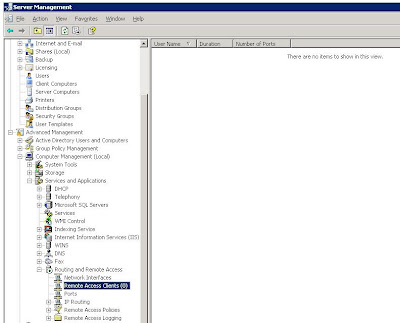
As a rule, if anyone was connected to their desktop via RWW/RDP at the time of the server reboot, they will be able to reconnect to their session after the server reboots. In the event that they are not able to, their workstation should remain locked with their work there for them in the morning. The exception to this rule is a workstation reboot forced by the overnight updates.
Thus the request for the server reboot in the first place! :D
Philip Elder
MPECS Inc.
Microsoft Small Business Specialists
With SBS 2K3 Standard, all one needs to do is change the IP, Subnet, and Gateway on the second adapter (if installed). Or, the same changes would need to be made on the Router/Gateway box protecting the SBS network. Obviously this would have to be done on-site by someone with admin access, or via a service call by us.
The second thing common to both versions is to update the client Internet domain name's DNS settings for e-mail if the client has their domain e-mail coming to the SBS box via SMTP. This involves updating the IP associated with the MX and A record pointing to the old IP:
- MX 10 mail.mydomain.com
- A mail.mydomain.com 24.62.26.42 (old IP)
- A mail.mydomain.com 62.24.42.26 (new IP)
Once the above steps have been completed, then on the Premium boxes, we need to make some changes to ISA as well.
- On the second NIC (WAN=ISA), the IP, Subnet, and Gateway need to be changed to the new settings. Note that DNS on this adapter always points to the SBS IP!
- ISA Services need to be rebooted:
- Click on Restart the service
- Click on "Yes" to the "Restart Other Services" warning dialogue:

- Verify the settings in ISA:
- Open the ISA Manager
- Click on Firewall Policy
- Double click any one of the SBS Rules: SharePoint, OWA, etc
- Click the Listener tab
- Click the Properties button
- Click on the Networks tab
- Double Click the "External
" (or click the Address button) - Note that the correct IP is now present: 62.24.42.26

- The server should be rebooted after hours.
One can log on later to reboot the server via remote connection, or one can schedule a reboot (previous blog post how-to).
As always, let your client know that the reboot will be happening later on in the evening, and check RRAS to verify that no clients are connected via VPN so that no files may be corrupted:

As a rule, if anyone was connected to their desktop via RWW/RDP at the time of the server reboot, they will be able to reconnect to their session after the server reboots. In the event that they are not able to, their workstation should remain locked with their work there for them in the morning. The exception to this rule is a workstation reboot forced by the overnight updates.
Thus the request for the server reboot in the first place! :D
Philip Elder
MPECS Inc.
Microsoft Small Business Specialists
Labels:
DNS,
E-mail,
ISA,
SBS,
SBS 2003 All Editions,
SBS 2003 Premium,
SBS 2K3 Premium,
Small Business Server
Just a quick post... That Phone Company, Acer Laptops, and more
Things are absolutely nuts around here right now...
The Phone Company finally got their poop together, as did the ISP riding on top of their equipment so we finally got our clients back up and running in the city burrow taken down by the Phone Company. They came back on a totally different segment, so DNS records and more needed to be updated accordingly.
We had another funky issue with the four Acer laptops we merged the two FAT32 partitions and converted to NTFS. That will be blogged about hopefully tomorrow morning. Basically, they were refusing to accept GP security setting updates. Took a while to figure out where the problem was and the fix.
We are doing a Tech Assessment for a client that is pretty much 100% Mac. It is providing a challenge, as we have only sporadically worked with Macs. So, we need to burn some serious midnight oil figuring out how we are going to integrate them into an SBS environment. To complicate things, they have 5 locations.
Anyone have Mac on SBS experience? Let me know, because we could use some help in that area!
Off to the races! ;)
UPDATE 2007-06-20: Macs and SBS: After some searching the following resources have come up for adding the Mac, or at least gaining access, to the SBS domain.
A blog post on the Windows Small Business Server Documentation Blog with a link to a draft document on adding OS X 10.3+ Macs to an SBS domain.
Document link: Connecting Mac OS X 10.3 and Higher Clients to a Windows Small Business Server 2003 Network (Word document).
Check the comments on the above blog post for errata. There are some things to note there.
Links came via Susan Bradley: Connecting a Macintosh to SBS 2003 Server via SMB.
Eriq Neal: Connecting a Macintosh to SBS 2003 Server via SMB has what looks like the original list of steps for connecting the Mac to SBS shared resources (via Susan's post).
Eriq's Mac related posts on his blog: Lessons Learned - Things I wish I had known...(Mac tagged)
Philip Elder
MPECS Inc.
Microsoft Small Business Specialists
The Phone Company finally got their poop together, as did the ISP riding on top of their equipment so we finally got our clients back up and running in the city burrow taken down by the Phone Company. They came back on a totally different segment, so DNS records and more needed to be updated accordingly.
We had another funky issue with the four Acer laptops we merged the two FAT32 partitions and converted to NTFS. That will be blogged about hopefully tomorrow morning. Basically, they were refusing to accept GP security setting updates. Took a while to figure out where the problem was and the fix.
We are doing a Tech Assessment for a client that is pretty much 100% Mac. It is providing a challenge, as we have only sporadically worked with Macs. So, we need to burn some serious midnight oil figuring out how we are going to integrate them into an SBS environment. To complicate things, they have 5 locations.
Anyone have Mac on SBS experience? Let me know, because we could use some help in that area!
Off to the races! ;)
UPDATE 2007-06-20: Macs and SBS: After some searching the following resources have come up for adding the Mac, or at least gaining access, to the SBS domain.
A blog post on the Windows Small Business Server Documentation Blog with a link to a draft document on adding OS X 10.3+ Macs to an SBS domain.
Document link: Connecting Mac OS X 10.3 and Higher Clients to a Windows Small Business Server 2003 Network (Word document).
Check the comments on the above blog post for errata. There are some things to note there.
Links came via Susan Bradley: Connecting a Macintosh to SBS 2003 Server via SMB.
Eriq Neal: Connecting a Macintosh to SBS 2003 Server via SMB has what looks like the original list of steps for connecting the Mac to SBS shared resources (via Susan's post).
Eriq's Mac related posts on his blog: Lessons Learned - Things I wish I had known...(Mac tagged)
Philip Elder
MPECS Inc.
Microsoft Small Business Specialists
Labels:
Acer Laptops,
Apple,
Business Principles,
Mac,
SBS,
Small Business Server
Saturday, 16 June 2007
SBS 2K3 - All Editions: Client Setup Wizard Error & Fix
When we receive Acer laptops, we normally pull the hard drives right away and at the minimum convert them to NTFS before booting the laptop for the first time. Acers come with one or sometimes two partitions formatted FAT32.
We missed one and this is what happened when we went to add it to the SBS domain:

These Acers were 8210 series laptops that had two FAT32 partitions on them. The 6460 series we were selling until we couldn't get any only had one FAT32 partition. Took it for granted that there would be a single FAT32 partition on these ones too.
I am not sure exactly why things go wonky on systems that were installed with two existing partitions with one eventually be eliminated. Things like desktop icons loose their images, and in some cases programs stop working altogether until they are reinstalled. A lot of grief with this particular scenario. Just try and uninstall an application after removing that second partition! :(
We were fortunate in this case as no apps were installed on the unit before heading down to the client site. We do have a cached image of all of their custom apps, but we decided to deliver and setup there due to timing.
So, how did we get rid of the error?
It is actually quite simple: go to the local Users & Groups and delete the _sbs_netsetup_ account from Users. You can then remove said user's directory from Documents and Settings.
Keep in mind that the setup did fail.
We have to remove the system from the domain, then rerun the mysbs/connectcomputer again to get it back on the domain. We would have to make sure the the Client Computer list on the SBS server reflects the needed changes before adding the system back to the domain too.
Or, as we chose to do, we continued setting up the system. It was added to the domain, but the SBS setup routine did not change the system name, add the appropriate users to the Local Admin group on the system, connect the domain profile to the existing profile in Documents & Settings, and run the client wizard after the final reboot.
After completing the missing tasks, we had a fully functional system on the SBS domain.
I do hope that Acer changes their system image setup to one NTFS partition soon!!!
Philip Elder
MPECS Inc.
Microsoft Small Business Specialists
We missed one and this is what happened when we went to add it to the SBS domain:

Client Setup Wizard: Client Setup could not remove a special account created to migrate user settings from the previous user of this computer. Contact the person responsible for your network.Heh, that person is me! ;)
These Acers were 8210 series laptops that had two FAT32 partitions on them. The 6460 series we were selling until we couldn't get any only had one FAT32 partition. Took it for granted that there would be a single FAT32 partition on these ones too.
I am not sure exactly why things go wonky on systems that were installed with two existing partitions with one eventually be eliminated. Things like desktop icons loose their images, and in some cases programs stop working altogether until they are reinstalled. A lot of grief with this particular scenario. Just try and uninstall an application after removing that second partition! :(
We were fortunate in this case as no apps were installed on the unit before heading down to the client site. We do have a cached image of all of their custom apps, but we decided to deliver and setup there due to timing.
So, how did we get rid of the error?
It is actually quite simple: go to the local Users & Groups and delete the _sbs_netsetup_ account from Users. You can then remove said user's directory from Documents and Settings.
Keep in mind that the setup did fail.
We have to remove the system from the domain, then rerun the mysbs/connectcomputer again to get it back on the domain. We would have to make sure the the Client Computer list on the SBS server reflects the needed changes before adding the system back to the domain too.
Or, as we chose to do, we continued setting up the system. It was added to the domain, but the SBS setup routine did not change the system name, add the appropriate users to the Local Admin group on the system, connect the domain profile to the existing profile in Documents & Settings, and run the client wizard after the final reboot.
After completing the missing tasks, we had a fully functional system on the SBS domain.
I do hope that Acer changes their system image setup to one NTFS partition soon!!!
Philip Elder
MPECS Inc.
Microsoft Small Business Specialists
Labels:
Acer,
Acer Laptops,
Error,
Error Fix,
SBS,
SBS 2003 All Editions
SBS 2K3 - All Editions: Backing up to a USB external HDD
We have pretty much settled into backing up all of our SBS installations to a set of USB 2.0 external hard drives.
It works really well with a couple of caveats: One, it really labours the system, even the more powerful dual Dual Core Xeon 5100 series servers struggle with it. So, we start the backup when we are sure no one would be around.
It must have something to do with the USB bus being saturated! ;)
When running the backup configuration, it is important to exclude the entire USB hard drive from being backed up.
During the backup setup process, click on the Exclude Folders button then click on the (E:) - your USB drive letter may be different - drive and OK.
When the drive has been selected, you should see the following:

The drive being backed up to is greyed out.
When we first started with the USB drives, we were getting random lockups during the verify phase of the backup. We discovered that it was because we did not exclude the USB drive itself from the backups. Once we excluded the USB drive from the backups all together, the lockups disappeared.
The second caveat is to make sure that the person responsible for rotating the drives stops the drive via the "Safely Remove Hardware" icon in the system tray before switching them out.
Otherwise there will be drive space errors indicating that there is 0 MB on the drive arriving in your e-mail every once in a while. They can be troublesome to get rid of too.
Another minor caveat that may show up if you have mapped network folders to drive letters on the low side of the alphabet on your server: when you plug in the USB drive, the Drive Manager may assign a drive letter to it that is the same as the mapped drive letter.
You will not be able to access the drive if this is the case, and will have to manually set the drive letter via the Drive Manager. This can be painful because once the drive letters have been set for the first time, there is no guarantee that the drive will pickup the same drive letter when it is time to plug it back into the server.
One thing that can be done to mitigate this if there is a drive letter crunch and no applications are using the CD/DVDROM: Move it up to Z: or Y: or the like. Once you do this, the USB drives will take over the CD/DVDROM's previous drive letter without incident.
Besides being quick and easy, hard drive storage is so cheap now that tape no longer makes sense.
Philip Elder
MPECS Inc.
Microsoft Small Business Specialists
It works really well with a couple of caveats: One, it really labours the system, even the more powerful dual Dual Core Xeon 5100 series servers struggle with it. So, we start the backup when we are sure no one would be around.
It must have something to do with the USB bus being saturated! ;)
When running the backup configuration, it is important to exclude the entire USB hard drive from being backed up.
During the backup setup process, click on the Exclude Folders button then click on the (E:) - your USB drive letter may be different - drive and OK.
When the drive has been selected, you should see the following:

The drive being backed up to is greyed out.
When we first started with the USB drives, we were getting random lockups during the verify phase of the backup. We discovered that it was because we did not exclude the USB drive itself from the backups. Once we excluded the USB drive from the backups all together, the lockups disappeared.
The second caveat is to make sure that the person responsible for rotating the drives stops the drive via the "Safely Remove Hardware" icon in the system tray before switching them out.
Otherwise there will be drive space errors indicating that there is 0 MB on the drive arriving in your e-mail every once in a while. They can be troublesome to get rid of too.
Another minor caveat that may show up if you have mapped network folders to drive letters on the low side of the alphabet on your server: when you plug in the USB drive, the Drive Manager may assign a drive letter to it that is the same as the mapped drive letter.
You will not be able to access the drive if this is the case, and will have to manually set the drive letter via the Drive Manager. This can be painful because once the drive letters have been set for the first time, there is no guarantee that the drive will pickup the same drive letter when it is time to plug it back into the server.
One thing that can be done to mitigate this if there is a drive letter crunch and no applications are using the CD/DVDROM: Move it up to Z: or Y: or the like. Once you do this, the USB drives will take over the CD/DVDROM's previous drive letter without incident.
Besides being quick and easy, hard drive storage is so cheap now that tape no longer makes sense.
Philip Elder
MPECS Inc.
Microsoft Small Business Specialists
Labels:
Backup Disks,
Backups,
SBS,
SBS 2003 All Editions,
USB Hard Drive
Business Principles: The other guy did it! Oh really?!?
We have an ongoing Internet outage here in an Edmonton burrow that is affecting some of our clients.
The Phone Company in their great wisdom has messed up an entire city burrow with an infrastructure upgrade. There is no Internet connectivity there. Period. This situation has been going on since last Thursday morning.
Some of our clients have an ISP that rides on top of the Phone Company's infrastructure. That ISP is in the midst of what can be called a PR disaster of epic proportions.
How is that? The only point of contact for many of their customers with crippled Internet connections is their support phone number. That phone number currently has a fast busy due to an entire city burrow phoning it at once.
So, where does that leave the ISP's customers? Presently, completely out of the loop.
What does that mean for the ISP's customer base? More than likely shrinkage! :*Þ
A simple phone call by the ISP to the radio stations here in town with a request to broadcast a message indicating that there are wide scale problems with the systems in the burrow and that the problems are being worked on would go a long way to helping ease their customer's pain.
Hearing from the ISP, "it is all the Phone Company's fault" via their front line phone people - when one does get through - does not go very far with most people today.
Take responsibility, apologize for the mess, and let your customers know that you care about their concerns.
What is our role in all this?
To keep calling into the ISP for status reports every 3 or 4 hours so we can in turn let our client's who are affected by this whole mess know what is happening.
This little service that we are providing goes a long way towards setting us apart from the "other guy".
Howz that?
We are taking the time to call into the ISP on our client's behalf and then let our clients know how things are progressing - or not.
It shows our clients that we care about them and their business livelihood.
Taking that Extra Step in our Customer Service pays huge dividends in our client relationships.
Philip Elder
MPECS Inc.
Microsoft Small Business Specialists
The Phone Company in their great wisdom has messed up an entire city burrow with an infrastructure upgrade. There is no Internet connectivity there. Period. This situation has been going on since last Thursday morning.
Some of our clients have an ISP that rides on top of the Phone Company's infrastructure. That ISP is in the midst of what can be called a PR disaster of epic proportions.
How is that? The only point of contact for many of their customers with crippled Internet connections is their support phone number. That phone number currently has a fast busy due to an entire city burrow phoning it at once.
So, where does that leave the ISP's customers? Presently, completely out of the loop.
What does that mean for the ISP's customer base? More than likely shrinkage! :*Þ
A simple phone call by the ISP to the radio stations here in town with a request to broadcast a message indicating that there are wide scale problems with the systems in the burrow and that the problems are being worked on would go a long way to helping ease their customer's pain.
Hearing from the ISP, "it is all the Phone Company's fault" via their front line phone people - when one does get through - does not go very far with most people today.
Take responsibility, apologize for the mess, and let your customers know that you care about their concerns.
What is our role in all this?
To keep calling into the ISP for status reports every 3 or 4 hours so we can in turn let our client's who are affected by this whole mess know what is happening.
This little service that we are providing goes a long way towards setting us apart from the "other guy".
Howz that?
We are taking the time to call into the ISP on our client's behalf and then let our clients know how things are progressing - or not.
It shows our clients that we care about them and their business livelihood.
Taking that Extra Step in our Customer Service pays huge dividends in our client relationships.
Philip Elder
MPECS Inc.
Microsoft Small Business Specialists
Friday, 15 June 2007
SBS - POP3 Connector - Part 2 ...
Yesterday, I mentioned that we have had issues with the Phone Company in the past, and thus consider them close to incompetent.
Keep in mind that we have been battling to get one of our client's Internet connection up and running for two straight days now.
As a result, I am just a little bit more than cranky.
It turns out that someone in their great wisdom over at the Phone Company decided to start a hardware upgrade to what is being termed ADSL 2.0 which means twice the speeds. However, no warning was made to anyone. Someone just started pulling cables and rerouting static IPs in the CO by our client.
I have seen this type of behaviour on many different occasions by this particular Phone Company.
The attitude strikes me as, "I am big enough to do whatever the chicken I want, to whomever I want whenever I want. So what if we loose some customers, there is a lot more where they came from."
It is frustrating, because what alternative do we have? We have an excellent ADSL provider who has done really well by us by the name of Nucleus. However, they are at the mercy of the Phone Company too as Nucleus' equipment ties into the Phone Company's equipment.
With Shaw, the major cable ISP here, we are hit and miss. They have picked up their poop a bit in the last year or so, but they were almost unbearable at one point.
So, here we sit, our client still without an Internet connection, our primary ISP contact trying to figure out how to get things hooked up again, and the Phone Company blithely going about their bliss.
Once things settle out, we will need to reconfigure their DNS, their RWW access, ISA, and more for a new IP as it is almost guaranteed that they have lost their original one. Again, we received no warning whatsoever! :(
Can you imagine just how much time and money our client has lost on this situation? It hasn't been cheap! Can you also imagine being without your e-mail for two straight days? At least there is Webmail access outside of this neighbourhood (the whole area is without DSL right now!).
*sigh* :*Þ
Philip Elder
MPECS Inc.
Microsoft Small Business Specialists
Keep in mind that we have been battling to get one of our client's Internet connection up and running for two straight days now.
As a result, I am just a little bit more than cranky.
It turns out that someone in their great wisdom over at the Phone Company decided to start a hardware upgrade to what is being termed ADSL 2.0 which means twice the speeds. However, no warning was made to anyone. Someone just started pulling cables and rerouting static IPs in the CO by our client.
I have seen this type of behaviour on many different occasions by this particular Phone Company.
The attitude strikes me as, "I am big enough to do whatever the chicken I want, to whomever I want whenever I want. So what if we loose some customers, there is a lot more where they came from."
It is frustrating, because what alternative do we have? We have an excellent ADSL provider who has done really well by us by the name of Nucleus. However, they are at the mercy of the Phone Company too as Nucleus' equipment ties into the Phone Company's equipment.
With Shaw, the major cable ISP here, we are hit and miss. They have picked up their poop a bit in the last year or so, but they were almost unbearable at one point.
So, here we sit, our client still without an Internet connection, our primary ISP contact trying to figure out how to get things hooked up again, and the Phone Company blithely going about their bliss.
Once things settle out, we will need to reconfigure their DNS, their RWW access, ISA, and more for a new IP as it is almost guaranteed that they have lost their original one. Again, we received no warning whatsoever! :(
Can you imagine just how much time and money our client has lost on this situation? It hasn't been cheap! Can you also imagine being without your e-mail for two straight days? At least there is Webmail access outside of this neighbourhood (the whole area is without DSL right now!).
*sigh* :*Þ
Philip Elder
MPECS Inc.
Microsoft Small Business Specialists
Labels:
Business Principles
Thursday, 14 June 2007
SBS - The POP3 Connector
We have a client that has had their ADSL connection killed by what seems to be a spike in the phone system.
Their systems are power isolated, so no equipment was harmed.
However, they have no Internet. We worked a good part of the day today trying to get the ISP to work it out. They are a second tier DSL provider, as the main phone company provides the infrastructure here.
We won't deal with the phone company due to way too many experiences of utter incompetence.
So, we need to be patient.
All of our SBS installations are setup in a primary/secondary mail structure. The SBS box is the primary e-mail server with the ISP's e-mail servers being the secondary ones.
We have e-mail directed to the SBS box via SMTP first. This is done by getting the ISP to point an MX record with the highest priority to the SBS box's static IP. An A record as well as a reverse DNS PTR record are also set to the SBS box.
If, as in this case, there is something that causes the SBS box's Internet connection to be non-functional, we have the ISP's e-mail servers setup with the client's e-mail domain too. This also provides a backup for those times where we need to reboot the server after updating it.
On the SBS box, the POP3 Connector is setup to pull e-mail from the user's e-mail account on the ISP's servers once an hour. This will generally cover any possible connection issues with the SBS box.
So, when we get the bugs worked out, the SBS box will pull all e-mail off of the ISP's servers and deliver them to the user's inbox. There will be no lost e-mail. Given that we will likely be there when this happens, a quick click on the "Retrieve Now" button in the POP3 Connector manager will have their e-mail down immediately.
It's not a perfect system, but it works.
Philip Elder
MPECS Inc.
Microsoft Small Business Specialists
Their systems are power isolated, so no equipment was harmed.
However, they have no Internet. We worked a good part of the day today trying to get the ISP to work it out. They are a second tier DSL provider, as the main phone company provides the infrastructure here.
We won't deal with the phone company due to way too many experiences of utter incompetence.
So, we need to be patient.
All of our SBS installations are setup in a primary/secondary mail structure. The SBS box is the primary e-mail server with the ISP's e-mail servers being the secondary ones.
We have e-mail directed to the SBS box via SMTP first. This is done by getting the ISP to point an MX record with the highest priority to the SBS box's static IP. An A record as well as a reverse DNS PTR record are also set to the SBS box.
If, as in this case, there is something that causes the SBS box's Internet connection to be non-functional, we have the ISP's e-mail servers setup with the client's e-mail domain too. This also provides a backup for those times where we need to reboot the server after updating it.
On the SBS box, the POP3 Connector is setup to pull e-mail from the user's e-mail account on the ISP's servers once an hour. This will generally cover any possible connection issues with the SBS box.
So, when we get the bugs worked out, the SBS box will pull all e-mail off of the ISP's servers and deliver them to the user's inbox. There will be no lost e-mail. Given that we will likely be there when this happens, a quick click on the "Retrieve Now" button in the POP3 Connector manager will have their e-mail down immediately.
It's not a perfect system, but it works.
Philip Elder
MPECS Inc.
Microsoft Small Business Specialists
Wednesday, 13 June 2007
Windows Vista - Feature? Maybe... Pictures in disk found.
A bit of an odd-ball, but someone has looked close enough at the Windows Vista hologram disk to find what looks to be a picture of three fellows embedded in it.
Go figure!
You can see the images here on Sugiero's Blog: Windows Vista Virtual Easter Egg.
Thanks to Todd Bishop: Reports: Microscopic image hidden on Vista disc.
Got a microscope? :D
UPDATE 2007-06-14: Heh ... an anti-piracy technique eh? :D
The Windows Vista News blog has the low down on just what is really happening: Taking a detailed look at Windows Vista DVD hologram:
I think the feature is pretty kewl! :D
Philip Elder
MPECS Inc.
Microsoft Small Business Specialists
Go figure!
You can see the images here on Sugiero's Blog: Windows Vista Virtual Easter Egg.
Thanks to Todd Bishop: Reports: Microscopic image hidden on Vista disc.
Got a microscope? :D
UPDATE 2007-06-14: Heh ... an anti-piracy technique eh? :D
The Windows Vista News blog has the low down on just what is really happening: Taking a detailed look at Windows Vista DVD hologram:
The real story is interesting, but conspiracy theorists will be disappointed to learn that it is not the result of a deliberate attempt to deceive. The photo displays members of the team who worked on the Windows Vista DVD hologram design. Microsoft’s Anti-Piracy Team designed a counterfeit-resistant digital "watermark" for the non-encoded surface of Windows Vista DVDs. The photo in question is only one of multiple images contained in the hologram design, all of whose inclusion serves to make it more difficult to replicate a Windows Vista DVD. The other images are of old master works of art that are in the public domain. These images are part of numerous other security measures that have been designed into our media, packaging and certificates of authenticity. Hence, even though this image has been reproduced on the Web, there are many other features providing further security.And, head on back to Sugiero's blog to see a few more images embedded in the disk.
I think the feature is pretty kewl! :D
Philip Elder
MPECS Inc.
Microsoft Small Business Specialists
Labels:
Vista Features,
Windows Vista
Tuesday, 12 June 2007
SBS 2K3 - RWW & Terminal Server Publishing
Once a Terminal Server is installed and configured on the SBS network, external access to the TS desktop is served via Remote Web Workplace:
 Once the user clicks on "Connect to my company's application-sharing server" the user will be redirected to the TS desktop's logon screen via a TSWeb session.
Proxy for the session is handled in the same way as a Remote Desktop session to Windows XP Pro or Vista Business via port 4125.
A few years back with the advent ofTSHammer TSGrinder, one should never expose a Terminal Server listener to the Internet. It does not matter what port either, whether 3389, or somewhere in the 10K+ range. TSHammer TSGrinder was adept at snooping TS listeners and subsequently hitting them with dictionary attacks.
With the advent of RDP version 6 and the restructuring of TS authentication, we may see a change in our ability to expose Terminal Services to the Internet.
These changes might explain whyTSHammer TSGrinder is harder to find in Internet searches.
UPDATE 2008-10-07: TSHammer could not be found because the old gray matter had clouded over the name! It is TSGrinder.
Philip Elder
MPECS Inc.
Microsoft Small Business Specialists
 Once the user clicks on "Connect to my company's application-sharing server" the user will be redirected to the TS desktop's logon screen via a TSWeb session.
Proxy for the session is handled in the same way as a Remote Desktop session to Windows XP Pro or Vista Business via port 4125.
A few years back with the advent of
With the advent of RDP version 6 and the restructuring of TS authentication, we may see a change in our ability to expose Terminal Services to the Internet.
These changes might explain why
UPDATE 2008-10-07: TSHammer could not be found because the old gray matter had clouded over the name! It is TSGrinder.
Philip Elder
MPECS Inc.
Microsoft Small Business Specialists
Labels:
SBS,
Small Business Server,
Terminal Services,
TSGrinder
Subscribe to:
Posts (Atom)