Monday, 15 May 2017

WannaCry Mitigation plus Windows XP and Server 2003 Patch

By now most of the world has heard about the WannaCry malware put together from purported NSA exploit "tools".

The simplest thing to do is to disable or remove SMBv1 on our networks: How to enable and disable SMBv1, SMBv2, and SMBv3 in Windows and Windows Server (Microsoft Support).

Dealing with SMBv1

On Windows 7:

First, we need the following put into a text file:

sc.exe config lanmanworkstation depend= bowser/mrxsmb20/nsi
sc.exe config mrxsmb10 start= disabled
pause
shutdown -r -t 0 -f

image

In Notepad click File then Save As and name exactly as follows:

"Windows7 SMBv1 DISABLE.BAT"

image

NOTE: The quotes " are necessary

Right click on the resulting BATCH file and Run As Administrator:

image

An administrator's username and password will be required for this step. A local admin or domain account would work.

A status window will show:

image

NOTE: Windows 7 should show SUCCESS for both steps

As the message says, press any key to continue.

NOTE: The script automatically reboots the machine so make sure users save and close before running.

On Windows 10:

  1. Click Start and type PowerShell
  2. Right click on the result and Run as Administrator
  3. Remove-WindowsOptionalFeature –Online –FeatureName SMB1Protocol
    • You should see:
    •      image

That fully removes the problematic component in Windows.

Windows Server

Open an elevated PowerShell window:

Remove-WindowsFeature –Name FS-SMB1

image

Backup & Restore

For users that almost exclusively work from their computer over server or cloud based resources with no local backup it's important that they back up their machines daily! They should have at least three 2.5" USB3 fast disk drives in rotation.

We use ShadowProtect Desktop by StorageCraft to back up our client's endpoints.

A critical component in the backup regime is an air-gap. Just as it is for the entire organization's server infrastructure.

Windows XP and Server 2003

Get the Security Updates ASAP and install them!

The files may be able to be set up to be delivered via your favourite patching mechanism. Please check that out to get these patches out to as many systems as is possible.

Windows Firewall

One mitigation step would be to set up a Group Policy object that denies File & Print (445) Inbound from any system but necessary such as servers and/or domain controllers.

Malware Mitigation

As always, the best form of mitigation is a well trained user. Patch and train the human is the best methodology going.

A a small plug, our xD mail sanitation and continuity service flags and renders inert links that say one thing but point to another location. This has put link shortening services like Bit.Ly at a disadvantage but we're willing to pay that price to keep our users sage. Just ask us how!

Philip Elder
Microsoft High Availability MVP
MPECS Inc.
Co-Author: SBS 2008 Blueprint Book
Our Cloud Service

Thursday, 27 April 2017

Surface Pro 4: Creator's Update Graphics Driver Issue

As an FYI, after updating to the Creator's Update Windows 10 version the graphics subsystems on the Surface Pro 4 seems to start behaving badly. This is especially true if connected to external monitors via a Surface Dock (Gen1 or Gen2).

An updated driver can be obtained here: Intel Iris 540 Driver for Windows 10

The SP4 had 15.44 while the download is 15.45 as of this writing!

Philip Elder
Microsoft High Availability MVP
MPECS Inc.
Co-Author: SBS 2008 Blueprint Book
Our Cloud Service

Wednesday, 15 March 2017

Windows Server 2016 March 2017 Update: Full & Delta Available

We can download both the full March Cumulative Update or there is now a Delta available.

image

Delta Update Windows Server 2016

The update is quite critical for those of us that run clusters on Windows Server 2016.

  • Addresses issue which could cause ReFS metadata corruption
  • Several fixes for Enable-ClusterS2D cmdlet for setting up Storage Spaces Direct
  • Addresses issue with Update-ClusterFunctionalLevel cmdlet during rolling upgrades if any of the default resource types are not registered
  • Optimization to the ordering when draining a S2D node with Storage Maintenance Mode
  • Addresses servicing issue where the Cluster Service may not start automatically on the first reboot after applying an update
  • Improved the bandwidth of SSD/NVMe drives available to application workloads during S2D rebuild operations.
  • Addresses issue with all flash S2D systems with cache devices where there was unnecessary read data from both tiers that would degrade performance

A full list is here: March 14, 2017—KB4013429 (OS Build 14393.953)

The Delta Update can be used to update our .WIM files for our Windows Server 2016 flash drive based installers (Blog post How-To).

Note that the last Cumulative Update took a good hour to run on our VMs and nodes. This one is sounding like it may take as long or longer depending on whether the Delta of full Cumulative Update gets installed.

Here’s a direct link to the Microsoft Update Page for KB4013429.

Happy Patching! ;)

Philip Elder
Microsoft High Availability MVP
MPECS Inc.
Co-Author: SBS 2008 Blueprint Book
Our Cloud Service

Monday, 13 February 2017

Installing Windows: Updating Drivers for Boot.WIM and Install.WIM

We have a number of clients that are going to be on Windows 7 Enterprise 64-bit for the foreseeable future.
Most, if not all, of the laptops we are deploying today require a few BIOS tweaks to turn off uEFI and SecureBoot prior to beginning the setup process.
Once that is done, the laptops we are deploying today have wired and wireless network, chipsets, and USB 3 ports that have no drivers in the Windows 7 Boot.WIM or Install.WIM files. So, we would be left stranded when trying to deploy an operating system (OS) via flash!
Given the amount of application updates most of our clients have we decided to avoid using MDT or other imaging software to deploy a new laptop. The time savings would be negligible since we’d be stuck running all of the application updates or new installs post OS deployment anyway.
Also, when installing an operating system via USB 3 flash drive with decent read speeds it only takes a few minutes to get through the base OS install. Windows 10 can have an entire OS install done in a few minutes.
The following instructions assume the files have already been extracted to a bootable flash drive to use for installing an OS on a new machine.
Here’s a simple step-by-step for updating the drivers for a Windows 7 Professional Install.WIM:
  1. Dism /Get-WimInfo /WimFile:D:\sources\install.wim
    • Where D: = the flash drive letter
  2. Dism /Mount-Wim /WimFile:D:\sources\install.wim /Name:"Windows 7 PROFESSIONAL" /MountDir:C:\Mount
    • Change C: to another drive/partition if required
    • NOTE: Do not browse the contents of this folder!
  3. Dism /Image:L:\mount /Add-Driver /Driver:C:\Mount_Driver /Recurse
    • Again, change C: to the required drive letter
    • We extract all drivers to be installed or updated to this folder
  4. Dism /unmount-Wim /mountdir:L:\mount /commit
    • This step will commit all of the changes to the .WIM file
    • NOTE: Make sure there are _no_ Windows/File Explorer, CMD, or PowerShell sessions sitting in the C:\Mount folder or the dismount will fail!
  5. Dism /unmount-Wim /mountdir:L:\mount /Discard
    1. Run this command to dismount the .WIM
The following is the process for updating the WinPE Boot.WIM:
  1. Dism /Get-WimInfo /WimFile:D:\sources\boot.wim
  2. Dism /Mount-Wim /WimFile:D:\sources\boot.wim /Name:"Microsoft Windows Setup (x64)" /MountDir:C:\Mount
  3. Dism /Image:C:\mount /Add-Driver /Driver:C:\Mount_Driver /Recurse
  4. Dism /unmount-Wim /mountdir:C:\mount /commit
The above process can be used to install the newest RAID driver into a Windows Server Boot.WIM and Install.WIM to facilitate a smoother install via flash drive.
Currently, we are using Kingston DTR3.0 G2 16GB flash drives as they have good read and decent write speeds. Please feel free to comment with your suggestions on reasonably priced 16GB and 32GB USB 3 flash drives that have good read and write speeds.
Good to us is ~75MB/Second read and ~35MB/Second write.
Thanks for reading! :)
Philip Elder
Microsoft High Availability MVP
MPECS Inc.
Co-Author: SBS 2008 Blueprint Book
Our Cloud Service

Saturday, 4 February 2017

Hyper-V Compute, Storage Spaces Storage, and S2D Hyper-Converged Solutions

Lately, we here at MPECS Inc. have been designing, implementing, servicing, and supporting highly available solutions for hyper-converged, Hyper-V compute, Storage Spaces storage, and lab environments along with standalone Hyper-V server solutions.

Here are some of the things we have been working on recently or have deployed within the last year.

Cluster Solutions

As has been posted here on our blog previously, we have invested heavily in the Windows Server 2016 story especially in Storage Spaces Direct (S2D) (S2D blog posts):

image

Proof-of-Concept (PoC) Storage Spaces Direct (S2D) Hyper-Converged or S2D SOFS cluster solution

The above Storage Spaces Direct PoC, based on the Intel Server System R2224WTTYSR, provides us with the necessary experience to deliver the hundreds of thousands of real every-day IOPS that our client solutions require. We can tailor our solution for a graphics firm to allow for multiple 10GbE data reads to their user’s systems or an engineering and architectural firm that requires high performance storage for their rendering farms.

Another Storage Spaces Direct PoC we are working on is the Kepler-47 (TechNet Blog Post):

image

Proof-of-Concept Storage Spaces Direct 2-Node for under $8K with storage!

Our goal for Kepler-47 is to deploy this solution into all clients that were normally deploying a single or dual Hyper-V server setup with Hyper-V Replica. Our recipe includes Intel 3700, 3600, and 3500 series SSDs, SuperMicro Mini-ITX Intel Xeon Processor E5-1200v5 series board, the 8-bay chassis, and Mellanox ConnectX-3 for direct connected RDMA East-West traffic. Cost for the 2-node cluster is about the same as one bigger Intel Server System that would run a client’s entire virtualization stack.

image

2016: Deployed 2 Node SOFS via Quanta JB4602 with ~400TB Storage Spaces Parity

In the late summer of 2016 we deployed the above SOFS cluster with the ultimate aim of adding three more JBODs for over 1.6PB (Petabytes) of very cost efficient Storage Spaces Parity storage for our client’s video and image files archive. The solution utilizes four 10GbE paths per node and SMB Multichannel to provide robust access to the files on the cluster. Six HGST SAS SSDs provide the needed high-speed cache for writes to the cluster.

Our smallest cluster client is a 15 seat accounting firm with a 2 node clustered Storage Spaces and Hyper-V cluster (our blog post). Some of our largest clients are SME hosting companies with hundreds of tenants and VMs running on SOFS storage and Hyper-V compute clusters.

We can deploy highly available solutions for $6K in hardware and up rendering standalone Hyper-V or VMware solutions moot!

Server and Storage Hardware

We primarily utilize Intel Server Systems and Storage as Intel’s support is second to none and our solution price points become way more than competitive to equivalent Tier 1 solutions. When required, we utilize Dell Server Systems and Storage for solutions that require a 4-hour on-site warranty over 3 to 5 years or more.

Our primary go-to for disaggregated SOFS cluster storage (Storage Nodes + Direct Attached Storage JBOD(s)) are Quanta QCT JBODs and DataON Storage JBODs. We’ve had great success with both company’s storage products.

For drives we deploy Intel NVMe PCIe and 2.5”, Intel SATA SSDs, and HGST SAS SSDs. We advise being very aware of each JBOD vendor’s Hardware Compatibility List (HCL) before jumping on just any SAS SSD listed in the Windows Server Catalog Storage Spaces Approved list (Microsoft Windows Server Catalog Site for Storage Spaces).

Important: Utilizing just any vendor’s drive in a Storage Spaces or Storage Spaces Direct setting can be a _costly_ error! One needs to do a lot of homework before deploying any solution into production. BTDT (Been There Done That)

The spinning media we use depends on the hyper-converged or storage solution we are deploying and the results of our thorough testing.

Network Fabrics

In a Storage Spaces Direct (S2D) setting our East-West (node to node) fabric is 10Gb to 100Gb Mellanox with RDMA via RoCEv1 and RoCEv2 (RDMA over Converged Ethernet) (our blog post) depending on the Mellanox NIC ConnectX version. We also turn to RoCE for North-South (Compute to Storage) for our disaggregated cluster solutions.

For 10GbE starter solutions for both storage and compute network the NETGEAR XS716T is the go-to switch. We always deploy either the storage to compute or the workload Hyper-V virtual switch in pairs to provide network resilience. Their switches are very well priced for the entry-level to mid-level solutions we deploy.

Cluster Lab

It’s no secret that we invest a lot in our client solution labs and network shadow solutions (our blog post). It is a point of principle that we make sure our solutions work as promised _before_ we would even consider selling them to our clients.

One does not need to look far for five figure, six figure, seven figure, or more solution failures. Recent catastrophic failures at the Australian Tax Office (Bing search) or 123-reg (Bing search) come to mind. It’s not difficult to find stories of very expensive solutions failing to deliver on their big promises with a big price tag.

The onus is on us to make sure we can under promise and over deliver on every solution!

Our Solutions

We can deliver a wide variety of solutions with the following being a partial list.

  • Storage Spaces Direct (S2D)
    • 2 nodes to 16 Nodes
    • Hyper-Converged running both compute and storage
    • SOFS mode to provide high IOPS storage
    • Hardware agnostic solution sets
    • Host UPDs in Azure, on VMware, or our solutions
  • Scale-Out File Server Clusters (2 nodes to 5 1 JBOD or more) 
    • IOPS tuned for intended workload performance
    • Large Volume backup and archival storage
    • Multiple Enclosure Resilience for additional redundancy
  • Hyper-V Compute Clusters (2 nodes to 64)
    • Tuned to workload type
    • Tuned for workload density
  • Clustered Storage Spaces (2 nodes + 1 JBOD)
    • Our entry-level go-to for small to medium business
    • Kepler-47 fits in this space too
  • RDMA RoCE via Mellanox Ethernet Fabrics for Storage <—> Compute
    • We can deploy 10Gb to 100Gb of RDMA fabric
    • High-Performance storage to compute
    • Hyper-converged East-West fabrics
  • Shadow Lab for production environments
    • Test those patches or application updates on a shadow lab
  • Learning Lab
    • Our lab solutions are very inexpensive
    • Four node S2D cluster that fits into a carry-on
    • Can include an hour or more for direct one-on-one or small-group learning
      • Save _lots_ of time sifting through all the chaff to build that first cluster
  • Standalone Hyper-V Servers
    • We can tailor and deliver standalone Hyper-V servers
    • Hyper-V Replica setups to provide some resilience
    • Ready to greenfield deploy, migrate from existing, or side-by-side migrate

Our solutions arrive at our client’s door ready to deploy production or lab workloads. Just ask us!

Or, if you need help with an existing setup we’re here. Please feel free to reach out.

Philip Elder
Microsoft High Availability MVP
MPECS Inc.
Co-Author: SBS 2008 Blueprint Book

Tuesday, 10 January 2017

Server 2016 January 10 Update: KB3213986 – Cluster Service May Not Start Automatically Post Reboot

The January 10, 2017 update package (KB3213986) has a _huge_ caveat for those updating clusters especially with Cluster Aware Updating:

Known issues in this update:

Symptom
The Cluster Service may not start automatically on the first reboot after applying the update.

Workaround
Workaround is to either start the Cluster Service with the Start-ClusterNode PowerShell cmdlet or to reboot the node.

For those managing large cluster deploys this situation definitely leads to a need to evaluate the update procedure for this particular update.

Please keep this in mind when scheduling this particular update and have update resources set up to mitigate the problem.

Note that as of this writing, the cluster service stall on reboot is a one-time deal as far as we know. Meaning, once the update has been completed and the node has successfully joined the cluster there should be no further issues.

Philip Elder
Microsoft High Availability MVP
MPECS Inc.
Co-Author: SBS 2008 Blueprint Book
Our Cloud Service

Wednesday, 7 December 2016

AutoDiscover “Broken” in Outlook 2016

We have a client that has their services spread across a number of different cloud systems.

Recently, users had started “losing” their connection to their hosted Exchange mailbox with Outlook coughing up some really strange errors that were not very helpful.

We ran the gamut trying to figure things out since any calls to the hosted Exchange provider and eventually the company hosting their web site always came back with “There’s a problem with Outlook”.

Indeed.

What we’ve managed to figure out is that Outlook 2016 will _always_ run an AutoDiscover check even if we’re manually setting up the mailbox for _any_ Exchange ActiveSync (EAS) connection. It must be some sort of new “security” feature in Outlook 2016.

What does that mean?

It means that when something changes unbeknownst to us things break. :(

In this case the AutoDiscover setup in Outlook for EAS connections and the web host changing something on their end as things were working for a _long_ time before the recent problems. Or, a recent update to Outlook 2016 changed things on the AutoDiscover side that revealed what was happening on the www hosting side.

Okay, back to the problem at hand. This is the prompt we would get when setting up a new mailbox, or eventually all users started getting who already had mailbox connections:

image

Internet E-mail Name@Domain.com

Enter your user name and password for the following server:

Server: gator3146.hostgator.com

Well, our mailboxes are on a third party and not HostGator. So, on to chatting and eventually phoning them after opening a ticket with the Exchange host and hearing back that the problem was elsewhere.

Unfortunately, HostGator was not very helpful via chat or phone when we initially reached out. Outlook was always the problem they claimed.

So, we set up a test mailbox on the hosted Exchange platform and went to our handy Microsoft tool: Microsoft Remote Connectivity Analyzer.

We selected the Outlook Autodiscover option and ran through the steps setting up the mailbox information, then the CAPTCHA a few times ;-), and received the following results:

image

We now had concrete evidence that HostGator was not honouring the AutoDiscover.domain.com DNS setup we had for this domain which was not on their system.

A question was sent out to a fellow MVP on Exchange and their reply back was “HostGator had a URLReWrite rule in place for IIS/Apache that was grabbing the AutoDiscover polls from Outlook and sending them to their own servers.”

During that time we created the /AutoDiscover folder and put a test file in it. The problem still happened.

Okay, back on the phone with HostGator support. The first call had two “escalations” associated with it unfortunately with no results. A second call was made after seeing the MVP response with a specific request to HostGator: Delete the URLReWrite rule that was set up on this client’s site within the last month.

They could not do it. Nothing. Nada. Zippo. :(

So, for now our workaround was to move the DNS A record for @ (Domain.com) to the same IP as the hosted Exchange service’s AutoDiscover IP to at least get Outlook to fail on the initial domain poll.

Moral of the story?

We’re moving all of our client’s web properties off HostGator to a hosting company that will honour the setup we implement and use the Microsoft Remote Connectivity Analyzer to test things out thoroughly.

Philip Elder
Microsoft High Availability MVP
MPECS Inc.
Co-Author: SBS 2008 Blueprint Book
Our Cloud Service

Tuesday, 22 November 2016

Something to be Thankful For

There are many things to be grateful for. For us, it's our family, friends, business, and so much more.

This last weekend we were reminded in a not so subtle way just how fragile life can be.

image

The other driver, two of my kids, and myself were all very fortunate to walk away with no bones broken or blood spilled. We had a big grug later in the day when we are all finally back together at home.

Dealing with the soreness and migraines since the accident are a small price to pay for the fact that we are all okay.

And fortunately, the other driver took full responsibility for the critical error in judgement that caused the accident so no insurance scrambles will be dealt with.

We are truly thankful to be alive today.

Have a great Thanksgiving to our US neighbours. And for everyone, give those special folks in life a hug I sure have been! ;)

Philip Elder
Microsoft High Availability MVP
MPECS Inc.
Co-Author: SBS 2008 Blueprint Book
Our Cloud Service

Tuesday, 15 November 2016

What’s in a Lab? Profit!

Our previous post on Server Hardware: The Data Bus is Playing Catch-Up has had a lot of traction.

Our tweets on I.T. companies not having a lab for their solutions sales engineers and technicians has had a lot of traction.

So, let’s move forward with a rather blunt opinion piece shall we? ;)

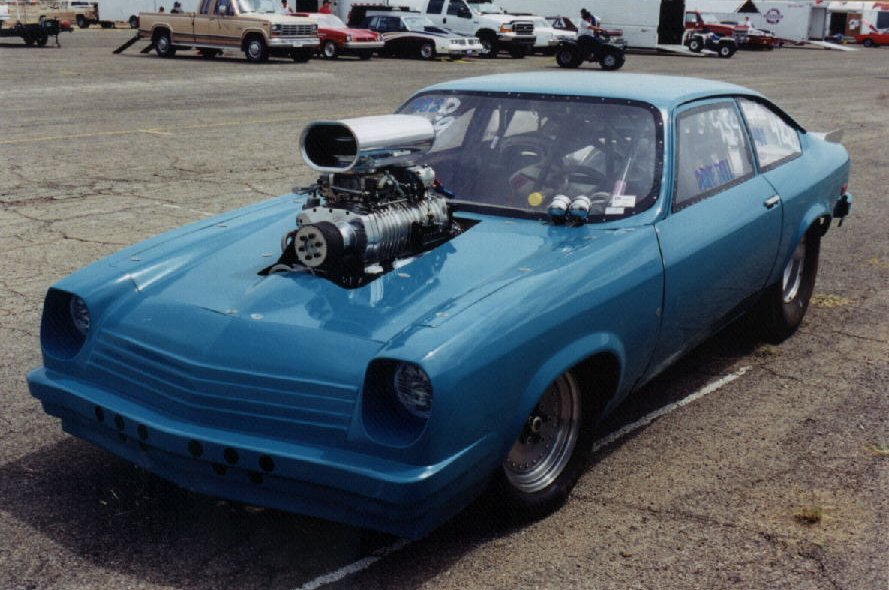
What client wants to drop $25K on an 800bhp blown 454CID engine then shovel it in to that Vega/Monza only to find the car twisted into a pretzel on the first run and very possibly the driver with serious injuries or worse?

image

Image credit

Seriously, why wouldn’t the same question be asked by a prospect or client that is about to drop $95K or more on a Storage Spaces Direct (S2D) cluster that the I.T. provider has _never_ worked with? Does the client or prospect even think of asking that question? Are there any references with that solution in production? If the answer is “No” then get the chicken out of that house!

In the automotive industry folks ask those questions especially when they have some serious coin tied up in the project … at least we believe they would based on previous experience.

Note that there are a plethora of videos on YouTube and elsewhere showing the results of so-called “tuners” blowing the bottom end out of an already expensive engine. :P

In all seriousness though, how can an I.T. company sell a solution to a client that they’ve never worked with, put together, tested, or even _seen_ before?

It really surprised me to be chatting with a technical architect that works for a large I.T. provider when they told me their company doesn’t believe there is any value in providing a lab for them.

S2D Lab Setup

A company that keeps a lab, refreshes it every so often, stands to gain so much more than folks that count the beans may see.

For S2D, the following is a good place, and inexpensive, to start:

  • Typical 4-node S2D lab based on Intel Server Systems
    • R2224WTTYSR Servers: $15K each
    • Storage
      • Intel 750 Series NVMe $1K/Node
      • Intel 3700 Series SATA $2K/Node
      • Seagate/HGST Spindles $3K/Node
    • Mellanox RDMA Networking: $18K (MSX1012X + 10GbE CX-3 Adapters)
    • NETGEAR 10GbE Networking: $4K (XS716T + X540-T2 or X550-T2)
    • Cost: ~$75K to $85K

The setup should look something like this:

image

S2D Lab (Front)

image

S2D Lab (Rear)

Note that we have two extra nodes for a Hyper-V cluster setup to work with S2D as a SOFS only solution.

Okay, so the bean counters are saying, “what do we get for our $100K hmmm?”

Point 1: We’ve Done It

The above racked systems images go into any S2D Proposal with an explanation that we’ve been building these hyper-converged clusters since Windows Server 2016 was in its early technical preview days. The prospect that sees the section outlining our efforts to fine tune our solutions on our own dime places our competitors at a huge disadvantage.

Point 2: References

With our digging in and testing from the outset we would be bidding on deals with these solutions. As a result, we are one of the few with go-to-market ready solutions and will have deployed them before most others out there even know what S2D is!

Point 3: Killer and Flexible Performance

Most solutions we would be bidding against are traditional SAN style configurations. Our hyper-converged S2D platform provides a huge step up over these solutions in so many ways:

  1. IOPS: NVMe utilized at the cache layer for real IOPS gains over traditional SAN either via Fibre Channel or especially iSCSI.
  2. Throughput: Our storage can be set up to run huge amounts of data through the pipe if required.
  3. Scalability: We can start off small and scale out up to 16 nodes per cluster.
    • 2-8 nodes @ 10GbE RDMA via Mellanox and RoCEv2
    • 8-16 nodes @ 40GbE RDMA via Mellanox and RoCEv2
      • Or, 100GbE RDMA via Mellanox and RoCEv2

This begs the question: How does one know how one’s solution is going to perform if one has never deployed it before?

Oh, we know: “I’ve read it in Server’s Reports”, says the lead sales engineer. ;)

Point 4: Point of Principle

It has been mentioned here before: We would never,_ever_, deploy a solution that we’ve not worked with directly.

Why?

For one, because we want to make sure our solution would fulfil the promises we’ve made around it. We don’t want to be called to come and pick up our high availability solution because it does not do what it was supposed to do. We’ve heard of that happening for some rather expensive solutions from other vendors.

Point 5: Reputation

Our prospects can see that we have a history, and a rather long one at that, of digging in quite deep both in our own pockets but also of our own time to develop our solution sets. That also tells them that we are passionate about the solutions we propose.

We _are_ Server’s Reports so we don’t need to rely on any third party for a frame of reference! ;)

Conclusion

Finally, an I.T. company that invests in their crew both in lab kit, time, training, and mentorship will find their crew quite passionate about the solutions they are selling and working with. That translates into sales but also happy clients that can see for themselves that they are getting a great value for their I.T. dollars.

I.T. Services Companies get and maintain a lab! It is worth it!

Philip Elder
Microsoft High Availability MVP
MPECS Inc.
Co-Author: SBS 2008 Blueprint Book
Our Cloud Service

Saturday, 12 November 2016

Server Hardware: The Data Bus is Playing Catch-Up

After seeing the Mellanox ConnectX-6 200Gb announcement the following image came to mind:

image

Image credit

The Vega/Monza was a small car that some folks found the time to stuff a 454CID Chevy engine into then drop a 671 or 871 series roots blower on (they came off trucks back in the day). The driveline and the "frame" were then tweaked to accommodate it.

The moral of the story? It was great to have all of that power but putting down to the road was always a problem. Check out some of the "tubbed" Vega images out there to see a few of the ways to do so.

Our server hardware today does not, unfortunately, have the ability to be "tubbed" to allow us to get things moving.

PCI Express

The PCI Express (PCIe) v3 spec (Wikipedia) at a little over 15GB/Second (that's Gigabytes not Gigabits) across a 16 lane connector falls far short of the needed bandwidth for a dual port 100Gb ConnectX-5 part.

As a point of reference, the theoretical throughput of one 100Gb port is about 12.5GB/Second. That essentially renders the dual port ConnectX-5 adapter a moot point as that second port has very little left for it to use. So, it becomes essentially a "passive" port to a second switch for redundancy.

A quick search for "Intel Server Systems PCIe Gen 4" yields very little in the way of results. We know we are about due for a hardware step as the "R" code (meaning refresh such as R2224WTTYSR) is coming into its second to third year in 2017.

Note that the current Intel Xeon Processor E5-2600 v4 series only has a grand total of 40 PCI Express Generation 3 lanes available. Toss in two PCIe x16 wired lanes with two ConnectX-4 100Gb adapters and that's going to be about it for real throughput.

Connectivity fabric bandwidth outside the data bus is increasing in leaps and bounds. Storage technologies such as NVMe and now NVDIMM-N, 3D XPoint, and other such memory bus direct storage technologies are either centre stage or coming on to the stage.

The current PCIe v3 pipe is way too small. The fourth generation PCI Express pipe that is not even in production is _already_ too small! It's either time for an entirely new bus fabric or a transitioning of the memory bus into either a full or intermediate storage bus which is what NVDIMM-N and 3D XPoint are hinting at.

Oh, and one more tiny point: Drawing storage into the memory bus virtually eliminates latency ... almost.

Today's Solutions

Finally, one needs to keep in mind that the server platforms we are deploying on today have very specific limitations. We've already hit some limits in our performance testing (blog post: Storage Configuration: Know Your Workloads for IOPS or Throughput).

With our S2D solutions looking to three, five, or more years of service life these limitations _must_ be at the forefront of our thought process when in discovery and then solution planning.

If not, we stand to have an unhappy customer calling us to take the solution back after we deploy or a call a year or two down the road when they hit the limits.

***

Author's Note: I was just shy of my Journeyman's ticket as a mechanic, in a direction towards high-performance, when the computer bug bit me. ;)

Philip Elder
Microsoft High Availability MVP
MPECS Inc.
Co-Author: SBS 2008 Blueprint Book
Our Cloud Service

Monday, 24 October 2016

Windows Server 2016 Feature Comparison Summary

This is a direct snip of the differences between Windows Server Standard and Datacenter from this PDF: image
image
image
image

Game Changing

A _lot_ of folks use the words “game changing” to somehow set their productions and/or service apart from others. Most of the time when we hear those words the products and/or services are “ho-hum” with little to no real impact on a company’s or user’s day-to-day work/personal life.
We’ve heard those words in our industry _a lot_ over the last number of years. The reality has been somewhat different for most of us.
We believe, based on our experience deploying inexpensive storage (clustered Scale-Out File Server/Storage Spaces) and compute (clustered Hyper-V) high availability solutions that Windows Server 2016 is indeed _game changing_ on three fronts:
  1. Compute
  2. Storage
  3. Networking
The Software Defined Data Centre (SDDC) story in Windows Server 2016 has traditional cluster, storage, and networking vendors concerned. In our opinion, deeply concerned. Just watch key vendor’s stocks, as we’ve been doing these last four or five years, to see just how much of an impact the Server 2016 SDDC story will have over the next two to five years. Some stocks have already reflected the inroads Hyper-V and recently (2 years) Storage Spaces have made into their markets. We’re a part of that story! :)
Using true commodity hardware we are able to set up an entire SDDC for a fraction of the cost of traditional data centre solutions. Not only that, with the Hyper-Converged Storage Spaces Direct platform we can provide lots of IOPS and compute in a small footprint without all of the added complexity and expense in traditional data centre solutions.

First Server 2016 Deployment

We’ve already deployed our first Windows Server 2016 Clustered Storage Spaces cluster on the General Availability (GA) bits while in Las Vegas two weeks ago:
image
That’s two Intel Server Systems R1208JP4OC 1U servers and a Quanta QCT JB4602 JBOD outfitted with (6) 200GB HGST SAS SSDs and (54) 8GB 8TB Seagate NearLine SAS drives. We are setting up for a Parity space to provide maximum storage availability as this client produces lots of 4K video. (EDIT NOTE: Updated the drive size)
Cost of the highly available storage solution is a fraction of the cost we’d see from Tier 1 storage or hardware vendors.

Going Forward

It’s no secret that we are excited about the Server 2016 story. We plan on posting a lot more about why we believe Windows Server 2016 is a game changer with the specifics around the above mentioned three areas. We may even mention some of the vendor’s stock tickers to add to your watch list too! ;)

Who is MPECS Inc.?

A bit of a shameless plug.
We’ve been building SDDC setups for small to medium hosting companies along with SMB/SME consultants and clients that are concerned about “Cloud being their data on someone else’s computer” since 2008/2009.
Our high availability solutions are designed with SMB (think sub $12K for a 2-node cluster) and SME (think sub $35K cluster) in mind along with SMB/SME focused hosting providers (think sub $50K to start). Our solutions are flexible and can be designed with the 3 year and 5 year stories, or more, in mind.
We run our Cloud on-premises, hybrid, or in _our_ Cloud that runs on _our_ highly available solutions.
Curious how we can help you? Then, please feel free to ask!
Have a great day and thanks for reading.
Philip Elder
Microsoft High Availability MVP
MPECS Inc.
Co-Author: SBS 2008 Blueprint Book
Our Cloud Service

Tuesday, 18 October 2016

Some Thoughts on the New Windows Server Per Core Licensing Model

This is a post sent to the SBS2K Yahoo Group.

***

Let’s take things from this perspective: Nothing has changed at our level.

How’s that?

We deploy four, six, and eight core single socket and dual socket servers.

We have not seen the need for four socket servers since one can set things up today with eight processors in one 2U space (4 nodes) without too much finagling and end up with way more performance.

Until Intel has conquered the GHz to core count ratio we will be deploying high GHz low core count CPUs for the time being. Not that eight cores is a “low” count in our world. ;)

Most of us will never see the need to set up a dual socket server with more than 12 cores with 16 being not as common a setup for us.

Our sweet spot right now in dual socket server cluster nodes is the E5-2643v4 at 6 cores and 3.4 GHz. For higher intensity workloads we run with the E5-2667v4 at 8 cores and 3.2 GHz. Price wise, these are the best bang for the buck relative to core count versus GHz.

With the introduction of the two node configuration for Storage Spaces Direct (S2D) we have an option to provide high availability (HA) in our smaller clients using two single socket 1U servers (R1208SPOSHOR or Dell R330) for a very reasonable cost. A Datacenter license is required for each node. Folks may balk at that, but keep this in mind:

clip_image001

What does that mean? It means that we can SPLA the Datacenter license whether the client leases the equipment, which was standard fair back in the day, or they own it but we SaaS the Windows Server licenses. Up here in Canada those licenses are about $175 per 16 cores. That’s $350/Month for a HA setup. We see a _huge_ market for this setup in SMB and SME. Oh, and keep in mind that we can then be very flexible about our VM layout. ;)

The licensing change reminds me of VMware’s changes a number of years back where they received so much backpressure that the “Core Tax” changes got reverted. So far, there’s not been a lot of backpressure that we’ve seen about this change. But then, the bulk of the on-premises SMB/SME world, where we spend most of our time, don’t deploy servers with more than 16 cores.

In the end, as I stated at the beginning, nothing has changed for us.

We’re still deploying “two” Server Standard licenses, now in this case with 16 cores per server, for our single box solutions with four VMs. And, we’re deploying “four” Server Standard licenses four our two node Clustered Storage Spaces and Hyper-V via shared storage that also yields four VMs in that setting.

If, and when, we broach into the higher density core counts for our cluster setups, or even standalone boxes, we will cross that bridge when we come to it.

Have a great day everyone and thanks for reading. :)

Philip Elder
Microsoft High Availability MVP
MPECS Inc.
Co-Author: SBS 2008 Blueprint Book
Our Cloud Service

Tuesday, 20 September 2016

Windows Server 2016: Storage Spaces Direct (S2D) and VMware Virtual SAN IOPS?

We’re not VMware experts here. Let’s make that very clear. 

However, we do have the ear of many a VMware expert so we are able to ask: Is the Windows Server 2016 hyper-converged Storage Spaces Direct (S2D) setup similar to the VMware Virtual SAN platform? Apples to Apples if you will?

The resounding answer has been, “Yes!”

That leads us to the following articles that are about Intel NVMe all-flash hyper-converged setups:

  1. Record Performance of All Flash NVMe Configuration – Windows Server 2016 and Storage Spaces Direct - IT Peer Network
    • An Intel based four node S2D setup
  2. VMware Virtual SAN 6.2 Sets New Record - IT Peer Network
    • A VMware based 8 node Virtual SAN 6.2 setup

What’s interesting to note is the following:

  1. Intel/S2D setup at 4 nodes
    • 3.2M IOPS at 4K Read
      • 930K IOPS at 70/30 Read/Write
  2. VMware setup at 8 nodes
    1. 1.2M IOPS @ Capacity Mode
      • 500K IOPS at 70/30 Read/Write
    2. ~830K IOPS @ Balance Mode
      • 800K IOPS at 70/30 Read/Write

What is starting to become apparent, at least to us, is that the folks over at the newly minted Dell EMC _really_ need to pay attention to Microsoft’s feature depth in Windows Server 2016. In fact, that goes without saying for all vendors into virtualization, high performance computing (HPC), storage, and data centre products.

We’re pretty excited about the hyper-converged S2D feature set in Windows Server 2016. So much so, we have invested quite heavily in our Proof-of-Concept (PoC).

image

The bill of materials (BoM) for the setup so far:

  • S2D Nodes (4)
    • Intel Server Systems R2224WTTYS with dual E5-2640, 256GB ECC, Intel JBOD HBA, Intel X540-T2 10GbE, Mellanox 56GbE NICs, Intel PCIe 750 NVMe, Intel SATA SSDs, and Seagate 10K SAS spindles
  • Hyper-V Nodes (2)
    • Intel Server Systems R2208GZ4GC with dual E5-2650, 128GB ECC, Intel X540-T2 10GbE, and Mellanox 56GbE NICs
  • Lab DC
    • An Intel Server setup including S1200BT series board and Intel Xeon E3 processor.

Our testing includes using the S2D setup as a hyper-converged platform but also as a Scale-Out File Server (SOFS) cluster destination for a Hyper-V cluster on the two Hyper-V nodes. Then, some testing of various configurations beyond.

We believe Windows Server 2016 is looking to be one of the best server operating systems Microsoft has ever released. Hopefully we won’t be seeing any major bugs in the production version!

Philip Elder
Microsoft High Availability MVP
MPECS Inc.
Our SMB/SME HA Solution
Our Cloud Service

Tuesday, 26 July 2016

Some Disaster Recovery Planning On-Premises, Hybrid, and Cloud Thoughts

This was a post to the SBS2K Yahoo list in response to a comment about the risks of encrypting all of our domain controllers (which we have been moving towards for a year or two now). It’s been tweaked for this blog post.

***

We’ve been moving to 100% encryption in all of our standalone and cluster settings.

Encrypting a setup does not change _anything_ as far as Disaster Recovery Plans go. Nothing. Period.

The “something can go wrong there” attitude should apply to everything from on-premises storage (we’ve been working with a firm that had Gigabytes/Terabytes of data lost due to the previous MSP’s failures) and services to Cloud resident data and services.

No stone should be left unturned when it comes to backing up data and Disaster Recovery Planning. None. Nada. Zippo. Zilch.

The new paradigm from Microsoft and others has migrated to “Hybrid” … for the moment. Do we have a backup of the cloud data and services? Is that backup air-gapped?

Google lost over 150K mailboxes a number of years back, we worked with one panicked call who lost everything, with no return. What happens then?

Recently, a UK VPS provider had a serious crash and, as it turns out lost _a lot_ of data. Where are their clients now? Where’s their client’s business after such a catastrophic loss?

Some on-premises versus cloud based backup experiences:

  • Veeam/ShadowProtect On-Premises: Air-gapped (no user access to avoid *Locker problems), encrypted, off-site rotated, and high performance recovery = Great.
  • Full recovery from the Cloud = Dismal.
  • Partial recovery of large files/numerous files/folders from the Cloud = Dismal.
  • Garbage In = Garbage Out = Cloud backup gets the botched bits in a *Locker event.
  • Cloud provider’s DC goes down = What then?
  • Cloud provider’s Services hit a wall and failover fails = What then (this was a part of Google’s earlier mentioned problem me thinks)?
    • ***Remember, we’re talking Data Centers on a grand scale where failover testing has been done?!?***
  • At Scale:
    • Cloud/Mail/Services providers rely on a myriad of systems to provide resilience
      • Most Cloud providers rely on those systems to keep things going
    • Backups?
      • Static, air-gapped backups?
      • “Off-Site” backups?
        • These do not, IMO, exist at scale
  • The BIG question: Does the Cloud service provider have a built-in backup facility?
    • Back up the data to local drive or NAS either manually or via schedule
    • Offer a virtual machine backup off their cloud service

There is an assumption, and we all know what that means right?, that seems to be prevalent among top tier cloud providers that their resiliency systems will be enough to protect them from that next big bang. But, has it? We seem to already have examples of the “not”.

In conclusion to this rather long winded post I can say this: It is up to us, our client’s trusted advisors, to make bl**dy well sure our client’s data and services are properly protected and that a down-to-earth backup exists of their cloud services/data.

We really don’t enjoy being on the other end of a phone call “OMG, my data’s gone, the service is offline, and I can’t get anywhere without it!” :(

Oh, and BTW, our SBS 2003/2008/2011 Standard/Premium sites all had 100% Uptime across YEARS of service. :P

We did have one exception in there due to an inability to cool the server closet as the A/C panel was full. Plus, the building’s HVAC had a bunch of open primary push ports (hot in winter cold in summer) above the ceiling tiles which is where the return air is supposed to happen. In the winter the server closet would hit +40C for long periods of time as the heat would settle into that area. ShadowProtect played a huge role in keeping this firm going plus technology changes over server refreshes helped (cooler running processors and our move to SAS drives).

*** 

Some further thoughts and references in addition to the above forum post.

The moral of this story is quite simple. Make sure _all_ data is backed up and air-gapped. Period.

Philip Elder
Microsoft High Availability MVP
MPECS Inc.
Co-Author: SBS 2008 Blueprint Book
Our Cloud Service

Thursday, 14 July 2016

Hyper-V and Cluster Important: A Proper Time Setup

We’ve been deploying DCs into virtual settings since 2008 RTM. There was not a lot of information on virtualizing anything back then. :S

In a domain setting having time properly synchronized is critical. In the physical world the OS has the on board CMOS timer to keep itself in check along with the occasional poll of ntp.org servers (we use specific sets for Canada, US, EU/UK, and other areas).

In a virtual setting one needs to make sure that time sync between host and guest PDCe/DC time authority is disabled. The PDCe needs to get its time from an outside, and accurate, source. The caveat with a virtual DC is that it no longer has a physical connection with the local CMOS clock.

What does this mean? We’ve seen high load standalone and clustered guests have their time skew before our eyes. It’s not as much of a problem in 2012 R2 as it was in 2008 RTM/R2 but time related problems still happen.

This is an older post but outlines our dilemma: MPECS Inc. Blog: Hyper-V: Preparing A High Load VM For Time Skew.

This is the method we use to set up our PDCe as authority and all other DCs as slaves: Hyper-V VM: Set Up PDCe NTP Time Server plus other DC’s time service.

In a cluster setting we _always_ deploy a physical DC as PDCe: MPECS Inc. Blog: Cluster: Why We Always Deploy a Physical DC in a Cluster Setting. The extra cost is 1U and a very minimal server to keep the time and have a starting place if something does go awry.

In higher load settings where time gets skewed scripting the time sync with a time server within the guest DC to happen more frequently means the time server will probably send a Kiss-O-Death packet (blog post). When that happens the PDCe will move on through its list of time servers until there are no more. Then things start breaking and clusters in the Windows world start stalling or failing.

As an FYI: A number of years ago we had a client call us to ask why things were wonky with the time and some services seemed to be offline. To the VMs everything seemed to be in order but their time was whacked as was the cluster node’s time.

After digging in and bringing things back online by correcting the time on the physical DC, the cluster nodes, and the VMs everything was okay.

When the owner asked why things went wonky the only explanation I had was that something in the time source system must have gone bad which subsequently threw everything out on the domain.

They indicated that a number of users had complained about their phone’s time being whacked that morning too. Putting two and two together there must have been a glitch in the time system providing time to our client site and the phone provider’s systems. At least, that’s the closest we could come to a reason for the time mysteriously going out on two disparate systems.

Philip Elder
Microsoft High Availability MVP
MPECS Inc.
Co-Author: SBS 2008 Blueprint Book
Our Cloud Service