2007 was a good year for us. We hope that it was a good year for you too!
We have had the pleasure to continue building client relationships with our long-term clients and begin the growth process with a number of new key clients.
It has been a year of growth in our client base and out products and services offerings.
For us, 2008 is looking to be a really exciting and challenging year.
It will be the year we formalize our training facility for both end users on applications and for SMB IT professionals on running an IT business, SBS 2K3, and SBS 2K8, and other SMB based products. We will also be formalizing our training materials for the Web too when we get our site updated and restructured.
2008 will be the year we actively work at starting an SMB/SBSC based Microsoft Support Group hopefully affiliated with our Edmonton Microsoft User Group.
It will hopefully be the year we can meet some of you face to face that we have been conversing with since starting the blog.
There are so many neat and challenging things happening in our industry right now!
Here is to embracing the challenges in our industry as well as within our own business in the year 2008.
Cheers and a prosperous new year for all of you from all of us here at MPECS Inc.
Philip Elder
MPECS Inc.
Microsoft Small Business Specialists
*All Mac on SBS posts are posted on our in-house iMac via the Safari Web browser.
Monday, 31 December 2007
Saturday, 29 December 2007
Lenovo T60 - Recovering to Factory Default
A while back, we worked on recovering a Lenovo T60 from a crashed hard drive via the built-in Lenovo backup/recovery tools: Lenovo Rescue & Recovery experience.
Given our struggles to recover the laptop via the Lenovo Rescue & Recovery (R&R) to the most recent backup that our client had, we were expecting more of the same when we had another T60 come to us.
In this case, the laptop had a Trojan infection. Given the nature of the infection, we flattened the system.
Because we do not have any R&R system backups to recover from, we needed to restore the laptop to factory defaults and build up from there.
We were fortunate that we made a copy of the T60's recovery DVDs at the time of the last image as this machine could not be trusted to generate clean recovery disks.
After booting the first R&R disk to initiate the Factory Default recovery process, we were able to find our way to restoring to default.
Once we had made our selection though and we were told to remove the disk from the drive and click OK, nothing happened other than the OK window disappearing. The machine was left on the bench for about 10 minutes with no further action by the laptop to reboot.
We had to force power the unit down by holding the power button for about 5-10 seconds.
The R&R environment came up again, and asked us to insert the Boot Disk 1 again which we did. It rejected the disk and asked for Boot Disk 1 again. This time we put in the Product Recovery disk 1 in and it seemed to be happy.
Once the recovery process finished and we booted into the OS we still had to wait for the configuration scripts to run which took quite a while.
Keep in mind that besides the needed Microsoft Updates, the Lenovo update feature will need to be run and there will be a lot of Lenovo updates to pull down. In this case, with the optional and some of the features updates we hit 660MB.
All in all, in our experience, the Lenovo R&R setup needs to be refined. From poor documentation or instructions, to the R&R environment's own inability to follow through on our click commands, there is a lot of room for improvement.
Philip Elder
MPECS Inc.
Microsoft Small Business Specialists
*All Mac on SBS posts are posted on our in-house iMac via the Safari Web browser.
Given our struggles to recover the laptop via the Lenovo Rescue & Recovery (R&R) to the most recent backup that our client had, we were expecting more of the same when we had another T60 come to us.
In this case, the laptop had a Trojan infection. Given the nature of the infection, we flattened the system.
Because we do not have any R&R system backups to recover from, we needed to restore the laptop to factory defaults and build up from there.
We were fortunate that we made a copy of the T60's recovery DVDs at the time of the last image as this machine could not be trusted to generate clean recovery disks.
After booting the first R&R disk to initiate the Factory Default recovery process, we were able to find our way to restoring to default.
Once we had made our selection though and we were told to remove the disk from the drive and click OK, nothing happened other than the OK window disappearing. The machine was left on the bench for about 10 minutes with no further action by the laptop to reboot.
We had to force power the unit down by holding the power button for about 5-10 seconds.
The R&R environment came up again, and asked us to insert the Boot Disk 1 again which we did. It rejected the disk and asked for Boot Disk 1 again. This time we put in the Product Recovery disk 1 in and it seemed to be happy.
Once the recovery process finished and we booted into the OS we still had to wait for the configuration scripts to run which took quite a while.
Keep in mind that besides the needed Microsoft Updates, the Lenovo update feature will need to be run and there will be a lot of Lenovo updates to pull down. In this case, with the optional and some of the features updates we hit 660MB.
All in all, in our experience, the Lenovo R&R setup needs to be refined. From poor documentation or instructions, to the R&R environment's own inability to follow through on our click commands, there is a lot of room for improvement.
Philip Elder
MPECS Inc.
Microsoft Small Business Specialists
*All Mac on SBS posts are posted on our in-house iMac via the Safari Web browser.
Labels:
Backups,
Data Storage,
Disaster Recovery,
Laptop Recovery Disks,
Lenovo,
Restores


Friday, 28 December 2007
New MS Blog: Security Vulnerability Research & Defense
A new blog to add to the RSS readers:
From the About:
Via the Micrsoft Exchange Team Blog.
Philip Elder
MPECS Inc.
Microsoft Small Business Specialists
*All Mac on SBS posts are posted on our in-house iMac via the Safari Web browser.
- Security Vulnerability Research & Defense.
- Information from Microsoft about vulnerabilities, mitigations and workarounds, active attacks, and other related guidance and information.
- About Security Vulnerability Research & Defense
From the About:
Launched in 2007, the Security Vulnerability Research & Defense blog’s intent is to provide more information about Microsoft vulnerabilities, mitigations and workarounds, and active attacks. During Microsoft’s technical investigation of security issues, information is discovered that we feel is important to share. Some examples include:This is definitely one for the reader!As always, security bulletins or security advisories are the ultimate authority but we’ll try to include juicy spill-over technical stuff in the SWI blog.
- Workarounds are not 100% effective in every situation, every attack vector
- Workarounds that are specific to a particular attack
- Super complicated workarounds that work but cannot be recommended to all customers
- Interesting mitigations that might not be present in all cases
- “Best Practices” type guidance that applies to a particular vulnerability
- Group policy deployment guidance
- “Interesting” facts about a vulnerability Microsoft is fixing that will help customers learn more about Windows, the security infrastructure, or the way we conduct security investigations
- Debugging techniques and information on how to triage security vulnerabilities
- Overview of some of the challenges that we face when fixing specific security bugs
Via the Micrsoft Exchange Team Blog.
Philip Elder
MPECS Inc.
Microsoft Small Business Specialists
*All Mac on SBS posts are posted on our in-house iMac via the Safari Web browser.
Labels:
Data Security,
Information Security,
Microsoft,
RSS Feeds,
TechNet
The most terrifying moment in 2007 ...
Our data mule system has a lot of software tools loaded on it for the various tasks we require of it.
Recently we swapped out the Intel DG945 based board for an Intel DQ965GF running an E6600 Core 2 Duo.
The Pentium D 945 just wasn't cutting it anymore for the multiple tasks that can be running on the system at the same time.
The hardware swap caused Windows XP Pro to hiccup an activation request which was expected.
However, Symantec's Norton Ghost also coughed up an activation request. When we entered the key on the back of the CD sleeve it refused the key. Nothing we did could fix it and we just did not have the time to mess with it.
So, we called Symantec Support. The last time we did that, the script jockey (front line support) had us repeatedly delete registry keys all the while warning us that any modifications we were making may kill our system! Needless to say, we did not follow their directions while managing to decipher which keys we really needed to kill from their instructions.
Well, this time around the support call took us to a Symantec micro support site:

While the data mule may not be the prettiest thing to look at - the MB, PSU, HDD and extra USB ports are all mounted to an old Compaq desktop case cover - the system is business critical.

So, surrendering the wheel to an unknown was not an option. The support person was completely grilled before allowing them to go anywhere on the system. There was no way someone reading from a script was going to proceed.
Fortunately, the person on the other end of the keyboard and mouse had a pretty good grasp of the product and the methodology needed to fix the problem. After monitoring their progress for while, we were able to work on other bench related tasks so as to could keep an eye on the Data Mule screen.
They ended up using the Norton Removal Tool, rebooting, cleaning out the registry and the software's folders, rebooting and reinstalling Ghost. The activation process was able to work after that. They were on the system for about 60-90 minutes.
Their remote support tool automatically reconnected to the support session after we logged in.
Doesn't that experience, and the gut reaction, say a lot about how we perceive manufacturer's penchant to save pennies by off shoring?
It is truly sad that, from where we sit, some companies just do not seem to care about anything beyond the initial sale.
And for us smaller I.T. support folks, it better be a lesson: Never ever leave a client high and dry after the sale - no matter what happens ... Be there for them!
Philip Elder
MPECS Inc.
Microsoft Small Business Specialists
*All Mac on SBS posts are posted on our in-house iMac via the Safari Web browser.
Recently we swapped out the Intel DG945 based board for an Intel DQ965GF running an E6600 Core 2 Duo.
The Pentium D 945 just wasn't cutting it anymore for the multiple tasks that can be running on the system at the same time.
The hardware swap caused Windows XP Pro to hiccup an activation request which was expected.
However, Symantec's Norton Ghost also coughed up an activation request. When we entered the key on the back of the CD sleeve it refused the key. Nothing we did could fix it and we just did not have the time to mess with it.
So, we called Symantec Support. The last time we did that, the script jockey (front line support) had us repeatedly delete registry keys all the while warning us that any modifications we were making may kill our system! Needless to say, we did not follow their directions while managing to decipher which keys we really needed to kill from their instructions.
Well, this time around the support call took us to a Symantec micro support site:

After punching in the given code, the support person was able to take control of the system.Connect to Support
While the data mule may not be the prettiest thing to look at - the MB, PSU, HDD and extra USB ports are all mounted to an old Compaq desktop case cover - the system is business critical.

We do all of our imaging, virus cleansing, data transfers, and DoD style hard drive wipes (up to 11 SATA drives simultaneously), and more on this system.MPECS' Data Mule System
So, surrendering the wheel to an unknown was not an option. The support person was completely grilled before allowing them to go anywhere on the system. There was no way someone reading from a script was going to proceed.
Fortunately, the person on the other end of the keyboard and mouse had a pretty good grasp of the product and the methodology needed to fix the problem. After monitoring their progress for while, we were able to work on other bench related tasks so as to could keep an eye on the Data Mule screen.
They ended up using the Norton Removal Tool, rebooting, cleaning out the registry and the software's folders, rebooting and reinstalling Ghost. The activation process was able to work after that. They were on the system for about 60-90 minutes.
Their remote support tool automatically reconnected to the support session after we logged in.
Doesn't that experience, and the gut reaction, say a lot about how we perceive manufacturer's penchant to save pennies by off shoring?
It is truly sad that, from where we sit, some companies just do not seem to care about anything beyond the initial sale.
And for us smaller I.T. support folks, it better be a lesson: Never ever leave a client high and dry after the sale - no matter what happens ... Be there for them!
Philip Elder
MPECS Inc.
Microsoft Small Business Specialists
*All Mac on SBS posts are posted on our in-house iMac via the Safari Web browser.
Windows Vista - Folder Does Not Exist Error
We finished setting up a new Acer TravelMate 6592G Windows Vista Business laptop on a client's SBS network.
While working on the mapped network drive we were receiving the following error when we tried to create and name a folder, rename a folder, and more:

Apparently this has to do with some corruption on the original Windows Vista image that Acer used to deploy with.
The fix is as follows:
This is your registry edit:

folder does not exist" .
It certainly was a little disconcerting having a client standing there to have a look at their new laptop and have it cough up an error! 8*O
Fortunately the fix was quick and simple. :)
UPDATE 2008-01-05: There is a quicker way to do this:
Philip Elder
MPECS Inc.
Microsoft Small Business Specialists
*All Mac on SBS posts are posted on our in-house iMac via the Safari Web browser.
While working on the mapped network drive we were receiving the following error when we tried to create and name a folder, rename a folder, and more:

Copy FolderOptions are Yes and No with neither bringing about the desired result.
The G:\ folder does not exist. The file may have been moved or deleted.
Do you want to create it?
Apparently this has to do with some corruption on the original Windows Vista image that Acer used to deploy with.
The fix is as follows:
- Start -->regedit [Enter]
- HKEY_LOCAL_MACHINE\SYSTEM\CurrentControlSet\Services\Csc\Parameters
- In our case the Paramaters key was missing and needed to be created
- In the Parameters key create a new DWORD Value (Right click or Edit -->New)
- Name it: FormatDatabase [Enter]
- Double click (right click -->Modify) on the new FormatDatabase REG_DWORD
- Set the value to: 1
- Reboot
This is your registry edit:

The fix was obtained via search that pointed us to Microsoft KB 934160: Error message in Windows Vista when you try to rename a new subfolder in a shared folder on the network: "TheCSC\Parameters FormatDatabase = 1
It certainly was a little disconcerting having a client standing there to have a look at their new laptop and have it cough up an error! 8*O
Fortunately the fix was quick and simple. :)
UPDATE 2008-01-05: There is a quicker way to do this:
- Cut and paste the follwing into NotePad:
Windows Registry Editor Version 5.00
[HKEY_LOCAL_MACHINE\SYSTEM\CurrentControlSet\Services\CSC\Parameters]
"FormatDatabase"=dword:00000001- Save the file making sure the extension is .reg: FolderFix.reg
Philip Elder
MPECS Inc.
Microsoft Small Business Specialists
*All Mac on SBS posts are posted on our in-house iMac via the Safari Web browser.
Labels:
Error,
Error Fix,
Microsoft Knowledgebase,
Windows,
Windows Vista
Thursday, 27 December 2007
Adobe Photoshop - Automating the same changes to a bunch of images
We have a client that we just finished scanning a whole bunch of architectural sketches into high resolution Photoshop files.
We now need to render those files to TIFF format for their access as well as small JPG format for email use.
There are close to 200 80-150MB files. Can you imagine opening each file then "save as" twice for the two required formats? We would be here for hours if not days.
So, to do that in Photoshop, we need to create a "Batch Process" that will automate the whole thing for us.
Initially searching across the Internet did not yield any results on the how-to because we did not know the proper terminology to use in the search. The keyword is "batch".
The best tutorials that we have found:
UPDATE: For doing the actual conversion process, there is a built-in Image Processor that the CreativePro link indicates. It works on both the PC and the Mac.
Philip Elder
MPECS Inc.
Microsoft Small Business Specialists
*All Mac on SBS posts are posted on our in-house iMac via the Safari Web browser.
We now need to render those files to TIFF format for their access as well as small JPG format for email use.
There are close to 200 80-150MB files. Can you imagine opening each file then "save as" twice for the two required formats? We would be here for hours if not days.
So, to do that in Photoshop, we need to create a "Batch Process" that will automate the whole thing for us.
Initially searching across the Internet did not yield any results on the how-to because we did not know the proper terminology to use in the search. The keyword is "batch".
The best tutorials that we have found:
- Wired: Batch Process Images in Photoshop (Windows)
- Creative Mac Tutorials: Batch Processing in Adobe Photoshop
- CreativePro: Get Better Output with Photoshop's Automate and Scripts Menus
UPDATE: For doing the actual conversion process, there is a built-in Image Processor that the CreativePro link indicates. It works on both the PC and the Mac.
Philip Elder
MPECS Inc.
Microsoft Small Business Specialists
*All Mac on SBS posts are posted on our in-house iMac via the Safari Web browser.
SBS - QuickBooks 2008 - Problem with multi-user hosting setup
When installing QuickBooks 2008 with the intention of having multiple users access the same company file, you may receive the following error when opening QB and opening a company file located on a network share:

So, we need to run the QB setup disk on the server itself. Once we start the setup, accept the licensing agreement, we are greeted with:


Keep in mind for busy accounting offices whose SBS box is nearing its performance limits, these two server services may push the box over the edge when a number of company files are open at the same time.
We did run through the "Alternate Setup" process to configure the workstation as a host for the file and it seems to work okay. Users on a simply Internet Router setup may have issues with name resolution or changing IPs, but it will work. Note that any third party firewall software may interfere with connectivity too.
Philip Elder
MPECS Inc.
Microsoft Small Business Specialists
*All Mac on SBS posts are posted on our in-house iMac via the Safari Web browser.

Problem with multi-user hosting setupIn our case, the files are being hosted on the client's Small Business Server 2003 Premium box.
Problem
You are trying to work with a company file that is located on another computer, but that computer needs additional installation and setup. (H505)
So, we need to run the QB setup disk on the server itself. Once we start the setup, accept the licensing agreement, we are greeted with:

Once the install has completed, we end up with a couple of new services on the server and an icon in the tray:Install QuickBooks Server 2008

Note the Simply Accounting 2008 server service is also running on this particular box.QuickBooks Services Icon - Far Left
Keep in mind for busy accounting offices whose SBS box is nearing its performance limits, these two server services may push the box over the edge when a number of company files are open at the same time.
We did run through the "Alternate Setup" process to configure the workstation as a host for the file and it seems to work okay. Users on a simply Internet Router setup may have issues with name resolution or changing IPs, but it will work. Note that any third party firewall software may interfere with connectivity too.
Philip Elder
MPECS Inc.
Microsoft Small Business Specialists
*All Mac on SBS posts are posted on our in-house iMac via the Safari Web browser.
QuickBooks 2008 - Install on Windows Vista
Just as we were finishing up the setup on a new laptop for one of our accounting company clients, Intuit's new QuickBooks 2008 (QB) showed up in the mail.
When we first fire up the setup procedure we are greeted with:

We now have a number of options that were not present in previous versions of QuickBooks available to us:

Keep in mind that larger company files that have not been purged of previous years' data should be setup with a full Gigabit infrastructure. Otherwise reports and other types of operations may take some time to complete.
The second option is the standard stand-alone setup. This is the default method for installing QB on a stand-alone workstation where no shared access would be required.
The third is to install a TSR to serve the company files from a server share on the network. A separate post will cover this.
In this case, we are installing on a system that will only be accessing QB' files via a network share so we will install using option 2.
We are installing QB on a new Acer TravelMate 6592G with a factory install of Windows Vista.
This next step may or may not happen depending on how up to date the workstation is:

We are then greeted with an entirely new key code page:

Once we have our correct codes entered, we were surprised to see the following:

For now, we will be answering "NO" to that question. We will run through the "Guided Installation" method on a Vista VM with undo disks enabled to see how this question is posed along with any other "surprises" that may appear there.
Once the installation routine has finished:
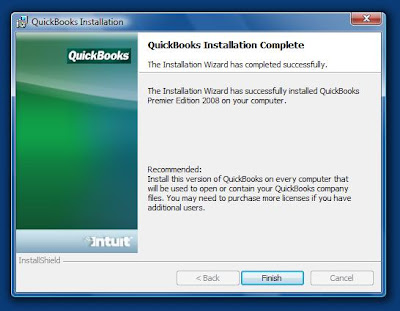
We use the Sample company file to activate QB and to run the update process.
When we go to open the Sample company file we are greeted with:

All in all, other than the Google integration (our opinion), QB 2008 runs flawlessly on Windows Vista.
Note that updates will be required:
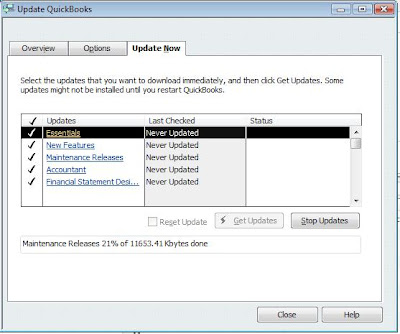

Philip Elder
MPECS Inc.
Microsoft Small Business Specialists
*All Mac on SBS posts are posted on our in-house iMac via the Safari Web browser.
When we first fire up the setup procedure we are greeted with:

We chose the Expert method since we need to see just what is happening.Guided or Expert Install?
We now have a number of options that were not present in previous versions of QuickBooks available to us:
The first option would be used for those who are installing in a peer to peer situation and require more than one user to access the company file.Multi-User Host - Standard - Server Install Options
Keep in mind that larger company files that have not been purged of previous years' data should be setup with a full Gigabit infrastructure. Otherwise reports and other types of operations may take some time to complete.
The second option is the standard stand-alone setup. This is the default method for installing QB on a stand-alone workstation where no shared access would be required.
The third is to install a TSR to serve the company files from a server share on the network. A separate post will cover this.
In this case, we are installing on a system that will only be accessing QB' files via a network share so we will install using option 2.
We are installing QB on a new Acer TravelMate 6592G with a factory install of Windows Vista.
This next step may or may not happen depending on how up to date the workstation is:

Once we have installed .NET, we are warned about the need to close any open windows or programs.Install .NET 1.1 Runtime
We are then greeted with an entirely new key code page:

For those who obtain their install media via a QuickBooks Support subscription, the proper codes will be in a letter that accompanies the install media.License Number and Product Number
Once we have our correct codes entered, we were surprised to see the following:

Google Desktop integration with QuickBooks? From the paragraph just above the "More About Privacy" button.Do you want to use Google Desktop in QuickBooks?
Google Desktop is customized to protect the privacy of your QuickBooks data. Existing users of Google Desktop may want to adjust your preferences to protect your data.This definitely bears more investigation as we are getting prepared to install QB08 on our accounting systems here in the office.
For now, we will be answering "NO" to that question. We will run through the "Guided Installation" method on a Vista VM with undo disks enabled to see how this question is posed along with any other "surprises" that may appear there.
Once the installation routine has finished:

We are no longer forced to reboot the system in order to initiate the QBUpdate Agent that runs in the background on the system.QuickBooks Installation Complete
We use the Sample company file to activate QB and to run the update process.
When we go to open the Sample company file we are greeted with:

WarningNote that the Sample company file is still in the \Program Files\Intuit\ folder and thus the permissions error.
You do not have sufficient permissions to the specified folder. ...
All in all, other than the Google integration (our opinion), QB 2008 runs flawlessly on Windows Vista.
Note that updates will be required:

And, they will require a reboot after the QB restart to install them:Update QuickBooks

You must restart your systems for the configuration changes made to QuickBooks to take effect.Close [sic] all other applications and click OK to restart now.Kudos to Intuit for making things right!
Philip Elder
MPECS Inc.
Microsoft Small Business Specialists
*All Mac on SBS posts are posted on our in-house iMac via the Safari Web browser.
Labels:
Google,
QuickBooks,
Supporting Vista,
Windows Vista
Wednesday, 26 December 2007
Hardware Review: Logitech MX Revolution
We took care of a friend's I.T. business for about 3 weeks while he and his family were travelling about Europe.
At one point I had to pop into his office to manage some server related issues at his principle workstation.
He had the Logitech MX Revolution (product page) installed on it.

It has a really good well balanced weight to it with the glide pads on the bottom of the mouse providing a seemingly friction free movement.
It fits the hand really well.
The mouse's button positioning, the ability to utilize Windows Vista's Flip 3D feature via the side mounted scroll wheel, the main scroll wheel's ability to smooth scroll while viewing long Web pages or click scroll when working in Word Documents (changes on the fly) demonstrates that Logitech put a lot of thought into the mouse's abilities and features.
The driver that shipped with the mouse was out of date. Make sure to visit the product's download page beforehand: MX Revolution Download Page.
Once downloaded, the SetPoint for Windows Vista x64 installed flawlessly and provided the ability to customize all of the buttons and scroll wheel actions.
Those who need mousing accuracy, such as CAD operators or professional publishers, will appreciate this mouse.
All in all, this mouse has made an excellent addition to our key workstations!
By the way, the MX Revolution is both PC and Mac friendly.
Philip Elder
MPECS Inc.
Microsoft Small Business Specialists
*All Mac on SBS posts are posted on our in-house iMac via the Safari Web browser.
At one point I had to pop into his office to manage some server related issues at his principle workstation.
He had the Logitech MX Revolution (product page) installed on it.

The mouse is impressive to look at and even more impressive the first time it is used.Logitech MX Revolution
It has a really good well balanced weight to it with the glide pads on the bottom of the mouse providing a seemingly friction free movement.
It fits the hand really well.
The mouse's button positioning, the ability to utilize Windows Vista's Flip 3D feature via the side mounted scroll wheel, the main scroll wheel's ability to smooth scroll while viewing long Web pages or click scroll when working in Word Documents (changes on the fly) demonstrates that Logitech put a lot of thought into the mouse's abilities and features.
The driver that shipped with the mouse was out of date. Make sure to visit the product's download page beforehand: MX Revolution Download Page.
Once downloaded, the SetPoint for Windows Vista x64 installed flawlessly and provided the ability to customize all of the buttons and scroll wheel actions.
Those who need mousing accuracy, such as CAD operators or professional publishers, will appreciate this mouse.
All in all, this mouse has made an excellent addition to our key workstations!
By the way, the MX Revolution is both PC and Mac friendly.
Philip Elder
MPECS Inc.
Microsoft Small Business Specialists
*All Mac on SBS posts are posted on our in-house iMac via the Safari Web browser.
Labels:
Logitech,
Logitech MX Revolution,
Product Review
Monday, 24 December 2007
Merry Christmas, Happy Hanukkah, & Happy Holidays!
Hello folks!
Have a safe and wonderful Christmas, a happy Hanukkah, and Happy Holidays!
We take the Christmas break as an opportunity to implement larger projects at our client's locations while they are down.
So, we generally take Christmas day and New Years day off, but work the rest of the week days.
Our break will come sometime later in January.
Thank you all for the great support, contributions via comments and email, and for encouraging us to continue blogging by your readership.
We hope that 2008 will be a prosperous one for all of you!
Please note that posting may be a bit sporadic during the next couple of weeks! :)
Philip Elder
MPECS Inc.
Microsoft Small Business Specialists
*All Mac on SBS posts are posted on our in-house iMac via the Safari Web browser.
Have a safe and wonderful Christmas, a happy Hanukkah, and Happy Holidays!
We take the Christmas break as an opportunity to implement larger projects at our client's locations while they are down.
So, we generally take Christmas day and New Years day off, but work the rest of the week days.
Our break will come sometime later in January.
Thank you all for the great support, contributions via comments and email, and for encouraging us to continue blogging by your readership.
We hope that 2008 will be a prosperous one for all of you!
Please note that posting may be a bit sporadic during the next couple of weeks! :)
Philip Elder
MPECS Inc.
Microsoft Small Business Specialists
*All Mac on SBS posts are posted on our in-house iMac via the Safari Web browser.
Labels:
Holidays,
Temporary Blogging Stoppage
Saturday, 22 December 2007
Office 2007 - Config.xml Error - Whitespace is not allowed at this location.
For those of us with absolutely no HTML/XHTML/XML coding experience, we may run into a bit of a headache when setting up Office 2007 to install via Logon Script and Group Policy.
We may see this when proofing the Config.xml file located in the source file directory ..\OfficeVersion.WW\Config.xml:

It is pointing to the space just after the actual cause of the problem.
What we need to remember is the file is coded in XML. Therefore, we need to follow XML coding rules when trying to insert special characters like the '&' ampersand in the above example.
Here is what the raw source code looks like:

A list of the codes needed for special characters like the '&' ampersand can be found here at Wikipedia: List of XML and HTML character entity references.
This is what the XML code should look like:

Thus, after double clicking on the config.xml file, in IE you will see:

Philip Elder
MPECS Inc.
Microsoft Small Business Specialists
*All Mac on SBS posts are posted on our in-house iMac via the Safari Web browser.
We may see this when proofing the Config.xml file located in the source file directory ..\OfficeVersion.WW\Config.xml:

The XML page cannot be displayedNote the dotted line under the last line in the original image: ----------^
Cannot view XML input using XSL style sheet. Please correct the error and click the Refresh button, or try again later.
Whitespace is not allowed at this location. Error processing resource 'file ://mysbsserver/clientapps/office2007ent/...
It is pointing to the space just after the actual cause of the problem.
What we need to remember is the file is coded in XML. Therefore, we need to follow XML coding rules when trying to insert special characters like the '&' ampersand in the above example.
Here is what the raw source code looks like:

You can see that there is an actual '&' ampersand in the COMPANYNAME value.Config.xml Source Code - Wrong
A list of the codes needed for special characters like the '&' ampersand can be found here at Wikipedia: List of XML and HTML character entity references.
This is what the XML code should look like:

Note the "&" Ampersand+amp+Semicolon in the COMPANYNAME value. This code value will cause the XML to be rendered correctly.Config.xml Source Code - Correct
Thus, after double clicking on the config.xml file, in IE you will see:

For a complete explanation of the various settings in the config.xml file go here: TechNet: Config.xml in the 2007 Office system.XML Correctly rendered in IE
Philip Elder
MPECS Inc.
Microsoft Small Business Specialists
*All Mac on SBS posts are posted on our in-house iMac via the Safari Web browser.
Labels:
Error,
Error Fix,
Group Policy,
Office,
Office 2007
Friday, 21 December 2007
Windows Vista - Caseware Working Papers 2006 Compatibility
We are in the process of installing our first Windows Vista based laptop at one of clients that run a large accounting practice.
Other than the usual fight to get QuickBooks 2007 installed on Windows Vista, we ran into an interesting error during the install of Caseware Working Papers:

We opened an existing file, worked through its contents and previewed the reports in Caseview with no issues.
It does turn out that there is an update that addresses any Windows Vista compatibility issues:
Philip Elder
MPECS Inc.
Microsoft Small Business Specialists
*All Mac on SBS posts are posted on our in-house iMac via the Safari Web browser.
Other than the usual fight to get QuickBooks 2007 installed on Windows Vista, we ran into an interesting error during the install of Caseware Working Papers:

Once we were into the Caseware 2006 program though, everything seemed to start up as it should.The following files did not self-register or unregister
We opened an existing file, worked through its contents and previewed the reports in Caseview with no issues.
It does turn out that there is an update that addresses any Windows Vista compatibility issues:
- Caseware International: CaseWare Working Papers - Minimum Supported Configuration - IMPORTANT · Microsoft Windows Vista and Office 2007.
- Caseware Working Papers Support Downloads
Philip Elder
MPECS Inc.
Microsoft Small Business Specialists
*All Mac on SBS posts are posted on our in-house iMac via the Safari Web browser.
Labels:
Caseware,
Error,
Error Fix,
Supporting Vista,
Windows Vista
Thursday, 20 December 2007
SBS + ShadowProtect + Swing Migration = A Good Combination
*Ack* ... hit the enter key once too many and it published! :( The original mistake post has been deleted.
One of the opportunities that a Swing Migration (SBSMigration.com) provides for us is the ability to clean up Active Directory (AD).
There are many times where the only real way to clean up a mess made in AD previously is to utilize Jeff Middleton's Swing method.
We have a client that has had their SBS 2K3 Premium installation in place for a number of years now. Their AD has a lot of GP settings that need to be purged along with some OU and group restructuring.
To facilitate a successful Swing Migration, we are going to utilize ShadowProtect IT Edition to image the original SBS box to new hardware along with a couple of the workstations to similar hardware here in the shop.
We can then proceed with the Swing Migration on their "production" environment to make sure that we do not hit any unforeseen problems. This method will also give us a good idea of how the workstations and the user's profiles will react to AD cleanup and the Swing.
For this kind of sensitive operation we prefer to work with actual hardware versus virtualizing everything. This gives us the opportunity to see if existing hardware and software drivers or OS installations will have a play on the success or failure of the Swing Migration.
We intend to utilize this method from now on to run through the Swing Migration before hand. We can then make sure we are not hit with any surprises on our more complex SBS setups that require tweaking before reinserting the new SBS hardware or the reinstall of the existing SBS hardware back into the production environment.
For the more sensitive or not so stable SBS environments where new hardware and/or upgraded SBS OSs are going to happen, utilizing this method will save us from having to clean up the production environment during the actual Swing process! We can leave the production environment alone until we come back with the new SBS box to copy newer data and shut down the existing SBS box.
Swing Migration Terminology references in this post are particular to the Swing Method. Out of respect for Jeff and his hard work, we suggest the you head over to his SBSMigration.com (Duet TechPro subscription page) site and sign up for a subscription. If you belong to a Microsoft User Group, check and see if your group is authorized for a Group discount before purchasing your subscription. If it is not, then talk to your group leaders about getting on the list. It will save you $45.00 on your first purchase or subsequent subscription renewal!
Philip Elder
MPECS Inc.
Microsoft Small Business Specialists
*All Mac on SBS posts are posted on our in-house iMac via the Safari Web browser.
One of the opportunities that a Swing Migration (SBSMigration.com) provides for us is the ability to clean up Active Directory (AD).
There are many times where the only real way to clean up a mess made in AD previously is to utilize Jeff Middleton's Swing method.
We have a client that has had their SBS 2K3 Premium installation in place for a number of years now. Their AD has a lot of GP settings that need to be purged along with some OU and group restructuring.
To facilitate a successful Swing Migration, we are going to utilize ShadowProtect IT Edition to image the original SBS box to new hardware along with a couple of the workstations to similar hardware here in the shop.
We can then proceed with the Swing Migration on their "production" environment to make sure that we do not hit any unforeseen problems. This method will also give us a good idea of how the workstations and the user's profiles will react to AD cleanup and the Swing.
For this kind of sensitive operation we prefer to work with actual hardware versus virtualizing everything. This gives us the opportunity to see if existing hardware and software drivers or OS installations will have a play on the success or failure of the Swing Migration.
We intend to utilize this method from now on to run through the Swing Migration before hand. We can then make sure we are not hit with any surprises on our more complex SBS setups that require tweaking before reinserting the new SBS hardware or the reinstall of the existing SBS hardware back into the production environment.
For the more sensitive or not so stable SBS environments where new hardware and/or upgraded SBS OSs are going to happen, utilizing this method will save us from having to clean up the production environment during the actual Swing process! We can leave the production environment alone until we come back with the new SBS box to copy newer data and shut down the existing SBS box.
Swing Migration Terminology references in this post are particular to the Swing Method. Out of respect for Jeff and his hard work, we suggest the you head over to his SBSMigration.com (Duet TechPro subscription page) site and sign up for a subscription. If you belong to a Microsoft User Group, check and see if your group is authorized for a Group discount before purchasing your subscription. If it is not, then talk to your group leaders about getting on the list. It will save you $45.00 on your first purchase or subsequent subscription renewal!
Philip Elder
MPECS Inc.
Microsoft Small Business Specialists
*All Mac on SBS posts are posted on our in-house iMac via the Safari Web browser.
Windows Home Server Resources and Business Opportunity
Some Windows Home Server (WHS) resources:
We have ordered our Windows Home Server Eval Kit and are awaiting its arrival now.
We are starting to see some interest in WHS with our clients, so we will be delving into WHS when the Eval Kit arrives. While WHS is being promoted as a plug-n-play setup, many of our clients would prefer a professional set it up for them.
WHS is a possible niche market for us ... we shall see.
Philip Elder
MPECS Inc.
Microsoft Small Business Specialists
*All Mac on SBS posts are posted on our in-house iMac via the Safari Web browser.
- Windows Home Server Team Blog
- Windows Home Server Support Page
- Windows Home Server Solution Center (Technical)
- Windows Home Server Forums
- Windows Home Server: Getting Started Guide (PDF)
- MS KB 939424: You receive a disk-related error message or a network adapter-related warning message when you try to install Windows Home Server
We have ordered our Windows Home Server Eval Kit and are awaiting its arrival now.
We are starting to see some interest in WHS with our clients, so we will be delving into WHS when the Eval Kit arrives. While WHS is being promoted as a plug-n-play setup, many of our clients would prefer a professional set it up for them.
WHS is a possible niche market for us ... we shall see.
Philip Elder
MPECS Inc.
Microsoft Small Business Specialists
*All Mac on SBS posts are posted on our in-house iMac via the Safari Web browser.
Labels:
Backups,
Business Opportunity,
Windows Home Server
Wednesday, 19 December 2007
Microsoft Internet Explorer 8 - Passes the Acid2 Test...
Folks, for anyone who has worked at coding Web sites on HTML and subsequently XHTML + CSS, the advent of Internet Explorer 7 (IE) was a huge step in the right direction.
Coding sites for IE6 quirks was nothing short of extremely painful ... loss of limb levels of pain. :(
IE7 helped that process along by at least rendering Web pages without too much in the way of painful extra coding. Though, it is still a long way from pure coding pleasure.
The litmus test for properly rendering a properly coded XHTML + CSS based Web site is the Acid2 Web Browser Test.
The Acid2 test is brutal. Check it out with IE7 and see just how far away it is.
In my own experience, the only Windows based browser that can pass the test is the current version of the Opera Browser which is 9.
Today, that has changed!
The Internet Explorer team announced that the IE8 will properly render the Acid2 Test!
Since a significant junk of the world browses the Web with IE, this is a huge step in the right direction and a huge relief for Web site coders everywhere.
As long as Web Standards remain the focus of the IE Team, coders will no longer need to keep such a large stable of coding hacks to make sites work on all browsers.
And, with this announcement there is now pressure on the other browser creators that are not Standards compliant to pick it up and get their browser products compliant.
In the end, we are the winners! As Standards are adopted, Web sites will no longer look different or not render at all on the various Web browsers out there.
Philip Elder
MPECS Inc.
Microsoft Small Business Specialists
*All Mac on SBS posts are posted on our in-house iMac via the Safari Web browser.
Coding sites for IE6 quirks was nothing short of extremely painful ... loss of limb levels of pain. :(
IE7 helped that process along by at least rendering Web pages without too much in the way of painful extra coding. Though, it is still a long way from pure coding pleasure.
The litmus test for properly rendering a properly coded XHTML + CSS based Web site is the Acid2 Web Browser Test.
The Acid2 test is brutal. Check it out with IE7 and see just how far away it is.
In my own experience, the only Windows based browser that can pass the test is the current version of the Opera Browser which is 9.
Today, that has changed!
The Internet Explorer team announced that the IE8 will properly render the Acid2 Test!
Since a significant junk of the world browses the Web with IE, this is a huge step in the right direction and a huge relief for Web site coders everywhere.
As long as Web Standards remain the focus of the IE Team, coders will no longer need to keep such a large stable of coding hacks to make sites work on all browsers.
And, with this announcement there is now pressure on the other browser creators that are not Standards compliant to pick it up and get their browser products compliant.
In the end, we are the winners! As Standards are adopted, Web sites will no longer look different or not render at all on the various Web browsers out there.
Philip Elder
MPECS Inc.
Microsoft Small Business Specialists
*All Mac on SBS posts are posted on our in-house iMac via the Safari Web browser.
Labels:
Coding,
Coding CSS,
Internet Explorer
Subscribe to:
Posts (Atom)