Saturday, 7 August 2010

Intel Modular Server First Boot – Firmware at 5.5

We just fired up an Intel Modular Server and were greeted with the following on the firmware page:

image

Having the firmware at 5.5 out of the box saves us the step we had to take in the past where we would need to update the firmware using a two step process.

  • IMS out of the box IP: 192.168.150.150
  • IMS out of the box administrator logon:
    • admin
    • admin
  • IMS first boot process
    • The first boot takes about 25-40 minutes
  • IMS firmware update process
    • A firmware update takes about 90 minutes.
  • Management Module Changes
    • Most CMM changes require the CMM to be rebooted.

image

We will be setting up a 2 node Hyper-V Server 2008 R2 cluster out of the box on our own domain as we need to run some client projects on the cluster.

We will then flatten the unit and start fresh with 2 cluster nodes and then install additional nodes to evaluate the cluster’s behaviours when the number of nodes is increased from 2 to 3, 2 to 4, 2 to 6.

Thanks for reading! :)

Philip Elder
MPECS Inc.
Microsoft Small Business Specialists
Co-Author: SBS 2008 Blueprint Book

*Our original iMac was stolen (previous blog post). We now have a new MacBook Pro courtesy of Vlad Mazek, owner of OWN.

Windows Live Writer

Friday, 6 August 2010

SharePoint Foundation 2010 Preliminary Observations

Now that we have been able to work first hand with SharePoint Foundation 2010, we are beginning to _really_ like it.

  • Learning curve is minimal due to already being used to using the Office Ribbon.
  • Task placement on the ribbon is very intuitive.
  • Site creation and management is a lot more intuitive.

We have begun to customize our in-house SharePoint Foundation 2010 Companyweb site around the way we have been wanting to work with SharePoint since version 3’s introduction.

Timing was such that we did not have any available to set up a separate server for a WSS v3 configuration. So, we stuck it out with a combination of file shares, SharePoint v2 on our SBS, and SharePoint v3 (our WWW) hosted by OWN.

Our current SBS 2003 R2 server which is now officially out of the SBS role was way too tired to take on the task of running SharePoint v2 and v3 side-by-side.

Given the fact that we will be using our Companyweb to store virtually all of our live documentation, archives, and more we have moved the SharePoint Foundation 2010 content database onto a dedicated SQL 2008 x64 server.

We did start working with the new Companyweb before the content databases were moved over to SQL so we saw a significant improvement in the Companyweb site’s performance after the move.

For those clients where SharePoint will be used a lot, a separate SQL server configuration would be an important performance consideration.

Have a great weekend and thanks for reading! :)

Philip Elder
MPECS Inc.
Microsoft Small Business Specialists
Co-Author: SBS 2008 Blueprint Book

*Our original iMac was stolen (previous blog post). We now have a new MacBook Pro courtesy of Vlad Mazek, owner of OWN.

Windows Live Writer

Wednesday, 4 August 2010

SBS Migration – Exchange 2003 Uninstall on Source Failed. Now what?

In one of our migrations that we were running using the Microsoft method, the Exchange 2003 server decided to choke during the uninstall.

When that happened, we reran the uninstall process via Add/Remove Programs and the process seemingly continued though with a number of click through errors.

Once the “uninstall” process completed we rebooted the source SBS 2003 just in case.

When we ran the Microsoft Exchange Best Practices Analyzer from within the Exchange Management Console on the destination server, the first thing we noticed was the presence of the source SBS in the First Storage Group.

Unfortunately, it is not a simple process to clean the source server out of the group on the destination server . . . at least for those of us that have not spent too much time with Exchange PowerShell.

So, we ended up needing to run the Exchange 2003 install routine off of SBS 2003 CD2 on an XP Pro SP3 workstation and install the Exchange Management Tools. Once installed, Exchange Server SP2 was required to bring the tools up to speed.

We then right clicked on the Exchange Management Console and clicked Run As choosing the new SBS domain admin account to authenticate with.

After expanding the First Administrative Group node down to the Members folder under Routing Groups we saw:

image

The offending source server.

Right click on the server and left click on Delete to finally remove the server.

_Under no conditions should the First Administrative Group be deleted_

We then reran the Microsoft Exchange Best Practices Analyzer tool on the destination tool and was greeted with an empty First Administrative Group when beginning a scan.

Philip Elder
MPECS Inc.
Microsoft Small Business Specialists
Co-Author: SBS 2008 Blueprint Book

*Our original iMac was stolen (previous blog post). We now have a new MacBook Pro courtesy of Vlad Mazek, owner of OWN.

Windows Live Writer

Tuesday, 3 August 2010

Windows 7, Windows Explorer, and SharePoint Foundation Allowing Quick Library Content Access

We have blogged about this subject before:

Here is a quick way to get a SharePoint Foundation library folder into Windows 7 to make it quickly available for content access via Windows Explorer or for saving content to the library without having to upload it.

In this example we will use the default Shared Documents folder while being accessed from _outside_ the SBS network that is via the Internet.

The process is the same for inside the SBS network, but one needs to keep in mind that the shortcut created should be aptly named.

  1. Open the SharePoint Foundation site.
    • image
  2. Click on the library link Shared Documents.
  3. Click on the Library link under Library Tools.
    • image
  4. On the menu that comes up, click on Open with Explorer.
    1. image
  5. A Windows Security box will pop up to authenticate.
    1. \Username
    2. My 1nsanely l0ng pass phraz3!
    • image
    • A Windows Explorer window will pop up.
  6. Click in the Address Bar so that the Internet address for the library is shown.
    • image
    • Note the address URL.
  7. Click on the folder icon just to the left of “http: . . .” and drag it down until a black bar shows under Favorites and the menu option Create link in Favorites comes up.
    1. image
  8. Right click on the newly created Favorite and click on Rename. Give it a name like WWW – Shared Documents.

Most of the recent Microsoft Office products will see the list of Favorites and allow for users to open or save content to the library.

But, some applications such as PDF readers or creators do not. So, one can click on the Favorites star folder to bring up the list of shortcuts then right click and hold on the newly created one and drag it over to Desktop. Left click on the Create shortcuts here menu item after releasing the right mouse button.

One can then use the application’s Save As dialogue to navigate to the Desktop and double click on the shortcut to the SharePoint library.

Philip Elder
MPECS Inc.
Microsoft Small Business Specialists
Co-Author: SBS 2008 Blueprint Book

*Our original iMac was stolen (previous blog post). We now have a new MacBook Pro courtesy of Vlad Mazek, owner of OWN.

Windows Live Writer

Saturday, 31 July 2010

Dell RAID Array Drive Failure

We had all of the Dell management utilities configured when the box was put into production which meant that the e-mail alerts that were set up were tested good.

For some reason they did not fire when a drive in one of the Dell server’s RAID arrays failed. The RAID controller is a PERC 6/i which has no audible warning on it so no one in the office beside the server closet knew anything was up.

Since this is a remote server we have contacted our client with the news and will work with them and Dell to get that drive swapped out as soon as possible since the array in jeopardy contains their data.

image

We will spend some time trying to figure out why OpenManage failed to send an e-mail as well.

The lack of an audible warning on Dell configured LSi RAID controllers has been mentioned here before.

Philip Elder
MPECS Inc.
Microsoft Small Business Specialists
Co-Author: SBS 2008 Blueprint Book

*Our original iMac was stolen (previous blog post). We now have a new MacBook Pro courtesy of Vlad Mazek, owner of OWN.

Windows Live Writer

Wednesday, 28 July 2010

SBS v7 Memory and Resource Usage

Here are some screenshots for you:

image

Yes, that is the Exchange store weighing in at a comfortable 2GB+ of RAM!

The box itself is not too busy right now, but there will need to be some serious evaluation done on the purposing of the SBS box beyond running SBS and perhaps an AntiVirus management console.

image

This box is an Intel SR1530HSH Server System running an Intel S3200SH server board with 8GB of RAM. An RS2BL040 RAID controller and three 450GB 15K.7 Seagate SAS drives round out the configuration in RAID 5 as there are only three 3.5” hot swappable drives in this rig.

Based on our initial observations any server needing to run SBS v7 should be at least Quad Core preferably with HyperThreading for a total of 16 threads. It should have 16GB of RAM and preferably have a hardware accelerated RAID controller along with SAS drives.

Since we are a relatively small shop, we will run with the RAID 5 setup on this box until we migrate to the next version of SBS v7. Then we will purpose a pedestal box with a bit more RAM and some extra drives in RAID 10 to see if we notice any performance differences.

We will be shuffling the SharePoint Foundation content database off of SBS v7 and onto a dedicated SQL box to save on some of the migration time for SharePoint. It will also save a bit on the disk I/O and RAM as we use SharePoint _a lot_ in our shop and via the Internet.

Philip Elder
MPECS Inc.
Microsoft Small Business Specialists
Co-Author: SBS 2008 Blueprint Book

*Our original iMac was stolen (previous blog post). We now have a new MacBook Pro courtesy of Vlad Mazek, owner of OWN.

Windows Live Writer

Cisco Small Business Pro SA 500 Series Security Appliances

We have been looking around for a security appliance to replace our SBS 2003 Premium ISA installs for a while now.

We have looked at a number of different vendors with none really standing out as the right product for our client’s needs.

Cisco however, has a relatively new product line in the Cisco Small Business Pro series. This series was born out of an initiative created when Linksys was brought on board with them.

image

When it comes to features needed with regards to replacing ISA we are looking for the ability to assign multiple static IPs to the WAN port on the appliance.

Having multiple public IPs on the WAN port allows us to publish multiple server or backend systems that the client may have that requires a dedicated SSL HTTPS connection.

We found out today that the Cisco 500 Series Security Appliances (Cisco product comparison page) have the ability to bind multiple public static IPs to the WAN port that allows us to set up rules to publish any needed internal services.

As a result, we are in the process of acquiring an SA520-K9 security appliance from one of our suppliers. Once it arrives we will evaluate the product to see if it really can meet our client’s and our needs.

If it does, our search for a reasonably priced and fully featured gateway appliance product has ended.

The bonus in all of this is that the Cisco name sells itself.

Philip Elder
MPECS Inc.
Microsoft Small Business Specialists
Co-Author: SBS 2008 Blueprint Book

*Our original iMac was stolen (previous blog post). We now have a new MacBook Pro courtesy of Vlad Mazek, owner of OWN.

Windows Live Writer

Tuesday, 27 July 2010

SBS – ActiveSync Error 0x80072F0D – Security certificate is invalid

As we go through the current SBS v7 migration we have hit a few different issues.

This SBS is using a GoDaddy certificate where everything is seemingly set up correctly, but ActiveSync does not agree.

Microsoft Exchange

Result:
The security certificate on the server is not valid. Contact your Exchange Server administrator or ISP to install a valid certificate on the server.Support code: 0x80072F0D

So far, we have ran through and verified that the GoDaddy certificate and Intermediate Certificate Authority certificates are installed correctly.

We set up a test e-mail account to help with our troubleshooting using the Microsoft Exchange Remote Connectivity Analyzer.

image

This is the result:

image

When we drill into the Test Details section to come up with the reason we see:

image

Validating certificate trust for Windows Mobile Devices

Certificate trust validation failed.
Additional Details

Missing intermediate certificate in Certificate Chain. Subject = SERIALNUMBER=07969287, CN=Go Daddy Secure Certification Authority, OU=http://certificates.godaddy.com/repository, O="GoDaddy.com, Inc.", L=Scottsdale, S=Arizona, C=US, See KB 927465 for more details.

The process that we went through to make sure that SBS v7 had its certificate hierarchy in place was the following:

  1. Open the Certificates.msc that is found on the desktop.
  2. Open the Certificates folder under Intermediate Certificate Authorities folder.
  3. Delete any GoDaddy certificates in that folder only.
  4. Download the following certificates from GoDaddy’s Repository site:
    1. gd_cross_ntermediate.crt
    2. gd_intermediate.crt
  5. In the Certificates console:
    1. Right click on the Intermediate Certificate Authorities root folder and Import.
    2. Import the gd_cross_ntermediate.crt _first_
    3. Import the gd_intermediate.crt _second_
  6. In the Personal –> Certificates folder
    1. Verify that the needed GoDaddy certificate is properly keyed.
    2. Delete any GoDaddy certificates that are not needed.
  7. IIReset from an elevated command prompt.

Once we cleaned things up our ActiveSync connection test was successful:

image

Note that we are using a test user account that was created just for this task. Once we have all of our troubleshooting issues taken care of we will delete this account.

The KB referenced in the above failed test results:

Note that if ISA/TMG is running in front of the SBS network that the OS ISA runs on top of must also have the intermediate certificates installed according to the above instructions.

Philip Elder
MPECS Inc.
Microsoft Small Business Specialists
Co-Author: SBS 2008 Blueprint Book

*Our original iMac was stolen (previous blog post). We now have a new MacBook Pro courtesy of Vlad Mazek, owner of OWN.

Windows Live Writer

SBS v7 Product Shots

We have our hands on an early release of SBS v7.

Here are some screenshots:

image

Welcome E-mail

image

Companyweb on SharePoint Foundation 2010

image

Remote Web Workplace Logon Page

image

RWW Portal

As can be seen, there are a number of possible new features involved with the Remote Web Workplace portal though nothing is set in stone as of yet.

So, like any early release version of a product, the above may not resemble the finished product that comes off the assembly line.

Philip Elder
MPECS Inc.
Microsoft Small Business Specialists
Co-Author: SBS 2008 Blueprint Book

*Our original iMac was stolen (previous blog post). We now have a new MacBook Pro courtesy of Vlad Mazek, owner of OWN.

Windows Live Writer

Monday, 26 July 2010

SBS Migration Error: Exchange – The token supplied to the function is invalid 80090308

We are in the process of running an SBS 2003 R2 server and have run into this error:

image

Exchange System Manager

The token supplied to the function is invalid.

ID no: 80090308
Exchange System Manager

A search on the error led us to the following Microsoft Knowledgebase article:

The fix is to clear both check marks for SSL on the ExAdmin virtual directory in the source server’s IIS:

image

Once we closed and opened the SBS 2003 Console and attempted to run the Public Folders move again we hit the same error.

We are using a wildcard SSL certificate on our old SBS 2003 setup, so that may have some part in this problem.

After some further digging, we came up with the following:

image

  1. Open ADSIEdit.msc
  2. In the left side pane expand the Configuration container.
  3. Next expand CN=Configuration
  4. Then CN=Services
  5. CN=Microsoft Exchange
  6. CN=<your organization name here>
  7. CN=Administrative Groups
  8. CN=First Administrative Group <or it may be your original Exchange 2000 site name>
  9. CN=Servers
  10. CN=Protocols
  11. CN=HTTP
  12. CN=1
  13. Right Click on CN=Exadmin and choose Properties.
  14. Find the above indicated msExchSecureBindings setting and Remove any ports listed. In the above case we removed the 443 port.
  15. Click Apply and OK.
  16. Close and reopen the Exchange System Manager or SBS 2003 Console.
  17. Rerun the Public Folder move.

This second fix actually did the trick as we watched the PF move dialogue boxes fly by and eventually our source SBS 2003 PF looked like:

image

The second fix was found here by Jerry Zhao (MSFT) on April 13 at 0658Hrs:

Philip Elder
MPECS Inc.
Microsoft Small Business Specialists
Co-Author: SBS 2008 Blueprint Book

*Our original iMac was stolen (previous blog post). We now have a new MacBook Pro courtesy of Vlad Mazek, owner of OWN.

Windows Live Writer

Saturday, 24 July 2010

SBS – Error: A networking component is not configured properly. (Component ID 4)

On SBS after running the Fix My Network Wizard the following may be shown as one of the Potential Network Issues:

image

A networking component is not configured properly. (Component ID 4)

The indicated Microsoft link takes us to:

That error code tells us that the TS Gateway service is not configured to use the SSL certificate configured in IIS.

This Knowledgebase article also has the (Component ID 3) error which indicates a problem with the RPC virtual directory settings.

Philip Elder
MPECS Inc.
Microsoft Small Business Specialists
Co-Author: SBS 2008 Blueprint Book

*Our original iMac was stolen (previous blog post). We now have a new MacBook Pro courtesy of Vlad Mazek, owner of OWN.

Windows Live Writer

Friday, 23 July 2010

Amazing WSUS v3 Cleanup Wizard Time Now Into Days!

We started the cleanup wizard on our managed SBS 2003 boxes three days ago.

All of the boxes finished in anywhere from 18 hours to 36 hours later.

We have however, one box that is _still_ running its cleanup process.

Now, this is not one of our normally crusty boxes as it is under 2 years old and is running a quad core Xeon X3220 with 4GB of RAM. Its reports normally come in every morning on time.

Since starting the wizard the reports have stopped, but we left the wizard alone just in case.

It took _two full days_ for the wizard to gain and hold just one pip on the progress bar.

So, here we are three mornings later:

image

We now have a number of pips in the progress bar but the process is still moving quite slow.

On the other boxes, the SQL process handling the cleanup usually pins a core on the server. In this case the SQL process has barely taken any additional headroom on the CPU.

image

Judging by the CPU time allotment shown in the above Task Manager Processes tab new the cleanup process is running however slowly.

If we have not seen at least three or four additional pips on the progress bar we will reboot this box tonight and restart the process.

We track the progress by setting a Notepad window above the progress bar and noting the advances of the progress bar:

image

The WSUS V3 Cleanup Wizard may look like it is not working even when checking the SQL Process CPU usage in the Task Manager, but in this case we let it ride and things started to move after a day!

Philip Elder
MPECS Inc.
Microsoft Small Business Specialists
Co-Author: SBS 2008 Blueprint Book

*Our original iMac was stolen (previous blog post). We now have a new MacBook Pro courtesy of Vlad Mazek, owner of OWN.

Windows Live Writer

Thursday, 22 July 2010

Intel Modular Server – Promise VTrak e310sD Has Arrived

A client that is running a three node Hyper-V Server 2008 R2 cluster on an Intel Modular Server (IMS) needs to have _a lot_ more storage configured for their highly available VMs.

Their current SPF file server is dying a harsh death and causing all sorts of problems with folder redirection and share availability.

In our initial investigations into augmenting storage for servers and/or clusters running on the IMS we ended up focusing in on the Promise VTrak series of direct attached storage units as indicated in the above blog post.

Well, our first VTrak unit, an e310sD 12 bay with dual controllers,  has arrived here at the shop. We are waiting on the 12 300GB 15K.7 Seagate SAS drives and the two Adaptec external mSAS cables that should be showing up tomorrow or early next week.

Once we have everything together, we will look to getting our own IMS fired up ASAP as we will be testing a few configurations on our own systems before looking to deploy at the client’s site.

Client IMS Storage Configuration

The client IMS in question is configured similarly to ours in that we have all 14 drive bays in the IMS configured with 146GB 15K Seagate Savvio SAS drives.

  1. Storage Group 1: 2 physical disks – Low I/O Requirement
    1. H-V 2K8 R2 OS volumes for nodes
    2. Single volume for H-V configuration files (VM memory files etc).
  2. Storage Group 2: 4 physical disks – Medium I/O Requirement
    1. TS VM Remote Apps installation and other data volume
    2. SBS VM secondary storage
    3. Desktop OS VM volumes.
  3. Storage Group 3: 6 physical disks – High I/O Requirement
    1. SBS VM OS, Exchange, and other volumes
    2. SQL VM OS and database volume
    3. TS VM OS volume

The Promise VTrak will be used to add some high capacity medium I/O performance storage for the cluster to allow for the company’s redirected folders as well as folder shares to reside as an attached volume within the highly available SBS 2008 OS VM.

Hyper-V VM IDE Limitation

Keeping in mind that we only have 4 IDE connections to work with in a Hyper-V based VM, we usually only have 2 VHDs IDE connected at a time in a production scenario.

One IDE connection hosts the VHD OS volume, one hosts the VHD with data sets, and one IDE connection remains open.

If there is a need to recover the VM, we can attach a remote VHD to the open IDE connection and it will be seen by the backup software as a source to restore from.

This configuration leaves one IDE connection left over for the Hyper-V “optical” drive that is always connected.

VM Backup Destination VHD

Note that the remotely accessed VHD is actually connected via the Hyper-V SCSI bus which is hot swap capable in Hyper-V Server 2008 R2 thus allowing us to “rotate” the backup VHDs. Backups to those VHDs are encrypted using ShadowProtect.

Philip Elder
MPECS Inc.
Microsoft Small Business Specialists
Co-Author: SBS 2008 Blueprint Book

*Our original iMac was stolen (previous blog post). We now have a new MacBook Pro courtesy of Vlad Mazek, owner of OWN.

Windows Live Writer

Wednesday, 21 July 2010

Managed Services Training Day

Managed Services Training

We facilitated a training session this morning with an I.T. firm’s team on how to implement a similar hybrid managed services model to ours.

We addressed the need to understand our clients and how they utilize their technology, how their utilization can be improved, as well as how assess those needs.

We also delved into how to present our managed services in such a way that the business owner realizes just how valuable they are. The value discussion is where the deal is won or lost.

From augmenting our existing client’s managed services with ExchangeDefender to facilitating their licensing using SPLA to enable a low monthly payment we discussed the many ways that we can pull together hardware, software, licensing, and our services to provide a great managed services offering.

In the end everyone appreciated the training and gave 100% positive feedback.

MPECS Inc’s Managed Services Offering

For us, our implementing of a hybrid managed services platform has eased the feast and famine cycle significantly. By doing so, we are better able to bring on part time technicians to help out with our client support needs and as we grow to look at bringing on a part time sales person. In both cases we hope to move towards a full time staff.

We make our monthly managed services charges a part of any quote or proposal that is going out to a prospective client. During our conversations with the owner/contact we would have discussed those services and their value.

An analogy that can be used with the owner/contact would be along the lines of a car needing regular oil changes, brake work, tires, cleaning, and the like as part of their ongoing ownership expenses. We expect those charges for our vehicles, we should also expect them for our IT infrastructure.

Philip Elder
MPECS Inc.
Microsoft Small Business Specialists
Co-Author: SBS 2008 Blueprint Book

*Our original iMac was stolen (previous blog post). We now have a new MacBook Pro courtesy of Vlad Mazek, owner of OWN.

Windows Live Writer

Beer Budget Hyper-V and/or Lab Server

Sometimes past memories happen to drop in when a question gets asked or something happens to trigger them.

One of those moments came when looking at a question we answered for someone going way back where they asked how to build a beer budget lab box.

At the time, server based hardware was significantly more expensive than the entry grade server equipment that we can get today.

So, in answering this question, the memory that popped up was one of the first lab boxes that we ever had. It was a server board that was a few generations prior to current, a pair of Intel CPUs running at what speed we are not sure of (not Tualatin CPUs), 32MB or 64MB RAM, and a pair of IDE or SCSI hard drives. Everything was sitting essentially out in the open.

Eventually they were mounted to the lid of an old desktop case much like our current Data Mule system was.
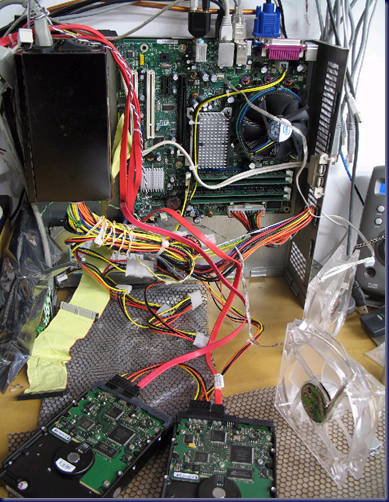
 image

MPECS’ Data Mule system

Keep in mind that there is a need to know how to use a Tap & Die set to create the threaded bores the motherboard standoffs will need to be set into if custom mounting the server board to an old case shell.

Otherwise, an old Styrofoam hard drive shipping container will work fine for setting the server board and drives into for protection but minimal initial cost.

So, here is the beer budget server setup that will allow for Hyper-V to run with hardware virtualization with prices showing in Canadian dollars.

  • Intel S3420GPLC $232
  • Intel Xeon X3430 $209
  • RAM configuration options
    • 8GB (2x 4GB) Kingston $290
    • 16GB (4x 4GB) Kingston $580
  • 2 SATA drives RAID 0 $120
    • no redundancy but gives performance.
  • Decent three rail 550 Watt PSU $80
  • OPTIONS
    • Intel PRO series dual gigabit NIC $200
    • Intel SC5650UP server chassis $250
    • 16GB (2x 8GB) Hynix $840
    • 32GB (4x 8GB) Hynix $1,680
    • Intel RS2BL040 PCI-E RAID $350

Using the above guide, we can have the bare minimum lab box up and running with 8GB of RAM for $931 plus applicable taxes and/or shipping charges if needed.

We all have USB keyboards and mice kicking around or can be had for pennies. Plus, a local system builder would probably be more than happy to part with a few bags of system screws, standoffs, and the like for a couple of bucks.

A DVD optical drive can be had very easily though newer OS installs can be done via USB flash drive thus eliminating the cost there.

As the budget allows, speed up those installs by purchasing faster 8GB USB flash drives with the best speeds being a real-world 35MB/Sec read and 30MB/Sec write. OCZ makes some great ones in the Rally2 Turbo and the ATV Turbo.

Note that USB 2.0 flash drives will become harder and harder to find as USB 3.0 drives come in. So far, the USB 3.0 drives are _a lot_ more expensive than their older USB 2.0 siblings.

BTW, a couple of LED fans would provide stylish cooling for that extra touch . :D

Philip Elder
MPECS Inc.
Microsoft Small Business Specialists
Co-Author: SBS 2008 Blueprint Book

*Our original iMac was stolen (previous blog post). We now have a new MacBook Pro courtesy of Vlad Mazek, owner of OWN.

Windows Live Writer