Showing posts with label Hosted Exchange. Show all posts

Friday, 19 April 2013

Office 365’s New Wave 15 Management Portal

We received notice that our hosted domain was upgraded earlier in the week.

It is important to note that any company looking to Office 365 for their hosted service provider needs to keep in mind that change-control is completely out of their, the customer’s, hands.

Let’s take a quick peak at the new administration centres for the features we regularly use:

image

  • The new Office 365 Admin Center

There is some reporting available under the current health column with links to INCIDENT IDs however they seem to be protected behind the service’s Microsoft ID logon. So, we will perhaps hold-off publishing the histories found in those reports until we are sure that we can.

Suffice it to say SharePoint Online and Exchange Online have had issues this month. :)

The Exchange admin center is pretty much the same as the one we find in our own Exchange 2013 deploys:

image

  • Exchange admin center

In the EAC we have the ability to finely tune our O365 Exchange experience right down to individual SPAM settings. This is even before we venture into PowerShell for Office 365!

And finally, the SharePoint Admin Center:

image

The service has most certainly taken a huge step forward . . . in feature set but also in complexity for management.

Philip Elder
MPECS Inc.
Microsoft Small Business Specialists
Co-Author: SBS 2008 Blueprint Book

Chef de partie in the SMBKitchen
Find out more at
www.thirdtier.net/enterprise-solutions-for-small-business/

Windows Live Writer

Monday, 29 October 2012

Stormy Cloud Number 2: ExchangeDefender Australia and an Apology

Karl and Manuel Palachuk called me to task on the previous blog post especially over our qualification mentioning ExchangeDefender Exchange Hosting (xD) not being the vendor of record that killed folk’s mailboxes.

While we had seen bits and pieces about a problem with OWN’s hosted Exchange in Australia we were so busy that there was not enough time to actually let the news settle in:

image

So, Karl and Manuel, my apologies. I should have been aware of the impact that the OWN catastrophic failure had on the folks of Australia before posting the previous entry.

With the apparent abandonment of the folks that were on the hosted Exchange 2007 platform in Australia that begs the question: What does this mean for folks that have their organization’s mailboxes on Exchange 2007 here in North America? Or, any other geographical area that OWN services with Exchange 2007?

By abandonment we mean leaving the entire Exchange 2007 platform behind. We are not entirely sure where the mailbox recovery stands at this point? Vlad?

One of our clients has their hosted Exchange 2007 with SherWeb based here in Canada. We’ve been discussing the various Cloud vendors available to them including Office 365 and OWN’s hosted Exchange 2010 services. And now, possibly hosted Exchange 2013.

The one place SherWeb has both O365 and OWN beat is in the migration story. Karl mentions documentation in his first comment on the above blog post. SherWeb has a clearly documented migration story among other aspects of their hosting business.

With O365 and OWN that migration story must be handled by the IT Solution Provider or Cloud Support Specialist. :)

In the end, just as the hardware and software story are constantly changing for our on-premises IT Solutions so too must we be evaluating our Cloud Vendor’s wares on an ongoing basis.

Most certainly the situation in Australia is a real Cause For Pause when it comes to OWN’s hosted Exchange.

For us, it means looking further into SherWeb as a possible hosted Exchange and SharePoint vendor partner.

Cloud or On-Premises: A _full_ backup of all data hosted outside of a client’s walls is absolutely mandatory.

Philip Elder
MPECS Inc.
Microsoft Small Business Specialists
Co-Author: SBS 2008 Blueprint Book

Windows Live Writer

Thursday, 11 August 2011

ExchangeDefender E-Mail Outage – Our Client E-mail and Some Thoughts

The following is a copy of an e-mail we sent out to all of our clients that are protected by ExchangeDefender and/or using OWN’s hosted Exchange and SharePoint:

Hello and good morning,

First, we do apologize for the mail flow interruption yesterday. Up until now we have had very reliable services with ExchangeDefender. Since our first signing up with OWN about two to three years ago we have experienced a few hiccups along the way with one serious outage for hosted Exchange happening in the last 12 months.

Yesterday, our e-mail sanitation and continuity provider ExchangeDefender experienced a catastrophic power outage in their Dallas data centre (DC). It just so happened that the component that failed was an Automatic Transfer Switch (ATS) about the size of a van that is supposed to keep power flowing into the facility by switching between the power grid or a backup generator.

Because that switch failed both power sources were cut off into the facility which eventually caused a system wide shut down. Statistically, the ATS failing is the equivalent to buying a 6/49 and winning the pot. A spare ATS was on-site, but we are talking about Kilo-Volts and Kilo-Amps of current so it is no easy task to switch them out and actually quite deadly.

The long and short of it is that Own Web Now, the owners of the ExchangeDefender services, have learned some lessons on where the system needs improvement. One place improvement will be made will be to set up additional data centres (DCs) to allow mail to continue flowing if Dallas has another outage.

We will also have LiveArchive access, which is your Web based access if our in-house servers go down, at additional DCs so that we can have access to our e-mail again if Dallas has a problem.

And finally, hosted Exchange 2010 will be set up for access across multiple DCs to eliminate the single point of failure in Dallas.

These changes are now in process. It will take about 3-5 months for the changes to be made.

Again, our apologies for the e-mail flow interruption.

While there are certainly other providers of these types of services out there, we prefer to continue our business relationship with OWN and ExchangeDefender. Why? Because we believe that OWN shares our vision, passion, and attitude about providing the best possible products and services for your hard earned money.

Please let me know if you have any questions or concerns!

Thank you for doing business with us and have a wonderful day! :)

Along the way to where we are today as far as the products and services we at MPECS provide to our clients there have been hiccups, burps and outright failures.

We have come to standardize our server and desktop hardware configurations on certain vendor's products. Those configurations have come as a result of wasting both our client’s time and our time with the cheap stuff. BTDT and no thank you.

We have also come to realize the weaknesses in any given setup that we deploy as a result of unforeseen failures.

The good and bad experiences in our industry are a fact of life. And, as a result of those experiences we have come where we are today providing products and services that our clients can count on to run without virtually any interruption.

We will continue to stand by OWN and ExchangeDefender because they do share the same attitude as us. They, and thus we, will grow as a result of this experience.

Philip Elder
MPECS Inc.
Microsoft Small Business Specialists
Co-Author: SBS 2008 Blueprint Book

*Our original iMac was stolen (previous blog post). We now have a new MacBook Pro courtesy of Vlad Mazek, owner of OWN.

Windows Live Writer

Wednesday, 10 August 2011

OWN ExchangeDefender Outage – Begs The Question: Where Is the Redundancy?

Currently, OWN’s services are all down. _All_ down.

We are able to get status updates from OWN’s NOC Twitter account here:

image

Note that the last tweet indicated above points to a power plant being offline thus hitting the Data Centre (DC). Given the heat wave going on in some parts of the USA having a power plant go offline is not an unexpected event anymore.

Even our own power systems here in the province of Alberta are running close to their limits.

With ExchangeDefender’s user base growing at such a high rate over the last number of years, having a single point of failure for the services here in North America becomes a drawback.

Not to be harsh, but this outage truly begs the questions:

  • Where is ExchangeDefender’s service redundancy?
  • And, if there is indeed a redundant DC located elsewhere what happened to the failover sequences?

As more and more folks sign up for the ExchangeDefender service, this has to be a question asked at the highest levels. Given Vlad Mazek’s business acumen and past responsiveness to service issues we sure hope that this incident will bring about a solution that will virtually eliminate the possibility of the whole service going offline again.

Perhaps this will be a “growing pain” experience.

Philip Elder
MPECS Inc.
Microsoft Small Business Specialists
Co-Author: SBS 2008 Blueprint Book

*Our original iMac was stolen (previous blog post). We now have a new MacBook Pro courtesy of Vlad Mazek, owner of OWN.

Windows Live Writer

Friday, 24 June 2011

Office Live 365 – We Are Now Online

Okay, so five minutes after hitting the post button in Windows Live Writer our SharePoint site came online.

Now that DNS has had a chance to propagate for our new domain we are trying to get our Outlook connected.

Step 1 – Get that info in:

image

Step 2 – Authenticate:

image

Step 3 – We are connected:

image

Step 4 – Outlook wants to restart:

image

Step 5 – Outlook shows the mailbox:

image

Now, let’s test to see just how the system will handle spam:

With the above address being integrated into my Outlook, please feel free to e-mail me there however with Microsoft announcing that the O365 service is going live in a few days there is no guarantee on how long this beta based mailbox stays alive.

We will not pay for this service as we are already properly licensed in-house and utilize OWN’s Hosted Exchange for our client’s needs as well as our own.

So, let’s see just how long this lasts! :)

Philip Elder
MPECS Inc.
Microsoft Small Business Specialists
Co-Author: SBS 2008 Blueprint Book

*Our original iMac was stolen (previous blog post). We now have a new MacBook Pro courtesy of Vlad Mazek, owner of OWN.

Windows Live Writer

Thursday, 23 June 2011

Office 365 Beta – Go Live Time Here

We signed up for the Office 365 Beta a while back but never heard back from the program until very recently.

image

Well, after receiving the sign-up e-mail we went about creating a new domain and a new LiveID for this project. We have seen situations where existing LiveIDs used for multiple services can get mixed up or have that LiveID’s connection to other than Office 365 services broken.

image

So, we are in!

We are going to add our new domain:

image

We need to wait until the newly registered domain and DNS setup hits the Internet before we can go any further. Once we do have everything lined up we will publish the e-mail address(es) here to make sure we get _lots_ of traffic! :)

Creating a user:

image

We will utilize the E3 plan to gain access to all of the O365 features that we can.

image

And, now that our domain has come online:

image

And, here we are about an hour later this is our new domain e-mail found in my Inbox:

image

The reply back to the mailbox has not arrived yet, but that may because ExchangeDefender has not picked up the new MX record for the domain.

One blip so far:

image

When we head into the Domain properties page we see:

image

Okay, we jumped into the help resources and ended up here:

So far, nothing seems to be coming up for SharePoint:

image

We went in and created a service ticket at 1400Hrs:

image

The setup was brought online around 1320 Hours. 40 minutes should be more than enough time for the service to be provisioned.

1411 Hours: Still no ticket:

image

Well, that’s about all the time we have for this today folks! :|

We may need to go in after the fact and set up a domain for SharePoint as mentioned earlier. But, we should get the out of the box SharePoint site once provisioned. That has not happened as of yet.

For now our hands are tied.

OWN 1 –  O365 0

At least with OWN support we get a response when we open a support ticket after a short period of time. Chalk one up for OWN.

UPDATE 14:28 Hours: The SharePoint site just came up. Go figure.

Philip Elder
MPECS Inc.
Microsoft Small Business Specialists
Co-Author: SBS 2008 Blueprint Book

*Our original iMac was stolen (previous blog post). We now have a new MacBook Pro courtesy of Vlad Mazek, owner of OWN.

Windows Live Writer

Thursday, 5 May 2011

The Cloud Caveat – No Service

Some Cloud based issues that we have and are dealing with this week.

Online E-mail Hosting/Sanitation

0800Hrs: Customer: “Dear sir, your money has been sent via e-mail money transfer.”

image

1330Hrs: Us via phone: “Mr. Client, we still have not received a payment?”

Ah, that’s when we discover that there must be something going on and of course there is the post in the RSS reader that OWN is having issues. The issues continued well past the 1150Hrs EST update time on the above post too.

Online Banking

We can’t seem to do anything with that EMT?!?

image

  • No money honey!

When we called the 800 number the person on the other end said that they knew about the problem and that there was no ETA on a fix.

Conclusion

We really don’t realize just how much impact a service outage can have on us until it actually happens.

As much as we can have the risk evaluation conversation with a client about moving their infrastructure to the Cloud the reality is that they may not become cognizant of the true cost of an outage until it happens.

That missed deposit could create havoc on a business running on the wire! :|

Philip Elder
MPECS Inc.
Microsoft Small Business Specialists
Co-Author: SBS 2008 Blueprint Book

*Our original iMac was stolen (previous blog post). We now have a new MacBook Pro courtesy of Vlad Mazek, owner of OWN.

Windows Live Writer

Wednesday, 20 April 2011

Office 365 Beta Sign Up

Okay, so we clicked the link:

image

image

After clicking the JOIN THE BETA button we filled out the form and we were presented with two options:

image

We chose the Enterprise level Beta so we could look at what was happening there.

image

Now, probably the number one stopping point for us and Microsoft’s hosted services is the fact that we are not the ones to bill the client _they_ are.

We resell a fair amount of Microsoft licensing as our primary way of licensing Microsoft products at client sites. So, Microsoft gets our client’s names. Thus, this is not the sticking point.

The sticking point is that we have _no control_ over billing, pricing, services, support, and other aspects of the online services. We also have no control over the very _small_ residual that comes to our company as a result of our signing up say a 250 seat customer.

Much of the feedback that we have heard from fellow SMB IT focused providers on Microsoft’s hosted services follows along the same lines. We have no real relationship with the customer/client.

Own Web Now

We stand by our decision to resell OWN’s hosted Exchange and SharePoint services. The service is excellent, the support folks are pretty good about getting things going when there is a need, and we get to be the face behind the product.

On another note, we have signed up for OWN’s SBS 2011 Essentials integration beta with an HP ProLiant MicroServer on its way to be a part of this beta in a small client setting. So, we will see OWN’s hosted Exchange services integrate into Microsoft’s new SBS product!

Philip Elder
MPECS Inc.
Microsoft Small Business Specialists
Co-Author: SBS 2008 Blueprint Book

*Our original iMac was stolen (previous blog post). We now have a new MacBook Pro courtesy of Vlad Mazek, owner of OWN.

Windows Live Writer

Monday, 30 August 2010

Client How-To Videos: Camtasia V7 Production and Rendering

We recently purchased some Camtasia licenses for our company to create videos of various user related tasks such as adding multiple mailboxes into Outlook 2010, connecting and using the Remote Web Workplace, RDP via TS Gateway, and others.

The use of Camtasia to create videos specific to each of our clients has had an amazing impact on them. So far, every single time we have created a new video to answer a specific question, or provided an overall guide for everyone in the client’s office, we received a 110% positive feedback.

Camtasia and creating these user oriented How-To videos has become a Killer App in our ability to build a business relationship with our clients.

After capturing the relevant video of the task, we edit the clips in Camtasia studio adding the relevant callouts.

This is the title of a video we just finished producing for a client that signed up for the OWN Hosted Exchange services we provide:

image

Using Camtasia Studio, we can zoom in on certain events that are taking place on the desktop we have recorded to help provide focus for the viewer:

image

Note that the callout provides feedback to the viewer and helps them to know what bits of information are needed for each of the fields. Of course, in the video those bits get filled out right before their eyes!

image

Once we have created the video that we are going to send to our client and upload to the Companyweb SharePoint site, we need to render that video.

In the Task Manager, this is what the rendering does to the Core 2 Extreme QX9650 series system with Windows 7 Enterprise x64 in Processes:

image

This is what the Performance tab looks like:

image

Once the rendering starts, Camtasia is quite capable of pushing this system to its limits. So, any Core i5 or Core i7 based system should be able to do a good job of rendering the project video quite efficiently.

Camtasia does look to take advantage of all 4 cores on this system, so having a quad core system will improve rendering times over a dual core system.

We have a pair of Intel X25-M series SSDs in RAID 0 for this system too. So, in effect the drive subsystem should not be a bottleneck in any way for the rendering process.

Philip Elder
MPECS Inc.
Microsoft Small Business Specialists
Co-Author: SBS 2008 Blueprint Book

*Our original iMac was stolen (previous blog post). We now have a new MacBook Pro courtesy of Vlad Mazek, owner of OWN.

Windows Live Writer

Thursday, 8 July 2010

A Glimpse At Exchange 2010 OWA And SharePoint Foundation

OWN has had their hosted Exchange and SharePoint systems on Exchange 2010 and SharePoint Foundation 2010 for a while now.

We just finished provisioning a client’s e-mail infrastructure and collaboration around OWN’s 2010 hosted Exchange and SharePoint products.

Since we have been so busy with other tasks, this is the first time we have had the time to take a bit of a dive into the new Microsoft offerings.

Outlook Web Access

Exchange 2010’s Outlook Web App (OWA):

image

Microsoft’s continued development of Outlook Web Access on Exchange has certainly been excellent. With each successive version we have seen vast improvements with each new release.

The changes from 2007 to 2010 however, are not quite as dramatic.

Outlook Web Access on Exchange 2007 Service Pack 2:

image

OWA 2010 does have a few key features out of the box that OWA 2007 did not though.

  1. Mail: Inclusion of the Favorites section which is identical to the Office Outlook client.
  2. Mail: Search Folders actually has the Unread Mail folder set up by default.
  3. Mail: Recover Deleted Items is now a right click option in 2010 as opposed to digging through Options in 2007.

From there, the OWA Options management page is a lot more intuitive to use on 2010 than it was on 2007. Users will be able to find the items they want to use with a bit more ease.

SharePoint Foundation 2010

Once the services are provisioned by OWN, we need to log on as the SharePoint site admin to set a template.

When the template has been set up, we then need to create our contributor group and add our client’s users to that group. Any needed Sites and/or special permissions groups would be created from there.

This is the new SharePoint Foundation 2010 site:

image

The changes between Windows SharePoint Services v3 and SharePoint Foundation 2010 are quite substantial.

Note the layout and navigation changes. There are a lot of changes made in the SharePoint product. As a result, be prepared to either contract someone like Robert Crane who can customize the site quite quickly and efficiently or delve into the bits and bolts to figure it out.

Own Web Now and the Cloud

We have mentioned this before, but it bears mentioning again since developing alternate revenue streams for our business is absolutely critical to our growth and longevity.

  1. We partner with OWN for our hosted Exchange/SharePoint needs because _we_ are the face of the hosted products to our client.
    • We set the value and pricing for each OWN service we resell.
    • We invoice our clients for those services ahead of time the same way our cell phone provider invoices us for next month’s services plus last month’s overages.
    • Once the services are set up, we have that monthly residual that totally _kills_ any residuals we might get through other Cloud services vendors.
  2. We partner with OWN because we get to work with _real_ and _knowledgeable_ people if we need support.
    • Benjamin and Matt have been our primary support contacts and they have always come through for us.
    • The OWN support team when called upon have been second to none.

While the Cloud and its impact have certainly been on the top of our minds lately, picking the right Cloud vendors is absolutely critical to the life of our business.

Even with the mainframe style of Cloud services, the client/customer will _always_ be in need of experts to facilitate their IT solutions and infrastructure. That’s another reason why we always need to be growing our expertise.

Those Cloud Solutions Experts need to be _US_! :)

Philip Elder
MPECS Inc.
Microsoft Small Business Specialists
Co-Author: SBS 2008 Blueprint Book

*Our original iMac was stolen (previous blog post). We now have a new MacBook Pro courtesy of Vlad Mazek, owner of OWN.

Windows Live Writer

Monday, 28 June 2010

Configuring A Client For OWN Hosted Exchange and SharePoint

Lately, we have been fairly counter-Cloud in many of our blog posts in an effort to offset a lot of the Cloud services hype that we are seeing in our industry.

However, despite our expressing our _opinions_ on all of the hype around Cloud services and the many IT industry “prophecies” that come as part of that hype, we will always do our best to provide our clients with the best possible solution for their needs.

OWN

It is obviously no secret that we have partnered with Cloud service provider OWN for our client’s Cloud services needs around e-mail sanitation (ExchangeDefender) and hosted Exchange with hosted SharePoint (OWN product page).

Disclaimer: The signature in this post shows Vlad’s (his blog) appreciation for our support of OWN and their services.

We have partnered with OWN mainly for two reasons:

  1. Vlad and his business provide excellent value in the services they provide with those services being stable and highly available.
  2. If you read Vlad’s blog linked above, then Vlad’s honesty and integrity in business are pretty straight forward to see.

Besides the above two points, OWN’s product documentation is very good and so is the pre-sales and post-sales support provided by the OWN Support Team.

While we appreciate the MacBook Pro gift, we still stand behind OWN’s services because of the excellent service we have received since Partner Day 1.

Client Hosted Exchange and SharePoint

We have a client that is asking to have their Exchange mailboxes hosted. They are primarily on the go with little in-office time other than the office administration folks.

Because most of the business users are on the go, a Cloud based solution makes sense for them. They are looking for a relatively inexpensive solution that helps them step away from any in-house server setups.

With Outlook 2010 in place, they can have their original mailbox up and running and also have the newly created hosted mailbox configured in their Outlook making data transfer a fairly straight forward thing in this case.

So, we are in the process of configuring an Internet domain for them that will be used for their e-mail as well as hosted SharePoint access.

Here is an overview of what is needed to set up a client with OWN’s hosted Exchange and SharePoint:

  1. Internet domain name registered.
  2. DNS either with the registrar if provided or via third party/ISP.
    1. DNS A: www.sbscougar.ca  = site host IP.
    2. DNS A: sharepoint.domain.com = OWN’s SP IP.
    3. DNS CNAME: autodiscover.ExchangeDefenderServer.
      • The actual ED server name URL will be given after provisioning the mailboxes.
    4. DNS Catch-all removed.
    5. MX pointing to ExchangeDefender.
    6. Proper SPF record configured for the domain using the ExchangeDefender.com domain (previous blog post).
  3. Test the DNS.
    1. DNSStuff report:
    2. image
  4. Acquire a list of users requiring a mailbox and any aliases they may need.
    1. Primary: First@sbscougar.ca.
    2. Alias: Mail@sbscougar.ca.
  5. Set up a spreadsheet with the above list.
    1. An example:
    2. image
    3. We place this grid in our client’s audit notes to facilitate managing their services.
  6. Provision the mailboxes via OWN Partner Portal.
  7. If SharePoint is required then:
    1. Initiate a support request to create the SP site.
    2. Either designate a user as site admin or have an account available for OWN to use as site admin.
  8. Configure an Outlook 2010 Exchange mailbox with a provisioned mailbox to test all settings.
  9. Option: Provision an All Users Distribution Group (a la SBS).
  10. Client configures or we deploy/configure Outlook mailboxes for the client.
  11. In Outlook, import the user’s PST if needed.
    1. With Outlook 2010 it is possible to have two or more Exchange mailboxes. This can enable users to selectively copy and paste Outlook/mailbox content.
    2. The multi-mailbox ability also allows for a flexible change-over even if the same e-mail domain is being used.

Once we have the mailboxes provisioned and our client is up and running, we have the ability to create any needed Public Folders or Distribution Groups for their particular needs using.

To keep things simple for our clients we create an All Users e-mail address for them out of the box. This gives them an out of the box ability to e-mail everyone in the company.

Not an OWN partner yet?

An excellent Hosted Exchange and SharePoint Getting Started Guide can be found here:

A PDF copy of the above DNSStuff report is available on our Blog Downloads page on our Web site.

Philip Elder
MPECS Inc.
Microsoft Small Business Specialists
Co-Author: SBS 2008 Blueprint Book

*Our original iMac was stolen (previous blog post). We now have a new MacBook Pro courtesy of Vlad Mazek, owner of OWN.

Windows Live Writer

Tuesday, 22 June 2010

Cloud Hype and a Cause For Pause – OWN, Microsoft, and Intuit

I have always been a bit of a sceptic. From business to life, one needs to be very careful about giving one’s word and accepting another’s.

In business, we have business relationships that have been built up over the years. Our longest standing client relationship is now running over 11 years!

In those business relationships, we have built up a strong trust between us and our client contacts and business owners.

As a result, we have an understanding with our ongoing clients that sometimes things do not work out quite the way we would expect them to. For the most part, when things don’t work, the problems tend to last hours instead of days and we do our best to make up for any lost time.

In our experience with Cloud vendors such as OWN (our primary Cloud partner), there have been a few service related issues causing slow downs, but so far we have not seen a complete service outage other than for server/cluster reboots.

As we can see, most of the indicator’s in OWN’s NOC status has to do with ongoing maintenance.

Now, let’s have a look at Microsoft’s Cloud offering in the form of BPOS:

The MOSN RSS link comes to us courtesy of Susan Bradley.

When we look at Microsoft’s RSS feed, we can see that there are a lot of service outage reports.

image

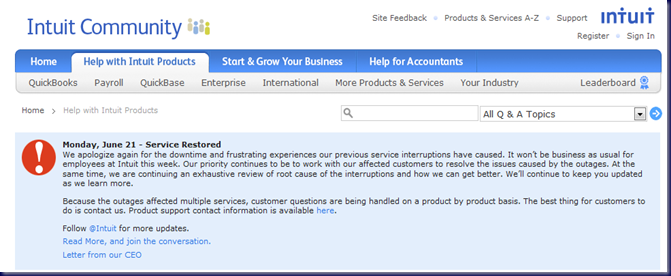
From here we look at Intuit’s latest:

In Intuit’s case, this latest outage lasted around 2 days for most customers with some still dealing with issues after that.

The Cause for Pause when it comes to hype about the Cloud is to make sure that the Cloud services we choose on behalf of our clients, or that they choose, are indeed the best option for them.

Microsoft or OWN?

When we look strictly at hosted e-mail and SharePoint, we can see by the above two RSS feeds that OWN provides a far superior uptime and service quality to the Microsoft offering. Yes, OWN has been at it a lot longer than Microsoft . . . and it shows.

Only time will tell if Microsoft’s offering provides the same level of Cloud service performance and stability as OWN’s hosted Exchange and SharePoint solution does.

Intuit

Part of any evaluation is to look at the costs associated with being disconnected from those Cloud based services.

For folks needing to process payroll during that two day outage at Intuit Online, there was probably a lot of nail biting going on by both management and their employees.

On top of payroll, any inventory, sales, or other business related activities would have been impacted. Calculating the lost time and revenues for these business aspects can be very difficult.
image

Internet Connection

If a client’s Internet connection goes down and they are totally cut off from the Internet, the cost associated with this type of service outage needs to be considered. A USB modem via cellular or other wireless form of Internet connection for critical PCs may be an alternative backup plan.

Conclusion

Just as it is with any other new technology, we need to test and make sure that any Cloud based service will follow through on its promises.

We need to dig deep into a Cloud based vendor’s reputation or lack thereof and find out if they really follow through on their commitment to provide good value and trouble free services.

Since the Cloud is a relatively new push, we are seeing a rush of new vendors vying for a piece of the Cloud pie. These new vendors are essentially untested technologies and should be approached as such . . . with great scepticism and caution on behalf of our clients.

And finally, the question to ask any business owner is, “How long can your business be down before the possibility of closing the doors looms?”

Obviously this question must include _all_ aspects of a business’s processes to provide a thorough answer not just the usage of Cloud based technologies.

Some light reading:

Philip Elder
MPECS Inc.
Microsoft Small Business Specialists
Co-Author: SBS 2008 Blueprint Book

*Our original iMac was stolen (previous blog post). We now have a new MacBook Pro courtesy of Vlad Mazek, owner of OWN.

Windows Live Writer

Wednesday, 9 June 2010

OWN Hosted Services – Network Operations Status RSS Feed

For those I.T. providers that have partnered up with OWN for hosted services along with ExchangeDefender services, OWN’s NOC (Network Operations Centre) RSS feed is a must.

We have subscribed to the feed on our workstations as well as Windows Mobile phones so that we can be aware of any service issues that may impact our clients.

We use OWN to provide the following Cloud services to our clients:

  • Hosted Exchange via Outlook Anywhere (RPC/HTTPS).
    • Includes Public Folders if needed.
    • Also includes a dedicated SharePoint site.
    • Protected by ExchangeDefender too.
  • Hosted off-site backups.
  • E-mail sanitation and continuity services via ExchangeDefender.
    • E-mail sanitation and reporting to the end user is second to none.
    • LiveArchive feature gives clients access to legit e-mails up to a year or more after the e-mail date.
    • LiveArchive feature provides access to legitimate e-mail if the in-house Exchange server is down.
  • Hosted SharePoint
    • Our own Web site runs on OWN’s SharePoint services.

The hosted services prices are quite reasonable for the level of service we receive from OWN.

Philip Elder
MPECS Inc.
Microsoft Small Business Specialists
Co-Author: SBS 2008 Blueprint Book

*Our original iMac was stolen (previous blog post). We now have a new MacBook Pro courtesy of Vlad Mazek, owner of OWN.

Windows Live Writer

Tuesday, 7 April 2009

Exchange Integrated Outlook – Recovering Deleted Items

When Outlook has been Exchange integrated, it is possible to recover a deleted e-mail once the Deleted Items folder has been emptied. This includes Outlook installed on a local workstation or desktop VM or Outlook connected to Exchange via Outlook Anywhere (RPC/HTTPS). Outlook Web Access on Exchange 2007 (SBS 2008) also has this feature.

09-04-07 Outlook Recover Deleted Items

Outlook and Exchange – Recover Deleted Items

The amount of e-mail available for recovery is set by the retention policies in the Exchange server. We tend to allow for 60 days.

To recover deleted items, click on the Deleted Items folder and then the Tools menu to bring up the Recover Deleted Items option.

Besides recovering e-mail removed from the Deleted Items folder, the same process can also be applied to the Junk Mail folder. Click on it and then the Tools menu to get to the deleted e-mail.

Having Outlook Exchange integrated, whether on a local server or via the Cloud, is probably one of the greatest ways to mitigate the impact of a disaster on the local machine, or server, or business location. Of course, good backups are a priority in the case of a local Exchange server.

Philip Elder
MPECS Inc.
Microsoft Small Business Specialists
Co-Author: SBS 2008 Blueprint Book

*All Mac on SBS posts will not be written on a Mac until we replace our now missing iMac! (previous blog post)

Windows Live Writer

Saturday, 4 April 2009

Some thoughts on Windows Server 2008 Foundation

While we have not had too much time to dive into the inner workings of Microsoft’s new server OS offering, Microsoft now has a specific product site for us to have a look at what the new Windows Server 2008 Foundation is:

From what we can see, the new server OS is meant to provide a “foundation” upon which a really small company can build their “stack”. Note that the user limit for the product is 15.

In Microsoft terms, the “stack” refers to the server software components that can be built into a box to provide server services. From Exchange to Windows SharePoint Services, most any Microsoft component can be stacked onto the OS to provide a viable solution for our clients.

In our case, we choose to run with the Small Business Server 2008 Suite of products if at all possible.

Cris Hanna’s comment on the IT World article Everyone forgets SOHO businesses is a good history lesson:

re: Everyone forgets SOHO businesses

Foundation Server is not new for Microsoft...it's been around at least since 2003. And was released under the name Windows Server for Small Business Server, which was very confusing for many. Same limitations, 15 users, no email, no remote web workplace and so on. People thought they were getting the full version of SBS 2003 which does include Exchange, SharePoint Services and so on … Cris Hanna

Cris goes on to comment about the possibility of a hosted solution for the small office’s e-mail and other needs thus providing a blend between the in-house server services and those based in the Cloud.

Windows Server 2008 Foundation

That is the direction we believe that Windows Server Foundation will facilitate for the small 2-7 seat offices. A local Active Directory server that manages the client’s locally stored data and share needs.

It can also have SharePoint installed and configured to give them Intranet and Internet access to their data. They The can also host their e-mail on a Cloud based Exchange hosting service to provide some form of redundancy for their e-mail. SharePoint could reside in the Cloud as well depending on the client’s specific data needs.

Small Business Server 2008

Around the 6-10 seat mark is where we would market an SBS 2008 based solution that may or may not include hosted Exchange. This is the level where the business owner needs to work with us on a vision of their business processes in relationship to their Intranet and Internet usage and access needs. With that vision in place, we would almost always end up with an SBS solution in place.

Hosted SBS 2008, Vista, and Office 2007

For a really small office, we would offer our own SBS 2008/Vista Business/Office 2007 hosted services as a starting block with room to grow into a blended solution via hosted Exchange and SharePoint. If the client’s growth continues, we would then be able to look into an in-house server solution either based on Windows Server 2008 Foundation and the already in place hosted Exchange/SharePoint, or an SBS 2008 based solution.

Which ever way we go, we have a lot of options at our disposal to tailor an I.T. solution based on our client’s needs that provides them with the best value for their I.T. budget.

Hosted Exchange and SharePoint

We are partnered with Own Web Now for our Hosted Exchange and SharePoint as well as E-mail sanitation (ExchangeDefender) needs. OWN enables us to provide an awesome MPECS branded Cloud experience for our clients. They do the hard work on the back end while we do the leg work. In the end, we both win!

Have a few minutes? Here are some thoughts on how to augment our company’s bottom line by partnering with OWN:

Philip Elder
MPECS Inc.
Microsoft Small Business Specialists
Co-Author: SBS 2008 Blueprint Book

*All Mac on SBS posts will not be written on a Mac until we replace our now missing iMac! (previous blog post)

Windows Live Writer

Monday, 9 March 2009

An Opportunity for Passive Income with OWN

There is no silver bullet when it comes to generating income in a business so that we can pay our employees and ourselves a living wage.

To build a business, there is no other way than working very hard for our goals whatever they may be. One “catch phrase” that has stuck with me through the many ups and downs of running our business is Passive Income.

What is Passive Income?

It is cash flow that comes in whether we are working or not. One would hope that the retirement fund, if we have one, would represent a form of passive income. Though, with today’s economy along with the taxes we would pay on that income in the long run there really are questions about its viability as a retirement fund in the first place.

Now, obviously passive income does not grow on trees. Otherwise, the beaches in nice places like Fiji, Tahiti, and the like would be filled with umbrella drink sipping folks.

One thing to keep in mind is that once the garden is planted, that does not mean the work is over. It takes a lot of work to come through the growing season with a good yield of fruits and vegetables.

There is not a lot of difference between that garden and working a business in this industry or any other for that matter.

It takes a lot of hard work.

Many have jumped on the Managed Services delivery platform as a way to generate their passive income. The catch to MSP is to balance the value the client receives with the income we receive. That can be a tough balance to catch if we are not experienced enough in our business dealings, hardware support, software support, or have an experienced team around us to come up with some solid costs for the 12 month or longer MSP contract with the client.

So, once we came up with the magic number, the next step was to convince our clients that MSP was the best way to go. In our case, we focus our attentions on the professional accounting industry. It was not hard to see that calculator going in the partner’s heads when we first proposed the MSP model and fees to them.

Needless to say that in our case, we ended up doing a blended Managed Services model with a tiered structure that our accounting clients worked with us on to provide the best value for them and for us.
Not bad eh? :)

Now, we are slowly working our way through the various MSP and related products out there to augment our services offering to provide more value for that monthly fee.

The one gold mine we have fortunately come across is the service provider OWN or Own Web Now.
We have a partnership with OWN as a Services Provider. We are slowly moving our clients over to ExchangeDefender and now are talking to key clients about Hosted Exchange and SharePoint.

One key feature to OWN is the true partnership relationship they have with us. We will never find OWN in our client’s inbox direct selling their services.

They recognize and value us and what we do for their business.

The other very important feature to reselling OWN services is that passive income. We do the leg work to bring our clients on board, we get to invoice them monthly as part of our managed services offering, and Vlad and his crew get to do all of the hard work for us. ;)

Establishing business partnerships with service providers like OWN will be the butter to our Hybrid MSP services hardware and software bread as we move forward.

Ultimately, we get to offer a nice suite of services without having to spend the hundreds of thousands of dollars to provide our clients with some sort of SLA. It is a win-win situation to be in!

Philip Elder
MPECS Inc.
Microsoft Small Business Specialists
Co-Author: SBS 2008 Blueprint Book
*All Mac on SBS posts will not be written on a Mac until we replace our now missing iMac!
Windows Live Writer