Showing posts with label Intel X25-M Solid-State Drive. Show all posts

Tuesday, 22 March 2011

Product Review – Intel’s New 510 Series SSDs At AnandTech

We have been anticipating Intel’s third generation (G3 code) SSDs for quite a while now. They were due to be released late last year, or at least they were initially.

AnandTech has a great review of the interim product release of the Intel SSD 510 Series that utilizes a third party’s controller (Marvell) but still relies on Intel 34nm (G2 code) NAND.

Note the initial lackluster performance reports in the review. Though, later on in the article AnandTech goes through a series of built in-house performance tests that show the Intel SSD 510 to be a much stronger performer.

So far, we have been installing the 160GB Intel X25-M SSD into almost all laptops that go out the shop door due to their exponential performance increase over a standard spindle based hard disk.

Since most, if not all, of our clients host their data on an SBS server and the 160GB of space more than meets our client’s laptop storage needs needs we will be hard pressed to install a 250GB Intel 510 Series SSD (currently around $695/unit).

For now, we will wait to see what the third generation SSDs bring to market.

In the mean time we are looking into sourcing an OCZ 240GB Vertex 3! :)

Philip Elder
MPECS Inc.
Microsoft Small Business Specialists
Co-Author: SBS 2008 Blueprint Book

*Our original iMac was stolen (previous blog post). We now have a new MacBook Pro courtesy of Vlad Mazek, owner of OWN.

Windows Live Writer

Friday, 26 November 2010

Toshiba Tecra S11 Core i7-620M 160GB X25-M WinSAT Score

We have just completed configuring a number of new Toshiba Tecra S11 laptops with 160GB X25-M Intel SSDs.

Our own Tecra S10 WinSAT scores can be found here:

The Tecra S10’s scores were:

  • Disk  Sequential 64.0 Read              203.74 MB/s        7.3
  • Disk  Random 16.0 Read                    39.33 MB/s        6.3
  • Disk  Sequential 64.0 Write              88.15 MB/s          6.3
  • Total Run Time 00:01:25.32

The Tecra S11’s scores were as follows:

  • Disk  Sequential 64.0 Read                   240.75 MB/s          7.5
  • Disk  Random 16.0 Read                       215.20 MB/s          7.8
  • Disk  Sequential 64.0 Write                  103.40 MB/s          6.6
  • Total Run Time 00:01:10.07

The second stat in the S10’s numbers must have been an anomaly. We will revisit the WinSAT test on that unit to see how the performance has stood up over time.

There is a tangible performance difference on the Core i7-620M based Tecra S11 versus the Core 2 Duo T9600. The system is a lot more responsive in so many ways.

So, it is not surprising to see that the SSD performance on the new S11 takes a step up versus the previous generation.

In the end, the cost of the SSD is more than made up by our client’s users increased productivity.

While one of the drivers for having the SSD installed has been Windows XP Mode on Windows 7, most of our client’s line of business applications have come up to date and are Windows 7 compatible. There are still a few hold outs, but for the most part XP Mode is slowly being deprecated.

Philip Elder
MPECS Inc.
Microsoft Small Business Specialists
Co-Author: SBS 2008 Blueprint Book

*Our original iMac was stolen (previous blog post). We now have a new MacBook Pro courtesy of Vlad Mazek, owner of OWN.

Windows Live Writer

Friday, 8 October 2010

An iPad Killer From Down Under?

We are in the process of finalizing an order for a product that is just in the process of being released to the general public.

image

Yes, that is an iPad sized tablet running Windows 7. After a colleague dropped an iPad off at our shop for us to use for a week or so earlier this year we were not too impressed with the machine. The iPad has its purpose but that purpose did not suite us here.

image

The Tegatech TEGA v2 Touch Tablet was introduced to us by fellow MVP Wayne Small (his article on the TEGA v2).

With a Windows 7 operating system installed the TEGA v2 will do everything we need it to do _natively_ without any additional apps beyond Office 2010.

Running an Intel Atom N455 1.66GHz CPU with a 64GB SSD the TEGA v2 will run circles around some of the older Toshiba Tecra laptops with Pentium M series CPUs that we still use as shop systems. It should also run on par with the Intel Atom based netbooks that we use in our business that have had their spindle based drives replaced with Intel X25-M SSDs.

So, with the TEGA v2 coming with an SSD out of the box that is large enough to host the OS, Office 2010, and a few additional applications and utilities we will have ourselves a very portable and very usable little machine.

Time is Money

BTW, when it comes to deciding on the use of any new technologies we always weigh in on what it will cost us in time to figure the new tech out. With the iPad, there is a bit of a learning curve involved for those that are not part of the “iN” crowd.

That is one of the reasons that we are looking at the TEGA v2. There is no learning curve involved since we already know how to use Windows and Windows based devices.

Philip Elder
MPECS Inc.
Microsoft Small Business Specialists
Co-Author: SBS 2008 Blueprint Book

*Our original iMac was stolen (previous blog post). We now have a new MacBook Pro courtesy of Vlad Mazek, owner of OWN.

Windows Live Writer

Monday, 30 August 2010

Client How-To Videos: Camtasia V7 Production and Rendering

We recently purchased some Camtasia licenses for our company to create videos of various user related tasks such as adding multiple mailboxes into Outlook 2010, connecting and using the Remote Web Workplace, RDP via TS Gateway, and others.

The use of Camtasia to create videos specific to each of our clients has had an amazing impact on them. So far, every single time we have created a new video to answer a specific question, or provided an overall guide for everyone in the client’s office, we received a 110% positive feedback.

Camtasia and creating these user oriented How-To videos has become a Killer App in our ability to build a business relationship with our clients.

After capturing the relevant video of the task, we edit the clips in Camtasia studio adding the relevant callouts.

This is the title of a video we just finished producing for a client that signed up for the OWN Hosted Exchange services we provide:

image

Using Camtasia Studio, we can zoom in on certain events that are taking place on the desktop we have recorded to help provide focus for the viewer:

image

Note that the callout provides feedback to the viewer and helps them to know what bits of information are needed for each of the fields. Of course, in the video those bits get filled out right before their eyes!

image

Once we have created the video that we are going to send to our client and upload to the Companyweb SharePoint site, we need to render that video.

In the Task Manager, this is what the rendering does to the Core 2 Extreme QX9650 series system with Windows 7 Enterprise x64 in Processes:

image

This is what the Performance tab looks like:

image

Once the rendering starts, Camtasia is quite capable of pushing this system to its limits. So, any Core i5 or Core i7 based system should be able to do a good job of rendering the project video quite efficiently.

Camtasia does look to take advantage of all 4 cores on this system, so having a quad core system will improve rendering times over a dual core system.

We have a pair of Intel X25-M series SSDs in RAID 0 for this system too. So, in effect the drive subsystem should not be a bottleneck in any way for the rendering process.

Philip Elder
MPECS Inc.
Microsoft Small Business Specialists
Co-Author: SBS 2008 Blueprint Book

*Our original iMac was stolen (previous blog post). We now have a new MacBook Pro courtesy of Vlad Mazek, owner of OWN.

Windows Live Writer

Wednesday, 5 May 2010

Intel SSD Expected Lifetime And Gross Data Throughput Capabilities

While working on the previous post on Intel SSDs configured in the Intel Modular Server SAN, the twelfth slide in the IMS IDF2009 presentation was a real eye opener:

image

Note the numbers for the amount of data that can be written to the X25-E series drives as well as the two X25-M series drives!

  • X25-E Series
    • 3 Years of random writes
    • 1-2 Petabytes of data volume
  • X25-M Series in a Client setting
    • 5 Years of random writes
    • 35 Terabytes of data volume
  • X25-M Series in a Datacenter setting
    • 3 Years of random writes
    • 7.5-15 Terabytes of data volume respectively

Those numbers give us a view of Intel’s expected lifetime for their Solid-State Drives in terms of the total volume of data to be written to them.

On initial view, the numbers seem relatively small volume wise. But, given the fact that we deal with some substantial amounts of static data both on servers and workstations we need to be mindful of the actual volume of data written to the disk over its expected lifetime.

Once we have a server OS and whatever applications installed on the disks, we are probably going to fall fairly far below the 20GB/day listed for the Intel X25-M series drives in a Client setting for example.

Intel Source:

Philip Elder
MPECS Inc.
Microsoft Small Business Specialists
Co-Author: SBS 2008 Blueprint Book

*Our original iMac was stolen (previous blog post). We now have a new MacBook Pro courtesy of Vlad Mazek, owner of OWN.

Windows Live Writer

Intel Modular Server and Intel Solid-State Drive Performance IDF2009 Presentation

The 2009 Intel Developer Forum presentations are all available online here:

Of particular interest to us is the presentation on configuring Intel X25-M or X25-E Solid-State Drives with the 2.5” drive MFSYS25 series Intel Modular Server.

image

This particular presentation runs about an hour is chock full of good information comparing the performance characteristics of traditional spindle based SAS drives and Intel’s Solid-State Drives.

There are some pretty good explanations of the various features and abilities of the Intel Modular Server too.

A point in the session that we have focused on here has to do with the actual I/O performance (IOPs) of the onboard SAN storage in the IMS (MFSYS25) with either SAS or SSD drives installed:

image

Note that when it comes to actual disk performance, the read and write throughput (MB/Sec) numbers are important, but those numbers become a moot point if the hard drive’s IOPs capabilities are relatively low.

IOPs (Wikipedia), or the number of Input/Output Operations Per Second a drive is capable of can make or break a server setup whether it is serving a very busy database or a series of IMS SAN located VHDs for VMs running in a cluster.

Even the largest RAID 10 array can perform quite poorly if the drives running in that RAID array have a relatively low IOPs capability.

image

Based on our own experiences with the Intel X25-M series Solid-State Drives, the above SSD performance slide is quite realistic considering that the X25-E series drives have an even higher IOPs capability than the X25-M drives.

The Solid-State Drives do indeed trump the traditional spindle based drives, even with a spindle rotational speed of 15,000 RPM, by huge margins.

So, our storage configurations need to be planned based on what each server node will be doing or storage sharing with the other nodes.

A blog post will follow to develop our thoughts on IMS storage options.

Philip Elder
MPECS Inc.
Microsoft Small Business Specialists
Co-Author: SBS 2008 Blueprint Book

*Our original iMac was stolen (previous blog post). We now have a new MacBook Pro courtesy of Vlad Mazek, owner of OWN.

Windows Live Writer

Monday, 12 April 2010

Intel Modular Server – SATA to SAS Adapters for Intel X25-M SSDs or SATA

Intel has given us an extension on the Intel Modular Server demo box we have had for the last six to eight weeks.

We have mentioned in the past that there is an optional SATA to SAS adapter, AXXTM3SATA,  for the IMS that allows us to install 2.5” SATA based drives in the built-in storage unit.

So, since we were ordering from Tech Data Canada and they happened to have some, we ordered the stock that they had:

image

Note that it is very important to have a look in the IMS Tested Hardware and Operating Systems List (THOL) (previous blog post) to verify how we can combine SATA, SSD, and SAS drives in the IMS storage bays.

We did not find out about the IMS demo extension until after we had taken everything down and set the IMS into its shipping pallet setup.

So, we are going to pull a couple of 160GB Intel X25-M second generation SSDs out of stock and install them. We will use the SSDs for the Hyper-V OSs as well as the Hyper-V configuration and memory file location.

We now have a pretty good performance baseline for the pair of 146GB 15K Seagate drives we have been using for this purpose, so we are looking forward to the performance gains the SSDs will give us.

The extension was give because we would not be able to get our own Intel Modular Server into our shop and ready for my upcoming SBS clustering presentation for the Edmonton Microsoft User Group on the twentieth.

Philip Elder
MPECS Inc.
Microsoft Small Business Specialists
Co-Author: SBS 2008 Blueprint Book

*Our original iMac was stolen (previous blog post). We now have a new MacBook Pro courtesy of Vlad Mazek, owner of OWN.

Windows Live Writer

Saturday, 3 April 2010

Apple - The Land Of Massive Updates?!?

We just fired up our MacBook Pro to do some video editing for a DVD that will accompany a letter we will be mailing out to the CEO of a company this coming week.


This has to be a first . . . at least for us:


10-03-31 OS X Updates Available.png


That OS X update at over 400MB is quite large for an Apple update. The combined total of the updates do approach 600MB.


In the Windows world, our most recent service packs have been quite large too, some weighing in at over 750MB!


So, it looks like Apple too has its hands full patching vulnerabilities in their products just as Microsoft and especially Adobe do.


There have been some good things going on over at Apple in the way of recent hires too. Perhaps the lessons learned by Microsoft and its Windows products being the 800 pound gorilla in the room have started to rub off as Apple has grown in its market share.


About 7 minutes later, our MacBook Pro was happily updated and rolling along:


10-04-03 OS X About Mac.png


Note that we swapped the default 160GB 5400RPM spindle out of our MacBook for an Intel 160GB X25-M Solid-State Drive a while back. It certainly makes for a much snappier Mac experience ... and moves those updates along quite quickly!


Philip Elder

MPECS Inc.

Microsoft Small Business Specialists

Co-Author: SBS 2008 Blueprint Book

*Our original iMac was stolen (previous blog post). We now have a new MacBook Pro courtesy of Vlad Mazek, owner of OWN.

MacBook Blogging written from Mars Edit

Tuesday, 2 February 2010

So, Just How Fast? 160GB X25-M Versus 250GB WD SATA – Both In Acer TM6592 Series

For comparison’s sake, we did the following tests on Acer TravelMate TM6592 series laptops with a fresh install of Windows 7 Enterprise x64 OS. Both laptops have the same CPU and RAM configuration as well as BIOS version.

This TM6592 is using the factory installed 250GB Western Digital WD2500BEVS SATA hard disk:

C:\Windows\system32>winsat disk
Windows System Assessment Tool
> Running: Feature Enumeration ''
> Run Time 00:00:00.00
> Running: Storage Assessment '-seq -read -n 0'
> Run Time 00:00:15.74
> Running: Storage Assessment '-ran -read -n 0'
> Run Time 00:00:13.56
> Running: Storage Assessment '-scen 2009 -drive C:'
> Run Time 00:01:26.55
> Running: Storage Assessment '-seq -write -drive C:'
> Run Time 00:00:13.29
> Running: Storage Assessment '-flush -drive C: -seq'
> Run Time 00:00:08.55
> Running: Storage Assessment '-flush -drive C: -ran'
> Run Time 00:00:13.01
> Running: Storage Assessment '-hybrid -ran -read -n 0 -ransize 4096'
NV Cache not present.
> Run Time 00:00:00.09
> Running: Storage Assessment '-hybrid -ran -read -n 0 -ransize 16384'
NV Cache not present.
> Run Time 00:00:00.05
> Disk  Sequential 64.0 Read                  44.80 MB/s          5.2
> Disk  Random 16.0 Read                     1.25 MB/s          3.5
> Responsiveness: Average IO Rate         5.79 ms/IO          5.1
> Responsiveness: Grouped IOs               13.61 units          6.3
> Responsiveness: Long IOs                   21.19 units          6.1
> Responsiveness: Overall                     288.42 units          6.0
> Responsiveness: PenaltyFactor                0.0
> Disk  Sequential 64.0 Write                 54.38 MB/s          5.5
> Average Read Time with Sequential Writes  7.824 ms       5.1
> Latency: 95th Percentile                     15.855 ms          4.9
> Latency: Maximum                             40.617 ms          7.9
> Average Read Time with Random Writes   8.321 ms         4.9
> Total Run Time 00:02:32.26

This TM6592 is using a second generation Intel X25-M 160GB SSD:

C:\>winsat disk
Windows System Assessment Tool
> Running: Feature Enumeration ''
> Run Time 00:00:00.00
> Running: Storage Assessment '-seq -read -n 0'
> Run Time 00:00:04.41
> Running: Storage Assessment '-ran -read -n 0'
> Run Time 00:00:00.36
> Running: Storage Assessment '-scen 2009 -drive C:'
> Run Time 00:01:20.96
> Running: Storage Assessment '-seq -write -drive C:'
> Run Time 00:00:07.86
> Running: Storage Assessment '-flush -drive C: -seq'
> Run Time 00:00:01.19
> Running: Storage Assessment '-flush -drive C: -ran'
> Run Time 00:00:01.19
> Running: Storage Assessment '-hybrid -ran -read -n 0 -ransize 4096'
NV Cache not present.
> Run Time 00:00:00.00
> Running: Storage Assessment '-hybrid -ran -read -n 0 -ransize 16384'
NV Cache not present.
> Run Time 00:00:00.00
> Disk  Sequential 64.0 Read                263.91 MB/s          7.6
> Disk  Random 16.0 Read                   243.05 MB/s          7.9
> Responsiveness: Average IO Rate       4.29 ms/IO          5.7
> Responsiveness: Grouped IOs            16.37 units          4.6
> Responsiveness: Long IOs                 100.06 units          1.9
> Responsiveness: Overall                   1638.23 units          1.9
> Responsiveness: PenaltyFactor                1.0
> Disk  Sequential 64.0 Write                 99.40 MB/s          6.5
> Average Read Time with Sequential Writes  0.427 ms       7.9
> Latency: 95th Percentile                     1.671 ms          7.9
> Latency: Maximum                             2.033 ms          7.9
> Average Read Time with Random Writes   0.489 ms       7.9
> Total Run Time 00:01:36.63

By the numbers:

  • 250GB SATA drive:
    • Disk  Sequential 64.0 Read       44.80 MB/s          5.2
    • Disk  Random 16.0 Read            1.25 MB/s          3.5
    • Disk  Sequential 64.0 Write       54.38 MB/s          5.5
    • Total Run Time 00:02:32.26
  • 160GB SSD drive:
    • Disk  Sequential 64.0 Read       263.91 MB/s          7.6
    • Disk  Random 16.0 Read          243.05 MB/s          7.9
    • Disk  Sequential 64.0 Write        99.40 MB/s          6.5
    • Total Run Time 00:01:36.63

Given the above numbers, it is not difficult to justify the extra cost of the 160GB SSD to our clients. The performance increase is so _huge_, that they see payback in a matter of weeks.

Philip Elder
MPECS Inc.
Microsoft Small Business Specialists
Co-Author: SBS 2008 Blueprint Book

*Our original iMac was stolen (previous blog post). We now have a new MacBook Pro courtesy of Vlad Mazek, owner of OWN.

Windows Live Writer

Wednesday, 30 December 2009

Asus Eee PC 1000HE WinSat Disk SSD performance

Since we have been on the topic of WinSat performance in the various configurations we have had here in the shop with Intel’s new second generation solid-state drives, we did not test the Netbook that started the whole thing off!

So, here are the results:

C:\>winsat disk
Windows System Assessment Tool
> Running: Feature Enumeration ''
> Run Time 00:00:00.00
> Running: Storage Assessment '-seq -read -n 0'
> Run Time 00:00:07.49
> Running: Storage Assessment '-ran -read -n 0'
> Run Time 00:00:01.03
> Running: Storage Assessment '-scen 2009 -drive C:'
> Run Time 00:01:02.59
> Running: Storage Assessment '-seq -write -drive C:'
> Run Time 00:00:13.43
> Running: Storage Assessment '-flush -drive C: -seq'
> Run Time 00:00:03.26
> Running: Storage Assessment '-flush -drive C: -ran'
> Run Time 00:00:02.67
> Running: Storage Assessment '-hybrid -ran -read -n 0 -ransize 4096'
NV Cache not present.
> Run Time 00:00:00.05
> Running: Storage Assessment '-hybrid -ran -read -n 0 -ransize 16384'
NV Cache not present.
> Run Time 00:00:00.03
> Disk  Sequential 64.0 Read                133.19 MB/s          7.0
> Disk  Random 16.0 Read                    122.65 MB/s          7.3
> Responsiveness: Average IO Rate        2.43 ms/IO          6.7
> Responsiveness: Grouped IOs             13.21 units          6.4
> Responsiveness: Long IOs                   11.57 units          7.3
> Responsiveness: Overall                    152.89 units          6.6
> Responsiveness: PenaltyFactor               0.0
> Disk  Sequential 64.0 Write                73.57 MB/s          6.1
> Average Read Time with Sequential Writes  1.192 ms       7.5
> Latency: 95th Percentile                     2.361 ms          7.4
> Latency: Maximum                             157.421 ms          7.5
> Average Read Time with Random Writes    1.440 ms       7.9
> Total Run Time 00:01:31.76

The specific Asus Eee PC 1000HE SSD performance variables we look at:

  • Disk  Sequential 64.0 Read                133.19 MB/s          7.0
  • Disk  Random 16.0 Read                    122.65 MB/s          7.3
  • Disk  Sequential 64.0 Write                73.57 MB/s          6.1
  • Total Run Time 00:01:31.76

This was the Toshiba Tecra S10’s 160GB Intel SSD’s Winsat performance (previous blog post) the last time we measured it.

Here are the Tecra S10’s single 160GB SSD read/write stats that we retook today:

  • Disk  Sequential 64.0 Read              215.06 MB/s        7.4
  • Disk  Random 16.0 Read                    63.50 MB/s        6.7
  • Disk  Sequential 64.0 Write              87.69 MB/s          6.3
  • Total Run Time 00:01:28.20

It looks as though the I/O bottleneck has been dealt a serious blow on both configurations. Though, the S10’s Random Read number does look a little low relative to the Netbook.

The Netbook is running Windows 7 Professional x86 (32bit) with no BitLocker Drive Encryption while the Tecra S10 is running Windows 7 Enterprise x64 (64bit) with BitLocker Drive Encryption enabled.

All in all, bumping out the 160GB 5400RPM SATA drive in the Netbook was a _really good decision_!

Philip Elder
MPECS Inc.
Microsoft Small Business Specialists
Co-Author: SBS 2008 Blueprint Book

*Our original iMac was stolen (previous blog post). We now have a new MacBook Pro courtesy of Vlad Mazek, owner of OWN.

Windows Live Writer

Thursday, 24 December 2009

160GB Pair of Intel G2 SSD’s RAID 1 and RAID 0 Performance On A W5590 Xeon Workstation

While putting together the trading station for our client, we did some bench testing of the Intel solid-state drives in two RAID array configurations.

The system configuration:

  • Intel S5520SC Workstation Board
    • BIOS 42, BMC 0.45, FRU/SDR 21
  • Intel W5590 Xeon Processor (second is going into an identical setup)
  • 12GB Kingston KVR1333 ECC Registered RAM
  • 160GB Intel SSD -G2R5 Code pair of drives
  • On Board Chipset LSI based RAID
  • Intel SC5650WS Workstation Chassis with 1,000Watt PSU
  • PNY nVidia Quadro NVS 450 PCI-E x16 (4 monitors)
  • ATI FirePro 2450 PCI-E x16 (4 monitors)
  • Windows 7 Ultimate x64 Edition

The Intel SSDs are using the factory default firmware and no trim tools have been installed. The RAID Web Console 2 was installed but the SSD trim tools built into it were not enabled either for both tests.

Here is the WinSat output for the RAID 1 configuration:

C:\Windows\system32>winsat disk
Windows System Assessment Tool
> Running: Feature Enumeration ''
> Run Time 00:00:00.00
> Running: Storage Assessment '-seq -read -n 0'
> Run Time 00:00:03.71
> Running: Storage Assessment '-ran -read -n 0'
> Run Time 00:00:00.31
> Running: Storage Assessment '-scen 2009 -drive C:'
> Run Time 00:00:55.51
> Running: Storage Assessment '-seq -write -drive C:'
> Run Time 00:00:07.55
> Running: Storage Assessment '-flush -drive C: -seq'
> Run Time 00:00:01.42
> Running: Storage Assessment '-flush -drive C: -ran'
> Run Time 00:00:01.37
> Running: Storage Assessment '-hybrid -ran -read -n 0 -ransize 4096'
NV Cache not present.
> Run Time 00:00:00.00
> Running: Storage Assessment '-hybrid -ran -read -n 0 -ransize 16384'
NV Cache not present.
> Run Time 00:00:00.00
> Disk  Sequential 64.0 Read               504.89 MB/s         7.9
> Disk  Random 16.0 Read                  242.46 MB/s         7.9
> Responsiveness: Average IO Rate     1.52 ms/IO          7.5
> Responsiveness: Grouped IOs          11.60 units          6.9
> Responsiveness: Long IOs                 3.62 units          7.8
> Responsiveness: Overall                  42.01 units          7.2
> Responsiveness: PenaltyFactor              0.0
> Disk  Sequential 64.0 Write             97.07 MB/s          6.5
> Average Read Time with Sequential Writes 0.997 ms     7.6
> Latency: 95th Percentile                     1.791 ms          7.8
> Latency: Maximum                             5.227 ms          7.9
> Average Read Time with Random Writes   0.879 ms          7.9
> Total Run Time 00:01:10.57

And here is the raw output for the RAID 0 configuration:

C:\Windows\system32>winsat disk
Windows System Assessment Tool
> Running: Feature Enumeration ''
> Run Time 00:00:00.00
> Running: Storage Assessment '-seq -read -n 0'
> Run Time 00:00:04.13
> Running: Storage Assessment '-ran -read -n 0'
> Run Time 00:00:00.26
> Running: Storage Assessment '-scen 2009 -drive C:'
> Run Time 00:00:51.11
> Running: Storage Assessment '-seq -write -drive C:'
> Run Time 00:00:04.30
> Running: Storage Assessment '-flush -drive C: -seq'
> Run Time 00:00:01.11
> Running: Storage Assessment '-flush -drive C: -ran'
> Run Time 00:00:01.09
> Running: Storage Assessment '-hybrid -ran -read -n 0 -ransize 4096'
NV Cache not present.
> Run Time 00:00:00.00
> Running: Storage Assessment '-hybrid -ran -read -n 0 -ransize 16384'
NV Cache not present.
> Run Time 00:00:00.02
> Disk  Sequential 64.0 Read           537.33 MB/s          7.9
> Disk  Random 16.0 Read              375.88 MB/s          7.9
> Responsiveness: Average IO Rate        0.76 ms/IO          7.9
> Responsiveness: Grouped IOs             8.99 units          7.3
> Responsiveness: Long IOs                     1.69 units          7.9
> Responsiveness: Overall                      15.21 units          7.9
> Responsiveness: PenaltyFactor                0.0
> Disk  Sequential 64.0 Write             197.47 MB/s          7.3
> Average Read Time with Sequential Writes    0.947 ms     7.7
> Latency: 95th Percentile                     1.719 ms          7.9
> Latency: Maximum                             5.686 ms          7.9
> Average Read Time with Random Writes   0.952 ms          7.9
> Total Run Time 00:01:02.78

Taking the above statistics we get:

  • RAID 1 configuration:
    • Disk  Sequential 64.0 Read        504.89 MB/s         7.9
    • Disk  Random 16.0 Read           242.46 MB/s         7.9
    • Disk  Sequential 64.0 Write         97.07 MB/s          6.5
    • Total Run Time 00:01:10.57
  • RAID 0 configuration:
    • Disk  Sequential 64.0 Read         537.33 MB/s          7.9
    • Disk  Random 16.0 Read            375.88 MB/s          7.9
    • Disk  Sequential 64.0 Write        197.47 MB/s          7.3
    • Total Run Time 00:01:02.78

It is pretty clear that having the SSDs in a RAID 0 or RAID 10 configuration will provide a significant performance advantage in real world usage.

The write speed more than doubled when the drives were striped and took a huge step for the random read tests as well.

So, what do the numbers translate to? They translate to extremely fast OS loads, application loads, RAM cache like behaviour for any swap file activity, and an all around great user computing experience.

For anyone that generates revenue on system setups and the speed that they accomplish their computing tasks, this is one rig to consider.

By the way, the peak power consumed by the box was 195Watts under load. The average power usage while running its various tasks was 110-120Watts as measured by the APC BR1500LCD UPS. Only the workstation was connected to the UPS.

When the components for the second workstation arrive, we will run the same tests but with an add-in RAID controller to see if that further improves disk I/O performance.

Philip Elder
MPECS Inc.
Microsoft Small Business Specialists
Co-Author: SBS 2008 Blueprint Book

*Our original iMac was stolen (previous blog post). We now have a new MacBook Pro courtesy of Vlad Mazek, owner of OWN.

Windows Live Writer

Tuesday, 22 December 2009

Intel 160GB SSD Performance In the Tecra S10 Versus RAID 0 2x 80GB SSDs on DX38BT

The following is the output of the WinSat disk test on the Windows 7 Enterprise x64 Toshiba Tecra S10 with an Intel 160GB SSD installed:

C:\Windows\system32>winsat disk
Windows System Assessment Tool
> Running: Feature Enumeration ''
> Run Time 00:00:00.00
> Running: Storage Assessment '-seq -read -n 0'
> Run Time 00:00:04.79
> Running: Storage Assessment '-ran -read -n 0'
> Run Time 00:00:00.87
> Running: Storage Assessment '-scen 2009 -drive C:'
> Run Time 00:01:03.66
> Running: Storage Assessment '-seq -write -drive C:'
> Run Time 00:00:09.03
> Running: Storage Assessment '-flush -drive C: -seq'
> Run Time 00:00:03.85
> Running: Storage Assessment '-flush -drive C: -ran'
> Run Time 00:00:02.45
> Running: Storage Assessment '-hybrid -ran -read -n 0 -ransize 4096'
NV Cache not present.
> Run Time 00:00:00.01
> Running: Storage Assessment '-hybrid -ran -read -n 0 -ransize 16384'
NV Cache not present.
> Run Time 00:00:00.02
> Disk  Sequential 64.0 Read             203.74 MB/s          7.3
> Disk  Random 16.0 Read                    39.33 MB/s          6.3
> Responsiveness: Average IO Rate       0.88 ms/IO          7.9
> Responsiveness: Grouped IOs             10.02 units          7.2
> Responsiveness: Long IOs                     7.13 units          7.6
> Responsiveness: Overall                      71.52 units          6.9
> Responsiveness: PenaltyFactor                0.0
> Disk  Sequential 64.0 Write              88.15 MB/s          6.3
> Average Read Time with Sequential Writes  1.143 ms     7.5
> Latency: 95th Percentile                     2.246 ms          7.5
> Latency: Maximum                             207.342 ms          7.3
> Average Read Time with Random Writes   1.048 ms         7.9
> Total Run Time 00:01:25.32

It is important to note that the above stats are on a _laptop_!

Now, let’s have a look at what two 80GB SSDs in a RAID 0 configuration via the onboard Intel DX38BT (Intel product site) chipset RAID gives us with Windows 7 Enterprise x64:

C:\Windows\system32>winsat disk
Windows System Assessment Tool
> Running: Feature Enumeration ''
> Run Time 00:00:00.00
> Running: Storage Assessment '-seq -read -n 0'
> Run Time 00:00:05.36
> Running: Storage Assessment '-ran -read -n 0'
> Run Time 00:00:00.59
> Running: Storage Assessment '-scen 2009 -drive C:'
> Run Time 00:00:56.94
> Running: Storage Assessment '-seq -write -drive C:'
> Run Time 00:00:06.47
> Running: Storage Assessment '-flush -drive C: -seq'
> Run Time 00:00:02.16
> Running: Storage Assessment '-flush -drive C: -ran'
> Run Time 00:00:01.69
> Running: Storage Assessment '-hybrid -ran -read -n 0 -ransize 4096'
NV Cache not present.
> Run Time 00:00:00.02
> Running: Storage Assessment '-hybrid -ran -read -n 0 -ransize 16384'
NV Cache not present.
> Run Time 00:00:00.01
> Disk  Sequential 64.0 Read              461.83 MB/s          7.9
> Disk  Random 16.0 Read                  282.86 MB/s          7.9
> Responsiveness: Average IO Rate        1.41 ms/IO          7.6
> Responsiveness: Grouped IOs              11.15 units          6.9
> Responsiveness: Long IOs                     9.11 units          7.4
> Responsiveness: Overall                    101.50 units          6.8
> Responsiveness: PenaltyFactor                0.0
> Disk  Sequential 64.0 Write               164.71 MB/s          7.2
> Average Read Time with Sequential Writes  0.721 ms       7.8
> Latency: 95th Percentile                     1.960 ms          7.7
> Latency: Maximum                             147.954 ms          7.5
> Average Read Time with Random Writes  0.782 ms          7.9
> Total Run Time 00:01:13.77

Now, given the hardware differences between the two configurations, this is obviously an unfair comparison. However, they do provide a good reference point for the solid-state drive’s capabilities.

Here are the Tecra S10’s single 160GB SSD read/write stats:

  • Disk  Sequential 64.0 Read              203.74 MB/s        7.3
  • Disk  Random 16.0 Read                    39.33 MB/s        6.3
  • Disk  Sequential 64.0 Write              88.15 MB/s          6.3

Here is the DX38BT 80GB x2 RAID 0 read/write stats:

  • Disk  Sequential 64.0 Read              461.83 MB/s          7.9
  • Disk  Random 16.0 Read                  282.86 MB/s          7.9
  • Disk  Sequential 64.0 Write              164.71 MB/s          7.2

What do these loosely put together stats that tell us?

That the Intel second generation Solid-State drives are _fast_!

Realistically, the above stats show that the on board RAID has the ability to improve disk I/O quite substantially when the drives are striped together.

The Tecra S10:

  • Intel T9600 2.8GHz
  • 4GB RAM
  • 160GB Intel SSD

The desktop:

  • Intel QX9650 Core 2 Quad Extreme
  • 4GB KVR1333 series Kingston RAM
  • Intel DX38BT BoneTrail
  • 80GB Intel SSD x2 RAID 0 via on board chipset

We will test some additional configurations as they pass through our shop.

Given the above stats we may look to start using a pair of 80GB SSDs for our SBS 2008 OS drives to help reduce the OS’s boot times.

Philip Elder
MPECS Inc.
Microsoft Small Business Specialists
Co-Author: SBS 2008 Blueprint Book

*Our original iMac was stolen (previous blog post). We now have a new MacBook Pro courtesy of Vlad Mazek, owner of OWN.

Windows Live Writer

Saturday, 14 November 2009

What A BitLocker Encrypted Drive Looks Like On Another PC

It looks like this:

image

After refreshing the view it looks like this:

image

And, in Windows Explorer after clicking on the encrypted partition showing as G: with no file system indicator we get:

image

The above screenshots are from the Tecra S10’s 160GB spindle based hard disk that has since been replaced by an Intel X-25 M 160GB SSD.

The E: partition was the Active one that contained the BCD database and other files needed for the initial boot of the Windows 7 Enterprise.

The E: partition was actually a misguided attempt at setting up BitLocker with Windows 7 since the discovery that Windows 7 would create its own 100MB partition for the boot content was made after the fact.

This time around, we allowed Windows to install into the new SSD without touching any of the partitioning and we now have a BitLocker encrypted SSD in the Tecra S10 with nothing more than a small Active partition. The encryption process looks to be more CPU dependent that drive I/O dependent as the encryption time may have been reduced by 35%.

So, any guesses on whether the data in that encrypted partition is accessible? Perhaps by someone with a lot of horsepower like law enforcement or perhaps an organized crime syndicate of some sort . . . maybe.

For now, with BitLocker we have taken the best possible precautions at protecting the data on that drive and can be reasonably assured that the data will remain intact until we wipe the drive using a DoD 7 pass erase.

For that DoD 7 pass wipe we use a freeware product called Eraser. It is an excellent little utility that allows us to wipe as many drives as this particular system can handle (7+ drives).

Philip Elder
MPECS Inc.
Microsoft Small Business Specialists
Co-Author: SBS 2008 Blueprint Book

*Our original iMac was stolen (previous blog post). We now have a new MacBook Pro courtesy of Vlad Mazek, owner of OWN.

Windows Live Writer

Friday, 13 November 2009

Replacing a MacBook Pro Drive With An SSD and Upgrading the RAM

Okay, so we found this great video online that shows how to take things apart and put them back together.

Now, in the above case, the replacement hard drive seemingly had an OS already on it and according to the comments he used a cloning method in a previous video to do that.

Well, since the MacBook Pro had already been messed around with, tweaked, and essentially made non-standard, it was time to start fresh anyway.

Once we had the MacBook Pro opened up we started with the memory:

image

Note the Seagate 160GB 5400RPM SATA drive in the bottom left hand corner of the above shot.

We upgraded the memory using Kingston’s 4GB kit:

We then used a 160GB Intel X25-M second generation drive to replace the Maxtor:

image

Now, being that we do _a lot_ of hard drive upgrades and changes with a fresh install of the Windows OS, this process was supposed to be a no-brainer.

But, this is what we were greeted with when the MacBook Mac OS X Snow Leopard DVD booted up:

image

Since Windows would have the drive listed there despite the fact that it was untouched, the above screen was a bit disconcerting at first.

Just in case, we powered the unit down and pulled off the bottom cover to verify that all connections were properly seated which they were.

While we were at it, we tied the SSD up to our data mule via SATA to USB adapter and the drive showed up with no problems.

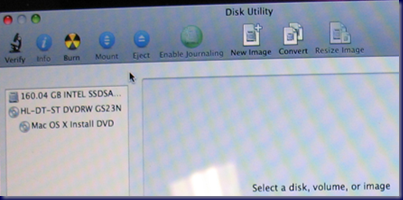
After installing it back into the MacBook Pro and booting back up into the setup routine, the Utilities menu item seemed to be the next logical place to look … at least for us Mac OS X n00bs anyway! ;)

Under that menu was an item called Disk Utility. We clicked on that and there was the SSD:
image

The only Disk Utility option that permitted us to do anything to the drive was Erase:

image

Note the Format was wrongly set to Case Sensitive. The second run through the OS X Snow Leopard install we left things at their default.

Once the format was finished we saw:

image

Forty minutes later we had a freshly installed Mac OS X and off we went to install the Mac Applications, Office 2008 for Mac, and all of the available updates.

Now, there may be a better way of getting a fresh drive available for OS X install in the Utilities menu, so please feel free to offer your way of doing things.

BTW, the RAM upgrade was actually done before the drive swap. It made a bit of a difference when multiple programs were open when swapping between them.

But, the SSD drive upgrade totally changed the performance characteristics of the MacBook Pro.

  • From off to logon screen is 16 seconds.
  • From logon to full dashboard functionality is less that 5 seconds.
    • The dashboard is pretty full.
  • Shutdown from the point of clicking the final shutdown button is 3 seconds.

The unit was pretty quick relative to the other portables that are used around here, but the SSD has made a huge difference in its performance.

Next up will be to pick up a copy of Parallels and install Windows to enable RWW/RDP and TS Gateway functionality to access client systems for management purposes.

Philip Elder
MPECS Inc.
Microsoft Small Business Specialists
Co-Author: SBS 2008 Blueprint Book

*Our original iMac was stolen (previous blog post). We now have a new MacBook Pro courtesy of Vlad Mazek, owner of OWN.

Windows Live Writer

Thursday, 12 November 2009

MacBook – You can’t turn on FileVault to protect the home folder of this user account.

Ack!

After finally figuring out how to get the MacBook to recognize the new Intel SSD (another post coming on this one), we ran into this lovely roadblock when enabling the home folder encryption setup called FileVault:

image

You can’t turn on FileVault to protect the home folder of this user account.

The home folder is located on a volume that isn’t in Mac OS Extended format.

Um, when we installed OS X 10.6 via the MacBook Pro DVD we chose the Mac OS Extended format for the hard drive. Though, we also included case sensitivity along with journaling.

So, what gives?

A few searches for the error turned up the following:

Essentially, we need to reinstall the OS via the DVD. Since this is a fresh install, it is not a really big deal. Apparently FileVault cannot be enabled when the disk was formatted to include case sensitivity in its structures.

This is a bit weird since the underlying OS for Snow Leopard is a UNIX derivative where case sensitivity has been a part of the OS setup since the beginning.

We have now learned that the type of disk format we use during an initial set up of any Mac will impact future uses of that Mac.

BTW, gotta love the non-descript error eh? It’s not like we haven’t seen those before in the Windows world! ;)

Philip Elder
MPECS Inc.
Microsoft Small Business Specialists
Co-Author: SBS 2008 Blueprint Book

*Our original iMac was stolen (previous blog post). We now have a new MacBook Pro courtesy of Vlad Mazek, owner of OWN.

Windows Live Writer

Wednesday, 21 October 2009

160GB Intel SSD Gen 2 Performance = WOW!

There have been a few blog posts here on the new second generation Intel Solid-State drives (post category search) lately.

A while back, we put together a box for a client that included an EVGA nVidia based motherboard (EVGA category search). We have had quite the odyssey with this particular system.

The Raptors have consistently broken the RAID 10 array we created via the onboard RAID setup. There has been no rhyme or reason to the array breaking. We even replaced the entire drive set with brand new drives hoping that it would be fixed. No joy there.

Each time the box visited the shop we made sure to update the BIOS on the motherboard and we were still hit with broken arrays.

So, we removed three of the four Raptors leaving the one behind for storage.

We installed a single Intel X25-M 160GB second generation SSD.

We then installed Windows 7 Ultimate x64 retail in 12 minutes using our OCZ ATV Turbo as the source.

Both the SSD and Windows 7 Ultimate retail were provided to our client at no cost along with the labour to install all of their needed applications. We needed to make sure that we made things right.

The scary thing is that the single Intel SSD boots the entire Windows 7 Ultimate OS from start to finish in about 15 seconds! 15 Seconds!!!

We define a completed boot as having the ability to click on the Start Button and open any program in the recent list or pinned there.

Even a set of four VelociRaptors configured in a RAID 10 array can’t touch that and they are fast too!

Since installing an Intel 80GB SSD in the Netbook, and soon the Tecra will be getting a 160GB version, bumping out the spindle for an SSD has been an easy sell to our clients.

They can see the visible excitement in me when I am demonstrating a full OS boot in 20 seconds on a Netbook with Windows 7 Pro and an SSD for a drive. Then the application performance for opening them as well as flipping around between open windows and more is pretty impressive on a Netbook.

Philip Elder
MPECS Inc.
Microsoft Small Business Specialists
Co-Author: SBS 2008 Blueprint Book

*Our original iMac was stolen (previous blog post). We now have a new MacBook Pro courtesy of Vlad Mazek, owner of OWN.

Windows Live Writer

Saturday, 17 October 2009

Contracted to Build a Boss Dual W5580 Trading System

One of our long time clients has delved into currency trading and is using a proprietary monitoring and graphing application for the various world currencies being watched and traded.

Their current system is a high performance system we put together for them six years ago.

That system was based on a P4 with HyperThreading, Windows XP Pro and 1GB of RAM. We had our client bring the system here to the shop to run various process monitoring utilities on the PC while the proprietary application was up and running.

We were looking for a couple of specific things:

  • How many simultaneous threads was the app capable of tossing towards the CPU.
  • How many threads were involved in generating a new graph and what happens during the graph generation.

What we discovered was an application that is capable of taking advantage of as many “cores” as possible.

The last test we ran was the generation of a new graph with everything else going on in the background. The new graph being generated pegged one of the “cores” on the system, so that particular process was single threaded . . . maybe.

Now that we had a pretty good overview of how the application performed, we now knew some key performance needs:

  • The ability to bin a core or multiple cores up for a demanding process was critical.
  • The ability to handle more than 4 simultaneous threads was also a priority due to the way the software operated.
  • The more RAM we had in the system, the better.
  • We need the ability to drive 8 monitors.
  • We need to eliminate the disk I/O bottleneck.

So, the configuration we have come up with for the system to be built to meet our client’s needs will be as follows:

We expect the ability of each of the Xeon Processors to bin one or two cores upwards to gain the needed extra performance will make this rig fit our client’s needs perfectly.

Using the second generation Intel Solid-State Drives plus a second generation Intel RAID controller aught to help us virtually eliminate any disk subsystem bottlenecks.

The extra RAM and the 64bit capabilities of Windows 7 Ultimate round out the setup.

The workstation board S5520SC has a Trusted Platform Module version 1.2. Since we are installing Windows 7 Ultimate x64 Edition on this setup and due to the sensitivity of the tasks being accomplished by the user we will be encrypting the contents of any partition created with BitLocker.

In the end, the system should provide our client with exactly the responsiveness they are looking for in a system and also protect everything on the system via encryption.

Philip Elder
MPECS Inc.
Microsoft Small Business Specialists
Co-Author: SBS 2008 Blueprint Book

*Our original iMac was stolen (previous blog post). We now have a new MacBook Pro courtesy of Vlad Mazek, owner of OWN.

Windows Live Writer