Showing posts with label Intuit. Show all posts

Wednesday, 8 August 2018

QuickBooks Desktop Freezes: Running Payroll, Downloading Online Transactions, and Closing Company File - Workaround

There seems to be an issue with the Canadian version of Intuit QuickBooks where the software freezes when doing a payroll run, downloading online transactions into QuickBooks, and when closing the Company file.

The workaround is to do the following:

  1. Close your company file.
  2. Open a sample file within QuickBooks
  3. From the No Company Open window, select Open a sample file
  4. Select a sample company file
  5. Click Ok to the warning You're opening a QuickBooks Desktop sample company file.
  6. In the sample company file, go to the Employees menu > Pay Employees > Scheduled Payroll
  7. Click Start Scheduled Payroll.
  8. Click Continue.
  9. Select one of the employees listed and click Continue.
  10. Click Ok to the warning message.
  11. Click Create Pay Cheques.
  12. Click Yes to the Past Transactions message.
  13. Click Close

We have a confirmation with one of our accounting firm clients that had the problem that this "fixes" it at least for now.

Intuit Help Article: QuickBooks Desktop freezes trying to create paycheques (CA only)

Philip Elder
Microsoft High Availability MVP
MPECS Inc.
Co-Author: SBS 2008 Blueprint Book
www.commodityclusters.com
Our Web Site
Our Cloud Service

Tuesday, 29 April 2014

QuickBooks: Save Open Windows For Next Session

Search Foo was turning up literally nothing on how to set a window, in this case Create Invoices, in QuickBooks to open by default the next time the company file was opened.

Why?

Because we invoice on the fly. When QuickBooks gets opened via RemoteApp it could be a bad thing to have things like vendor windows open, product properties with pricing opened, and so much more while the client is standing right there.

An ask via Intuit's Twitter account turned up the following resolution:

image

  • Edit --> Preferences --> Desktop View --> Desktop: Save when closing company

When the above window was opened the setting was "Don't save the desktop" which was a bit frustrating.

Prior to our upgrade to version 2013 the only window that would open was Create Invoices. After our upgrade that somehow was lost with any searching, when the thought arouse to look, turning up nothing due to improper search terms.

We can now safely open QuickBooks anywhere we are working to fire off an invoice via e-mail right there and then.

Philip Elder
Microsoft Cluster MVP
MPECS Inc.
Co-Author: SBS 2008 Blueprint Book

Chef de partie in the SMBKitchen ASP Project
Find out more at
Third Tier: Enterprise Solutions for Small Business

Thursday, 25 April 2013

QuickBooks 2013 and Flash – Install the Database Setup on a Server And . . .

We get Flash!

image

We're not 100% sure where exactly Flash is required when it comes to the Database Manager for Intuit's QuickBooks.

But, it's not a really happy thing to be installing Flash on a server. :(

Philip Elder
MPECS Inc.
Microsoft Small Business Specialists
Co-Author: SBS 2008 Blueprint Book

Chef de partie in the SMBKitchen
Find out more at
www.thirdtier.net/enterprise-solutions-for-small-business/

Windows Live Writer

Friday, 3 August 2012

Troubleshooting QuickBooks Network Connectivity

The following is a re-post of our post to the SBS2K Yahoo list:

***

First place to start would be with their Network Test Tool. It will give you the full host of things missing/broken between the client and the server.

  1. Make sure the database manager is up to date and the exceptions are in the firewall on _both_ the server and the clients. We use a custom GPO setup for QB/Simply/LoBs.
  2. Make sure that none of the previous QuickBooks user services accounts are running and/or installed in Services.MSC.
    1. QuickBooksDB19
    2. QuickBooksDB22
    3. ETC.
      • Whatever the latest one is should be the only one running.
  3. You may need to use the registry editor to DELETE any references to the specific QuickBooksDB19 entries under SERVICES only (ignore Legacy).
    1. We have disabled the earlier versions in Services.msc only to have QB Database Manager re-enable them.
    2. Make sure that the QuickBooksDB22 or whatever has Read/Write at the NTFS level (we set share to EVERYONE=FULL) for the QB company files.
  4. Direct the QB Database Manager to scan and set the folder(s) that the QB company files reside in on the server.
  5. Once the above steps are run through your QB should work as expected.

As a rule we have not had to mess with anything network related on SBS 2008/2011 Standard to get QB working.

Philip Elder
MPECS Inc.
Microsoft Small Business Specialists
Co-Author: SBS 2008 Blueprint Book

*Our original iMac was stolen (previous blog post). We now have a new MacBook Pro courtesy of Vlad Mazek, owner of OWN.

Windows Live Writer

Monday, 28 November 2011

Is Intuit QuickBooks 2012 Phoning Home?

We are in the process of setting up the Intuit QuickBooks 2012 database manager on a relatively new SBS 2011 setup.

This is our first time seeing this software so we were a little surprised by the following during the QB 2012 setup routine:

image

The installer looks like the following when ready to install:

image

image

image

And finally:

image

The database management install only took a few minutes for this particular setup.

The next step in this process was to update the firewall rules on the SBS 2011 (running virtualized) to allow the database manager and its components to function. Once the firewall rules were updated we recycled both QB services.

image

image

For the moment we will be leaving the “…DB20” service alone.

To test the setup we went to install QB 2012 on the RDS server on this particular network. Again we received the prompt:

image

We choose the option to only install the QB client:

image

image

image

Now, we go and install the Intuit QB Connection Diagnostic Tool:

image

Once completed we run the tool. When the tool begins its start-up process we see the following warning several times:

image

We then run the Test Connectivity tool:

image

When we were done we clicked on the Close button and received several more prompts for the workplace URL.

We have yet to dig into Intuit’s Privacy Policy and documentation to figure out just what information is being transmitted back home. Neither the QB install routine nor the QB Connection Diagnostic Tool have any links anywhere that have any relevant information either.

image

The Help link was not very helpful either.

For now we have a look around to see if we can find any further information.

For now, the following may give us a clue as to what is going on as it was a Snip taken earlier this year:

image

With the new URL it looks as though Intuit has brought the analytics in-house.

Philip Elder
MPECS Inc.
Microsoft Small Business Specialists
Co-Author: SBS 2008 Blueprint Book

*Our original iMac was stolen (previous blog post). We now have a new MacBook Pro courtesy of Vlad Mazek, owner of OWN.

Friday, 14 October 2011

Intuit QuickBooks 2012 is on the way!

Apparently our new version of QuickBooks is on the way:

image

But it won’t get to us since the town is missing in the above e-mail.

We chose to receive all future versions of QuickBooks, we are on a subscription, via electronic means at least a couple of versions ago. So, we are not 100% sure why we are being told that a CD will be shipped to us.

A quick call into the 800 number overseas support folks has hopefully updated our address correctly.

Either way the most important element in all of this is our key codes which we can call in for if we do not see an e-mail or letter in the mail at some point.

Philip Elder
MPECS Inc.
Microsoft Small Business Specialists
Co-Author: SBS 2008 Blueprint Book

*Our original iMac was stolen (previous blog post). We now have a new MacBook Pro courtesy of Vlad Mazek, owner of OWN.

Windows Live Writer

Friday, 9 September 2011

Lacerte 2010 Error: Error initializing config. Datapath cannot be blank

We ran into one of the most challenging problems with Intuit’s Lacerte that we have dealt with in a while.

After a few hours of trying to get things working Intuit’s support concluded that our client’s data must have been corrupted. Yet there were 9 other Lacerte 2010 clients installed and connected without issue.

image

Lacerte 2010

Error

Error initializing config. Datapath cannot be blank.

When we opened Lacerte 2009 and brought up the data path properties everything looked as it should. Trying to open Lacerte 2010 brought the above error with no recourse but to close the program.

image

We ran the gamut of troubleshooting this problem from .NET through to a complete registry and drive wipe of Lacerte 2010 content to no avail. Note that the drivepath value was nowhere to be found in the registry.

Lacerte 2010 did not have any .INI files with the relevant settings in them either.

So, the only thing we had left was to check the install folder for a non-standard file with the most recent Modified Date to see if there were any clues contained therein.

In the Lacerte install folder for 2009 was a file called NetDir.w9. In the Lacerte install folder for 2010 there was a file called NetDir.w0. Both files were the most recently modified and both had the path setting in them:

image

Now, what did not make sense was the fact that the Lacerte 2010 settings _were correct_ as shown in the above screenshot!

Note that by this time we had run through a number of clean installs of Lacerte 2010, .NET, and other related software.

On a gamble we changed the NetDir.w0 paths by appending an additional iData subfolder:

  • SharedPath: J:\Data\Lacerte\10tax\iData\iData
  • SharedUNC=\\SBS\Company\Data\Lacerte\10tax\iData\iData

We went to start Lacerte 2010 and sure enough the program started!

When we checked the settings the path reflected the one we set in the file:

image

We made the necessary path changes for Data Path and K1 and closed the program.

We then opened it and were greeted with:

image

Their full client database was alive and well with all of the data available to the user to work on! From there on in Lacerte 2010 started and was able to be used without a hiccup.

Note the ProcessMonitor folder on the Task Bar. We used the SysInternals process utilities to help us narrow down where the path problem was coming from. They gave us the clue we needed to start digging into where those settings were.

Philip Elder
MPECS Inc.
Microsoft Small Business Specialists
Co-Author: SBS 2008 Blueprint Book

*Our original iMac was stolen (previous blog post). We now have a new MacBook Pro courtesy of Vlad Mazek, owner of OWN.

Windows Live Writer

Monday, 20 June 2011

Intuit QuickBooks 2011 – Some Really _Neat_ Features

Keeping in mind that we have had our fair share of issues with QuickBooks (Blog Label) in the past, this post is actually quite refreshing.

We delayed migrating our own QB 2007 company file to any new version of QuickBooks (QB) due to the number of times we would be migrating our own network (SBS 2003 –> SBS v7 NDA bits –> SBS 2011 RTM) as well as due to the need to rebuild all of our custom forms for invoices, purchase orders, sales orders, and others _each migration_.

We finally broke down and ran through the backend setup on our SBS 2011 RTM VM making all of the necessary firewall exceptions (Previous Blog Post).

We then installed QB 2011 on a Windows 7 VM that we use for management and ran through the QB 2007 to QB 2011 database upgrade locally on that VM. That process went through without any issues that we can see (our bookkeeper and accountants will have the final say on that).

We moved the database over to the SBS 2011 server share and opened the database in Multi-User mode with no issues too while still logged in.

We then installed QB 2011 Premiere on our Remote Desktop Services server to test its RDS and RemoteApp compatibility. To our pleasant surprise QB 2011 came up without issue while logged onto an RDS session as a Standard User. While logged in with an admin account IE’s restricted mode would cause QB to choke.

So, we published QB 2011 Premiere via the RemoteApp manager and created an RDP file for connecting via our RD Gateway and another RDP file for internal users.

QB 2011 is RD RemoteApp Friendly

We are happy to report that our QB 2011 is running via RemoteApp both internally and via our RD Gateway without a problem:

image

  • QuickBooks 2011 Premiere Taskbar RemoteApp Icon

The process of customizing our forms was not too painful using the built-in Layout Designer.

One of the neat things with the new QB GUI though is the ability to change the Invoice or PO input GUI columns around to make them larger or smaller:

Invoice entry before:

image

Invoice entry after:

image

Note the increase in the width of the Item column. What this means is that we can actually _see_ the part number as QB always appends a prefix indicating the location of the part number (we have yet to discover that this feature can be turned off).

Now that we have had a chance to use the software, overall we are quite impressed with its responsiveness and the major GUI improvements.

Barring any issues with the books themselves, we are happy with the changes in the software and our own user experience.

Philip Elder
MPECS Inc.
Microsoft Small Business Specialists
Co-Author: SBS 2008 Blueprint Book

*Our original iMac was stolen (previous blog post). We now have a new MacBook Pro courtesy of Vlad Mazek, owner of OWN.

Windows Live Writer

Tuesday, 25 January 2011

QuickBooks 2010 and 2011 Update – Another Database Change Coming

Not too long ago one we had a problem with a client not being able to open the company file in QuickBooks (QB) after QB downloaded an update.

We ended up needing to copy the company file to the local machine, running the update to QB, then updating the company file. Once we dropped the company file back on the server we were hit with the 6000 series errors that indicated the database manager was not handling the company file.

We then downloaded the latest R Web patch from Intuit’s site for the client’s version and updated the database manager on the server. Sure enough, their company file opened.

Intuit is indicating that another change is coming:

image

Important

Due to a minor database change included in this release you will be required to upgrade your company file again.

The above screenshot is from here: QuickBooks and Payroll 2011 Update.

We will see if this database change will require us to update all of our client’s QB database manager installations once this update hits.

One of the issues addressed:

Philip Elder
MPECS Inc.
Microsoft Small Business Specialists
Co-Author: SBS 2008 Blueprint Book

*Our original iMac was stolen (previous blog post). We now have a new MacBook Pro courtesy of Vlad Mazek, owner of OWN.

Windows Live Writer

Friday, 7 January 2011

QuickBooks 2010 and 2011 MSVCR90.DLL Crash Error – Solved

Our previous post on the problem:

We had a number of people pulled into working on this problem and in the end it was Susan Bradley that put together the fact that QB would crash locally but not crash via RDP/Remote Assistance.

The common denominator?

While connected via Remote Assistance or RDP the video subsystem is taken over by the RDP protocol to render anything that QB would require.

The Fix

While the user was logged in the ATI driver (a Dell configured with a Radeon HD 2400 XT) would be the one to render whatever QuickBooks required.

So, we followed Susan’s suggestion and downloaded the newest Catalyst driver for Windows Vista x86 (32-bit) and rebooted.

We had the user log on and try to start both QuickBooks 2010 and 2011 and sure enough they both started without a hitch.

So, we had our culprit . . . the video driver.

Intuit Support’s Comment

After the fact Arvid, who is an engineer with Intuit, mentioned that Intuit introduced features within the QuickBooks products from 2010 on that required video acceleration. So, the out-dated Radeon HD 2400 XT video driver on the Dell was not able to handle whatever rendering requests were being made by QuickBooks.

Conclusion

Sometimes it is a good idea to reach out and ask others for assistance when a problem seemingly has no fix. Fortunately, we had a number of avenues to pose the question with Susan ultimately being the one to put the pieces together!

Thanks Susan and to all of those that provided input. :)

Philip Elder
MPECS Inc.
Microsoft Small Business Specialists
Co-Author: SBS 2008 Blueprint Book

*Our original iMac was stolen (previous blog post). We now have a new MacBook Pro courtesy of Vlad Mazek, owner of OWN.

Windows Live Writer

SBS 2011 – Remote Web Access (RWW) Shared Folders Upload With Easy File Upload Tool

When we first saw and started to use the Shared Folders access feature in the Remote Web Access portal (formerly Remote Web Workplace or RWW), we did not see it as being too useful except for spot file access.

Today definitely confirms that the Shared Folders feature is indeed useful especially when it comes to getting many large files uploaded onto our network.

image

The screenshot above shows a ZIP archive of two ProcessMonitor files that were created a few minutes ago.

One of those files contains the ProcessMonitor results of a successful QuickBooks 2010 open while connected using Remote Assistance while the other contains the ProcessMonitor results of the QB 2011 crash when the user opened it without any remote connections.

Yes, we are _still_ fighting to get QuickBooks 2011 and now QuickBooks 2010 to run at a client’s site:

To get the 65MB file to our own site is now quite simple as we no longer need a third party service or VPN (bandwidth soak) to get the file.

While preparing to upload the file we saw the option to install the Easy File Upload Tool in the portal. So, we clicked the link and installed the ActiveX control that was needed:

image

image

Once we clicked the Install button our Upload page now looked like:

image

Now we no longer need to use the cumbersome Browse button method to add each file that we need to upload into the folder.

The folder access feature has become quite important to us because it is so simple to use especially once we have the Easy File Upload Tool installed!

Philip Elder
MPECS Inc.
Microsoft Small Business Specialists
Co-Author: SBS 2008 Blueprint Book

*Our original iMac was stolen (previous blog post). We now have a new MacBook Pro courtesy of Vlad Mazek, owner of OWN.

Windows Live Writer

Friday, 3 December 2010

US QuickBooks 2011 R1 – Third Party Components Install Error Plus Error on MSVCR90.DLL And More - Unresolved

We have a client that we set QuickBooks 2011 R1 (Accountant’s Edition) up for a while back. Then, the user went to use the software and it kept crashing.

The QB 2011 software was installed via RDP session by us.

The strange thing was that when we connected to the user’s desktop via Remote Assistance (SBS 2008 backend) QB 2011 would open with no issues. If the user connected to their desktop via RDP QB 2011 would open without a problem. Note that this user is operating as a Standard User.

We elevated the user to Local Admin status with no change. QB 2011 would not run unless a Remote Assistance session was active or they were connected via RDP.

We left the user at Local Admin status and had them uninstall QB 2011. Once they did so we had them attempt to reinstall only to get hit by:

image

Intuit QuickBooks Installer

Third party components could not be located.
The installation cannot proceed and will now exit.

Okay, so what does this mean?

We need to go get the R2 version of the product as the error is being generated by the RTM or R1 product which was delivered via DVD.

Once we downloaded the R2 product via the above support page the user was able to install, but it still kept crashing outside of an RDP or Remote Assistance session:

image

Event 1000, Application Error

Faulting application QBW32.exe, . . . faulting module MSVCR90.dll.

So, while connected we had the user run the internal update feature and voila, we have updates:

image

Sure enough, after downloading and re-opening QB the R2 was now R3P:

image

After all of this we disconnected our Remote Assistance session and had the user log off and log back on again to see if they could start QB on their own. QuickBooks crashed again.

We then tried the Reboot.Bat script to register QuickBooks components as per:

image

The script did not solve our problem. We still had the same application crash on the same DLL.

A search on the DLL brought up the following KB:

This is the version set of the DLL on the problematic workstation:

image

MSVCR90.DLL Properties

Product version: 9.00.21022.8
Product version: 9.0.30729.1

Note that in the end the above hotfix was specific to Visual Studio 2008 so we were essentially barking up the wrong tree. This KB confirms it too:

With a further amount of searching we found this Intuit Support article:

image

Note the specific reference to the MSVCR80.DLL. While not the same one as the DLL we are dealing with, it is close enough. We are at step 6 where we need to perform a clean uninstall of QuickBooks 2011.

If that works, we will update this post as well as publish a new post with a pointer back to this one. If it does not, then we are against the wall as Intuit has not given us any indication that they know what is going on either.

Philip Elder
MPECS Inc.
Microsoft Small Business Specialists
Co-Author: SBS 2008 Blueprint Book

*Our original iMac was stolen (previous blog post). We now have a new MacBook Pro courtesy of Vlad Mazek, owner of OWN.

Windows Live Writer

Thursday, 24 June 2010

QuickBooks Upgrade to QB 2010 Caveat

Our bookkeeping is done on QuickBooks.

We have some highly customized forms and templates that we use for our invoicing and purchase orders among others.

We did a trial run at upgrading our current QB 2007 company files to QB 2010.

Since we use the multi-currency capabilities of QB, we needed to wait until the 2010 version became available as the earlier versions of the new code base did not support multi-currency.

So, the verdict?

We lose all of our custom forms and templates. As far as the data is concerned, we need to dig in a bit deeper yet to see if anything was broken in the process.

So, we will hold off a bit longer on the upgrade for our production bookkeeping until things slow down a little more and we have finished migrating our own SBS network to SBS 2008.

As a result, time needs to be budgeted for rebuilding those forms when upgrading from earlier versions of QuickBooks.

Philip Elder
MPECS Inc.
Microsoft Small Business Specialists
Co-Author: SBS 2008 Blueprint Book

*Our original iMac was stolen (previous blog post). We now have a new MacBook Pro courtesy of Vlad Mazek, owner of OWN.

Windows Live Writer

Wednesday, 23 June 2010

QB Network Issues? Use the QuickBooks Connection Diagnostic Tool

There are times where troubleshooting a client’s QuickBooks Multi-User Mode connectivity problems can be a real rat’s nest.

This little tool is _extremely_ helpful in providing feedback on where things are broken.

Note that an e-mail address and an agreement to the Terms & Conditions for the tool will be required before gaining access to the download.

Once the tool is downloaded and the install routine is complete, an icon for the tool will be placed on the desktop.

image

Make sure to elevate when running the tool by right clicking on the icon and left clicking on Run As Administrator. Otherwise:

image

Once the tool loads, we see the following GUI:

image

Click the Browse button under the Test connectivity section to navigate to the network located QuickBooks company file.

Click the Test Connectivity button and a series of tests will be run to verify that the tool can connect to the file and subsequently open it in shared mode.

Given that QuickBooks requires a database TSR on the server to manage database connections to the company file, any firewall exceptions that need to be made on SBS 2008 or Windows Server 2008 and up will show up as a failed to connect error.

image

We do the following to make sure that the QuickBooks database management setup has exceptions in the SBS 2008 or Windows Server 2008 Windows Firewall with Advanced Security.

We add the following port exceptions on the server (click to see the full shot):

image

  • Program Allow: QBCFMonitorService.exe
  • Program Allow: QBDBMgrN.exe

Be mindful that any updates to the two QuickBooks service on the server may break the rules. A recycle of the services after an update plus a test connection via client based QuickBooks in Multi-User mode will confirm that things are working as they should.

The QuickBooks Connection Diagnostic Tool can do the same without needing any QB logon or password information.

Caveat: The tool will only work if QuickBooks is installed on the machine or VM being used to test the connection!

Further reading:

Philip Elder
MPECS Inc.
Microsoft Small Business Specialists
Co-Author: SBS 2008 Blueprint Book

*Our original iMac was stolen (previous blog post). We now have a new MacBook Pro courtesy of Vlad Mazek, owner of OWN.

Windows Live Writer

Tuesday, 22 June 2010

Cloud Hype and a Cause For Pause – OWN, Microsoft, and Intuit

I have always been a bit of a sceptic. From business to life, one needs to be very careful about giving one’s word and accepting another’s.

In business, we have business relationships that have been built up over the years. Our longest standing client relationship is now running over 11 years!

In those business relationships, we have built up a strong trust between us and our client contacts and business owners.

As a result, we have an understanding with our ongoing clients that sometimes things do not work out quite the way we would expect them to. For the most part, when things don’t work, the problems tend to last hours instead of days and we do our best to make up for any lost time.

In our experience with Cloud vendors such as OWN (our primary Cloud partner), there have been a few service related issues causing slow downs, but so far we have not seen a complete service outage other than for server/cluster reboots.

As we can see, most of the indicator’s in OWN’s NOC status has to do with ongoing maintenance.

Now, let’s have a look at Microsoft’s Cloud offering in the form of BPOS:

The MOSN RSS link comes to us courtesy of Susan Bradley.

When we look at Microsoft’s RSS feed, we can see that there are a lot of service outage reports.

image

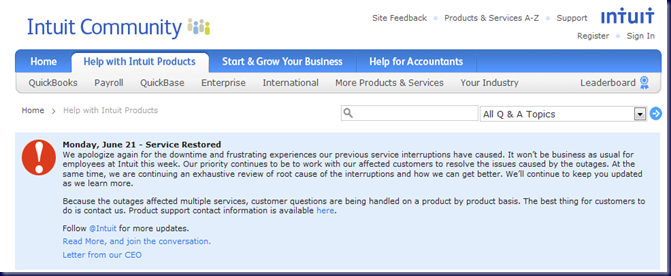
From here we look at Intuit’s latest:

In Intuit’s case, this latest outage lasted around 2 days for most customers with some still dealing with issues after that.

The Cause for Pause when it comes to hype about the Cloud is to make sure that the Cloud services we choose on behalf of our clients, or that they choose, are indeed the best option for them.

Microsoft or OWN?

When we look strictly at hosted e-mail and SharePoint, we can see by the above two RSS feeds that OWN provides a far superior uptime and service quality to the Microsoft offering. Yes, OWN has been at it a lot longer than Microsoft . . . and it shows.

Only time will tell if Microsoft’s offering provides the same level of Cloud service performance and stability as OWN’s hosted Exchange and SharePoint solution does.

Intuit

Part of any evaluation is to look at the costs associated with being disconnected from those Cloud based services.

For folks needing to process payroll during that two day outage at Intuit Online, there was probably a lot of nail biting going on by both management and their employees.

On top of payroll, any inventory, sales, or other business related activities would have been impacted. Calculating the lost time and revenues for these business aspects can be very difficult.
image

Internet Connection

If a client’s Internet connection goes down and they are totally cut off from the Internet, the cost associated with this type of service outage needs to be considered. A USB modem via cellular or other wireless form of Internet connection for critical PCs may be an alternative backup plan.

Conclusion

Just as it is with any other new technology, we need to test and make sure that any Cloud based service will follow through on its promises.

We need to dig deep into a Cloud based vendor’s reputation or lack thereof and find out if they really follow through on their commitment to provide good value and trouble free services.

Since the Cloud is a relatively new push, we are seeing a rush of new vendors vying for a piece of the Cloud pie. These new vendors are essentially untested technologies and should be approached as such . . . with great scepticism and caution on behalf of our clients.

And finally, the question to ask any business owner is, “How long can your business be down before the possibility of closing the doors looms?”

Obviously this question must include _all_ aspects of a business’s processes to provide a thorough answer not just the usage of Cloud based technologies.

Some light reading:

Philip Elder
MPECS Inc.
Microsoft Small Business Specialists
Co-Author: SBS 2008 Blueprint Book

*Our original iMac was stolen (previous blog post). We now have a new MacBook Pro courtesy of Vlad Mazek, owner of OWN.

Windows Live Writer

Tuesday, 24 November 2009

QuickBooks 2010 Multicurrency Upgrade Disk Has Arrived

If there is something we approach with a lot of trepidation, it is the upgrade of any QuickBooks instance to a newer codebase version of QuickBooks.

The upgrade from QuickBooks 2007 non-multicurrency version to QuickBooks 2008 non-multicurrency version with the new codebase was rife with issues.

We run our bookkeeping on QuickBooks Multicurrency since many of our transactions are in non-Canadian dollars. The codebase for the Multicurrency version has not been touched until now.

The accompanying QuickBooks Upgrade card indicate a number of things to be aware of when upgrading:

  • Make sure to have any recent Sales Tax Returns at hand prior to upgrading.
  • Have the tax return payment or refund information at hand as well.
  • Make a backup.

The QuickBooks site:

Needless to say, we will be keeping our current bookkeeping online with our current version for the next month or three. Our bookkeeper will asked to run things in tandem for a while . . . just in case (previous disastrous QuickBooks post).

Philip Elder
MPECS Inc.
Microsoft Small Business Specialists
Co-Author: SBS 2008 Blueprint Book

*Our original iMac was stolen (previous blog post). We now have a new MacBook Pro courtesy of Vlad Mazek, owner of OWN.

Windows Live Writer

Wednesday, 23 September 2009

QuickBooks 2008 MC, XP Pro, and IE8 Error – Security Levels Too High

We just released IE8 on a network for the XP Pro client machines.

They are being used for QuickBooks 2008 Multi-Currency since a new set of Windows 7 Pro VMs have not been set up for this client yet.

This is the message from QuickBooks after the update:

image

 Internet Security Levels Are Set Too High

The security for Microsoft Internet Explorer has been set higher than the default levels. To use all features provided by QuickBooks, you must reduce the security levels for the “Internet” zone.

We click the Fix button and we get the Internet Properties’ Security tab:

image

Note the custom settings. The users on these machines are set up in a rather restricted way with the OS security settings tweaked a bit to accommodate QuickBooks 2008’s legacy code structure (Non-multicurrency is the product based on Intuit’s new codebase).

After clicking the Default Level button then Apply and OK, we were greeted with:

image

Now, the instinct is to close the program and start again. But, in this case we left QuickBooks alone as it thrashed through the system and we were eventually greeted with the company file’s logon page.

Philip Elder
MPECS Inc.
Microsoft Small Business Specialists
Co-Author: SBS 2008 Blueprint Book

*All Mac on SBS posts will not be written on a Mac until we replace our now missing iMac! (previous blog post)

Windows Live Writer

Thursday, 27 August 2009

QuickBooks 2009 Error – The installed product does not match the installation source(s)

We have a client that is changing their QuickBooks 2009 versions.

When they went to uninstall the QB 2009 version they had, the uninstall routine was coming up with the following error:

image

QuickBooks

The installed product does not match the installation source(s). Until a matching source is provided or the installed product and source are synchronized, this action cannot be performed.

Contact your administrator or product vendor for assistance. If there is a matching installation source, type it below or click Browse to locate it.

Now, what we discovered was the user had tried to install the edition they were going to be using before uninstalling the previous version.

image

A search for the error turned up the QuickBooks support article:

Section 1 did not work for us. Neither did section 2. We tried to copy the original QuickBooks.msi out of our network share into the following directory as per the knowledgebase article:

  • C:\Program Files\Intuit\QuickBooks 2009\Components\PConfig

The PConfig folder is the same across most of the recent editions, so this method will work for most.

We renamed the QuickBooks.msi file that was there prior to copying in the network sourced one:

image

Note the date stamp difference as well as a size difference.

That did not work.

So, we needed to install the original QuickBooks version again, then rerun the uninstall routine. That did not work! We ended up with the same error.

image

We tried to copy in the QuickBooks 2009 folder from another known good installation after renaming the original. That did not work either.

image

We start the utility and remove QuickBooks 19:

image

Once we used the utility and removed the install directory we were able to successfully install QuickBooks 2009. It even picked up the key codes!

image

Since we had a successful installation, hopefully the uninstall routine would actually work and pull all of the QuickBooks 2009 components off the hard disk, the QB database service removed, as well as the registry!

Fortunately, after a not so brief pause we were eventually greeted with:

image

Bottom line: If there is a need to use a different edition of QuickBooks in the same product version, in this case 2009, uninstall the one no longer needed before installing the other edition.

Philip Elder
MPECS Inc.
Microsoft Small Business Specialists
Co-Author: SBS 2008 Blueprint Book

*All Mac on SBS posts will not be written on a Mac until we replace our now missing iMac! (previous blog post)

Windows Live Writer